




Success Guide
Translate Your YouTube Videos with AI — No Voice Actors
Jump to section
Jump to section
Share
Share
Share

AI Video Translator, Localization, and Dubbing Tool
Try it out for Free
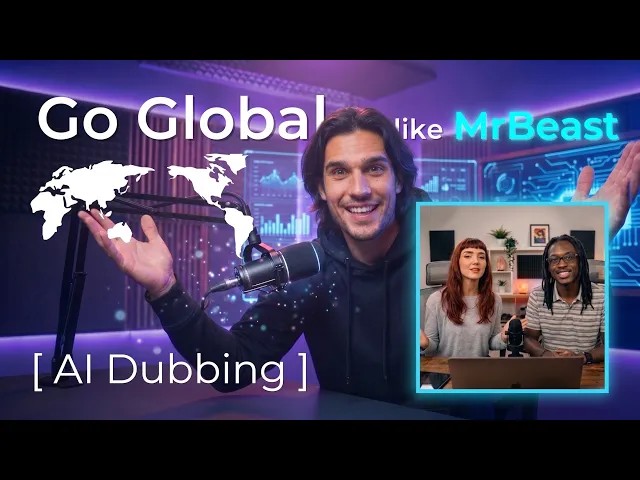
Want your YouTube videos to travel?
AI dubbing translates your YouTube video into another language while using voice cloning to preserve the speaker's voice. Lip-sync can also align mouth movements with the translated audio when you choose that option. Automatic lip-sync is an option on all paid plans, with a monthly allowance in each tier.
How the biggest channels reach the whole world
The biggest channels didn't just upload in English and hope for the best. They took their best-performing videos and made them speak every viewer's language , dubbing top content into 11+ languages and running dedicated language channels, some of which have generated as many as 100 million views per video (source: Rest of World, YouTube Official Blog).
This isn't a niche tactic. YouTube has reported that creators can earn a large share of watch time outside their home region once content is available in more languages. Language is the gate; dubbing opens it.
The catch: voice actors don't scale
Here's the problem. The channels that pioneered this hired professional voice actors. For most creators, paying voice talent for every video, in every language, on every upload, simply doesn't add up. The cost grows with each language and each new video, and it never stops.
That math is why most channels stay English-only , and leave the rest of the world unserved.
The accessible way: AI dubbing with your own voice
The most realistic way to reach people in their own language is AI dubbing. It gets you most of the way there at a fraction of the cost of manual dubbing.
Good AI dubbing does two things a basic voice swap doesn't. First, voice cloning, it carries your actual voice into the new language and keeps your tone, so your channel still feels like you in every language, not a stranger reading a script. Second, lip sync, it reshapes your mouth so the lips move with the new language instead of drifting off. Automatic lip-sync is an option on all paid plans, with a monthly allowance in each tier.
Lip-sync aligns visible mouth movements with translated speech. A mismatch may distract some viewers, but this guide does not establish a causal effect on watch time or retention. Measure the result with your own audience.
How to translate your YouTube videos with AI
You can translate a YouTube video in three steps with Perso Dubbing, with no voice actors and no editing software.
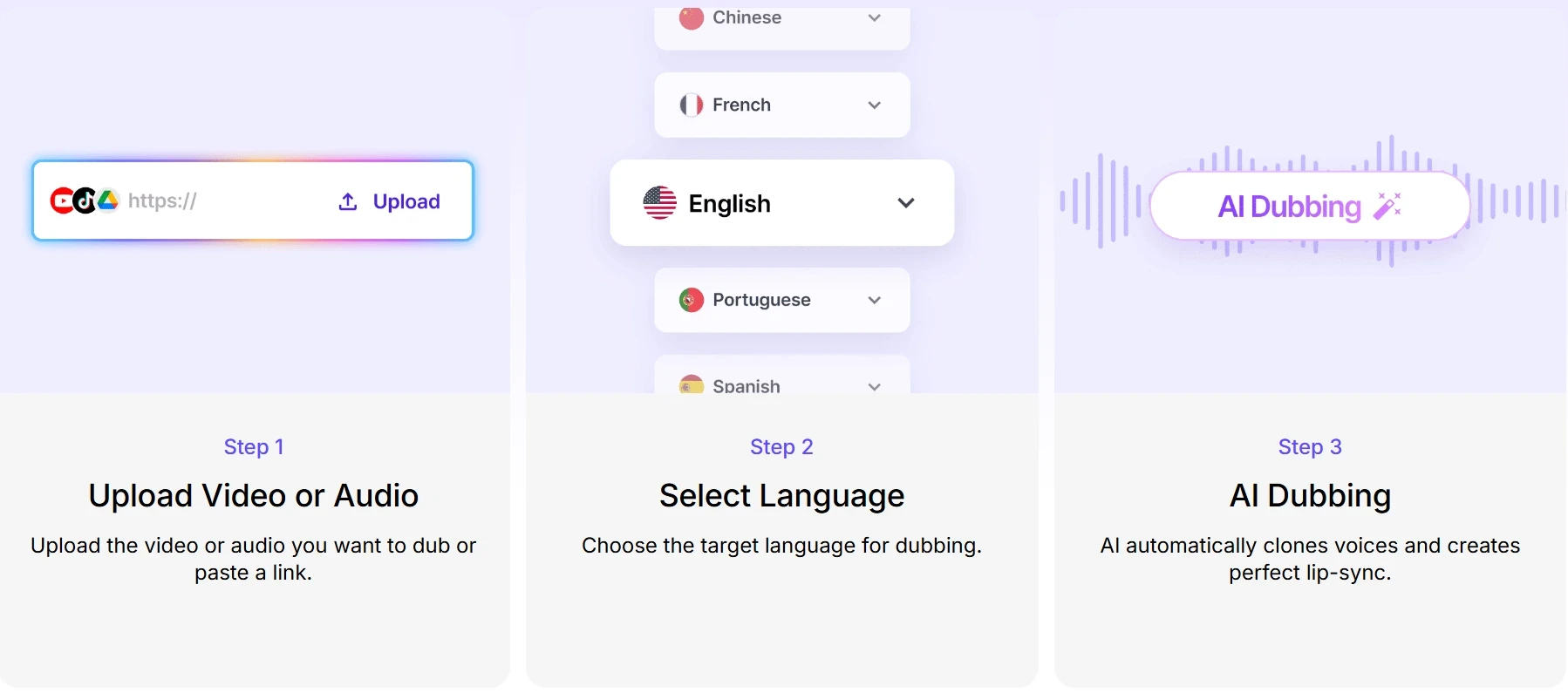
Upload your video, or paste a link. Pick one that's already working , there's no point translating something that didn't land.
Choose your language. 99+ dubbing languages (100 speech-recognition languages). Automatic lip-sync is an option on all paid plans, with a monthly allowance in each tier.
Download and publish. Review the generated voice and lip-sync on your own footage. Results can vary with the source audio, language, and visibility of the speaker.
Most standard-length videos finish in about three minutes , versus the days a manual dubbing-plus-lip-sync pass takes.
For a full walkthrough , step-by-step screenshots, a tool comparison, and how YouTube's auto-dub differs from a dedicated platform , see our complete guide to translating and dubbing YouTube videos with AI. Or jump straight in with the YouTube video translator.
Why this matters for your channel
Reaching people in their own language used to take a team and a budget. Now it's a few clicks. We won't promise you record-breaking numbers , how far a video travels still comes down to your content. But your videos already work in one language. They might just work in more places than you've tried.
Perso Dubbing pairs voice cloning with natural lip sync in one workflow, so your international viewers get the experience you intended , not a cheap dub with mismatched visuals. Grab your best video, run it through Perso Dubbing, and see how far it travels.
Try it on your own video , Perso Dubbing. Translate your first video free.
Multilingual use in platform data
In the State of AI Dubbing 2026 Mid-Year Update, 31.9% of 2,902 paying creators used two or more target languages on Perso Dubbing between December 1, 2025 and August 31, 2026.
The cohort includes creators with at least one project on a paid plan during that window. Free-plan and unknown-plan projects, accounts flagged for multi-account abuse, internal and demo workspaces, and cancelled projects are excluded.
These are Perso Dubbing usage data. The report does not measure YouTube watch time, audience growth or the effect of lip sync on either outcome.
Source: State of AI Dubbing 2026, Mid-Year Update (v2.0), Kwon, T., & Perso Dubbing Data Team.
Frequently asked questions
How do top YouTube channels reach a global audience?
They dub their best-performing videos rather than reshooting them. The largest channels run dedicated language channels , dubbed versions of their top content in 11+ languages, including Spanish, Portuguese, Hindi, Japanese, and Arabic , and those channels can draw as many as 100 million views per video. The same dubbing approach is now available to any creator through AI.
How do I translate my YouTube videos into other languages?
Upload your video or paste its link, choose from 99+ dubbing languages, review the cloned voice, and download the dubbed version. Automatic lip-sync is an option on all paid plans, with a monthly allowance in each tier.
Can I keep my own voice when dubbing into another language?
Yes. Voice cloning carries your real voice and tone into the new language, so your channel still sounds like you. Perso Dubbing clones the original speaker's voice rather than generating a generic synthetic one.
Why does lip sync matter for translated videos?
Lip-sync aligns visible mouth movements with translated speech. A mismatch may distract some viewers, but this guide does not establish a causal effect on watch time or retention. Measure the result with your own audience.
Want your YouTube videos to travel?
AI dubbing translates your YouTube video into another language while using voice cloning to preserve the speaker's voice. Lip-sync can also align mouth movements with the translated audio when you choose that option. Automatic lip-sync is an option on all paid plans, with a monthly allowance in each tier.
How the biggest channels reach the whole world
The biggest channels didn't just upload in English and hope for the best. They took their best-performing videos and made them speak every viewer's language , dubbing top content into 11+ languages and running dedicated language channels, some of which have generated as many as 100 million views per video (source: Rest of World, YouTube Official Blog).
This isn't a niche tactic. YouTube has reported that creators can earn a large share of watch time outside their home region once content is available in more languages. Language is the gate; dubbing opens it.
The catch: voice actors don't scale
Here's the problem. The channels that pioneered this hired professional voice actors. For most creators, paying voice talent for every video, in every language, on every upload, simply doesn't add up. The cost grows with each language and each new video, and it never stops.
That math is why most channels stay English-only , and leave the rest of the world unserved.
The accessible way: AI dubbing with your own voice
The most realistic way to reach people in their own language is AI dubbing. It gets you most of the way there at a fraction of the cost of manual dubbing.
Good AI dubbing does two things a basic voice swap doesn't. First, voice cloning, it carries your actual voice into the new language and keeps your tone, so your channel still feels like you in every language, not a stranger reading a script. Second, lip sync, it reshapes your mouth so the lips move with the new language instead of drifting off. Automatic lip-sync is an option on all paid plans, with a monthly allowance in each tier.
Lip-sync aligns visible mouth movements with translated speech. A mismatch may distract some viewers, but this guide does not establish a causal effect on watch time or retention. Measure the result with your own audience.
How to translate your YouTube videos with AI
You can translate a YouTube video in three steps with Perso Dubbing, with no voice actors and no editing software.
Upload your video, or paste a link. Pick one that's already working , there's no point translating something that didn't land.
Choose your language. 99+ dubbing languages (100 speech-recognition languages). Automatic lip-sync is an option on all paid plans, with a monthly allowance in each tier.
Download and publish. Review the generated voice and lip-sync on your own footage. Results can vary with the source audio, language, and visibility of the speaker.
Most standard-length videos finish in about three minutes , versus the days a manual dubbing-plus-lip-sync pass takes.
For a full walkthrough , step-by-step screenshots, a tool comparison, and how YouTube's auto-dub differs from a dedicated platform , see our complete guide to translating and dubbing YouTube videos with AI. Or jump straight in with the YouTube video translator.
Why this matters for your channel
Reaching people in their own language used to take a team and a budget. Now it's a few clicks. We won't promise you record-breaking numbers , how far a video travels still comes down to your content. But your videos already work in one language. They might just work in more places than you've tried.
Perso Dubbing pairs voice cloning with natural lip sync in one workflow, so your international viewers get the experience you intended , not a cheap dub with mismatched visuals. Grab your best video, run it through Perso Dubbing, and see how far it travels.
Try it on your own video , Perso Dubbing. Translate your first video free.
Multilingual use in platform data
In the State of AI Dubbing 2026 Mid-Year Update, 31.9% of 2,902 paying creators used two or more target languages on Perso Dubbing between December 1, 2025 and August 31, 2026.
The cohort includes creators with at least one project on a paid plan during that window. Free-plan and unknown-plan projects, accounts flagged for multi-account abuse, internal and demo workspaces, and cancelled projects are excluded.
These are Perso Dubbing usage data. The report does not measure YouTube watch time, audience growth or the effect of lip sync on either outcome.
Source: State of AI Dubbing 2026, Mid-Year Update (v2.0), Kwon, T., & Perso Dubbing Data Team.
Frequently asked questions
How do top YouTube channels reach a global audience?
They dub their best-performing videos rather than reshooting them. The largest channels run dedicated language channels , dubbed versions of their top content in 11+ languages, including Spanish, Portuguese, Hindi, Japanese, and Arabic , and those channels can draw as many as 100 million views per video. The same dubbing approach is now available to any creator through AI.
How do I translate my YouTube videos into other languages?
Upload your video or paste its link, choose from 99+ dubbing languages, review the cloned voice, and download the dubbed version. Automatic lip-sync is an option on all paid plans, with a monthly allowance in each tier.
Can I keep my own voice when dubbing into another language?
Yes. Voice cloning carries your real voice and tone into the new language, so your channel still sounds like you. Perso Dubbing clones the original speaker's voice rather than generating a generic synthetic one.
Why does lip sync matter for translated videos?
Lip-sync aligns visible mouth movements with translated speech. A mismatch may distract some viewers, but this guide does not establish a causal effect on watch time or retention. Measure the result with your own audience.
Want your YouTube videos to travel?
AI dubbing translates your YouTube video into another language while using voice cloning to preserve the speaker's voice. Lip-sync can also align mouth movements with the translated audio when you choose that option. Automatic lip-sync is an option on all paid plans, with a monthly allowance in each tier.
How the biggest channels reach the whole world
The biggest channels didn't just upload in English and hope for the best. They took their best-performing videos and made them speak every viewer's language , dubbing top content into 11+ languages and running dedicated language channels, some of which have generated as many as 100 million views per video (source: Rest of World, YouTube Official Blog).
This isn't a niche tactic. YouTube has reported that creators can earn a large share of watch time outside their home region once content is available in more languages. Language is the gate; dubbing opens it.
The catch: voice actors don't scale
Here's the problem. The channels that pioneered this hired professional voice actors. For most creators, paying voice talent for every video, in every language, on every upload, simply doesn't add up. The cost grows with each language and each new video, and it never stops.
That math is why most channels stay English-only , and leave the rest of the world unserved.
The accessible way: AI dubbing with your own voice
The most realistic way to reach people in their own language is AI dubbing. It gets you most of the way there at a fraction of the cost of manual dubbing.
Good AI dubbing does two things a basic voice swap doesn't. First, voice cloning, it carries your actual voice into the new language and keeps your tone, so your channel still feels like you in every language, not a stranger reading a script. Second, lip sync, it reshapes your mouth so the lips move with the new language instead of drifting off. Automatic lip-sync is an option on all paid plans, with a monthly allowance in each tier.
Lip-sync aligns visible mouth movements with translated speech. A mismatch may distract some viewers, but this guide does not establish a causal effect on watch time or retention. Measure the result with your own audience.
How to translate your YouTube videos with AI
You can translate a YouTube video in three steps with Perso Dubbing, with no voice actors and no editing software.
Upload your video, or paste a link. Pick one that's already working , there's no point translating something that didn't land.
Choose your language. 99+ dubbing languages (100 speech-recognition languages). Automatic lip-sync is an option on all paid plans, with a monthly allowance in each tier.
Download and publish. Review the generated voice and lip-sync on your own footage. Results can vary with the source audio, language, and visibility of the speaker.
Most standard-length videos finish in about three minutes , versus the days a manual dubbing-plus-lip-sync pass takes.
For a full walkthrough , step-by-step screenshots, a tool comparison, and how YouTube's auto-dub differs from a dedicated platform , see our complete guide to translating and dubbing YouTube videos with AI. Or jump straight in with the YouTube video translator.
Why this matters for your channel
Reaching people in their own language used to take a team and a budget. Now it's a few clicks. We won't promise you record-breaking numbers , how far a video travels still comes down to your content. But your videos already work in one language. They might just work in more places than you've tried.
Perso Dubbing pairs voice cloning with natural lip sync in one workflow, so your international viewers get the experience you intended , not a cheap dub with mismatched visuals. Grab your best video, run it through Perso Dubbing, and see how far it travels.
Try it on your own video , Perso Dubbing. Translate your first video free.
Multilingual use in platform data
In the State of AI Dubbing 2026 Mid-Year Update, 31.9% of 2,902 paying creators used two or more target languages on Perso Dubbing between December 1, 2025 and August 31, 2026.
The cohort includes creators with at least one project on a paid plan during that window. Free-plan and unknown-plan projects, accounts flagged for multi-account abuse, internal and demo workspaces, and cancelled projects are excluded.
These are Perso Dubbing usage data. The report does not measure YouTube watch time, audience growth or the effect of lip sync on either outcome.
Source: State of AI Dubbing 2026, Mid-Year Update (v2.0), Kwon, T., & Perso Dubbing Data Team.
Frequently asked questions
How do top YouTube channels reach a global audience?
They dub their best-performing videos rather than reshooting them. The largest channels run dedicated language channels , dubbed versions of their top content in 11+ languages, including Spanish, Portuguese, Hindi, Japanese, and Arabic , and those channels can draw as many as 100 million views per video. The same dubbing approach is now available to any creator through AI.
How do I translate my YouTube videos into other languages?
Upload your video or paste its link, choose from 99+ dubbing languages, review the cloned voice, and download the dubbed version. Automatic lip-sync is an option on all paid plans, with a monthly allowance in each tier.
Can I keep my own voice when dubbing into another language?
Yes. Voice cloning carries your real voice and tone into the new language, so your channel still sounds like you. Perso Dubbing clones the original speaker's voice rather than generating a generic synthetic one.
Why does lip sync matter for translated videos?
Lip-sync aligns visible mouth movements with translated speech. A mismatch may distract some viewers, but this guide does not establish a causal effect on watch time or retention. Measure the result with your own audience.
Continue Reading
Browse All