AI Video Transcriber: Multi-Speaker Dubbing Made Easy
Last Updated




Jump to section
Jump to section

Share
Share
Share
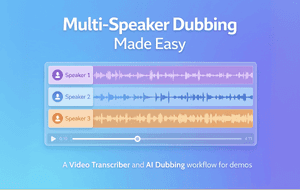
AI Video Translator, Localization, and Dubbing Tool
Try it out for Free
Your team just recorded a roundtable discussion. A product manager explains the roadmap. A sales lead shares customer insights. A guest expert adds technical depth. The conversation flows naturally in English.
Now you need to release versions in Spanish, German, and Japanese. The translation is accurate. The voices are clear. But during playback, something feels unstable. A line overlaps. One voice sounds like it is answering before the previous speaker finishes.
Multi-speaker content exposes weaknesses in transcription and timing more than any other format.
This is where a strong Video Transcriber becomes essential, and it’s exactly the point where teams often lean on Perso Dubbing to keep speaker turns clean before they generate dubbed audio. A Video Transcriber does more than convert speech into text. In Perso Dubbing, it’s treated as the foundation step that organizes speakers and timing so everything downstream stays stable.
It structures speaker turns, stabilizes timestamps, and prepares a clean script foundation for Dubbing, Automatic Dubbing, and Video Translation workflows. In this guide, we will explore the features that make multi-speaker dubbing seamless and how creators and teams can structure their workflow for reliable results.
This article is written for creators, podcast hosts, SaaS marketing teams, and training departments producing interviews, webinars, and discussion-style content.
Why Multi-Speaker Dubbing Breaks Without Clean Transcription
Single-speaker narration is predictable. Multi-speaker content is not. Interruptions, overlapping phrases, and rapid back-and-forth exchanges make timing complex.
If the transcript merges voices incorrectly, Dubbing becomes unstable. Problems typically include:
Speaker lines assigned to the wrong person
Turn-taking that feels early/late
Overlaps that create stacked audio
Translation errors caused by broken context
Clean speaker detection keeps the conversation structure intact before translation starts. In Perso Dubbing, teams usually do a quick pass to confirm speaker labels on the first 2–3 minutes, because small errors there tend to repeat across the whole episode.
For teams building repeatable workflows, transcription quality is what keeps multi-speaker dubbing stable, and Perso Dubbing is useful here because it keeps speaker structure, edits, and exports connected in one flow. If you want a reference point, AI dubbing is a useful overview of how transcript structure affects the final output.
Video Transcriber Features That Improve Multi-Speaker Dubbing
When evaluating tools for panel discussions, interviews, or podcasts, focus on these core capabilities.
Accurate Speaker Separation
Accurate speaker separation is the foundation. The transcriber should label turns reliably during fast exchanges and give you an easy way to correct tags when it gets a speaker wrong. Small mistakes here multiply later during translation and voice generation.
Look for:
Clear labeling of speaker segments
Stable segmentation during rapid exchanges
The ability to adjust speaker tags manually if needed
This foundation directly improves Dubbing accuracy and reduces timing drift.
Clean Timestamp Management
In discussion-based content, timing precision matters more than in simple narration.
The Video Transcriber should:
Avoid overlapping subtitle blocks
Keep dialogue blocks concise
Maintain consistent spacing between speaker turns
Stable timestamps reduce sync issues and keep turn-taking natural. In Perso Dubbing, clean timestamps also make it easier to preview only the sections you changed instead of reprocessing the full file.
Editable Script Control
Even with strong detection, some lines may require refinement. A clean editing layer prevents full regeneration.
A Subtitle & Script Editor allows teams to:
Adjust segmentation
Fix phrasing
Stabilize dialogue transitions
Editing is where you protect tone and speaker identity, especially in dialogue-heavy videos where small wording changes affect how a voice feels. In Perso Dubbing, teams often standardize a few recurring phrases (intros, segment transitions, sponsor reads) so every language version stays consistent. For a deeper example of what to standardize, see consistent brand voice.
How Video Translation Workflows Depend on Speaker Structure?
A structured Video Translation workflow often follows this chain:
Transcribe multi-speaker content
Translate each speaker’s lines
Generate voice output per speaker
Review synchronization
Export final multilingual versions
If the initial Video Transcriber merges speakers incorrectly, translation errors multiply. The Voice Cloning output may sound mismatched. Dialogue rhythm becomes unnatural.
A practical example: a team runs a 30–45 minute roundtable through Perso Dubbing, confirms speaker labels for the host + guests, fixes a few overlap segments, then generates localized versions. Most of the time is spent on the first pass (speaker tags + timing), not on redoing audio.
For global teams, it helps when transcription, editing, and dubbing live in one place—so speaker timing, terminology, and exports stay consistent. A video translation platform is one option to compare against your checklist.
Automatic Dubbing Vs Controlled Dubbing in Multi-Speaker Videos
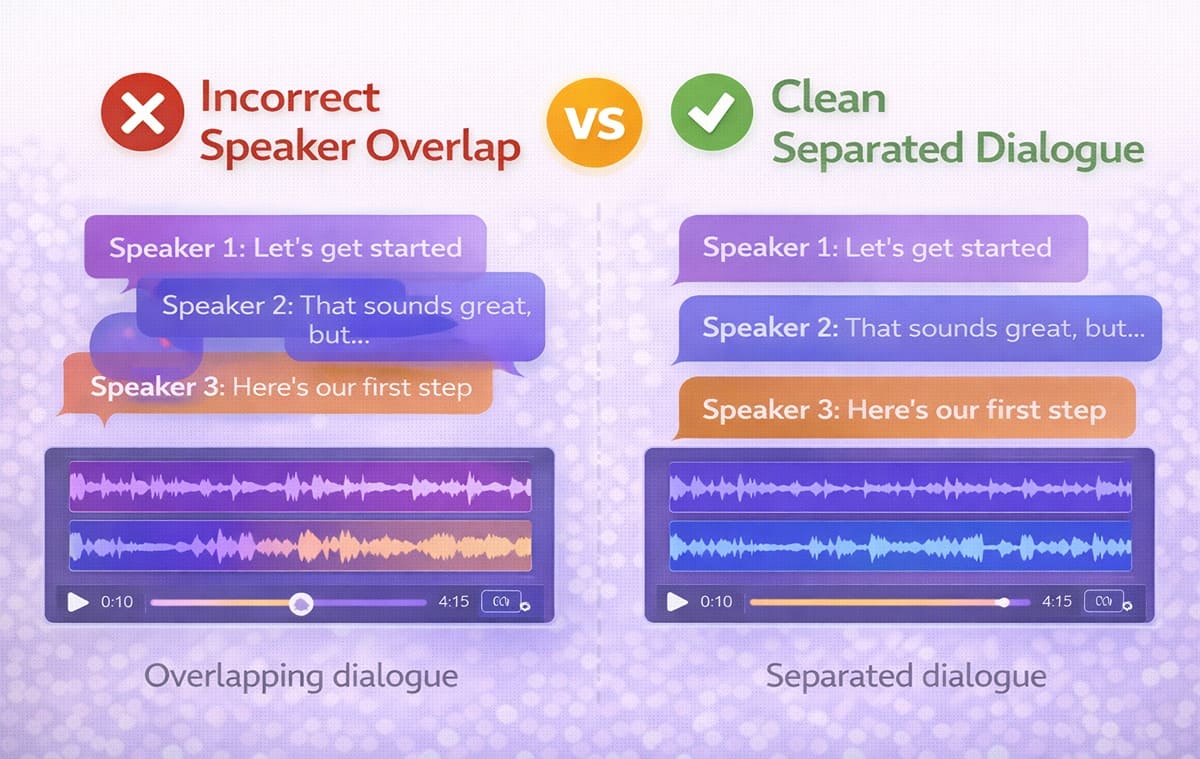
Automatic Dubbing can be effective when speaker exchanges are structured and minimal. However, unscripted conversations require more review.
When Automatic Dubbing works well
Moderated webinars with clear turn-taking
Interview formats with minimal overlap
Structured Q&A sessions
When controlled Dubbing is safer
Podcast-style conversations
Emotional or fast-paced debates
Multi-guest panels
Live event recordings
In these cases, refining segmentation before final export reduces confusion and protects pacing.
Role of Voice Cloning in Multi-Speaker Localization
Voice Cloning becomes particularly useful in interviews or panels where each voice has a distinct personality.
Instead of using a single generic narrator, Voice Cloning helps preserve:
Individual speaking styles
Authority differences between hosts and guests
Emotional tone during storytelling
When combined with accurate speaker detection from the Video Transcriber, Voice Cloning makes multilingual Dubbing feel more authentic.
Multi-Speaker Workflow Comparison Table
Workflow Stage | Without Structured Transcription | With Strong Video Transcriber |
Speaker detection | Lines merge incorrectly | Speakers clearly separated |
Timing alignment | Overlapping segments | Clean timestamp spacing |
Translation clarity | Context confusion | Structured dialogue flow |
Voice generation | Mismatched speaker tones | Stable voice assignments |
Editing control | Requires full reprocessing | Minor adjustments only |
This comparison highlights why the Video Transcriber stage determines the quality of everything that follows.
Subtitle & Script Editor in Multi-Speaker Projects
After transcription, editing is usually required in small sections. A Subtitle & Script Editor allows teams to correct minor issues quickly.
It supports:
Reassigning speaker labels
Splitting long dialogue blocks
Adjusting transition timing
Refining translated phrasing
This step strengthens Video Translation stability and prepares the project for smooth Automatic Dubbing.
If you publish roundtables or interviews on YouTube, the key is keeping speakers consistent across languages without spending hours on fixes. YouTube dubbing shows one workflow creators often use.
Common Issues in Multi-Speaker Dubbing
Even experienced teams face recurring problems.
Overlapping audio during translation: When two speakers interrupt each other, poor segmentation creates stacked audio in the final dub.
Incorrect emotional tone: If translation loses context, Voice Cloning output may sound flat or mismatched.
Drift between speakers: Minor timing shifts accumulate, making dialogue responses feel delayed.
Manual correction overload: Without clean transcription, teams spend excessive time fixing individual segments instead of refining content.
How To Build a Stable Multi-Speaker Video Translator Workflow?
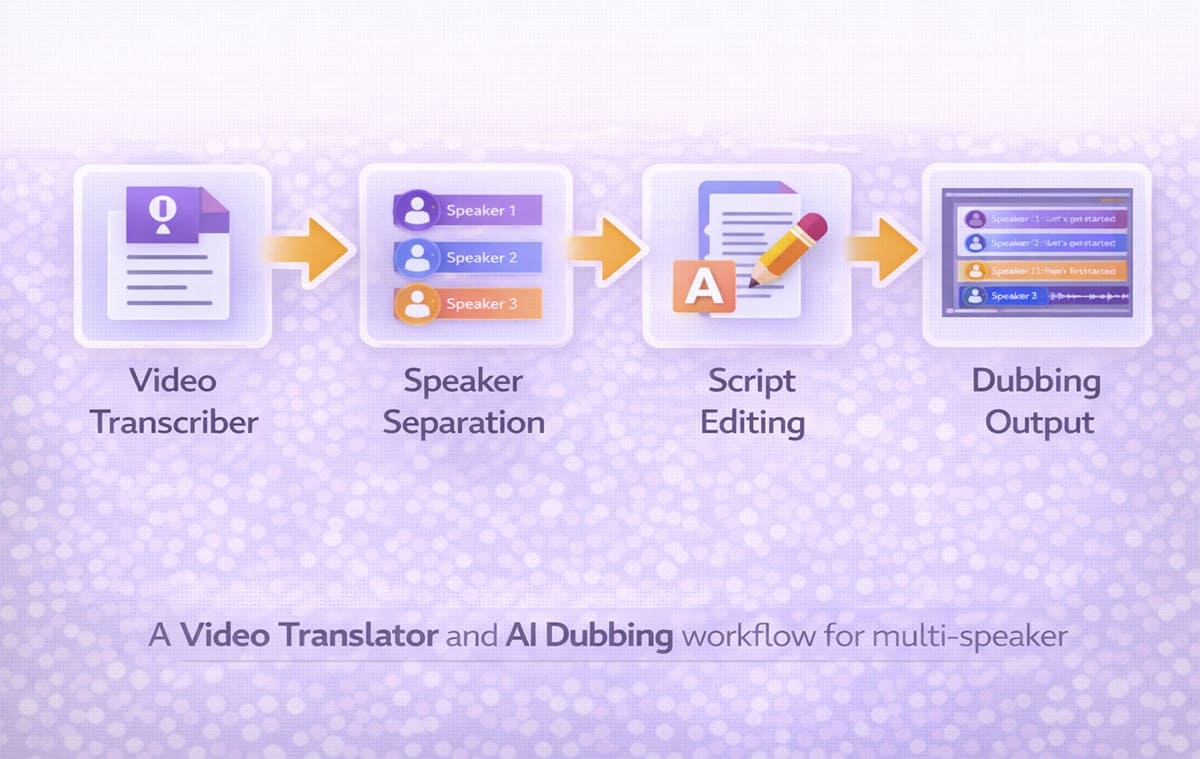
A repeatable system reduces complexity:
Generate transcript with speaker detection
Review and correct segmentation
Translate dialogue blocks clearly
Assign appropriate voices
Run Dubbing output
Perform quick synchronization review
When transcription is clean, Automatic Dubbing becomes far more predictable and scalable.
Frequently Asked Questions
Why is a Video Transcriber critical for multi-speaker dubbing?
Multi-speaker content increases timing complexity. A structured Video Transcriber stabilizes dialogue flow before translation and voice generation.
Does Automatic Dubbing handle panel discussions well?
It can handle structured conversations, but fast-paced or overlapping dialogue often benefits from additional script review.
How does Voice Cloning help in interviews?
It preserves individual identity and speaking style across languages, improving authenticity.
Is script editing always required?
Not always, but most multi-speaker projects benefit from minor refinements before final export.
Conclusion
Multi-speaker content introduces timing and structural complexity that simple narration does not. A strong Video Transcriber protects dialogue flow, supports clean segmentation, and strengthens the entire Dubbing pipeline. When combined with structured Video Translation workflows and controlled Automatic Dubbing, teams can scale interviews, webinars, and panel discussions into multiple languages without losing clarity or speaker identity.
Your team just recorded a roundtable discussion. A product manager explains the roadmap. A sales lead shares customer insights. A guest expert adds technical depth. The conversation flows naturally in English.
Now you need to release versions in Spanish, German, and Japanese. The translation is accurate. The voices are clear. But during playback, something feels unstable. A line overlaps. One voice sounds like it is answering before the previous speaker finishes.
Multi-speaker content exposes weaknesses in transcription and timing more than any other format.
This is where a strong Video Transcriber becomes essential, and it’s exactly the point where teams often lean on Perso Dubbing to keep speaker turns clean before they generate dubbed audio. A Video Transcriber does more than convert speech into text. In Perso Dubbing, it’s treated as the foundation step that organizes speakers and timing so everything downstream stays stable.
It structures speaker turns, stabilizes timestamps, and prepares a clean script foundation for Dubbing, Automatic Dubbing, and Video Translation workflows. In this guide, we will explore the features that make multi-speaker dubbing seamless and how creators and teams can structure their workflow for reliable results.
This article is written for creators, podcast hosts, SaaS marketing teams, and training departments producing interviews, webinars, and discussion-style content.
Why Multi-Speaker Dubbing Breaks Without Clean Transcription
Single-speaker narration is predictable. Multi-speaker content is not. Interruptions, overlapping phrases, and rapid back-and-forth exchanges make timing complex.
If the transcript merges voices incorrectly, Dubbing becomes unstable. Problems typically include:
Speaker lines assigned to the wrong person
Turn-taking that feels early/late
Overlaps that create stacked audio
Translation errors caused by broken context
Clean speaker detection keeps the conversation structure intact before translation starts. In Perso Dubbing, teams usually do a quick pass to confirm speaker labels on the first 2–3 minutes, because small errors there tend to repeat across the whole episode.
For teams building repeatable workflows, transcription quality is what keeps multi-speaker dubbing stable, and Perso Dubbing is useful here because it keeps speaker structure, edits, and exports connected in one flow. If you want a reference point, AI dubbing is a useful overview of how transcript structure affects the final output.
Video Transcriber Features That Improve Multi-Speaker Dubbing
When evaluating tools for panel discussions, interviews, or podcasts, focus on these core capabilities.
Accurate Speaker Separation
Accurate speaker separation is the foundation. The transcriber should label turns reliably during fast exchanges and give you an easy way to correct tags when it gets a speaker wrong. Small mistakes here multiply later during translation and voice generation.
Look for:
Clear labeling of speaker segments
Stable segmentation during rapid exchanges
The ability to adjust speaker tags manually if needed
This foundation directly improves Dubbing accuracy and reduces timing drift.
Clean Timestamp Management
In discussion-based content, timing precision matters more than in simple narration.
The Video Transcriber should:
Avoid overlapping subtitle blocks
Keep dialogue blocks concise
Maintain consistent spacing between speaker turns
Stable timestamps reduce sync issues and keep turn-taking natural. In Perso Dubbing, clean timestamps also make it easier to preview only the sections you changed instead of reprocessing the full file.
Editable Script Control
Even with strong detection, some lines may require refinement. A clean editing layer prevents full regeneration.
A Subtitle & Script Editor allows teams to:
Adjust segmentation
Fix phrasing
Stabilize dialogue transitions
Editing is where you protect tone and speaker identity, especially in dialogue-heavy videos where small wording changes affect how a voice feels. In Perso Dubbing, teams often standardize a few recurring phrases (intros, segment transitions, sponsor reads) so every language version stays consistent. For a deeper example of what to standardize, see consistent brand voice.
How Video Translation Workflows Depend on Speaker Structure?
A structured Video Translation workflow often follows this chain:
Transcribe multi-speaker content
Translate each speaker’s lines
Generate voice output per speaker
Review synchronization
Export final multilingual versions
If the initial Video Transcriber merges speakers incorrectly, translation errors multiply. The Voice Cloning output may sound mismatched. Dialogue rhythm becomes unnatural.
A practical example: a team runs a 30–45 minute roundtable through Perso Dubbing, confirms speaker labels for the host + guests, fixes a few overlap segments, then generates localized versions. Most of the time is spent on the first pass (speaker tags + timing), not on redoing audio.
For global teams, it helps when transcription, editing, and dubbing live in one place—so speaker timing, terminology, and exports stay consistent. A video translation platform is one option to compare against your checklist.
Automatic Dubbing Vs Controlled Dubbing in Multi-Speaker Videos
Automatic Dubbing can be effective when speaker exchanges are structured and minimal. However, unscripted conversations require more review.
When Automatic Dubbing works well
Moderated webinars with clear turn-taking
Interview formats with minimal overlap
Structured Q&A sessions
When controlled Dubbing is safer
Podcast-style conversations
Emotional or fast-paced debates
Multi-guest panels
Live event recordings
In these cases, refining segmentation before final export reduces confusion and protects pacing.
Role of Voice Cloning in Multi-Speaker Localization
Voice Cloning becomes particularly useful in interviews or panels where each voice has a distinct personality.
Instead of using a single generic narrator, Voice Cloning helps preserve:
Individual speaking styles
Authority differences between hosts and guests
Emotional tone during storytelling
When combined with accurate speaker detection from the Video Transcriber, Voice Cloning makes multilingual Dubbing feel more authentic.
Multi-Speaker Workflow Comparison Table
Workflow Stage | Without Structured Transcription | With Strong Video Transcriber |
Speaker detection | Lines merge incorrectly | Speakers clearly separated |
Timing alignment | Overlapping segments | Clean timestamp spacing |
Translation clarity | Context confusion | Structured dialogue flow |
Voice generation | Mismatched speaker tones | Stable voice assignments |
Editing control | Requires full reprocessing | Minor adjustments only |
This comparison highlights why the Video Transcriber stage determines the quality of everything that follows.
Subtitle & Script Editor in Multi-Speaker Projects
After transcription, editing is usually required in small sections. A Subtitle & Script Editor allows teams to correct minor issues quickly.
It supports:
Reassigning speaker labels
Splitting long dialogue blocks
Adjusting transition timing
Refining translated phrasing
This step strengthens Video Translation stability and prepares the project for smooth Automatic Dubbing.
If you publish roundtables or interviews on YouTube, the key is keeping speakers consistent across languages without spending hours on fixes. YouTube dubbing shows one workflow creators often use.
Common Issues in Multi-Speaker Dubbing
Even experienced teams face recurring problems.
Overlapping audio during translation: When two speakers interrupt each other, poor segmentation creates stacked audio in the final dub.
Incorrect emotional tone: If translation loses context, Voice Cloning output may sound flat or mismatched.
Drift between speakers: Minor timing shifts accumulate, making dialogue responses feel delayed.
Manual correction overload: Without clean transcription, teams spend excessive time fixing individual segments instead of refining content.
How To Build a Stable Multi-Speaker Video Translator Workflow?
A repeatable system reduces complexity:
Generate transcript with speaker detection
Review and correct segmentation
Translate dialogue blocks clearly
Assign appropriate voices
Run Dubbing output
Perform quick synchronization review
When transcription is clean, Automatic Dubbing becomes far more predictable and scalable.
Frequently Asked Questions
Why is a Video Transcriber critical for multi-speaker dubbing?
Multi-speaker content increases timing complexity. A structured Video Transcriber stabilizes dialogue flow before translation and voice generation.
Does Automatic Dubbing handle panel discussions well?
It can handle structured conversations, but fast-paced or overlapping dialogue often benefits from additional script review.
How does Voice Cloning help in interviews?
It preserves individual identity and speaking style across languages, improving authenticity.
Is script editing always required?
Not always, but most multi-speaker projects benefit from minor refinements before final export.
Conclusion
Multi-speaker content introduces timing and structural complexity that simple narration does not. A strong Video Transcriber protects dialogue flow, supports clean segmentation, and strengthens the entire Dubbing pipeline. When combined with structured Video Translation workflows and controlled Automatic Dubbing, teams can scale interviews, webinars, and panel discussions into multiple languages without losing clarity or speaker identity.
Your team just recorded a roundtable discussion. A product manager explains the roadmap. A sales lead shares customer insights. A guest expert adds technical depth. The conversation flows naturally in English.
Now you need to release versions in Spanish, German, and Japanese. The translation is accurate. The voices are clear. But during playback, something feels unstable. A line overlaps. One voice sounds like it is answering before the previous speaker finishes.
Multi-speaker content exposes weaknesses in transcription and timing more than any other format.
This is where a strong Video Transcriber becomes essential, and it’s exactly the point where teams often lean on Perso Dubbing to keep speaker turns clean before they generate dubbed audio. A Video Transcriber does more than convert speech into text. In Perso Dubbing, it’s treated as the foundation step that organizes speakers and timing so everything downstream stays stable.
It structures speaker turns, stabilizes timestamps, and prepares a clean script foundation for Dubbing, Automatic Dubbing, and Video Translation workflows. In this guide, we will explore the features that make multi-speaker dubbing seamless and how creators and teams can structure their workflow for reliable results.
This article is written for creators, podcast hosts, SaaS marketing teams, and training departments producing interviews, webinars, and discussion-style content.
Why Multi-Speaker Dubbing Breaks Without Clean Transcription
Single-speaker narration is predictable. Multi-speaker content is not. Interruptions, overlapping phrases, and rapid back-and-forth exchanges make timing complex.
If the transcript merges voices incorrectly, Dubbing becomes unstable. Problems typically include:
Speaker lines assigned to the wrong person
Turn-taking that feels early/late
Overlaps that create stacked audio
Translation errors caused by broken context
Clean speaker detection keeps the conversation structure intact before translation starts. In Perso Dubbing, teams usually do a quick pass to confirm speaker labels on the first 2–3 minutes, because small errors there tend to repeat across the whole episode.
For teams building repeatable workflows, transcription quality is what keeps multi-speaker dubbing stable, and Perso Dubbing is useful here because it keeps speaker structure, edits, and exports connected in one flow. If you want a reference point, AI dubbing is a useful overview of how transcript structure affects the final output.
Video Transcriber Features That Improve Multi-Speaker Dubbing
When evaluating tools for panel discussions, interviews, or podcasts, focus on these core capabilities.
Accurate Speaker Separation
Accurate speaker separation is the foundation. The transcriber should label turns reliably during fast exchanges and give you an easy way to correct tags when it gets a speaker wrong. Small mistakes here multiply later during translation and voice generation.
Look for:
Clear labeling of speaker segments
Stable segmentation during rapid exchanges
The ability to adjust speaker tags manually if needed
This foundation directly improves Dubbing accuracy and reduces timing drift.
Clean Timestamp Management
In discussion-based content, timing precision matters more than in simple narration.
The Video Transcriber should:
Avoid overlapping subtitle blocks
Keep dialogue blocks concise
Maintain consistent spacing between speaker turns
Stable timestamps reduce sync issues and keep turn-taking natural. In Perso Dubbing, clean timestamps also make it easier to preview only the sections you changed instead of reprocessing the full file.
Editable Script Control
Even with strong detection, some lines may require refinement. A clean editing layer prevents full regeneration.
A Subtitle & Script Editor allows teams to:
Adjust segmentation
Fix phrasing
Stabilize dialogue transitions
Editing is where you protect tone and speaker identity, especially in dialogue-heavy videos where small wording changes affect how a voice feels. In Perso Dubbing, teams often standardize a few recurring phrases (intros, segment transitions, sponsor reads) so every language version stays consistent. For a deeper example of what to standardize, see consistent brand voice.
How Video Translation Workflows Depend on Speaker Structure?
A structured Video Translation workflow often follows this chain:
Transcribe multi-speaker content
Translate each speaker’s lines
Generate voice output per speaker
Review synchronization
Export final multilingual versions
If the initial Video Transcriber merges speakers incorrectly, translation errors multiply. The Voice Cloning output may sound mismatched. Dialogue rhythm becomes unnatural.
A practical example: a team runs a 30–45 minute roundtable through Perso Dubbing, confirms speaker labels for the host + guests, fixes a few overlap segments, then generates localized versions. Most of the time is spent on the first pass (speaker tags + timing), not on redoing audio.
For global teams, it helps when transcription, editing, and dubbing live in one place—so speaker timing, terminology, and exports stay consistent. A video translation platform is one option to compare against your checklist.
Automatic Dubbing Vs Controlled Dubbing in Multi-Speaker Videos
Automatic Dubbing can be effective when speaker exchanges are structured and minimal. However, unscripted conversations require more review.
When Automatic Dubbing works well
Moderated webinars with clear turn-taking
Interview formats with minimal overlap
Structured Q&A sessions
When controlled Dubbing is safer
Podcast-style conversations
Emotional or fast-paced debates
Multi-guest panels
Live event recordings
In these cases, refining segmentation before final export reduces confusion and protects pacing.
Role of Voice Cloning in Multi-Speaker Localization
Voice Cloning becomes particularly useful in interviews or panels where each voice has a distinct personality.
Instead of using a single generic narrator, Voice Cloning helps preserve:
Individual speaking styles
Authority differences between hosts and guests
Emotional tone during storytelling
When combined with accurate speaker detection from the Video Transcriber, Voice Cloning makes multilingual Dubbing feel more authentic.
Multi-Speaker Workflow Comparison Table
Workflow Stage | Without Structured Transcription | With Strong Video Transcriber |
Speaker detection | Lines merge incorrectly | Speakers clearly separated |
Timing alignment | Overlapping segments | Clean timestamp spacing |
Translation clarity | Context confusion | Structured dialogue flow |
Voice generation | Mismatched speaker tones | Stable voice assignments |
Editing control | Requires full reprocessing | Minor adjustments only |
This comparison highlights why the Video Transcriber stage determines the quality of everything that follows.
Subtitle & Script Editor in Multi-Speaker Projects
After transcription, editing is usually required in small sections. A Subtitle & Script Editor allows teams to correct minor issues quickly.
It supports:
Reassigning speaker labels
Splitting long dialogue blocks
Adjusting transition timing
Refining translated phrasing
This step strengthens Video Translation stability and prepares the project for smooth Automatic Dubbing.
If you publish roundtables or interviews on YouTube, the key is keeping speakers consistent across languages without spending hours on fixes. YouTube dubbing shows one workflow creators often use.
Common Issues in Multi-Speaker Dubbing
Even experienced teams face recurring problems.
Overlapping audio during translation: When two speakers interrupt each other, poor segmentation creates stacked audio in the final dub.
Incorrect emotional tone: If translation loses context, Voice Cloning output may sound flat or mismatched.
Drift between speakers: Minor timing shifts accumulate, making dialogue responses feel delayed.
Manual correction overload: Without clean transcription, teams spend excessive time fixing individual segments instead of refining content.
How To Build a Stable Multi-Speaker Video Translator Workflow?
A repeatable system reduces complexity:
Generate transcript with speaker detection
Review and correct segmentation
Translate dialogue blocks clearly
Assign appropriate voices
Run Dubbing output
Perform quick synchronization review
When transcription is clean, Automatic Dubbing becomes far more predictable and scalable.
Frequently Asked Questions
Why is a Video Transcriber critical for multi-speaker dubbing?
Multi-speaker content increases timing complexity. A structured Video Transcriber stabilizes dialogue flow before translation and voice generation.
Does Automatic Dubbing handle panel discussions well?
It can handle structured conversations, but fast-paced or overlapping dialogue often benefits from additional script review.
How does Voice Cloning help in interviews?
It preserves individual identity and speaking style across languages, improving authenticity.
Is script editing always required?
Not always, but most multi-speaker projects benefit from minor refinements before final export.
Conclusion
Multi-speaker content introduces timing and structural complexity that simple narration does not. A strong Video Transcriber protects dialogue flow, supports clean segmentation, and strengthens the entire Dubbing pipeline. When combined with structured Video Translation workflows and controlled Automatic Dubbing, teams can scale interviews, webinars, and panel discussions into multiple languages without losing clarity or speaker identity.
Continue Reading
Browse All



