視頻轉錄器功能:如何獲得完美清晰的時間設定以改進配音





人工智能視頻翻譯、定位和配音工具
免費試用
Your team just recorded a 20-minute product demo. You need subtitles for accessibility, a clean script for translation, and multiple language versions for international release.
You export the transcript. The words are mostly correct. But the timestamps are messy. Some lines start late. Others end too early. A few segments are too long to read comfortably.
When you move into Dubbing, everything becomes harder. The voice feels rushed. The pacing sounds unnatural. Editing takes longer than expected.
This is where a strong Video Transcriber makes the difference.
A Video Transcriber converts speech into timed text, but the real value lies in clean segmentation, accurate timestamps, and editable scripts. In this article, we’ll break down the key features that improve timing and explain how better transcription strengthens Automatic Dubbing, Video Translation, and Video Translator workflows.
Video Transcriber Features That Create Clean Timing for Dubbing
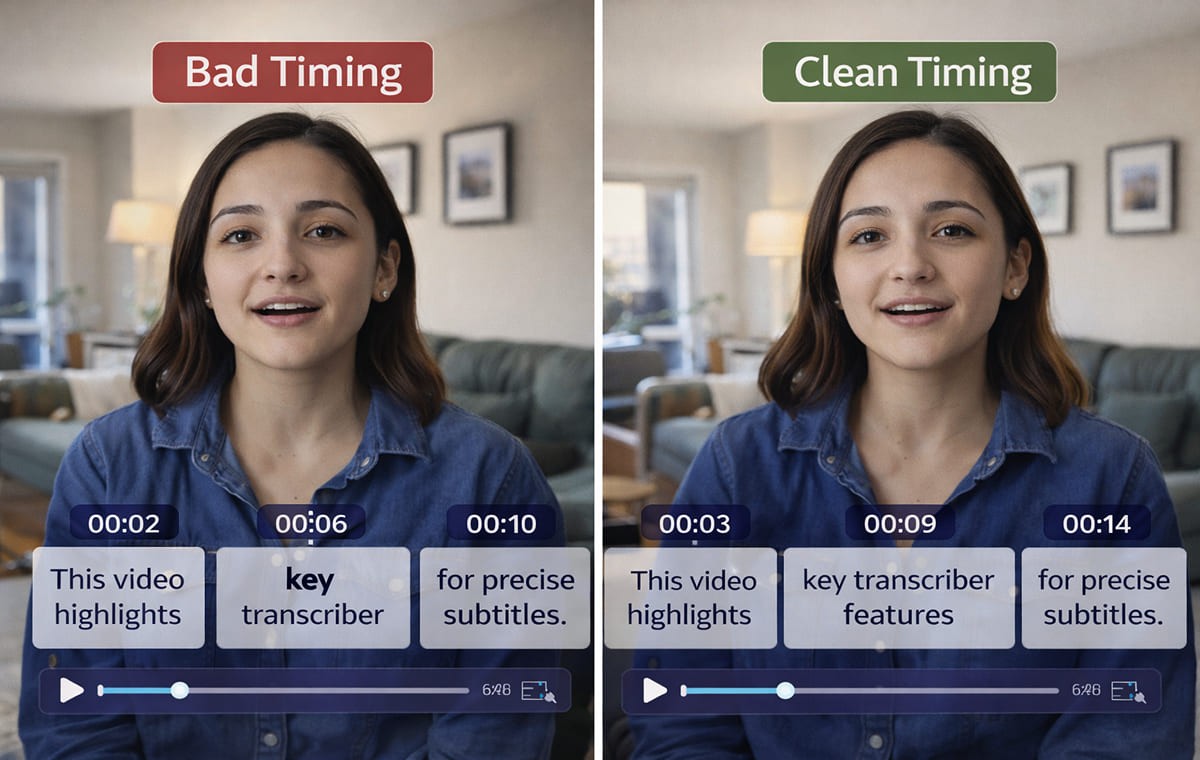
Not all transcribers are “bad” when timing looks off, most issues come from missing controls. A strong Video Transcriber gives you tools to clean timing before you ever export an SRT.
Here are the features that make the biggest difference:
Speaker Detection That Keeps Lines Stable
If your video has more than one voice, speaker handling matters. When a transcriber separates speakers cleanly, you avoid mixed lines and weird timing jumps that ruin Dubbing flow.
For multi-speaker content, start with a tool designed for this workflow, like an AI video transcriber that captures every word with clean timing.
Smart Segmentation That Prevents “One Giant Subtitle”
Clean timing is partly about how text is chunked:
lines should break at natural phrases
Subtitles shouldn’t be too long.
Segments shouldn’t flash too fast to read.
If your output gives you giant blocks or rapid-fire fragments, you’ll feel it immediately when you try to dub.
Editable Timestamps (The Real “Timing Control”)
Even good transcription needs tiny timing adjustments:
Tighten a segment that starts late
extend a segment that ends early
Split a line when the sentence runs long
This is where an editor matters more than the raw transcript.
Why Clean SRT Timing Improves Automatic Dubbing Quality?
Here’s the simple truth: dubbing quality isn’t only about the voice. It’s also about timing logic.
When your video to SRT file is clean:
Your dubbed audio aligns more naturally
The pacing feels closer to the original speaker
fewer lines need rewriting just to “fit” the mouth movements
edits don’t cascade into other scenes
That’s why teams doing automatic video translation with dubbing and synchronized output treat transcription timing as the foundation, not an afterthought.
How A Video Translator Workflow Depends on A Good Transcript
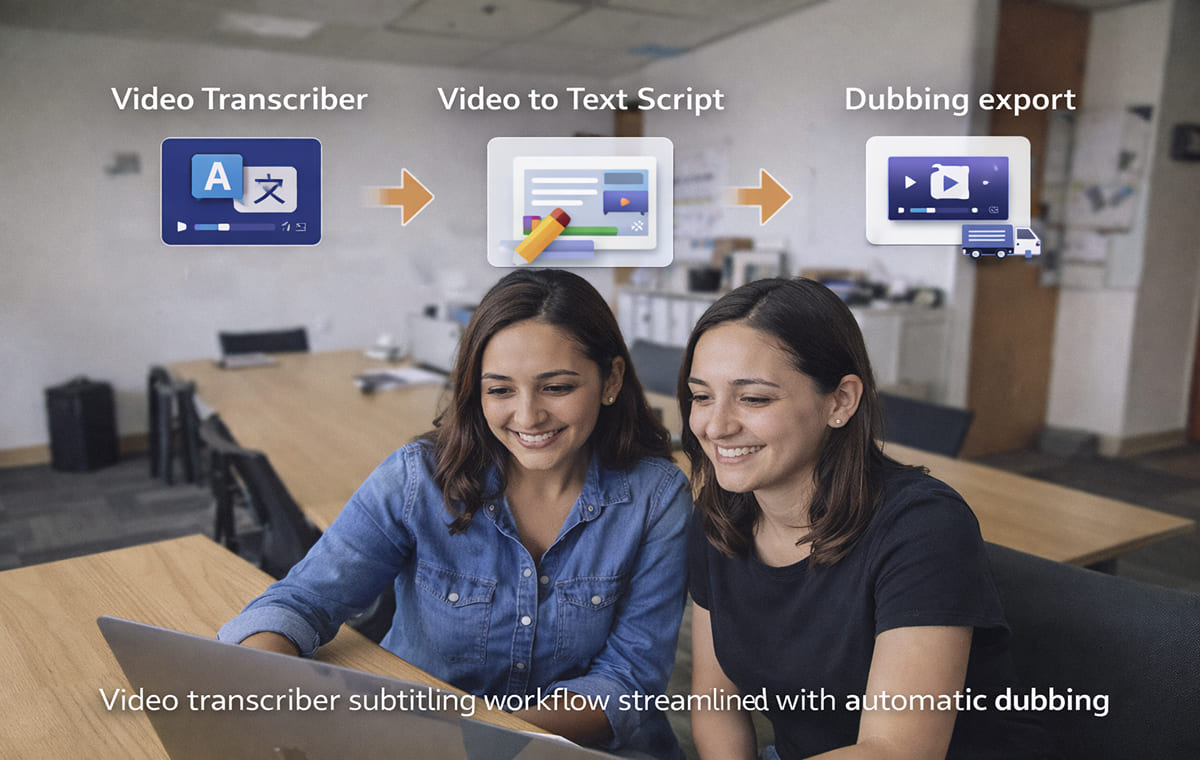
A Video Translator workflow often follows a predictable chain: transcribe → translate → generate voice → sync → refine.
If the transcript is messy, everything that follows becomes harder:
Translation gets awkward because sentences are broken badly
Voice delivery sounds unnatural because the phrasing is wrong
lip sync becomes tougher because timing windows don’t match speech rhythm
If you’re building a reliable workflow, connect your transcription stage to an end-to-end approach like AI video translator for dubbing and multilingual video localization so your process stays consistent from script to export.
Video To Text Script Setup That Reduces Dubbing Rework
A clean Video to Text Script is more than “accurate words.” It’s also:
readable sentences
consistent terminology
lines that match natural speaking rhythm
If your script is off, you’ll end up “fixing timing” by rewriting lines, which is slow and risky.
When you need an editable script output built for this, a Video to Text Script that turns video into an editable script is the kind of page you’d reference in a workflow checklist.
Quick Script Cleanup Checklist
Before you export to dubbing:
Fix product names and acronyms once
Remove filler words that break pacing
Combine choppy fragments into natural phrases
Keep consistent terms across the whole video
This is also where AI Dubbing and Voice Cloning results tend to improve, because the model is “reading” cleaner language.
Subtitle & Script Editor Tools That Fix Timing Without Redoing the Whole Video
Most teams don’t need to regenerate everything when one section is off. They need an editor where they can:
adjust text
tweak timing
translate lines
keep sync stable
That’s why an editor layer is a core part of quality control. Perso AI’s Subtitle & Script Editor for editing and syncing subtitles is built around that idea, transcribe, then refine in one place.
When To Use the Editor Instead of Re-Transcribing?
Use the editor when:
only a few segments are mis-timed
Your transcript is accurate, but the phrasing needs polishing.
You want better timing for Automatic Dubbing without touching the full project
A Clean Audio to SRT Process That Works in Real Projects
If you want repeatable results, don’t aim for “perfect on the first pass.” Aim for a clean loop:
Upload your source video/audio
Generate the transcript + initial timestamps
Review speaker splits and segmentation
Open the script in an editor and fix awkward lines
Export audio to srt (or video to srt) for downstream use
Proceed to Dubbing / Video Translation output
If your content is ad-driven, a use-case workflow like localizing video ads with AI dubbing for multiple markets matches the reality of tight turnarounds and fast iteration.
Common Timing Problems That Ruin Dubbing and How to Spot Them
These issues are easy to miss until you hear the dub:
Subtitles that start after the speaker begins: The dub will feel late, even if the words are correct.
Lines that end too early: The voice feels cut off or rushed, which creates “robotic” pacing.
Over-segmentation: Too many tiny subtitle chunks can make voice delivery unnatural.
Under-segmentation: One long subtitle can force unnatural speed to fit timing windows.
If your goal is better Automatic Video Translation, these timing problems show up quickly because translation expands or compresses sentence length.
FAQs
What Video Transcriber features matter most for dubbing?
The most practical ones are clean segmentation, editable timing, and a workflow that lets you refine the script before exporting SRT, especially if you plan to use Automatic Dubbing.
Is the video to SRT enough, or do I need script editing too?
If your content is simple, video to SRT may be enough. If you’re publishing externally, script editing usually improves flow, terminology, and timing stability, especially for a Video Translator workflow.
How does transcription affect voice cloning results?
Voice models perform better when scripts are read naturally. Clean punctuation, stable phrasing, and correct terminology help Voice Cloning and dubbing sound less “generated.”
Who benefits most from clean transcription timing?
Creators, marketers, and course/training teams benefit most from anyone shipping multilingual content regularly. For creators, dubbing YouTube videos for global audiences using AI video translation is the typical starting point.
Conclusion
A Video Transcriber isn’t just a “text generator.” It’s the timing foundation for better Dubbing, smoother Automatic Dubbing, and more reliable Video Translator workflows. If you focus on the features that control segmentation, speaker handling, and script refinement, you’ll spend less time fixing subtitles and more time publishing high-quality localized videos.
Your team just recorded a 20-minute product demo. You need subtitles for accessibility, a clean script for translation, and multiple language versions for international release.
You export the transcript. The words are mostly correct. But the timestamps are messy. Some lines start late. Others end too early. A few segments are too long to read comfortably.
When you move into Dubbing, everything becomes harder. The voice feels rushed. The pacing sounds unnatural. Editing takes longer than expected.
This is where a strong Video Transcriber makes the difference.
A Video Transcriber converts speech into timed text, but the real value lies in clean segmentation, accurate timestamps, and editable scripts. In this article, we’ll break down the key features that improve timing and explain how better transcription strengthens Automatic Dubbing, Video Translation, and Video Translator workflows.
Video Transcriber Features That Create Clean Timing for Dubbing
Not all transcribers are “bad” when timing looks off, most issues come from missing controls. A strong Video Transcriber gives you tools to clean timing before you ever export an SRT.
Here are the features that make the biggest difference:
Speaker Detection That Keeps Lines Stable
If your video has more than one voice, speaker handling matters. When a transcriber separates speakers cleanly, you avoid mixed lines and weird timing jumps that ruin Dubbing flow.
For multi-speaker content, start with a tool designed for this workflow, like an AI video transcriber that captures every word with clean timing.
Smart Segmentation That Prevents “One Giant Subtitle”
Clean timing is partly about how text is chunked:
lines should break at natural phrases
Subtitles shouldn’t be too long.
Segments shouldn’t flash too fast to read.
If your output gives you giant blocks or rapid-fire fragments, you’ll feel it immediately when you try to dub.
Editable Timestamps (The Real “Timing Control”)
Even good transcription needs tiny timing adjustments:
Tighten a segment that starts late
extend a segment that ends early
Split a line when the sentence runs long
This is where an editor matters more than the raw transcript.
Why Clean SRT Timing Improves Automatic Dubbing Quality?
Here’s the simple truth: dubbing quality isn’t only about the voice. It’s also about timing logic.
When your video to SRT file is clean:
Your dubbed audio aligns more naturally
The pacing feels closer to the original speaker
fewer lines need rewriting just to “fit” the mouth movements
edits don’t cascade into other scenes
That’s why teams doing automatic video translation with dubbing and synchronized output treat transcription timing as the foundation, not an afterthought.
How A Video Translator Workflow Depends on A Good Transcript
A Video Translator workflow often follows a predictable chain: transcribe → translate → generate voice → sync → refine.
If the transcript is messy, everything that follows becomes harder:
Translation gets awkward because sentences are broken badly
Voice delivery sounds unnatural because the phrasing is wrong
lip sync becomes tougher because timing windows don’t match speech rhythm
If you’re building a reliable workflow, connect your transcription stage to an end-to-end approach like AI video translator for dubbing and multilingual video localization so your process stays consistent from script to export.
Video To Text Script Setup That Reduces Dubbing Rework
A clean Video to Text Script is more than “accurate words.” It’s also:
readable sentences
consistent terminology
lines that match natural speaking rhythm
If your script is off, you’ll end up “fixing timing” by rewriting lines, which is slow and risky.
When you need an editable script output built for this, a Video to Text Script that turns video into an editable script is the kind of page you’d reference in a workflow checklist.
Quick Script Cleanup Checklist
Before you export to dubbing:
Fix product names and acronyms once
Remove filler words that break pacing
Combine choppy fragments into natural phrases
Keep consistent terms across the whole video
This is also where AI Dubbing and Voice Cloning results tend to improve, because the model is “reading” cleaner language.
Subtitle & Script Editor Tools That Fix Timing Without Redoing the Whole Video
Most teams don’t need to regenerate everything when one section is off. They need an editor where they can:
adjust text
tweak timing
translate lines
keep sync stable
That’s why an editor layer is a core part of quality control. Perso AI’s Subtitle & Script Editor for editing and syncing subtitles is built around that idea, transcribe, then refine in one place.
When To Use the Editor Instead of Re-Transcribing?
Use the editor when:
only a few segments are mis-timed
Your transcript is accurate, but the phrasing needs polishing.
You want better timing for Automatic Dubbing without touching the full project
A Clean Audio to SRT Process That Works in Real Projects
If you want repeatable results, don’t aim for “perfect on the first pass.” Aim for a clean loop:
Upload your source video/audio
Generate the transcript + initial timestamps
Review speaker splits and segmentation
Open the script in an editor and fix awkward lines
Export audio to srt (or video to srt) for downstream use
Proceed to Dubbing / Video Translation output
If your content is ad-driven, a use-case workflow like localizing video ads with AI dubbing for multiple markets matches the reality of tight turnarounds and fast iteration.
Common Timing Problems That Ruin Dubbing and How to Spot Them
These issues are easy to miss until you hear the dub:
Subtitles that start after the speaker begins: The dub will feel late, even if the words are correct.
Lines that end too early: The voice feels cut off or rushed, which creates “robotic” pacing.
Over-segmentation: Too many tiny subtitle chunks can make voice delivery unnatural.
Under-segmentation: One long subtitle can force unnatural speed to fit timing windows.
If your goal is better Automatic Video Translation, these timing problems show up quickly because translation expands or compresses sentence length.
FAQs
What Video Transcriber features matter most for dubbing?
The most practical ones are clean segmentation, editable timing, and a workflow that lets you refine the script before exporting SRT, especially if you plan to use Automatic Dubbing.
Is the video to SRT enough, or do I need script editing too?
If your content is simple, video to SRT may be enough. If you’re publishing externally, script editing usually improves flow, terminology, and timing stability, especially for a Video Translator workflow.
How does transcription affect voice cloning results?
Voice models perform better when scripts are read naturally. Clean punctuation, stable phrasing, and correct terminology help Voice Cloning and dubbing sound less “generated.”
Who benefits most from clean transcription timing?
Creators, marketers, and course/training teams benefit most from anyone shipping multilingual content regularly. For creators, dubbing YouTube videos for global audiences using AI video translation is the typical starting point.
Conclusion
A Video Transcriber isn’t just a “text generator.” It’s the timing foundation for better Dubbing, smoother Automatic Dubbing, and more reliable Video Translator workflows. If you focus on the features that control segmentation, speaker handling, and script refinement, you’ll spend less time fixing subtitles and more time publishing high-quality localized videos.
繼續閱讀
瀏覽全部