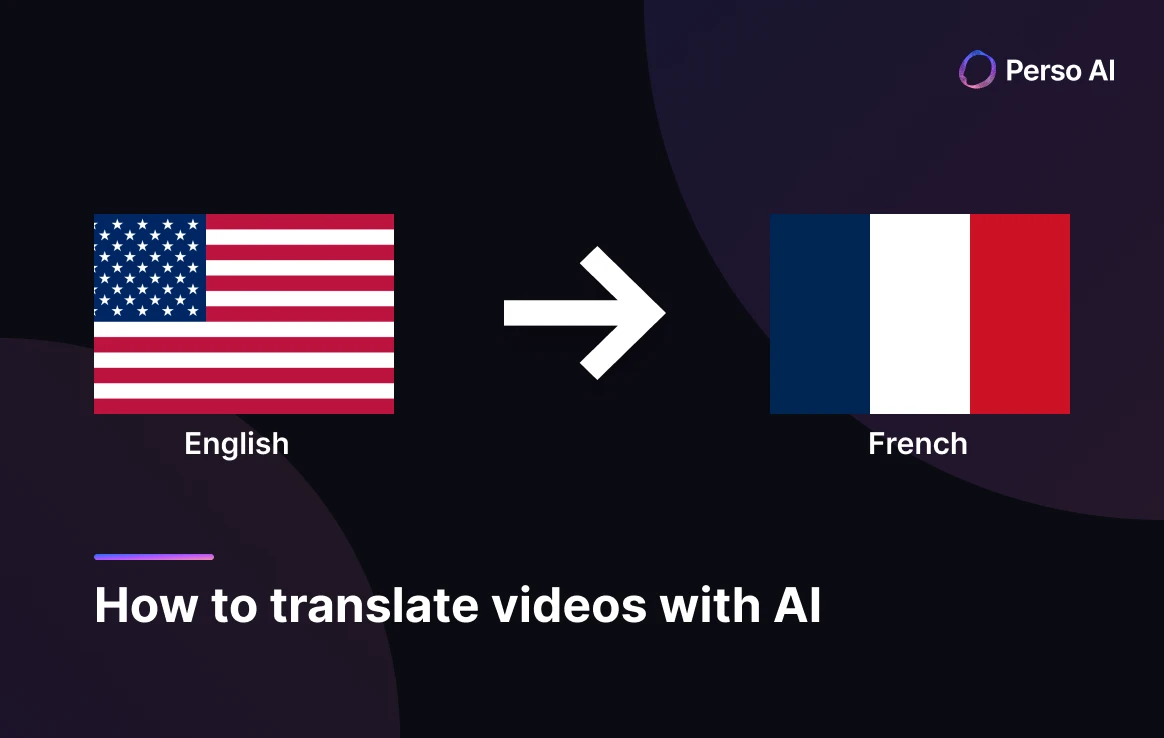
How to Translate English Videos to French with AI




Jump to section
Jump to section

Share
Share
Share
AI Video Translator, Localization, and Dubbing Tool
Try it out for Free
💡 Translate any English video to French in minutes with Perso AI. Free trial — no credit card required.
Answer-First Opening
French is the world's fourth most-spoken language, reaching 396 million speakers across five continents (Organisation internationale de la Francophonie, 2026). Perso AI translates English videos to French with AI dubbing in three steps, handling grammatical gender, formal/informal registers (tu vs vous), and the regional variants spoken in France, Quebec, Belgium, Switzerland, and Francophone Africa.
English → French is one of the platform's well-established corridors — among the top 8 most-used language pairs with 554+ hours of content processed over 12 months. AI dubbing delivers French versions in minutes rather than days, enabling creators and studios to ship localized content same-day.
The most distinctive signal is content clarity: 70.66% of English → French projects receive AI category classification — the highest classification rate across all language pairs on Perso AI — reflecting a clearly defined content mix dominated by Education (11.80%) and Entertainment/Documentary (11.45%) formats.
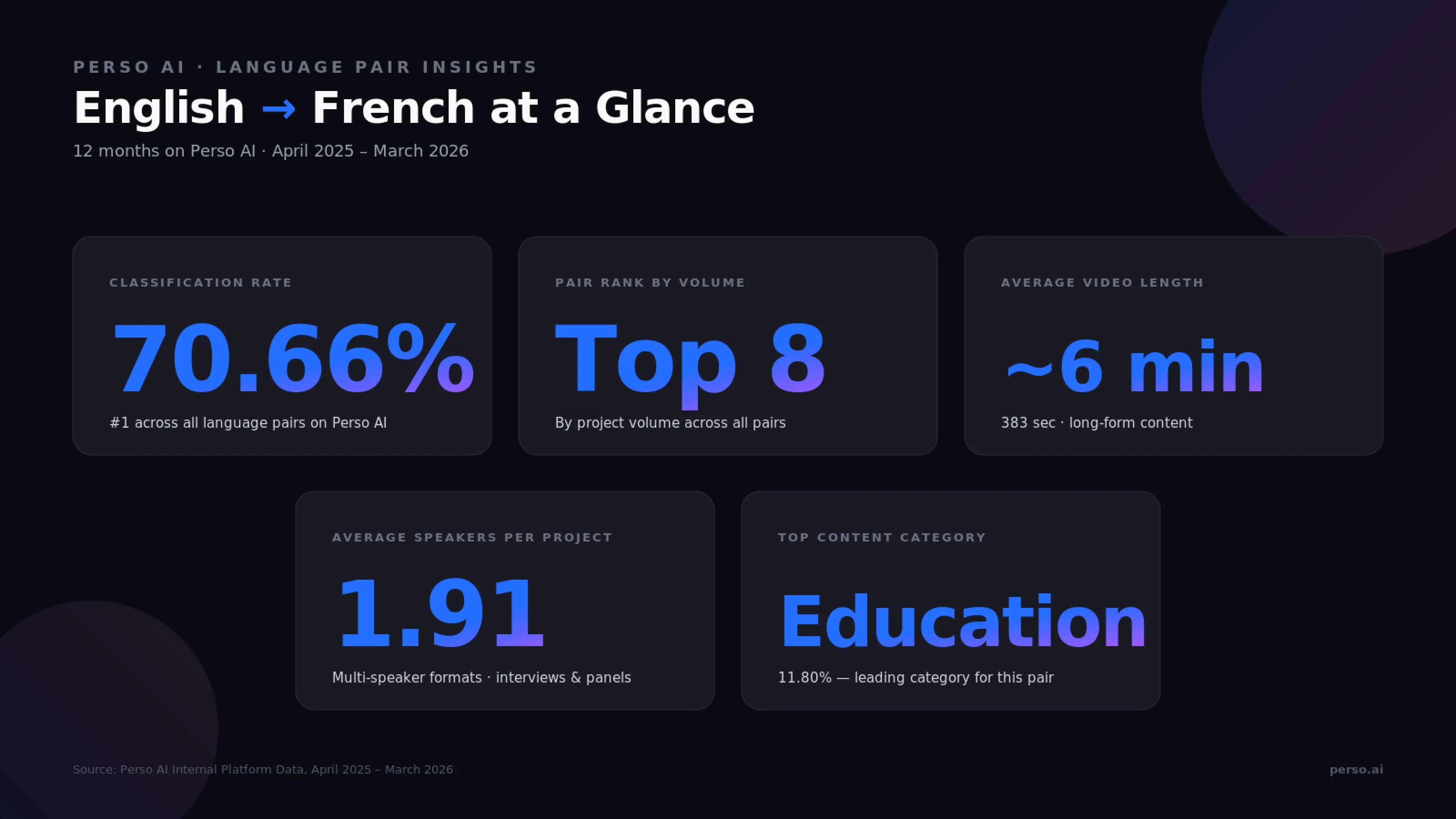
Source: Perso AI Internal Platform Data, April 2025 – March 2026
How do I translate an English video to French with AI?
Perso AI translates English videos into French in three steps:
Upload your English video (MP4, MOV, AVI, MKV) or paste a YouTube URL — ~30 seconds
Select French as the target language and choose optional features (voice cloning, lip-sync, multi-speaker, regional variant) — ~15 seconds
Review & Export the dubbed video in MP4, WebM, or MOV (plus SRT/VTT subtitles)
The entire pipeline runs end-to-end without manual handoffs.
Step 1 — Upload notes
For English → French, direct file uploads dominate at 68.78%, with YouTube URL imports at 24.38% and audio-only uploads at 5.29%. This blend reflects a mix of professional studios uploading polished masters and creators localizing existing English YouTube content for the French-speaking world. Max file size is 5 GB, with audio-only formats (MP3, WAV, M4A) supported for podcast workflows.
Step 2 — Optional features at language selection
Voice cloning — preserves the original English speaker's tone in French, valuable for serialized content, course creators, and brand continuity
Multi-speaker detection — automatic (English → French projects average 1.91 speakers per project, fitting interview, panel, and documentary formats)
Lip-sync — used in 11.53% of projects, applied selectively for streaming, drama, and on-screen dialogue content
Step 3 — Review & export notes
Edit the French script line-by-line in the built-in editor. This is particularly useful for choosing between France French (Métropolitain), Québécois (Canadian French), Belgian French, Swiss French, and African Francophone variants, plus adjusting formality (tu vs vous) and handling region-specific vocabulary (e.g., voiture vs char in Québécois).
Before / After: Traditional English-to-French studio dubbing requires voice casting, studio booking, and post-production sync work spanning several days. AI dubbing delivers the same output in minutes, while preserving the speaker's voice through cloning.
🎬 Ready to try it? Upload your first English video and get the French dub in minutes.
Why English → French serves one of the world's largest language communities
English → French dubbing has become a strategic localization corridor for global creators, streaming platforms, and brands targeting the Francophone world — France, Canada, Belgium, Switzerland, and the rapidly growing African Francophone region. The macro signals are clear.
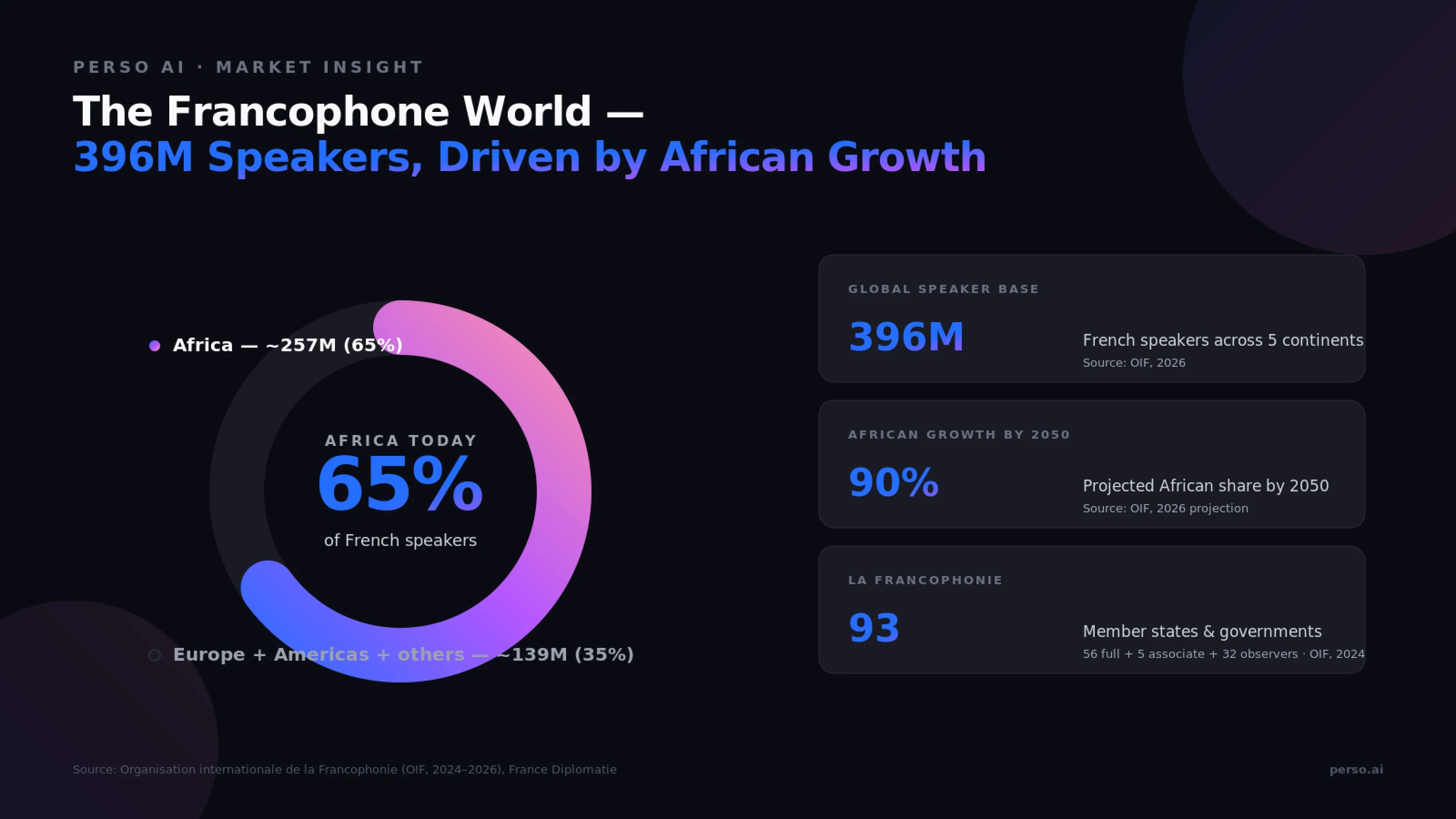
Source: Organisation internationale de la Francophonie (OIF, 2026), France Diplomatie (2026)
Why French content matters globally
The numbers behind the Francophone opportunity:
Metric | Value | Source |
|---|---|---|
French speakers worldwide | 396 million across five continents | OIF, 2026 |
French global rank by speakers | #4 most-spoken language | OIF / France Diplomatie, 2026 |
French speakers in Africa | ~65% (~257 million) | OIF, 2026 |
Projected African share by 2050 | 90% of French speakers | OIF, 2026 |
La Francophonie member states/governments | 93 (56 full + 5 associate + 32 observers) | OIF, 2024 |
France Media & Entertainment industry (2024) | $115.16 billion | Market Research Future, 2024 |
France EdTech market (2024) | $7.88 billion (CAGR ~12%) | IMARC Group, 2024 |
The three demand engines
1. France and European Francophone markets. France's Media & Entertainment industry reached $115.16 billion in 2024 (Market Research Future), supporting a mature dubbing infrastructure for streaming, film, and television. YouTube alone contributed over €1 billion to France's GDP in 2024 with 24,000+ full-time-equivalent jobs (YouTube France / Advanced Television).
2. Africa — the future of Francophone content. Africa is the demographic engine of the French language. Approximately 65% of the world's French speakers already live in Africa (OIF, 2026), and OIF projects 90% of French speakers will be African by 2050. English-to-French dubbing for Africa-targeted content is a structural growth corridor.
3. Education and knowledge content. France's EdTech market reached $7.88 billion in 2024 with double-digit growth (IMARC Group). On Perso AI, Education makes up 11.80% of classified English → French projects — the leading content category for this language pair — followed by Entertainment/Documentary (11.45%) and Science/Technology (5.75%).
Perso AI's data matches the multi-genre, professional Francophone signature
English → French projects on Perso AI show a distinctive long-form, well-defined pattern:
383 seconds average length (~6 minutes) — long-form streaming, education, and documentary formats
70.66% classification rate — the highest across all language pairs on Perso AI, reflecting a clearly defined content mix
1.91 average speakers per project — among the higher multi-speaker rates, reflecting interview, panel, and documentary formats
11.53% lip-sync activation — applied selectively for streaming, drama, and dialogue content
24.38% YouTube URL imports — moderate creator-led re-localization activity
What makes English-to-French translation technically unique?
English → French is one of the few major language pairs where source and target share core typological features — both Indo-European, both Latin alphabet, both Subject-Verb-Object word order. The challenge shifts to gender agreement, formality, regional variants, and verb conjugation complexity.
English vs French — Linguistic Comparison
Feature | English | French |
|---|---|---|
Word order | SVO — "She watches videos" | SVO — "Elle regarde des vidéos" (similar order) |
Script | Latin alphabet (no diacritics) | Latin alphabet with diacritics (é, è, ê, à, ç, etc.) |
Gender | No grammatical gender (mostly) | Every noun has masculine/feminine — affects articles, adjectives, past participles |
Formal pronouns | Single "you" | tu (informal singular) · vous (formal singular & all plural) |
Verb conjugation | Light (3rd person -s) | Heavy (6 person/number forms × multiple tenses) |
Regional variants | Single global standard | France French · Québécois · Belgian · Swiss · African Francophone — distinct vocabulary, accent, and idioms |
Script length | Baseline | Often 15–20% longer in French audio |
Sources: Romance language linguistics references; Académie française materials.
The four-step conversion problem
Converting English audio into French requires AI to perform four distinct operations:
Transcribe English accurately — including idioms, contractions, and informal speech
Apply gender agreement — every French article, adjective, and past participle must match the noun's grammatical gender (le vidéo... actually la vidéo)
Choose the regional variant — France French as the broad default, with Québécois, Belgian, Swiss, or African Francophone available for region-specific content
Manage formality and verb conjugation — the model must select between tu and vous and apply the correct conjugation across 6 person/number forms with diacritic accuracy
France French vs Québécois vs African Francophone — the variant choice
For most Perso AI users targeting the broader Francophone world, France French (Métropolitain) serves as the default. Québécois carries distinct vocabulary, idioms, and accent for Canadian audiences. African Francophone variants serve Sub-Saharan and North African markets where French is widely used in education, media, and government.
The variants differ in vocabulary, pronunciation, and idioms:
"Car" → France voiture / Québec char (informal)
"Email" → France courriel or email / Québec courriel (preferred)
"70" → France soixante-dix / Belgium and Switzerland septante
Misalignment between intended audience and chosen variant immediately signals "wrong region" to viewers. Editors can refine specific lines in the built-in script editor.
Diacritics matter
French diacritics (é, è, ê, à, ç, ï, ü) carry meaning — ou (or) vs où (where), a (has) vs à (to). Perso AI's French output preserves diacritic accuracy across the entire script, with editors able to verify specific terms in the built-in editor.
Content categories shaping English-to-French dubbing
Perso AI's 12-month data reveals a uniquely well-defined content mix for English → French — a 70.66% classification rate that exceeds every other top language pair on the platform, dominated by Education and Entertainment/Documentary content.
Content category breakdown
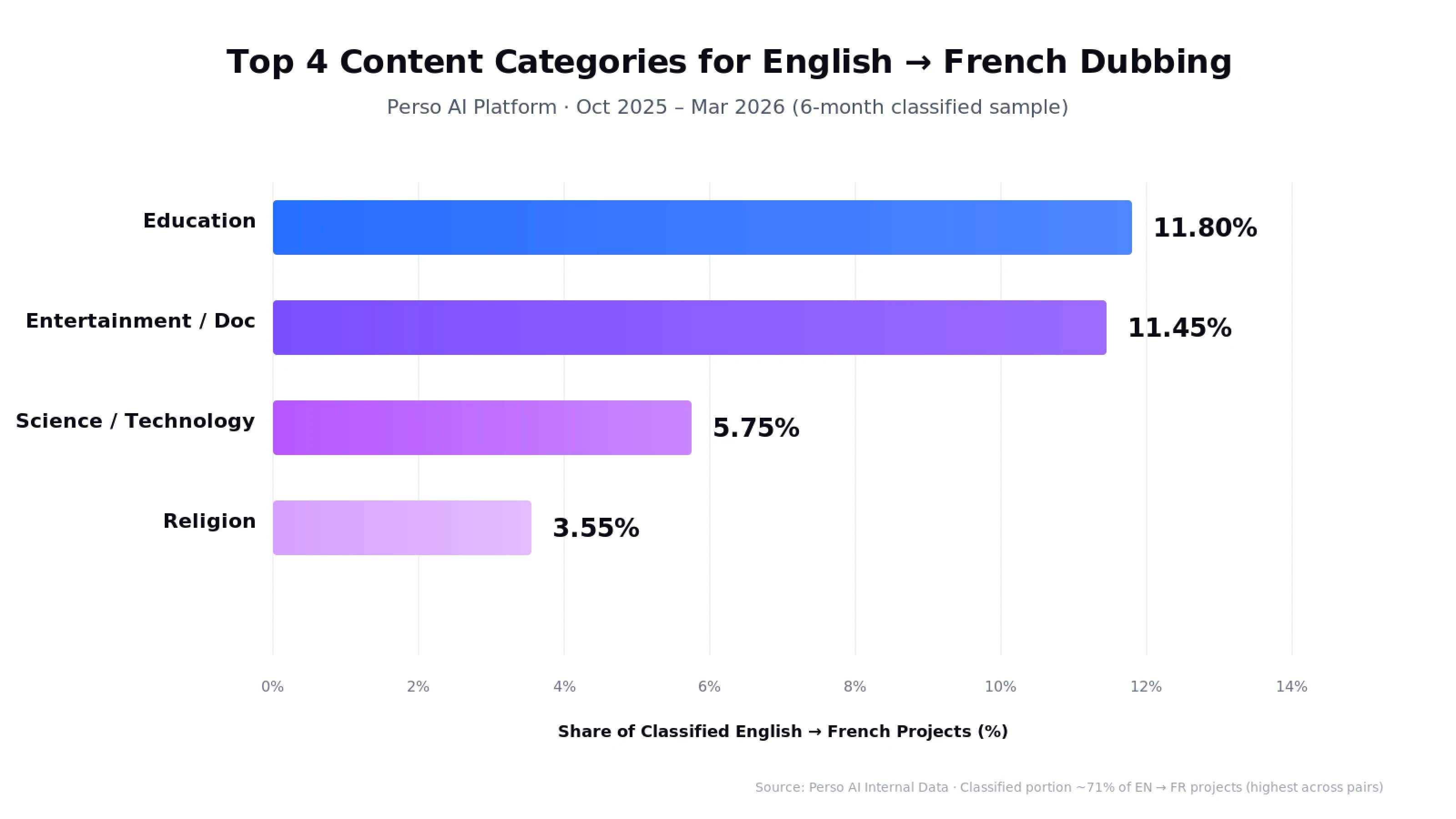
Source: Perso AI Internal Data · Oct 2025 – Mar 2026 (6-month classified sample)
Education (11.80%) — The leading content category for this language pair. Online courses, MOOCs, K-12 academic content, and creator-led tutorials adapted for French learners across France, Quebec, Belgium, Switzerland, and Francophone Africa
Entertainment / Documentary (11.45%) — Reality content, vlogs, documentary clips, and entertainment formats dubbed for the broader Francophone audience
Science / Technology (5.75%) — Tech tutorials, science communication, and STEM education from English creators reaching French-speaking learners
Religion (3.55%) — Christian and faith-based content for French-speaking religious audiences across multiple regions
Note: Category data reflects approximately 71% of English → French projects that received AI category classification (feature active from October 2025). General/uncategorized content (10.99%) is excluded from the Top 4 above.
Format characteristics
English → French projects share a long-form, multi-genre, professional signature:
Average video length: 383 seconds (~6 minutes) — long-form streaming, education, and documentary content
Average speakers per project: 1.91 — multi-speaker formats common (interviews, panels, documentaries)
Lip-sync activation: 11.53% — used selectively for streaming and dialogue content
Direct file upload: 68.78% — professional studio workflow signature
Total hours processed: 554+ hours — among the platform's top 8 by total volume
What this means for creators and studios
If you're producing English content for French-speaking audiences, your workflow will likely involve:
Long-form file uploads (4–10 minute episodes typical)
France French as default target (Québécois or African variants for region-specific content)
Voice cloning for serialized content and course creators
Lip-sync activation for streaming and on-screen dialogue
Genre fit across education, entertainment/documentary, science, and faith-based content
Perso AI's English → French pipeline supports this professional, multi-genre Francophone workflow.
How does Perso AI handle English-to-French dubbing?
Perso AI is an AI-powered video dubbing and translation platform supporting 33+ languages. Its English → French pipeline is tuned for the diverse Francophone world — France, Quebec, Belgium, Switzerland, and African Francophone markets — supporting multiple regional variants and the long-form, multi-genre content typical of this corridor.
Direct English-to-French translation
Generic translators that route through pivot languages introduce phonetic and grammatical approximation errors at each step. Perso AI uses a direct English → French model, preserving idiomatic expressions, cultural references, grammatical gender consistency, and diacritic accuracy across the entire script.
Multiple regional French variants
Perso AI's French output supports France French (Métropolitain), Québécois (Canadian), and broader Francophone variants. Editors can adjust register, idioms, and regional vocabulary in the built-in script editor — important when serving distinct audiences across France, Canada, Belgium, Switzerland, and Africa.
Voice cloning preserves identity
For long-form serialized content — courses, multi-episode series, documentary, and faith-based programs — voice continuity matters. The platform clones the original speaker's vocal characteristics (pitch, timbre, speaking pace) and applies them to the French output, supporting both single-speaker and multi-speaker formats.
Multi-speaker detection (averaging 1.91 voices per project)
English → French projects average 1.91 distinct speakers, fitting interview, panel, and documentary formats more frequently than other top language pairs. Speaker changes are detected automatically, with distinct French voices assigned to each.
Lip-sync for streaming and drama content
The 11.53% lip-sync activation rate on English → French projects reflects demand for production-grade dubbing in streaming, drama, and on-screen dialogue content. The platform's lip-sync engine adjusts French audio timing and phoneme placement to match the original English speaker's mouth movements.
Long-form export flexibility
Output formats include MP4, WebM, MOV for video, plus SRT, VTT, ASS for subtitle files. This supports re-upload to YouTube, Netflix-style platforms, French broadcast distribution, and African Francophone OTT services, or export as separate deliverables for streaming and social media distribution.
Frequently Asked Questions
How accurate is AI English-to-French video translation?
Perso AI achieves high translation accuracy for English-to-French dubbing, validated across education, entertainment/documentary, science/technology, and religious content. Accuracy is higher for scripted content than unscripted material. English → French is among the platform's top 8 most-used language pairs, with the highest classification rate across all pairs (70.66%) — reflecting a clearly defined content mix that aids model training signal.
Does Perso AI dub into France French or Québécois (Canadian French)?
Perso AI supports multiple French variants. France French (Métropolitain) serves as the default, with Québécois, Belgian, Swiss, and African Francophone variants available for region-specific content. You can select the variant during language selection or adjust regional vocabulary and idioms in the built-in script editor.
How long does it take to dub an English video into French?
AI dubbing delivers French versions in minutes rather than the days required by manual studio dubbing. The average English-to-French project on Perso AI is 383 seconds (about 6 minutes) long, and the entire pipeline — transcription, translation, and French voice synthesis — runs end-to-end on the platform.
Does Perso AI handle French gender agreement and formality correctly?
Yes. Perso AI's direct English → French model handles grammatical gender automatically — every article, adjective, and past participle is matched to the noun's masculine or feminine form. Formality choice (tu vs vous) is contextually determined and adjustable line-by-line in the built-in script editor.
Can Perso AI handle long-form French content like full courses or documentaries?
Yes. English → French projects average 383 seconds (~6 minutes), and the platform processes long-form content extensively (554+ hours over 12 months — among the top 8 language pairs by volume). The platform supports MP4, MOV, AVI, and MKV files up to 5 GB for full episodes, courses, and serialized content.
What content types perform best for English-to-French dubbing?
Education, entertainment/documentary, science/technology, and faith-based content all perform strongly on Perso AI. Education alone accounts for 11.80% of all English-to-French projects — the leading content category for this language pair. With French reaching 396 million speakers across five continents (OIF, 2026), scripted long-form content benefits most from professional AI dubbing.
Ready to translate your English video to French?
Start your first English → French dubbing project in minutes. Free trial — no credit card required.
Start dubbing your English video now →
Data source: Perso AI Internal Platform Data, April 2025 – March 2026. Market figures sourced from Organisation internationale de la Francophonie (OIF, 2026), France Diplomatie (2026), Market Research Future (2024), IMARC Group (2024), and YouTube France via Advanced Television (2024) as cited inline. This post is part of Perso AI's Language Pair Guide series. For broader AI dubbing trends, see our Q1 2026 AI Dubbing Language Trends Report.
💡 Translate any English video to French in minutes with Perso AI. Free trial — no credit card required.
Answer-First Opening
French is the world's fourth most-spoken language, reaching 396 million speakers across five continents (Organisation internationale de la Francophonie, 2026). Perso AI translates English videos to French with AI dubbing in three steps, handling grammatical gender, formal/informal registers (tu vs vous), and the regional variants spoken in France, Quebec, Belgium, Switzerland, and Francophone Africa.
English → French is one of the platform's well-established corridors — among the top 8 most-used language pairs with 554+ hours of content processed over 12 months. AI dubbing delivers French versions in minutes rather than days, enabling creators and studios to ship localized content same-day.
The most distinctive signal is content clarity: 70.66% of English → French projects receive AI category classification — the highest classification rate across all language pairs on Perso AI — reflecting a clearly defined content mix dominated by Education (11.80%) and Entertainment/Documentary (11.45%) formats.
Source: Perso AI Internal Platform Data, April 2025 – March 2026
How do I translate an English video to French with AI?
Perso AI translates English videos into French in three steps:
Upload your English video (MP4, MOV, AVI, MKV) or paste a YouTube URL — ~30 seconds
Select French as the target language and choose optional features (voice cloning, lip-sync, multi-speaker, regional variant) — ~15 seconds
Review & Export the dubbed video in MP4, WebM, or MOV (plus SRT/VTT subtitles)
The entire pipeline runs end-to-end without manual handoffs.
Step 1 — Upload notes
For English → French, direct file uploads dominate at 68.78%, with YouTube URL imports at 24.38% and audio-only uploads at 5.29%. This blend reflects a mix of professional studios uploading polished masters and creators localizing existing English YouTube content for the French-speaking world. Max file size is 5 GB, with audio-only formats (MP3, WAV, M4A) supported for podcast workflows.
Step 2 — Optional features at language selection
Voice cloning — preserves the original English speaker's tone in French, valuable for serialized content, course creators, and brand continuity
Multi-speaker detection — automatic (English → French projects average 1.91 speakers per project, fitting interview, panel, and documentary formats)
Lip-sync — used in 11.53% of projects, applied selectively for streaming, drama, and on-screen dialogue content
Step 3 — Review & export notes
Edit the French script line-by-line in the built-in editor. This is particularly useful for choosing between France French (Métropolitain), Québécois (Canadian French), Belgian French, Swiss French, and African Francophone variants, plus adjusting formality (tu vs vous) and handling region-specific vocabulary (e.g., voiture vs char in Québécois).
Before / After: Traditional English-to-French studio dubbing requires voice casting, studio booking, and post-production sync work spanning several days. AI dubbing delivers the same output in minutes, while preserving the speaker's voice through cloning.
🎬 Ready to try it? Upload your first English video and get the French dub in minutes.
Why English → French serves one of the world's largest language communities
English → French dubbing has become a strategic localization corridor for global creators, streaming platforms, and brands targeting the Francophone world — France, Canada, Belgium, Switzerland, and the rapidly growing African Francophone region. The macro signals are clear.
Source: Organisation internationale de la Francophonie (OIF, 2026), France Diplomatie (2026)
Why French content matters globally
The numbers behind the Francophone opportunity:
Metric | Value | Source |
|---|---|---|
French speakers worldwide | 396 million across five continents | OIF, 2026 |
French global rank by speakers | #4 most-spoken language | OIF / France Diplomatie, 2026 |
French speakers in Africa | ~65% (~257 million) | OIF, 2026 |
Projected African share by 2050 | 90% of French speakers | OIF, 2026 |
La Francophonie member states/governments | 93 (56 full + 5 associate + 32 observers) | OIF, 2024 |
France Media & Entertainment industry (2024) | $115.16 billion | Market Research Future, 2024 |
France EdTech market (2024) | $7.88 billion (CAGR ~12%) | IMARC Group, 2024 |
The three demand engines
1. France and European Francophone markets. France's Media & Entertainment industry reached $115.16 billion in 2024 (Market Research Future), supporting a mature dubbing infrastructure for streaming, film, and television. YouTube alone contributed over €1 billion to France's GDP in 2024 with 24,000+ full-time-equivalent jobs (YouTube France / Advanced Television).
2. Africa — the future of Francophone content. Africa is the demographic engine of the French language. Approximately 65% of the world's French speakers already live in Africa (OIF, 2026), and OIF projects 90% of French speakers will be African by 2050. English-to-French dubbing for Africa-targeted content is a structural growth corridor.
3. Education and knowledge content. France's EdTech market reached $7.88 billion in 2024 with double-digit growth (IMARC Group). On Perso AI, Education makes up 11.80% of classified English → French projects — the leading content category for this language pair — followed by Entertainment/Documentary (11.45%) and Science/Technology (5.75%).
Perso AI's data matches the multi-genre, professional Francophone signature
English → French projects on Perso AI show a distinctive long-form, well-defined pattern:
383 seconds average length (~6 minutes) — long-form streaming, education, and documentary formats
70.66% classification rate — the highest across all language pairs on Perso AI, reflecting a clearly defined content mix
1.91 average speakers per project — among the higher multi-speaker rates, reflecting interview, panel, and documentary formats
11.53% lip-sync activation — applied selectively for streaming, drama, and dialogue content
24.38% YouTube URL imports — moderate creator-led re-localization activity
What makes English-to-French translation technically unique?
English → French is one of the few major language pairs where source and target share core typological features — both Indo-European, both Latin alphabet, both Subject-Verb-Object word order. The challenge shifts to gender agreement, formality, regional variants, and verb conjugation complexity.
English vs French — Linguistic Comparison
Feature | English | French |
|---|---|---|
Word order | SVO — "She watches videos" | SVO — "Elle regarde des vidéos" (similar order) |
Script | Latin alphabet (no diacritics) | Latin alphabet with diacritics (é, è, ê, à, ç, etc.) |
Gender | No grammatical gender (mostly) | Every noun has masculine/feminine — affects articles, adjectives, past participles |
Formal pronouns | Single "you" | tu (informal singular) · vous (formal singular & all plural) |
Verb conjugation | Light (3rd person -s) | Heavy (6 person/number forms × multiple tenses) |
Regional variants | Single global standard | France French · Québécois · Belgian · Swiss · African Francophone — distinct vocabulary, accent, and idioms |
Script length | Baseline | Often 15–20% longer in French audio |
Sources: Romance language linguistics references; Académie française materials.
The four-step conversion problem
Converting English audio into French requires AI to perform four distinct operations:
Transcribe English accurately — including idioms, contractions, and informal speech
Apply gender agreement — every French article, adjective, and past participle must match the noun's grammatical gender (le vidéo... actually la vidéo)
Choose the regional variant — France French as the broad default, with Québécois, Belgian, Swiss, or African Francophone available for region-specific content
Manage formality and verb conjugation — the model must select between tu and vous and apply the correct conjugation across 6 person/number forms with diacritic accuracy
France French vs Québécois vs African Francophone — the variant choice
For most Perso AI users targeting the broader Francophone world, France French (Métropolitain) serves as the default. Québécois carries distinct vocabulary, idioms, and accent for Canadian audiences. African Francophone variants serve Sub-Saharan and North African markets where French is widely used in education, media, and government.
The variants differ in vocabulary, pronunciation, and idioms:
"Car" → France voiture / Québec char (informal)
"Email" → France courriel or email / Québec courriel (preferred)
"70" → France soixante-dix / Belgium and Switzerland septante
Misalignment between intended audience and chosen variant immediately signals "wrong region" to viewers. Editors can refine specific lines in the built-in script editor.
Diacritics matter
French diacritics (é, è, ê, à, ç, ï, ü) carry meaning — ou (or) vs où (where), a (has) vs à (to). Perso AI's French output preserves diacritic accuracy across the entire script, with editors able to verify specific terms in the built-in editor.
Content categories shaping English-to-French dubbing
Perso AI's 12-month data reveals a uniquely well-defined content mix for English → French — a 70.66% classification rate that exceeds every other top language pair on the platform, dominated by Education and Entertainment/Documentary content.
Content category breakdown
Source: Perso AI Internal Data · Oct 2025 – Mar 2026 (6-month classified sample)
Education (11.80%) — The leading content category for this language pair. Online courses, MOOCs, K-12 academic content, and creator-led tutorials adapted for French learners across France, Quebec, Belgium, Switzerland, and Francophone Africa
Entertainment / Documentary (11.45%) — Reality content, vlogs, documentary clips, and entertainment formats dubbed for the broader Francophone audience
Science / Technology (5.75%) — Tech tutorials, science communication, and STEM education from English creators reaching French-speaking learners
Religion (3.55%) — Christian and faith-based content for French-speaking religious audiences across multiple regions
Note: Category data reflects approximately 71% of English → French projects that received AI category classification (feature active from October 2025). General/uncategorized content (10.99%) is excluded from the Top 4 above.
Format characteristics
English → French projects share a long-form, multi-genre, professional signature:
Average video length: 383 seconds (~6 minutes) — long-form streaming, education, and documentary content
Average speakers per project: 1.91 — multi-speaker formats common (interviews, panels, documentaries)
Lip-sync activation: 11.53% — used selectively for streaming and dialogue content
Direct file upload: 68.78% — professional studio workflow signature
Total hours processed: 554+ hours — among the platform's top 8 by total volume
What this means for creators and studios
If you're producing English content for French-speaking audiences, your workflow will likely involve:
Long-form file uploads (4–10 minute episodes typical)
France French as default target (Québécois or African variants for region-specific content)
Voice cloning for serialized content and course creators
Lip-sync activation for streaming and on-screen dialogue
Genre fit across education, entertainment/documentary, science, and faith-based content
Perso AI's English → French pipeline supports this professional, multi-genre Francophone workflow.
How does Perso AI handle English-to-French dubbing?
Perso AI is an AI-powered video dubbing and translation platform supporting 33+ languages. Its English → French pipeline is tuned for the diverse Francophone world — France, Quebec, Belgium, Switzerland, and African Francophone markets — supporting multiple regional variants and the long-form, multi-genre content typical of this corridor.
Direct English-to-French translation
Generic translators that route through pivot languages introduce phonetic and grammatical approximation errors at each step. Perso AI uses a direct English → French model, preserving idiomatic expressions, cultural references, grammatical gender consistency, and diacritic accuracy across the entire script.
Multiple regional French variants
Perso AI's French output supports France French (Métropolitain), Québécois (Canadian), and broader Francophone variants. Editors can adjust register, idioms, and regional vocabulary in the built-in script editor — important when serving distinct audiences across France, Canada, Belgium, Switzerland, and Africa.
Voice cloning preserves identity
For long-form serialized content — courses, multi-episode series, documentary, and faith-based programs — voice continuity matters. The platform clones the original speaker's vocal characteristics (pitch, timbre, speaking pace) and applies them to the French output, supporting both single-speaker and multi-speaker formats.
Multi-speaker detection (averaging 1.91 voices per project)
English → French projects average 1.91 distinct speakers, fitting interview, panel, and documentary formats more frequently than other top language pairs. Speaker changes are detected automatically, with distinct French voices assigned to each.
Lip-sync for streaming and drama content
The 11.53% lip-sync activation rate on English → French projects reflects demand for production-grade dubbing in streaming, drama, and on-screen dialogue content. The platform's lip-sync engine adjusts French audio timing and phoneme placement to match the original English speaker's mouth movements.
Long-form export flexibility
Output formats include MP4, WebM, MOV for video, plus SRT, VTT, ASS for subtitle files. This supports re-upload to YouTube, Netflix-style platforms, French broadcast distribution, and African Francophone OTT services, or export as separate deliverables for streaming and social media distribution.
Frequently Asked Questions
How accurate is AI English-to-French video translation?
Perso AI achieves high translation accuracy for English-to-French dubbing, validated across education, entertainment/documentary, science/technology, and religious content. Accuracy is higher for scripted content than unscripted material. English → French is among the platform's top 8 most-used language pairs, with the highest classification rate across all pairs (70.66%) — reflecting a clearly defined content mix that aids model training signal.
Does Perso AI dub into France French or Québécois (Canadian French)?
Perso AI supports multiple French variants. France French (Métropolitain) serves as the default, with Québécois, Belgian, Swiss, and African Francophone variants available for region-specific content. You can select the variant during language selection or adjust regional vocabulary and idioms in the built-in script editor.
How long does it take to dub an English video into French?
AI dubbing delivers French versions in minutes rather than the days required by manual studio dubbing. The average English-to-French project on Perso AI is 383 seconds (about 6 minutes) long, and the entire pipeline — transcription, translation, and French voice synthesis — runs end-to-end on the platform.
Does Perso AI handle French gender agreement and formality correctly?
Yes. Perso AI's direct English → French model handles grammatical gender automatically — every article, adjective, and past participle is matched to the noun's masculine or feminine form. Formality choice (tu vs vous) is contextually determined and adjustable line-by-line in the built-in script editor.
Can Perso AI handle long-form French content like full courses or documentaries?
Yes. English → French projects average 383 seconds (~6 minutes), and the platform processes long-form content extensively (554+ hours over 12 months — among the top 8 language pairs by volume). The platform supports MP4, MOV, AVI, and MKV files up to 5 GB for full episodes, courses, and serialized content.
What content types perform best for English-to-French dubbing?
Education, entertainment/documentary, science/technology, and faith-based content all perform strongly on Perso AI. Education alone accounts for 11.80% of all English-to-French projects — the leading content category for this language pair. With French reaching 396 million speakers across five continents (OIF, 2026), scripted long-form content benefits most from professional AI dubbing.
Ready to translate your English video to French?
Start your first English → French dubbing project in minutes. Free trial — no credit card required.
Start dubbing your English video now →
Data source: Perso AI Internal Platform Data, April 2025 – March 2026. Market figures sourced from Organisation internationale de la Francophonie (OIF, 2026), France Diplomatie (2026), Market Research Future (2024), IMARC Group (2024), and YouTube France via Advanced Television (2024) as cited inline. This post is part of Perso AI's Language Pair Guide series. For broader AI dubbing trends, see our Q1 2026 AI Dubbing Language Trends Report.
Continue Reading
Browse All