How to Translate Korean Videos to English with AI




Jump to section
Jump to section

Share
Share
Share
AI Video Translator, Localization, and Dubbing Tool
Try it out for Free
💡 Translate any Korean video to English in minutes with Perso AI. Free trial — no credit card required.
Answer-First Opening
The Korean Wave (Hallyu) now reaches 225 million fans across 119 countries, generating $14.16 billion in annual economic value (Korea Foundation, 2024). Perso AI translates Korean videos to English with AI dubbing in three steps, preserving the original speaker's voice while restructuring Korean's SOV syntax and three-tier honorific system into natural English.
Korean → English is one of the highest-volume language pairs on the platform — #1 by total content processed (2,105+ hours over 12 months) and #1 by average video length (~8 minutes per clip). AI dubbing delivers English versions in minutes rather than days, enabling creators to ship localized content same-day.
The most distinctive signal: 31.25% of Korean → English projects activate lip-sync, the highest activation rate across all language pairs on Perso AI. This reflects the Hallyu content signature — K-Drama, K-Pop, and K-Variety formats where on-screen mouth alignment matters as much as voice translation.
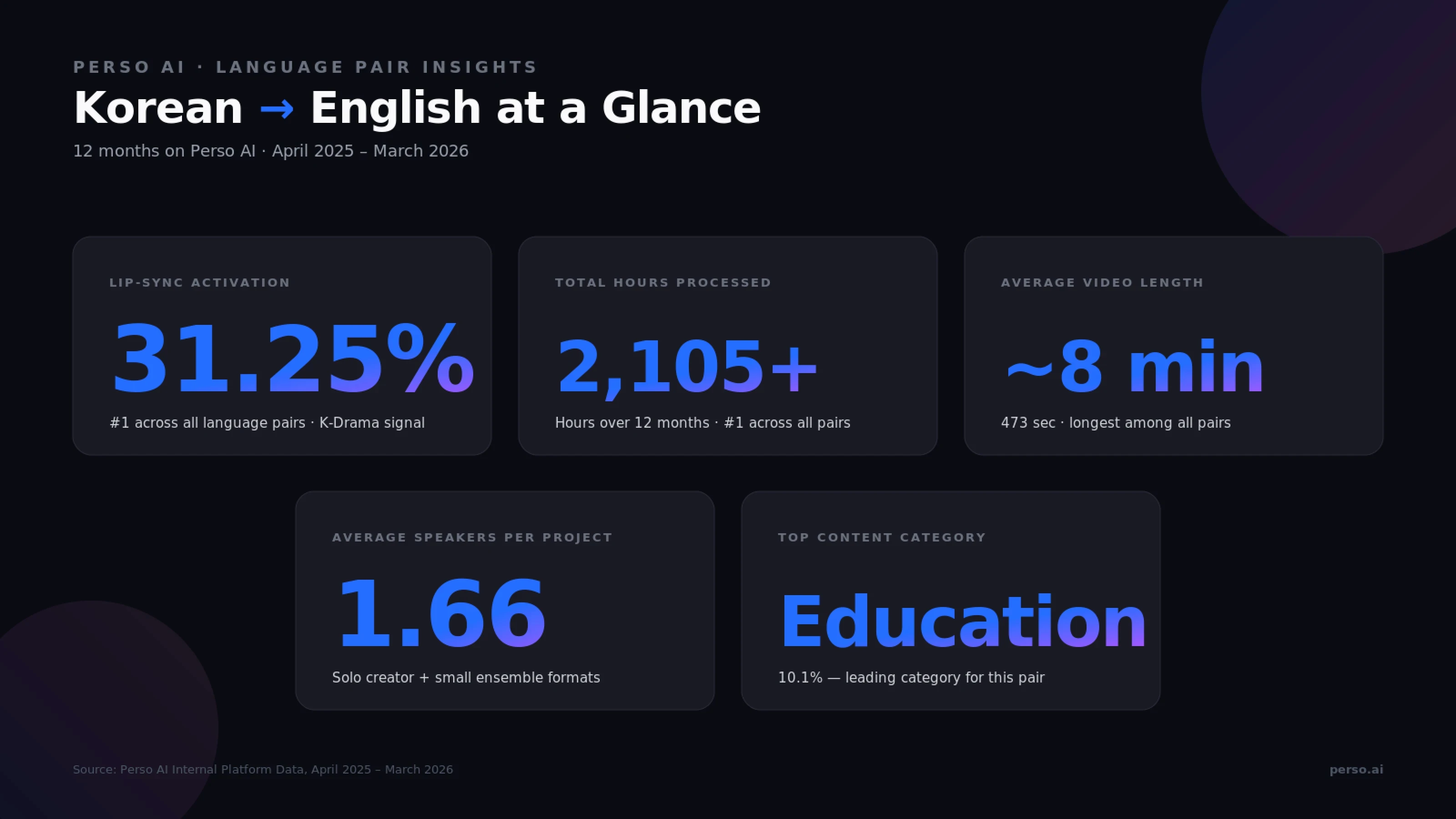
Source: Perso AI Internal Platform Data, April 2025 – March 2026
How do I translate a Korean video to English with AI?
Perso AI translates Korean videos into English in three steps:
Upload your Korean video (MP4, MOV, AVI, MKV) or paste a YouTube URL — ~30 seconds
Select English as the target language and choose optional features (voice cloning, lip-sync, multi-speaker) — ~15 seconds
Review & Export the dubbed video in MP4, WebM, or MOV (plus SRT/VTT subtitles)
The entire pipeline runs end-to-end without manual handoffs.
Step 1 — Upload notes
For Korean → English, direct file uploads account for 70.5% of projects, with YouTube URL imports at 24.7%. This blend reflects two distinct user types: studios uploading polished export files, and creators pasting existing YouTube content for quick re-localization. Max file size is 5 GB, with audio-only formats (MP3, WAV, M4A) also supported for podcast workflows.
Step 2 — Optional features at language selection
Voice cloning — preserves the original Korean speaker's tone in English, valuable for K-content creators maintaining channel or brand identity
Multi-speaker detection — automatic (Korean → English projects average 1.66 speakers, fitting solo host and small interview formats)
Lip-sync — used in 31.25% of Korean → English projects, the highest activation rate across all language pairs on Perso AI, reflecting K-Drama and K-Pop content where mouth movement alignment matters
Step 3 — Review & export notes
Edit the English script line-by-line in the built-in editor. This is particularly useful for handling Korean honorifics — converting 반말 (informal), 해요체 (polite), and 합니다체 (formal) speech levels into appropriate English register, since English has no equivalent grammatical formality system.
Before / After: Traditional Korean-to-English studio dubbing — used by major K-content distributors — typically requires voice casting, studio booking, and post-production sync work spanning several days. AI dubbing delivers the same output in minutes, while preserving the original creator's voice through cloning.
🎬 Ready to try it? Upload your first Korean video and get the English dub in minutes.
Why Korean → English is one of the most active dubbing corridors
Korean → English dubbing has become a strategic growth lever for K-content creators, studios, and global brands targeting English-speaking audiences. The macro signals are clear.
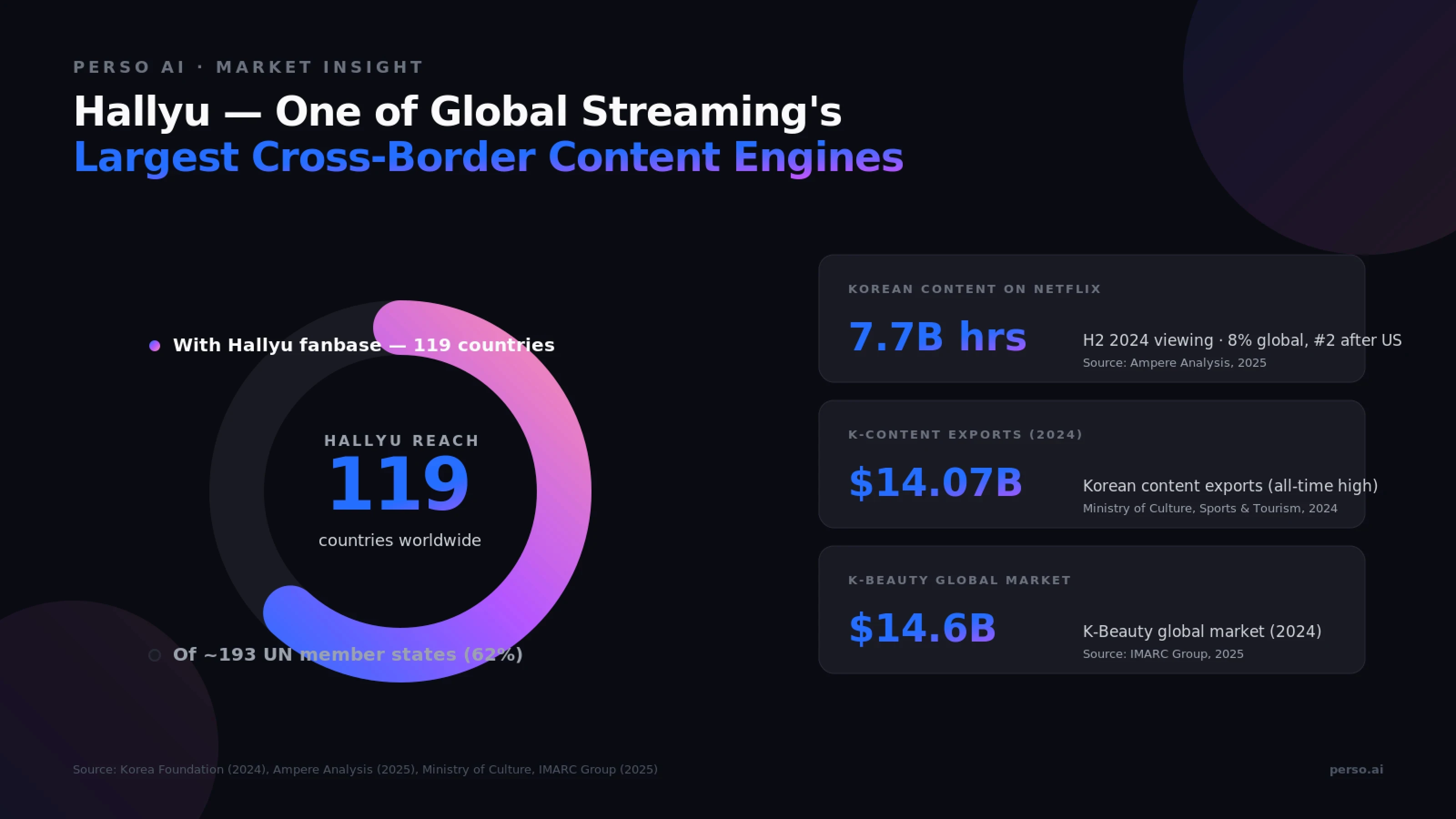
Source: Korea Foundation (2024), Ampere Analysis (2025), Ministry of Culture, Sports & Tourism (2024), IMARC Group (2025)
Why Korean content needs English at scale
The numbers behind the Hallyu wave:
Metric | Value | Source |
|---|---|---|
Global Hallyu fans | 225 million across 119 countries | Korea Foundation, 2024 |
Hallyu economic value (annual) | $14.16 billion | Korea Foundation, 2024 |
Korean content share of Netflix global viewing | 8% (H2 2024, #2 after US) | Ampere Analysis, 2025 |
Korean content exports (2024) | $14.07 billion (all-time high) | Ministry of Culture, Sports & Tourism, 2024 |
K-Beauty global market (2024) | $14.61 billion | IMARC Group, 2025 |
In H2 2024, Korean content generated 7.7 billion viewing hours on Netflix — second only to US-produced titles globally. KIMPRO became the first Korean creator to surpass 100 million YouTube subscribers, ranking ninth globally as of 2025 (Korea Times). The demand for Korean-origin content in English is structural, not seasonal.
The three demand engines
1. K-Drama, K-Pop, and entertainment. Korean dramas, music content, and variety shows drive Netflix and YouTube viewing at global scale. Lip-sync accuracy is essential — 31.25% lip-sync activation on Perso AI's Korean → English projects reflects exactly this content type, where mouth movement alignment is non-negotiable for production-grade dubbing.
2. Education and knowledge content. Korean education and tutorial content makes up 10.1% of classified Korean → English projects on Perso AI — the leading category for this language pair. This includes online courses, MOOCs, K-academic content, and creator-led tutorials being adapted for English-speaking learners.
3. K-Beauty, K-Medical, and lifestyle. Korea attracted 1.17 million international medical tourists in 2024 — nearly doubling from 610,000 in 2023 (Ministry of Health and Welfare / KHIDI, 2025). The K-Beauty market reached $14.61 billion in 2024. On Perso AI, medical and health content makes up 5.51% of Korean → English projects — a notable share that reflects K-medical and K-Beauty creators reaching global audiences in English.
Perso AI's data matches the K-content signature
Korean → English projects on Perso AI show a distinctive long-form, premium-quality pattern:
472.9 seconds average length (~8 minutes) — the longest among all language pairs
2,105+ hours of content processed in 12 months — the highest total volume across all pairs
31.25% lip-sync activation — the highest across all language pairs, reflecting K-Drama and K-Pop production needs
70.5% direct file upload — professional studio workflow signature
24.7% YouTube URL imports — creator-led re-localization of existing K-content
What makes Korean-to-English translation technically unique?
Korean → English presents distinctive technical challenges that differ sharply from European or other Asian language pairs. The two languages diverge across syntax, honorifics, and morphology.
Korean vs English — Linguistic Comparison
Feature | Korean | English |
|---|---|---|
Word order | SOV (Subject-Object-Verb) — "저는 비디오를 봅니다" | SVO — "I watch videos" |
Script | Hangul (한글) — featural alphabet | Latin alphabet |
Honorifics | 3+ speech levels (반말, 해요체, 합니다체) + subject/object honorifics | Single register; politeness conveyed through word choice and phrasing |
Subject omission | Subjects often dropped when context-clear | Subject required in most sentences |
Morphology | Agglutinative — particles/suffixes attach to stems (-은/는, -이/가, -을/를) | Analytic — separate words for grammatical relations |
Script length | Baseline | Often 20–30% longer in English audio |
Sources: Korean linguistics references; Korean Language Institute (KLI) materials.
The four-step conversion problem
Converting Korean audio into English requires AI to perform four distinct operations:
Transcribe Korean accurately — including honorifics, particles, and informal contractions used by creators
Restructure syntax from SOV to SVO — every sentence requires grammatical reordering, with verbs moving forward and particles being absorbed
Recover dropped subjects — Korean omits subjects when context is clear; English requires them, so the model must infer "I", "you", "we", or "they" from surrounding context
Flatten the honorific system — collapsing three-plus speech levels into English's single register without losing tonal nuance
Why honorifics matter for Korean → English
The honorific choice carries meaning that English doesn't natively encode. A K-Drama character switching from 해요체 (polite) to 반말 (informal) signals a relationship shift — friendship, romance, hierarchy. A skilled translation preserves this through word choice, rhythm, and context cues. Direct word-for-word translation strips this entirely.
Script length expansion
English typically runs 20–30% longer than Korean for the same meaning, both in written form and spoken duration. Timing adjustments are handled automatically during the dubbing pass to keep English output aligned with the original Korean video duration — important for the long-form (~8 minute) content that dominates this language pair.
Content categories shaping Korean-to-English dubbing
Perso AI's 12-month data reveals distinctive content patterns for Korean → English — a mix that mirrors the global K-content economy across education, K-Beauty/K-Medical, gaming, and entertainment.
Content category breakdown
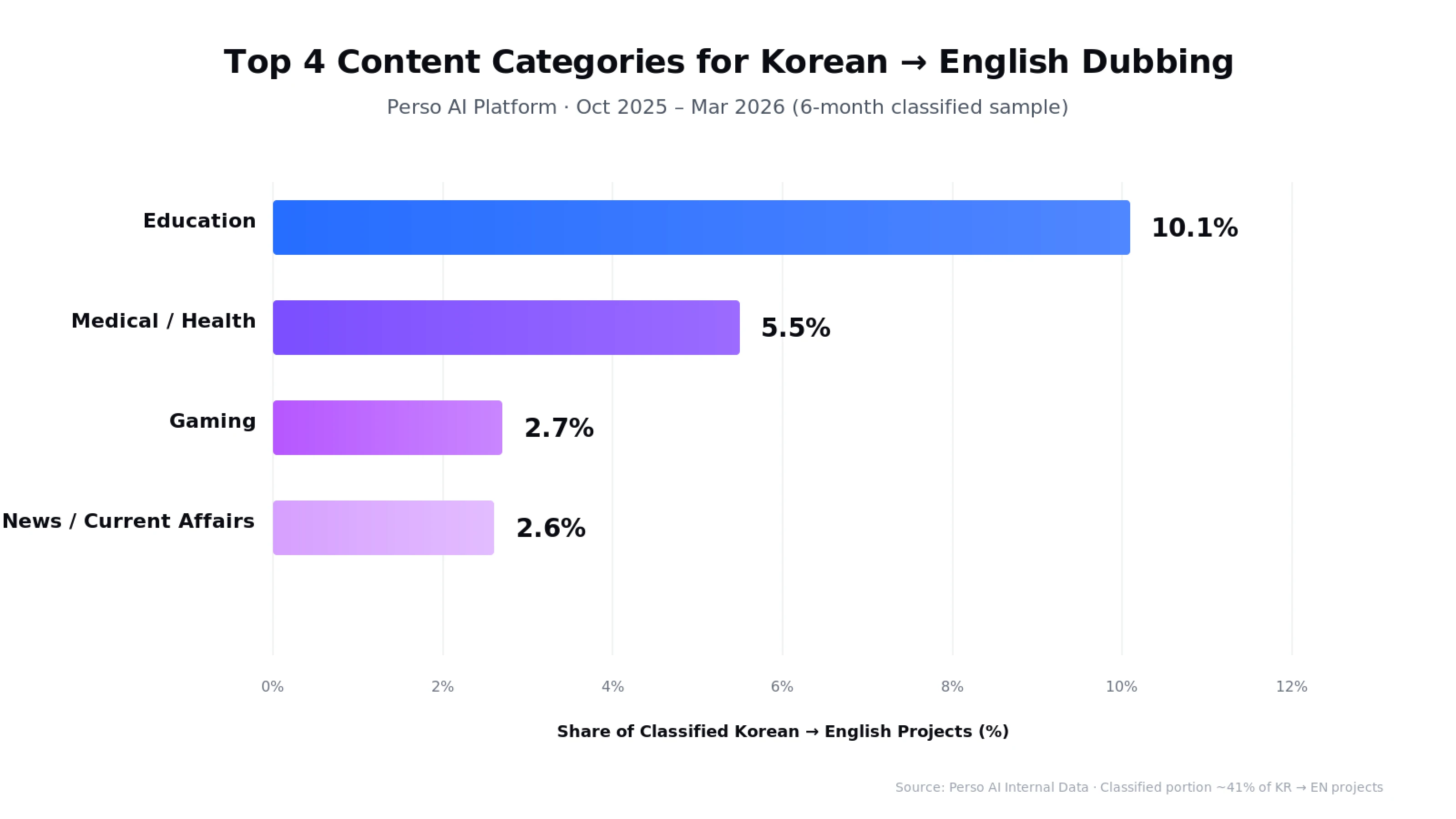
Source: Perso AI Internal Data · Oct 2025 – Mar 2026 (6-month classified sample)
Education (10.1%) — The leading content category for this language pair. Online courses, MOOCs, K-academic content, and creator-led tutorials adapted for English-speaking learners
Medical / Health (5.5%) — K-Beauty tutorials, K-Medical procedure content, dermatology and aesthetics — reflecting Korea's medical tourism and beauty industry going global
Gaming (2.7%) — Korean game streamers, esports content, and gaming reviews adapted for English audiences
News / Current Affairs (2.6%) — Korean news clips, business news, and current events content for global audiences
Note: Category data reflects approximately 41% of Korean → English projects that received AI category classification (feature active from October 2025).
Format characteristics
Korean → English projects share a distinct long-form, production-quality signature:
Average video length: 473 seconds (~8 minutes) — the longest among all language pairs on Perso AI
Average speakers per project: 1.66 — solo host and small ensemble content dominant
Lip-sync activation: 31.25% — the highest across all language pairs, matching K-Drama and K-Pop production needs
Direct file upload: 70.5% — studio and professional workflow signature
Total hours processed: 2,105+ hours — the highest volume across all language pairs
What this means for K-content creators and studios
If you're producing Korean content for English-speaking audiences, your workflow will likely involve:
Long-form file uploads (5–15 minute episodes typical)
Lip-sync activation for K-Drama, K-Pop MV, and on-screen dialogue content
Voice cloning for serialized creator content and K-Beauty/K-Medical tutorials
Honorific register decisions during script editing
Genre fit across education, medical/beauty, gaming, and entertainment
Perso AI's Korean → English pipeline supports this professional, multi-genre K-content workflow.
How does Perso AI handle Korean-to-English dubbing?
Perso AI is an AI-powered video dubbing and translation platform supporting 32+ languages. Its Korean → English pipeline is tuned for K-content workflows — long-form episodes, lip-synced productions, and the honorific-rich source material typical of Korean creators and studios.
Direct Korean-to-English translation with syntax restructuring
Generic translators often produce literal output that preserves Korean SOV order, leaving English readers with awkward sentence structure. Perso AI's direct Korean → English model automatically restructures sentences into natural SVO order, recovers dropped subjects from context, and flattens honorifics into appropriate English register.
Lip-sync built for K-content production
The 31.25% lip-sync activation rate on Korean → English projects — the highest across all language pairs on Perso AI — reflects K-Drama, K-Pop, and on-screen dialogue content where mouth movement alignment is essential. The platform's lip-sync engine adjusts English audio timing and phoneme placement to match the original Korean speaker's mouth movements.
Voice cloning preserves K-creator identity
For K-Beauty, K-Medical, gaming, and education channels, voice continuity across episodes builds audience trust. The platform clones the original speaker's vocal characteristics — pitch, timbre, speaking pace — and applies them to the English output.
Honorific-aware output
Unlike generic translators, Perso AI's English output handles Korean honorific shifts contextually — preserving the relational signals that 반말 vs 해요체 vs 합니다체 communicate, through English word choice, sentence rhythm, and tone. Editors can refine specific lines in the built-in script editor.
Long-form export flexibility
Output formats include MP4, WebM, MOV for video, plus SRT, VTT, ASS for subtitle files. This supports re-upload to YouTube, Netflix, and Korean OTT platforms, or export as separate deliverables for streaming and social media distribution.
Frequently Asked Questions
Q. How accurate is AI Korean-to-English video translation?
Perso AI achieves high translation accuracy for Korean-to-English dubbing, validated across K-Drama, education, K-Beauty/K-Medical, and gaming content. Accuracy is higher for scripted content than unscripted material with heavy slang. Korean → English is among the platform's highest-volume pairs (#1 by total hours processed), giving the model extensive training signal.
Q. Does Perso AI handle Korean honorifics correctly?
Yes. Perso AI's direct Korean → English model handles honorific shifts contextually — the relational signals carried by 반말, 해요체, and 합니다체 are mapped into appropriate English register, word choice, and tone. Editors can refine specific lines in the built-in script editor for brand-specific or character-specific tone.
Q. How long does it take to dub a Korean video into English?
AI dubbing delivers English versions in minutes rather than the days required by manual studio dubbing — particularly relevant for Korean → English, where average project length runs about 8 minutes (473 seconds) and lip-synced production is common. The entire pipeline runs end-to-end on the platform.
Q. Can Perso AI lip-sync Korean videos into English for K-Drama or K-Pop?
Yes. Lip-sync activation on Korean → English projects runs at 31.25% — the highest rate across all language pairs on Perso AI — specifically because K-Drama, K-Pop MVs, and on-screen dialogue content require mouth movement alignment. The platform's lip-sync engine adjusts English phoneme timing to match the original Korean speaker's mouth movements.
Q. Can Perso AI handle long-form Korean content like full episodes and lectures?
Yes. Korean → English is the longest-format language pair on Perso AI, with an average video length of 473 seconds (~8 minutes). The platform supports MP4, MOV, AVI, and MKV files up to 5 GB — sufficient for full streaming episodes, K-academic lectures, and serialized K-creator content.
Q. What content types perform best for Korean-to-English dubbing?
Education, K-Beauty/K-Medical tutorials, gaming content, and entertainment formats (K-Drama, K-Pop, K-Variety) all perform strongly on Perso AI. Education alone accounts for 10.1% of all Korean-to-English projects — the leading category for this language pair. With Korean content reaching 225 million Hallyu fans across 119 countries (Korea Foundation, 2024), scripted long-form content benefits most from professional AI dubbing.
Ready to translate your Korean video to English?
Start your first Korean → English dubbing project in minutes. Free trial — no credit card required.
Start dubbing your Korean video now →
Data source: Perso AI Internal Platform Data, April 2025 – March 2026. Market figures sourced from Korea Foundation (2024), Ampere Analysis (2025), Ministry of Culture, Sports & Tourism (2024), IMARC Group (2025), Korea Times (2025), and Korean Ministry of Health and Welfare / KHIDI (2025) as cited inline. This post is part of Perso AI's Language Pair Guide series. For broader AI dubbing trends, see our Q1 2026 AI Dubbing Language Trends Report.
💡 Translate any Korean video to English in minutes with Perso AI. Free trial — no credit card required.
Answer-First Opening
The Korean Wave (Hallyu) now reaches 225 million fans across 119 countries, generating $14.16 billion in annual economic value (Korea Foundation, 2024). Perso AI translates Korean videos to English with AI dubbing in three steps, preserving the original speaker's voice while restructuring Korean's SOV syntax and three-tier honorific system into natural English.
Korean → English is one of the highest-volume language pairs on the platform — #1 by total content processed (2,105+ hours over 12 months) and #1 by average video length (~8 minutes per clip). AI dubbing delivers English versions in minutes rather than days, enabling creators to ship localized content same-day.
The most distinctive signal: 31.25% of Korean → English projects activate lip-sync, the highest activation rate across all language pairs on Perso AI. This reflects the Hallyu content signature — K-Drama, K-Pop, and K-Variety formats where on-screen mouth alignment matters as much as voice translation.
Source: Perso AI Internal Platform Data, April 2025 – March 2026
How do I translate a Korean video to English with AI?
Perso AI translates Korean videos into English in three steps:
Upload your Korean video (MP4, MOV, AVI, MKV) or paste a YouTube URL — ~30 seconds
Select English as the target language and choose optional features (voice cloning, lip-sync, multi-speaker) — ~15 seconds
Review & Export the dubbed video in MP4, WebM, or MOV (plus SRT/VTT subtitles)
The entire pipeline runs end-to-end without manual handoffs.
Step 1 — Upload notes
For Korean → English, direct file uploads account for 70.5% of projects, with YouTube URL imports at 24.7%. This blend reflects two distinct user types: studios uploading polished export files, and creators pasting existing YouTube content for quick re-localization. Max file size is 5 GB, with audio-only formats (MP3, WAV, M4A) also supported for podcast workflows.
Step 2 — Optional features at language selection
Voice cloning — preserves the original Korean speaker's tone in English, valuable for K-content creators maintaining channel or brand identity
Multi-speaker detection — automatic (Korean → English projects average 1.66 speakers, fitting solo host and small interview formats)
Lip-sync — used in 31.25% of Korean → English projects, the highest activation rate across all language pairs on Perso AI, reflecting K-Drama and K-Pop content where mouth movement alignment matters
Step 3 — Review & export notes
Edit the English script line-by-line in the built-in editor. This is particularly useful for handling Korean honorifics — converting 반말 (informal), 해요체 (polite), and 합니다체 (formal) speech levels into appropriate English register, since English has no equivalent grammatical formality system.
Before / After: Traditional Korean-to-English studio dubbing — used by major K-content distributors — typically requires voice casting, studio booking, and post-production sync work spanning several days. AI dubbing delivers the same output in minutes, while preserving the original creator's voice through cloning.
🎬 Ready to try it? Upload your first Korean video and get the English dub in minutes.
Why Korean → English is one of the most active dubbing corridors
Korean → English dubbing has become a strategic growth lever for K-content creators, studios, and global brands targeting English-speaking audiences. The macro signals are clear.
Source: Korea Foundation (2024), Ampere Analysis (2025), Ministry of Culture, Sports & Tourism (2024), IMARC Group (2025)
Why Korean content needs English at scale
The numbers behind the Hallyu wave:
Metric | Value | Source |
|---|---|---|
Global Hallyu fans | 225 million across 119 countries | Korea Foundation, 2024 |
Hallyu economic value (annual) | $14.16 billion | Korea Foundation, 2024 |
Korean content share of Netflix global viewing | 8% (H2 2024, #2 after US) | Ampere Analysis, 2025 |
Korean content exports (2024) | $14.07 billion (all-time high) | Ministry of Culture, Sports & Tourism, 2024 |
K-Beauty global market (2024) | $14.61 billion | IMARC Group, 2025 |
In H2 2024, Korean content generated 7.7 billion viewing hours on Netflix — second only to US-produced titles globally. KIMPRO became the first Korean creator to surpass 100 million YouTube subscribers, ranking ninth globally as of 2025 (Korea Times). The demand for Korean-origin content in English is structural, not seasonal.
The three demand engines
1. K-Drama, K-Pop, and entertainment. Korean dramas, music content, and variety shows drive Netflix and YouTube viewing at global scale. Lip-sync accuracy is essential — 31.25% lip-sync activation on Perso AI's Korean → English projects reflects exactly this content type, where mouth movement alignment is non-negotiable for production-grade dubbing.
2. Education and knowledge content. Korean education and tutorial content makes up 10.1% of classified Korean → English projects on Perso AI — the leading category for this language pair. This includes online courses, MOOCs, K-academic content, and creator-led tutorials being adapted for English-speaking learners.
3. K-Beauty, K-Medical, and lifestyle. Korea attracted 1.17 million international medical tourists in 2024 — nearly doubling from 610,000 in 2023 (Ministry of Health and Welfare / KHIDI, 2025). The K-Beauty market reached $14.61 billion in 2024. On Perso AI, medical and health content makes up 5.51% of Korean → English projects — a notable share that reflects K-medical and K-Beauty creators reaching global audiences in English.
Perso AI's data matches the K-content signature
Korean → English projects on Perso AI show a distinctive long-form, premium-quality pattern:
472.9 seconds average length (~8 minutes) — the longest among all language pairs
2,105+ hours of content processed in 12 months — the highest total volume across all pairs
31.25% lip-sync activation — the highest across all language pairs, reflecting K-Drama and K-Pop production needs
70.5% direct file upload — professional studio workflow signature
24.7% YouTube URL imports — creator-led re-localization of existing K-content
What makes Korean-to-English translation technically unique?
Korean → English presents distinctive technical challenges that differ sharply from European or other Asian language pairs. The two languages diverge across syntax, honorifics, and morphology.
Korean vs English — Linguistic Comparison
Feature | Korean | English |
|---|---|---|
Word order | SOV (Subject-Object-Verb) — "저는 비디오를 봅니다" | SVO — "I watch videos" |
Script | Hangul (한글) — featural alphabet | Latin alphabet |
Honorifics | 3+ speech levels (반말, 해요체, 합니다체) + subject/object honorifics | Single register; politeness conveyed through word choice and phrasing |
Subject omission | Subjects often dropped when context-clear | Subject required in most sentences |
Morphology | Agglutinative — particles/suffixes attach to stems (-은/는, -이/가, -을/를) | Analytic — separate words for grammatical relations |
Script length | Baseline | Often 20–30% longer in English audio |
Sources: Korean linguistics references; Korean Language Institute (KLI) materials.
The four-step conversion problem
Converting Korean audio into English requires AI to perform four distinct operations:
Transcribe Korean accurately — including honorifics, particles, and informal contractions used by creators
Restructure syntax from SOV to SVO — every sentence requires grammatical reordering, with verbs moving forward and particles being absorbed
Recover dropped subjects — Korean omits subjects when context is clear; English requires them, so the model must infer "I", "you", "we", or "they" from surrounding context
Flatten the honorific system — collapsing three-plus speech levels into English's single register without losing tonal nuance
Why honorifics matter for Korean → English
The honorific choice carries meaning that English doesn't natively encode. A K-Drama character switching from 해요체 (polite) to 반말 (informal) signals a relationship shift — friendship, romance, hierarchy. A skilled translation preserves this through word choice, rhythm, and context cues. Direct word-for-word translation strips this entirely.
Script length expansion
English typically runs 20–30% longer than Korean for the same meaning, both in written form and spoken duration. Timing adjustments are handled automatically during the dubbing pass to keep English output aligned with the original Korean video duration — important for the long-form (~8 minute) content that dominates this language pair.
Content categories shaping Korean-to-English dubbing
Perso AI's 12-month data reveals distinctive content patterns for Korean → English — a mix that mirrors the global K-content economy across education, K-Beauty/K-Medical, gaming, and entertainment.
Content category breakdown
Source: Perso AI Internal Data · Oct 2025 – Mar 2026 (6-month classified sample)
Education (10.1%) — The leading content category for this language pair. Online courses, MOOCs, K-academic content, and creator-led tutorials adapted for English-speaking learners
Medical / Health (5.5%) — K-Beauty tutorials, K-Medical procedure content, dermatology and aesthetics — reflecting Korea's medical tourism and beauty industry going global
Gaming (2.7%) — Korean game streamers, esports content, and gaming reviews adapted for English audiences
News / Current Affairs (2.6%) — Korean news clips, business news, and current events content for global audiences
Note: Category data reflects approximately 41% of Korean → English projects that received AI category classification (feature active from October 2025).
Format characteristics
Korean → English projects share a distinct long-form, production-quality signature:
Average video length: 473 seconds (~8 minutes) — the longest among all language pairs on Perso AI
Average speakers per project: 1.66 — solo host and small ensemble content dominant
Lip-sync activation: 31.25% — the highest across all language pairs, matching K-Drama and K-Pop production needs
Direct file upload: 70.5% — studio and professional workflow signature
Total hours processed: 2,105+ hours — the highest volume across all language pairs
What this means for K-content creators and studios
If you're producing Korean content for English-speaking audiences, your workflow will likely involve:
Long-form file uploads (5–15 minute episodes typical)
Lip-sync activation for K-Drama, K-Pop MV, and on-screen dialogue content
Voice cloning for serialized creator content and K-Beauty/K-Medical tutorials
Honorific register decisions during script editing
Genre fit across education, medical/beauty, gaming, and entertainment
Perso AI's Korean → English pipeline supports this professional, multi-genre K-content workflow.
How does Perso AI handle Korean-to-English dubbing?
Perso AI is an AI-powered video dubbing and translation platform supporting 32+ languages. Its Korean → English pipeline is tuned for K-content workflows — long-form episodes, lip-synced productions, and the honorific-rich source material typical of Korean creators and studios.
Direct Korean-to-English translation with syntax restructuring
Generic translators often produce literal output that preserves Korean SOV order, leaving English readers with awkward sentence structure. Perso AI's direct Korean → English model automatically restructures sentences into natural SVO order, recovers dropped subjects from context, and flattens honorifics into appropriate English register.
Lip-sync built for K-content production
The 31.25% lip-sync activation rate on Korean → English projects — the highest across all language pairs on Perso AI — reflects K-Drama, K-Pop, and on-screen dialogue content where mouth movement alignment is essential. The platform's lip-sync engine adjusts English audio timing and phoneme placement to match the original Korean speaker's mouth movements.
Voice cloning preserves K-creator identity
For K-Beauty, K-Medical, gaming, and education channels, voice continuity across episodes builds audience trust. The platform clones the original speaker's vocal characteristics — pitch, timbre, speaking pace — and applies them to the English output.
Honorific-aware output
Unlike generic translators, Perso AI's English output handles Korean honorific shifts contextually — preserving the relational signals that 반말 vs 해요체 vs 합니다체 communicate, through English word choice, sentence rhythm, and tone. Editors can refine specific lines in the built-in script editor.
Long-form export flexibility
Output formats include MP4, WebM, MOV for video, plus SRT, VTT, ASS for subtitle files. This supports re-upload to YouTube, Netflix, and Korean OTT platforms, or export as separate deliverables for streaming and social media distribution.
Frequently Asked Questions
Q. How accurate is AI Korean-to-English video translation?
Perso AI achieves high translation accuracy for Korean-to-English dubbing, validated across K-Drama, education, K-Beauty/K-Medical, and gaming content. Accuracy is higher for scripted content than unscripted material with heavy slang. Korean → English is among the platform's highest-volume pairs (#1 by total hours processed), giving the model extensive training signal.
Q. Does Perso AI handle Korean honorifics correctly?
Yes. Perso AI's direct Korean → English model handles honorific shifts contextually — the relational signals carried by 반말, 해요체, and 합니다체 are mapped into appropriate English register, word choice, and tone. Editors can refine specific lines in the built-in script editor for brand-specific or character-specific tone.
Q. How long does it take to dub a Korean video into English?
AI dubbing delivers English versions in minutes rather than the days required by manual studio dubbing — particularly relevant for Korean → English, where average project length runs about 8 minutes (473 seconds) and lip-synced production is common. The entire pipeline runs end-to-end on the platform.
Q. Can Perso AI lip-sync Korean videos into English for K-Drama or K-Pop?
Yes. Lip-sync activation on Korean → English projects runs at 31.25% — the highest rate across all language pairs on Perso AI — specifically because K-Drama, K-Pop MVs, and on-screen dialogue content require mouth movement alignment. The platform's lip-sync engine adjusts English phoneme timing to match the original Korean speaker's mouth movements.
Q. Can Perso AI handle long-form Korean content like full episodes and lectures?
Yes. Korean → English is the longest-format language pair on Perso AI, with an average video length of 473 seconds (~8 minutes). The platform supports MP4, MOV, AVI, and MKV files up to 5 GB — sufficient for full streaming episodes, K-academic lectures, and serialized K-creator content.
Q. What content types perform best for Korean-to-English dubbing?
Education, K-Beauty/K-Medical tutorials, gaming content, and entertainment formats (K-Drama, K-Pop, K-Variety) all perform strongly on Perso AI. Education alone accounts for 10.1% of all Korean-to-English projects — the leading category for this language pair. With Korean content reaching 225 million Hallyu fans across 119 countries (Korea Foundation, 2024), scripted long-form content benefits most from professional AI dubbing.
Ready to translate your Korean video to English?
Start your first Korean → English dubbing project in minutes. Free trial — no credit card required.
Start dubbing your Korean video now →
Data source: Perso AI Internal Platform Data, April 2025 – March 2026. Market figures sourced from Korea Foundation (2024), Ampere Analysis (2025), Ministry of Culture, Sports & Tourism (2024), IMARC Group (2025), Korea Times (2025), and Korean Ministry of Health and Welfare / KHIDI (2025) as cited inline. This post is part of Perso AI's Language Pair Guide series. For broader AI dubbing trends, see our Q1 2026 AI Dubbing Language Trends Report.
Continue Reading
Browse All