Can Google Translate or ChatGPT Translate a Video? (2026)
Last Updated




Jump to section
Jump to section

Share
Share
Share
AI Video Translator, Localization, and Dubbing Tool
Try it out for Free
Partly, and only in one place. Google Translate itself accepts no video or audio files: it processes text, documents, websites, and camera images. Google's real video translation lives inside YouTube, where auto-dubbing now covers 27 languages for all creators. ChatGPT translates scripts well but outputs text, not a dubbed video file. For videos outside YouTube, or for languages and control the auto tools do not offer, you need a dedicated tool like Perso Dubbing, which dubs into 99+ languages from a single upload.
What Google Translate can and cannot do with a video
Google Translate is a text service. There is no video upload button: it accepts typed text, documents, full websites, and camera images, and the mobile app can interpret live conversations. Paste a transcript of your video and it returns a usable translation in nearly 250 languages, free.
What you get back is a block of text. No audio, no timing, and no mapping between sentences and moments in your footage. To publish a translated video from there, you would still need a voice recording, timing alignment, and a video edit. Google Translate handles the first step of that pipeline and none of the rest. It remains the fastest free option for checking phrases, translating titles and descriptions, or verifying terminology in an unfamiliar language.
YouTube auto-dubbing: where Google actually translates video
Google does translate videos in 2026, just not in Google Translate. YouTube's auto-dubbing became available to all creators in February 2026. It supports 27 languages, though the available source-target pairs are limited, and an Expressive Speech mode that preserves tone and emphasis covers 8 of them, including English, Spanish, Portuguese, and Hindi. A lip-sync enhancement is in testing but not publicly available. (Source: Social Media Today, February 2026.)
The limits define who it is for. Auto-dubbing works only on videos uploaded to your own YouTube channel, the language list is fixed, and the dub exists inside YouTube rather than as a file you can post to other platforms, courses, or clients. If your video lives on YouTube and your target languages are covered, turn it on. It costs nothing.
Can ChatGPT translate a video?
No. ChatGPT handles idioms, adjusts formality, and can rewrite lines to sound natural when spoken. Paste your transcript and ask for a Spanish version that preserves tone, and the output beats a literal translation.
It still ends at text. ChatGPT does not accept a video file and return a dubbed video: it does not generate the voice track, align timing, or export anything you can upload. Use it for the writing stage, not the production stage.
The four layers of video translation
The gap between text tools and video translation is structural. Translating text is a one-dimensional problem: convert words from language A to language B. Translating a video adds three more layers.
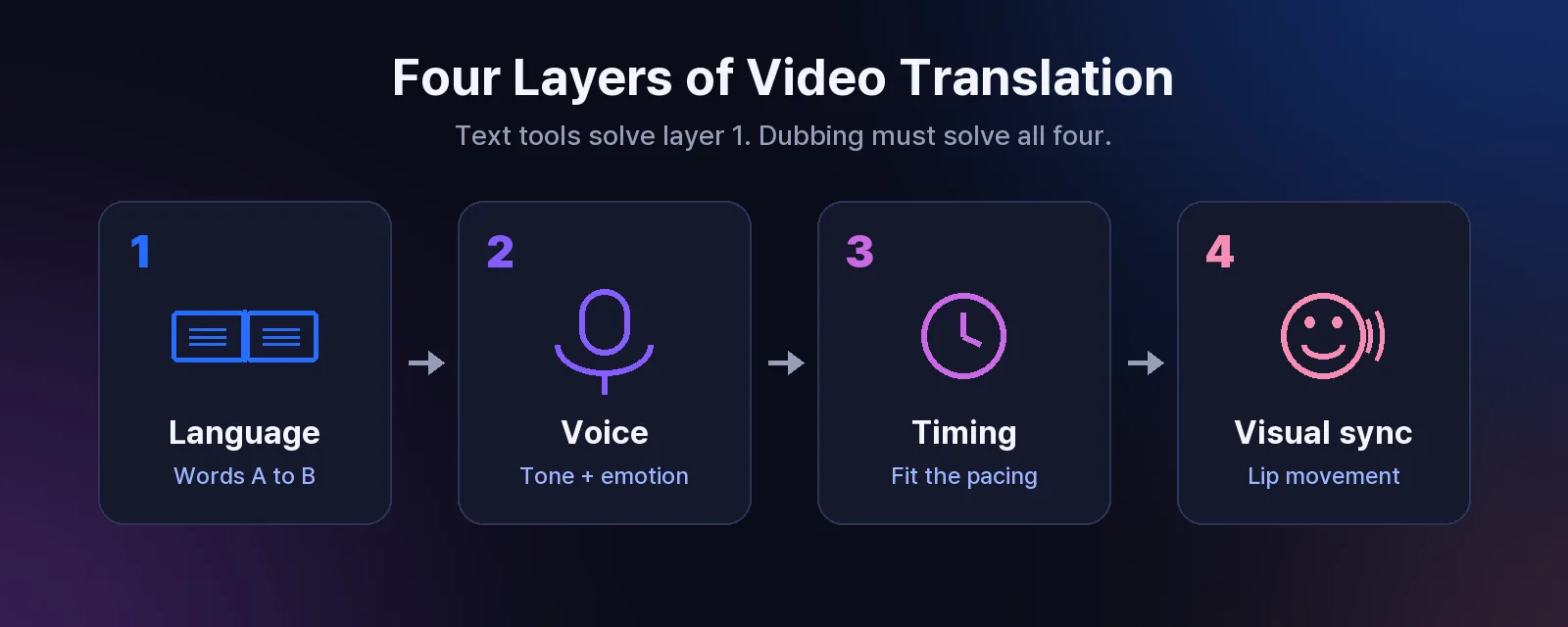
Language. The words themselves. Google Translate, ChatGPT, and dubbing tools all handle this layer.
Voice. The dubbed version needs a voice that fits the original speaker's tone and emotion. This is voice synthesis, not text processing. Human dubbing services price this work from $5 to $15 per minute with entry-level freelancers, $20 to $40 at mid-tier, and $50+ at high-end studios (VerboLabs, published July 2025).
Timing. A 3-second English phrase can become a 5-second German sentence. The dubbed audio must fit the original pacing without silences or overlaps.
Visual sync. Mouth movements must plausibly match the new audio, or the result looks like a badly dubbed film. AI lip-sync handles this algorithmically.
Text tools solve layer 1. A dubbing platform has to solve all four at once. As Taeksoon Kwon, Director of Perso AI (ESTsoft), puts it: "Most dubbing tools translate line by line. Perso Dubbing reads the full context first, so the output sounds like it was originally written in that language."
What each tool actually handles
Google Translate | YouTube auto-dubbing | ChatGPT | Perso Dubbing | |
|---|---|---|---|---|
Accepts video input | No | Yes (own channel only) | No | Yes |
Languages | Nearly 250 (text) | 27, limited pairs | Contextual, most languages | 99+ dubbing, 100 speech recognition |
Generated voice track | No | Yes | No | Yes |
Timing alignment | No | Yes | No | Yes |
Lip sync | No | In testing, not public | No | On all paid plans, monthly allowance per tier |
Works outside YouTube | Yes (text only) | No | Yes (text only) | Yes, exports a video file |
Cost | Free | Free | Free tier and subscription | Subscription, from $6.99/month |
The table is not about which tool is better. They solve different problems, and the right question is which layers you need, and where your video needs to live.
A workflow that uses all of them
Many creators combine these tools instead of choosing one.
Use ChatGPT at the planning stage: pick target languages, draft localized titles and descriptions, and adapt the script culturally before dubbing. Use Google Translate as the quick free check for phrases, tags, and metadata. Turn on YouTube auto-dubbing for your channel as a free baseline in its 27 languages.
Then use a dedicated platform for everything the auto tools cannot reach: videos for courses, clients, ads, and other platforms, languages beyond the auto-dubbing list, and output you control. Perso Dubbing transcribes speech in 100 languages, translates with sentence-level context, generates the dubbed track, and exports a finished video in any of 99+ languages. Across 266,132 completed dubbing projects that finished within an hour, the median processing time was 4 minutes 23 seconds. (Source: Perso AI platform data, Jan 2025 to Apr 2026.) You can review and edit the translated script in the Subtitle & Script Editor before generating, and check the AI video translator page for supported language pairs.
William B., a social media manager, used to stitch these steps together manually: "I'd spend a whole afternoon: Google Translate for the script, a freelance voice actor for recording, then hours of manual editing to sync everything. Now the entire pipeline happens inside one tool in about 15 minutes."
That shift matters because of a well-documented preference gap: CSA Research found 72% of consumers prefer content in their native language. Only creators who can produce multilingual versions efficiently can act on it.
Frequently asked questions
Q. Can Google Translate translate a video directly?
A. No. Google Translate accepts text, documents, websites, and camera images, not video or audio files. You can translate a transcript or subtitles with it, but producing dubbed audio and a synchronized video requires YouTube auto-dubbing (on YouTube, 27 languages) or a dedicated AI dubbing tool.
Q. Does YouTube auto-dub videos automatically?
A. Yes. Since February 2026, YouTube auto-dubbing is available to all creators in 27 languages, with Expressive Speech in 8 of them. It applies only to videos on your own YouTube channel, and the dubbed track stays on YouTube rather than exporting as a file.
Q. Can ChatGPT dub or translate a video?
A. ChatGPT translates scripts with strong contextual quality, but it cannot process a video file, generate a dubbed voice track, or export video. Use it to refine your script before dubbing, then run the dub in a dedicated tool.
Q. How much does it cost to translate a video professionally?
A. Human dubbing services run $5 to $15 per minute for entry-level freelancers, $20 to $40 at mid-tier agencies, and $50+ at high-end studios, per language (VerboLabs, published July 2025). AI dubbing platforms use subscription pricing instead: Perso Dubbing plans start at $6.99 per month. For a full cost breakdown by model, see our guide to video translation services.
For the step-by-step workflow itself, see how to translate a video with AI.
Your viewers do not care which tools you used. They care whether they can understand you. Try Perso Dubbing free and let them hear your content in their language.
Partly, and only in one place. Google Translate itself accepts no video or audio files: it processes text, documents, websites, and camera images. Google's real video translation lives inside YouTube, where auto-dubbing now covers 27 languages for all creators. ChatGPT translates scripts well but outputs text, not a dubbed video file. For videos outside YouTube, or for languages and control the auto tools do not offer, you need a dedicated tool like Perso Dubbing, which dubs into 99+ languages from a single upload.
What Google Translate can and cannot do with a video
Google Translate is a text service. There is no video upload button: it accepts typed text, documents, full websites, and camera images, and the mobile app can interpret live conversations. Paste a transcript of your video and it returns a usable translation in nearly 250 languages, free.
What you get back is a block of text. No audio, no timing, and no mapping between sentences and moments in your footage. To publish a translated video from there, you would still need a voice recording, timing alignment, and a video edit. Google Translate handles the first step of that pipeline and none of the rest. It remains the fastest free option for checking phrases, translating titles and descriptions, or verifying terminology in an unfamiliar language.
YouTube auto-dubbing: where Google actually translates video
Google does translate videos in 2026, just not in Google Translate. YouTube's auto-dubbing became available to all creators in February 2026. It supports 27 languages, though the available source-target pairs are limited, and an Expressive Speech mode that preserves tone and emphasis covers 8 of them, including English, Spanish, Portuguese, and Hindi. A lip-sync enhancement is in testing but not publicly available. (Source: Social Media Today, February 2026.)
The limits define who it is for. Auto-dubbing works only on videos uploaded to your own YouTube channel, the language list is fixed, and the dub exists inside YouTube rather than as a file you can post to other platforms, courses, or clients. If your video lives on YouTube and your target languages are covered, turn it on. It costs nothing.
Can ChatGPT translate a video?
No. ChatGPT handles idioms, adjusts formality, and can rewrite lines to sound natural when spoken. Paste your transcript and ask for a Spanish version that preserves tone, and the output beats a literal translation.
It still ends at text. ChatGPT does not accept a video file and return a dubbed video: it does not generate the voice track, align timing, or export anything you can upload. Use it for the writing stage, not the production stage.
The four layers of video translation
The gap between text tools and video translation is structural. Translating text is a one-dimensional problem: convert words from language A to language B. Translating a video adds three more layers.
Language. The words themselves. Google Translate, ChatGPT, and dubbing tools all handle this layer.
Voice. The dubbed version needs a voice that fits the original speaker's tone and emotion. This is voice synthesis, not text processing. Human dubbing services price this work from $5 to $15 per minute with entry-level freelancers, $20 to $40 at mid-tier, and $50+ at high-end studios (VerboLabs, published July 2025).
Timing. A 3-second English phrase can become a 5-second German sentence. The dubbed audio must fit the original pacing without silences or overlaps.
Visual sync. Mouth movements must plausibly match the new audio, or the result looks like a badly dubbed film. AI lip-sync handles this algorithmically.
Text tools solve layer 1. A dubbing platform has to solve all four at once. As Taeksoon Kwon, Director of Perso AI (ESTsoft), puts it: "Most dubbing tools translate line by line. Perso Dubbing reads the full context first, so the output sounds like it was originally written in that language."
What each tool actually handles
Google Translate | YouTube auto-dubbing | ChatGPT | Perso Dubbing | |
|---|---|---|---|---|
Accepts video input | No | Yes (own channel only) | No | Yes |
Languages | Nearly 250 (text) | 27, limited pairs | Contextual, most languages | 99+ dubbing, 100 speech recognition |
Generated voice track | No | Yes | No | Yes |
Timing alignment | No | Yes | No | Yes |
Lip sync | No | In testing, not public | No | On all paid plans, monthly allowance per tier |
Works outside YouTube | Yes (text only) | No | Yes (text only) | Yes, exports a video file |
Cost | Free | Free | Free tier and subscription | Subscription, from $6.99/month |
The table is not about which tool is better. They solve different problems, and the right question is which layers you need, and where your video needs to live.
A workflow that uses all of them
Many creators combine these tools instead of choosing one.
Use ChatGPT at the planning stage: pick target languages, draft localized titles and descriptions, and adapt the script culturally before dubbing. Use Google Translate as the quick free check for phrases, tags, and metadata. Turn on YouTube auto-dubbing for your channel as a free baseline in its 27 languages.
Then use a dedicated platform for everything the auto tools cannot reach: videos for courses, clients, ads, and other platforms, languages beyond the auto-dubbing list, and output you control. Perso Dubbing transcribes speech in 100 languages, translates with sentence-level context, generates the dubbed track, and exports a finished video in any of 99+ languages. Across 266,132 completed dubbing projects that finished within an hour, the median processing time was 4 minutes 23 seconds. (Source: Perso AI platform data, Jan 2025 to Apr 2026.) You can review and edit the translated script in the Subtitle & Script Editor before generating, and check the AI video translator page for supported language pairs.
William B., a social media manager, used to stitch these steps together manually: "I'd spend a whole afternoon: Google Translate for the script, a freelance voice actor for recording, then hours of manual editing to sync everything. Now the entire pipeline happens inside one tool in about 15 minutes."
That shift matters because of a well-documented preference gap: CSA Research found 72% of consumers prefer content in their native language. Only creators who can produce multilingual versions efficiently can act on it.
Frequently asked questions
Q. Can Google Translate translate a video directly?
A. No. Google Translate accepts text, documents, websites, and camera images, not video or audio files. You can translate a transcript or subtitles with it, but producing dubbed audio and a synchronized video requires YouTube auto-dubbing (on YouTube, 27 languages) or a dedicated AI dubbing tool.
Q. Does YouTube auto-dub videos automatically?
A. Yes. Since February 2026, YouTube auto-dubbing is available to all creators in 27 languages, with Expressive Speech in 8 of them. It applies only to videos on your own YouTube channel, and the dubbed track stays on YouTube rather than exporting as a file.
Q. Can ChatGPT dub or translate a video?
A. ChatGPT translates scripts with strong contextual quality, but it cannot process a video file, generate a dubbed voice track, or export video. Use it to refine your script before dubbing, then run the dub in a dedicated tool.
Q. How much does it cost to translate a video professionally?
A. Human dubbing services run $5 to $15 per minute for entry-level freelancers, $20 to $40 at mid-tier agencies, and $50+ at high-end studios, per language (VerboLabs, published July 2025). AI dubbing platforms use subscription pricing instead: Perso Dubbing plans start at $6.99 per month. For a full cost breakdown by model, see our guide to video translation services.
For the step-by-step workflow itself, see how to translate a video with AI.
Your viewers do not care which tools you used. They care whether they can understand you. Try Perso Dubbing free and let them hear your content in their language.
Partly, and only in one place. Google Translate itself accepts no video or audio files: it processes text, documents, websites, and camera images. Google's real video translation lives inside YouTube, where auto-dubbing now covers 27 languages for all creators. ChatGPT translates scripts well but outputs text, not a dubbed video file. For videos outside YouTube, or for languages and control the auto tools do not offer, you need a dedicated tool like Perso Dubbing, which dubs into 99+ languages from a single upload.
What Google Translate can and cannot do with a video
Google Translate is a text service. There is no video upload button: it accepts typed text, documents, full websites, and camera images, and the mobile app can interpret live conversations. Paste a transcript of your video and it returns a usable translation in nearly 250 languages, free.
What you get back is a block of text. No audio, no timing, and no mapping between sentences and moments in your footage. To publish a translated video from there, you would still need a voice recording, timing alignment, and a video edit. Google Translate handles the first step of that pipeline and none of the rest. It remains the fastest free option for checking phrases, translating titles and descriptions, or verifying terminology in an unfamiliar language.
YouTube auto-dubbing: where Google actually translates video
Google does translate videos in 2026, just not in Google Translate. YouTube's auto-dubbing became available to all creators in February 2026. It supports 27 languages, though the available source-target pairs are limited, and an Expressive Speech mode that preserves tone and emphasis covers 8 of them, including English, Spanish, Portuguese, and Hindi. A lip-sync enhancement is in testing but not publicly available. (Source: Social Media Today, February 2026.)
The limits define who it is for. Auto-dubbing works only on videos uploaded to your own YouTube channel, the language list is fixed, and the dub exists inside YouTube rather than as a file you can post to other platforms, courses, or clients. If your video lives on YouTube and your target languages are covered, turn it on. It costs nothing.
Can ChatGPT translate a video?
No. ChatGPT handles idioms, adjusts formality, and can rewrite lines to sound natural when spoken. Paste your transcript and ask for a Spanish version that preserves tone, and the output beats a literal translation.
It still ends at text. ChatGPT does not accept a video file and return a dubbed video: it does not generate the voice track, align timing, or export anything you can upload. Use it for the writing stage, not the production stage.
The four layers of video translation
The gap between text tools and video translation is structural. Translating text is a one-dimensional problem: convert words from language A to language B. Translating a video adds three more layers.
Language. The words themselves. Google Translate, ChatGPT, and dubbing tools all handle this layer.
Voice. The dubbed version needs a voice that fits the original speaker's tone and emotion. This is voice synthesis, not text processing. Human dubbing services price this work from $5 to $15 per minute with entry-level freelancers, $20 to $40 at mid-tier, and $50+ at high-end studios (VerboLabs, published July 2025).
Timing. A 3-second English phrase can become a 5-second German sentence. The dubbed audio must fit the original pacing without silences or overlaps.
Visual sync. Mouth movements must plausibly match the new audio, or the result looks like a badly dubbed film. AI lip-sync handles this algorithmically.
Text tools solve layer 1. A dubbing platform has to solve all four at once. As Taeksoon Kwon, Director of Perso AI (ESTsoft), puts it: "Most dubbing tools translate line by line. Perso Dubbing reads the full context first, so the output sounds like it was originally written in that language."
What each tool actually handles
Google Translate | YouTube auto-dubbing | ChatGPT | Perso Dubbing | |
|---|---|---|---|---|
Accepts video input | No | Yes (own channel only) | No | Yes |
Languages | Nearly 250 (text) | 27, limited pairs | Contextual, most languages | 99+ dubbing, 100 speech recognition |
Generated voice track | No | Yes | No | Yes |
Timing alignment | No | Yes | No | Yes |
Lip sync | No | In testing, not public | No | On all paid plans, monthly allowance per tier |
Works outside YouTube | Yes (text only) | No | Yes (text only) | Yes, exports a video file |
Cost | Free | Free | Free tier and subscription | Subscription, from $6.99/month |
The table is not about which tool is better. They solve different problems, and the right question is which layers you need, and where your video needs to live.
A workflow that uses all of them
Many creators combine these tools instead of choosing one.
Use ChatGPT at the planning stage: pick target languages, draft localized titles and descriptions, and adapt the script culturally before dubbing. Use Google Translate as the quick free check for phrases, tags, and metadata. Turn on YouTube auto-dubbing for your channel as a free baseline in its 27 languages.
Then use a dedicated platform for everything the auto tools cannot reach: videos for courses, clients, ads, and other platforms, languages beyond the auto-dubbing list, and output you control. Perso Dubbing transcribes speech in 100 languages, translates with sentence-level context, generates the dubbed track, and exports a finished video in any of 99+ languages. Across 266,132 completed dubbing projects that finished within an hour, the median processing time was 4 minutes 23 seconds. (Source: Perso AI platform data, Jan 2025 to Apr 2026.) You can review and edit the translated script in the Subtitle & Script Editor before generating, and check the AI video translator page for supported language pairs.
William B., a social media manager, used to stitch these steps together manually: "I'd spend a whole afternoon: Google Translate for the script, a freelance voice actor for recording, then hours of manual editing to sync everything. Now the entire pipeline happens inside one tool in about 15 minutes."
That shift matters because of a well-documented preference gap: CSA Research found 72% of consumers prefer content in their native language. Only creators who can produce multilingual versions efficiently can act on it.
Frequently asked questions
Q. Can Google Translate translate a video directly?
A. No. Google Translate accepts text, documents, websites, and camera images, not video or audio files. You can translate a transcript or subtitles with it, but producing dubbed audio and a synchronized video requires YouTube auto-dubbing (on YouTube, 27 languages) or a dedicated AI dubbing tool.
Q. Does YouTube auto-dub videos automatically?
A. Yes. Since February 2026, YouTube auto-dubbing is available to all creators in 27 languages, with Expressive Speech in 8 of them. It applies only to videos on your own YouTube channel, and the dubbed track stays on YouTube rather than exporting as a file.
Q. Can ChatGPT dub or translate a video?
A. ChatGPT translates scripts with strong contextual quality, but it cannot process a video file, generate a dubbed voice track, or export video. Use it to refine your script before dubbing, then run the dub in a dedicated tool.
Q. How much does it cost to translate a video professionally?
A. Human dubbing services run $5 to $15 per minute for entry-level freelancers, $20 to $40 at mid-tier agencies, and $50+ at high-end studios, per language (VerboLabs, published July 2025). AI dubbing platforms use subscription pricing instead: Perso Dubbing plans start at $6.99 per month. For a full cost breakdown by model, see our guide to video translation services.
For the step-by-step workflow itself, see how to translate a video with AI.
Your viewers do not care which tools you used. They care whether they can understand you. Try Perso Dubbing free and let them hear your content in their language.
Continue Reading
Browse All