How to Translate a Video: 3 Methods Compared (+Cost & Time)
Last Updated




Jump to section
Jump to section

Share
Share
Share
AI Video Translator, Localization, and Dubbing Tool
Try it out for Free
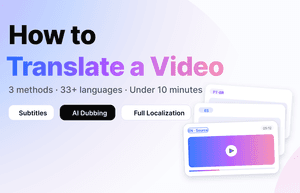
You can translate a video in three ways: add translated subtitles, replace the audio with AI dubbing, or run full AI localization (voice + lip-sync + subtitles). In 2026, AI dubbing is the fastest route: most videos under 10 minutes are fully translated in under 5 minutes across 99+ languages, while traditional workflows (human translator + dubbing studio) still take 5 to 15 business days. This guide compares the three methods, walks through the exact 5-step workflow, and shows you how to choose based on your video type, audience, and budget.
Perso pricing update, October 22, 2026: Perso Dubbing starts at $0.11 per dubbed minute with Finch on PRO monthly: $99/month for 10,800 credits, providing up to 900 minutes when all credits are used for Finch. Actual minutes depend on model choice and other credit use. Optional lip sync has separate usage conditions; the $0.11 rate is for Finch dubbing. The same PRO credit pool alternatively provides up to 180 minutes with Linnet 4 or 45 minutes with Nightingale. These allowances are alternatives, not additive.
Why “How to Translate a Video” Is No Longer a Simple Question
A decade ago, translating a video meant one workflow: hire a translator, book voice actors, mix audio, burn subtitles. Today a marketing manager can upload a 5-minute Zoom recording and receive a fully dubbed Spanish version before lunch.
The shift is structural, not just technical. Global content demand has outpaced the supply of human localization capacity. According to Slator’s 2025 Language Industry Market Report, the global language industry reached USD 31.70 billion in 2025, with AI-driven video and audiovisual localization identified as a core growth segment. Meanwhile, YouTube expanded multi-language audio tracks to millions of creators throughout 2024–2025, making multilingual publishing the default expectation rather than a premium add-on.
For most creators and teams, the real question in 2026 is no longer “can I translate this video?” It’s “which method fits this video, this audience, and this deadline?” The rest of this guide answers exactly that.
The 3 Ways to Translate a Video (And When to Use Each)
Every method you’ll see online — VEED, Rask, HeyGen, Kapwing, CapCut, human studios — is a variation of one of these three approaches. Picking the right one upfront saves the most time.
Method 1 — Translated Subtitles
Subtitles are text overlays in the target language while the original audio plays underneath. This is the oldest and cheapest method, and still the default for short-form social content where viewers watch on mute.
Best for: TikTok, Instagram Reels, YouTube Shorts, conference talks where the speaker’s voice has brand value (founders, keynote speakers). Typical time: 3–10 minutes with AI tools, 1–3 days with human translators. Trade-off: Viewers must read. Completion rate drops for videos longer than 3 minutes.
Method 2 — AI Dubbing (Voice Replacement)
AI dubbing replaces the original audio with a translated voice. Modern systems clone the original speaker’s voice, so the Spanish version still sounds like the original English speaker. AI dubbing is most effective for videos under 10 minutes — the sweet spot where processing speed, cost efficiency, and output quality converge. For videos in this range, dedicated AI dubbing platforms deliver significantly higher accuracy than general-purpose translation tools.
Best for: Videos under 10 minutes — product demos, YouTube explainers, training modules, marketing videos, webinars, course content. Typical time: Under 5 minutes for a 5-minute video with dedicated AI dubbing tools like Perso Dubbing. Human dubbing studios quote 5–15 business days. Trade-off: Mouth movements still match the original language. Acceptable for talking-head content, less ideal for tight close-ups.
Method 3 — Full AI Localization (Voice + Lip-Sync + Subtitles)
Full localization combines dubbed audio, AI lip-sync to match the translated speech, and optional subtitles in a third language. This is the newest tier and what enterprises use for high-production-value content.
Best for: Paid ads, brand campaigns, executive messages, product launch videos, investor content, and longer-form content (10+ minutes) where lip-sync precision matters. Typical time: 10–25 minutes per finished minute of video. Trade-off: Higher cost per minute. Best ROI on evergreen or high-distribution assets.
Decision shortcut: Under 60 seconds → subtitles. Under 10 minutes talking-head → AI dubbing. Paid ads, brand assets, or 10+ minute premium content → full localization.
Step-by-Step: How to Translate a Video in Under 5 Minutes
This workflow applies to any modern AI video translator. Screenshots below use Perso Dubbing, but the sequence is identical across AI-native tools.
Step 1 — Upload Your Video
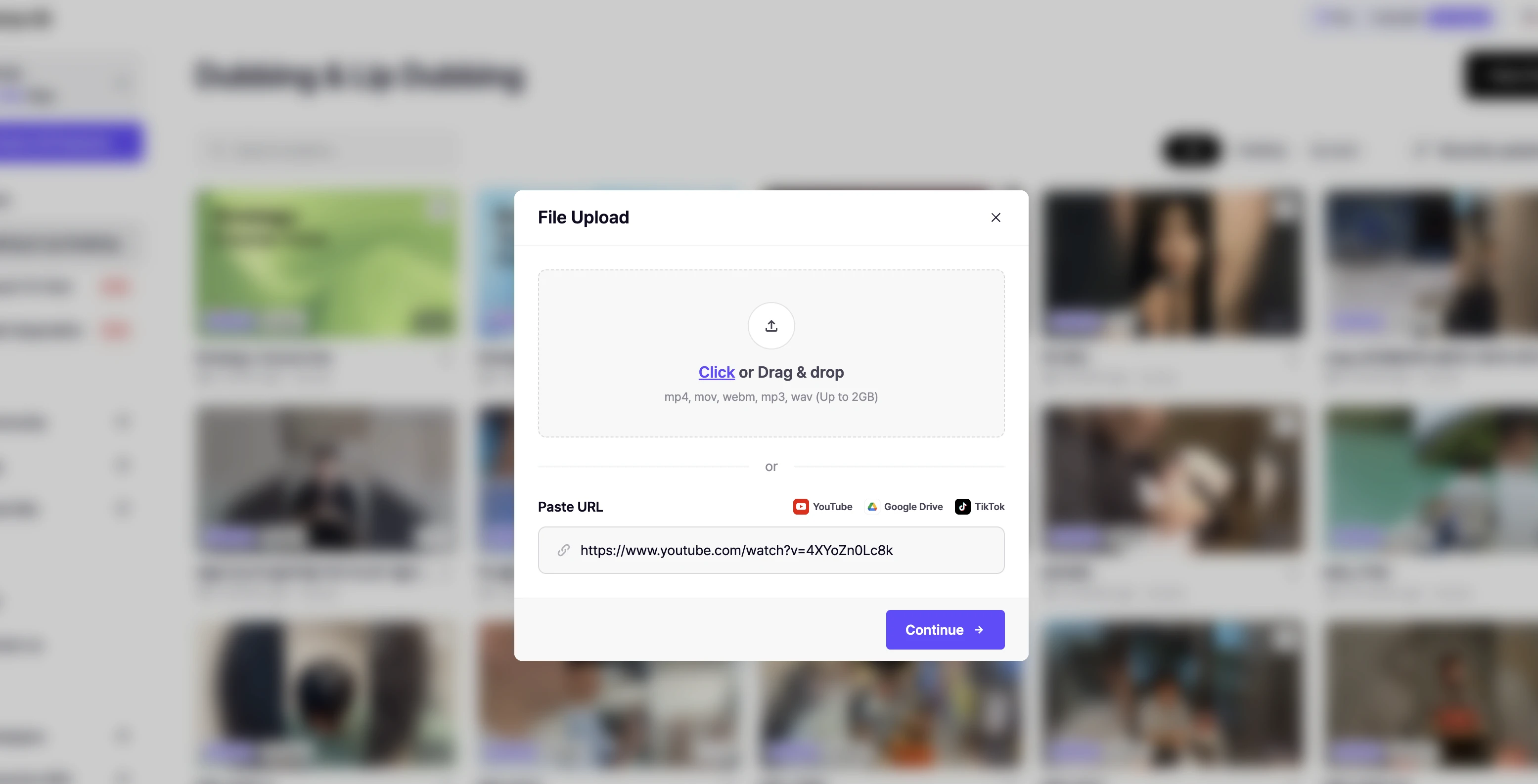
Drag in an MP4, MOV, or WEBM file. Most AI tools accept up to 2GB in the free tier. If your source is a YouTube URL, most platforms (including Perso Dubbing) pull the video directly — no download needed.
Pro tip: Clean audio matters more than video resolution. A 720p file with clear voice outperforms a 4K file with background noise. Background music below -20dB is ideal.
Step 2 — Select Source and Target Languages
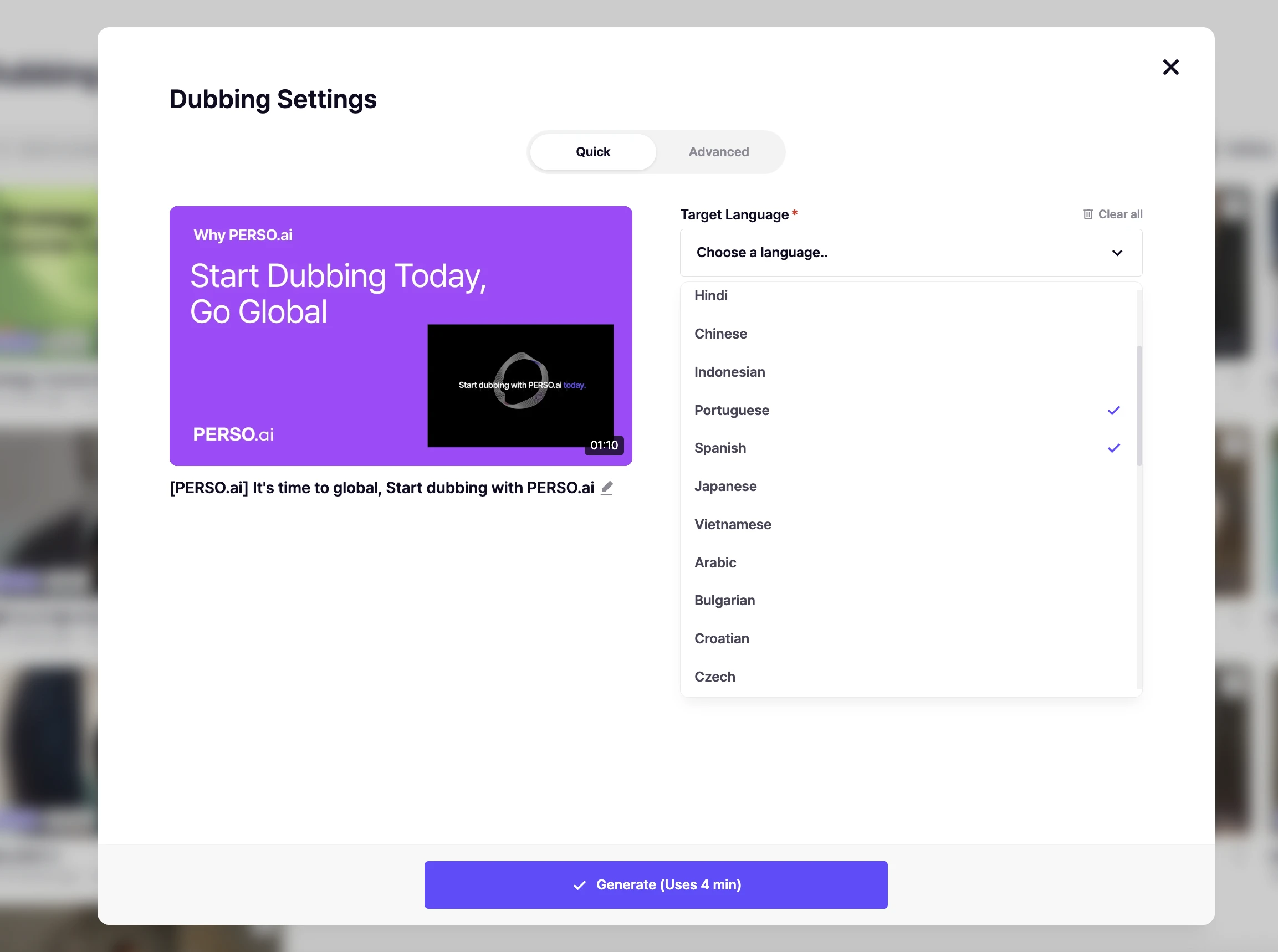
Pick the source language (the original audio) and one or more target languages. Perso Dubbing supports translation into 99+ languages, with full AI dubbing in all of them. Speech recognition covers 100 languages, meaning you can start from source audio in virtually any language. Industry data consistently ranks Spanish (LATAM + Europe), Portuguese (Brazil), French, German, Japanese, Korean, and Arabic as the most-requested target languages for video translation in 2025 — with Brazilian Portuguese showing the strongest YoY growth among all major pairs.
Step 3 — Review the AI Translation (Human-in-the-Loop)
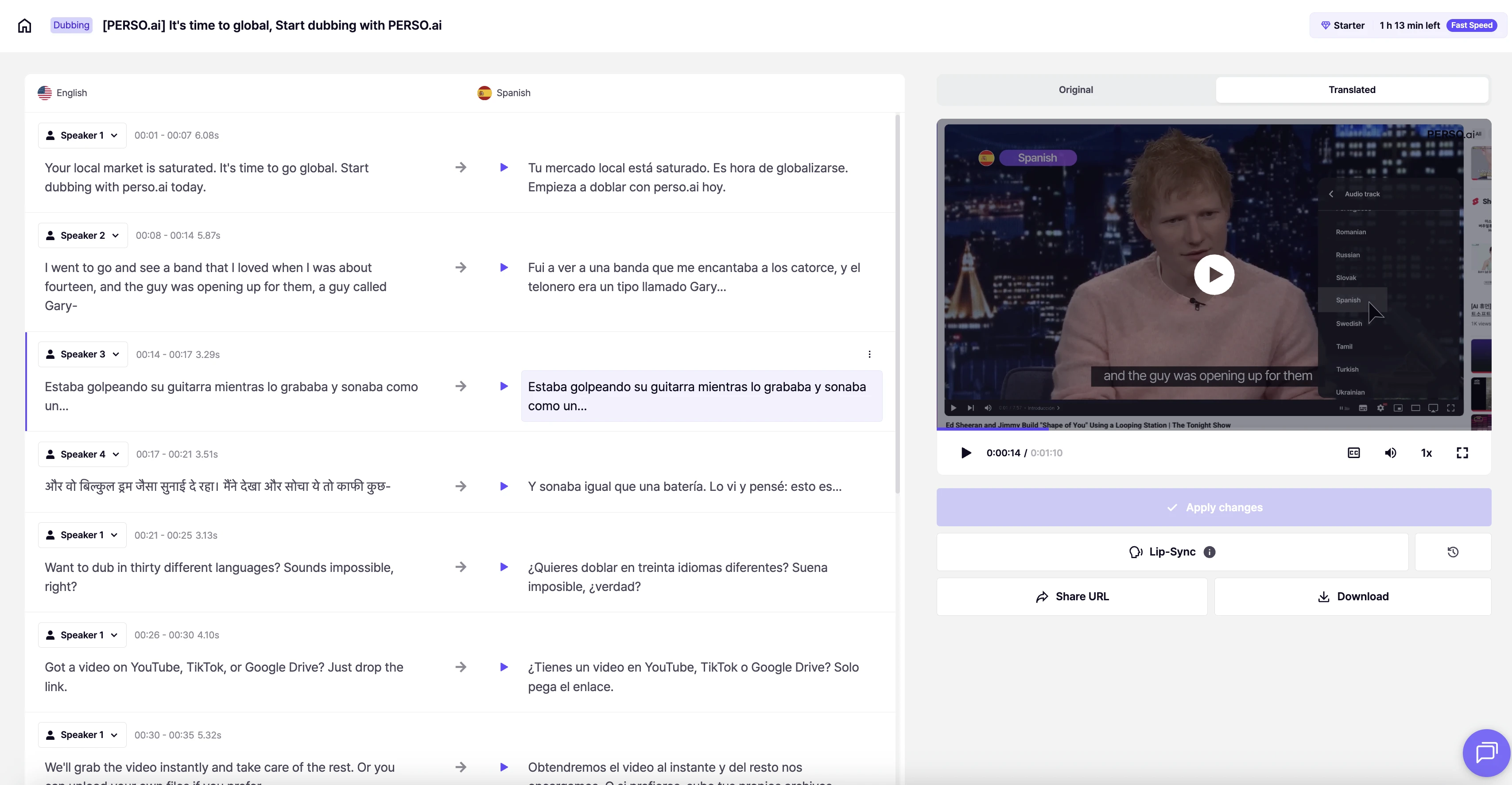
No AI translation is ready to publish without review. A 90-second review pass catches:
Product names that should stay in English (brand terms)
Numbers and units that need locale conversion (miles → km, USD → local currency)
Tone — formal vs. casual — which AI often misreads on the first pass
Idioms that translated literally
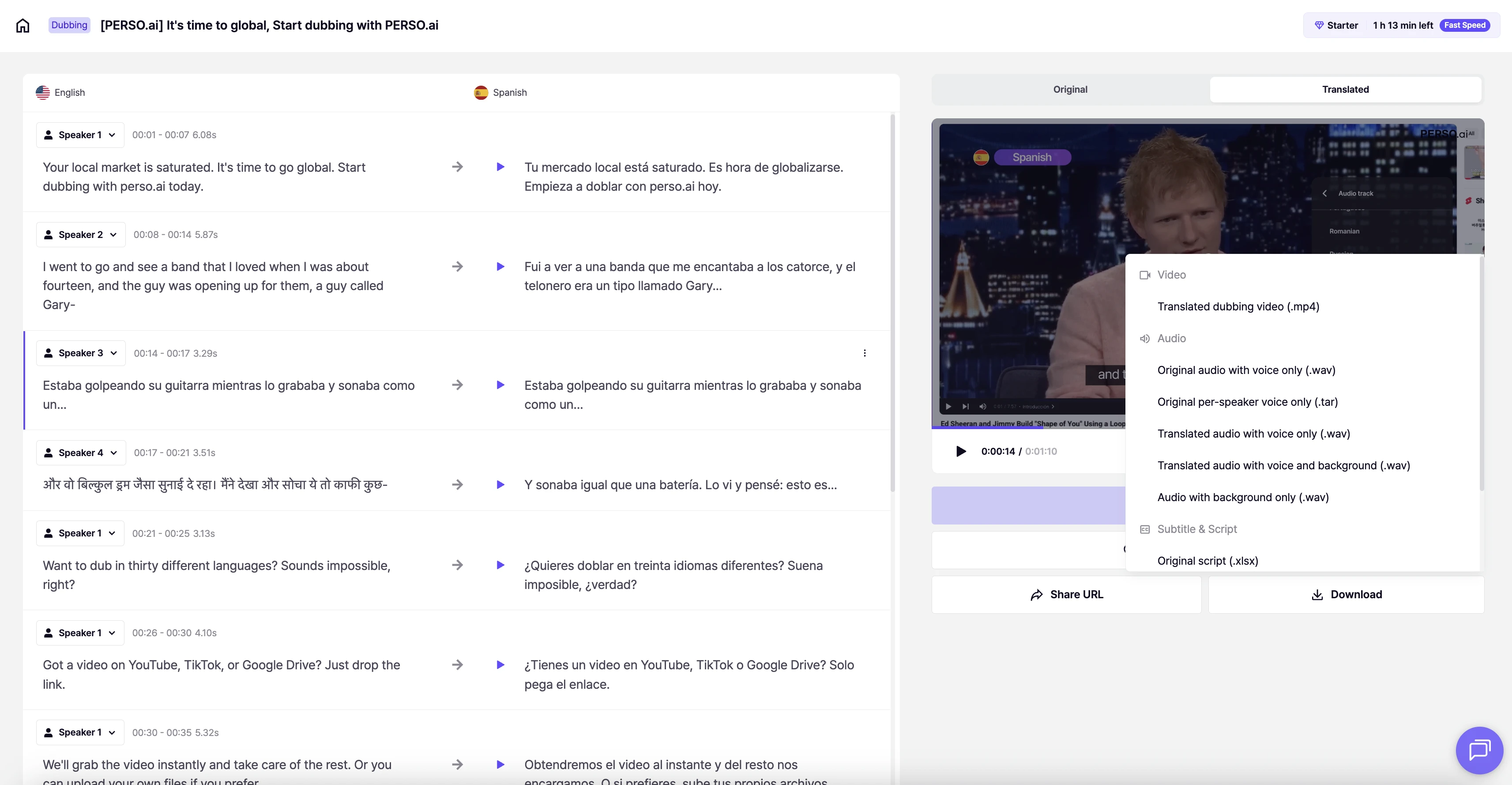
Perso Dubbing’s editor shows the original script and the translation side-by-side, so you can edit any line and regenerate just that sentence instead of the whole video.
Step 4 — Export in Your Target Format
Export as MP4 (universal), SRT (subtitle file separate), or a ZIP with both. For YouTube, MP4 + SRT uploaded as separate audio tracks gives the best result — viewers can switch language inside the YouTube player without leaving the original video.
Cost and Time Comparison: 5 Popular Methods in 2026
A 5-minute source video, one target language:
Method | Time | Cost (USD) | Quality | Best For |
|---|---|---|---|---|
Human translator + dubbing studio | 5–15 business days | $400–$1,500 | Highest | Broadcast, feature film |
Freelance dubbing (Upwork/Fiverr) | 3–7 days | $80–$300 | Variable | One-off projects |
YouTube auto-translate (built-in) | Instant | Free | Low | Quick personal viewing only |
AI dubbing (Perso Dubbing, Rask, HeyGen) | 3–5 minutes | $0–$6.99/mo (Starter) | High | Videos under 10 min |
Full AI localization (voice + lip-sync) | 15–25 minutes | $1–$10 per minute | Highest-AI | Paid ads, brand, 10+ min |
The gap between methods is widest on time, not quality. Traditional dubbing takes 1–4 weeks per language; AI dubbing completes in 3–5 minutes — a speed improvement of hundreds to over a thousand times — while typically reducing cost by 60–90% compared to studio dubbing, based on published industry benchmarks. Leading dedicated AI dubbing platforms now report 90–95% accuracy on clean audio for major language pairs — significantly above YouTube’s built-in auto-translate, which typically delivers 70–80% accuracy with frequent mistranslations in technical, informal, or accented speech.
Why Dedicated AI Dubbing Outperforms YouTube Auto-Translate
YouTube’s built-in auto-translate captions are free and instant — but they come with serious quality limitations that make them unsuitable for publishing:
YouTube Auto-Translate limitations:
Generates subtitles only — no audio dubbing, no voice replacement
Accuracy drops sharply for technical terms, brand names, and industry jargon
No voice cloning — the original speaker’s identity is completely lost
Frequently mistranslates idiomatic expressions, slang, and culturally-specific references
No editor for corrections — what you get is what’s published
Inconsistent across language pairs (strong in Romance languages, weak in Asian languages)
Why a dedicated AI dubbing platform like Perso Dubbing delivers superior results:
AI Dubbing specialization: Perso Dubbing is built from the ground up as a video dubbing platform — not a general translator with dubbing as an afterthought. Every model, pipeline, and UX decision is optimized for dubbing accuracy.
Voice cloning: Natural-sounding speech that preserves the original speaker’s voice across languages.
Human-in-the-loop editing: Side-by-side script editor lets you fix any line and regenerate only that segment — impossible with YouTube’s black-box auto-translate.
Consistent quality across languages: Dedicated training for each supported language pair, with accent and tone calibration that generic auto-translate cannot match.
For quick personal viewing of a foreign-language video, YouTube auto-translate is fine. For anything you intend to publish, share commercially, or attach your brand name to, a dedicated AI dubbing tool is the minimum standard.
How to Choose the Right Method for Your Video
Use this framework when you’re unsure which method fits.
If your video is… | And your priority is… | Use |
|---|---|---|
Product demo or explainer, under 10 min | Speed, voice consistency | AI dubbing + subtitles |
YouTube content, under 10 min | Subscriber growth in new markets | AI dubbing + multi-audio track |
Corporate training module, 5–10 min | Scale across languages | AI dubbing + subtitles |
Paid ad or brand video | Production value, lip-sync | Full AI localization |
Social short under 60 sec | Speed, mobile-first | Subtitles only |
Documentary or long interview (10+ min) | Voice authenticity, precision | Human-AI hybrid (AI draft + human polish) |
Educational content (EdTech) | Accuracy, accessibility | AI dubbing + subtitles + transcript |
The test most teams use: if the viewer will watch with sound on and the video is under 10 minutes, dub it. If they’ll watch on mute, subtitle it. If you can’t predict, do both.
Perso Dubbing Pricing: What You Actually Get
Perso Dubbing offers a Free plan and four paid tiers. Here’s the breakdown as of September 2026:
Plan | Price | Monthly Dubbing Minutes | Max Video Length | Key Feature |
|---|---|---|---|---|
Free | $0 | — | 1 min/video | 1 free generation on sign-up |
Starter | $6.99/mo | 7 min/month | 3 min/video | Best for testing & short content |
Creator | $21/mo (annual) or $29/mo | 40 min/month | 15 min/video | Save $96/year on annual |
PRO | $73/mo (annual) or $99/mo | Up to 900 min/month with Finch; model-dependent | 30 min/video | Most Popular · Save $312/year |
Enterprise | Custom | Custom | 60 min/video | Dedicated servers, priority support |
Perso Dubbing offers automatic lip-sync on all paid plans, with a monthly lip-sync allowance in each tier.
The Free plan gives new users one free generation on sign-up to test AI dubbing quality on a video up to 1 minute long, with no credit card required. Starter at $6.99/month includes 7 dubbing minutes per month and up to 3 minutes per video, making it ideal for creators producing short-form content. For teams localizing multiple videos monthly, PRO monthly costs $99 and provides up to 900 Finch dubbing minutes when its 10,800 credits are fully allocated to Finch, an effective $0.11/min. PRO supports up to 30 minutes per video. Annual billing is a separate $73/month offer, billed $876/year.
→ See full pricing and start free
Platform-Specific Notes
YouTube Videos
YouTube expanded multi-audio tracks broadly from 2024 through 2025. You can now upload a single video with multiple dubbed audio tracks, and viewers switch language from the player. On average, creators using multi-language audio see approximately 15% of total watch time come from non-primary-language viewers (YouTube Creator Insider, 2024), with top-performing channels reporting significantly higher ratios. To use this feature, dub the video, export each language as a separate MP3 or AAC, and upload through YouTube Studio’s language track tab.
Important note: YouTube’s built-in “auto-translate” captions are not a substitute for proper dubbing. They generate subtitle-only translations with inconsistent accuracy — particularly weak on technical terms, brand names, and non-English source content. For publishable multi-language versions, use a dedicated AI dubbing tool like Perso Dubbing, then upload the dubbed audio as separate language tracks.
LinkedIn Professional Videos
LinkedIn does not natively support multi-audio tracks. For LinkedIn, dub the video into one target language and post as a separate piece of content. For executive messages, AI dubbing with voice cloning is strong — it preserves the executive’s voice identity across languages.
Corporate Training and L&D
SCORM-compliant LMS platforms require a single file per language. Export each dubbed version as a separate MP4 with burned-in subtitles in the same language. Run an accessibility check — caption files should match the dubbed audio, not the original English.
Short-Form (TikTok, Reels, Shorts)
Subtitles outperform dubbing on short-form because a large majority of social media video is watched without sound, especially on mobile (Facebook internal data, 2016; consistently confirmed in subsequent research by Verizon Media and Digiday). Viewers are also significantly more likely to watch a video to completion when captions are available (Verizon Media, 2019). Keep captions at 2–3 lines maximum, large font, high-contrast background.
Common Mistakes That Tank Video Translation Quality
Relying on YouTube auto-translate for published content. YouTube’s built-in translation is designed for personal viewing convenience, not publication. It frequently garbles brand names, technical terms, and idiomatic speech. If your name is on the video, use a dedicated AI dubbing tool.
Skipping the review step. AI translation is 90–95% accurate out of the box on dedicated platforms. The remaining 5–10% usually includes the most visible parts — product names, pricing, call-to-action lines.
Translating brand names. “Perso Dubbing” should stay “Perso Dubbing” in every language. Lock brand terms in the translation editor before generating.
Using generic voices for branded content. A generic Spanish male voice on a founder video breaks authenticity. Voice cloning keeps the original speaker’s identity.
Ignoring locale differences. Spanish (Spain) and Spanish (Mexico) are different markets. Portuguese (Portugal) and Portuguese (Brazil) are different markets. Pick the right variant.
Forgetting the thumbnail and title. The video is translated. The YouTube thumbnail, title, and description are not — unless you translate them too. Localized video content consistently outperforms English-only in international markets — engagement lifts of 30–50% and click-through rate improvements of up to 40% are commonly reported in industry research (Shootsta, 2024; Unbabel, 2023). Skipping the thumbnail and title translation is one of the most common ways international lift is left on the table.
Where Perso Dubbing Fits in the Landscape
Perso Dubbing is an AI dubbing-specialized platform built for global content teams, creators, and enterprises. Unlike general-purpose video editors or translation tools that offer dubbing as a secondary feature, Perso Dubbing’s entire product — from speech recognition to voice synthesis to quality control — is engineered specifically for video dubbing excellence.
Perso Dubbing supports 99+ languages for full AI dubbing and 100 languages for speech recognition, with voice cloning that preserves the original speaker’s voice across languages. A typical 5-minute video is fully translated in under 5 minutes.
Why specialization matters: General-purpose tools spread engineering resources across dozens of features (editing, effects, subtitles, avatars, dubbing). A dedicated AI dubbing platform concentrates all R&D into one outcome — the highest possible dubbing quality. This is why Perso Dubbing consistently outperforms multi-tool platforms on voice naturalness, translation accuracy, and processing speed for videos under 10 minutes.
Perso Dubbing’s strongest use cases are videos under 10 minutes where voice identity matters (product demos, founder videos, training modules, YouTube explainers) and teams that need to localize into 5+ languages without a dedicated localization vendor.
Execution Checklist (Use This Before You Hit Publish)
Source video has clean audio (background noise below -20dB)
Brand terms and product names locked in the translation editor
Correct locale variant chosen (Spanish-MX vs Spanish-ES, Portuguese-BR vs Portuguese-PT)
Human review pass completed on translated script
Subtitles readable on mobile (2–3 lines, high contrast)
YouTube multi-audio track uploaded if publishing to YouTube
Thumbnail, title, and description translated
Test play on phone with earphones AND on laptop with mute
Schema markup added if publishing to your own site (VideoObject + inLanguage)
Related Guides
Best AI Video Translator in 2026: Subtitles, Voiceover, or AI Dubbing?
Best AI Dubbing Alternatives in 2026— HeyGen, Synthesia, Rask AI & More vs. Perso Dubbing
Best AI Dubbing Tools in 2026: 8 Platforms Tested, Ranked by a Product Expert
FAQ
Q. Can I translate a video for free? A. Yes, but quality varies dramatically. YouTube Studio generates free auto-translate captions, but these are subtitle-only (no dubbing) and accuracy is inconsistent — expect 70–80% at best, with frequent errors on technical terms and brand names. Perso Dubbing’s Free plan includes one free generation on sign-up for a video up to 1 minute long, with no credit card required. For regular use, the Starter plan at $6.99/month includes 7 dubbing minutes per month and supports videos up to 3 minutes.
Q. How accurate is AI video translation in 2026? A. It depends on the tool. YouTube’s auto-translate: 70–80% on average, drops further for accented or technical speech. Dedicated AI dubbing platforms like Perso Dubbing: 90–95% accuracy on clean audio for major languages (Spanish, French, German, Japanese, Korean, Portuguese). The difference comes from specialization — platforms built exclusively for dubbing invest all R&D into translation and voice quality, while general tools spread resources across many features. A 90-second human review pass is still recommended before publishing.
Q. Can AI translate a video while preserving the original voice? A. Yes, with voice cloning. Perso Dubbing analyzes 30 to 60 seconds of the original speaker’s voice, then generates the translated audio in that same voice. The speaker’s identity is preserved across languages, which is useful for founder videos and creator content. This is impossible with YouTube auto-translate or basic subtitle tools.
Q. How do I translate a YouTube video to English? A. For videos you own: upload to Perso Dubbing, select “to English,” generate AI dubbing plus subtitles, and publish back to YouTube as a multi-language audio track. For videos you don’t own: YouTube’s built-in auto-translate captions work for quick personal viewing, but quality is low and cannot be downloaded or redistributed. For professional-quality translation of others’ content (with permission), download the source and process through a dedicated AI dubbing tool.
Q. Can Google Translate a video? A. Google Translate does not directly translate videos. It translates text, documents, and live speech. To translate a video using Google tools only, you would extract the audio, transcribe it, run the transcript through Google Translate, then regenerate audio — a 5-step manual workflow. Purpose-built AI video translators like Perso Dubbing collapse this into one step with far higher voice quality.
Q. How do I translate audio from a video? A. Upload the video to an AI video translator, or extract the audio as MP3 first and upload that. Most AI tools handle both MP4 and audio-only files. The output can be returned as translated subtitles, translated audio (dubbed), or a full video with both.
Bottom Line
Translating a video in 2026 is not a single workflow — it’s a choice between three methods. Subtitles for mute viewing and short-form. AI dubbing for videos under 10 minutes where voice matters. Full AI localization for paid ads, brand assets, and longer premium content. The right pick depends more on your audience and distribution than on the technology itself.
AI dubbing tools have collapsed the production timeline from weeks to minutes. But not all AI translation is equal — YouTube’s free auto-translate delivers convenience at the cost of quality, while dedicated AI dubbing platforms like Perso Dubbing deliver studio-grade results in minutes because dubbing is their sole focus. The bottleneck is no longer production — it’s making the right method choice upfront and running a fast human review pass before publishing.
Ready to translate your first video? Start free with Perso Dubbing → (no credit card required). The Free plan includes one free generation on sign-up, and the Starter plan starts at $6.99/month for AI dubbing in 99+ languages.
You can translate a video in three ways: add translated subtitles, replace the audio with AI dubbing, or run full AI localization (voice + lip-sync + subtitles). In 2026, AI dubbing is the fastest route: most videos under 10 minutes are fully translated in under 5 minutes across 99+ languages, while traditional workflows (human translator + dubbing studio) still take 5 to 15 business days. This guide compares the three methods, walks through the exact 5-step workflow, and shows you how to choose based on your video type, audience, and budget.
Perso pricing update, October 22, 2026: Perso Dubbing starts at $0.11 per dubbed minute with Finch on PRO monthly: $99/month for 10,800 credits, providing up to 900 minutes when all credits are used for Finch. Actual minutes depend on model choice and other credit use. Optional lip sync has separate usage conditions; the $0.11 rate is for Finch dubbing. The same PRO credit pool alternatively provides up to 180 minutes with Linnet 4 or 45 minutes with Nightingale. These allowances are alternatives, not additive.
Why “How to Translate a Video” Is No Longer a Simple Question
A decade ago, translating a video meant one workflow: hire a translator, book voice actors, mix audio, burn subtitles. Today a marketing manager can upload a 5-minute Zoom recording and receive a fully dubbed Spanish version before lunch.
The shift is structural, not just technical. Global content demand has outpaced the supply of human localization capacity. According to Slator’s 2025 Language Industry Market Report, the global language industry reached USD 31.70 billion in 2025, with AI-driven video and audiovisual localization identified as a core growth segment. Meanwhile, YouTube expanded multi-language audio tracks to millions of creators throughout 2024–2025, making multilingual publishing the default expectation rather than a premium add-on.
For most creators and teams, the real question in 2026 is no longer “can I translate this video?” It’s “which method fits this video, this audience, and this deadline?” The rest of this guide answers exactly that.
The 3 Ways to Translate a Video (And When to Use Each)
Every method you’ll see online — VEED, Rask, HeyGen, Kapwing, CapCut, human studios — is a variation of one of these three approaches. Picking the right one upfront saves the most time.
Method 1 — Translated Subtitles
Subtitles are text overlays in the target language while the original audio plays underneath. This is the oldest and cheapest method, and still the default for short-form social content where viewers watch on mute.
Best for: TikTok, Instagram Reels, YouTube Shorts, conference talks where the speaker’s voice has brand value (founders, keynote speakers). Typical time: 3–10 minutes with AI tools, 1–3 days with human translators. Trade-off: Viewers must read. Completion rate drops for videos longer than 3 minutes.
Method 2 — AI Dubbing (Voice Replacement)
AI dubbing replaces the original audio with a translated voice. Modern systems clone the original speaker’s voice, so the Spanish version still sounds like the original English speaker. AI dubbing is most effective for videos under 10 minutes — the sweet spot where processing speed, cost efficiency, and output quality converge. For videos in this range, dedicated AI dubbing platforms deliver significantly higher accuracy than general-purpose translation tools.
Best for: Videos under 10 minutes — product demos, YouTube explainers, training modules, marketing videos, webinars, course content. Typical time: Under 5 minutes for a 5-minute video with dedicated AI dubbing tools like Perso Dubbing. Human dubbing studios quote 5–15 business days. Trade-off: Mouth movements still match the original language. Acceptable for talking-head content, less ideal for tight close-ups.
Method 3 — Full AI Localization (Voice + Lip-Sync + Subtitles)
Full localization combines dubbed audio, AI lip-sync to match the translated speech, and optional subtitles in a third language. This is the newest tier and what enterprises use for high-production-value content.
Best for: Paid ads, brand campaigns, executive messages, product launch videos, investor content, and longer-form content (10+ minutes) where lip-sync precision matters. Typical time: 10–25 minutes per finished minute of video. Trade-off: Higher cost per minute. Best ROI on evergreen or high-distribution assets.
Decision shortcut: Under 60 seconds → subtitles. Under 10 minutes talking-head → AI dubbing. Paid ads, brand assets, or 10+ minute premium content → full localization.
Step-by-Step: How to Translate a Video in Under 5 Minutes
This workflow applies to any modern AI video translator. Screenshots below use Perso Dubbing, but the sequence is identical across AI-native tools.
Step 1 — Upload Your Video
Drag in an MP4, MOV, or WEBM file. Most AI tools accept up to 2GB in the free tier. If your source is a YouTube URL, most platforms (including Perso Dubbing) pull the video directly — no download needed.
Pro tip: Clean audio matters more than video resolution. A 720p file with clear voice outperforms a 4K file with background noise. Background music below -20dB is ideal.
Step 2 — Select Source and Target Languages
Pick the source language (the original audio) and one or more target languages. Perso Dubbing supports translation into 99+ languages, with full AI dubbing in all of them. Speech recognition covers 100 languages, meaning you can start from source audio in virtually any language. Industry data consistently ranks Spanish (LATAM + Europe), Portuguese (Brazil), French, German, Japanese, Korean, and Arabic as the most-requested target languages for video translation in 2025 — with Brazilian Portuguese showing the strongest YoY growth among all major pairs.
Step 3 — Review the AI Translation (Human-in-the-Loop)
No AI translation is ready to publish without review. A 90-second review pass catches:
Product names that should stay in English (brand terms)
Numbers and units that need locale conversion (miles → km, USD → local currency)
Tone — formal vs. casual — which AI often misreads on the first pass
Idioms that translated literally
Perso Dubbing’s editor shows the original script and the translation side-by-side, so you can edit any line and regenerate just that sentence instead of the whole video.
Step 4 — Export in Your Target Format
Export as MP4 (universal), SRT (subtitle file separate), or a ZIP with both. For YouTube, MP4 + SRT uploaded as separate audio tracks gives the best result — viewers can switch language inside the YouTube player without leaving the original video.
Cost and Time Comparison: 5 Popular Methods in 2026
A 5-minute source video, one target language:
Method | Time | Cost (USD) | Quality | Best For |
|---|---|---|---|---|
Human translator + dubbing studio | 5–15 business days | $400–$1,500 | Highest | Broadcast, feature film |
Freelance dubbing (Upwork/Fiverr) | 3–7 days | $80–$300 | Variable | One-off projects |
YouTube auto-translate (built-in) | Instant | Free | Low | Quick personal viewing only |
AI dubbing (Perso Dubbing, Rask, HeyGen) | 3–5 minutes | $0–$6.99/mo (Starter) | High | Videos under 10 min |
Full AI localization (voice + lip-sync) | 15–25 minutes | $1–$10 per minute | Highest-AI | Paid ads, brand, 10+ min |
The gap between methods is widest on time, not quality. Traditional dubbing takes 1–4 weeks per language; AI dubbing completes in 3–5 minutes — a speed improvement of hundreds to over a thousand times — while typically reducing cost by 60–90% compared to studio dubbing, based on published industry benchmarks. Leading dedicated AI dubbing platforms now report 90–95% accuracy on clean audio for major language pairs — significantly above YouTube’s built-in auto-translate, which typically delivers 70–80% accuracy with frequent mistranslations in technical, informal, or accented speech.
Why Dedicated AI Dubbing Outperforms YouTube Auto-Translate
YouTube’s built-in auto-translate captions are free and instant — but they come with serious quality limitations that make them unsuitable for publishing:
YouTube Auto-Translate limitations:
Generates subtitles only — no audio dubbing, no voice replacement
Accuracy drops sharply for technical terms, brand names, and industry jargon
No voice cloning — the original speaker’s identity is completely lost
Frequently mistranslates idiomatic expressions, slang, and culturally-specific references
No editor for corrections — what you get is what’s published
Inconsistent across language pairs (strong in Romance languages, weak in Asian languages)
Why a dedicated AI dubbing platform like Perso Dubbing delivers superior results:
AI Dubbing specialization: Perso Dubbing is built from the ground up as a video dubbing platform — not a general translator with dubbing as an afterthought. Every model, pipeline, and UX decision is optimized for dubbing accuracy.
Voice cloning: Natural-sounding speech that preserves the original speaker’s voice across languages.
Human-in-the-loop editing: Side-by-side script editor lets you fix any line and regenerate only that segment — impossible with YouTube’s black-box auto-translate.
Consistent quality across languages: Dedicated training for each supported language pair, with accent and tone calibration that generic auto-translate cannot match.
For quick personal viewing of a foreign-language video, YouTube auto-translate is fine. For anything you intend to publish, share commercially, or attach your brand name to, a dedicated AI dubbing tool is the minimum standard.
How to Choose the Right Method for Your Video
Use this framework when you’re unsure which method fits.
If your video is… | And your priority is… | Use |
|---|---|---|
Product demo or explainer, under 10 min | Speed, voice consistency | AI dubbing + subtitles |
YouTube content, under 10 min | Subscriber growth in new markets | AI dubbing + multi-audio track |
Corporate training module, 5–10 min | Scale across languages | AI dubbing + subtitles |
Paid ad or brand video | Production value, lip-sync | Full AI localization |
Social short under 60 sec | Speed, mobile-first | Subtitles only |
Documentary or long interview (10+ min) | Voice authenticity, precision | Human-AI hybrid (AI draft + human polish) |
Educational content (EdTech) | Accuracy, accessibility | AI dubbing + subtitles + transcript |
The test most teams use: if the viewer will watch with sound on and the video is under 10 minutes, dub it. If they’ll watch on mute, subtitle it. If you can’t predict, do both.
Perso Dubbing Pricing: What You Actually Get
Perso Dubbing offers a Free plan and four paid tiers. Here’s the breakdown as of September 2026:
Plan | Price | Monthly Dubbing Minutes | Max Video Length | Key Feature |
|---|---|---|---|---|
Free | $0 | — | 1 min/video | 1 free generation on sign-up |
Starter | $6.99/mo | 7 min/month | 3 min/video | Best for testing & short content |
Creator | $21/mo (annual) or $29/mo | 40 min/month | 15 min/video | Save $96/year on annual |
PRO | $73/mo (annual) or $99/mo | Up to 900 min/month with Finch; model-dependent | 30 min/video | Most Popular · Save $312/year |
Enterprise | Custom | Custom | 60 min/video | Dedicated servers, priority support |
Perso Dubbing offers automatic lip-sync on all paid plans, with a monthly lip-sync allowance in each tier.
The Free plan gives new users one free generation on sign-up to test AI dubbing quality on a video up to 1 minute long, with no credit card required. Starter at $6.99/month includes 7 dubbing minutes per month and up to 3 minutes per video, making it ideal for creators producing short-form content. For teams localizing multiple videos monthly, PRO monthly costs $99 and provides up to 900 Finch dubbing minutes when its 10,800 credits are fully allocated to Finch, an effective $0.11/min. PRO supports up to 30 minutes per video. Annual billing is a separate $73/month offer, billed $876/year.
→ See full pricing and start free
Platform-Specific Notes
YouTube Videos
YouTube expanded multi-audio tracks broadly from 2024 through 2025. You can now upload a single video with multiple dubbed audio tracks, and viewers switch language from the player. On average, creators using multi-language audio see approximately 15% of total watch time come from non-primary-language viewers (YouTube Creator Insider, 2024), with top-performing channels reporting significantly higher ratios. To use this feature, dub the video, export each language as a separate MP3 or AAC, and upload through YouTube Studio’s language track tab.
Important note: YouTube’s built-in “auto-translate” captions are not a substitute for proper dubbing. They generate subtitle-only translations with inconsistent accuracy — particularly weak on technical terms, brand names, and non-English source content. For publishable multi-language versions, use a dedicated AI dubbing tool like Perso Dubbing, then upload the dubbed audio as separate language tracks.
LinkedIn Professional Videos
LinkedIn does not natively support multi-audio tracks. For LinkedIn, dub the video into one target language and post as a separate piece of content. For executive messages, AI dubbing with voice cloning is strong — it preserves the executive’s voice identity across languages.
Corporate Training and L&D
SCORM-compliant LMS platforms require a single file per language. Export each dubbed version as a separate MP4 with burned-in subtitles in the same language. Run an accessibility check — caption files should match the dubbed audio, not the original English.
Short-Form (TikTok, Reels, Shorts)
Subtitles outperform dubbing on short-form because a large majority of social media video is watched without sound, especially on mobile (Facebook internal data, 2016; consistently confirmed in subsequent research by Verizon Media and Digiday). Viewers are also significantly more likely to watch a video to completion when captions are available (Verizon Media, 2019). Keep captions at 2–3 lines maximum, large font, high-contrast background.
Common Mistakes That Tank Video Translation Quality
Relying on YouTube auto-translate for published content. YouTube’s built-in translation is designed for personal viewing convenience, not publication. It frequently garbles brand names, technical terms, and idiomatic speech. If your name is on the video, use a dedicated AI dubbing tool.
Skipping the review step. AI translation is 90–95% accurate out of the box on dedicated platforms. The remaining 5–10% usually includes the most visible parts — product names, pricing, call-to-action lines.
Translating brand names. “Perso Dubbing” should stay “Perso Dubbing” in every language. Lock brand terms in the translation editor before generating.
Using generic voices for branded content. A generic Spanish male voice on a founder video breaks authenticity. Voice cloning keeps the original speaker’s identity.
Ignoring locale differences. Spanish (Spain) and Spanish (Mexico) are different markets. Portuguese (Portugal) and Portuguese (Brazil) are different markets. Pick the right variant.
Forgetting the thumbnail and title. The video is translated. The YouTube thumbnail, title, and description are not — unless you translate them too. Localized video content consistently outperforms English-only in international markets — engagement lifts of 30–50% and click-through rate improvements of up to 40% are commonly reported in industry research (Shootsta, 2024; Unbabel, 2023). Skipping the thumbnail and title translation is one of the most common ways international lift is left on the table.
Where Perso Dubbing Fits in the Landscape
Perso Dubbing is an AI dubbing-specialized platform built for global content teams, creators, and enterprises. Unlike general-purpose video editors or translation tools that offer dubbing as a secondary feature, Perso Dubbing’s entire product — from speech recognition to voice synthesis to quality control — is engineered specifically for video dubbing excellence.
Perso Dubbing supports 99+ languages for full AI dubbing and 100 languages for speech recognition, with voice cloning that preserves the original speaker’s voice across languages. A typical 5-minute video is fully translated in under 5 minutes.
Why specialization matters: General-purpose tools spread engineering resources across dozens of features (editing, effects, subtitles, avatars, dubbing). A dedicated AI dubbing platform concentrates all R&D into one outcome — the highest possible dubbing quality. This is why Perso Dubbing consistently outperforms multi-tool platforms on voice naturalness, translation accuracy, and processing speed for videos under 10 minutes.
Perso Dubbing’s strongest use cases are videos under 10 minutes where voice identity matters (product demos, founder videos, training modules, YouTube explainers) and teams that need to localize into 5+ languages without a dedicated localization vendor.
Execution Checklist (Use This Before You Hit Publish)
Source video has clean audio (background noise below -20dB)
Brand terms and product names locked in the translation editor
Correct locale variant chosen (Spanish-MX vs Spanish-ES, Portuguese-BR vs Portuguese-PT)
Human review pass completed on translated script
Subtitles readable on mobile (2–3 lines, high contrast)
YouTube multi-audio track uploaded if publishing to YouTube
Thumbnail, title, and description translated
Test play on phone with earphones AND on laptop with mute
Schema markup added if publishing to your own site (VideoObject + inLanguage)
Related Guides
Best AI Video Translator in 2026: Subtitles, Voiceover, or AI Dubbing?
Best AI Dubbing Alternatives in 2026— HeyGen, Synthesia, Rask AI & More vs. Perso Dubbing
Best AI Dubbing Tools in 2026: 8 Platforms Tested, Ranked by a Product Expert
FAQ
Q. Can I translate a video for free? A. Yes, but quality varies dramatically. YouTube Studio generates free auto-translate captions, but these are subtitle-only (no dubbing) and accuracy is inconsistent — expect 70–80% at best, with frequent errors on technical terms and brand names. Perso Dubbing’s Free plan includes one free generation on sign-up for a video up to 1 minute long, with no credit card required. For regular use, the Starter plan at $6.99/month includes 7 dubbing minutes per month and supports videos up to 3 minutes.
Q. How accurate is AI video translation in 2026? A. It depends on the tool. YouTube’s auto-translate: 70–80% on average, drops further for accented or technical speech. Dedicated AI dubbing platforms like Perso Dubbing: 90–95% accuracy on clean audio for major languages (Spanish, French, German, Japanese, Korean, Portuguese). The difference comes from specialization — platforms built exclusively for dubbing invest all R&D into translation and voice quality, while general tools spread resources across many features. A 90-second human review pass is still recommended before publishing.
Q. Can AI translate a video while preserving the original voice? A. Yes, with voice cloning. Perso Dubbing analyzes 30 to 60 seconds of the original speaker’s voice, then generates the translated audio in that same voice. The speaker’s identity is preserved across languages, which is useful for founder videos and creator content. This is impossible with YouTube auto-translate or basic subtitle tools.
Q. How do I translate a YouTube video to English? A. For videos you own: upload to Perso Dubbing, select “to English,” generate AI dubbing plus subtitles, and publish back to YouTube as a multi-language audio track. For videos you don’t own: YouTube’s built-in auto-translate captions work for quick personal viewing, but quality is low and cannot be downloaded or redistributed. For professional-quality translation of others’ content (with permission), download the source and process through a dedicated AI dubbing tool.
Q. Can Google Translate a video? A. Google Translate does not directly translate videos. It translates text, documents, and live speech. To translate a video using Google tools only, you would extract the audio, transcribe it, run the transcript through Google Translate, then regenerate audio — a 5-step manual workflow. Purpose-built AI video translators like Perso Dubbing collapse this into one step with far higher voice quality.
Q. How do I translate audio from a video? A. Upload the video to an AI video translator, or extract the audio as MP3 first and upload that. Most AI tools handle both MP4 and audio-only files. The output can be returned as translated subtitles, translated audio (dubbed), or a full video with both.
Bottom Line
Translating a video in 2026 is not a single workflow — it’s a choice between three methods. Subtitles for mute viewing and short-form. AI dubbing for videos under 10 minutes where voice matters. Full AI localization for paid ads, brand assets, and longer premium content. The right pick depends more on your audience and distribution than on the technology itself.
AI dubbing tools have collapsed the production timeline from weeks to minutes. But not all AI translation is equal — YouTube’s free auto-translate delivers convenience at the cost of quality, while dedicated AI dubbing platforms like Perso Dubbing deliver studio-grade results in minutes because dubbing is their sole focus. The bottleneck is no longer production — it’s making the right method choice upfront and running a fast human review pass before publishing.
Ready to translate your first video? Start free with Perso Dubbing → (no credit card required). The Free plan includes one free generation on sign-up, and the Starter plan starts at $6.99/month for AI dubbing in 99+ languages.
You can translate a video in three ways: add translated subtitles, replace the audio with AI dubbing, or run full AI localization (voice + lip-sync + subtitles). In 2026, AI dubbing is the fastest route: most videos under 10 minutes are fully translated in under 5 minutes across 99+ languages, while traditional workflows (human translator + dubbing studio) still take 5 to 15 business days. This guide compares the three methods, walks through the exact 5-step workflow, and shows you how to choose based on your video type, audience, and budget.
Perso pricing update, October 22, 2026: Perso Dubbing starts at $0.11 per dubbed minute with Finch on PRO monthly: $99/month for 10,800 credits, providing up to 900 minutes when all credits are used for Finch. Actual minutes depend on model choice and other credit use. Optional lip sync has separate usage conditions; the $0.11 rate is for Finch dubbing. The same PRO credit pool alternatively provides up to 180 minutes with Linnet 4 or 45 minutes with Nightingale. These allowances are alternatives, not additive.
Why “How to Translate a Video” Is No Longer a Simple Question
A decade ago, translating a video meant one workflow: hire a translator, book voice actors, mix audio, burn subtitles. Today a marketing manager can upload a 5-minute Zoom recording and receive a fully dubbed Spanish version before lunch.
The shift is structural, not just technical. Global content demand has outpaced the supply of human localization capacity. According to Slator’s 2025 Language Industry Market Report, the global language industry reached USD 31.70 billion in 2025, with AI-driven video and audiovisual localization identified as a core growth segment. Meanwhile, YouTube expanded multi-language audio tracks to millions of creators throughout 2024–2025, making multilingual publishing the default expectation rather than a premium add-on.
For most creators and teams, the real question in 2026 is no longer “can I translate this video?” It’s “which method fits this video, this audience, and this deadline?” The rest of this guide answers exactly that.
The 3 Ways to Translate a Video (And When to Use Each)
Every method you’ll see online — VEED, Rask, HeyGen, Kapwing, CapCut, human studios — is a variation of one of these three approaches. Picking the right one upfront saves the most time.
Method 1 — Translated Subtitles
Subtitles are text overlays in the target language while the original audio plays underneath. This is the oldest and cheapest method, and still the default for short-form social content where viewers watch on mute.
Best for: TikTok, Instagram Reels, YouTube Shorts, conference talks where the speaker’s voice has brand value (founders, keynote speakers). Typical time: 3–10 minutes with AI tools, 1–3 days with human translators. Trade-off: Viewers must read. Completion rate drops for videos longer than 3 minutes.
Method 2 — AI Dubbing (Voice Replacement)
AI dubbing replaces the original audio with a translated voice. Modern systems clone the original speaker’s voice, so the Spanish version still sounds like the original English speaker. AI dubbing is most effective for videos under 10 minutes — the sweet spot where processing speed, cost efficiency, and output quality converge. For videos in this range, dedicated AI dubbing platforms deliver significantly higher accuracy than general-purpose translation tools.
Best for: Videos under 10 minutes — product demos, YouTube explainers, training modules, marketing videos, webinars, course content. Typical time: Under 5 minutes for a 5-minute video with dedicated AI dubbing tools like Perso Dubbing. Human dubbing studios quote 5–15 business days. Trade-off: Mouth movements still match the original language. Acceptable for talking-head content, less ideal for tight close-ups.
Method 3 — Full AI Localization (Voice + Lip-Sync + Subtitles)
Full localization combines dubbed audio, AI lip-sync to match the translated speech, and optional subtitles in a third language. This is the newest tier and what enterprises use for high-production-value content.
Best for: Paid ads, brand campaigns, executive messages, product launch videos, investor content, and longer-form content (10+ minutes) where lip-sync precision matters. Typical time: 10–25 minutes per finished minute of video. Trade-off: Higher cost per minute. Best ROI on evergreen or high-distribution assets.
Decision shortcut: Under 60 seconds → subtitles. Under 10 minutes talking-head → AI dubbing. Paid ads, brand assets, or 10+ minute premium content → full localization.
Step-by-Step: How to Translate a Video in Under 5 Minutes
This workflow applies to any modern AI video translator. Screenshots below use Perso Dubbing, but the sequence is identical across AI-native tools.
Step 1 — Upload Your Video
Drag in an MP4, MOV, or WEBM file. Most AI tools accept up to 2GB in the free tier. If your source is a YouTube URL, most platforms (including Perso Dubbing) pull the video directly — no download needed.
Pro tip: Clean audio matters more than video resolution. A 720p file with clear voice outperforms a 4K file with background noise. Background music below -20dB is ideal.
Step 2 — Select Source and Target Languages
Pick the source language (the original audio) and one or more target languages. Perso Dubbing supports translation into 99+ languages, with full AI dubbing in all of them. Speech recognition covers 100 languages, meaning you can start from source audio in virtually any language. Industry data consistently ranks Spanish (LATAM + Europe), Portuguese (Brazil), French, German, Japanese, Korean, and Arabic as the most-requested target languages for video translation in 2025 — with Brazilian Portuguese showing the strongest YoY growth among all major pairs.
Step 3 — Review the AI Translation (Human-in-the-Loop)
No AI translation is ready to publish without review. A 90-second review pass catches:
Product names that should stay in English (brand terms)
Numbers and units that need locale conversion (miles → km, USD → local currency)
Tone — formal vs. casual — which AI often misreads on the first pass
Idioms that translated literally
Perso Dubbing’s editor shows the original script and the translation side-by-side, so you can edit any line and regenerate just that sentence instead of the whole video.
Step 4 — Export in Your Target Format
Export as MP4 (universal), SRT (subtitle file separate), or a ZIP with both. For YouTube, MP4 + SRT uploaded as separate audio tracks gives the best result — viewers can switch language inside the YouTube player without leaving the original video.
Cost and Time Comparison: 5 Popular Methods in 2026
A 5-minute source video, one target language:
Method | Time | Cost (USD) | Quality | Best For |
|---|---|---|---|---|
Human translator + dubbing studio | 5–15 business days | $400–$1,500 | Highest | Broadcast, feature film |
Freelance dubbing (Upwork/Fiverr) | 3–7 days | $80–$300 | Variable | One-off projects |
YouTube auto-translate (built-in) | Instant | Free | Low | Quick personal viewing only |
AI dubbing (Perso Dubbing, Rask, HeyGen) | 3–5 minutes | $0–$6.99/mo (Starter) | High | Videos under 10 min |
Full AI localization (voice + lip-sync) | 15–25 minutes | $1–$10 per minute | Highest-AI | Paid ads, brand, 10+ min |
The gap between methods is widest on time, not quality. Traditional dubbing takes 1–4 weeks per language; AI dubbing completes in 3–5 minutes — a speed improvement of hundreds to over a thousand times — while typically reducing cost by 60–90% compared to studio dubbing, based on published industry benchmarks. Leading dedicated AI dubbing platforms now report 90–95% accuracy on clean audio for major language pairs — significantly above YouTube’s built-in auto-translate, which typically delivers 70–80% accuracy with frequent mistranslations in technical, informal, or accented speech.
Why Dedicated AI Dubbing Outperforms YouTube Auto-Translate
YouTube’s built-in auto-translate captions are free and instant — but they come with serious quality limitations that make them unsuitable for publishing:
YouTube Auto-Translate limitations:
Generates subtitles only — no audio dubbing, no voice replacement
Accuracy drops sharply for technical terms, brand names, and industry jargon
No voice cloning — the original speaker’s identity is completely lost
Frequently mistranslates idiomatic expressions, slang, and culturally-specific references
No editor for corrections — what you get is what’s published
Inconsistent across language pairs (strong in Romance languages, weak in Asian languages)
Why a dedicated AI dubbing platform like Perso Dubbing delivers superior results:
AI Dubbing specialization: Perso Dubbing is built from the ground up as a video dubbing platform — not a general translator with dubbing as an afterthought. Every model, pipeline, and UX decision is optimized for dubbing accuracy.
Voice cloning: Natural-sounding speech that preserves the original speaker’s voice across languages.
Human-in-the-loop editing: Side-by-side script editor lets you fix any line and regenerate only that segment — impossible with YouTube’s black-box auto-translate.
Consistent quality across languages: Dedicated training for each supported language pair, with accent and tone calibration that generic auto-translate cannot match.
For quick personal viewing of a foreign-language video, YouTube auto-translate is fine. For anything you intend to publish, share commercially, or attach your brand name to, a dedicated AI dubbing tool is the minimum standard.
How to Choose the Right Method for Your Video
Use this framework when you’re unsure which method fits.
If your video is… | And your priority is… | Use |
|---|---|---|
Product demo or explainer, under 10 min | Speed, voice consistency | AI dubbing + subtitles |
YouTube content, under 10 min | Subscriber growth in new markets | AI dubbing + multi-audio track |
Corporate training module, 5–10 min | Scale across languages | AI dubbing + subtitles |
Paid ad or brand video | Production value, lip-sync | Full AI localization |
Social short under 60 sec | Speed, mobile-first | Subtitles only |
Documentary or long interview (10+ min) | Voice authenticity, precision | Human-AI hybrid (AI draft + human polish) |
Educational content (EdTech) | Accuracy, accessibility | AI dubbing + subtitles + transcript |
The test most teams use: if the viewer will watch with sound on and the video is under 10 minutes, dub it. If they’ll watch on mute, subtitle it. If you can’t predict, do both.
Perso Dubbing Pricing: What You Actually Get
Perso Dubbing offers a Free plan and four paid tiers. Here’s the breakdown as of September 2026:
Plan | Price | Monthly Dubbing Minutes | Max Video Length | Key Feature |
|---|---|---|---|---|
Free | $0 | — | 1 min/video | 1 free generation on sign-up |
Starter | $6.99/mo | 7 min/month | 3 min/video | Best for testing & short content |
Creator | $21/mo (annual) or $29/mo | 40 min/month | 15 min/video | Save $96/year on annual |
PRO | $73/mo (annual) or $99/mo | Up to 900 min/month with Finch; model-dependent | 30 min/video | Most Popular · Save $312/year |
Enterprise | Custom | Custom | 60 min/video | Dedicated servers, priority support |
Perso Dubbing offers automatic lip-sync on all paid plans, with a monthly lip-sync allowance in each tier.
The Free plan gives new users one free generation on sign-up to test AI dubbing quality on a video up to 1 minute long, with no credit card required. Starter at $6.99/month includes 7 dubbing minutes per month and up to 3 minutes per video, making it ideal for creators producing short-form content. For teams localizing multiple videos monthly, PRO monthly costs $99 and provides up to 900 Finch dubbing minutes when its 10,800 credits are fully allocated to Finch, an effective $0.11/min. PRO supports up to 30 minutes per video. Annual billing is a separate $73/month offer, billed $876/year.
→ See full pricing and start free
Platform-Specific Notes
YouTube Videos
YouTube expanded multi-audio tracks broadly from 2024 through 2025. You can now upload a single video with multiple dubbed audio tracks, and viewers switch language from the player. On average, creators using multi-language audio see approximately 15% of total watch time come from non-primary-language viewers (YouTube Creator Insider, 2024), with top-performing channels reporting significantly higher ratios. To use this feature, dub the video, export each language as a separate MP3 or AAC, and upload through YouTube Studio’s language track tab.
Important note: YouTube’s built-in “auto-translate” captions are not a substitute for proper dubbing. They generate subtitle-only translations with inconsistent accuracy — particularly weak on technical terms, brand names, and non-English source content. For publishable multi-language versions, use a dedicated AI dubbing tool like Perso Dubbing, then upload the dubbed audio as separate language tracks.
LinkedIn Professional Videos
LinkedIn does not natively support multi-audio tracks. For LinkedIn, dub the video into one target language and post as a separate piece of content. For executive messages, AI dubbing with voice cloning is strong — it preserves the executive’s voice identity across languages.
Corporate Training and L&D
SCORM-compliant LMS platforms require a single file per language. Export each dubbed version as a separate MP4 with burned-in subtitles in the same language. Run an accessibility check — caption files should match the dubbed audio, not the original English.
Short-Form (TikTok, Reels, Shorts)
Subtitles outperform dubbing on short-form because a large majority of social media video is watched without sound, especially on mobile (Facebook internal data, 2016; consistently confirmed in subsequent research by Verizon Media and Digiday). Viewers are also significantly more likely to watch a video to completion when captions are available (Verizon Media, 2019). Keep captions at 2–3 lines maximum, large font, high-contrast background.
Common Mistakes That Tank Video Translation Quality
Relying on YouTube auto-translate for published content. YouTube’s built-in translation is designed for personal viewing convenience, not publication. It frequently garbles brand names, technical terms, and idiomatic speech. If your name is on the video, use a dedicated AI dubbing tool.
Skipping the review step. AI translation is 90–95% accurate out of the box on dedicated platforms. The remaining 5–10% usually includes the most visible parts — product names, pricing, call-to-action lines.
Translating brand names. “Perso Dubbing” should stay “Perso Dubbing” in every language. Lock brand terms in the translation editor before generating.
Using generic voices for branded content. A generic Spanish male voice on a founder video breaks authenticity. Voice cloning keeps the original speaker’s identity.
Ignoring locale differences. Spanish (Spain) and Spanish (Mexico) are different markets. Portuguese (Portugal) and Portuguese (Brazil) are different markets. Pick the right variant.
Forgetting the thumbnail and title. The video is translated. The YouTube thumbnail, title, and description are not — unless you translate them too. Localized video content consistently outperforms English-only in international markets — engagement lifts of 30–50% and click-through rate improvements of up to 40% are commonly reported in industry research (Shootsta, 2024; Unbabel, 2023). Skipping the thumbnail and title translation is one of the most common ways international lift is left on the table.
Where Perso Dubbing Fits in the Landscape
Perso Dubbing is an AI dubbing-specialized platform built for global content teams, creators, and enterprises. Unlike general-purpose video editors or translation tools that offer dubbing as a secondary feature, Perso Dubbing’s entire product — from speech recognition to voice synthesis to quality control — is engineered specifically for video dubbing excellence.
Perso Dubbing supports 99+ languages for full AI dubbing and 100 languages for speech recognition, with voice cloning that preserves the original speaker’s voice across languages. A typical 5-minute video is fully translated in under 5 minutes.
Why specialization matters: General-purpose tools spread engineering resources across dozens of features (editing, effects, subtitles, avatars, dubbing). A dedicated AI dubbing platform concentrates all R&D into one outcome — the highest possible dubbing quality. This is why Perso Dubbing consistently outperforms multi-tool platforms on voice naturalness, translation accuracy, and processing speed for videos under 10 minutes.
Perso Dubbing’s strongest use cases are videos under 10 minutes where voice identity matters (product demos, founder videos, training modules, YouTube explainers) and teams that need to localize into 5+ languages without a dedicated localization vendor.
Execution Checklist (Use This Before You Hit Publish)
Source video has clean audio (background noise below -20dB)
Brand terms and product names locked in the translation editor
Correct locale variant chosen (Spanish-MX vs Spanish-ES, Portuguese-BR vs Portuguese-PT)
Human review pass completed on translated script
Subtitles readable on mobile (2–3 lines, high contrast)
YouTube multi-audio track uploaded if publishing to YouTube
Thumbnail, title, and description translated
Test play on phone with earphones AND on laptop with mute
Schema markup added if publishing to your own site (VideoObject + inLanguage)
Related Guides
Best AI Video Translator in 2026: Subtitles, Voiceover, or AI Dubbing?
Best AI Dubbing Alternatives in 2026— HeyGen, Synthesia, Rask AI & More vs. Perso Dubbing
Best AI Dubbing Tools in 2026: 8 Platforms Tested, Ranked by a Product Expert
FAQ
Q. Can I translate a video for free? A. Yes, but quality varies dramatically. YouTube Studio generates free auto-translate captions, but these are subtitle-only (no dubbing) and accuracy is inconsistent — expect 70–80% at best, with frequent errors on technical terms and brand names. Perso Dubbing’s Free plan includes one free generation on sign-up for a video up to 1 minute long, with no credit card required. For regular use, the Starter plan at $6.99/month includes 7 dubbing minutes per month and supports videos up to 3 minutes.
Q. How accurate is AI video translation in 2026? A. It depends on the tool. YouTube’s auto-translate: 70–80% on average, drops further for accented or technical speech. Dedicated AI dubbing platforms like Perso Dubbing: 90–95% accuracy on clean audio for major languages (Spanish, French, German, Japanese, Korean, Portuguese). The difference comes from specialization — platforms built exclusively for dubbing invest all R&D into translation and voice quality, while general tools spread resources across many features. A 90-second human review pass is still recommended before publishing.
Q. Can AI translate a video while preserving the original voice? A. Yes, with voice cloning. Perso Dubbing analyzes 30 to 60 seconds of the original speaker’s voice, then generates the translated audio in that same voice. The speaker’s identity is preserved across languages, which is useful for founder videos and creator content. This is impossible with YouTube auto-translate or basic subtitle tools.
Q. How do I translate a YouTube video to English? A. For videos you own: upload to Perso Dubbing, select “to English,” generate AI dubbing plus subtitles, and publish back to YouTube as a multi-language audio track. For videos you don’t own: YouTube’s built-in auto-translate captions work for quick personal viewing, but quality is low and cannot be downloaded or redistributed. For professional-quality translation of others’ content (with permission), download the source and process through a dedicated AI dubbing tool.
Q. Can Google Translate a video? A. Google Translate does not directly translate videos. It translates text, documents, and live speech. To translate a video using Google tools only, you would extract the audio, transcribe it, run the transcript through Google Translate, then regenerate audio — a 5-step manual workflow. Purpose-built AI video translators like Perso Dubbing collapse this into one step with far higher voice quality.
Q. How do I translate audio from a video? A. Upload the video to an AI video translator, or extract the audio as MP3 first and upload that. Most AI tools handle both MP4 and audio-only files. The output can be returned as translated subtitles, translated audio (dubbed), or a full video with both.
Bottom Line
Translating a video in 2026 is not a single workflow — it’s a choice between three methods. Subtitles for mute viewing and short-form. AI dubbing for videos under 10 minutes where voice matters. Full AI localization for paid ads, brand assets, and longer premium content. The right pick depends more on your audience and distribution than on the technology itself.
AI dubbing tools have collapsed the production timeline from weeks to minutes. But not all AI translation is equal — YouTube’s free auto-translate delivers convenience at the cost of quality, while dedicated AI dubbing platforms like Perso Dubbing deliver studio-grade results in minutes because dubbing is their sole focus. The bottleneck is no longer production — it’s making the right method choice upfront and running a fast human review pass before publishing.
Ready to translate your first video? Start free with Perso Dubbing → (no credit card required). The Free plan includes one free generation on sign-up, and the Starter plan starts at $6.99/month for AI dubbing in 99+ languages.
Continue Reading
Browse All