AI Speech to Text with Speaker Detection & Subtitle Export

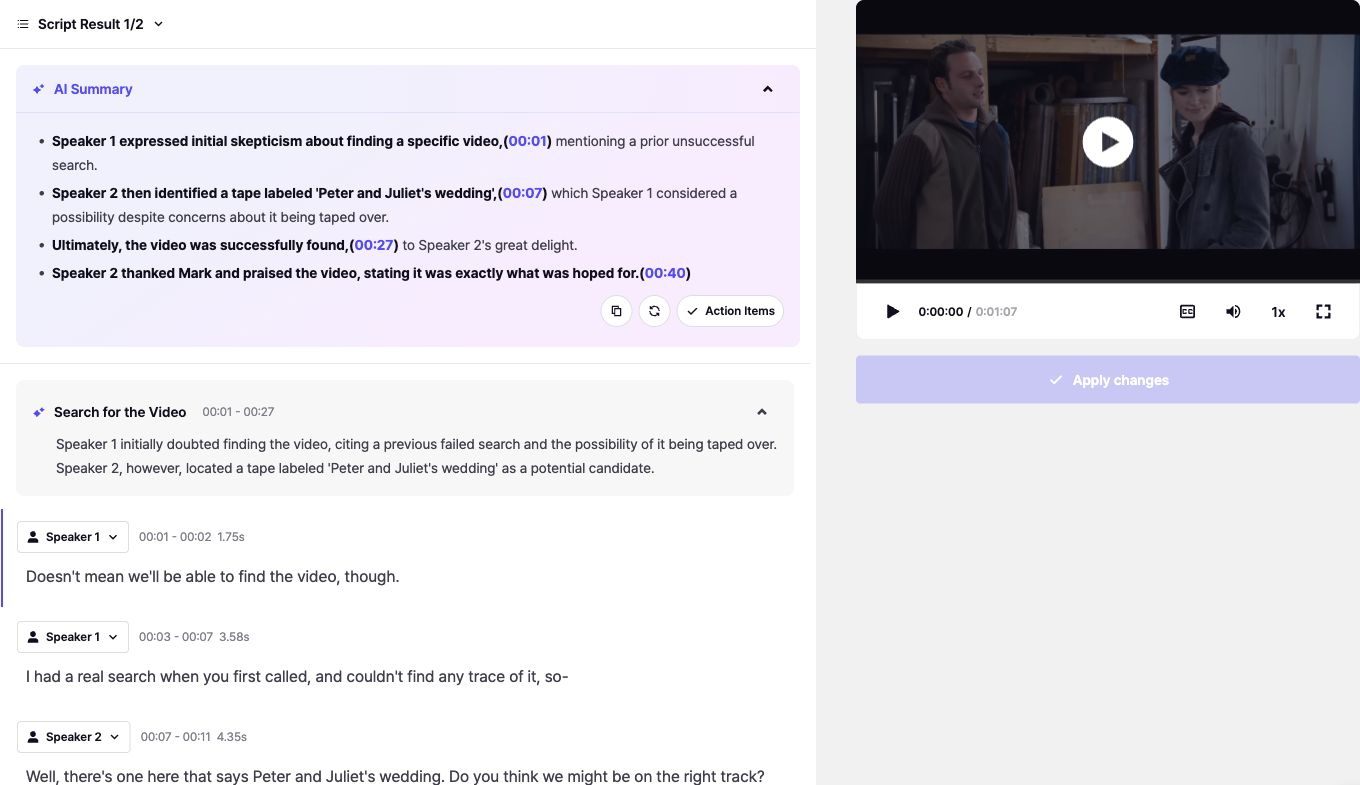
Perso AI Speech to Text is an AI-powered transcription tool that converts audio and video files into editable text in 99+ languages with automatic speaker detection. Edit transcripts, relabel speakers, and export as SRT, VTT, Excel, or JSON with word-level timestamps. All in one project.

Try Now

Try Now

Try Now

No installation needed · Free plan available · Start in seconds

The Best Audio Separation Tool

Export Formats SRT · VTT · XLSX · JSON

Export Formats SRT · VTT · XLSX · JSON

99+ Languages Auto-Detected

99+ Languages Auto-Detected

Word-Level Timestamps

Word-Level Timestamps

Auto Speaker Detection

Auto Speaker Detection

Fast Speed Ready in Minutes

Fast Speed Ready in Minutes

Fast · Secure · Accurate

Core Features

Core Features

Transcribe, Edit, Export in One Project

Transcribe, Edit, Export in One Project

Auto Language Detection: 99+ Languages

Upload any audio or video file. Perso AI auto-detects the spoken language across 99+ supported languages. No manual selection needed.

Speaker Diarization & Label Editing

Automatically separates speakers and labels each segment. Reassign any segment to a different detected speaker, and changes apply across all exported files.

Script & Subtitle Editing

Upload any audio or video file. Perso AI auto-detects the spoken language across 99+ supported languages. No manual selection needed.

Multi-Format Export

Upload any audio or video file. Perso AI auto-detects the spoken language across 99+ supported languages. No manual selection needed.

Connects Directly to Dubbing & Translation

Upload any audio or video file. Perso AI auto-detects the spoken language across 99+ supported languages. No manual selection needed.

Start Now

Start Now

Start Now

One Upload, Multiple Exports

Subtitles, scripts, or raw data with timestamps. Pick the format you need.

SRT

SRT Subtitles

Industry-standard subtitle format. Ready for YouTube, Vimeo, and all major video platforms.

VTT

WebVTT

Web-native subtitle format with styling support. Works with HTML5 video players and web embeds.

XLS

Excel Script

Full transcript with speaker labels in spreadsheet format. Use it for meeting minutes, documentation, or archival.

{ }

JSON Data

Structured data with word-level timestamps, speaker IDs, and confidence scores. Useful for API integration or custom workflows.

Subtitles, Meeting Notes, Lecture Scripts

Same tool, different outputs depending on what you need.

Content Creators

Turn vlogs, podcasts, and videos into publish-ready subtitles in minutes. Upload, edit, export — no manual transcription needed.

Auto-subtitles for YouTube, TikTok, Reels

Edit captions inline before export

99+ language support

SRT · VTT Export

Teams & Business

Transform meeting recordings into searchable, speaker-labeled notes. Works with any conferencing platform or voice recorder.

Auto speaker diarization

Structured Excel meeting minutes

Word-level timestamps for quoting

XLSX Export

XLSX Export

Educators

Transcribe lectures and course content with high accuracy. Generate subtitles for accessibility or study-ready scripts.

Long-lecture accuracy

Subtitle generation for LMS

Multi-language for global students

Accessibility Ready

Video Producers

Start with transcription, move into dubbing or translation without re-uploading. One upload covers the full localization pipeline.

Transcribe → Edit → Export in one flow

Connects to AI Dubbing & Translation

Audio separation included

Full Localization

Start Now

Start Now

Start Now

Why Choose Us

Why Choose Us

Perso AI vs. Manual Transcription

Time, cost, and output quality side by side.

What Matters

What Matters

What Matters

Perso AI Speech to Text

Perso AI Speech to Text

Perso AI Speech to Text

Manual Transcription

Manual Transcription

Manual Transcription

Turnaround Speed

Turnaround Speed

~2 minutes for 1 hour of audio · results ready in minutes, not hours

~2 minutes for 1 hour of audio · results ready in minutes, not hours

3–6 hours of work for 1 hour of audio · advance booking required

3–6 hours of work for 1 hour of audio · advance booking required

Language Coverage

Language Coverage

99+ languages · automatic detection · native-level accuracy

99+ languages · automatic detection · native-level accuracy

Limited to the transcriber's native language · mixed-language files need multiple people

Limited to the transcriber's native language · mixed-language files need multiple people

Speaker Diarization

Speaker Diarization

Auto-detects every speaker · reassign any segment to a different detected speaker · changes reflected in exported subtitles

Auto-detects every speaker · reassign any segment to a different detected speaker · changes reflected in exported subtitles

Manual tagging per segment · inconsistent across long recordings · re-tagging required if speakers are confused

Manual tagging per segment · inconsistent across long recordings · re-tagging required if speakers are confused

Dialogue Editing & Sync

Dialogue Editing & Sync

Edit transcribed dialogue inline · edits sync automatically to SRT · VTT · XLSX · JSON exports

Edit transcribed dialogue inline · edits sync automatically to SRT · VTT · XLSX · JSON exports

Edit transcript as plain text · re-align subtitle timing and re-export separately for every change

Edit transcript as plain text · re-align subtitle timing and re-export separately for every change

Timestamps

Timestamps

Word-level precision · millisecond accuracy · embedded in every export format

Word-level precision · millisecond accuracy · embedded in every export format

Manual segment alignment · prone to drift over long recordings

Manual segment alignment · prone to drift over long recordings

Subtitle Export

Subtitle Export

One-click export to SRT · VTT · XLSX · JSON — ready for YouTube, DaVinci, Premiere, or any LLM pipeline

One-click export to SRT · VTT · XLSX · JSON — ready for YouTube, DaVinci, Premiere, or any LLM pipeline

Requires a separate subtitling tool · timing has to be re-added manually

Requires a separate subtitling tool · timing has to be re-added manually

Accuracy

Accuracy

95%+ AI accuracy · refinable in built-in editor with word-level control

95%+ AI accuracy · refinable in built-in editor with word-level control

Varies 85–98% depending on the individual transcriber and audio quality

Varies 85–98% depending on the individual transcriber and audio quality

Start Now

Start Now

Start Now

Frequently asked questions

Frequently asked questions

What is Perso AI Speech to Text, and how does it differ from basic transcription tools?

Perso AI Speech to Text converts video and audio files into accurate, speaker-separated scripts in 99+ languages. Unlike basic transcription tools, it automatically detects every speaker, lets you reassign any segment to a different detected speaker, and exports editable SRT, VTT, XLSX, and JSON files for subtitling, archiving, or content workflows.

How does Perso AI charge for Speech to Text usage?

Perso AI deducts 1 credit per minute of media length for Speech to Text and Voice Separation — the same rate as AI Dubbing. Only Lip Dubbing uses 3× credits. There is no per-feature usage cap, so you can freely allocate credits across Speech to Text, Voice Separation, and Dubbing based on your workflow needs.

How does Perso AI charge for Speech to Text usage?

Is Perso AI Speech to Text available on the free plan?

Yes. Speech to Text is fully available on the Perso AI free plan within the included 1 minute of free credit. This lets you transcribe a short clip, verify speaker diarization accuracy, and test SRT or VTT export quality before upgrading to a paid plan for longer media.

Is Perso AI Speech to Text available on the free plan?

Does Speech to Text support Low Speed mode for higher accuracy?

No. Low Speed mode is not supported for Speech to Text or Voice Separation. It is only available for AI Dubbing and Lip Dubbing, where translation quality benefits from slower, more refined processing. Speech to Text runs on a fast, high-accuracy pipeline optimized for transcription rather than translation.

Does Speech to Text support Low Speed mode for higher accuracy?

Can I set a target language for Speech to Text output?

No. Speech to Text transcribes speech in the same language it is spoken — it is not a translation feature, so there is no target language setting. If you need to translate and re-voice your video into another language, use Perso AI Dubbing, which handles transcription, translation, and voice synthesis in one workflow.

Can I set a target language for Speech to Text output?

Which export formats does Perso AI Speech to Text support?

Perso AI Speech to Text exports four formats: SRT and VTT for subtitles and video players, XLSX for editorial review or translation workflows, and JSON for developer integrations and automation. Every format includes speaker labels, timestamps, and any edits you make in the web editor.

Which export formats does Perso AI Speech to Text support?

How many languages does Perso AI Speech to Text support?

Perso AI Speech to Text automatically detects and transcribes 99+ languages, including English, Korean, Japanese, Spanish, German, French, Portuguese, and Russian. Language detection is automatic, so you can upload multilingual content without pre-selecting a source language.

How many languages does Perso AI Speech to Text support?

Can I edit the transcribed text before exporting?

Yes. You can edit any transcribed line directly inside the Perso AI web editor, fix misrecognized words, and refine punctuation. Your edits sync automatically to SRT, VTT, XLSX, and JSON exports, so you never have to manually reconcile subtitle files after correction.

Can I edit the transcribed text before exporting?

Is Perso AI Speech to Text suitable for meetings, interviews, and YouTube videos?

Yes. Perso AI Speech to Text is optimized for multi-speaker media such as team meetings, podcast interviews, webinars, and long-form YouTube videos. Automatic speaker diarization, timestamp accuracy, and direct SRT/VTT export make it a drop-in replacement for manual transcription workflows in content and research teams.

Is Perso AI Speech to Text suitable for meetings, interviews, and YouTube videos?

Start Transcribing Your Videos with Perso AI

Convert video to text and create translated, lip-synced versions in just minutes

Try Perso AI for Free

Dashboard

Start Transcribing Your Videos with Perso AI

Convert video to text and create translated, lip-synced versions in just minutes

Try Perso AI for Free

Dashboard

Start Transcribing Your Videos with Perso AI

Convert video to text and create translated, lip-synced versions in just minutes

Try Perso AI for Free

Dashboard