What Is Video Localization? Process, Steps & Best Practices




Jump to section
Jump to section

Share
Share
Share
AI Video Translator, Localization, and Dubbing Tool
Try it out for Free
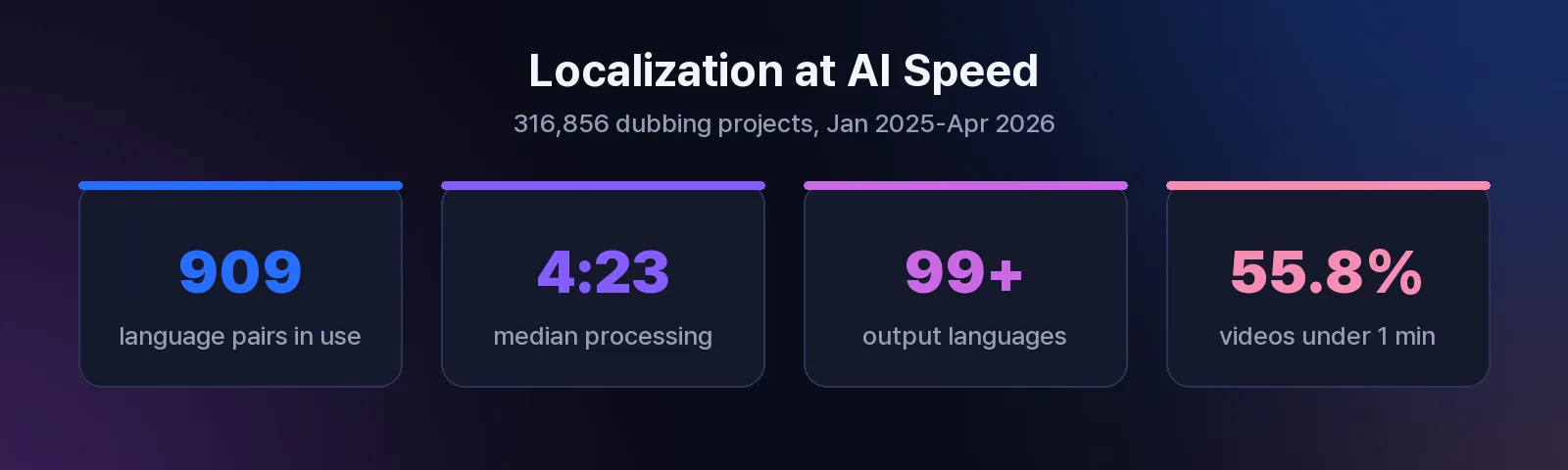
Video localization is the process of adapting a video for a new market — translating the speech, subtitles, and on-screen text, and adjusting cultural references so the content feels native rather than translated. It goes beyond word-for-word translation: tone, humor, units, and even pacing change with the audience. This guide walks through the full localization process step by step, compares the three delivery methods, and shows where AI collapses the cost. On Perso Dubbing, 909 language pairs are actively in use across 316,856 projects (Perso AI platform data, Jan 2025–Apr 2026) — the workflows below are drawn from what actually ships.
Localization vs. Translation: What the Difference Costs You
Translation converts words. Localization converts the experience. A translated tutorial might be accurate yet still feel foreign — the jokes land wrong, the currency is unfamiliar, the voice sounds like a stranger. Localization handles four layers at once:
Spoken audio — dubbed speech in the viewer's language, ideally in the original speaker's cloned voice
Text layers — subtitles, captions, titles, and on-screen graphics
Cultural adaptation — idioms, examples, units, dates, and references reworked for the market
Timing — languages expand and contract, so pacing and lip sync must be re-fitted
Skipping any layer is what makes localized video feel cheap. The market with the lowest tolerance for that gap is usually the one you most want to win.
The Video Localization Process in 6 Steps
A repeatable localization process looks the same whether you run one video or a thousand:
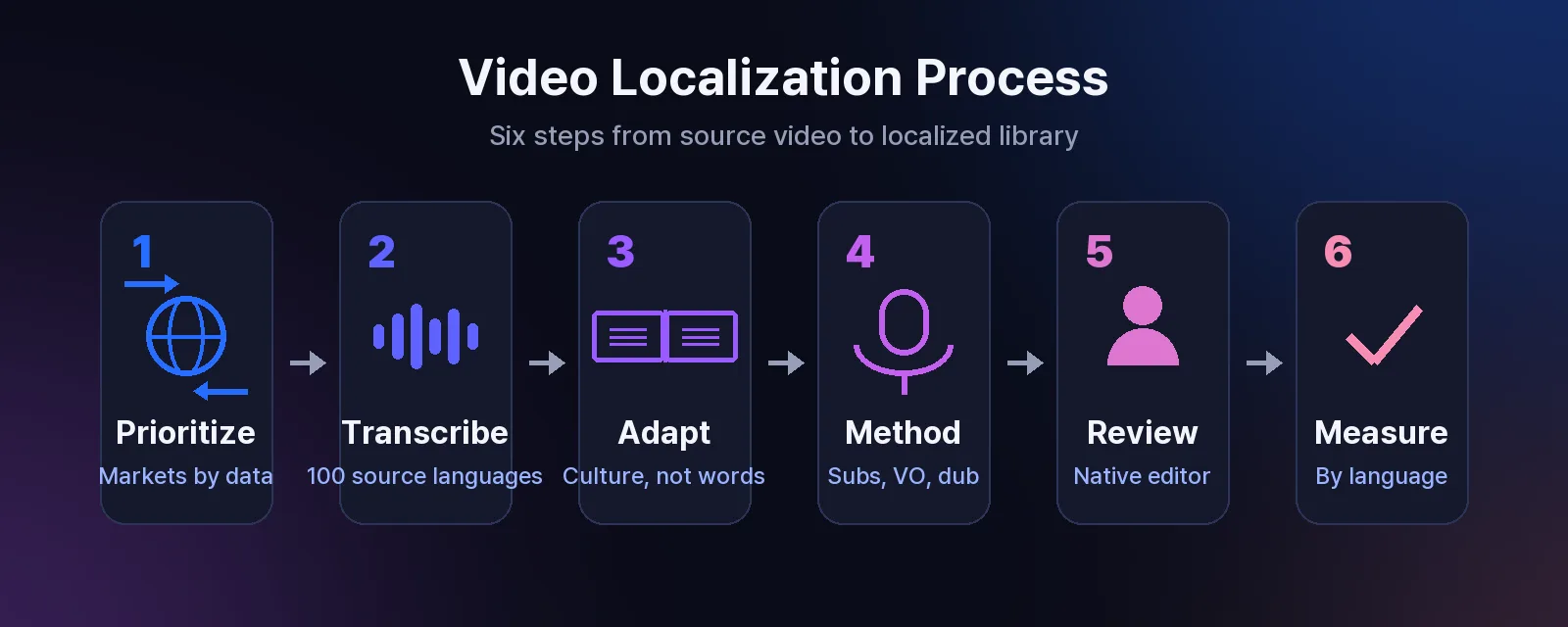
Prioritize markets by data, not population. Rank target languages by where your revenue and engaged viewers already come from — analytics beats intuition here. A smaller market that pays is worth more than a large one that doesn't.
Transcribe and time-code the source. Speech recognition covering 100 source languages turns the original audio into a time-coded script — the working document for everything downstream. If you need it as a standalone asset, export the video as a text script.
Translate and adapt the script. This is where cultural adaptation happens: idioms replaced, examples localized, phrasing shortened where the target language runs long. A custom glossary keeps product names and technical terms consistent.
Choose the delivery method. Subtitles, voice-over, or dubbing — the comparison below shows when each wins. For most creator and brand content, AI dubbing with voice cloning preserves the speaker's identity across languages.
Review with a native speaker. A built-in script editor lets reviewers fix terminology and timing per line before export — catching what machine review can't.
Measure and iterate. Track watch time and conversion by language. Double down where localized content performs; adjust voice or phrasing where it lags.
With AI handling steps 2–4, the median completed project finishes in 4 minutes 23 seconds, and 56.6% of completed projects finish in under 5 minutes (Perso AI platform data). The same pipeline through agencies and studios runs days to weeks per language.
Subtitles vs. Voice-over vs. Dubbing: Choosing a Method
Method | What the viewer gets | Best for |
|---|---|---|
Subtitles | Original audio + translated text | Social feeds, silent viewing, fastest and cheapest |
Voice-over | A new synthetic voice reads the translation | Screen recordings, internal training |
AI dubbing | Translated speech in the original speaker's cloned voice, lip-synced | YouTube, courses, marketing — where the speaker's identity carries the content |
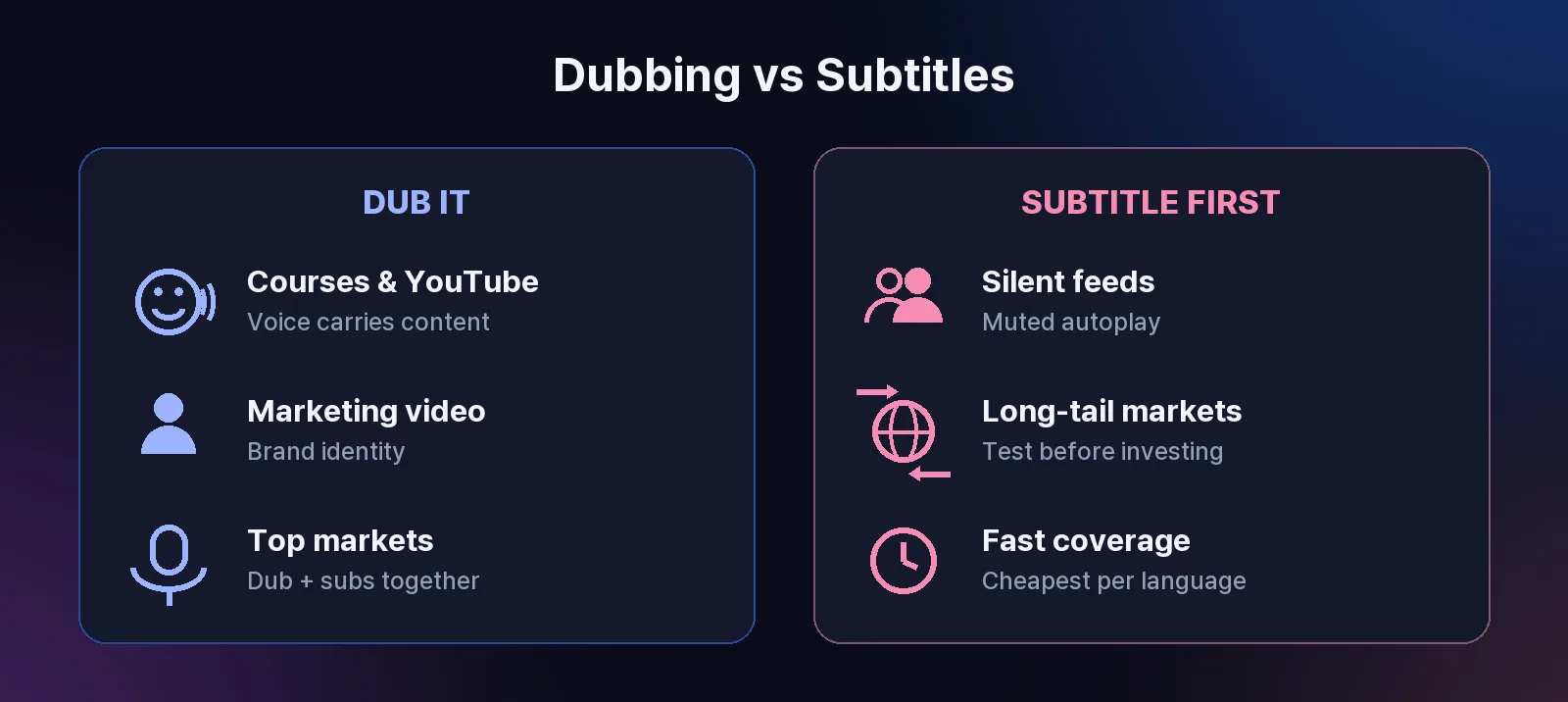
These aren't mutually exclusive. High-value markets often get dubbing plus subtitles; long-tail languages start with subtitles and graduate to dubbing once the data justifies it. For a deeper walkthrough of the audio side, see how to translate audio from a video step by step.
Best Practices That Separate Good Localization from Cheap Translation
Keep one master file. Localize after the final edit and generate every language variant from that single source — re-editing per language multiplies work and drift.
Build a glossary before you scale. Product names, industry terms, and phrases you never want translated, uploaded once as a custom dictionary and applied to every video and language.
Preserve the sound design. Audio source separation isolates the voice layer, so music beds and effects survive localization untouched.
Test one clip per language first. Verify the cloned voice, terminology, and emotional tone on a short representative clip before running a back catalog. Across the platform, 95.1% of dubbing projects complete successfully — clean source audio is the biggest factor you control.
Localize the metadata too. Titles, descriptions, and thumbnails in the target language are what make the localized video findable at all.
Teams running localization at library scale — course catalogs, training archives, episodic content — automate these rules through enterprise dubbing workflows rather than enforcing them by hand. Try the pipeline free on one of your videos to see how your voice carries into another language.
What Localization Costs — and What AI Changes
Traditional localization prices per language: translators, voice actors, studio time, and project management for each market you add. That cost structure is why most teams historically stopped at one or two languages. AI dubbing changes the economics — the marginal cost of an additional language drops to minutes of processing, which is why 99+ output languages can be realistic for a single creator, not just a studio. Short-form leads the shift: 55.8% of dubbed videos on the platform are under one minute, creators testing many markets cheaply before investing deeper.
Key Takeaways
Localization adapts the experience — audio, text, culture, timing — not just the words.
Run a 6-step process: prioritize by data, transcribe, adapt, choose a method, review natively, measure.
Choose subtitles for reach, dubbing for connection; combine them in your top markets.
One master file, one glossary, one test clip per language — then scale.
Frequently Asked Questions
What is video localization?
Video localization is adapting a video for another market: translating the spoken audio and on-screen text, and adjusting cultural references, units, and tone so the content feels made for that audience rather than translated after the fact.
What's the difference between video translation and video localization?
Translation converts the words; localization adapts the whole experience — voice, subtitles, graphics, cultural references, and timing. A video can be accurately translated and still feel foreign if it isn't localized.
What are the steps in the video localization process?
Six steps: prioritize target markets with data, transcribe and time-code the source, translate and culturally adapt the script, choose subtitles, voice-over, or dubbing, review with a native speaker, then measure performance by language and iterate.
How long does video localization take?
With AI dubbing, the median completed project finishes in 4 minutes 23 seconds, and 56.6% of completed projects finish in under 5 minutes (Perso AI platform data). Traditional agency workflows typically take days to weeks per language.
Should I use subtitles or dubbing?
Use subtitles for silent, feed-based viewing and fast, low-cost coverage. Use dubbing when the speaker's voice carries the content — courses, YouTube, marketing. Top markets often warrant both at once.
How do I decide which languages to localize first?
Rank languages by where your revenue and engaged watch time already come from, not by speaker population. Start with one or two markets that show real demand, verify performance, then expand.
How do I keep brand and technical terms consistent across languages?
Upload a custom glossary — approved translations for product names and industry terms. The localization engine applies it across every video and language, which matters most for tutorials and enterprise training.
Video localization is the process of adapting a video for a new market — translating the speech, subtitles, and on-screen text, and adjusting cultural references so the content feels native rather than translated. It goes beyond word-for-word translation: tone, humor, units, and even pacing change with the audience. This guide walks through the full localization process step by step, compares the three delivery methods, and shows where AI collapses the cost. On Perso Dubbing, 909 language pairs are actively in use across 316,856 projects (Perso AI platform data, Jan 2025–Apr 2026) — the workflows below are drawn from what actually ships.
Localization vs. Translation: What the Difference Costs You
Translation converts words. Localization converts the experience. A translated tutorial might be accurate yet still feel foreign — the jokes land wrong, the currency is unfamiliar, the voice sounds like a stranger. Localization handles four layers at once:
Spoken audio — dubbed speech in the viewer's language, ideally in the original speaker's cloned voice
Text layers — subtitles, captions, titles, and on-screen graphics
Cultural adaptation — idioms, examples, units, dates, and references reworked for the market
Timing — languages expand and contract, so pacing and lip sync must be re-fitted
Skipping any layer is what makes localized video feel cheap. The market with the lowest tolerance for that gap is usually the one you most want to win.
The Video Localization Process in 6 Steps
A repeatable localization process looks the same whether you run one video or a thousand:
Prioritize markets by data, not population. Rank target languages by where your revenue and engaged viewers already come from — analytics beats intuition here. A smaller market that pays is worth more than a large one that doesn't.
Transcribe and time-code the source. Speech recognition covering 100 source languages turns the original audio into a time-coded script — the working document for everything downstream. If you need it as a standalone asset, export the video as a text script.
Translate and adapt the script. This is where cultural adaptation happens: idioms replaced, examples localized, phrasing shortened where the target language runs long. A custom glossary keeps product names and technical terms consistent.
Choose the delivery method. Subtitles, voice-over, or dubbing — the comparison below shows when each wins. For most creator and brand content, AI dubbing with voice cloning preserves the speaker's identity across languages.
Review with a native speaker. A built-in script editor lets reviewers fix terminology and timing per line before export — catching what machine review can't.
Measure and iterate. Track watch time and conversion by language. Double down where localized content performs; adjust voice or phrasing where it lags.
With AI handling steps 2–4, the median completed project finishes in 4 minutes 23 seconds, and 56.6% of completed projects finish in under 5 minutes (Perso AI platform data). The same pipeline through agencies and studios runs days to weeks per language.
Subtitles vs. Voice-over vs. Dubbing: Choosing a Method
Method | What the viewer gets | Best for |
|---|---|---|
Subtitles | Original audio + translated text | Social feeds, silent viewing, fastest and cheapest |
Voice-over | A new synthetic voice reads the translation | Screen recordings, internal training |
AI dubbing | Translated speech in the original speaker's cloned voice, lip-synced | YouTube, courses, marketing — where the speaker's identity carries the content |
These aren't mutually exclusive. High-value markets often get dubbing plus subtitles; long-tail languages start with subtitles and graduate to dubbing once the data justifies it. For a deeper walkthrough of the audio side, see how to translate audio from a video step by step.
Best Practices That Separate Good Localization from Cheap Translation
Keep one master file. Localize after the final edit and generate every language variant from that single source — re-editing per language multiplies work and drift.
Build a glossary before you scale. Product names, industry terms, and phrases you never want translated, uploaded once as a custom dictionary and applied to every video and language.
Preserve the sound design. Audio source separation isolates the voice layer, so music beds and effects survive localization untouched.
Test one clip per language first. Verify the cloned voice, terminology, and emotional tone on a short representative clip before running a back catalog. Across the platform, 95.1% of dubbing projects complete successfully — clean source audio is the biggest factor you control.
Localize the metadata too. Titles, descriptions, and thumbnails in the target language are what make the localized video findable at all.
Teams running localization at library scale — course catalogs, training archives, episodic content — automate these rules through enterprise dubbing workflows rather than enforcing them by hand. Try the pipeline free on one of your videos to see how your voice carries into another language.
What Localization Costs — and What AI Changes
Traditional localization prices per language: translators, voice actors, studio time, and project management for each market you add. That cost structure is why most teams historically stopped at one or two languages. AI dubbing changes the economics — the marginal cost of an additional language drops to minutes of processing, which is why 99+ output languages can be realistic for a single creator, not just a studio. Short-form leads the shift: 55.8% of dubbed videos on the platform are under one minute, creators testing many markets cheaply before investing deeper.
Key Takeaways
Localization adapts the experience — audio, text, culture, timing — not just the words.
Run a 6-step process: prioritize by data, transcribe, adapt, choose a method, review natively, measure.
Choose subtitles for reach, dubbing for connection; combine them in your top markets.
One master file, one glossary, one test clip per language — then scale.
Frequently Asked Questions
What is video localization?
Video localization is adapting a video for another market: translating the spoken audio and on-screen text, and adjusting cultural references, units, and tone so the content feels made for that audience rather than translated after the fact.
What's the difference between video translation and video localization?
Translation converts the words; localization adapts the whole experience — voice, subtitles, graphics, cultural references, and timing. A video can be accurately translated and still feel foreign if it isn't localized.
What are the steps in the video localization process?
Six steps: prioritize target markets with data, transcribe and time-code the source, translate and culturally adapt the script, choose subtitles, voice-over, or dubbing, review with a native speaker, then measure performance by language and iterate.
How long does video localization take?
With AI dubbing, the median completed project finishes in 4 minutes 23 seconds, and 56.6% of completed projects finish in under 5 minutes (Perso AI platform data). Traditional agency workflows typically take days to weeks per language.
Should I use subtitles or dubbing?
Use subtitles for silent, feed-based viewing and fast, low-cost coverage. Use dubbing when the speaker's voice carries the content — courses, YouTube, marketing. Top markets often warrant both at once.
How do I decide which languages to localize first?
Rank languages by where your revenue and engaged watch time already come from, not by speaker population. Start with one or two markets that show real demand, verify performance, then expand.
How do I keep brand and technical terms consistent across languages?
Upload a custom glossary — approved translations for product names and industry terms. The localization engine applies it across every video and language, which matters most for tutorials and enterprise training.
Video localization is the process of adapting a video for a new market — translating the speech, subtitles, and on-screen text, and adjusting cultural references so the content feels native rather than translated. It goes beyond word-for-word translation: tone, humor, units, and even pacing change with the audience. This guide walks through the full localization process step by step, compares the three delivery methods, and shows where AI collapses the cost. On Perso Dubbing, 909 language pairs are actively in use across 316,856 projects (Perso AI platform data, Jan 2025–Apr 2026) — the workflows below are drawn from what actually ships.
Localization vs. Translation: What the Difference Costs You
Translation converts words. Localization converts the experience. A translated tutorial might be accurate yet still feel foreign — the jokes land wrong, the currency is unfamiliar, the voice sounds like a stranger. Localization handles four layers at once:
Spoken audio — dubbed speech in the viewer's language, ideally in the original speaker's cloned voice
Text layers — subtitles, captions, titles, and on-screen graphics
Cultural adaptation — idioms, examples, units, dates, and references reworked for the market
Timing — languages expand and contract, so pacing and lip sync must be re-fitted
Skipping any layer is what makes localized video feel cheap. The market with the lowest tolerance for that gap is usually the one you most want to win.
The Video Localization Process in 6 Steps
A repeatable localization process looks the same whether you run one video or a thousand:
Prioritize markets by data, not population. Rank target languages by where your revenue and engaged viewers already come from — analytics beats intuition here. A smaller market that pays is worth more than a large one that doesn't.
Transcribe and time-code the source. Speech recognition covering 100 source languages turns the original audio into a time-coded script — the working document for everything downstream. If you need it as a standalone asset, export the video as a text script.
Translate and adapt the script. This is where cultural adaptation happens: idioms replaced, examples localized, phrasing shortened where the target language runs long. A custom glossary keeps product names and technical terms consistent.
Choose the delivery method. Subtitles, voice-over, or dubbing — the comparison below shows when each wins. For most creator and brand content, AI dubbing with voice cloning preserves the speaker's identity across languages.
Review with a native speaker. A built-in script editor lets reviewers fix terminology and timing per line before export — catching what machine review can't.
Measure and iterate. Track watch time and conversion by language. Double down where localized content performs; adjust voice or phrasing where it lags.
With AI handling steps 2–4, the median completed project finishes in 4 minutes 23 seconds, and 56.6% of completed projects finish in under 5 minutes (Perso AI platform data). The same pipeline through agencies and studios runs days to weeks per language.
Subtitles vs. Voice-over vs. Dubbing: Choosing a Method
Method | What the viewer gets | Best for |
|---|---|---|
Subtitles | Original audio + translated text | Social feeds, silent viewing, fastest and cheapest |
Voice-over | A new synthetic voice reads the translation | Screen recordings, internal training |
AI dubbing | Translated speech in the original speaker's cloned voice, lip-synced | YouTube, courses, marketing — where the speaker's identity carries the content |
These aren't mutually exclusive. High-value markets often get dubbing plus subtitles; long-tail languages start with subtitles and graduate to dubbing once the data justifies it. For a deeper walkthrough of the audio side, see how to translate audio from a video step by step.
Best Practices That Separate Good Localization from Cheap Translation
Keep one master file. Localize after the final edit and generate every language variant from that single source — re-editing per language multiplies work and drift.
Build a glossary before you scale. Product names, industry terms, and phrases you never want translated, uploaded once as a custom dictionary and applied to every video and language.
Preserve the sound design. Audio source separation isolates the voice layer, so music beds and effects survive localization untouched.
Test one clip per language first. Verify the cloned voice, terminology, and emotional tone on a short representative clip before running a back catalog. Across the platform, 95.1% of dubbing projects complete successfully — clean source audio is the biggest factor you control.
Localize the metadata too. Titles, descriptions, and thumbnails in the target language are what make the localized video findable at all.
Teams running localization at library scale — course catalogs, training archives, episodic content — automate these rules through enterprise dubbing workflows rather than enforcing them by hand. Try the pipeline free on one of your videos to see how your voice carries into another language.
What Localization Costs — and What AI Changes
Traditional localization prices per language: translators, voice actors, studio time, and project management for each market you add. That cost structure is why most teams historically stopped at one or two languages. AI dubbing changes the economics — the marginal cost of an additional language drops to minutes of processing, which is why 99+ output languages can be realistic for a single creator, not just a studio. Short-form leads the shift: 55.8% of dubbed videos on the platform are under one minute, creators testing many markets cheaply before investing deeper.
Key Takeaways
Localization adapts the experience — audio, text, culture, timing — not just the words.
Run a 6-step process: prioritize by data, transcribe, adapt, choose a method, review natively, measure.
Choose subtitles for reach, dubbing for connection; combine them in your top markets.
One master file, one glossary, one test clip per language — then scale.
Frequently Asked Questions
What is video localization?
Video localization is adapting a video for another market: translating the spoken audio and on-screen text, and adjusting cultural references, units, and tone so the content feels made for that audience rather than translated after the fact.
What's the difference between video translation and video localization?
Translation converts the words; localization adapts the whole experience — voice, subtitles, graphics, cultural references, and timing. A video can be accurately translated and still feel foreign if it isn't localized.
What are the steps in the video localization process?
Six steps: prioritize target markets with data, transcribe and time-code the source, translate and culturally adapt the script, choose subtitles, voice-over, or dubbing, review with a native speaker, then measure performance by language and iterate.
How long does video localization take?
With AI dubbing, the median completed project finishes in 4 minutes 23 seconds, and 56.6% of completed projects finish in under 5 minutes (Perso AI platform data). Traditional agency workflows typically take days to weeks per language.
Should I use subtitles or dubbing?
Use subtitles for silent, feed-based viewing and fast, low-cost coverage. Use dubbing when the speaker's voice carries the content — courses, YouTube, marketing. Top markets often warrant both at once.
How do I decide which languages to localize first?
Rank languages by where your revenue and engaged watch time already come from, not by speaker population. Start with one or two markets that show real demand, verify performance, then expand.
How do I keep brand and technical terms consistent across languages?
Upload a custom glossary — approved translations for product names and industry terms. The localization engine applies it across every video and language, which matters most for tutorials and enterprise training.
Continue Reading
Browse All