AI Lip Sync: When You Need It & Why It Matters in 2026
Last Updated




Jump to section
Jump to section

Share
Share
Share
AI Video Translator, Localization, and Dubbing Tool
Try it out for Free
Your marketing team just finished recording a product announcement. The CEO delivered it on camera. The tone feels confident. The pacing is natural.
Now you need versions in Spanish, German, and Japanese for global release next week.
You run the video through a dubbing tool. The translation is accurate. The new voice sounds clear. But something feels off. The speaker’s mouth movements do not match the words.
This is where AI Lip Sync becomes critical. Most of the marketers, creators, and product teams use an AI video translator with AI lip sync to scale content into multiple languages without rebuilding every video from scratch.
AI Lip Sync aligns translated voice audio with the speaker’s mouth movements so the video looks natural in the target language. We’ll break down when lip sync is worth it, when it isn’t, and how to build a reliable localization workflow without over-editing every video.
The Simple Reason Viewers Notice Lip Sync
Most viewers will forgive small subtitle timing issues. They rarely forgive a face that clearly doesn’t match the words.
AI Lip sync matters because it reduces the “something feels off” reaction that happens when audio and mouth movement don’t align. That reaction is stronger in:
Talking-head videos
Close-up interviews
Founder-led announcements
Testimonial content
UGC-style ads
If your content relies on trust, clarity, or personality, AI lip sync is often the difference between “this feels local” and “this feels dubbed.”
When AI Lip Sync Is a Must?
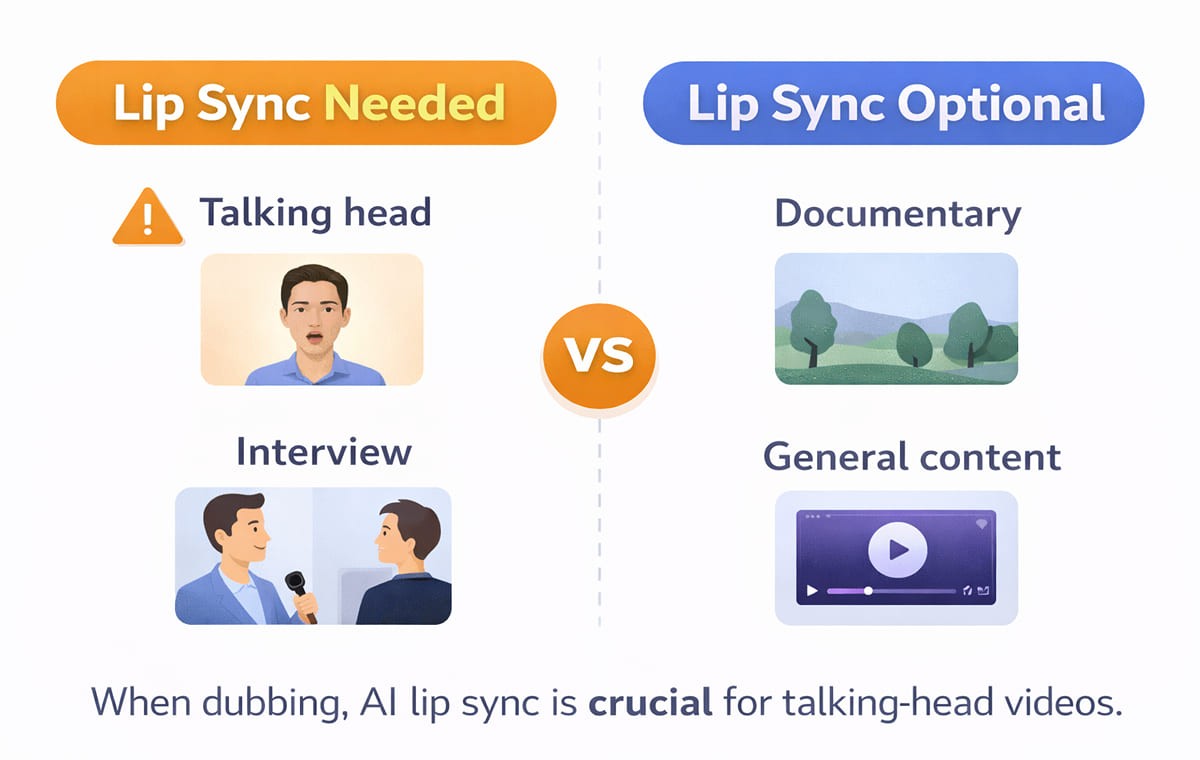
If you’re choosing where to spend effort, start here. Lip sync is worth prioritizing when your video has one or more of these traits.
On-Camera Speaking Is the Main Format
If the speaker’s face is on screen for long stretches, mismatches are obvious. This is the most common “must-have” scenario for AI lip sync.
Your Brand Voice Is Tied to a Real Person
When the speaker is the brand CEO, creator, trainer, or spokesperson, lip sync supports credibility. This pairs naturally with Voice Cloning when you want consistent delivery across languages.
You’re Running Performance Creative
For video ads, small trust signals matter. When the voice doesn’t match the mouth, viewers can scroll faster. For campaigns, use-case workflows often prioritize realism over “good enough.”
You Have Multiple Speakers
Panels and interviews are harder than single narration. If your tool can handle multiple speakers, lip sync helps each person feel consistent after the language swap.
When Can You Skip Lip Sync Without Regret?
You don’t need AI lip sync for every project. In these formats, it may be optional.
Screen Recordings and Product Demos
If the speaker is mostly off-camera and the content is UI-focused, your quality drivers are clarity, terminology, and pacing. Lip sync is still a bonus, but not always essential.
Slides, Animations, or Voiceover-Heavy Content
If there’s no visible mouth movement, lip sync has nothing to correct. In these cases, a clean Video Translation workflow and script editing matter more.
Internal-First Content with Low Visual Scrutiny
Some internal updates can prioritize speed and coverage first. You can still upgrade later for external-facing versions.
What Makes AI Lip Sync Feel Natural?
Lip sync quality isn’t only about the mouth. “Natural” usually comes from a combination of timing, voice realism, and script fit.
Timing That Matches the Language
Different languages expand or compress meaning. Good tools help align pacing so the dubbed voice doesn’t feel rushed or stretched.
Script That Reads Like a Native Speaker
If the translation is literal, it can sound unnatural even with perfect sync. This is why a Subtitle & Script Editor matters before final export.
Voice Quality That Fits the Speaker
If the voice sounds wrong for the person on screen, viewers notice instantly. That’s where Voice Cloning or well-matched voices can help keep the delivery believable.
A Quick Decision Table
Use this table as a simple “do we need it” filter.
Video Type | Do You Need AI Lip Sync | Why It Matters |
Talking head, interviews, testimonials | Usually yes | Mouth mismatch is immediately visible |
UGC-style video ads | Often yes | Trust and authenticity drive performance |
Webinars and panels | Often yes | Multiple speakers amplify mismatch risk |
Product demos (mostly screen) | Sometimes | Clarity and script fit matter more |
Animations and slides | No | No visible mouth movement to sync |
What To Check Before You Publish Dubbed Videos?
If you’re dubbing into another language, these checks prevent most “obviously dubbed” outcomes.
Check Lip Sync on Close-Ups First
Don’t judge on wide shots. Review the moments where the speaker fills the frame.
Confirm The Script Matches What the Mouth Can “Sell”
Some phrases look awkward on the mouth in certain languages. Small script edits can make the visual feel more natural.
Watch For Pronunciation and Brand Terms
If you use product names, acronyms, or branded phrases, use a workflow that supports consistent handling. Many teams combine a glossary with script review before export.
Validate The Workflow on Your Real Distribution Formats
Test the dubbed export on your actual channels. Ads, YouTube, and landing pages can expose issues differently.
Where AI Lip Sync Fits in A Modern Dubbing Workflow
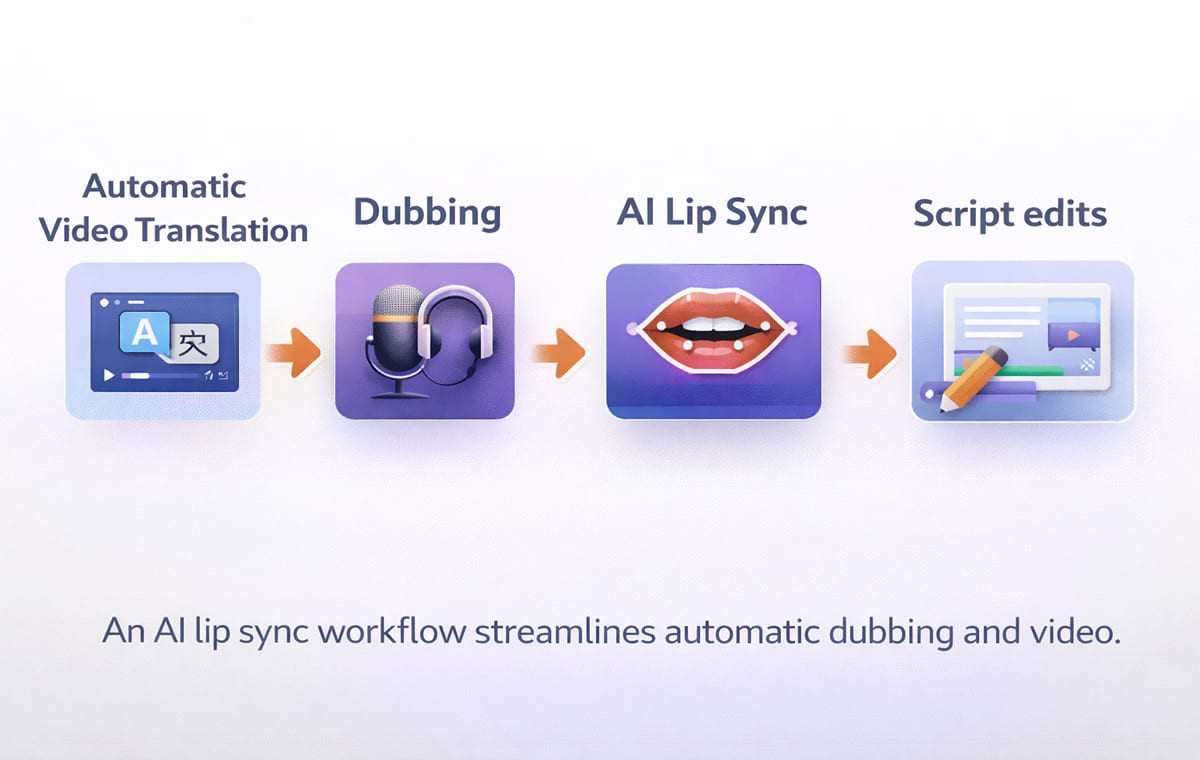
Most teams treat AI lip sync as one part of a bigger system:
Transcribe the video
Translate the script
Generate dubbed voice audio
Apply lip sync
Edit lines that don’t feel native
Export and publish
If you’re trying to scale Automatic Dubbing across multiple videos per week, the goal is repeatability. A platform that combines dubbing, translation, and editing in one workflow reduces back-and-forth.
Frequently Asked Questions
1. Does AI lip sync matter for every language?
Not always. It matters most when the speaker’s face is visible and the audience expects natural delivery. For voiceover-only content, it’s less relevant.
2. Can I use AI lip sync without voice cloning?
Yes. Lip sync aligns visuals with the audio. Voice Cloning is about preserving the speaker’s identity or tone across languages.
3. What’s the difference between subtitles and AI lip sync?
Subtitles help people read. AI lip sync helps people believe the dubbed voice belongs to the on-screen speaker. Many teams use both depending on the channel.
4. Is AI lip sync mainly for creators or businesses?
Both. YouTube creators use automatic dubbing for AI video translation to grow global audiences. Businesses use it to localize ads, training, and product marketing without rebuilding content.
5. How do I decide if a video translator is good enough?
Test one real video, not a demo. Review close-ups, check script editing control, and confirm your terminology stays consistent across exports.
Conclusion
AI Lip Sync is important when your content depends on on-camera trust, talking heads, testimonials, creator videos, and advertisement creative. When you have a mostly screen-based or animated format, however, you can usually work on the quality of script and the clarity of the dub first, and then work on lip sync when the visuals require it.
For U.S.-first teams scaling globally, the best approach is simple: apply Perso Dubbing lip sync where the viewer can see the mouth and where credibility affects outcomes, and keep your Dubbing, Video Translator, and Automatic Dubbing workflow consistent with repeatable checks before publishing.
Your marketing team just finished recording a product announcement. The CEO delivered it on camera. The tone feels confident. The pacing is natural.
Now you need versions in Spanish, German, and Japanese for global release next week.
You run the video through a dubbing tool. The translation is accurate. The new voice sounds clear. But something feels off. The speaker’s mouth movements do not match the words.
This is where AI Lip Sync becomes critical. Most of the marketers, creators, and product teams use an AI video translator with AI lip sync to scale content into multiple languages without rebuilding every video from scratch.
AI Lip Sync aligns translated voice audio with the speaker’s mouth movements so the video looks natural in the target language. We’ll break down when lip sync is worth it, when it isn’t, and how to build a reliable localization workflow without over-editing every video.
The Simple Reason Viewers Notice Lip Sync
Most viewers will forgive small subtitle timing issues. They rarely forgive a face that clearly doesn’t match the words.
AI Lip sync matters because it reduces the “something feels off” reaction that happens when audio and mouth movement don’t align. That reaction is stronger in:
Talking-head videos
Close-up interviews
Founder-led announcements
Testimonial content
UGC-style ads
If your content relies on trust, clarity, or personality, AI lip sync is often the difference between “this feels local” and “this feels dubbed.”
When AI Lip Sync Is a Must?
If you’re choosing where to spend effort, start here. Lip sync is worth prioritizing when your video has one or more of these traits.
On-Camera Speaking Is the Main Format
If the speaker’s face is on screen for long stretches, mismatches are obvious. This is the most common “must-have” scenario for AI lip sync.
Your Brand Voice Is Tied to a Real Person
When the speaker is the brand CEO, creator, trainer, or spokesperson, lip sync supports credibility. This pairs naturally with Voice Cloning when you want consistent delivery across languages.
You’re Running Performance Creative
For video ads, small trust signals matter. When the voice doesn’t match the mouth, viewers can scroll faster. For campaigns, use-case workflows often prioritize realism over “good enough.”
You Have Multiple Speakers
Panels and interviews are harder than single narration. If your tool can handle multiple speakers, lip sync helps each person feel consistent after the language swap.
When Can You Skip Lip Sync Without Regret?
You don’t need AI lip sync for every project. In these formats, it may be optional.
Screen Recordings and Product Demos
If the speaker is mostly off-camera and the content is UI-focused, your quality drivers are clarity, terminology, and pacing. Lip sync is still a bonus, but not always essential.
Slides, Animations, or Voiceover-Heavy Content
If there’s no visible mouth movement, lip sync has nothing to correct. In these cases, a clean Video Translation workflow and script editing matter more.
Internal-First Content with Low Visual Scrutiny
Some internal updates can prioritize speed and coverage first. You can still upgrade later for external-facing versions.
What Makes AI Lip Sync Feel Natural?
Lip sync quality isn’t only about the mouth. “Natural” usually comes from a combination of timing, voice realism, and script fit.
Timing That Matches the Language
Different languages expand or compress meaning. Good tools help align pacing so the dubbed voice doesn’t feel rushed or stretched.
Script That Reads Like a Native Speaker
If the translation is literal, it can sound unnatural even with perfect sync. This is why a Subtitle & Script Editor matters before final export.
Voice Quality That Fits the Speaker
If the voice sounds wrong for the person on screen, viewers notice instantly. That’s where Voice Cloning or well-matched voices can help keep the delivery believable.
A Quick Decision Table
Use this table as a simple “do we need it” filter.
Video Type | Do You Need AI Lip Sync | Why It Matters |
Talking head, interviews, testimonials | Usually yes | Mouth mismatch is immediately visible |
UGC-style video ads | Often yes | Trust and authenticity drive performance |
Webinars and panels | Often yes | Multiple speakers amplify mismatch risk |
Product demos (mostly screen) | Sometimes | Clarity and script fit matter more |
Animations and slides | No | No visible mouth movement to sync |
What To Check Before You Publish Dubbed Videos?
If you’re dubbing into another language, these checks prevent most “obviously dubbed” outcomes.
Check Lip Sync on Close-Ups First
Don’t judge on wide shots. Review the moments where the speaker fills the frame.
Confirm The Script Matches What the Mouth Can “Sell”
Some phrases look awkward on the mouth in certain languages. Small script edits can make the visual feel more natural.
Watch For Pronunciation and Brand Terms
If you use product names, acronyms, or branded phrases, use a workflow that supports consistent handling. Many teams combine a glossary with script review before export.
Validate The Workflow on Your Real Distribution Formats
Test the dubbed export on your actual channels. Ads, YouTube, and landing pages can expose issues differently.
Where AI Lip Sync Fits in A Modern Dubbing Workflow
Most teams treat AI lip sync as one part of a bigger system:
Transcribe the video
Translate the script
Generate dubbed voice audio
Apply lip sync
Edit lines that don’t feel native
Export and publish
If you’re trying to scale Automatic Dubbing across multiple videos per week, the goal is repeatability. A platform that combines dubbing, translation, and editing in one workflow reduces back-and-forth.
Frequently Asked Questions
1. Does AI lip sync matter for every language?
Not always. It matters most when the speaker’s face is visible and the audience expects natural delivery. For voiceover-only content, it’s less relevant.
2. Can I use AI lip sync without voice cloning?
Yes. Lip sync aligns visuals with the audio. Voice Cloning is about preserving the speaker’s identity or tone across languages.
3. What’s the difference between subtitles and AI lip sync?
Subtitles help people read. AI lip sync helps people believe the dubbed voice belongs to the on-screen speaker. Many teams use both depending on the channel.
4. Is AI lip sync mainly for creators or businesses?
Both. YouTube creators use automatic dubbing for AI video translation to grow global audiences. Businesses use it to localize ads, training, and product marketing without rebuilding content.
5. How do I decide if a video translator is good enough?
Test one real video, not a demo. Review close-ups, check script editing control, and confirm your terminology stays consistent across exports.
Conclusion
AI Lip Sync is important when your content depends on on-camera trust, talking heads, testimonials, creator videos, and advertisement creative. When you have a mostly screen-based or animated format, however, you can usually work on the quality of script and the clarity of the dub first, and then work on lip sync when the visuals require it.
For U.S.-first teams scaling globally, the best approach is simple: apply Perso Dubbing lip sync where the viewer can see the mouth and where credibility affects outcomes, and keep your Dubbing, Video Translator, and Automatic Dubbing workflow consistent with repeatable checks before publishing.
Your marketing team just finished recording a product announcement. The CEO delivered it on camera. The tone feels confident. The pacing is natural.
Now you need versions in Spanish, German, and Japanese for global release next week.
You run the video through a dubbing tool. The translation is accurate. The new voice sounds clear. But something feels off. The speaker’s mouth movements do not match the words.
This is where AI Lip Sync becomes critical. Most of the marketers, creators, and product teams use an AI video translator with AI lip sync to scale content into multiple languages without rebuilding every video from scratch.
AI Lip Sync aligns translated voice audio with the speaker’s mouth movements so the video looks natural in the target language. We’ll break down when lip sync is worth it, when it isn’t, and how to build a reliable localization workflow without over-editing every video.
The Simple Reason Viewers Notice Lip Sync
Most viewers will forgive small subtitle timing issues. They rarely forgive a face that clearly doesn’t match the words.
AI Lip sync matters because it reduces the “something feels off” reaction that happens when audio and mouth movement don’t align. That reaction is stronger in:
Talking-head videos
Close-up interviews
Founder-led announcements
Testimonial content
UGC-style ads
If your content relies on trust, clarity, or personality, AI lip sync is often the difference between “this feels local” and “this feels dubbed.”
When AI Lip Sync Is a Must?
If you’re choosing where to spend effort, start here. Lip sync is worth prioritizing when your video has one or more of these traits.
On-Camera Speaking Is the Main Format
If the speaker’s face is on screen for long stretches, mismatches are obvious. This is the most common “must-have” scenario for AI lip sync.
Your Brand Voice Is Tied to a Real Person
When the speaker is the brand CEO, creator, trainer, or spokesperson, lip sync supports credibility. This pairs naturally with Voice Cloning when you want consistent delivery across languages.
You’re Running Performance Creative
For video ads, small trust signals matter. When the voice doesn’t match the mouth, viewers can scroll faster. For campaigns, use-case workflows often prioritize realism over “good enough.”
You Have Multiple Speakers
Panels and interviews are harder than single narration. If your tool can handle multiple speakers, lip sync helps each person feel consistent after the language swap.
When Can You Skip Lip Sync Without Regret?
You don’t need AI lip sync for every project. In these formats, it may be optional.
Screen Recordings and Product Demos
If the speaker is mostly off-camera and the content is UI-focused, your quality drivers are clarity, terminology, and pacing. Lip sync is still a bonus, but not always essential.
Slides, Animations, or Voiceover-Heavy Content
If there’s no visible mouth movement, lip sync has nothing to correct. In these cases, a clean Video Translation workflow and script editing matter more.
Internal-First Content with Low Visual Scrutiny
Some internal updates can prioritize speed and coverage first. You can still upgrade later for external-facing versions.
What Makes AI Lip Sync Feel Natural?
Lip sync quality isn’t only about the mouth. “Natural” usually comes from a combination of timing, voice realism, and script fit.
Timing That Matches the Language
Different languages expand or compress meaning. Good tools help align pacing so the dubbed voice doesn’t feel rushed or stretched.
Script That Reads Like a Native Speaker
If the translation is literal, it can sound unnatural even with perfect sync. This is why a Subtitle & Script Editor matters before final export.
Voice Quality That Fits the Speaker
If the voice sounds wrong for the person on screen, viewers notice instantly. That’s where Voice Cloning or well-matched voices can help keep the delivery believable.
A Quick Decision Table
Use this table as a simple “do we need it” filter.
Video Type | Do You Need AI Lip Sync | Why It Matters |
Talking head, interviews, testimonials | Usually yes | Mouth mismatch is immediately visible |
UGC-style video ads | Often yes | Trust and authenticity drive performance |
Webinars and panels | Often yes | Multiple speakers amplify mismatch risk |
Product demos (mostly screen) | Sometimes | Clarity and script fit matter more |
Animations and slides | No | No visible mouth movement to sync |
What To Check Before You Publish Dubbed Videos?
If you’re dubbing into another language, these checks prevent most “obviously dubbed” outcomes.
Check Lip Sync on Close-Ups First
Don’t judge on wide shots. Review the moments where the speaker fills the frame.
Confirm The Script Matches What the Mouth Can “Sell”
Some phrases look awkward on the mouth in certain languages. Small script edits can make the visual feel more natural.
Watch For Pronunciation and Brand Terms
If you use product names, acronyms, or branded phrases, use a workflow that supports consistent handling. Many teams combine a glossary with script review before export.
Validate The Workflow on Your Real Distribution Formats
Test the dubbed export on your actual channels. Ads, YouTube, and landing pages can expose issues differently.
Where AI Lip Sync Fits in A Modern Dubbing Workflow
Most teams treat AI lip sync as one part of a bigger system:
Transcribe the video
Translate the script
Generate dubbed voice audio
Apply lip sync
Edit lines that don’t feel native
Export and publish
If you’re trying to scale Automatic Dubbing across multiple videos per week, the goal is repeatability. A platform that combines dubbing, translation, and editing in one workflow reduces back-and-forth.
Frequently Asked Questions
1. Does AI lip sync matter for every language?
Not always. It matters most when the speaker’s face is visible and the audience expects natural delivery. For voiceover-only content, it’s less relevant.
2. Can I use AI lip sync without voice cloning?
Yes. Lip sync aligns visuals with the audio. Voice Cloning is about preserving the speaker’s identity or tone across languages.
3. What’s the difference between subtitles and AI lip sync?
Subtitles help people read. AI lip sync helps people believe the dubbed voice belongs to the on-screen speaker. Many teams use both depending on the channel.
4. Is AI lip sync mainly for creators or businesses?
Both. YouTube creators use automatic dubbing for AI video translation to grow global audiences. Businesses use it to localize ads, training, and product marketing without rebuilding content.
5. How do I decide if a video translator is good enough?
Test one real video, not a demo. Review close-ups, check script editing control, and confirm your terminology stays consistent across exports.
Conclusion
AI Lip Sync is important when your content depends on on-camera trust, talking heads, testimonials, creator videos, and advertisement creative. When you have a mostly screen-based or animated format, however, you can usually work on the quality of script and the clarity of the dub first, and then work on lip sync when the visuals require it.
For U.S.-first teams scaling globally, the best approach is simple: apply Perso Dubbing lip sync where the viewer can see the mouth and where credibility affects outcomes, and keep your Dubbing, Video Translator, and Automatic Dubbing workflow consistent with repeatable checks before publishing.
Continue Reading
Browse All



