




AI Strategy
YouTube Copyright Claim on Background Music: How to Fix It
Jump to section
Jump to section
Share
Share
Share

AI Video Translator, Localization, and Dubbing Tool
Try it out for Free
A YouTube copyright claim usually means Content ID matched recorded music inside your video, even when that music was only playing in the background while you filmed. You do not have to re-record. Separating the audio into individual tracks lets you drop the flagged music and keep your own dialogue, then add a licensed track in its place.
That is the short version. The longer version matters, because three of the four options YouTube gives you will cost you something you probably do not want to lose.
What a copyright claim on YouTube actually is
A Content ID claim is not a strike. This is the single most common confusion, and the difference is significant.
A Content ID claim is automated. YouTube's system compares your upload against a database of reference files supplied by rights holders, finds a match, and applies a claim. Nothing happens to your channel standing. The rights holder decides what the claim does: monetize your video and take the revenue, restrict where it can be viewed, track its stats, or block it.
A copyright strike is different. It comes from a manual legal removal request, it affects your channel standing, and accumulating them puts your channel at risk.
Most creators who search for how to remove a copyright claim on YouTube are dealing with the first kind. The video is still up. The problem is that the revenue is going somewhere else, or the video is blocked in markets that matter.
Why your own footage gets flagged
You own the camera. You own the words. You still get claimed, because Content ID does not care who filmed it. It cares whether the recorded music is in the audio.
The usual sources:
A café, gym, shop, or restaurant playing music while you filmed
A live venue, conference, or event with music between segments
A TV or radio audible somewhere in the room
Music from a passing car, a neighbouring stall, a shop next door
Travel vlogs, street interviews, event recaps, and in-store product demos get hit constantly for exactly this reason. The music was never the point. It was in the room.
Your four options when a claim lands
Option | What it costs you |
|---|---|
Leave the claim | The rights holder keeps the revenue, or the video stays blocked where it is blocked |
Dispute it | Only works if you actually have the rights or a fair use basis. A wrong dispute wastes weeks and can escalate |
Trim the segment | You delete your own content along with the music |
Remove the music, keep the dialogue | Nothing, if the separation is clean |
YouTube Studio does offer song removal tools inside the editor. They are worth trying first, since they are free and built in. The limitation creators report is that muting a claimed segment takes your voice with it, and automated song removal does not always leave usable audio behind on dense mixes. When the flagged music runs underneath continuous speech, which is exactly the café and event case, there is often nothing left to keep.
How to drop the music and keep your dialogue
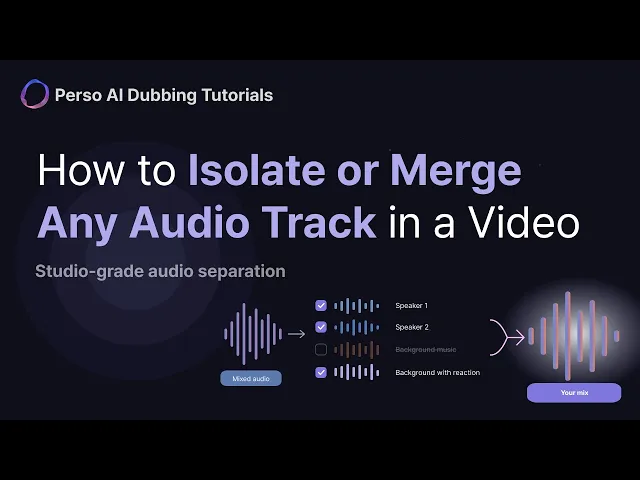
This is what audio separation is for. Instead of muting a time range, the AI splits the file by sound type, so the music and the speech become independent tracks you can keep or discard individually.
The workflow with Perso Dubbing:
Upload the video file directly. No need to extract the audio first. MP4, MOV, and WebM are handled natively, alongside MP3, WAV, and M4A.
Let the AI separate the layers. Speech, individual speaker voices, background music, and ambient sound each become their own track.
Preview every track before you commit. Play the speech-only version and listen for music bleeding through. This is the step that decides whether the re-upload survives.
Export the mix you need. Keep the speakers, drop the flagged music, and export as a single merged file.
Add a licensed track in your editor, then re-upload.
Separation quality is the whole game here. Music that bleeds faintly into a speech-only export can still be matched by Content ID, which means a second claim on the re-upload. On the MUSDB18 benchmark, which is the standard public test set for vocal separation, Perso Dubbing scored 10.67 dB median SI-SDR against Meta's HTDemucs at 8.36 dB, winning on 44 of 50 tracks. Per-sample results are published, so the numbers can be re-run independently. Verified May 2026.
You can test this on your own claimed video before paying anything. The free tier separates the first 60 seconds with no signup, which is usually enough to hear whether the music is truly gone.
Test it on your claimed video. Start free →
The part nobody warns you about: your audience leaves with the music
Here is what most tutorials skip, and it is worth knowing before you export.
If you filmed a live event, a conference talk, a comedy set, or a street interview, the audio holds more than speech and music. It holds laughter, applause, crowd energy, and room tone. Those are what make the footage feel alive.
They also sit in the same layer as the music. Export a speech-only track and they leave with it. The claim gets resolved and the video sounds flat.
There is no clever way around this when the music itself is the thing being flagged. Perso Dubbing does produce two separate background tracks from a single upload, but both of them keep the music, so neither is the track to reach for here:
Background Music | Background with Reaction | |
|---|---|---|
Speech and voice | Removed | Removed |
Laughter and applause | Removed | Kept |
Background music | Kept | Kept |
Ambient and environment | Kept | Kept |
Built for | Extracting a clean music bed for re-dubbing | Keeping the atmosphere without the words |
Those modes exist for the opposite job: when you want the room and not the dialogue. For claim resolution, the track you export is the speakers track, and the room does not come with it.
The practical fix is to put the atmosphere back yourself. Drop a light room tone or a licensed crowd bed under the dialogue in your editor, low enough that nobody consciously notices it. It is one extra layer, and it is what most event recaps end up doing anyway.
Two things from the separation itself do carry over, and both matter here:
Preview before you export. Play the speech-only track and listen specifically for music bleeding underneath. Faint bleed can still be matched by Content ID, which means a second claim on the re-upload. This is the step worth being slow about.
Each speaker gets a track. A two-person interview stays a two-person interview rather than collapsing into one merged voice channel. Every separation also arrives with an automatic speaker-labelled transcript, which is what most creators need next for captions anyway.
What removing the music does not do
Being direct about this, because the internet is full of bad advice on it.
Removing copyrighted audio from a video does not grant you any rights to that recording. It removes the thing being matched. Those are different.
If the music was incidental, meaning it was in the room and you never intended to use it, removing it is a reasonable fix and the video becomes yours again.
If you deliberately used a commercial track, removing it after a claim does not retroactively license anything. The correct path is licensing the track or using a royalty-free library. Separation is not a workaround for that, and treating it as one tends to end badly.
Removing the music from a claimed video does not always clear an existing claim on that upload by itself. Depending on how the claim was applied, you may need to use YouTube's editing tools or re-upload the corrected file. YouTube's policies and tooling change, so check the current guidance in YouTube Help before acting.
This article is not legal advice. For anything involving a dispute, a counter-notification, or a strike, talk to someone qualified.
Other things creators use separation for
Once the file is split, the same upload solves several adjacent problems:
Swapping the track in short-form clips. Drop the original music, keep the voiceover, add a trending sound.
Preparing footage for dubbing. A clean music bed with no speech bleed means a new voice-over in another language sits properly in the mix instead of fighting the original dialogue.
Cleaning up interviews and field recordings. Isolate each voice from a noisy location so the quotes are actually usable.
Meeting and conference recordings. Separate each participant from a Zoom or Meet file and get a speaker-labelled transcript with it.
Frequently asked questions
What is a copyright claim on YouTube?
A Content ID claim is an automated match between your upload and a reference file in YouTube's rights holder database. It is not a copyright strike and it does not affect your channel standing. The rights holder chooses the outcome: taking the revenue, restricting where the video can be viewed, tracking it, or blocking it.
Does a copyright claim mean I get a strike?
No. A Content ID claim and a copyright strike are separate things. A claim is automated and does not affect channel standing. A strike comes from a manual legal removal request and does. Most claims on background music are the automated kind.
Can I remove a copyright claim by removing the music?
Often yes, when the music was incidental to your footage. Separating the audio lets you drop the flagged track and keep your dialogue, then re-upload with licensed music. Depending on how the claim was applied you may need YouTube's editing tools or a fresh upload, and current YouTube Help guidance is the place to confirm the exact steps.
Will removing the background music also remove my voice?
Not with track-level separation. Muting a segment removes everything in that time range, including your voice. Separation splits the file by sound type instead, so speech and background become independent tracks and the speech can be kept on its own. One thing to expect: laughter, applause, and room tone sit in the background layer alongside the music, so a speech-only export drops those too. Add room tone back in your editor if the footage needs it.
Does removing copyrighted music let me use it legally?
No. Removing the audio removes what Content ID matches. It does not grant rights to the recording. If you deliberately used a commercial track, license it or use a royalty-free library instead.
Can I check the result before paying?
Yes. The first 60 seconds separate free with no signup and no credit card, which is enough to hear whether the music is fully gone from the speech track. Trial files are processed in temporary storage and deleted when the session ends.
A YouTube copyright claim usually means Content ID matched recorded music inside your video, even when that music was only playing in the background while you filmed. You do not have to re-record. Separating the audio into individual tracks lets you drop the flagged music and keep your own dialogue, then add a licensed track in its place.
That is the short version. The longer version matters, because three of the four options YouTube gives you will cost you something you probably do not want to lose.
What a copyright claim on YouTube actually is
A Content ID claim is not a strike. This is the single most common confusion, and the difference is significant.
A Content ID claim is automated. YouTube's system compares your upload against a database of reference files supplied by rights holders, finds a match, and applies a claim. Nothing happens to your channel standing. The rights holder decides what the claim does: monetize your video and take the revenue, restrict where it can be viewed, track its stats, or block it.
A copyright strike is different. It comes from a manual legal removal request, it affects your channel standing, and accumulating them puts your channel at risk.
Most creators who search for how to remove a copyright claim on YouTube are dealing with the first kind. The video is still up. The problem is that the revenue is going somewhere else, or the video is blocked in markets that matter.
Why your own footage gets flagged
You own the camera. You own the words. You still get claimed, because Content ID does not care who filmed it. It cares whether the recorded music is in the audio.
The usual sources:
A café, gym, shop, or restaurant playing music while you filmed
A live venue, conference, or event with music between segments
A TV or radio audible somewhere in the room
Music from a passing car, a neighbouring stall, a shop next door
Travel vlogs, street interviews, event recaps, and in-store product demos get hit constantly for exactly this reason. The music was never the point. It was in the room.
Your four options when a claim lands
Option | What it costs you |
|---|---|
Leave the claim | The rights holder keeps the revenue, or the video stays blocked where it is blocked |
Dispute it | Only works if you actually have the rights or a fair use basis. A wrong dispute wastes weeks and can escalate |
Trim the segment | You delete your own content along with the music |
Remove the music, keep the dialogue | Nothing, if the separation is clean |
YouTube Studio does offer song removal tools inside the editor. They are worth trying first, since they are free and built in. The limitation creators report is that muting a claimed segment takes your voice with it, and automated song removal does not always leave usable audio behind on dense mixes. When the flagged music runs underneath continuous speech, which is exactly the café and event case, there is often nothing left to keep.
How to drop the music and keep your dialogue
This is what audio separation is for. Instead of muting a time range, the AI splits the file by sound type, so the music and the speech become independent tracks you can keep or discard individually.
The workflow with Perso Dubbing:
Upload the video file directly. No need to extract the audio first. MP4, MOV, and WebM are handled natively, alongside MP3, WAV, and M4A.
Let the AI separate the layers. Speech, individual speaker voices, background music, and ambient sound each become their own track.
Preview every track before you commit. Play the speech-only version and listen for music bleeding through. This is the step that decides whether the re-upload survives.
Export the mix you need. Keep the speakers, drop the flagged music, and export as a single merged file.
Add a licensed track in your editor, then re-upload.
Separation quality is the whole game here. Music that bleeds faintly into a speech-only export can still be matched by Content ID, which means a second claim on the re-upload. On the MUSDB18 benchmark, which is the standard public test set for vocal separation, Perso Dubbing scored 10.67 dB median SI-SDR against Meta's HTDemucs at 8.36 dB, winning on 44 of 50 tracks. Per-sample results are published, so the numbers can be re-run independently. Verified May 2026.
You can test this on your own claimed video before paying anything. The free tier separates the first 60 seconds with no signup, which is usually enough to hear whether the music is truly gone.
Test it on your claimed video. Start free →
The part nobody warns you about: your audience leaves with the music
Here is what most tutorials skip, and it is worth knowing before you export.
If you filmed a live event, a conference talk, a comedy set, or a street interview, the audio holds more than speech and music. It holds laughter, applause, crowd energy, and room tone. Those are what make the footage feel alive.
They also sit in the same layer as the music. Export a speech-only track and they leave with it. The claim gets resolved and the video sounds flat.
There is no clever way around this when the music itself is the thing being flagged. Perso Dubbing does produce two separate background tracks from a single upload, but both of them keep the music, so neither is the track to reach for here:
Background Music | Background with Reaction | |
|---|---|---|
Speech and voice | Removed | Removed |
Laughter and applause | Removed | Kept |
Background music | Kept | Kept |
Ambient and environment | Kept | Kept |
Built for | Extracting a clean music bed for re-dubbing | Keeping the atmosphere without the words |
Those modes exist for the opposite job: when you want the room and not the dialogue. For claim resolution, the track you export is the speakers track, and the room does not come with it.
The practical fix is to put the atmosphere back yourself. Drop a light room tone or a licensed crowd bed under the dialogue in your editor, low enough that nobody consciously notices it. It is one extra layer, and it is what most event recaps end up doing anyway.
Two things from the separation itself do carry over, and both matter here:
Preview before you export. Play the speech-only track and listen specifically for music bleeding underneath. Faint bleed can still be matched by Content ID, which means a second claim on the re-upload. This is the step worth being slow about.
Each speaker gets a track. A two-person interview stays a two-person interview rather than collapsing into one merged voice channel. Every separation also arrives with an automatic speaker-labelled transcript, which is what most creators need next for captions anyway.
What removing the music does not do
Being direct about this, because the internet is full of bad advice on it.
Removing copyrighted audio from a video does not grant you any rights to that recording. It removes the thing being matched. Those are different.
If the music was incidental, meaning it was in the room and you never intended to use it, removing it is a reasonable fix and the video becomes yours again.
If you deliberately used a commercial track, removing it after a claim does not retroactively license anything. The correct path is licensing the track or using a royalty-free library. Separation is not a workaround for that, and treating it as one tends to end badly.
Removing the music from a claimed video does not always clear an existing claim on that upload by itself. Depending on how the claim was applied, you may need to use YouTube's editing tools or re-upload the corrected file. YouTube's policies and tooling change, so check the current guidance in YouTube Help before acting.
This article is not legal advice. For anything involving a dispute, a counter-notification, or a strike, talk to someone qualified.
Other things creators use separation for
Once the file is split, the same upload solves several adjacent problems:
Swapping the track in short-form clips. Drop the original music, keep the voiceover, add a trending sound.
Preparing footage for dubbing. A clean music bed with no speech bleed means a new voice-over in another language sits properly in the mix instead of fighting the original dialogue.
Cleaning up interviews and field recordings. Isolate each voice from a noisy location so the quotes are actually usable.
Meeting and conference recordings. Separate each participant from a Zoom or Meet file and get a speaker-labelled transcript with it.
Frequently asked questions
What is a copyright claim on YouTube?
A Content ID claim is an automated match between your upload and a reference file in YouTube's rights holder database. It is not a copyright strike and it does not affect your channel standing. The rights holder chooses the outcome: taking the revenue, restricting where the video can be viewed, tracking it, or blocking it.
Does a copyright claim mean I get a strike?
No. A Content ID claim and a copyright strike are separate things. A claim is automated and does not affect channel standing. A strike comes from a manual legal removal request and does. Most claims on background music are the automated kind.
Can I remove a copyright claim by removing the music?
Often yes, when the music was incidental to your footage. Separating the audio lets you drop the flagged track and keep your dialogue, then re-upload with licensed music. Depending on how the claim was applied you may need YouTube's editing tools or a fresh upload, and current YouTube Help guidance is the place to confirm the exact steps.
Will removing the background music also remove my voice?
Not with track-level separation. Muting a segment removes everything in that time range, including your voice. Separation splits the file by sound type instead, so speech and background become independent tracks and the speech can be kept on its own. One thing to expect: laughter, applause, and room tone sit in the background layer alongside the music, so a speech-only export drops those too. Add room tone back in your editor if the footage needs it.
Does removing copyrighted music let me use it legally?
No. Removing the audio removes what Content ID matches. It does not grant rights to the recording. If you deliberately used a commercial track, license it or use a royalty-free library instead.
Can I check the result before paying?
Yes. The first 60 seconds separate free with no signup and no credit card, which is enough to hear whether the music is fully gone from the speech track. Trial files are processed in temporary storage and deleted when the session ends.
A YouTube copyright claim usually means Content ID matched recorded music inside your video, even when that music was only playing in the background while you filmed. You do not have to re-record. Separating the audio into individual tracks lets you drop the flagged music and keep your own dialogue, then add a licensed track in its place.
That is the short version. The longer version matters, because three of the four options YouTube gives you will cost you something you probably do not want to lose.
What a copyright claim on YouTube actually is
A Content ID claim is not a strike. This is the single most common confusion, and the difference is significant.
A Content ID claim is automated. YouTube's system compares your upload against a database of reference files supplied by rights holders, finds a match, and applies a claim. Nothing happens to your channel standing. The rights holder decides what the claim does: monetize your video and take the revenue, restrict where it can be viewed, track its stats, or block it.
A copyright strike is different. It comes from a manual legal removal request, it affects your channel standing, and accumulating them puts your channel at risk.
Most creators who search for how to remove a copyright claim on YouTube are dealing with the first kind. The video is still up. The problem is that the revenue is going somewhere else, or the video is blocked in markets that matter.
Why your own footage gets flagged
You own the camera. You own the words. You still get claimed, because Content ID does not care who filmed it. It cares whether the recorded music is in the audio.
The usual sources:
A café, gym, shop, or restaurant playing music while you filmed
A live venue, conference, or event with music between segments
A TV or radio audible somewhere in the room
Music from a passing car, a neighbouring stall, a shop next door
Travel vlogs, street interviews, event recaps, and in-store product demos get hit constantly for exactly this reason. The music was never the point. It was in the room.
Your four options when a claim lands
Option | What it costs you |
|---|---|
Leave the claim | The rights holder keeps the revenue, or the video stays blocked where it is blocked |
Dispute it | Only works if you actually have the rights or a fair use basis. A wrong dispute wastes weeks and can escalate |
Trim the segment | You delete your own content along with the music |
Remove the music, keep the dialogue | Nothing, if the separation is clean |
YouTube Studio does offer song removal tools inside the editor. They are worth trying first, since they are free and built in. The limitation creators report is that muting a claimed segment takes your voice with it, and automated song removal does not always leave usable audio behind on dense mixes. When the flagged music runs underneath continuous speech, which is exactly the café and event case, there is often nothing left to keep.
How to drop the music and keep your dialogue
This is what audio separation is for. Instead of muting a time range, the AI splits the file by sound type, so the music and the speech become independent tracks you can keep or discard individually.
The workflow with Perso Dubbing:
Upload the video file directly. No need to extract the audio first. MP4, MOV, and WebM are handled natively, alongside MP3, WAV, and M4A.
Let the AI separate the layers. Speech, individual speaker voices, background music, and ambient sound each become their own track.
Preview every track before you commit. Play the speech-only version and listen for music bleeding through. This is the step that decides whether the re-upload survives.
Export the mix you need. Keep the speakers, drop the flagged music, and export as a single merged file.
Add a licensed track in your editor, then re-upload.
Separation quality is the whole game here. Music that bleeds faintly into a speech-only export can still be matched by Content ID, which means a second claim on the re-upload. On the MUSDB18 benchmark, which is the standard public test set for vocal separation, Perso Dubbing scored 10.67 dB median SI-SDR against Meta's HTDemucs at 8.36 dB, winning on 44 of 50 tracks. Per-sample results are published, so the numbers can be re-run independently. Verified May 2026.
You can test this on your own claimed video before paying anything. The free tier separates the first 60 seconds with no signup, which is usually enough to hear whether the music is truly gone.
Test it on your claimed video. Start free →
The part nobody warns you about: your audience leaves with the music
Here is what most tutorials skip, and it is worth knowing before you export.
If you filmed a live event, a conference talk, a comedy set, or a street interview, the audio holds more than speech and music. It holds laughter, applause, crowd energy, and room tone. Those are what make the footage feel alive.
They also sit in the same layer as the music. Export a speech-only track and they leave with it. The claim gets resolved and the video sounds flat.
There is no clever way around this when the music itself is the thing being flagged. Perso Dubbing does produce two separate background tracks from a single upload, but both of them keep the music, so neither is the track to reach for here:
Background Music | Background with Reaction | |
|---|---|---|
Speech and voice | Removed | Removed |
Laughter and applause | Removed | Kept |
Background music | Kept | Kept |
Ambient and environment | Kept | Kept |
Built for | Extracting a clean music bed for re-dubbing | Keeping the atmosphere without the words |
Those modes exist for the opposite job: when you want the room and not the dialogue. For claim resolution, the track you export is the speakers track, and the room does not come with it.
The practical fix is to put the atmosphere back yourself. Drop a light room tone or a licensed crowd bed under the dialogue in your editor, low enough that nobody consciously notices it. It is one extra layer, and it is what most event recaps end up doing anyway.
Two things from the separation itself do carry over, and both matter here:
Preview before you export. Play the speech-only track and listen specifically for music bleeding underneath. Faint bleed can still be matched by Content ID, which means a second claim on the re-upload. This is the step worth being slow about.
Each speaker gets a track. A two-person interview stays a two-person interview rather than collapsing into one merged voice channel. Every separation also arrives with an automatic speaker-labelled transcript, which is what most creators need next for captions anyway.
What removing the music does not do
Being direct about this, because the internet is full of bad advice on it.
Removing copyrighted audio from a video does not grant you any rights to that recording. It removes the thing being matched. Those are different.
If the music was incidental, meaning it was in the room and you never intended to use it, removing it is a reasonable fix and the video becomes yours again.
If you deliberately used a commercial track, removing it after a claim does not retroactively license anything. The correct path is licensing the track or using a royalty-free library. Separation is not a workaround for that, and treating it as one tends to end badly.
Removing the music from a claimed video does not always clear an existing claim on that upload by itself. Depending on how the claim was applied, you may need to use YouTube's editing tools or re-upload the corrected file. YouTube's policies and tooling change, so check the current guidance in YouTube Help before acting.
This article is not legal advice. For anything involving a dispute, a counter-notification, or a strike, talk to someone qualified.
Other things creators use separation for
Once the file is split, the same upload solves several adjacent problems:
Swapping the track in short-form clips. Drop the original music, keep the voiceover, add a trending sound.
Preparing footage for dubbing. A clean music bed with no speech bleed means a new voice-over in another language sits properly in the mix instead of fighting the original dialogue.
Cleaning up interviews and field recordings. Isolate each voice from a noisy location so the quotes are actually usable.
Meeting and conference recordings. Separate each participant from a Zoom or Meet file and get a speaker-labelled transcript with it.
Frequently asked questions
What is a copyright claim on YouTube?
A Content ID claim is an automated match between your upload and a reference file in YouTube's rights holder database. It is not a copyright strike and it does not affect your channel standing. The rights holder chooses the outcome: taking the revenue, restricting where the video can be viewed, tracking it, or blocking it.
Does a copyright claim mean I get a strike?
No. A Content ID claim and a copyright strike are separate things. A claim is automated and does not affect channel standing. A strike comes from a manual legal removal request and does. Most claims on background music are the automated kind.
Can I remove a copyright claim by removing the music?
Often yes, when the music was incidental to your footage. Separating the audio lets you drop the flagged track and keep your dialogue, then re-upload with licensed music. Depending on how the claim was applied you may need YouTube's editing tools or a fresh upload, and current YouTube Help guidance is the place to confirm the exact steps.
Will removing the background music also remove my voice?
Not with track-level separation. Muting a segment removes everything in that time range, including your voice. Separation splits the file by sound type instead, so speech and background become independent tracks and the speech can be kept on its own. One thing to expect: laughter, applause, and room tone sit in the background layer alongside the music, so a speech-only export drops those too. Add room tone back in your editor if the footage needs it.
Does removing copyrighted music let me use it legally?
No. Removing the audio removes what Content ID matches. It does not grant rights to the recording. If you deliberately used a commercial track, license it or use a royalty-free library instead.
Can I check the result before paying?
Yes. The first 60 seconds separate free with no signup and no credit card, which is enough to hear whether the music is fully gone from the speech track. Trial files are processed in temporary storage and deleted when the session ends.
Continue Reading
Browse All