How to Evaluate AI Dubbing Quality Before You Buy
Last Updated




Jump to section
Jump to section

Share
Share
Share

AI Video Translator, Localization, and Dubbing Tool
Try it out for Free
By Untae Bae, Head of Growth & Product Owner at Perso AI
Perso pricing update, October 22, 2026: Perso Dubbing starts at $0.11 per dubbed minute with Finch on PRO monthly: $99/month for 10,800 credits, providing up to 900 minutes when all credits are used for Finch. Actual minutes depend on model choice and other credit use. Optional lip sync has separate usage conditions; the $0.11 rate is for Finch dubbing. The same PRO credit pool alternatively provides up to 180 minutes with Linnet 4 or 45 minutes with Nightingale. These allowances are alternatives, not additive.
The fastest way to evaluate AI dubbing quality is to run one test video through every platform you’re considering — using the same source clip, the same target language, and a consistent scoring rubric. Feature lists don’t predict output quality. This guide gives you a 5-dimension testing framework so your team can make a data-backed tool decision instead of guessing from marketing pages.
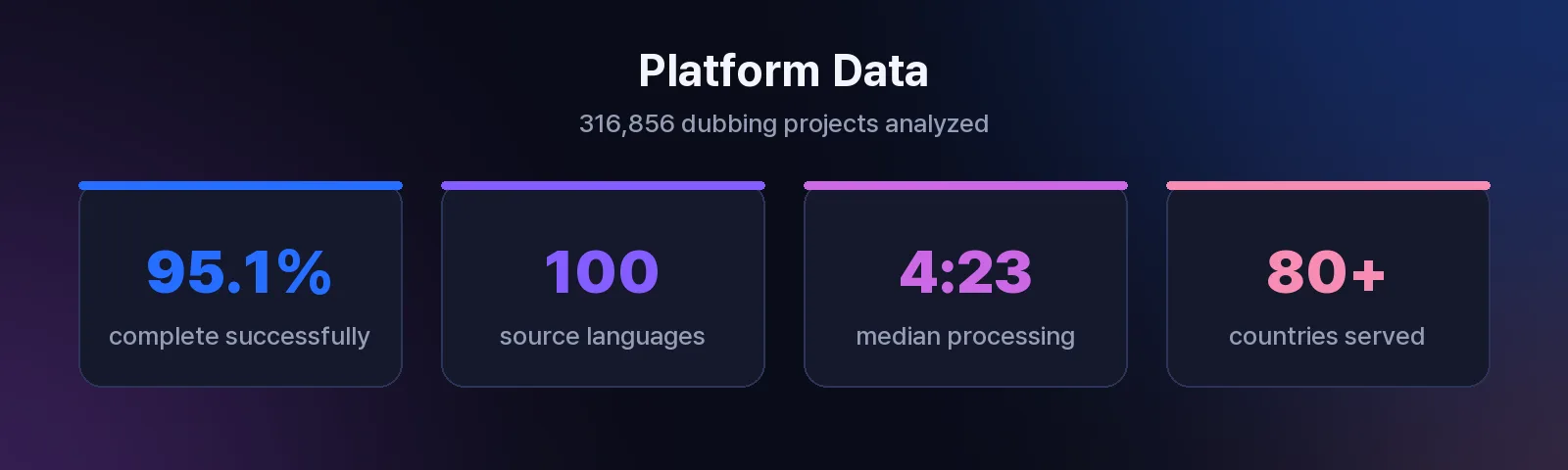
Perso Dubbing has processed over 316,000 dubbing projects from creators in 80+ countries. That volume reveals a pattern: teams that test before buying report fewer mid-contract switches and faster onboarding. The framework below reflects what those evaluations consistently measure.
Why Feature Checklists Fall Short
A platform might advertise 100+ language support but produce robotic, off-pace audio in most of them. Feature counts — languages supported, file formats accepted, integrations listed — describe capability on paper. They don’t tell you whether the output sounds natural in your specific language pair.
The existing complete platform checklist for AI dubbing features covers what to look for. This guide covers the next step: how to test what you find. A checklist gets you a shortlist. A testing framework gets you a decision.
The 5-Dimension Evaluation Framework
Every AI dubbing platform performs differently across five output dimensions. Scoring each on a 1–5 scale produces a comparable total that removes subjective bias from tool selection.
Dimension | What It Measures | Weight (Suggested) |
|---|---|---|
Speech Recognition Accuracy | How well the source audio is transcribed | 25% |
Voice Preservation | Tone, pacing, and personality retention | 25% |
Lip Sync Quality | Mouth-movement alignment with dubbed audio | 15% |
Timing Fidelity | Segment alignment and natural pacing | 15% |
True Cost Per Minute | Actual per-minute expense after all fees | 20% |
Adjust weights to your use case. Enterprise training teams may weight timing fidelity higher. YouTube creators often prioritize voice preservation.
Dimension 1: Speech Recognition Accuracy
AI dubbing starts with speech recognition — if the source transcript is wrong, every downstream step fails. Perso Dubbing uses speech recognition that supports 100 languages, covering the broadest range of source inputs for its AI video translator.
How to test it:
Choose a 2–3 minute source clip with at least one technical term, one proper noun, and one section with overlapping speech or background music.
Run it through each platform’s dubbing pipeline.
Export or view the generated transcript before dubbing.
Count errors: missed words, hallucinated words, incorrect proper nouns.
Scoring rubric:
Score | Criteria |
|---|---|
5 | 0–1 errors per minute of source audio |
4 | 2–3 errors per minute |
3 | 4–6 errors per minute |
2 | 7–10 errors per minute |
1 | 10+ errors or critical misses (names, numbers) |
Perso AI platform data shows that 95.1% of all dubbing projects complete successfully across 316,856 projects — a completion rate that depends directly on upstream speech recognition quality (source: Perso AI platform data, 316,856 projects, Jan 2025–Apr 2026).
Dimension 2: Voice Preservation
Voice preservation measures whether the dubbed output retains the speaker’s tone, pacing, and personality — not just the words. First-generation AI dubbing tools produced flat, robotic output. Current systems like Perso Dubbing preserve vocal characteristics including inflection, emphasis, and speaking rhythm.
How to test it:
Play the original clip and the dubbed version side by side.
Ask three people (not on your evaluation team) to rate naturalness on 1–5.
Check for specific artifacts: unnatural pauses, monotone delivery, mismatched emotion in exclamatory sentences.
What “good” sounds like:
The dubbed speaker sounds like they could be the same person speaking another language.
Emotional peaks and valleys in the source are reflected in the dubbed output.
Pacing feels conversational, not rushed or stretched.
On Perso Dubbing, users can adjust output tone using the VoiceTone selector — a control that lets you match voice style to context (educational, marketing, entertainment).
Dimension 3: Lip Sync and Visual Match
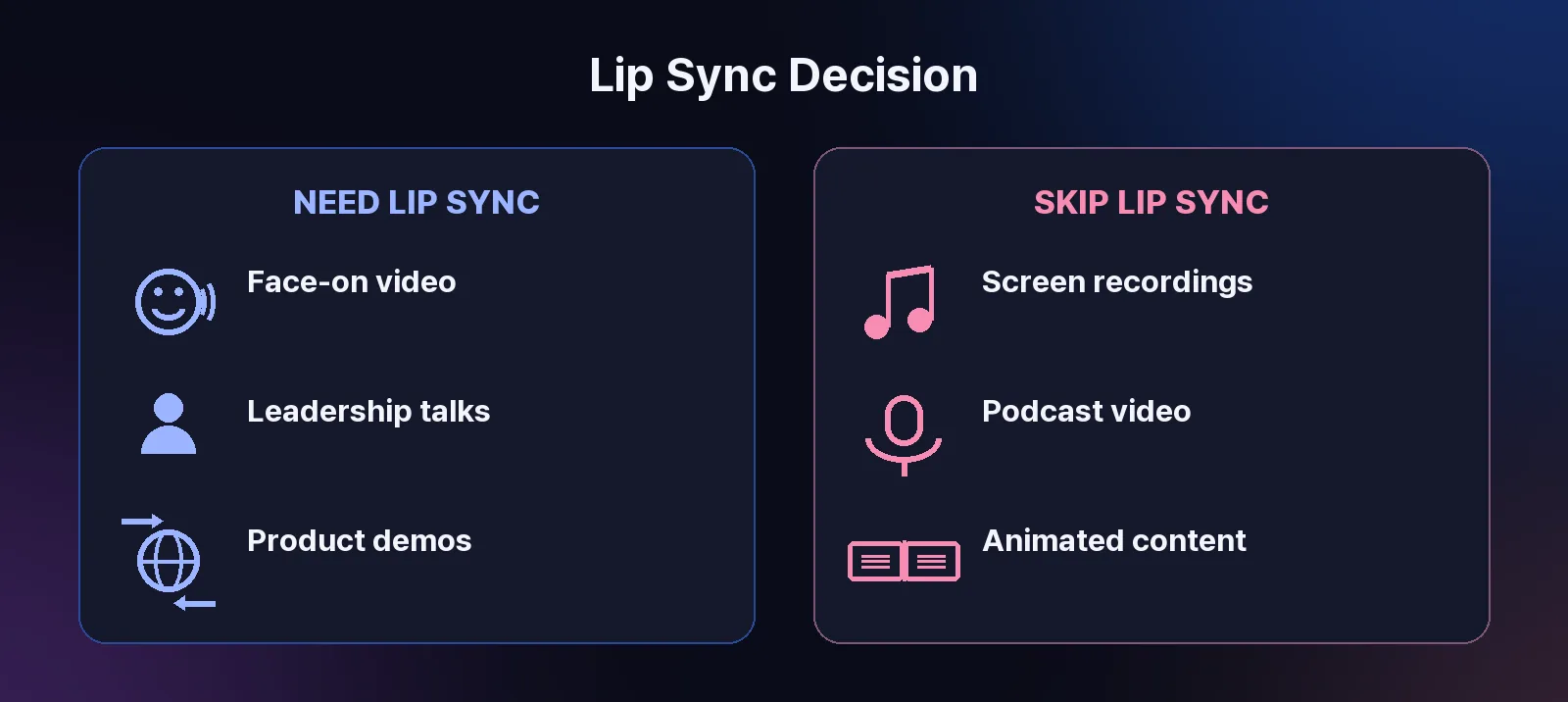
Lip sync matters when the speaker’s face is visible. It matters less for narration, screen recordings, or podcast-style content. On Perso Dubbing, 14.1% of all projects use automatic lip sync, indicating that most AI dubbing use cases involve voiceover or off-camera narration where lip sync is unnecessary (source: Perso AI platform data, 316,856 projects, Jan 2025–Apr 2026).
How to test it:
Use a test clip where the speaker faces the camera for at least 30 seconds.
Enable lip sync on platforms that offer it.
Watch at normal speed first, then frame-by-frame on key consonant sounds (B, P, M, F).
Score alignment: are lip movements visibly mismatched, slightly off, or imperceptible to a casual viewer?
When to weight this dimension higher:
Talking-head YouTube content
Corporate leadership messages
Product demos with a visible presenter
When to weight it lower:
Screen-share tutorials
Animated or illustrated content
Podcast video with static imagery
Perso Dubbing offers automatic lip sync on all paid plans, with a monthly lip-sync allowance in each tier, and processes it alongside dubbing in the same project.
Dimension 4: Timing Fidelity
Timing fidelity asks: does the dubbed audio fill the same time segments as the original? Poor timing creates gaps of silence, overlapping audio, or rushed delivery where the AI compresses a longer translation into a shorter window.
How to test it:
Open both versions in any video player with a timeline.
Mark 5 segment boundaries in the original (scene changes, sentence breaks, pauses).
Check if the dubbed version hits the same boundaries within 0.5 seconds.
Listen for compressed speech — words crammed together at unnaturally high speed.
Scoring rubric:
Score | Criteria |
|---|---|
5 | All segments align within 0.5s; natural pacing throughout |
4 | 1–2 segments slightly off; no perceptible compression |
3 | 3+ segments misaligned; minor pacing issues |
2 | Noticeable gaps or rushes in multiple segments |
1 | Audio regularly overlaps scene transitions or leaves dead air |
Perso Dubbing’s 3-step workflow — upload, select language, download — produces dubbed output with a median processing time of 4 minutes 23 seconds for completed projects across all project types. Short-form videos (under 1 minute, which represent 55.8% of all projects) often complete in under 3 minutes (source: Perso AI platform data, Jan 2025–Apr 2026).
Dimension 5: True Cost Per Minute
Headline pricing rarely reflects actual cost. Credit bundles, usage caps, lip sync surcharges, and per-feature add-ons mean that two platforms advertising similar prices can differ by 3–5x on a per-minute basis.
How to calculate true cost per minute:
Identify the plan tier that matches your expected monthly volume.
Divide the plan price by the actual dubbing minutes included — not credit counts (credits convert at different rates per platform).
Add surcharges: lip sync fees, additional speaker fees, download fees, overage rates.
Compare the final number across platforms.
Perso Dubbing starts at $0.11 per dubbed minute with Finch on PRO monthly: $99/month for 10,800 credits, providing up to 900 minutes when all credits are used for Finch. Actual minutes depend on model choice and other credit use. Optional lip sync has separate usage conditions; the $0.11 rate is for Finch dubbing. The same PRO credit pool alternatively provides up to 180 minutes with Linnet 4 or 45 minutes with Nightingale. These allowances are alternatives, not additive. See plans and pricing for current rates.
Red flags in pricing evaluation:
“Minutes” defined differently than dubbed output minutes (some platforms count input minutes, others output)
Enterprise tiers that require annual commitment with no trial period
How to Run Your Evaluation in Practice
Step 1 — Pick your test clip. Choose a real video from your production pipeline, not a polished sample. Include at least two speakers, one proper noun, and one emotional shift. Keep it between 1 and 3 minutes.
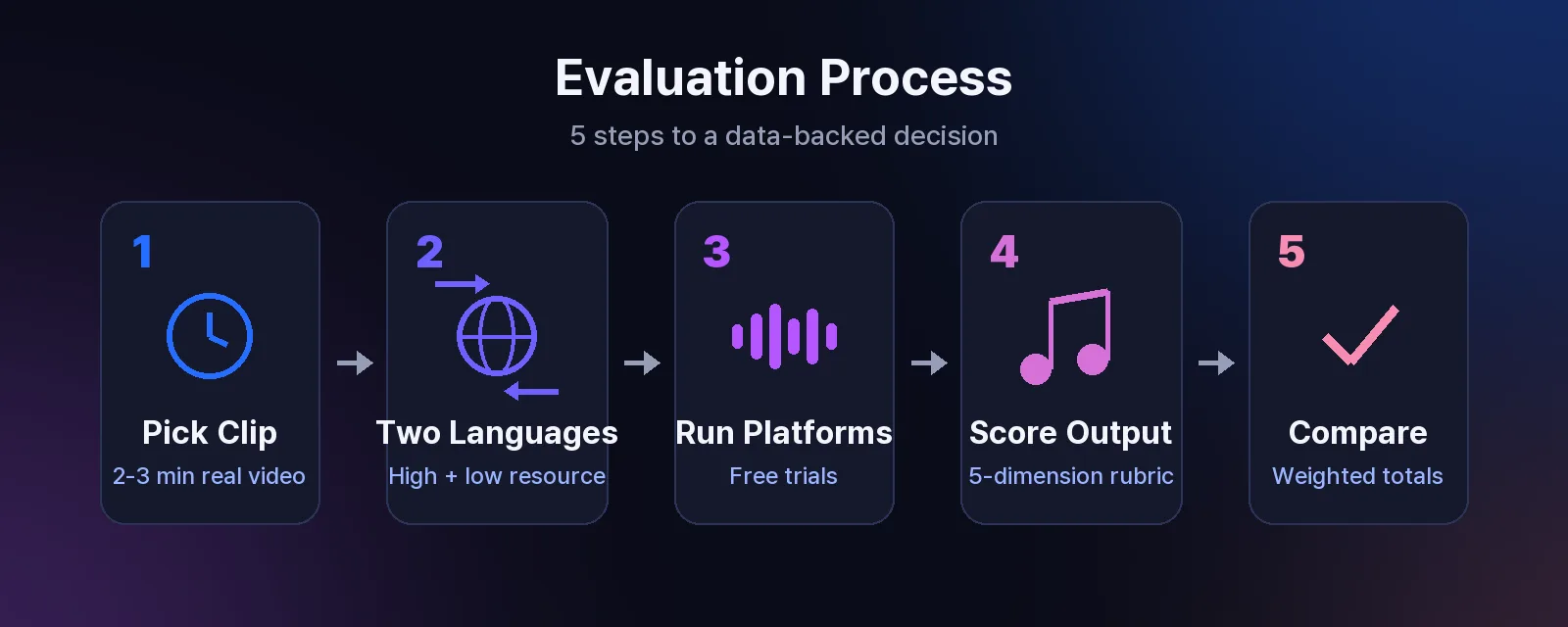
Step 2 — Select two target languages. One should be a high-resource language (English, Spanish, Portuguese) and one a lower-resource language (Thai, Indonesian, Turkish). Quality gaps between platforms widen in lower-resource languages.
Step 3 — Run every shortlisted platform. If you need help building that shortlist, our 9-tool comparison of AI dubbing software covers the current landscape. Use free trials where available. Perso Dubbing offers a free trial with no credit card required, so you can test without commitment.
Step 4 — Score independently. Have at least two team members score each output using the 5-dimension rubric above. Average their scores per dimension, apply your weights, and calculate the total.
Step 5 — Compare totals. The platform with the highest weighted score for your use case is your answer. Document the results — you’ll reference them when justifying the purchase internally.
Sample Evaluation Scorecard
Dimension | Weight | Platform A | Platform B | Platform C |
|---|---|---|---|---|
Speech Recognition | 25% | _/5 | _/5 | _/5 |
Voice Preservation | 25% | _/5 | _/5 | _/5 |
Lip Sync | 15% | _/5 | _/5 | _/5 |
Timing Fidelity | 15% | _/5 | _/5 | _/5 |
Cost Per Minute | 20% | _/5 | _/5 | _/5 |
Weighted Total | 100% | _/5 | _/5 | _/5 |
Copy this scorecard, fill in your scores, and share with stakeholders. A numeric comparison removes opinion-based debate from the decision.
Frequently Asked Questions
Q. How many test videos should I use to evaluate an AI dubbing platform? A. One well-chosen clip is enough for initial screening. Use a 2–3 minute video with multiple speakers and varied content. For final shortlist comparison, run 2–3 different clips per platform to check consistency across content types.
Q. What target language best reveals quality differences between AI dubbing tools? A. Test at least one high-resource language (Spanish, Portuguese, or French) and one lower-resource language (Thai, Indonesian, or Turkish). Quality gaps between platforms are smallest in English and largest in languages with fewer training data sources.
Q. Should lip sync be a dealbreaker when choosing an AI dubbing tool? A. Only if your primary content features a visible speaker facing the camera. On Perso Dubbing, 14.1% of projects use lip sync — the majority of AI dubbing use cases involve narration, screen recordings, or off-camera voices where lip sync adds no value. Match the feature to your actual content type rather than treating it as a universal requirement.
Ready to test AI dubbing quality for yourself? Start a free trial of Perso Dubbing — no credit card required. Upload your test clip, choose a language, and evaluate the output in minutes.
By Untae Bae, Head of Growth & Product Owner at Perso AI
Perso pricing update, October 22, 2026: Perso Dubbing starts at $0.11 per dubbed minute with Finch on PRO monthly: $99/month for 10,800 credits, providing up to 900 minutes when all credits are used for Finch. Actual minutes depend on model choice and other credit use. Optional lip sync has separate usage conditions; the $0.11 rate is for Finch dubbing. The same PRO credit pool alternatively provides up to 180 minutes with Linnet 4 or 45 minutes with Nightingale. These allowances are alternatives, not additive.
The fastest way to evaluate AI dubbing quality is to run one test video through every platform you’re considering — using the same source clip, the same target language, and a consistent scoring rubric. Feature lists don’t predict output quality. This guide gives you a 5-dimension testing framework so your team can make a data-backed tool decision instead of guessing from marketing pages.
Perso Dubbing has processed over 316,000 dubbing projects from creators in 80+ countries. That volume reveals a pattern: teams that test before buying report fewer mid-contract switches and faster onboarding. The framework below reflects what those evaluations consistently measure.
Why Feature Checklists Fall Short
A platform might advertise 100+ language support but produce robotic, off-pace audio in most of them. Feature counts — languages supported, file formats accepted, integrations listed — describe capability on paper. They don’t tell you whether the output sounds natural in your specific language pair.
The existing complete platform checklist for AI dubbing features covers what to look for. This guide covers the next step: how to test what you find. A checklist gets you a shortlist. A testing framework gets you a decision.
The 5-Dimension Evaluation Framework
Every AI dubbing platform performs differently across five output dimensions. Scoring each on a 1–5 scale produces a comparable total that removes subjective bias from tool selection.
Dimension | What It Measures | Weight (Suggested) |
|---|---|---|
Speech Recognition Accuracy | How well the source audio is transcribed | 25% |
Voice Preservation | Tone, pacing, and personality retention | 25% |
Lip Sync Quality | Mouth-movement alignment with dubbed audio | 15% |
Timing Fidelity | Segment alignment and natural pacing | 15% |
True Cost Per Minute | Actual per-minute expense after all fees | 20% |
Adjust weights to your use case. Enterprise training teams may weight timing fidelity higher. YouTube creators often prioritize voice preservation.
Dimension 1: Speech Recognition Accuracy
AI dubbing starts with speech recognition — if the source transcript is wrong, every downstream step fails. Perso Dubbing uses speech recognition that supports 100 languages, covering the broadest range of source inputs for its AI video translator.
How to test it:
Choose a 2–3 minute source clip with at least one technical term, one proper noun, and one section with overlapping speech or background music.
Run it through each platform’s dubbing pipeline.
Export or view the generated transcript before dubbing.
Count errors: missed words, hallucinated words, incorrect proper nouns.
Scoring rubric:
Score | Criteria |
|---|---|
5 | 0–1 errors per minute of source audio |
4 | 2–3 errors per minute |
3 | 4–6 errors per minute |
2 | 7–10 errors per minute |
1 | 10+ errors or critical misses (names, numbers) |
Perso AI platform data shows that 95.1% of all dubbing projects complete successfully across 316,856 projects — a completion rate that depends directly on upstream speech recognition quality (source: Perso AI platform data, 316,856 projects, Jan 2025–Apr 2026).
Dimension 2: Voice Preservation
Voice preservation measures whether the dubbed output retains the speaker’s tone, pacing, and personality — not just the words. First-generation AI dubbing tools produced flat, robotic output. Current systems like Perso Dubbing preserve vocal characteristics including inflection, emphasis, and speaking rhythm.
How to test it:
Play the original clip and the dubbed version side by side.
Ask three people (not on your evaluation team) to rate naturalness on 1–5.
Check for specific artifacts: unnatural pauses, monotone delivery, mismatched emotion in exclamatory sentences.
What “good” sounds like:
The dubbed speaker sounds like they could be the same person speaking another language.
Emotional peaks and valleys in the source are reflected in the dubbed output.
Pacing feels conversational, not rushed or stretched.
On Perso Dubbing, users can adjust output tone using the VoiceTone selector — a control that lets you match voice style to context (educational, marketing, entertainment).
Dimension 3: Lip Sync and Visual Match
Lip sync matters when the speaker’s face is visible. It matters less for narration, screen recordings, or podcast-style content. On Perso Dubbing, 14.1% of all projects use automatic lip sync, indicating that most AI dubbing use cases involve voiceover or off-camera narration where lip sync is unnecessary (source: Perso AI platform data, 316,856 projects, Jan 2025–Apr 2026).
How to test it:
Use a test clip where the speaker faces the camera for at least 30 seconds.
Enable lip sync on platforms that offer it.
Watch at normal speed first, then frame-by-frame on key consonant sounds (B, P, M, F).
Score alignment: are lip movements visibly mismatched, slightly off, or imperceptible to a casual viewer?
When to weight this dimension higher:
Talking-head YouTube content
Corporate leadership messages
Product demos with a visible presenter
When to weight it lower:
Screen-share tutorials
Animated or illustrated content
Podcast video with static imagery
Perso Dubbing offers automatic lip sync on all paid plans, with a monthly lip-sync allowance in each tier, and processes it alongside dubbing in the same project.
Dimension 4: Timing Fidelity
Timing fidelity asks: does the dubbed audio fill the same time segments as the original? Poor timing creates gaps of silence, overlapping audio, or rushed delivery where the AI compresses a longer translation into a shorter window.
How to test it:
Open both versions in any video player with a timeline.
Mark 5 segment boundaries in the original (scene changes, sentence breaks, pauses).
Check if the dubbed version hits the same boundaries within 0.5 seconds.
Listen for compressed speech — words crammed together at unnaturally high speed.
Scoring rubric:
Score | Criteria |
|---|---|
5 | All segments align within 0.5s; natural pacing throughout |
4 | 1–2 segments slightly off; no perceptible compression |
3 | 3+ segments misaligned; minor pacing issues |
2 | Noticeable gaps or rushes in multiple segments |
1 | Audio regularly overlaps scene transitions or leaves dead air |
Perso Dubbing’s 3-step workflow — upload, select language, download — produces dubbed output with a median processing time of 4 minutes 23 seconds for completed projects across all project types. Short-form videos (under 1 minute, which represent 55.8% of all projects) often complete in under 3 minutes (source: Perso AI platform data, Jan 2025–Apr 2026).
Dimension 5: True Cost Per Minute
Headline pricing rarely reflects actual cost. Credit bundles, usage caps, lip sync surcharges, and per-feature add-ons mean that two platforms advertising similar prices can differ by 3–5x on a per-minute basis.
How to calculate true cost per minute:
Identify the plan tier that matches your expected monthly volume.
Divide the plan price by the actual dubbing minutes included — not credit counts (credits convert at different rates per platform).
Add surcharges: lip sync fees, additional speaker fees, download fees, overage rates.
Compare the final number across platforms.
Perso Dubbing starts at $0.11 per dubbed minute with Finch on PRO monthly: $99/month for 10,800 credits, providing up to 900 minutes when all credits are used for Finch. Actual minutes depend on model choice and other credit use. Optional lip sync has separate usage conditions; the $0.11 rate is for Finch dubbing. The same PRO credit pool alternatively provides up to 180 minutes with Linnet 4 or 45 minutes with Nightingale. These allowances are alternatives, not additive. See plans and pricing for current rates.
Red flags in pricing evaluation:
“Minutes” defined differently than dubbed output minutes (some platforms count input minutes, others output)
Enterprise tiers that require annual commitment with no trial period
How to Run Your Evaluation in Practice
Step 1 — Pick your test clip. Choose a real video from your production pipeline, not a polished sample. Include at least two speakers, one proper noun, and one emotional shift. Keep it between 1 and 3 minutes.
Step 2 — Select two target languages. One should be a high-resource language (English, Spanish, Portuguese) and one a lower-resource language (Thai, Indonesian, Turkish). Quality gaps between platforms widen in lower-resource languages.
Step 3 — Run every shortlisted platform. If you need help building that shortlist, our 9-tool comparison of AI dubbing software covers the current landscape. Use free trials where available. Perso Dubbing offers a free trial with no credit card required, so you can test without commitment.
Step 4 — Score independently. Have at least two team members score each output using the 5-dimension rubric above. Average their scores per dimension, apply your weights, and calculate the total.
Step 5 — Compare totals. The platform with the highest weighted score for your use case is your answer. Document the results — you’ll reference them when justifying the purchase internally.
Sample Evaluation Scorecard
Dimension | Weight | Platform A | Platform B | Platform C |
|---|---|---|---|---|
Speech Recognition | 25% | _/5 | _/5 | _/5 |
Voice Preservation | 25% | _/5 | _/5 | _/5 |
Lip Sync | 15% | _/5 | _/5 | _/5 |
Timing Fidelity | 15% | _/5 | _/5 | _/5 |
Cost Per Minute | 20% | _/5 | _/5 | _/5 |
Weighted Total | 100% | _/5 | _/5 | _/5 |
Copy this scorecard, fill in your scores, and share with stakeholders. A numeric comparison removes opinion-based debate from the decision.
Frequently Asked Questions
Q. How many test videos should I use to evaluate an AI dubbing platform? A. One well-chosen clip is enough for initial screening. Use a 2–3 minute video with multiple speakers and varied content. For final shortlist comparison, run 2–3 different clips per platform to check consistency across content types.
Q. What target language best reveals quality differences between AI dubbing tools? A. Test at least one high-resource language (Spanish, Portuguese, or French) and one lower-resource language (Thai, Indonesian, or Turkish). Quality gaps between platforms are smallest in English and largest in languages with fewer training data sources.
Q. Should lip sync be a dealbreaker when choosing an AI dubbing tool? A. Only if your primary content features a visible speaker facing the camera. On Perso Dubbing, 14.1% of projects use lip sync — the majority of AI dubbing use cases involve narration, screen recordings, or off-camera voices where lip sync adds no value. Match the feature to your actual content type rather than treating it as a universal requirement.
Ready to test AI dubbing quality for yourself? Start a free trial of Perso Dubbing — no credit card required. Upload your test clip, choose a language, and evaluate the output in minutes.
By Untae Bae, Head of Growth & Product Owner at Perso AI
Perso pricing update, October 22, 2026: Perso Dubbing starts at $0.11 per dubbed minute with Finch on PRO monthly: $99/month for 10,800 credits, providing up to 900 minutes when all credits are used for Finch. Actual minutes depend on model choice and other credit use. Optional lip sync has separate usage conditions; the $0.11 rate is for Finch dubbing. The same PRO credit pool alternatively provides up to 180 minutes with Linnet 4 or 45 minutes with Nightingale. These allowances are alternatives, not additive.
The fastest way to evaluate AI dubbing quality is to run one test video through every platform you’re considering — using the same source clip, the same target language, and a consistent scoring rubric. Feature lists don’t predict output quality. This guide gives you a 5-dimension testing framework so your team can make a data-backed tool decision instead of guessing from marketing pages.
Perso Dubbing has processed over 316,000 dubbing projects from creators in 80+ countries. That volume reveals a pattern: teams that test before buying report fewer mid-contract switches and faster onboarding. The framework below reflects what those evaluations consistently measure.
Why Feature Checklists Fall Short
A platform might advertise 100+ language support but produce robotic, off-pace audio in most of them. Feature counts — languages supported, file formats accepted, integrations listed — describe capability on paper. They don’t tell you whether the output sounds natural in your specific language pair.
The existing complete platform checklist for AI dubbing features covers what to look for. This guide covers the next step: how to test what you find. A checklist gets you a shortlist. A testing framework gets you a decision.
The 5-Dimension Evaluation Framework
Every AI dubbing platform performs differently across five output dimensions. Scoring each on a 1–5 scale produces a comparable total that removes subjective bias from tool selection.
Dimension | What It Measures | Weight (Suggested) |
|---|---|---|
Speech Recognition Accuracy | How well the source audio is transcribed | 25% |
Voice Preservation | Tone, pacing, and personality retention | 25% |
Lip Sync Quality | Mouth-movement alignment with dubbed audio | 15% |
Timing Fidelity | Segment alignment and natural pacing | 15% |
True Cost Per Minute | Actual per-minute expense after all fees | 20% |
Adjust weights to your use case. Enterprise training teams may weight timing fidelity higher. YouTube creators often prioritize voice preservation.
Dimension 1: Speech Recognition Accuracy
AI dubbing starts with speech recognition — if the source transcript is wrong, every downstream step fails. Perso Dubbing uses speech recognition that supports 100 languages, covering the broadest range of source inputs for its AI video translator.
How to test it:
Choose a 2–3 minute source clip with at least one technical term, one proper noun, and one section with overlapping speech or background music.
Run it through each platform’s dubbing pipeline.
Export or view the generated transcript before dubbing.
Count errors: missed words, hallucinated words, incorrect proper nouns.
Scoring rubric:
Score | Criteria |
|---|---|
5 | 0–1 errors per minute of source audio |
4 | 2–3 errors per minute |
3 | 4–6 errors per minute |
2 | 7–10 errors per minute |
1 | 10+ errors or critical misses (names, numbers) |
Perso AI platform data shows that 95.1% of all dubbing projects complete successfully across 316,856 projects — a completion rate that depends directly on upstream speech recognition quality (source: Perso AI platform data, 316,856 projects, Jan 2025–Apr 2026).
Dimension 2: Voice Preservation
Voice preservation measures whether the dubbed output retains the speaker’s tone, pacing, and personality — not just the words. First-generation AI dubbing tools produced flat, robotic output. Current systems like Perso Dubbing preserve vocal characteristics including inflection, emphasis, and speaking rhythm.
How to test it:
Play the original clip and the dubbed version side by side.
Ask three people (not on your evaluation team) to rate naturalness on 1–5.
Check for specific artifacts: unnatural pauses, monotone delivery, mismatched emotion in exclamatory sentences.
What “good” sounds like:
The dubbed speaker sounds like they could be the same person speaking another language.
Emotional peaks and valleys in the source are reflected in the dubbed output.
Pacing feels conversational, not rushed or stretched.
On Perso Dubbing, users can adjust output tone using the VoiceTone selector — a control that lets you match voice style to context (educational, marketing, entertainment).
Dimension 3: Lip Sync and Visual Match
Lip sync matters when the speaker’s face is visible. It matters less for narration, screen recordings, or podcast-style content. On Perso Dubbing, 14.1% of all projects use automatic lip sync, indicating that most AI dubbing use cases involve voiceover or off-camera narration where lip sync is unnecessary (source: Perso AI platform data, 316,856 projects, Jan 2025–Apr 2026).
How to test it:
Use a test clip where the speaker faces the camera for at least 30 seconds.
Enable lip sync on platforms that offer it.
Watch at normal speed first, then frame-by-frame on key consonant sounds (B, P, M, F).
Score alignment: are lip movements visibly mismatched, slightly off, or imperceptible to a casual viewer?
When to weight this dimension higher:
Talking-head YouTube content
Corporate leadership messages
Product demos with a visible presenter
When to weight it lower:
Screen-share tutorials
Animated or illustrated content
Podcast video with static imagery
Perso Dubbing offers automatic lip sync on all paid plans, with a monthly lip-sync allowance in each tier, and processes it alongside dubbing in the same project.
Dimension 4: Timing Fidelity
Timing fidelity asks: does the dubbed audio fill the same time segments as the original? Poor timing creates gaps of silence, overlapping audio, or rushed delivery where the AI compresses a longer translation into a shorter window.
How to test it:
Open both versions in any video player with a timeline.
Mark 5 segment boundaries in the original (scene changes, sentence breaks, pauses).
Check if the dubbed version hits the same boundaries within 0.5 seconds.
Listen for compressed speech — words crammed together at unnaturally high speed.
Scoring rubric:
Score | Criteria |
|---|---|
5 | All segments align within 0.5s; natural pacing throughout |
4 | 1–2 segments slightly off; no perceptible compression |
3 | 3+ segments misaligned; minor pacing issues |
2 | Noticeable gaps or rushes in multiple segments |
1 | Audio regularly overlaps scene transitions or leaves dead air |
Perso Dubbing’s 3-step workflow — upload, select language, download — produces dubbed output with a median processing time of 4 minutes 23 seconds for completed projects across all project types. Short-form videos (under 1 minute, which represent 55.8% of all projects) often complete in under 3 minutes (source: Perso AI platform data, Jan 2025–Apr 2026).
Dimension 5: True Cost Per Minute
Headline pricing rarely reflects actual cost. Credit bundles, usage caps, lip sync surcharges, and per-feature add-ons mean that two platforms advertising similar prices can differ by 3–5x on a per-minute basis.
How to calculate true cost per minute:
Identify the plan tier that matches your expected monthly volume.
Divide the plan price by the actual dubbing minutes included — not credit counts (credits convert at different rates per platform).
Add surcharges: lip sync fees, additional speaker fees, download fees, overage rates.
Compare the final number across platforms.
Perso Dubbing starts at $0.11 per dubbed minute with Finch on PRO monthly: $99/month for 10,800 credits, providing up to 900 minutes when all credits are used for Finch. Actual minutes depend on model choice and other credit use. Optional lip sync has separate usage conditions; the $0.11 rate is for Finch dubbing. The same PRO credit pool alternatively provides up to 180 minutes with Linnet 4 or 45 minutes with Nightingale. These allowances are alternatives, not additive. See plans and pricing for current rates.
Red flags in pricing evaluation:
“Minutes” defined differently than dubbed output minutes (some platforms count input minutes, others output)
Enterprise tiers that require annual commitment with no trial period
How to Run Your Evaluation in Practice
Step 1 — Pick your test clip. Choose a real video from your production pipeline, not a polished sample. Include at least two speakers, one proper noun, and one emotional shift. Keep it between 1 and 3 minutes.
Step 2 — Select two target languages. One should be a high-resource language (English, Spanish, Portuguese) and one a lower-resource language (Thai, Indonesian, Turkish). Quality gaps between platforms widen in lower-resource languages.
Step 3 — Run every shortlisted platform. If you need help building that shortlist, our 9-tool comparison of AI dubbing software covers the current landscape. Use free trials where available. Perso Dubbing offers a free trial with no credit card required, so you can test without commitment.
Step 4 — Score independently. Have at least two team members score each output using the 5-dimension rubric above. Average their scores per dimension, apply your weights, and calculate the total.
Step 5 — Compare totals. The platform with the highest weighted score for your use case is your answer. Document the results — you’ll reference them when justifying the purchase internally.
Sample Evaluation Scorecard
Dimension | Weight | Platform A | Platform B | Platform C |
|---|---|---|---|---|
Speech Recognition | 25% | _/5 | _/5 | _/5 |
Voice Preservation | 25% | _/5 | _/5 | _/5 |
Lip Sync | 15% | _/5 | _/5 | _/5 |
Timing Fidelity | 15% | _/5 | _/5 | _/5 |
Cost Per Minute | 20% | _/5 | _/5 | _/5 |
Weighted Total | 100% | _/5 | _/5 | _/5 |
Copy this scorecard, fill in your scores, and share with stakeholders. A numeric comparison removes opinion-based debate from the decision.
Frequently Asked Questions
Q. How many test videos should I use to evaluate an AI dubbing platform? A. One well-chosen clip is enough for initial screening. Use a 2–3 minute video with multiple speakers and varied content. For final shortlist comparison, run 2–3 different clips per platform to check consistency across content types.
Q. What target language best reveals quality differences between AI dubbing tools? A. Test at least one high-resource language (Spanish, Portuguese, or French) and one lower-resource language (Thai, Indonesian, or Turkish). Quality gaps between platforms are smallest in English and largest in languages with fewer training data sources.
Q. Should lip sync be a dealbreaker when choosing an AI dubbing tool? A. Only if your primary content features a visible speaker facing the camera. On Perso Dubbing, 14.1% of projects use lip sync — the majority of AI dubbing use cases involve narration, screen recordings, or off-camera voices where lip sync adds no value. Match the feature to your actual content type rather than treating it as a universal requirement.
Ready to test AI dubbing quality for yourself? Start a free trial of Perso Dubbing — no credit card required. Upload your test clip, choose a language, and evaluate the output in minutes.
Continue Reading
Browse All