Best AI Dubbing Tools for E-Learning: A Practical Buying Guide




Jump to section
Jump to section

Share
Share
Share
AI Video Translator, Localization, and Dubbing Tool
Try it out for Free
For an existing course, choose an AI dubbing tool by testing whether your team can correct terminology, review each target language, and deliver a usable lesson to your learning platform. A convincing voice sample alone does not answer those questions. Start with the type of lesson you need to localize, then compare the full editing and delivery workflow.
This guide compares documented workflows from Perso Dubbing, HeyGen, Synthesia, ElevenLabs, Rask AI, and Maestra. It is published by Perso AI and is not an independent performance benchmark. Features and plan access should be confirmed before purchase.
What should an education team compare first?
Use one representative lesson to answer these questions before selecting a platform:
Requirement | What to check in your pilot |
|---|---|
Terminology | Can a reviewer correct acronyms, product names, technical terms, and instructions before delivery? |
Voice and pacing | Are explanations understandable, and do spoken instructions still match what appears on screen? |
Visible presenters | Does this lesson need lip sync, and what plan or usage allowance covers it? |
Captions and slides | Can you deliver the required caption files? Who will translate diagrams, slide text, and embedded captions? |
Updates | Can the team revise a changed sentence without losing its approved terminology and version history? |
Delivery | Does an exported sample play correctly in your actual LMS, including caption controls and mobile playback? |
Governance | Are permissions, speaker consent, access controls, and retention terms suitable for the material? |
Do not assume a translated video is a complete localized course. Quiz questions, downloadable worksheets, slide images, and navigation labels need their own review. Confirm LMS packaging requirements separately from the video export format.
Match the workflow to your lesson
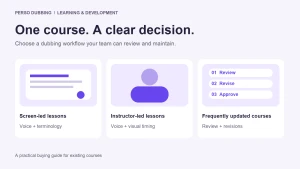
Slide presentations and software walkthroughs. Prioritize clear narration, accurate terminology, and timing that follows the screen. If no presenter is visible, evaluate an audio-focused workflow before adding lip sync to the budget. Translate screen text in the source project where possible.
Instructor-led lessons with a visible presenter. Include close-up speech in the pilot. Review lip movement, voice consistency, and whether the translated explanation fits the scene. A short introduction may have different requirements from a full lecture.
Compliance and product training that changes often. Test a revision as well as a first translation. Change one instruction, have the reviewer approve it, and check what must be regenerated, re-exported, and uploaded again. Treat accurate meaning as a release condition, especially for safety instructions.
Six tools to include in a shortlist
The checks below are purchasing questions, not assertions that a vendor lacks a feature. Test the same source clip and target language across your finalists.
Tool | Documented workflow | What your education team should verify |
|---|---|---|
Perso Dubbing | Video dubbing, translated-script editing through its documented API, and lip-sync options. | Editor workflow, required exports, paid-plan lip-sync access, and the allowance for revisions. |
HeyGen | Video translation offers audio-only and lip-sync modes; proofreading access varies by plan. | Whether the selected plan includes the review workflow and mode your lesson needs. |
Synthesia | Its video translator accepts existing videos and supports transcript editing and lip sync. | How an uploaded lesson is reviewed and exported in the plan you intend to buy. |
ElevenLabs | Dubbing accepts audio or video and replaces speech while preserving speaker characteristics. | Audio review and delivery requirements, plus any separate visual synchronization workflow. |
Rask AI | Its platform documents translation editing, lip sync, and captions. | Reviewer handoff, export requirements, and the cost of the chosen combination. |
Maestra | Its dubbing editor documents voice selection, timing adjustments, lip sync, and exports. | Timing control, caption delivery, and the account or plan needed to export. |
Perso Dubbing
Perso Dubbing is a candidate when you want to translate an existing lesson and review the resulting script. Its public developer documentation lists dubbing, editing, and lip-sync APIs, so API availability should not be described as “coming soon.” API access and commercial terms still need confirmation for your account. The lip-sync page specifies availability on paid plans; that does not establish that lip sync is bundled into every dubbing price. Developer documentation · Lip-sync information
HeyGen
HeyGen distinguishes audio-only translation from video translation modes with lip sync. Its help guide also describes plan-dependent proofreading. For a screen recording, compare the audio-only path with the requirements of your course; for a visible instructor, review the relevant video mode. The guide states that video translation does not translate on-screen text or graphics, so plan that work separately. Official translation guide
Synthesia
Synthesia should not be excluded merely because you already have recorded lessons. Its video translator documents an upload-based workflow, transcript edits, and translated videos with lip sync. Evaluate that workflow directly rather than treating the product only as a way to create new avatar videos. Official video translator
ElevenLabs
ElevenLabs documents dubbing for audio and video, speaker detection, and replacement of the original speech while retaining speaker characteristics. Include it when evaluating the audio portion of a course localization workflow. Confirm the complete video delivery process you need instead of inferring it from a voice demonstration. Official dubbing documentation
Rask AI
Rask documents translation editing alongside lip sync and captions. For a course with several presenters, use your pilot to check speaker handling, editing effort, and the files your reviewer receives. Confirm the relevant plan and usage terms before comparing a project quote. Official product information
Maestra
Maestra documents a dubbing editor with voice selection and timing adjustments, as well as lip sync and export options. A useful pilot question is whether the reviewer can make a spoken instruction line up with the corresponding visual step. Verify export access for the account you will use. Official video dubbing tool
Budget for the project, including review and updates
A headline price per minute is not a complete course budget. Ask each shortlisted vendor to quote the same scope: source duration, target languages, delivery format, lip-sync requirement, and expected revisions. Record subscription allowances, usage charges, and reviewer time separately.
For illustration, a 20-minute lesson translated into three languages produces 60 minutes of target-language content. This is a planning quantity, not a billable-unit promise: a vendor may charge by credits, source duration, output duration, subscription allowance, or another measure. Confirm how regeneration and partial updates are counted.
Budget line | Record before purchase |
|---|---|
First translation | Required plan, included allowance, and usage beyond that allowance |
Lip sync | Whether it is needed and how it is charged |
Review | Language reviewer and subject expert time |
Supporting content | Captions, slides, quizzes, and downloadable materials |
Updates | Regeneration rules and the cost of a representative revision |
Delivery | Export access and time to validate the lesson in the LMS |
Use current Perso pricing for plan information and confirm the relevant usage conditions in your account. Do not extrapolate a subscription into an unlimited batch quote.
Run a pilot with clear acceptance criteria
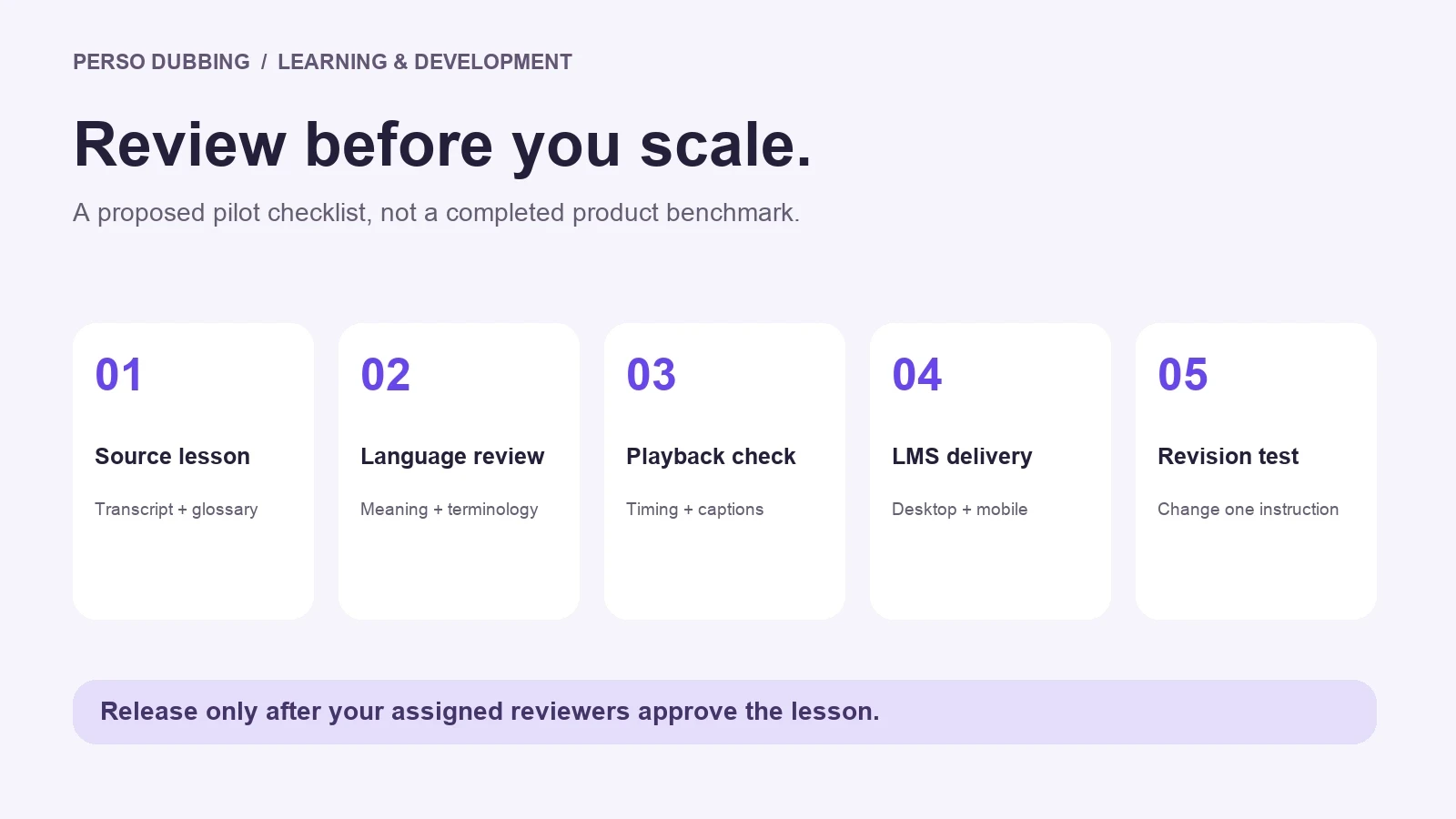
Choose a short excerpt containing technical terminology, a visual instruction, and a representative speaker. The following is a proposed evaluation process, not a completed vendor test.
Prepare an approved source transcript and a glossary. Identify content that should remain unchanged, such as product names.
Select one target language and assign a fluent reviewer plus a subject expert.
Generate and review the sample in each shortlisted tool. Record setup time, corrections, and any parts that require another application.
Check meaning, pronunciation, pacing, caption accuracy, and visible speaker synchronization where relevant. Record each issue with a timestamp.
Export the approved sample and play it in the actual LMS on desktop and mobile. Verify caption controls and playback before scaling.
Change one source instruction and repeat the update process. Record the extra work and the usage charged.
An example release rule is that every instructional or terminology error is resolved and signed off by the assigned reviewer. Set your own tolerance for cosmetic issues before comparing outputs. Completion rates and learning outcomes require learner evidence; they cannot be established by a vendor feature list.
Start with one lesson
Have an existing course ready? Open Perso Dubbing with a short lesson excerpt and an approved terminology list. Review the available settings and usage cost before generating, then use the checklist above to decide whether to expand to another language.
For the broader production process, see our course localization workflow guide. For platform-wide comparisons beyond education, see the AI dubbing tools comparison.
Frequently asked questions
What is the best AI dubbing tool for e-learning content?
The right choice depends on your course format and review requirements. Shortlist tools that accept your source content, let your team correct the translation, and provide the delivery files you need. Use the same lesson excerpt and a fluent reviewer to evaluate finalists before committing a course library.
Do training videos need lip sync?
A visible instructor may make lip sync relevant. A slide deck or screen recording may need only translated narration and captions. Review a representative clip and confirm the additional plan or usage requirements before including lip sync in every lesson.
Can AI dubbing translate my entire course?
Dubbing addresses the spoken content of a recording. Slides, diagrams, assessments, and course navigation still need a localization plan. Verify the selected tool's scope and test the exported media in your LMS rather than assuming complete course compatibility.
How should I compare the cost of course localization?
Request the same project scope from each vendor and include review, supporting content, revisions, and delivery work. Compare the account's actual billing rules rather than converting unrelated subscription prices into a universal per-minute rate.
For an existing course, choose an AI dubbing tool by testing whether your team can correct terminology, review each target language, and deliver a usable lesson to your learning platform. A convincing voice sample alone does not answer those questions. Start with the type of lesson you need to localize, then compare the full editing and delivery workflow.
This guide compares documented workflows from Perso Dubbing, HeyGen, Synthesia, ElevenLabs, Rask AI, and Maestra. It is published by Perso AI and is not an independent performance benchmark. Features and plan access should be confirmed before purchase.
What should an education team compare first?
Use one representative lesson to answer these questions before selecting a platform:
Requirement | What to check in your pilot |
|---|---|
Terminology | Can a reviewer correct acronyms, product names, technical terms, and instructions before delivery? |
Voice and pacing | Are explanations understandable, and do spoken instructions still match what appears on screen? |
Visible presenters | Does this lesson need lip sync, and what plan or usage allowance covers it? |
Captions and slides | Can you deliver the required caption files? Who will translate diagrams, slide text, and embedded captions? |
Updates | Can the team revise a changed sentence without losing its approved terminology and version history? |
Delivery | Does an exported sample play correctly in your actual LMS, including caption controls and mobile playback? |
Governance | Are permissions, speaker consent, access controls, and retention terms suitable for the material? |
Do not assume a translated video is a complete localized course. Quiz questions, downloadable worksheets, slide images, and navigation labels need their own review. Confirm LMS packaging requirements separately from the video export format.
Match the workflow to your lesson
Slide presentations and software walkthroughs. Prioritize clear narration, accurate terminology, and timing that follows the screen. If no presenter is visible, evaluate an audio-focused workflow before adding lip sync to the budget. Translate screen text in the source project where possible.
Instructor-led lessons with a visible presenter. Include close-up speech in the pilot. Review lip movement, voice consistency, and whether the translated explanation fits the scene. A short introduction may have different requirements from a full lecture.
Compliance and product training that changes often. Test a revision as well as a first translation. Change one instruction, have the reviewer approve it, and check what must be regenerated, re-exported, and uploaded again. Treat accurate meaning as a release condition, especially for safety instructions.
Six tools to include in a shortlist
The checks below are purchasing questions, not assertions that a vendor lacks a feature. Test the same source clip and target language across your finalists.
Tool | Documented workflow | What your education team should verify |
|---|---|---|
Perso Dubbing | Video dubbing, translated-script editing through its documented API, and lip-sync options. | Editor workflow, required exports, paid-plan lip-sync access, and the allowance for revisions. |
HeyGen | Video translation offers audio-only and lip-sync modes; proofreading access varies by plan. | Whether the selected plan includes the review workflow and mode your lesson needs. |
Synthesia | Its video translator accepts existing videos and supports transcript editing and lip sync. | How an uploaded lesson is reviewed and exported in the plan you intend to buy. |
ElevenLabs | Dubbing accepts audio or video and replaces speech while preserving speaker characteristics. | Audio review and delivery requirements, plus any separate visual synchronization workflow. |
Rask AI | Its platform documents translation editing, lip sync, and captions. | Reviewer handoff, export requirements, and the cost of the chosen combination. |
Maestra | Its dubbing editor documents voice selection, timing adjustments, lip sync, and exports. | Timing control, caption delivery, and the account or plan needed to export. |
Perso Dubbing
Perso Dubbing is a candidate when you want to translate an existing lesson and review the resulting script. Its public developer documentation lists dubbing, editing, and lip-sync APIs, so API availability should not be described as “coming soon.” API access and commercial terms still need confirmation for your account. The lip-sync page specifies availability on paid plans; that does not establish that lip sync is bundled into every dubbing price. Developer documentation · Lip-sync information
HeyGen
HeyGen distinguishes audio-only translation from video translation modes with lip sync. Its help guide also describes plan-dependent proofreading. For a screen recording, compare the audio-only path with the requirements of your course; for a visible instructor, review the relevant video mode. The guide states that video translation does not translate on-screen text or graphics, so plan that work separately. Official translation guide
Synthesia
Synthesia should not be excluded merely because you already have recorded lessons. Its video translator documents an upload-based workflow, transcript edits, and translated videos with lip sync. Evaluate that workflow directly rather than treating the product only as a way to create new avatar videos. Official video translator
ElevenLabs
ElevenLabs documents dubbing for audio and video, speaker detection, and replacement of the original speech while retaining speaker characteristics. Include it when evaluating the audio portion of a course localization workflow. Confirm the complete video delivery process you need instead of inferring it from a voice demonstration. Official dubbing documentation
Rask AI
Rask documents translation editing alongside lip sync and captions. For a course with several presenters, use your pilot to check speaker handling, editing effort, and the files your reviewer receives. Confirm the relevant plan and usage terms before comparing a project quote. Official product information
Maestra
Maestra documents a dubbing editor with voice selection and timing adjustments, as well as lip sync and export options. A useful pilot question is whether the reviewer can make a spoken instruction line up with the corresponding visual step. Verify export access for the account you will use. Official video dubbing tool
Budget for the project, including review and updates
A headline price per minute is not a complete course budget. Ask each shortlisted vendor to quote the same scope: source duration, target languages, delivery format, lip-sync requirement, and expected revisions. Record subscription allowances, usage charges, and reviewer time separately.
For illustration, a 20-minute lesson translated into three languages produces 60 minutes of target-language content. This is a planning quantity, not a billable-unit promise: a vendor may charge by credits, source duration, output duration, subscription allowance, or another measure. Confirm how regeneration and partial updates are counted.
Budget line | Record before purchase |
|---|---|
First translation | Required plan, included allowance, and usage beyond that allowance |
Lip sync | Whether it is needed and how it is charged |
Review | Language reviewer and subject expert time |
Supporting content | Captions, slides, quizzes, and downloadable materials |
Updates | Regeneration rules and the cost of a representative revision |
Delivery | Export access and time to validate the lesson in the LMS |
Use current Perso pricing for plan information and confirm the relevant usage conditions in your account. Do not extrapolate a subscription into an unlimited batch quote.
Run a pilot with clear acceptance criteria
Choose a short excerpt containing technical terminology, a visual instruction, and a representative speaker. The following is a proposed evaluation process, not a completed vendor test.
Prepare an approved source transcript and a glossary. Identify content that should remain unchanged, such as product names.
Select one target language and assign a fluent reviewer plus a subject expert.
Generate and review the sample in each shortlisted tool. Record setup time, corrections, and any parts that require another application.
Check meaning, pronunciation, pacing, caption accuracy, and visible speaker synchronization where relevant. Record each issue with a timestamp.
Export the approved sample and play it in the actual LMS on desktop and mobile. Verify caption controls and playback before scaling.
Change one source instruction and repeat the update process. Record the extra work and the usage charged.
An example release rule is that every instructional or terminology error is resolved and signed off by the assigned reviewer. Set your own tolerance for cosmetic issues before comparing outputs. Completion rates and learning outcomes require learner evidence; they cannot be established by a vendor feature list.
Start with one lesson
Have an existing course ready? Open Perso Dubbing with a short lesson excerpt and an approved terminology list. Review the available settings and usage cost before generating, then use the checklist above to decide whether to expand to another language.
For the broader production process, see our course localization workflow guide. For platform-wide comparisons beyond education, see the AI dubbing tools comparison.
Frequently asked questions
What is the best AI dubbing tool for e-learning content?
The right choice depends on your course format and review requirements. Shortlist tools that accept your source content, let your team correct the translation, and provide the delivery files you need. Use the same lesson excerpt and a fluent reviewer to evaluate finalists before committing a course library.
Do training videos need lip sync?
A visible instructor may make lip sync relevant. A slide deck or screen recording may need only translated narration and captions. Review a representative clip and confirm the additional plan or usage requirements before including lip sync in every lesson.
Can AI dubbing translate my entire course?
Dubbing addresses the spoken content of a recording. Slides, diagrams, assessments, and course navigation still need a localization plan. Verify the selected tool's scope and test the exported media in your LMS rather than assuming complete course compatibility.
How should I compare the cost of course localization?
Request the same project scope from each vendor and include review, supporting content, revisions, and delivery work. Compare the account's actual billing rules rather than converting unrelated subscription prices into a universal per-minute rate.
For an existing course, choose an AI dubbing tool by testing whether your team can correct terminology, review each target language, and deliver a usable lesson to your learning platform. A convincing voice sample alone does not answer those questions. Start with the type of lesson you need to localize, then compare the full editing and delivery workflow.
This guide compares documented workflows from Perso Dubbing, HeyGen, Synthesia, ElevenLabs, Rask AI, and Maestra. It is published by Perso AI and is not an independent performance benchmark. Features and plan access should be confirmed before purchase.
What should an education team compare first?
Use one representative lesson to answer these questions before selecting a platform:
Requirement | What to check in your pilot |
|---|---|
Terminology | Can a reviewer correct acronyms, product names, technical terms, and instructions before delivery? |
Voice and pacing | Are explanations understandable, and do spoken instructions still match what appears on screen? |
Visible presenters | Does this lesson need lip sync, and what plan or usage allowance covers it? |
Captions and slides | Can you deliver the required caption files? Who will translate diagrams, slide text, and embedded captions? |
Updates | Can the team revise a changed sentence without losing its approved terminology and version history? |
Delivery | Does an exported sample play correctly in your actual LMS, including caption controls and mobile playback? |
Governance | Are permissions, speaker consent, access controls, and retention terms suitable for the material? |
Do not assume a translated video is a complete localized course. Quiz questions, downloadable worksheets, slide images, and navigation labels need their own review. Confirm LMS packaging requirements separately from the video export format.
Match the workflow to your lesson
Slide presentations and software walkthroughs. Prioritize clear narration, accurate terminology, and timing that follows the screen. If no presenter is visible, evaluate an audio-focused workflow before adding lip sync to the budget. Translate screen text in the source project where possible.
Instructor-led lessons with a visible presenter. Include close-up speech in the pilot. Review lip movement, voice consistency, and whether the translated explanation fits the scene. A short introduction may have different requirements from a full lecture.
Compliance and product training that changes often. Test a revision as well as a first translation. Change one instruction, have the reviewer approve it, and check what must be regenerated, re-exported, and uploaded again. Treat accurate meaning as a release condition, especially for safety instructions.
Six tools to include in a shortlist
The checks below are purchasing questions, not assertions that a vendor lacks a feature. Test the same source clip and target language across your finalists.
Tool | Documented workflow | What your education team should verify |
|---|---|---|
Perso Dubbing | Video dubbing, translated-script editing through its documented API, and lip-sync options. | Editor workflow, required exports, paid-plan lip-sync access, and the allowance for revisions. |
HeyGen | Video translation offers audio-only and lip-sync modes; proofreading access varies by plan. | Whether the selected plan includes the review workflow and mode your lesson needs. |
Synthesia | Its video translator accepts existing videos and supports transcript editing and lip sync. | How an uploaded lesson is reviewed and exported in the plan you intend to buy. |
ElevenLabs | Dubbing accepts audio or video and replaces speech while preserving speaker characteristics. | Audio review and delivery requirements, plus any separate visual synchronization workflow. |
Rask AI | Its platform documents translation editing, lip sync, and captions. | Reviewer handoff, export requirements, and the cost of the chosen combination. |
Maestra | Its dubbing editor documents voice selection, timing adjustments, lip sync, and exports. | Timing control, caption delivery, and the account or plan needed to export. |
Perso Dubbing
Perso Dubbing is a candidate when you want to translate an existing lesson and review the resulting script. Its public developer documentation lists dubbing, editing, and lip-sync APIs, so API availability should not be described as “coming soon.” API access and commercial terms still need confirmation for your account. The lip-sync page specifies availability on paid plans; that does not establish that lip sync is bundled into every dubbing price. Developer documentation · Lip-sync information
HeyGen
HeyGen distinguishes audio-only translation from video translation modes with lip sync. Its help guide also describes plan-dependent proofreading. For a screen recording, compare the audio-only path with the requirements of your course; for a visible instructor, review the relevant video mode. The guide states that video translation does not translate on-screen text or graphics, so plan that work separately. Official translation guide
Synthesia
Synthesia should not be excluded merely because you already have recorded lessons. Its video translator documents an upload-based workflow, transcript edits, and translated videos with lip sync. Evaluate that workflow directly rather than treating the product only as a way to create new avatar videos. Official video translator
ElevenLabs
ElevenLabs documents dubbing for audio and video, speaker detection, and replacement of the original speech while retaining speaker characteristics. Include it when evaluating the audio portion of a course localization workflow. Confirm the complete video delivery process you need instead of inferring it from a voice demonstration. Official dubbing documentation
Rask AI
Rask documents translation editing alongside lip sync and captions. For a course with several presenters, use your pilot to check speaker handling, editing effort, and the files your reviewer receives. Confirm the relevant plan and usage terms before comparing a project quote. Official product information
Maestra
Maestra documents a dubbing editor with voice selection and timing adjustments, as well as lip sync and export options. A useful pilot question is whether the reviewer can make a spoken instruction line up with the corresponding visual step. Verify export access for the account you will use. Official video dubbing tool
Budget for the project, including review and updates
A headline price per minute is not a complete course budget. Ask each shortlisted vendor to quote the same scope: source duration, target languages, delivery format, lip-sync requirement, and expected revisions. Record subscription allowances, usage charges, and reviewer time separately.
For illustration, a 20-minute lesson translated into three languages produces 60 minutes of target-language content. This is a planning quantity, not a billable-unit promise: a vendor may charge by credits, source duration, output duration, subscription allowance, or another measure. Confirm how regeneration and partial updates are counted.
Budget line | Record before purchase |
|---|---|
First translation | Required plan, included allowance, and usage beyond that allowance |
Lip sync | Whether it is needed and how it is charged |
Review | Language reviewer and subject expert time |
Supporting content | Captions, slides, quizzes, and downloadable materials |
Updates | Regeneration rules and the cost of a representative revision |
Delivery | Export access and time to validate the lesson in the LMS |
Use current Perso pricing for plan information and confirm the relevant usage conditions in your account. Do not extrapolate a subscription into an unlimited batch quote.
Run a pilot with clear acceptance criteria
Choose a short excerpt containing technical terminology, a visual instruction, and a representative speaker. The following is a proposed evaluation process, not a completed vendor test.
Prepare an approved source transcript and a glossary. Identify content that should remain unchanged, such as product names.
Select one target language and assign a fluent reviewer plus a subject expert.
Generate and review the sample in each shortlisted tool. Record setup time, corrections, and any parts that require another application.
Check meaning, pronunciation, pacing, caption accuracy, and visible speaker synchronization where relevant. Record each issue with a timestamp.
Export the approved sample and play it in the actual LMS on desktop and mobile. Verify caption controls and playback before scaling.
Change one source instruction and repeat the update process. Record the extra work and the usage charged.
An example release rule is that every instructional or terminology error is resolved and signed off by the assigned reviewer. Set your own tolerance for cosmetic issues before comparing outputs. Completion rates and learning outcomes require learner evidence; they cannot be established by a vendor feature list.
Start with one lesson
Have an existing course ready? Open Perso Dubbing with a short lesson excerpt and an approved terminology list. Review the available settings and usage cost before generating, then use the checklist above to decide whether to expand to another language.
For the broader production process, see our course localization workflow guide. For platform-wide comparisons beyond education, see the AI dubbing tools comparison.
Frequently asked questions
What is the best AI dubbing tool for e-learning content?
The right choice depends on your course format and review requirements. Shortlist tools that accept your source content, let your team correct the translation, and provide the delivery files you need. Use the same lesson excerpt and a fluent reviewer to evaluate finalists before committing a course library.
Do training videos need lip sync?
A visible instructor may make lip sync relevant. A slide deck or screen recording may need only translated narration and captions. Review a representative clip and confirm the additional plan or usage requirements before including lip sync in every lesson.
Can AI dubbing translate my entire course?
Dubbing addresses the spoken content of a recording. Slides, diagrams, assessments, and course navigation still need a localization plan. Verify the selected tool's scope and test the exported media in your LMS rather than assuming complete course compatibility.
How should I compare the cost of course localization?
Request the same project scope from each vendor and include review, supporting content, revisions, and delivery work. Compare the account's actual billing rules rather than converting unrelated subscription prices into a universal per-minute rate.
Continue Reading
Browse All