How to Dub Portuguese Videos into English with AI (2026)




Jump to section
Jump to section

Share
Share
Share

AI Video Translator, Localization, and Dubbing Tool
Try it out for Free
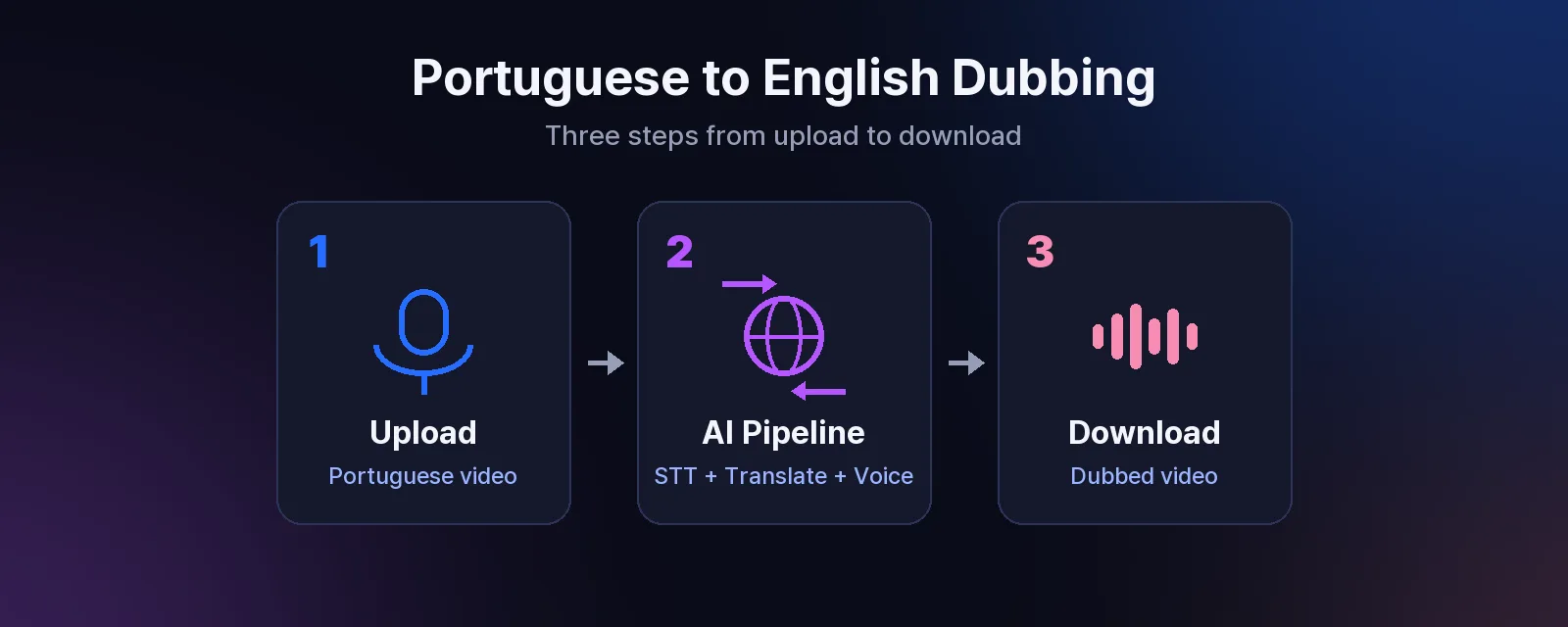
Dubbing a Portuguese video into English takes three steps with Perso Dubbing: upload the video, choose English as the target language, and download the finished file. The AI transcribes the Portuguese audio, translates it, and generates a natural English voice track. Across completed projects on the platform, the median turnaround is 4.4 minutes.
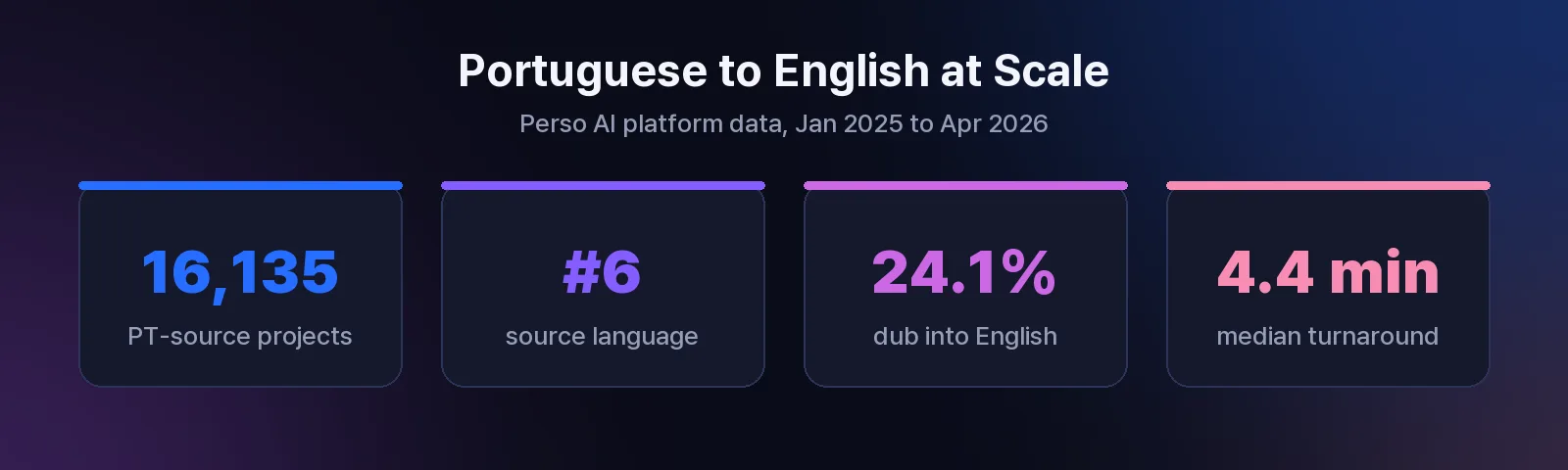
Portuguese creators are already doing this at scale. On the Perso AI platform, Portuguese is the #6 source language for AI dubbing, with 16,135 dubbing projects started from Portuguese audio. And English is the #2 target language overall, accounting for 24.1% of all dubbing projects. The Portuguese-to-English route is not an edge case. It is one of the most common ways creators move their content into a bigger market.
Why dub Portuguese videos into English?
An English version opens your existing catalog to viewers who would never find the original. YouTube, TikTok, and Instagram all recommend content based on watch behavior, and an English audio track lets your video enter feeds far beyond Brazil and Portugal.
Dubbing also outperforms subtitles for retention on short-form content. Viewers scrolling a feed rarely stop to read captions in a language they do not speak. A native-sounding English voice keeps the video watchable with zero reading effort.
The economics have changed too. Traditional dubbing means hiring voice actors, booking a studio, and waiting days per video. AI dubbing compresses that into minutes, which makes it viable even for a channel posting daily Shorts.
How to dub a Portuguese video into English: 3 steps
Perso Dubbing is an AI dubbing tool that supports 99+ target languages and recognizes speech in 100 languages, including Portuguese. Here is the full workflow.
Step 1: Upload your video
Create a free account, start a new project, and upload your video file or paste a link. The AI transcribes the Portuguese audio automatically using speech recognition that covers 100 languages, so you do not need to prepare a script or subtitle file first. Brazilian Portuguese works out of the box.
Step 2: Choose English and review the script
Select English as the target language. Perso Dubbing translates the transcript and shows it in an editor before the voice is generated. This review step matters for Portuguese content: check names, brand terms, and slang, since a literal translation of an expression like “fazer um sucesso” rarely lands the way you want in English. Edit any line directly in the editor.
Step 3: Generate and download
Start the dub. The AI generates the English voice track and syncs it to your video. Across completed projects on the platform the median processing time is 4.4 minutes, and 24.2% finish in under 3 minutes. Download the result as a ready-to-post video file.
Need lip movements to match the new audio? Add AI lip sync to the same project. Lip sync is available on paid plans, each with a monthly lip-sync allowance.
Tips for Portuguese-to-English dubbing
Keep clips short where you can. On the Perso AI platform, 55.8% of all dubbed videos are under 1 minute. Short-form is where AI dubbing pays off fastest: processing is quicker, and Shorts, Reels, and TikTok are where an English version finds new viewers with no extra promotion.
Review the English script before generating. Machine translation handles standard Portuguese well, but channel-specific vocabulary, jokes, and regional slang deserve a 30-second check in the editor. Fixing the script before generation is faster than regenerating audio.
Dub the other direction too. If part of your audience is in Brazil but your source content is in English, the same workflow runs in reverse. See our guide on translating English videos to Portuguese.
For the full feature walkthrough beyond the Portuguese case, see the step-by-step guide to dubbing any video with AI, or explore the AI video translator feature page.
Source: Perso AI platform data, 316,856 projects, Jan 2025 to Apr 2026.
Frequently asked questions
Q. Can AI dub a Portuguese video into English?
A. Yes. Perso Dubbing transcribes Portuguese audio with 100-language speech recognition, translates it, and generates an English voice track. Portuguese is the #6 source language on the platform, with more than 16,000 dubbing projects started from Portuguese audio.
Q. How long does it take to dub a video into English?
A. The median processing time is 4 minutes 23 seconds, and 24.2% of completed projects finish in under 3 minutes. Length of the source video is the main factor.
Q. Does it work with Brazilian Portuguese?
A. Yes. The speech recognition step covers Portuguese, including Brazilian Portuguese, without any manual setup. You can review and edit the translated English script before the voice is generated.
Q. Will the lips match the English audio?
A. Standard dubbing syncs the new audio to your video’s timing. For matching mouth movements, add the AI lip sync option to the same project. Lip sync is available on paid plans, each with a monthly allowance.
Ready to try it with your own video? Dub your video with AI free, no credit card required.
Dubbing a Portuguese video into English takes three steps with Perso Dubbing: upload the video, choose English as the target language, and download the finished file. The AI transcribes the Portuguese audio, translates it, and generates a natural English voice track. Across completed projects on the platform, the median turnaround is 4.4 minutes.
Portuguese creators are already doing this at scale. On the Perso AI platform, Portuguese is the #6 source language for AI dubbing, with 16,135 dubbing projects started from Portuguese audio. And English is the #2 target language overall, accounting for 24.1% of all dubbing projects. The Portuguese-to-English route is not an edge case. It is one of the most common ways creators move their content into a bigger market.
Why dub Portuguese videos into English?
An English version opens your existing catalog to viewers who would never find the original. YouTube, TikTok, and Instagram all recommend content based on watch behavior, and an English audio track lets your video enter feeds far beyond Brazil and Portugal.
Dubbing also outperforms subtitles for retention on short-form content. Viewers scrolling a feed rarely stop to read captions in a language they do not speak. A native-sounding English voice keeps the video watchable with zero reading effort.
The economics have changed too. Traditional dubbing means hiring voice actors, booking a studio, and waiting days per video. AI dubbing compresses that into minutes, which makes it viable even for a channel posting daily Shorts.
How to dub a Portuguese video into English: 3 steps
Perso Dubbing is an AI dubbing tool that supports 99+ target languages and recognizes speech in 100 languages, including Portuguese. Here is the full workflow.
Step 1: Upload your video
Create a free account, start a new project, and upload your video file or paste a link. The AI transcribes the Portuguese audio automatically using speech recognition that covers 100 languages, so you do not need to prepare a script or subtitle file first. Brazilian Portuguese works out of the box.
Step 2: Choose English and review the script
Select English as the target language. Perso Dubbing translates the transcript and shows it in an editor before the voice is generated. This review step matters for Portuguese content: check names, brand terms, and slang, since a literal translation of an expression like “fazer um sucesso” rarely lands the way you want in English. Edit any line directly in the editor.
Step 3: Generate and download
Start the dub. The AI generates the English voice track and syncs it to your video. Across completed projects on the platform the median processing time is 4.4 minutes, and 24.2% finish in under 3 minutes. Download the result as a ready-to-post video file.
Need lip movements to match the new audio? Add AI lip sync to the same project. Lip sync is available on paid plans, each with a monthly lip-sync allowance.
Tips for Portuguese-to-English dubbing
Keep clips short where you can. On the Perso AI platform, 55.8% of all dubbed videos are under 1 minute. Short-form is where AI dubbing pays off fastest: processing is quicker, and Shorts, Reels, and TikTok are where an English version finds new viewers with no extra promotion.
Review the English script before generating. Machine translation handles standard Portuguese well, but channel-specific vocabulary, jokes, and regional slang deserve a 30-second check in the editor. Fixing the script before generation is faster than regenerating audio.
Dub the other direction too. If part of your audience is in Brazil but your source content is in English, the same workflow runs in reverse. See our guide on translating English videos to Portuguese.
For the full feature walkthrough beyond the Portuguese case, see the step-by-step guide to dubbing any video with AI, or explore the AI video translator feature page.
Source: Perso AI platform data, 316,856 projects, Jan 2025 to Apr 2026.
Frequently asked questions
Q. Can AI dub a Portuguese video into English?
A. Yes. Perso Dubbing transcribes Portuguese audio with 100-language speech recognition, translates it, and generates an English voice track. Portuguese is the #6 source language on the platform, with more than 16,000 dubbing projects started from Portuguese audio.
Q. How long does it take to dub a video into English?
A. The median processing time is 4 minutes 23 seconds, and 24.2% of completed projects finish in under 3 minutes. Length of the source video is the main factor.
Q. Does it work with Brazilian Portuguese?
A. Yes. The speech recognition step covers Portuguese, including Brazilian Portuguese, without any manual setup. You can review and edit the translated English script before the voice is generated.
Q. Will the lips match the English audio?
A. Standard dubbing syncs the new audio to your video’s timing. For matching mouth movements, add the AI lip sync option to the same project. Lip sync is available on paid plans, each with a monthly allowance.
Ready to try it with your own video? Dub your video with AI free, no credit card required.
Dubbing a Portuguese video into English takes three steps with Perso Dubbing: upload the video, choose English as the target language, and download the finished file. The AI transcribes the Portuguese audio, translates it, and generates a natural English voice track. Across completed projects on the platform, the median turnaround is 4.4 minutes.
Portuguese creators are already doing this at scale. On the Perso AI platform, Portuguese is the #6 source language for AI dubbing, with 16,135 dubbing projects started from Portuguese audio. And English is the #2 target language overall, accounting for 24.1% of all dubbing projects. The Portuguese-to-English route is not an edge case. It is one of the most common ways creators move their content into a bigger market.
Why dub Portuguese videos into English?
An English version opens your existing catalog to viewers who would never find the original. YouTube, TikTok, and Instagram all recommend content based on watch behavior, and an English audio track lets your video enter feeds far beyond Brazil and Portugal.
Dubbing also outperforms subtitles for retention on short-form content. Viewers scrolling a feed rarely stop to read captions in a language they do not speak. A native-sounding English voice keeps the video watchable with zero reading effort.
The economics have changed too. Traditional dubbing means hiring voice actors, booking a studio, and waiting days per video. AI dubbing compresses that into minutes, which makes it viable even for a channel posting daily Shorts.
How to dub a Portuguese video into English: 3 steps
Perso Dubbing is an AI dubbing tool that supports 99+ target languages and recognizes speech in 100 languages, including Portuguese. Here is the full workflow.
Step 1: Upload your video
Create a free account, start a new project, and upload your video file or paste a link. The AI transcribes the Portuguese audio automatically using speech recognition that covers 100 languages, so you do not need to prepare a script or subtitle file first. Brazilian Portuguese works out of the box.
Step 2: Choose English and review the script
Select English as the target language. Perso Dubbing translates the transcript and shows it in an editor before the voice is generated. This review step matters for Portuguese content: check names, brand terms, and slang, since a literal translation of an expression like “fazer um sucesso” rarely lands the way you want in English. Edit any line directly in the editor.
Step 3: Generate and download
Start the dub. The AI generates the English voice track and syncs it to your video. Across completed projects on the platform the median processing time is 4.4 minutes, and 24.2% finish in under 3 minutes. Download the result as a ready-to-post video file.
Need lip movements to match the new audio? Add AI lip sync to the same project. Lip sync is available on paid plans, each with a monthly lip-sync allowance.
Tips for Portuguese-to-English dubbing
Keep clips short where you can. On the Perso AI platform, 55.8% of all dubbed videos are under 1 minute. Short-form is where AI dubbing pays off fastest: processing is quicker, and Shorts, Reels, and TikTok are where an English version finds new viewers with no extra promotion.
Review the English script before generating. Machine translation handles standard Portuguese well, but channel-specific vocabulary, jokes, and regional slang deserve a 30-second check in the editor. Fixing the script before generation is faster than regenerating audio.
Dub the other direction too. If part of your audience is in Brazil but your source content is in English, the same workflow runs in reverse. See our guide on translating English videos to Portuguese.
For the full feature walkthrough beyond the Portuguese case, see the step-by-step guide to dubbing any video with AI, or explore the AI video translator feature page.
Source: Perso AI platform data, 316,856 projects, Jan 2025 to Apr 2026.
Frequently asked questions
Q. Can AI dub a Portuguese video into English?
A. Yes. Perso Dubbing transcribes Portuguese audio with 100-language speech recognition, translates it, and generates an English voice track. Portuguese is the #6 source language on the platform, with more than 16,000 dubbing projects started from Portuguese audio.
Q. How long does it take to dub a video into English?
A. The median processing time is 4 minutes 23 seconds, and 24.2% of completed projects finish in under 3 minutes. Length of the source video is the main factor.
Q. Does it work with Brazilian Portuguese?
A. Yes. The speech recognition step covers Portuguese, including Brazilian Portuguese, without any manual setup. You can review and edit the translated English script before the voice is generated.
Q. Will the lips match the English audio?
A. Standard dubbing syncs the new audio to your video’s timing. For matching mouth movements, add the AI lip sync option to the same project. Lip sync is available on paid plans, each with a monthly allowance.
Ready to try it with your own video? Dub your video with AI free, no credit card required.
Continue Reading
Browse All


