




Success Guide
How to Translate and Dub YouTube Videos with AI: Complete Creator Guide
Jump to section
Jump to section
Share
Share
Share
AI Video Translator, Localization, and Dubbing Tool
Try it out for Free
Last year, dubbing a 10-minute YouTube video into 10 languages cost roughly $25,000 and took 6 weeks. Today, it costs around $20 and takes 20 minutes. This is how creators are doing it — and why some still get it wrong.
If your videos work in English but flatline in Spanish, Portuguese, or Japanese, the answer usually isn't your content. It's that nobody can hear you in their language. And the gap is wider than most creators realize: more than 70% of YouTube watch time happens outside the United States, but most channels publish English-only. Every month you delay localizing your channel, the gap widens. Creators who started dubbing in 2024 now have two years of compounding non-English watch time. You can't recover those views — but you can stop the bleeding starting today.
What you'll learn from this guide:
How AI YouTube translation actually works — and where it breaks
Why YouTube's built-in auto-dub disappoints most creators (and how to disable it)
Step-by-step: how to translate your video in 3 steps
The 5 AI tools compared — which one fits your channel
How to set up multi-language audio tracks and rank in foreign markets
Reading time: about 12 minutes · Skill level: Beginner-friendly
Why your YouTube videos need AI translation
YouTube's multi-language audio tracks feature lets a single video carry up to 40 separate audio tracks. If you localize your content, you reach audiences that subtitle-only videos miss entirely — particularly in Brazil, Mexico, Indonesia, India, and Spanish-speaking markets, where dubbed content significantly outperforms subtitled equivalents in retention and watch time.
AI translation makes this practical for individual creators. Where traditional dubbing costs $500~$2,500 per minute of finished video and takes 7~14 days per language, modern AI dubbing platforms complete the same workflow in minutes at a fraction of the cost. The result: your single source video can become 10~30 localized versions in a single workflow, opening foreign markets that were previously out of reach.
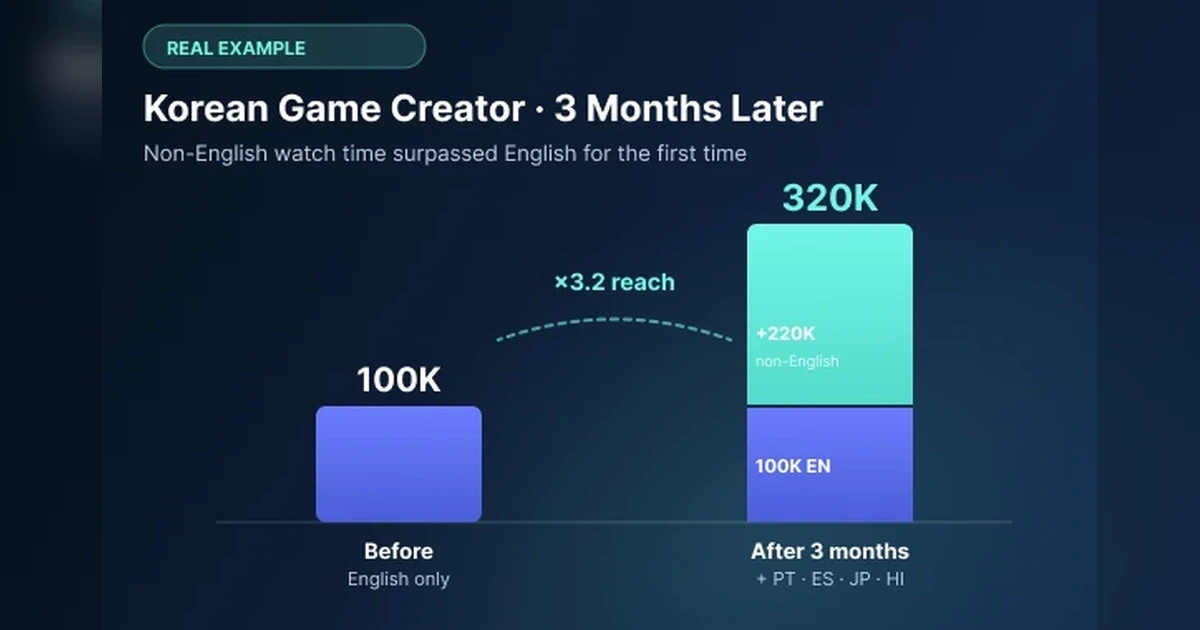
Real example: A Korean game creator with 100K English-speaking subscribers added Portuguese, Spanish, Japanese, and Hindi audio tracks to their videos in 2025. Within three months, their non-English watch time exceeded their English watch time for the first time. Total localization cost: roughly $40/month in AI dubbing credits — compared to an estimated $40,000+ for traditional voice acting in the same languages.
In practical terms, AI translation matters for your channel because:
Your audience reach scales with language coverage — every additional language adds a measurable percentage to potential watch time
YouTube's algorithm rewards videos with multi-language audio tracks by surfacing them in non-English search and discovery feeds
Sponsorship and brand deals increasingly require multilingual delivery
Localized content has lower competition in many languages than English-only content
How does AI YouTube translation work?
AI YouTube translation follows a four-step pipeline. Each step uses a different AI model, and the quality of the final output depends on how well each step performs and how seamlessly they integrate.
Step 1: Speech recognition (ASR) The AI transcribes the original audio of the YouTube video into text, identifying each speaker and adding timestamps for each word. Accuracy at this step depends on audio quality, background noise, and accent clarity. Modern ASR reaches 90~97% accuracy for clear single-speaker audio.
Step 2: Translation The transcribed text is translated into the target language using neural machine translation. Good platforms preserve idioms, context, and brand-specific terminology. Most platforms let creators review and edit the translated script before voice generation — this is where you fix product names, brand voice, and culturally specific phrases.
Step 3: Voice synthesis or voice cloning The translated text is converted back into spoken audio. Basic platforms use generic AI voices in each language. Advanced platforms use voice cloning — generating the translated audio in your own voice, preserving your tone, accent, and emotional inflection. For creator content, voice cloning is the difference between a video that sounds like your channel and a video that sounds generic.
Step 4: Lip synchronization The most advanced platforms add a final step: re-rendering the speaker's mouth movements to match the new translated audio. Without lip sync, dubbed videos look visibly off — the mouth says English while the audio says Spanish. With lip sync, viewers cannot easily tell the video was dubbed.
The entire four-step pipeline typically runs in 1~5 minutes for a 5-minute YouTube video on leading platforms.
"If you've ever watched a dubbed video where the mouth says English while the voice says Spanish, you know what AI dubbing looks like when lip sync is missing. Step 4 is what separates acceptable dubbing from invisible dubbing — and most free tools skip it entirely."
YouTube's built-in auto-dub vs dedicated AI tools — what's the difference?
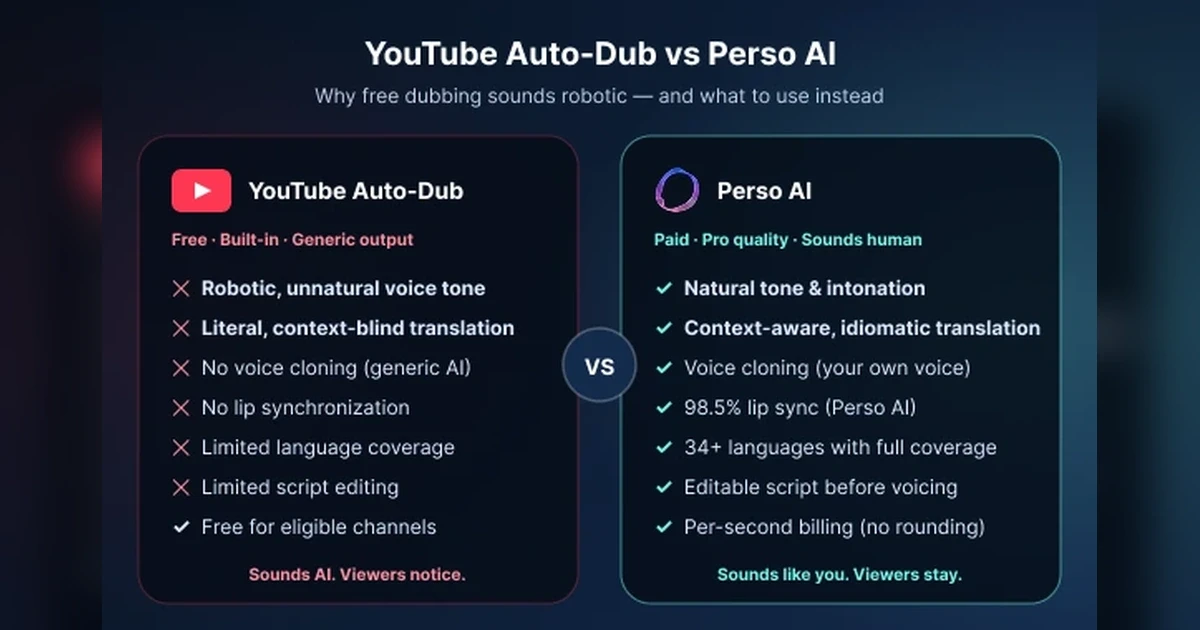
If you publish on YouTube, you've probably seen the prompt: "Enable multi-language audio." It's free, it's automatic, and on paper it solves your translation problem in one click. So why are some of the biggest creators turning it off?
Why YouTube Auto-Dub falls short
YouTube's auto-dubbing was built to be available everywhere, not to be good everywhere. That trade-off shows up the moment a viewer presses play:
1. The voice sounds like a robot — and viewers say so out loud. Auto-dub uses a generic synthetic voice that doesn't match your tone, cadence, or personality. Open the comments under any auto-dubbed video and you'll find some version of "why does this sound like AI?" within the first 10 comments. For a creator whose brand is their voice, that's brand damage on autopilot.
2. Translations are literal, not contextual. Auto-dub translates word-by-word without understanding humor, slang, idioms, or your niche's vocabulary. A gaming creator's "this boss is cracked" becomes a literal "this boss has a crack in it" in Spanish. Educators lose nuance. Storytellers lose punchlines.
3. There is no voice cloning. Your audience hears a stock AI voice — not yours. Your brand identity stops at the language barrier.
4. There is no lip sync. The dubbed audio plays over your original mouth movements. For face-to-camera content (tutorials, vlogs, interviews), the mismatch is immediately uncomfortable to watch — and the bigger your face is on screen, the worse it gets.
5. Language coverage is limited. YouTube auto-dub currently supports a small set of languages, with rollout still gated by channel eligibility. If your priority market isn't on the list, the feature simply doesn't exist for you.
6. You can't edit the script. Auto-dub gives you no way to tweak a mistranslated line, fix a brand name, or adjust pronunciation before the dub goes live. What the model outputs is what your audience hears.
7. It's free — but it's free for a reason. YouTube's incentive is coverage at scale, not professional-grade output. Auto-dub is good enough to localize a how-to video for a casual viewer. It is not good enough to grow a paid audience, sell a course, or build a global brand.
Pull quote Auto-dub sounds like AI. Viewers notice. That's the entire problem.
What dedicated AI dubbing tools do differently
Dedicated tools (Perso Dubbing, ElevenLabs, HeyGen, Rask, and others) are built around a different premise: the dub should be indistinguishable from a human-produced version of you. To get there, they layer four capabilities that YouTube auto-dub doesn't have:
Capability | YouTube Auto-Dub | Dedicated AI tools (e.g., Perso Dubbing) |
|---|---|---|
Voice naturalness | Robotic, generic TTS | Natural tone, intonation, and pacing |
Translation quality | Literal, context-blind | Context-aware, idiomatic, niche-aware |
Voice cloning | ✕ Stock AI voice | ✓ Your own voice across every language |
Lip synchronization | ✕ No alignment | ✓ Frame-accurate (98.5% accuracy on Perso Dubbing) |
Language coverage | Small, gated rollout | 99+ languages, no eligibility wall |
Script editing | ✕ Output is locked | ✓ Edit any line before generating audio |
Multilingual subtitles | Auto-generated only | ✓ Editable, downloadable in every language |
Billing model | Free (loss-leader) | Per-second billing (no minute rounding) on Perso Dubbing |
Best for | Casual coverage at zero cost | Professional channels building a global audience |
The gap isn't subtle. A dedicated tool produces dubs that pass the "did a human do this?" test. Auto-dub doesn't try to — and that's the choice you're really making when you pick between them.
So which one should you use?
A simple decision rule:
Use YouTube Auto-Dub if you're a hobbyist creator, your content is low-stakes (vlogs, behind-the-scenes), and your monetization doesn't depend on non-English audiences. Free is free.
Use a dedicated AI dubbing tool if any of the following are true: your voice is your brand, you're face-to-camera, your content educates or sells, or you're targeting a specific non-English market where production quality directly affects watch time and conversion.
For most creators reading this guide, the second list is closer to reality. The free option costs you nothing upfront — and a meaningful share of your potential global audience every month.
How to translate a YouTube video step-by-step (3 steps)
The exact interface varies by platform, but the core workflow on most dedicated AI dubbing platforms in 2026 follows three steps. Below is the workflow for Perso Dubbing; HeyGen and Rask AI work similarly.
Step 1: Upload your video or import from YouTube Drag and drop your video file (MP4, MOV are commonly supported) or paste your YouTube URL to import directly. Most platforms accept videos up to 1 hour on standard plans, longer on enterprise plans. Select the source language (the language spoken in the original video).
Step 2: Select target languages and voice settings Choose one or more target languages from the platform's supported list. Configure voice options: use voice cloning to preserve your own voice across languages, or choose an AI voice from the platform's library. Review and edit the translated script before voice generation — this is where you fix brand-specific terms, product names, and culturally specific phrases that automated translation may not handle correctly.
Step 3: Generate, preview, and download Click generate. Processing time ranges from seconds to a few minutes depending on platform and video length. Preview the dubbed video — check lip sync quality, voice naturalness, and translation accuracy. Download the final video in MP4 (or other supported formats) and upload to YouTube as a multi-language audio track on your original video, or as a standalone video in the target language.
The complete workflow typically takes 5~10 minutes of human time per video — versus 7~14 days for traditional voice-actor dubbing.
Best AI tools for YouTube video translation — 5 platforms compared
The following five tools are the most commonly evaluated AI dubbing options for YouTube creators in 2026. Specifications are drawn from each platform's official website as of June 2026.
1. Perso Dubbing — Best for creators needing transparent lip sync accuracy + multilingual workflow
Perso Dubbing is an AI video translation and dubbing platform that combines transcription, neural translation, voice cloning, and lip synchronization in a single end-to-end workflow.
Best for: Creators publishing face-led video content · Marketers localizing product demos · Enterprise teams capturing global meetings and lectures
Key strengths:
98.5% lip sync accuracy — the only platform among compared tools to publicly disclose a quantified lip sync metric
Supports 99+ languages, with voice cloning available across all of them by default
Works on faces partially covered by hands, microphones, or other obstructions
Under 3 minutes processing time per video
AI-powered summary and action item extraction from transcribed audio — generates meeting recaps, lecture summaries, and to-do lists automatically
Multilingual subtitle file downloads — generate transcripts and subtitle files in 99+ languages from a single source video
Per-second billing — pay for the exact length of your video, never rounded up to the next minute. A 47-second clip is billed as 47 seconds, not as 1 full minute
ISO 27001 and ISMS certified with enterprise-grade encryption
Free 1-minute trial at Fast Speed (no credit card required)
Considerations:
Smaller language count than HeyGen (175+) or Rask AI (130+), though all 99+ languages include lip sync and voice cloning by default
Real-time processing is not supported — videos process in batches under 3 minutes
2. HeyGen — Best for maximum language coverage and AI avatar workflows
HeyGen is an AI video generation platform that combines AI avatar creation with multilingual video translation. Its translation feature supports the highest language count among the five platforms compared.
Best for: Avatar-based content creators · Marketing teams needing maximum language reach · Solo creators building global brands
Key strengths:
175+ languages and dialects — highest among compared tools
AI avatar lip sync combined with video translation
Translate, dub, and lip-sync within a single workflow
AI-generated subtitles and voiceovers built in
API and integrations available on Enterprise plan
Free tier: 3 videos per month, up to 3 minutes each
Voice cloning supported
Considerations:
Lip sync accuracy is not publicly disclosed (HeyGen mentions "higher accuracy" in premium plans without publishing a quantified metric)
Free tier is generous in language count but limited in video volume (9 minutes total per month)
Platform is optimized for AI-generated avatars; teams dubbing real human-speaker videos may not need the full avatar feature set
3. Rask AI — Best for multi-speaker content at scale
Rask AI is an AI video localization platform with lip sync and multi-speaker translation, designed for content teams scaling large multilingual video libraries.
Best for: Content teams · Media companies · Publishers with multi-speaker videos (interviews, podcasts, panel discussions)
Key strengths:
130+ languages for video translation and dubbing
135 languages for text translation
Voice cloning in 32 languages
Multi-speaker translation — distinguishes and translates multiple voices within a single video
API access and a Free Tools section (Subtitle Generator, Free AI Dubbing)
Optimized for batch processing large video libraries
Voice cloning with accent adaptation
Considerations:
Lip sync accuracy is not publicly disclosed (Rask AI uses "pixel-perfect" without publishing a numerical metric)
Voice cloning is limited to 32 languages (vs 130+ for translation)
Free Tools section is more limited than a full free trial
4. sync.so — Best for editor-native workflows
sync.so (sync. labs) is an AI lipsync and visual dubbing platform built for editor-native workflows. Unlike most AI dubbing tools that operate as standalone web apps, sync.so integrates directly into existing video editing pipelines via plugins.
Best for: Post-production teams · Filmmakers · Video editors already working in Adobe Premiere Pro or ComfyUI
Key strengths:
Adobe Premiere Pro plugin — direct integration into the most common professional editing environment
ComfyUI node — fits AI artist and indie creator workflows
REST API + SDKs for custom automation
4K ProRes output for professional post-production
Multiple face support within a single video
Voice cloning included
29+ languages for visual dubbing
Free $0 tier, with paid plans up to $99/month
Considerations:
Lip sync accuracy is not publicly disclosed (sync.so describes the output as "studio-grade")
Smaller language coverage (29+) than HeyGen or Rask AI
Designed primarily for lip sync editing rather than end-to-end translation
5. YouTube Auto-Dub — Best free option for eligible channels
YouTube's built-in auto-dub feature generates dubbed audio tracks for eligible channels directly inside YouTube Studio. It is free and integrated, but limited compared to dedicated platforms.
Best for: Creators on eligible channels who want a free starting point · Channels publishing in widely-supported languages
Key strengths:
Free for eligible creators
Generated directly inside YouTube Studio
Automatically distributed via YouTube's multi-language audio tracks feature
No external account or subscription required
Considerations:
Limited language coverage compared to dedicated platforms
No voice cloning — uses generic AI voices, not the creator's own voice
No lip synchronization — the speaker's mouth movements stay in the original language
Limited script editing options
Quality is inconsistent across channels and languages
How to choose the right AI tool for your YouTube channel
The right platform depends on your content type, language priorities, and quality requirements. Use this matching guide:
You publish face-led video — talking-head explainers, product demos, vlog content — and need the dubbed video to look and sound like you:
→ Prioritize lip sync accuracy and voice cloning. Perso Dubbing is the only platform that publicly discloses a quantified 98.5% accuracy figure, with voice cloning across all 99+ supported languages by default.
You need to reach the widest possible language audience and your content uses AI avatars:
→ HeyGen leads at 175+ languages with avatar integration built in.
You publish multi-speaker content — interviews, panels, podcasts — and need each voice handled separately:
→ Rask AI is built for multi-speaker translation across 130+ languages.
You work primarily in Adobe Premiere Pro or ComfyUI and want lip sync as an inline editing step:
→ sync.so integrates directly as a plugin into your existing editing pipeline.
You're a YouTube creator just starting with translation and want a free zero-friction option:
→ Start with YouTube's auto-dub. Upgrade to a dedicated platform when you need voice cloning, lip sync, or higher quality control.
You produce high-volume short-form content — Shorts, Reels, TikToks under 60 seconds:
→ Check the billing model carefully. Many platforms bill in per-minute units, so your 30-second short is charged as a full minute — effectively doubling your cost across a content library. Perso Dubbing uses per-second billing: a 47-second short is billed as 47 seconds.
How to set up YouTube multi-language audio tracks
Once you've dubbed your video into target languages, the next step is uploading the audio tracks to YouTube so viewers automatically hear the version in their preferred language.
Step 1: Go to YouTube Studio → Content → select the video you want to add languages to → click the pencil (edit) icon.
Step 2: Open the "Subtitles" tab → click "Add Language" to add target languages → for each language, upload both the translated subtitles file and the dubbed audio file (M4A or other supported format).
Step 3: Save and wait for YouTube to process the audio tracks (usually a few minutes). Once processed, viewers will see a language selector on your video and can switch between audio tracks.
Tip: YouTube prioritizes audio tracks based on the viewer's language settings, so a viewer in Brazil will automatically hear the Portuguese audio if available. This is why uploading multi-language tracks usually outperforms uploading separate videos per language.
Tips for ranking translated YouTube videos in foreign markets
Translating the audio is only the first step. To actually grow audiences in foreign markets, the video metadata also needs to be localized.
Translate the title and description for each language. A translated audio with English title and description tells YouTube the video is English content. Translated metadata signals to YouTube that the video is genuinely localized.
Add localized tags and keywords. Research what creators in your target language actually search for — direct translation of English keywords often misses local search patterns.
Customize the thumbnail per language if possible. A thumbnail with English text loses click-through in non-English markets. Localized thumbnails — even just the text overlay — significantly improve CTR.
Use the multi-language description feature. YouTube lets you upload separate descriptions per audio track. Use this to localize the description, including any links, brand mentions, or calls to action.
Subtitle the video in addition to dubbing. Even when the audio is dubbed, providing subtitles in the target language helps accessibility and improves comprehension for viewers in noisy environments.
Other YouTube translation options worth knowing
This guide focused on the five most evaluated AI dubbing platforms for YouTube creators. Beyond these, several other tools are commonly used for narrower use cases:
VEED — Browser-based video editor with built-in AI translation, popular among short-form creators
Descript — Editor-native transcription and translation, popular among podcasters who also publish to YouTube
Maestra — Focuses on multilingual subtitles and transcription rather than full dubbing
Akool — AI video translator with avatar features
For accurate, up-to-date specifications on any of these tools, check each platform's official website before subscribing.
——————————————————————————————————-
Frequently Asked Questions
How do I translate a YouTube video into another language?
Upload your video to an AI dubbing platform (Perso Dubbing, HeyGen, Rask AI, or sync.so), select the target language, choose voice cloning to preserve your own voice, generate the dubbed video, and upload it to YouTube as a multi-language audio track. The complete workflow typically takes under 10 minutes of human time per video.
Can YouTube translate my videos automatically?
YouTube has a built-in auto-dub feature that generates translated audio tracks for eligible channels in a limited set of languages. It is free but uses generic AI voices, has no lip sync, and offers limited script control. For better quality, voice cloning, and broader language support, creators typically use a dedicated AI dubbing platform alongside or instead of YouTube's auto-dub.
How do I turn off YouTube's automatic dubbing?
In YouTube Studio, go to Settings → Upload defaults → Advanced settings → turn off "Translated videos." This disables the auto-generated translations. You can then upload your own dubbed audio tracks manually via the multi-language audio feature for full control over the output.
Is AI YouTube translation free?
Several platforms offer free tiers: YouTube's built-in auto-dub is free for eligible channels, Perso Dubbing offers 1 free minute at Fast Speed, HeyGen offers 3 videos per month (up to 3 minutes each), sync.so has a $0 tier, and Rask AI offers a Free Tools section. Full-featured use typically requires a paid plan starting from $20~$100 per month depending on platform and volume.
Will AI dubbing preserve my voice?
Yes, with voice cloning. Modern AI dubbing platforms can replicate your voice tone, accent, and emotional inflection in the target language from a short audio sample. Perso Dubbing supports voice cloning across all 99+ supported languages by default. YouTube's built-in auto-dub does not currently offer voice cloning — it uses generic AI voices.
How long does it take to dub a YouTube video?
Most modern AI dubbing platforms complete the processing in 1~5 minutes for a 5-minute video. Total human time (uploading, reviewing the translation, downloading, uploading to YouTube) is typically 5~10 minutes per video. This compares to 7~14 days for traditional voice-actor dubbing.
Does AI dubbing match lip movements with the new audio?
Yes, advanced platforms include automatic lip synchronization that re-renders the speaker's mouth movements to match the translated audio. Perso Dubbing achieves 98.5% lip sync accuracy across 99+ languages, including faces partially covered by hands or microphones. YouTube's built-in auto-dub does not currently include lip sync — the speaker's mouth stays in the original language.
Is AI dubbing legal for YouTube content?
Yes, AI dubbing is legal when you own the rights to the source video and have consent for any voices used. For your own original videos featuring your own voice, AI dubbing with voice cloning is straightforward. For videos featuring guests, interviewees, or licensed content, ensure you have appropriate rights and consent before cloning voices.
Can AI dub my video in real time during a livestream?
Real-time AI dubbing for live YouTube streams is not standard in 2026. The platforms covered in this guide all operate in batch mode — uploaded videos process in minutes, but not as a live stream. For real-time speech translation (without video lip sync), separate tools like Google's Interpreter mode are more commonly used.
What's the best AI tool for YouTube translation overall?
There is no single best tool — the right choice depends on your priorities. For creators prioritizing transparent lip sync accuracy and voice cloning across all supported languages, Perso Dubbing is uniquely positioned (98.5% disclosed accuracy, 99+ languages, voice cloning by default). For creators prioritizing maximum language count, HeyGen leads at 175+. For multi-speaker content at scale, Rask AI. For editor-native workflows, sync.so.
Do dubbed videos rank in YouTube search?
Yes. YouTube's algorithm surfaces dubbed videos to viewers in their preferred language, and videos with multi-language audio tracks typically perform better in non-English search results than separate single-language uploads. Localized titles, descriptions, and thumbnails further improve discoverability in target markets.
Should I dub or use subtitles for my YouTube videos?
Both work, and many creators use both. Dubbing typically outperforms subtitles for retention and watch time in markets where dubbed content is the cultural norm (Brazil, Mexico, Germany, France). Subtitles are faster and cheaper to produce and remain essential for accessibility. For optimal coverage, dubbing in your top 5~10 markets and providing subtitles in additional languages is a common approach.
How accurate is AI translation for YouTube content?
Modern neural machine translation reaches 90~97% accuracy for major language pairs (English to Spanish, Portuguese, French, German, Japanese, Korean). Specialized terminology, idioms, brand names, and culturally specific references benefit from manual review. Most platforms let you edit the translated script before voice generation — this step is where you catch and fix translation issues.
Can I dub long YouTube videos (over 1 hour)?
Yes, most platforms support long videos. Processing time scales with video length — a one-hour video typically takes 10~30 minutes to process. Some platforms have per-video length limits on lower-tier plans, so check the limits before uploading long videos. For very long videos, splitting into shorter segments often produces better quality control.
Ready to translate your first video?
Pick the language with the largest opportunity for your channel — for most creators, that's Spanish, Portuguese, or Japanese — and dub a single video this week. Perso Dubbing offers a free 1-minute trial: enough to test the full workflow with your own content before committing.
If it works, you'll know in 5 minutes whether AI dubbing fits your channel. If it doesn't, you've lost nothing.
Try Perso Dubbing free — no credit card required →
One video this week is the difference between staying English-only and starting to compound non-English watch time. Two years from now, the creators dubbing today will have a head start you can't recover.
Sources
Specifications verified directly from each platform's official website as of June 2026:
Last year, dubbing a 10-minute YouTube video into 10 languages cost roughly $25,000 and took 6 weeks. Today, it costs around $20 and takes 20 minutes. This is how creators are doing it — and why some still get it wrong.
If your videos work in English but flatline in Spanish, Portuguese, or Japanese, the answer usually isn't your content. It's that nobody can hear you in their language. And the gap is wider than most creators realize: more than 70% of YouTube watch time happens outside the United States, but most channels publish English-only. Every month you delay localizing your channel, the gap widens. Creators who started dubbing in 2024 now have two years of compounding non-English watch time. You can't recover those views — but you can stop the bleeding starting today.
What you'll learn from this guide:
How AI YouTube translation actually works — and where it breaks
Why YouTube's built-in auto-dub disappoints most creators (and how to disable it)
Step-by-step: how to translate your video in 3 steps
The 5 AI tools compared — which one fits your channel
How to set up multi-language audio tracks and rank in foreign markets
Reading time: about 12 minutes · Skill level: Beginner-friendly
Why your YouTube videos need AI translation
YouTube's multi-language audio tracks feature lets a single video carry up to 40 separate audio tracks. If you localize your content, you reach audiences that subtitle-only videos miss entirely — particularly in Brazil, Mexico, Indonesia, India, and Spanish-speaking markets, where dubbed content significantly outperforms subtitled equivalents in retention and watch time.
AI translation makes this practical for individual creators. Where traditional dubbing costs $500~$2,500 per minute of finished video and takes 7~14 days per language, modern AI dubbing platforms complete the same workflow in minutes at a fraction of the cost. The result: your single source video can become 10~30 localized versions in a single workflow, opening foreign markets that were previously out of reach.
Real example: A Korean game creator with 100K English-speaking subscribers added Portuguese, Spanish, Japanese, and Hindi audio tracks to their videos in 2025. Within three months, their non-English watch time exceeded their English watch time for the first time. Total localization cost: roughly $40/month in AI dubbing credits — compared to an estimated $40,000+ for traditional voice acting in the same languages.
In practical terms, AI translation matters for your channel because:
Your audience reach scales with language coverage — every additional language adds a measurable percentage to potential watch time
YouTube's algorithm rewards videos with multi-language audio tracks by surfacing them in non-English search and discovery feeds
Sponsorship and brand deals increasingly require multilingual delivery
Localized content has lower competition in many languages than English-only content
How does AI YouTube translation work?
AI YouTube translation follows a four-step pipeline. Each step uses a different AI model, and the quality of the final output depends on how well each step performs and how seamlessly they integrate.
Step 1: Speech recognition (ASR) The AI transcribes the original audio of the YouTube video into text, identifying each speaker and adding timestamps for each word. Accuracy at this step depends on audio quality, background noise, and accent clarity. Modern ASR reaches 90~97% accuracy for clear single-speaker audio.
Step 2: Translation The transcribed text is translated into the target language using neural machine translation. Good platforms preserve idioms, context, and brand-specific terminology. Most platforms let creators review and edit the translated script before voice generation — this is where you fix product names, brand voice, and culturally specific phrases.
Step 3: Voice synthesis or voice cloning The translated text is converted back into spoken audio. Basic platforms use generic AI voices in each language. Advanced platforms use voice cloning — generating the translated audio in your own voice, preserving your tone, accent, and emotional inflection. For creator content, voice cloning is the difference between a video that sounds like your channel and a video that sounds generic.
Step 4: Lip synchronization The most advanced platforms add a final step: re-rendering the speaker's mouth movements to match the new translated audio. Without lip sync, dubbed videos look visibly off — the mouth says English while the audio says Spanish. With lip sync, viewers cannot easily tell the video was dubbed.
The entire four-step pipeline typically runs in 1~5 minutes for a 5-minute YouTube video on leading platforms.
"If you've ever watched a dubbed video where the mouth says English while the voice says Spanish, you know what AI dubbing looks like when lip sync is missing. Step 4 is what separates acceptable dubbing from invisible dubbing — and most free tools skip it entirely."
YouTube's built-in auto-dub vs dedicated AI tools — what's the difference?
If you publish on YouTube, you've probably seen the prompt: "Enable multi-language audio." It's free, it's automatic, and on paper it solves your translation problem in one click. So why are some of the biggest creators turning it off?
Why YouTube Auto-Dub falls short
YouTube's auto-dubbing was built to be available everywhere, not to be good everywhere. That trade-off shows up the moment a viewer presses play:
1. The voice sounds like a robot — and viewers say so out loud. Auto-dub uses a generic synthetic voice that doesn't match your tone, cadence, or personality. Open the comments under any auto-dubbed video and you'll find some version of "why does this sound like AI?" within the first 10 comments. For a creator whose brand is their voice, that's brand damage on autopilot.
2. Translations are literal, not contextual. Auto-dub translates word-by-word without understanding humor, slang, idioms, or your niche's vocabulary. A gaming creator's "this boss is cracked" becomes a literal "this boss has a crack in it" in Spanish. Educators lose nuance. Storytellers lose punchlines.
3. There is no voice cloning. Your audience hears a stock AI voice — not yours. Your brand identity stops at the language barrier.
4. There is no lip sync. The dubbed audio plays over your original mouth movements. For face-to-camera content (tutorials, vlogs, interviews), the mismatch is immediately uncomfortable to watch — and the bigger your face is on screen, the worse it gets.
5. Language coverage is limited. YouTube auto-dub currently supports a small set of languages, with rollout still gated by channel eligibility. If your priority market isn't on the list, the feature simply doesn't exist for you.
6. You can't edit the script. Auto-dub gives you no way to tweak a mistranslated line, fix a brand name, or adjust pronunciation before the dub goes live. What the model outputs is what your audience hears.
7. It's free — but it's free for a reason. YouTube's incentive is coverage at scale, not professional-grade output. Auto-dub is good enough to localize a how-to video for a casual viewer. It is not good enough to grow a paid audience, sell a course, or build a global brand.
Pull quote Auto-dub sounds like AI. Viewers notice. That's the entire problem.
What dedicated AI dubbing tools do differently
Dedicated tools (Perso Dubbing, ElevenLabs, HeyGen, Rask, and others) are built around a different premise: the dub should be indistinguishable from a human-produced version of you. To get there, they layer four capabilities that YouTube auto-dub doesn't have:
Capability | YouTube Auto-Dub | Dedicated AI tools (e.g., Perso Dubbing) |
|---|---|---|
Voice naturalness | Robotic, generic TTS | Natural tone, intonation, and pacing |
Translation quality | Literal, context-blind | Context-aware, idiomatic, niche-aware |
Voice cloning | ✕ Stock AI voice | ✓ Your own voice across every language |
Lip synchronization | ✕ No alignment | ✓ Frame-accurate (98.5% accuracy on Perso Dubbing) |
Language coverage | Small, gated rollout | 99+ languages, no eligibility wall |
Script editing | ✕ Output is locked | ✓ Edit any line before generating audio |
Multilingual subtitles | Auto-generated only | ✓ Editable, downloadable in every language |
Billing model | Free (loss-leader) | Per-second billing (no minute rounding) on Perso Dubbing |
Best for | Casual coverage at zero cost | Professional channels building a global audience |
The gap isn't subtle. A dedicated tool produces dubs that pass the "did a human do this?" test. Auto-dub doesn't try to — and that's the choice you're really making when you pick between them.
So which one should you use?
A simple decision rule:
Use YouTube Auto-Dub if you're a hobbyist creator, your content is low-stakes (vlogs, behind-the-scenes), and your monetization doesn't depend on non-English audiences. Free is free.
Use a dedicated AI dubbing tool if any of the following are true: your voice is your brand, you're face-to-camera, your content educates or sells, or you're targeting a specific non-English market where production quality directly affects watch time and conversion.
For most creators reading this guide, the second list is closer to reality. The free option costs you nothing upfront — and a meaningful share of your potential global audience every month.
How to translate a YouTube video step-by-step (3 steps)
The exact interface varies by platform, but the core workflow on most dedicated AI dubbing platforms in 2026 follows three steps. Below is the workflow for Perso Dubbing; HeyGen and Rask AI work similarly.
Step 1: Upload your video or import from YouTube Drag and drop your video file (MP4, MOV are commonly supported) or paste your YouTube URL to import directly. Most platforms accept videos up to 1 hour on standard plans, longer on enterprise plans. Select the source language (the language spoken in the original video).
Step 2: Select target languages and voice settings Choose one or more target languages from the platform's supported list. Configure voice options: use voice cloning to preserve your own voice across languages, or choose an AI voice from the platform's library. Review and edit the translated script before voice generation — this is where you fix brand-specific terms, product names, and culturally specific phrases that automated translation may not handle correctly.
Step 3: Generate, preview, and download Click generate. Processing time ranges from seconds to a few minutes depending on platform and video length. Preview the dubbed video — check lip sync quality, voice naturalness, and translation accuracy. Download the final video in MP4 (or other supported formats) and upload to YouTube as a multi-language audio track on your original video, or as a standalone video in the target language.
The complete workflow typically takes 5~10 minutes of human time per video — versus 7~14 days for traditional voice-actor dubbing.
Best AI tools for YouTube video translation — 5 platforms compared
The following five tools are the most commonly evaluated AI dubbing options for YouTube creators in 2026. Specifications are drawn from each platform's official website as of June 2026.
1. Perso Dubbing — Best for creators needing transparent lip sync accuracy + multilingual workflow
Perso Dubbing is an AI video translation and dubbing platform that combines transcription, neural translation, voice cloning, and lip synchronization in a single end-to-end workflow.
Best for: Creators publishing face-led video content · Marketers localizing product demos · Enterprise teams capturing global meetings and lectures
Key strengths:
98.5% lip sync accuracy — the only platform among compared tools to publicly disclose a quantified lip sync metric
Supports 99+ languages, with voice cloning available across all of them by default
Works on faces partially covered by hands, microphones, or other obstructions
Under 3 minutes processing time per video
AI-powered summary and action item extraction from transcribed audio — generates meeting recaps, lecture summaries, and to-do lists automatically
Multilingual subtitle file downloads — generate transcripts and subtitle files in 99+ languages from a single source video
Per-second billing — pay for the exact length of your video, never rounded up to the next minute. A 47-second clip is billed as 47 seconds, not as 1 full minute
ISO 27001 and ISMS certified with enterprise-grade encryption
Free 1-minute trial at Fast Speed (no credit card required)
Considerations:
Smaller language count than HeyGen (175+) or Rask AI (130+), though all 99+ languages include lip sync and voice cloning by default
Real-time processing is not supported — videos process in batches under 3 minutes
2. HeyGen — Best for maximum language coverage and AI avatar workflows
HeyGen is an AI video generation platform that combines AI avatar creation with multilingual video translation. Its translation feature supports the highest language count among the five platforms compared.
Best for: Avatar-based content creators · Marketing teams needing maximum language reach · Solo creators building global brands
Key strengths:
175+ languages and dialects — highest among compared tools
AI avatar lip sync combined with video translation
Translate, dub, and lip-sync within a single workflow
AI-generated subtitles and voiceovers built in
API and integrations available on Enterprise plan
Free tier: 3 videos per month, up to 3 minutes each
Voice cloning supported
Considerations:
Lip sync accuracy is not publicly disclosed (HeyGen mentions "higher accuracy" in premium plans without publishing a quantified metric)
Free tier is generous in language count but limited in video volume (9 minutes total per month)
Platform is optimized for AI-generated avatars; teams dubbing real human-speaker videos may not need the full avatar feature set
3. Rask AI — Best for multi-speaker content at scale
Rask AI is an AI video localization platform with lip sync and multi-speaker translation, designed for content teams scaling large multilingual video libraries.
Best for: Content teams · Media companies · Publishers with multi-speaker videos (interviews, podcasts, panel discussions)
Key strengths:
130+ languages for video translation and dubbing
135 languages for text translation
Voice cloning in 32 languages
Multi-speaker translation — distinguishes and translates multiple voices within a single video
API access and a Free Tools section (Subtitle Generator, Free AI Dubbing)
Optimized for batch processing large video libraries
Voice cloning with accent adaptation
Considerations:
Lip sync accuracy is not publicly disclosed (Rask AI uses "pixel-perfect" without publishing a numerical metric)
Voice cloning is limited to 32 languages (vs 130+ for translation)
Free Tools section is more limited than a full free trial
4. sync.so — Best for editor-native workflows
sync.so (sync. labs) is an AI lipsync and visual dubbing platform built for editor-native workflows. Unlike most AI dubbing tools that operate as standalone web apps, sync.so integrates directly into existing video editing pipelines via plugins.
Best for: Post-production teams · Filmmakers · Video editors already working in Adobe Premiere Pro or ComfyUI
Key strengths:
Adobe Premiere Pro plugin — direct integration into the most common professional editing environment
ComfyUI node — fits AI artist and indie creator workflows
REST API + SDKs for custom automation
4K ProRes output for professional post-production
Multiple face support within a single video
Voice cloning included
29+ languages for visual dubbing
Free $0 tier, with paid plans up to $99/month
Considerations:
Lip sync accuracy is not publicly disclosed (sync.so describes the output as "studio-grade")
Smaller language coverage (29+) than HeyGen or Rask AI
Designed primarily for lip sync editing rather than end-to-end translation
5. YouTube Auto-Dub — Best free option for eligible channels
YouTube's built-in auto-dub feature generates dubbed audio tracks for eligible channels directly inside YouTube Studio. It is free and integrated, but limited compared to dedicated platforms.
Best for: Creators on eligible channels who want a free starting point · Channels publishing in widely-supported languages
Key strengths:
Free for eligible creators
Generated directly inside YouTube Studio
Automatically distributed via YouTube's multi-language audio tracks feature
No external account or subscription required
Considerations:
Limited language coverage compared to dedicated platforms
No voice cloning — uses generic AI voices, not the creator's own voice
No lip synchronization — the speaker's mouth movements stay in the original language
Limited script editing options
Quality is inconsistent across channels and languages
How to choose the right AI tool for your YouTube channel
The right platform depends on your content type, language priorities, and quality requirements. Use this matching guide:
You publish face-led video — talking-head explainers, product demos, vlog content — and need the dubbed video to look and sound like you:
→ Prioritize lip sync accuracy and voice cloning. Perso Dubbing is the only platform that publicly discloses a quantified 98.5% accuracy figure, with voice cloning across all 99+ supported languages by default.
You need to reach the widest possible language audience and your content uses AI avatars:
→ HeyGen leads at 175+ languages with avatar integration built in.
You publish multi-speaker content — interviews, panels, podcasts — and need each voice handled separately:
→ Rask AI is built for multi-speaker translation across 130+ languages.
You work primarily in Adobe Premiere Pro or ComfyUI and want lip sync as an inline editing step:
→ sync.so integrates directly as a plugin into your existing editing pipeline.
You're a YouTube creator just starting with translation and want a free zero-friction option:
→ Start with YouTube's auto-dub. Upgrade to a dedicated platform when you need voice cloning, lip sync, or higher quality control.
You produce high-volume short-form content — Shorts, Reels, TikToks under 60 seconds:
→ Check the billing model carefully. Many platforms bill in per-minute units, so your 30-second short is charged as a full minute — effectively doubling your cost across a content library. Perso Dubbing uses per-second billing: a 47-second short is billed as 47 seconds.
How to set up YouTube multi-language audio tracks
Once you've dubbed your video into target languages, the next step is uploading the audio tracks to YouTube so viewers automatically hear the version in their preferred language.
Step 1: Go to YouTube Studio → Content → select the video you want to add languages to → click the pencil (edit) icon.
Step 2: Open the "Subtitles" tab → click "Add Language" to add target languages → for each language, upload both the translated subtitles file and the dubbed audio file (M4A or other supported format).
Step 3: Save and wait for YouTube to process the audio tracks (usually a few minutes). Once processed, viewers will see a language selector on your video and can switch between audio tracks.
Tip: YouTube prioritizes audio tracks based on the viewer's language settings, so a viewer in Brazil will automatically hear the Portuguese audio if available. This is why uploading multi-language tracks usually outperforms uploading separate videos per language.
Tips for ranking translated YouTube videos in foreign markets
Translating the audio is only the first step. To actually grow audiences in foreign markets, the video metadata also needs to be localized.
Translate the title and description for each language. A translated audio with English title and description tells YouTube the video is English content. Translated metadata signals to YouTube that the video is genuinely localized.
Add localized tags and keywords. Research what creators in your target language actually search for — direct translation of English keywords often misses local search patterns.
Customize the thumbnail per language if possible. A thumbnail with English text loses click-through in non-English markets. Localized thumbnails — even just the text overlay — significantly improve CTR.
Use the multi-language description feature. YouTube lets you upload separate descriptions per audio track. Use this to localize the description, including any links, brand mentions, or calls to action.
Subtitle the video in addition to dubbing. Even when the audio is dubbed, providing subtitles in the target language helps accessibility and improves comprehension for viewers in noisy environments.
Other YouTube translation options worth knowing
This guide focused on the five most evaluated AI dubbing platforms for YouTube creators. Beyond these, several other tools are commonly used for narrower use cases:
VEED — Browser-based video editor with built-in AI translation, popular among short-form creators
Descript — Editor-native transcription and translation, popular among podcasters who also publish to YouTube
Maestra — Focuses on multilingual subtitles and transcription rather than full dubbing
Akool — AI video translator with avatar features
For accurate, up-to-date specifications on any of these tools, check each platform's official website before subscribing.
——————————————————————————————————-
Frequently Asked Questions
How do I translate a YouTube video into another language?
Upload your video to an AI dubbing platform (Perso Dubbing, HeyGen, Rask AI, or sync.so), select the target language, choose voice cloning to preserve your own voice, generate the dubbed video, and upload it to YouTube as a multi-language audio track. The complete workflow typically takes under 10 minutes of human time per video.
Can YouTube translate my videos automatically?
YouTube has a built-in auto-dub feature that generates translated audio tracks for eligible channels in a limited set of languages. It is free but uses generic AI voices, has no lip sync, and offers limited script control. For better quality, voice cloning, and broader language support, creators typically use a dedicated AI dubbing platform alongside or instead of YouTube's auto-dub.
How do I turn off YouTube's automatic dubbing?
In YouTube Studio, go to Settings → Upload defaults → Advanced settings → turn off "Translated videos." This disables the auto-generated translations. You can then upload your own dubbed audio tracks manually via the multi-language audio feature for full control over the output.
Is AI YouTube translation free?
Several platforms offer free tiers: YouTube's built-in auto-dub is free for eligible channels, Perso Dubbing offers 1 free minute at Fast Speed, HeyGen offers 3 videos per month (up to 3 minutes each), sync.so has a $0 tier, and Rask AI offers a Free Tools section. Full-featured use typically requires a paid plan starting from $20~$100 per month depending on platform and volume.
Will AI dubbing preserve my voice?
Yes, with voice cloning. Modern AI dubbing platforms can replicate your voice tone, accent, and emotional inflection in the target language from a short audio sample. Perso Dubbing supports voice cloning across all 99+ supported languages by default. YouTube's built-in auto-dub does not currently offer voice cloning — it uses generic AI voices.
How long does it take to dub a YouTube video?
Most modern AI dubbing platforms complete the processing in 1~5 minutes for a 5-minute video. Total human time (uploading, reviewing the translation, downloading, uploading to YouTube) is typically 5~10 minutes per video. This compares to 7~14 days for traditional voice-actor dubbing.
Does AI dubbing match lip movements with the new audio?
Yes, advanced platforms include automatic lip synchronization that re-renders the speaker's mouth movements to match the translated audio. Perso Dubbing achieves 98.5% lip sync accuracy across 99+ languages, including faces partially covered by hands or microphones. YouTube's built-in auto-dub does not currently include lip sync — the speaker's mouth stays in the original language.
Is AI dubbing legal for YouTube content?
Yes, AI dubbing is legal when you own the rights to the source video and have consent for any voices used. For your own original videos featuring your own voice, AI dubbing with voice cloning is straightforward. For videos featuring guests, interviewees, or licensed content, ensure you have appropriate rights and consent before cloning voices.
Can AI dub my video in real time during a livestream?
Real-time AI dubbing for live YouTube streams is not standard in 2026. The platforms covered in this guide all operate in batch mode — uploaded videos process in minutes, but not as a live stream. For real-time speech translation (without video lip sync), separate tools like Google's Interpreter mode are more commonly used.
What's the best AI tool for YouTube translation overall?
There is no single best tool — the right choice depends on your priorities. For creators prioritizing transparent lip sync accuracy and voice cloning across all supported languages, Perso Dubbing is uniquely positioned (98.5% disclosed accuracy, 99+ languages, voice cloning by default). For creators prioritizing maximum language count, HeyGen leads at 175+. For multi-speaker content at scale, Rask AI. For editor-native workflows, sync.so.
Do dubbed videos rank in YouTube search?
Yes. YouTube's algorithm surfaces dubbed videos to viewers in their preferred language, and videos with multi-language audio tracks typically perform better in non-English search results than separate single-language uploads. Localized titles, descriptions, and thumbnails further improve discoverability in target markets.
Should I dub or use subtitles for my YouTube videos?
Both work, and many creators use both. Dubbing typically outperforms subtitles for retention and watch time in markets where dubbed content is the cultural norm (Brazil, Mexico, Germany, France). Subtitles are faster and cheaper to produce and remain essential for accessibility. For optimal coverage, dubbing in your top 5~10 markets and providing subtitles in additional languages is a common approach.
How accurate is AI translation for YouTube content?
Modern neural machine translation reaches 90~97% accuracy for major language pairs (English to Spanish, Portuguese, French, German, Japanese, Korean). Specialized terminology, idioms, brand names, and culturally specific references benefit from manual review. Most platforms let you edit the translated script before voice generation — this step is where you catch and fix translation issues.
Can I dub long YouTube videos (over 1 hour)?
Yes, most platforms support long videos. Processing time scales with video length — a one-hour video typically takes 10~30 minutes to process. Some platforms have per-video length limits on lower-tier plans, so check the limits before uploading long videos. For very long videos, splitting into shorter segments often produces better quality control.
Ready to translate your first video?
Pick the language with the largest opportunity for your channel — for most creators, that's Spanish, Portuguese, or Japanese — and dub a single video this week. Perso Dubbing offers a free 1-minute trial: enough to test the full workflow with your own content before committing.
If it works, you'll know in 5 minutes whether AI dubbing fits your channel. If it doesn't, you've lost nothing.
Try Perso Dubbing free — no credit card required →
One video this week is the difference between staying English-only and starting to compound non-English watch time. Two years from now, the creators dubbing today will have a head start you can't recover.
Sources
Specifications verified directly from each platform's official website as of June 2026:
Last year, dubbing a 10-minute YouTube video into 10 languages cost roughly $25,000 and took 6 weeks. Today, it costs around $20 and takes 20 minutes. This is how creators are doing it — and why some still get it wrong.
If your videos work in English but flatline in Spanish, Portuguese, or Japanese, the answer usually isn't your content. It's that nobody can hear you in their language. And the gap is wider than most creators realize: more than 70% of YouTube watch time happens outside the United States, but most channels publish English-only. Every month you delay localizing your channel, the gap widens. Creators who started dubbing in 2024 now have two years of compounding non-English watch time. You can't recover those views — but you can stop the bleeding starting today.
What you'll learn from this guide:
How AI YouTube translation actually works — and where it breaks
Why YouTube's built-in auto-dub disappoints most creators (and how to disable it)
Step-by-step: how to translate your video in 3 steps
The 5 AI tools compared — which one fits your channel
How to set up multi-language audio tracks and rank in foreign markets
Reading time: about 12 minutes · Skill level: Beginner-friendly
Why your YouTube videos need AI translation
YouTube's multi-language audio tracks feature lets a single video carry up to 40 separate audio tracks. If you localize your content, you reach audiences that subtitle-only videos miss entirely — particularly in Brazil, Mexico, Indonesia, India, and Spanish-speaking markets, where dubbed content significantly outperforms subtitled equivalents in retention and watch time.
AI translation makes this practical for individual creators. Where traditional dubbing costs $500~$2,500 per minute of finished video and takes 7~14 days per language, modern AI dubbing platforms complete the same workflow in minutes at a fraction of the cost. The result: your single source video can become 10~30 localized versions in a single workflow, opening foreign markets that were previously out of reach.
Real example: A Korean game creator with 100K English-speaking subscribers added Portuguese, Spanish, Japanese, and Hindi audio tracks to their videos in 2025. Within three months, their non-English watch time exceeded their English watch time for the first time. Total localization cost: roughly $40/month in AI dubbing credits — compared to an estimated $40,000+ for traditional voice acting in the same languages.
In practical terms, AI translation matters for your channel because:
Your audience reach scales with language coverage — every additional language adds a measurable percentage to potential watch time
YouTube's algorithm rewards videos with multi-language audio tracks by surfacing them in non-English search and discovery feeds
Sponsorship and brand deals increasingly require multilingual delivery
Localized content has lower competition in many languages than English-only content
How does AI YouTube translation work?
AI YouTube translation follows a four-step pipeline. Each step uses a different AI model, and the quality of the final output depends on how well each step performs and how seamlessly they integrate.
Step 1: Speech recognition (ASR) The AI transcribes the original audio of the YouTube video into text, identifying each speaker and adding timestamps for each word. Accuracy at this step depends on audio quality, background noise, and accent clarity. Modern ASR reaches 90~97% accuracy for clear single-speaker audio.
Step 2: Translation The transcribed text is translated into the target language using neural machine translation. Good platforms preserve idioms, context, and brand-specific terminology. Most platforms let creators review and edit the translated script before voice generation — this is where you fix product names, brand voice, and culturally specific phrases.
Step 3: Voice synthesis or voice cloning The translated text is converted back into spoken audio. Basic platforms use generic AI voices in each language. Advanced platforms use voice cloning — generating the translated audio in your own voice, preserving your tone, accent, and emotional inflection. For creator content, voice cloning is the difference between a video that sounds like your channel and a video that sounds generic.
Step 4: Lip synchronization The most advanced platforms add a final step: re-rendering the speaker's mouth movements to match the new translated audio. Without lip sync, dubbed videos look visibly off — the mouth says English while the audio says Spanish. With lip sync, viewers cannot easily tell the video was dubbed.
The entire four-step pipeline typically runs in 1~5 minutes for a 5-minute YouTube video on leading platforms.
"If you've ever watched a dubbed video where the mouth says English while the voice says Spanish, you know what AI dubbing looks like when lip sync is missing. Step 4 is what separates acceptable dubbing from invisible dubbing — and most free tools skip it entirely."
YouTube's built-in auto-dub vs dedicated AI tools — what's the difference?
If you publish on YouTube, you've probably seen the prompt: "Enable multi-language audio." It's free, it's automatic, and on paper it solves your translation problem in one click. So why are some of the biggest creators turning it off?
Why YouTube Auto-Dub falls short
YouTube's auto-dubbing was built to be available everywhere, not to be good everywhere. That trade-off shows up the moment a viewer presses play:
1. The voice sounds like a robot — and viewers say so out loud. Auto-dub uses a generic synthetic voice that doesn't match your tone, cadence, or personality. Open the comments under any auto-dubbed video and you'll find some version of "why does this sound like AI?" within the first 10 comments. For a creator whose brand is their voice, that's brand damage on autopilot.
2. Translations are literal, not contextual. Auto-dub translates word-by-word without understanding humor, slang, idioms, or your niche's vocabulary. A gaming creator's "this boss is cracked" becomes a literal "this boss has a crack in it" in Spanish. Educators lose nuance. Storytellers lose punchlines.
3. There is no voice cloning. Your audience hears a stock AI voice — not yours. Your brand identity stops at the language barrier.
4. There is no lip sync. The dubbed audio plays over your original mouth movements. For face-to-camera content (tutorials, vlogs, interviews), the mismatch is immediately uncomfortable to watch — and the bigger your face is on screen, the worse it gets.
5. Language coverage is limited. YouTube auto-dub currently supports a small set of languages, with rollout still gated by channel eligibility. If your priority market isn't on the list, the feature simply doesn't exist for you.
6. You can't edit the script. Auto-dub gives you no way to tweak a mistranslated line, fix a brand name, or adjust pronunciation before the dub goes live. What the model outputs is what your audience hears.
7. It's free — but it's free for a reason. YouTube's incentive is coverage at scale, not professional-grade output. Auto-dub is good enough to localize a how-to video for a casual viewer. It is not good enough to grow a paid audience, sell a course, or build a global brand.
Pull quote Auto-dub sounds like AI. Viewers notice. That's the entire problem.
What dedicated AI dubbing tools do differently
Dedicated tools (Perso Dubbing, ElevenLabs, HeyGen, Rask, and others) are built around a different premise: the dub should be indistinguishable from a human-produced version of you. To get there, they layer four capabilities that YouTube auto-dub doesn't have:
Capability | YouTube Auto-Dub | Dedicated AI tools (e.g., Perso Dubbing) |
|---|---|---|
Voice naturalness | Robotic, generic TTS | Natural tone, intonation, and pacing |
Translation quality | Literal, context-blind | Context-aware, idiomatic, niche-aware |
Voice cloning | ✕ Stock AI voice | ✓ Your own voice across every language |
Lip synchronization | ✕ No alignment | ✓ Frame-accurate (98.5% accuracy on Perso Dubbing) |
Language coverage | Small, gated rollout | 99+ languages, no eligibility wall |
Script editing | ✕ Output is locked | ✓ Edit any line before generating audio |
Multilingual subtitles | Auto-generated only | ✓ Editable, downloadable in every language |
Billing model | Free (loss-leader) | Per-second billing (no minute rounding) on Perso Dubbing |
Best for | Casual coverage at zero cost | Professional channels building a global audience |
The gap isn't subtle. A dedicated tool produces dubs that pass the "did a human do this?" test. Auto-dub doesn't try to — and that's the choice you're really making when you pick between them.
So which one should you use?
A simple decision rule:
Use YouTube Auto-Dub if you're a hobbyist creator, your content is low-stakes (vlogs, behind-the-scenes), and your monetization doesn't depend on non-English audiences. Free is free.
Use a dedicated AI dubbing tool if any of the following are true: your voice is your brand, you're face-to-camera, your content educates or sells, or you're targeting a specific non-English market where production quality directly affects watch time and conversion.
For most creators reading this guide, the second list is closer to reality. The free option costs you nothing upfront — and a meaningful share of your potential global audience every month.
How to translate a YouTube video step-by-step (3 steps)
The exact interface varies by platform, but the core workflow on most dedicated AI dubbing platforms in 2026 follows three steps. Below is the workflow for Perso Dubbing; HeyGen and Rask AI work similarly.
Step 1: Upload your video or import from YouTube Drag and drop your video file (MP4, MOV are commonly supported) or paste your YouTube URL to import directly. Most platforms accept videos up to 1 hour on standard plans, longer on enterprise plans. Select the source language (the language spoken in the original video).
Step 2: Select target languages and voice settings Choose one or more target languages from the platform's supported list. Configure voice options: use voice cloning to preserve your own voice across languages, or choose an AI voice from the platform's library. Review and edit the translated script before voice generation — this is where you fix brand-specific terms, product names, and culturally specific phrases that automated translation may not handle correctly.
Step 3: Generate, preview, and download Click generate. Processing time ranges from seconds to a few minutes depending on platform and video length. Preview the dubbed video — check lip sync quality, voice naturalness, and translation accuracy. Download the final video in MP4 (or other supported formats) and upload to YouTube as a multi-language audio track on your original video, or as a standalone video in the target language.
The complete workflow typically takes 5~10 minutes of human time per video — versus 7~14 days for traditional voice-actor dubbing.
Best AI tools for YouTube video translation — 5 platforms compared
The following five tools are the most commonly evaluated AI dubbing options for YouTube creators in 2026. Specifications are drawn from each platform's official website as of June 2026.
1. Perso Dubbing — Best for creators needing transparent lip sync accuracy + multilingual workflow
Perso Dubbing is an AI video translation and dubbing platform that combines transcription, neural translation, voice cloning, and lip synchronization in a single end-to-end workflow.
Best for: Creators publishing face-led video content · Marketers localizing product demos · Enterprise teams capturing global meetings and lectures
Key strengths:
98.5% lip sync accuracy — the only platform among compared tools to publicly disclose a quantified lip sync metric
Supports 99+ languages, with voice cloning available across all of them by default
Works on faces partially covered by hands, microphones, or other obstructions
Under 3 minutes processing time per video
AI-powered summary and action item extraction from transcribed audio — generates meeting recaps, lecture summaries, and to-do lists automatically
Multilingual subtitle file downloads — generate transcripts and subtitle files in 99+ languages from a single source video
Per-second billing — pay for the exact length of your video, never rounded up to the next minute. A 47-second clip is billed as 47 seconds, not as 1 full minute
ISO 27001 and ISMS certified with enterprise-grade encryption
Free 1-minute trial at Fast Speed (no credit card required)
Considerations:
Smaller language count than HeyGen (175+) or Rask AI (130+), though all 99+ languages include lip sync and voice cloning by default
Real-time processing is not supported — videos process in batches under 3 minutes
2. HeyGen — Best for maximum language coverage and AI avatar workflows
HeyGen is an AI video generation platform that combines AI avatar creation with multilingual video translation. Its translation feature supports the highest language count among the five platforms compared.
Best for: Avatar-based content creators · Marketing teams needing maximum language reach · Solo creators building global brands
Key strengths:
175+ languages and dialects — highest among compared tools
AI avatar lip sync combined with video translation
Translate, dub, and lip-sync within a single workflow
AI-generated subtitles and voiceovers built in
API and integrations available on Enterprise plan
Free tier: 3 videos per month, up to 3 minutes each
Voice cloning supported
Considerations:
Lip sync accuracy is not publicly disclosed (HeyGen mentions "higher accuracy" in premium plans without publishing a quantified metric)
Free tier is generous in language count but limited in video volume (9 minutes total per month)
Platform is optimized for AI-generated avatars; teams dubbing real human-speaker videos may not need the full avatar feature set
3. Rask AI — Best for multi-speaker content at scale
Rask AI is an AI video localization platform with lip sync and multi-speaker translation, designed for content teams scaling large multilingual video libraries.
Best for: Content teams · Media companies · Publishers with multi-speaker videos (interviews, podcasts, panel discussions)
Key strengths:
130+ languages for video translation and dubbing
135 languages for text translation
Voice cloning in 32 languages
Multi-speaker translation — distinguishes and translates multiple voices within a single video
API access and a Free Tools section (Subtitle Generator, Free AI Dubbing)
Optimized for batch processing large video libraries
Voice cloning with accent adaptation
Considerations:
Lip sync accuracy is not publicly disclosed (Rask AI uses "pixel-perfect" without publishing a numerical metric)
Voice cloning is limited to 32 languages (vs 130+ for translation)
Free Tools section is more limited than a full free trial
4. sync.so — Best for editor-native workflows
sync.so (sync. labs) is an AI lipsync and visual dubbing platform built for editor-native workflows. Unlike most AI dubbing tools that operate as standalone web apps, sync.so integrates directly into existing video editing pipelines via plugins.
Best for: Post-production teams · Filmmakers · Video editors already working in Adobe Premiere Pro or ComfyUI
Key strengths:
Adobe Premiere Pro plugin — direct integration into the most common professional editing environment
ComfyUI node — fits AI artist and indie creator workflows
REST API + SDKs for custom automation
4K ProRes output for professional post-production
Multiple face support within a single video
Voice cloning included
29+ languages for visual dubbing
Free $0 tier, with paid plans up to $99/month
Considerations:
Lip sync accuracy is not publicly disclosed (sync.so describes the output as "studio-grade")
Smaller language coverage (29+) than HeyGen or Rask AI
Designed primarily for lip sync editing rather than end-to-end translation
5. YouTube Auto-Dub — Best free option for eligible channels
YouTube's built-in auto-dub feature generates dubbed audio tracks for eligible channels directly inside YouTube Studio. It is free and integrated, but limited compared to dedicated platforms.
Best for: Creators on eligible channels who want a free starting point · Channels publishing in widely-supported languages
Key strengths:
Free for eligible creators
Generated directly inside YouTube Studio
Automatically distributed via YouTube's multi-language audio tracks feature
No external account or subscription required
Considerations:
Limited language coverage compared to dedicated platforms
No voice cloning — uses generic AI voices, not the creator's own voice
No lip synchronization — the speaker's mouth movements stay in the original language
Limited script editing options
Quality is inconsistent across channels and languages
How to choose the right AI tool for your YouTube channel
The right platform depends on your content type, language priorities, and quality requirements. Use this matching guide:
You publish face-led video — talking-head explainers, product demos, vlog content — and need the dubbed video to look and sound like you:
→ Prioritize lip sync accuracy and voice cloning. Perso Dubbing is the only platform that publicly discloses a quantified 98.5% accuracy figure, with voice cloning across all 99+ supported languages by default.
You need to reach the widest possible language audience and your content uses AI avatars:
→ HeyGen leads at 175+ languages with avatar integration built in.
You publish multi-speaker content — interviews, panels, podcasts — and need each voice handled separately:
→ Rask AI is built for multi-speaker translation across 130+ languages.
You work primarily in Adobe Premiere Pro or ComfyUI and want lip sync as an inline editing step:
→ sync.so integrates directly as a plugin into your existing editing pipeline.
You're a YouTube creator just starting with translation and want a free zero-friction option:
→ Start with YouTube's auto-dub. Upgrade to a dedicated platform when you need voice cloning, lip sync, or higher quality control.
You produce high-volume short-form content — Shorts, Reels, TikToks under 60 seconds:
→ Check the billing model carefully. Many platforms bill in per-minute units, so your 30-second short is charged as a full minute — effectively doubling your cost across a content library. Perso Dubbing uses per-second billing: a 47-second short is billed as 47 seconds.
How to set up YouTube multi-language audio tracks
Once you've dubbed your video into target languages, the next step is uploading the audio tracks to YouTube so viewers automatically hear the version in their preferred language.
Step 1: Go to YouTube Studio → Content → select the video you want to add languages to → click the pencil (edit) icon.
Step 2: Open the "Subtitles" tab → click "Add Language" to add target languages → for each language, upload both the translated subtitles file and the dubbed audio file (M4A or other supported format).
Step 3: Save and wait for YouTube to process the audio tracks (usually a few minutes). Once processed, viewers will see a language selector on your video and can switch between audio tracks.
Tip: YouTube prioritizes audio tracks based on the viewer's language settings, so a viewer in Brazil will automatically hear the Portuguese audio if available. This is why uploading multi-language tracks usually outperforms uploading separate videos per language.
Tips for ranking translated YouTube videos in foreign markets
Translating the audio is only the first step. To actually grow audiences in foreign markets, the video metadata also needs to be localized.
Translate the title and description for each language. A translated audio with English title and description tells YouTube the video is English content. Translated metadata signals to YouTube that the video is genuinely localized.
Add localized tags and keywords. Research what creators in your target language actually search for — direct translation of English keywords often misses local search patterns.
Customize the thumbnail per language if possible. A thumbnail with English text loses click-through in non-English markets. Localized thumbnails — even just the text overlay — significantly improve CTR.
Use the multi-language description feature. YouTube lets you upload separate descriptions per audio track. Use this to localize the description, including any links, brand mentions, or calls to action.
Subtitle the video in addition to dubbing. Even when the audio is dubbed, providing subtitles in the target language helps accessibility and improves comprehension for viewers in noisy environments.
Other YouTube translation options worth knowing
This guide focused on the five most evaluated AI dubbing platforms for YouTube creators. Beyond these, several other tools are commonly used for narrower use cases:
VEED — Browser-based video editor with built-in AI translation, popular among short-form creators
Descript — Editor-native transcription and translation, popular among podcasters who also publish to YouTube
Maestra — Focuses on multilingual subtitles and transcription rather than full dubbing
Akool — AI video translator with avatar features
For accurate, up-to-date specifications on any of these tools, check each platform's official website before subscribing.
——————————————————————————————————-
Frequently Asked Questions
How do I translate a YouTube video into another language?
Upload your video to an AI dubbing platform (Perso Dubbing, HeyGen, Rask AI, or sync.so), select the target language, choose voice cloning to preserve your own voice, generate the dubbed video, and upload it to YouTube as a multi-language audio track. The complete workflow typically takes under 10 minutes of human time per video.
Can YouTube translate my videos automatically?
YouTube has a built-in auto-dub feature that generates translated audio tracks for eligible channels in a limited set of languages. It is free but uses generic AI voices, has no lip sync, and offers limited script control. For better quality, voice cloning, and broader language support, creators typically use a dedicated AI dubbing platform alongside or instead of YouTube's auto-dub.
How do I turn off YouTube's automatic dubbing?
In YouTube Studio, go to Settings → Upload defaults → Advanced settings → turn off "Translated videos." This disables the auto-generated translations. You can then upload your own dubbed audio tracks manually via the multi-language audio feature for full control over the output.
Is AI YouTube translation free?
Several platforms offer free tiers: YouTube's built-in auto-dub is free for eligible channels, Perso Dubbing offers 1 free minute at Fast Speed, HeyGen offers 3 videos per month (up to 3 minutes each), sync.so has a $0 tier, and Rask AI offers a Free Tools section. Full-featured use typically requires a paid plan starting from $20~$100 per month depending on platform and volume.
Will AI dubbing preserve my voice?
Yes, with voice cloning. Modern AI dubbing platforms can replicate your voice tone, accent, and emotional inflection in the target language from a short audio sample. Perso Dubbing supports voice cloning across all 99+ supported languages by default. YouTube's built-in auto-dub does not currently offer voice cloning — it uses generic AI voices.
How long does it take to dub a YouTube video?
Most modern AI dubbing platforms complete the processing in 1~5 minutes for a 5-minute video. Total human time (uploading, reviewing the translation, downloading, uploading to YouTube) is typically 5~10 minutes per video. This compares to 7~14 days for traditional voice-actor dubbing.
Does AI dubbing match lip movements with the new audio?
Yes, advanced platforms include automatic lip synchronization that re-renders the speaker's mouth movements to match the translated audio. Perso Dubbing achieves 98.5% lip sync accuracy across 99+ languages, including faces partially covered by hands or microphones. YouTube's built-in auto-dub does not currently include lip sync — the speaker's mouth stays in the original language.
Is AI dubbing legal for YouTube content?
Yes, AI dubbing is legal when you own the rights to the source video and have consent for any voices used. For your own original videos featuring your own voice, AI dubbing with voice cloning is straightforward. For videos featuring guests, interviewees, or licensed content, ensure you have appropriate rights and consent before cloning voices.
Can AI dub my video in real time during a livestream?
Real-time AI dubbing for live YouTube streams is not standard in 2026. The platforms covered in this guide all operate in batch mode — uploaded videos process in minutes, but not as a live stream. For real-time speech translation (without video lip sync), separate tools like Google's Interpreter mode are more commonly used.
What's the best AI tool for YouTube translation overall?
There is no single best tool — the right choice depends on your priorities. For creators prioritizing transparent lip sync accuracy and voice cloning across all supported languages, Perso Dubbing is uniquely positioned (98.5% disclosed accuracy, 99+ languages, voice cloning by default). For creators prioritizing maximum language count, HeyGen leads at 175+. For multi-speaker content at scale, Rask AI. For editor-native workflows, sync.so.
Do dubbed videos rank in YouTube search?
Yes. YouTube's algorithm surfaces dubbed videos to viewers in their preferred language, and videos with multi-language audio tracks typically perform better in non-English search results than separate single-language uploads. Localized titles, descriptions, and thumbnails further improve discoverability in target markets.
Should I dub or use subtitles for my YouTube videos?
Both work, and many creators use both. Dubbing typically outperforms subtitles for retention and watch time in markets where dubbed content is the cultural norm (Brazil, Mexico, Germany, France). Subtitles are faster and cheaper to produce and remain essential for accessibility. For optimal coverage, dubbing in your top 5~10 markets and providing subtitles in additional languages is a common approach.
How accurate is AI translation for YouTube content?
Modern neural machine translation reaches 90~97% accuracy for major language pairs (English to Spanish, Portuguese, French, German, Japanese, Korean). Specialized terminology, idioms, brand names, and culturally specific references benefit from manual review. Most platforms let you edit the translated script before voice generation — this step is where you catch and fix translation issues.
Can I dub long YouTube videos (over 1 hour)?
Yes, most platforms support long videos. Processing time scales with video length — a one-hour video typically takes 10~30 minutes to process. Some platforms have per-video length limits on lower-tier plans, so check the limits before uploading long videos. For very long videos, splitting into shorter segments often produces better quality control.
Ready to translate your first video?
Pick the language with the largest opportunity for your channel — for most creators, that's Spanish, Portuguese, or Japanese — and dub a single video this week. Perso Dubbing offers a free 1-minute trial: enough to test the full workflow with your own content before committing.
If it works, you'll know in 5 minutes whether AI dubbing fits your channel. If it doesn't, you've lost nothing.
Try Perso Dubbing free — no credit card required →
One video this week is the difference between staying English-only and starting to compound non-English watch time. Two years from now, the creators dubbing today will have a head start you can't recover.
Sources
Specifications verified directly from each platform's official website as of June 2026:
Continue Reading
Browse All