✨New
Get All Key Features for Just $6.99
How to Translate Audio from Video Without Losing Quality
Last Updated
January 2, 2026
Jump to section
Jump to section
Jump to section
Jump to section
Summarize with
Summarize with
Summarize with
Share
Share
Share
You spent hours perfecting your tutorial video. The audio is crisp. The pacing is perfect. Then you translate it into Spanish, and suddenly your voice sounds robotic. The emotional tone? Gone. The professional quality? Destroyed.
This is the nightmare scenario for creators who need to reach global audiences. You know translation opens doors to millions of new viewers, but you refuse to sacrifice the audio quality that makes your content stand out.
The good news: Modern AI has solved this problem. You can now translate audio from video while preserving voice quality using advanced AI technology that maintains voice character, emotional nuance, and professional sound quality.
Why Audio Quality Collapses During Translation
Traditional translation workflows destroy audio quality because they treat your voice as disposable data. The old method extracts audio, transcribes it to text, translates the text, then generates new audio using generic text-to-speech before replacing your original track.
By that fourth step, your unique voice identity is gone. Generic TTS engines create flat, emotionless audio. Viewers notice immediately. Engagement drops.
The problem isn't translation itself, it's the audio replacement process. When you strip away your original voice characteristics, you lose the human connection that makes video content effective for global audiences.
What Quality Preservation Actually Means
Before choosing a translation method, define what quality means for your content:
Quality Dimension | What It Preserves | Critical For |
|---|---|---|
Voice Character | Pitch, timbre, speaking style | Personal branding, vlogs |
Emotional Tone | Enthusiasm, concern, excitement | Educational content |
Audio Clarity | No noise or distortion | Professional presentations |
Lip-Sync Accuracy | Mouth movements match audio | Close-up speaking videos |
Cultural Context | Localized expressions | Marketing content |
Generic voice-over tools preserve clarity but destroy voice character. Understanding these trade-offs helps you choose the right approach for multilingual video content creation.
Method 1: Voice Cloning with AI Dubbing
For creators who need authentic audio quality, voice cloning technology has transformed what's possible. Modern AI voice cloning technology analyzes your original audio for pitch patterns, speech rhythm, emotional variations, and tonal characteristics. The AI recreates your voice speaking the new language, not a generic replacement.
Voice cloning maintains the authentic connection between creator and audience, even across language barriers.
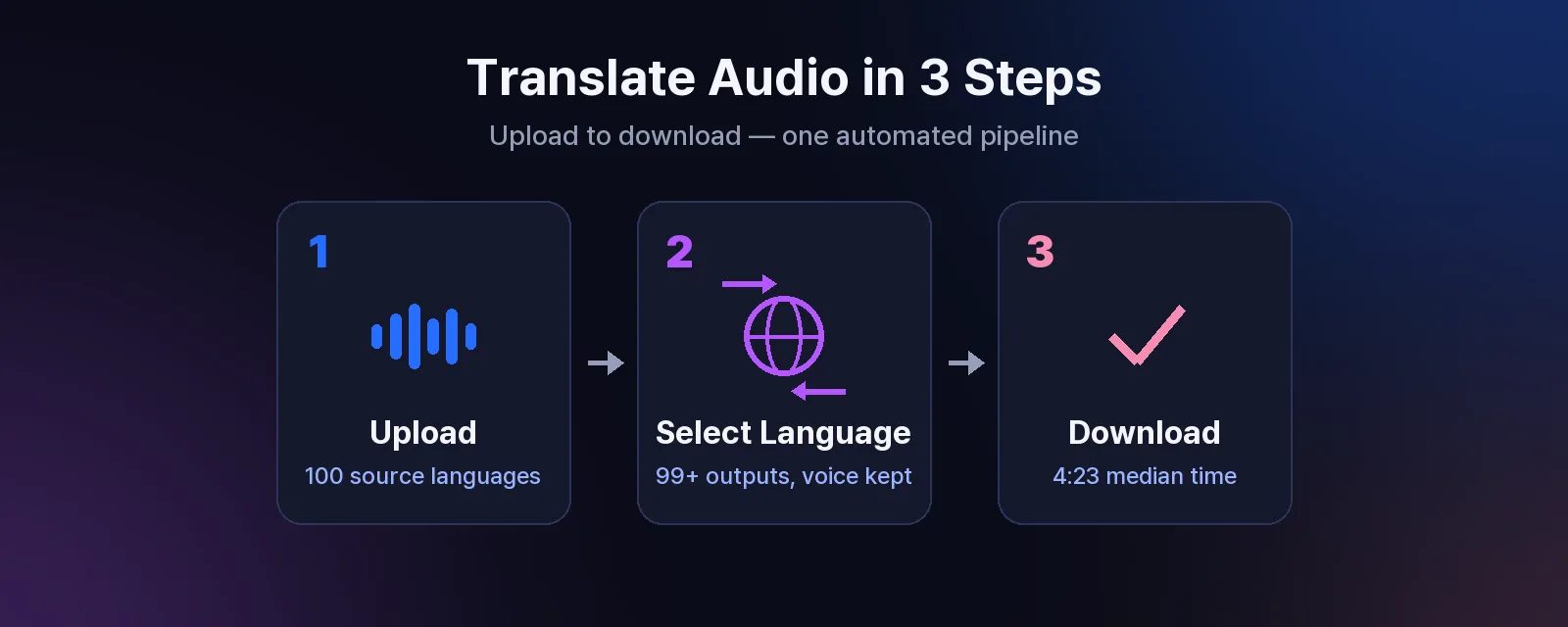
The Process:
Upload your video
Select target language from 32+ options
AI generates translation preserving your voice signature
Review and adjust
Download final video
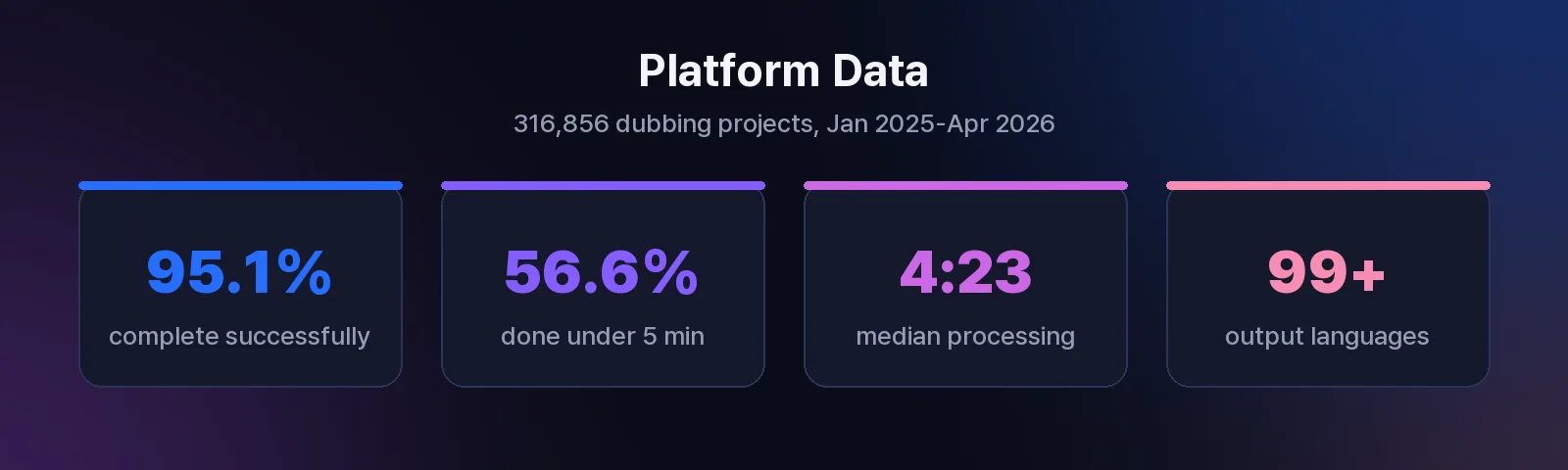
Processing takes minutes. A 5-minute tutorial typically completes in under 3 minutes.
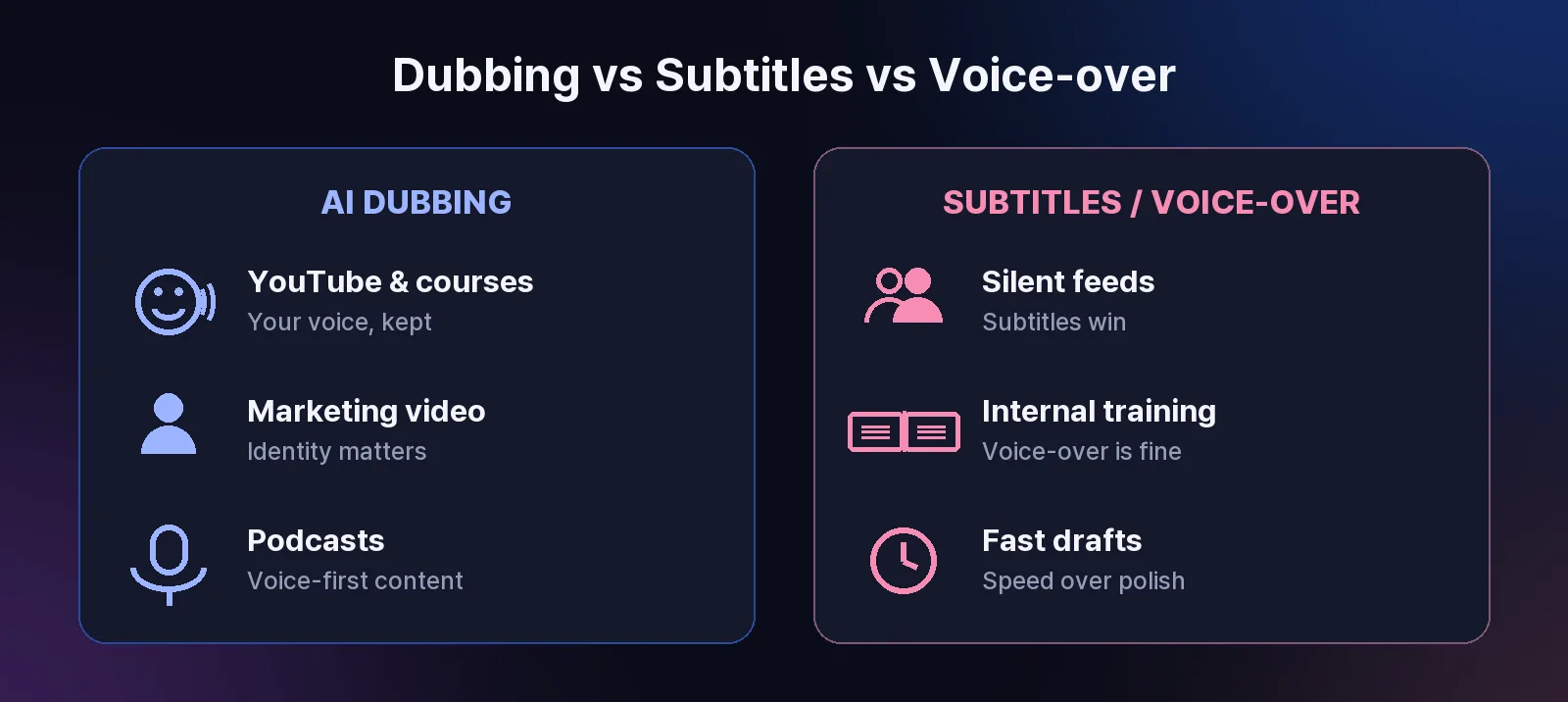
YouTube creators, educators teaching online courses, and businesses creating customer testimonials all benefit from authentic voice preservation. Podcast voice translation and dubbing especially benefits from this approach, as audio-first content relies entirely on voice authenticity.
Method 2: API Translation Service Integration
For teams managing high-volume content, an API translation service provides scalable audio translation. Automated API translation for video workflows connects directly to your content management system, automatically detecting source language, transcribing with context awareness, and generating dubbed audio while maintaining quality parameters.
This automation prevents quality loss from repeated file conversions. Professional API services include audio format preservation, background noise handling, volume normalization, and multi-speaker detection.
E-learning platforms translating course libraries, marketing teams scaling video ad campaigns, and enterprises managing corporate training videos find API integration essential. Organizations producing multilingual training video content maintain consistent quality across departments and regions through automated video translation solutions.
Method 3: Specialized Tutorial Video Translation
Tutorial videos present unique audio challenges. Screen recordings include system sounds, mouse clicks, and background music. Advanced AI dubbing uses audio source separation to isolate primary voice narration from secondary audio and environmental sounds.
Only your narration gets translated. Background elements remain untouched. When recording a software tutorial, specialized tools preserve the original environment while translating only your spoken content for global software documentation audiences.
Dubbing Voice Selection Impact
Even with perfect translation technology, poor voice selection destroys audio quality. Professional dubbing voice customization platforms analyze your original voice and suggest matching characteristics, considering age range, gender presentation, speaking style, and energy level.
Before committing to full translation, test your AI voice selection for video dubbing:
Translate a 30-second clip
Listen for voice-content alignment
Check emotional tone consistency
Verify technical term pronunciation
Test with target language speakers
This prevents discovering voice mismatch after translating your entire library using AI-powered video dubbing platforms.
Preserving Emotional Nuance Across Languages
Languages express emotion differently. Enthusiasm in English might sound aggressive in Japanese. Your translation must adapt emotional expression while maintaining authentic intent.
Modern translation technology analyzes speech pattern variations, volume changes, pause duration, and pitch variations. The AI recreates these emotional cues using culturally appropriate expressions in the target language.
Translation quality means your message feels the same in every language, even when the exact words differ.
Quality translation tools handle these adaptations automatically. Understanding how voice cloning preserves emotional tone across languages ensures your message resonates universally with international video audiences.
Technical Export Considerations
Export settings determine whether your translated audio reaches viewers at full quality. Always export at minimum 192 kbps bitrate, 48 kHz sample rate, stereo (2-channel), using AAC codec. YouTube supports up to 384 kbps for professional content.
If you need video transcription to text for translation workflows, ensure transcription accuracy directly impacts final audio quality when converting video to text for multilingual projects.
Scaling Translation Across Content Libraries
Once you've established a quality standard for one video, maintain that standard across your library through template-based translation, batch processing with quality controls, and quality metrics tracking.
For organizations managing e-learning course video translation at scale, batch processing with enterprise video dubbing solutions ensures consistent learner experience. Automated subtitle generation and translation provides an additional quality control layer for large-scale video translation projects.
Track audio clarity scores, voice consistency, translation accuracy, and viewer engagement to identify quality drift before it affects perception.
Integration with Existing Workflows
Audio translation shouldn't disrupt your content creation process. Integrate translation after your final edit, this prevents needing to re-translate if you make changes. You maintain a single source of truth and generate language variants from that master file.
For video translation workflows for content creators, this integration point preserves creative flexibility while enabling global distribution through seamless video localization processes.
Time Investment for a 10-minute video:
Traditional approach: 5-7 days
Modern AI translation: 5-10 minutes
When to Prioritize Speed vs. Quality
Not every video requires maximum translation quality. Brand presentation videos, product launch videos, and explainer videos demand highest quality, audio quality directly impacts brand perception.
Tutorial libraries and webinar recording translation for global audiences require professional quality but volume matters. Social media shorts and time-sensitive announcements benefit more from timely publication.
For product demonstration video localization, AI dubbing speed means you can launch translated versions simultaneously with original content using fast AI video translation technology.
Future-Proofing Your Strategy
Keep master video files in highest quality format. As translation technology improves, re-translate archived content without re-creating videos. Document translation decisions, monitor audience feedback by language, and test new features gradually.
Stay informed about how to achieve perfect lip-sync with AI dubbing technology to continuously improve output quality for professional video content localization.
Key Takeaways
Translation doesn't mean sacrificing audio quality. Modern AI dubbing technology preserves voice character, emotional authenticity, and professional sound quality across languages.
Critical factors for quality preservation:
Voice cloning capturing your unique characteristics
Cultural adaptation beyond literal translation
Proper export settings matching your platform
Consistent quality checks across your library
Start with your best-performing content. Translate one video, verify quality, then scale. Most creators discover their translated content performs as well as, sometimes better than, original language versions when audio quality is properly maintained through AI-powered video translation platforms.
For content creators ready to expand globally, quality audio translation is the foundation of authentic international audience connection. Ready to explore how it works? Check out voice cloning technology and how it preserves your authentic voice across any language with advanced AI dubbing solutions.
Frequently Asked Questions
1. Can I translate audio from video without changing my voice?
Yes. Modern voice cloning technology analyzes your voice characteristics and recreates your unique vocal signature in other languages, maintaining your pitch, tone, speaking style, and emotional expression while making content accessible to global audiences through AI voice preservation technology.
2. What's the difference between dubbing and voice-over for translated videos?
Voice-over replaces original audio with translated speech using generic AI voices. Dubbing includes voice cloning to match your original voice, lip-sync technology to align mouth movements, and cultural adaptation for natural expression, preserving authenticity and visual coherence with professional AI dubbing services.
3. How long does it take to translate audio from a 10-minute video?
Modern AI dubbing platforms process 10-minute videos in 5-10 minutes. Traditional methods requiring human translators and voice actors take 3-5 days, making frequent content translation practical for individual creators and small teams using fast video translation technology.
4. Will translated audio work with my existing video editing software?
Yes. Translated videos export in standard formats (MP4, MOV) compatible with Premiere Pro, Final Cut, DaVinci Resolve, and all major editing tools for post-translation edits when you translate videos with AI dubbing platforms.
5. Can API translation services handle multiple speakers in one video?
Yes. Advanced API translation services detect multiple speakers and assign different voice profiles to each person, maintaining distinct voices in interviews, panel discussions, or multi-host content automatically for multi-speaker video translation projects.
6. How do I ensure technical terms translate correctly?
Create custom glossaries of industry-specific terms with approved translations. Professional platforms allow uploading these glossaries for consistent, accurate pronunciation, especially important for software tutorials or specialized educational content using AI dubbing with custom terminology.
7. What audio quality settings should I use for YouTube translation?
Export translated audio at minimum 192 kbps bitrate, 48 kHz sample rate, stereo (2-channel), using AAC codec. YouTube supports up to 384 kbps for professional content, preventing compression artifacts on large screens or with headphones when translating YouTube videos with AI.
8. Can I translate videos with background music without losing the music?
Yes. Advanced dubbing tools use audio source separation to isolate your voice from background music and sound effects. Only narration gets translated, background audio remains unchanged, preserving your video's original atmosphere and production value through AI audio separation for video translation.
You spent hours perfecting your tutorial video. The audio is crisp. The pacing is perfect. Then you translate it into Spanish, and suddenly your voice sounds robotic. The emotional tone? Gone. The professional quality? Destroyed.
This is the nightmare scenario for creators who need to reach global audiences. You know translation opens doors to millions of new viewers, but you refuse to sacrifice the audio quality that makes your content stand out.
The good news: Modern AI has solved this problem. You can now translate audio from video while preserving voice quality using advanced AI technology that maintains voice character, emotional nuance, and professional sound quality.
Why Audio Quality Collapses During Translation
Traditional translation workflows destroy audio quality because they treat your voice as disposable data. The old method extracts audio, transcribes it to text, translates the text, then generates new audio using generic text-to-speech before replacing your original track.
By that fourth step, your unique voice identity is gone. Generic TTS engines create flat, emotionless audio. Viewers notice immediately. Engagement drops.
The problem isn't translation itself, it's the audio replacement process. When you strip away your original voice characteristics, you lose the human connection that makes video content effective for global audiences.
What Quality Preservation Actually Means
Before choosing a translation method, define what quality means for your content:
Quality Dimension | What It Preserves | Critical For |
|---|---|---|
Voice Character | Pitch, timbre, speaking style | Personal branding, vlogs |
Emotional Tone | Enthusiasm, concern, excitement | Educational content |
Audio Clarity | No noise or distortion | Professional presentations |
Lip-Sync Accuracy | Mouth movements match audio | Close-up speaking videos |
Cultural Context | Localized expressions | Marketing content |
Generic voice-over tools preserve clarity but destroy voice character. Understanding these trade-offs helps you choose the right approach for multilingual video content creation.
Method 1: Voice Cloning with AI Dubbing
For creators who need authentic audio quality, voice cloning technology has transformed what's possible. Modern AI voice cloning technology analyzes your original audio for pitch patterns, speech rhythm, emotional variations, and tonal characteristics. The AI recreates your voice speaking the new language, not a generic replacement.
Voice cloning maintains the authentic connection between creator and audience, even across language barriers.
The Process:
Upload your video
Select target language from 32+ options
AI generates translation preserving your voice signature
Review and adjust
Download final video
Processing takes minutes. A 5-minute tutorial typically completes in under 3 minutes.
YouTube creators, educators teaching online courses, and businesses creating customer testimonials all benefit from authentic voice preservation. Podcast voice translation and dubbing especially benefits from this approach, as audio-first content relies entirely on voice authenticity.
Method 2: API Translation Service Integration
For teams managing high-volume content, an API translation service provides scalable audio translation. Automated API translation for video workflows connects directly to your content management system, automatically detecting source language, transcribing with context awareness, and generating dubbed audio while maintaining quality parameters.
This automation prevents quality loss from repeated file conversions. Professional API services include audio format preservation, background noise handling, volume normalization, and multi-speaker detection.
E-learning platforms translating course libraries, marketing teams scaling video ad campaigns, and enterprises managing corporate training videos find API integration essential. Organizations producing multilingual training video content maintain consistent quality across departments and regions through automated video translation solutions.
Method 3: Specialized Tutorial Video Translation
Tutorial videos present unique audio challenges. Screen recordings include system sounds, mouse clicks, and background music. Advanced AI dubbing uses audio source separation to isolate primary voice narration from secondary audio and environmental sounds.
Only your narration gets translated. Background elements remain untouched. When recording a software tutorial, specialized tools preserve the original environment while translating only your spoken content for global software documentation audiences.
Dubbing Voice Selection Impact
Even with perfect translation technology, poor voice selection destroys audio quality. Professional dubbing voice customization platforms analyze your original voice and suggest matching characteristics, considering age range, gender presentation, speaking style, and energy level.
Before committing to full translation, test your AI voice selection for video dubbing:
Translate a 30-second clip
Listen for voice-content alignment
Check emotional tone consistency
Verify technical term pronunciation
Test with target language speakers
This prevents discovering voice mismatch after translating your entire library using AI-powered video dubbing platforms.
Preserving Emotional Nuance Across Languages
Languages express emotion differently. Enthusiasm in English might sound aggressive in Japanese. Your translation must adapt emotional expression while maintaining authentic intent.
Modern translation technology analyzes speech pattern variations, volume changes, pause duration, and pitch variations. The AI recreates these emotional cues using culturally appropriate expressions in the target language.
Translation quality means your message feels the same in every language, even when the exact words differ.
Quality translation tools handle these adaptations automatically. Understanding how voice cloning preserves emotional tone across languages ensures your message resonates universally with international video audiences.
Technical Export Considerations
Export settings determine whether your translated audio reaches viewers at full quality. Always export at minimum 192 kbps bitrate, 48 kHz sample rate, stereo (2-channel), using AAC codec. YouTube supports up to 384 kbps for professional content.
If you need video transcription to text for translation workflows, ensure transcription accuracy directly impacts final audio quality when converting video to text for multilingual projects.
Scaling Translation Across Content Libraries
Once you've established a quality standard for one video, maintain that standard across your library through template-based translation, batch processing with quality controls, and quality metrics tracking.
For organizations managing e-learning course video translation at scale, batch processing with enterprise video dubbing solutions ensures consistent learner experience. Automated subtitle generation and translation provides an additional quality control layer for large-scale video translation projects.
Track audio clarity scores, voice consistency, translation accuracy, and viewer engagement to identify quality drift before it affects perception.
Integration with Existing Workflows
Audio translation shouldn't disrupt your content creation process. Integrate translation after your final edit, this prevents needing to re-translate if you make changes. You maintain a single source of truth and generate language variants from that master file.
For video translation workflows for content creators, this integration point preserves creative flexibility while enabling global distribution through seamless video localization processes.
Time Investment for a 10-minute video:
Traditional approach: 5-7 days
Modern AI translation: 5-10 minutes
When to Prioritize Speed vs. Quality
Not every video requires maximum translation quality. Brand presentation videos, product launch videos, and explainer videos demand highest quality, audio quality directly impacts brand perception.
Tutorial libraries and webinar recording translation for global audiences require professional quality but volume matters. Social media shorts and time-sensitive announcements benefit more from timely publication.
For product demonstration video localization, AI dubbing speed means you can launch translated versions simultaneously with original content using fast AI video translation technology.
Future-Proofing Your Strategy
Keep master video files in highest quality format. As translation technology improves, re-translate archived content without re-creating videos. Document translation decisions, monitor audience feedback by language, and test new features gradually.
Stay informed about how to achieve perfect lip-sync with AI dubbing technology to continuously improve output quality for professional video content localization.
Key Takeaways
Translation doesn't mean sacrificing audio quality. Modern AI dubbing technology preserves voice character, emotional authenticity, and professional sound quality across languages.
Critical factors for quality preservation:
Voice cloning capturing your unique characteristics
Cultural adaptation beyond literal translation
Proper export settings matching your platform
Consistent quality checks across your library
Start with your best-performing content. Translate one video, verify quality, then scale. Most creators discover their translated content performs as well as, sometimes better than, original language versions when audio quality is properly maintained through AI-powered video translation platforms.
For content creators ready to expand globally, quality audio translation is the foundation of authentic international audience connection. Ready to explore how it works? Check out voice cloning technology and how it preserves your authentic voice across any language with advanced AI dubbing solutions.
Frequently Asked Questions
1. Can I translate audio from video without changing my voice?
Yes. Modern voice cloning technology analyzes your voice characteristics and recreates your unique vocal signature in other languages, maintaining your pitch, tone, speaking style, and emotional expression while making content accessible to global audiences through AI voice preservation technology.
2. What's the difference between dubbing and voice-over for translated videos?
Voice-over replaces original audio with translated speech using generic AI voices. Dubbing includes voice cloning to match your original voice, lip-sync technology to align mouth movements, and cultural adaptation for natural expression, preserving authenticity and visual coherence with professional AI dubbing services.
3. How long does it take to translate audio from a 10-minute video?
Modern AI dubbing platforms process 10-minute videos in 5-10 minutes. Traditional methods requiring human translators and voice actors take 3-5 days, making frequent content translation practical for individual creators and small teams using fast video translation technology.
4. Will translated audio work with my existing video editing software?
Yes. Translated videos export in standard formats (MP4, MOV) compatible with Premiere Pro, Final Cut, DaVinci Resolve, and all major editing tools for post-translation edits when you translate videos with AI dubbing platforms.
5. Can API translation services handle multiple speakers in one video?
Yes. Advanced API translation services detect multiple speakers and assign different voice profiles to each person, maintaining distinct voices in interviews, panel discussions, or multi-host content automatically for multi-speaker video translation projects.
6. How do I ensure technical terms translate correctly?
Create custom glossaries of industry-specific terms with approved translations. Professional platforms allow uploading these glossaries for consistent, accurate pronunciation, especially important for software tutorials or specialized educational content using AI dubbing with custom terminology.
7. What audio quality settings should I use for YouTube translation?
Export translated audio at minimum 192 kbps bitrate, 48 kHz sample rate, stereo (2-channel), using AAC codec. YouTube supports up to 384 kbps for professional content, preventing compression artifacts on large screens or with headphones when translating YouTube videos with AI.
8. Can I translate videos with background music without losing the music?
Yes. Advanced dubbing tools use audio source separation to isolate your voice from background music and sound effects. Only narration gets translated, background audio remains unchanged, preserving your video's original atmosphere and production value through AI audio separation for video translation.
You spent hours perfecting your tutorial video. The audio is crisp. The pacing is perfect. Then you translate it into Spanish, and suddenly your voice sounds robotic. The emotional tone? Gone. The professional quality? Destroyed.
This is the nightmare scenario for creators who need to reach global audiences. You know translation opens doors to millions of new viewers, but you refuse to sacrifice the audio quality that makes your content stand out.
The good news: Modern AI has solved this problem. You can now translate audio from video while preserving voice quality using advanced AI technology that maintains voice character, emotional nuance, and professional sound quality.
Why Audio Quality Collapses During Translation
Traditional translation workflows destroy audio quality because they treat your voice as disposable data. The old method extracts audio, transcribes it to text, translates the text, then generates new audio using generic text-to-speech before replacing your original track.
By that fourth step, your unique voice identity is gone. Generic TTS engines create flat, emotionless audio. Viewers notice immediately. Engagement drops.
The problem isn't translation itself, it's the audio replacement process. When you strip away your original voice characteristics, you lose the human connection that makes video content effective for global audiences.
What Quality Preservation Actually Means
Before choosing a translation method, define what quality means for your content:
Quality Dimension | What It Preserves | Critical For |
|---|---|---|
Voice Character | Pitch, timbre, speaking style | Personal branding, vlogs |
Emotional Tone | Enthusiasm, concern, excitement | Educational content |
Audio Clarity | No noise or distortion | Professional presentations |
Lip-Sync Accuracy | Mouth movements match audio | Close-up speaking videos |
Cultural Context | Localized expressions | Marketing content |
Generic voice-over tools preserve clarity but destroy voice character. Understanding these trade-offs helps you choose the right approach for multilingual video content creation.
Method 1: Voice Cloning with AI Dubbing
For creators who need authentic audio quality, voice cloning technology has transformed what's possible. Modern AI voice cloning technology analyzes your original audio for pitch patterns, speech rhythm, emotional variations, and tonal characteristics. The AI recreates your voice speaking the new language, not a generic replacement.
Voice cloning maintains the authentic connection between creator and audience, even across language barriers.
The Process:
Upload your video
Select target language from 32+ options
AI generates translation preserving your voice signature
Review and adjust
Download final video
Processing takes minutes. A 5-minute tutorial typically completes in under 3 minutes.
YouTube creators, educators teaching online courses, and businesses creating customer testimonials all benefit from authentic voice preservation. Podcast voice translation and dubbing especially benefits from this approach, as audio-first content relies entirely on voice authenticity.
Method 2: API Translation Service Integration
For teams managing high-volume content, an API translation service provides scalable audio translation. Automated API translation for video workflows connects directly to your content management system, automatically detecting source language, transcribing with context awareness, and generating dubbed audio while maintaining quality parameters.
This automation prevents quality loss from repeated file conversions. Professional API services include audio format preservation, background noise handling, volume normalization, and multi-speaker detection.
E-learning platforms translating course libraries, marketing teams scaling video ad campaigns, and enterprises managing corporate training videos find API integration essential. Organizations producing multilingual training video content maintain consistent quality across departments and regions through automated video translation solutions.
Method 3: Specialized Tutorial Video Translation
Tutorial videos present unique audio challenges. Screen recordings include system sounds, mouse clicks, and background music. Advanced AI dubbing uses audio source separation to isolate primary voice narration from secondary audio and environmental sounds.
Only your narration gets translated. Background elements remain untouched. When recording a software tutorial, specialized tools preserve the original environment while translating only your spoken content for global software documentation audiences.
Dubbing Voice Selection Impact
Even with perfect translation technology, poor voice selection destroys audio quality. Professional dubbing voice customization platforms analyze your original voice and suggest matching characteristics, considering age range, gender presentation, speaking style, and energy level.
Before committing to full translation, test your AI voice selection for video dubbing:
Translate a 30-second clip
Listen for voice-content alignment
Check emotional tone consistency
Verify technical term pronunciation
Test with target language speakers
This prevents discovering voice mismatch after translating your entire library using AI-powered video dubbing platforms.
Preserving Emotional Nuance Across Languages
Languages express emotion differently. Enthusiasm in English might sound aggressive in Japanese. Your translation must adapt emotional expression while maintaining authentic intent.
Modern translation technology analyzes speech pattern variations, volume changes, pause duration, and pitch variations. The AI recreates these emotional cues using culturally appropriate expressions in the target language.
Translation quality means your message feels the same in every language, even when the exact words differ.
Quality translation tools handle these adaptations automatically. Understanding how voice cloning preserves emotional tone across languages ensures your message resonates universally with international video audiences.
Technical Export Considerations
Export settings determine whether your translated audio reaches viewers at full quality. Always export at minimum 192 kbps bitrate, 48 kHz sample rate, stereo (2-channel), using AAC codec. YouTube supports up to 384 kbps for professional content.
If you need video transcription to text for translation workflows, ensure transcription accuracy directly impacts final audio quality when converting video to text for multilingual projects.
Scaling Translation Across Content Libraries
Once you've established a quality standard for one video, maintain that standard across your library through template-based translation, batch processing with quality controls, and quality metrics tracking.
For organizations managing e-learning course video translation at scale, batch processing with enterprise video dubbing solutions ensures consistent learner experience. Automated subtitle generation and translation provides an additional quality control layer for large-scale video translation projects.
Track audio clarity scores, voice consistency, translation accuracy, and viewer engagement to identify quality drift before it affects perception.
Integration with Existing Workflows
Audio translation shouldn't disrupt your content creation process. Integrate translation after your final edit, this prevents needing to re-translate if you make changes. You maintain a single source of truth and generate language variants from that master file.
For video translation workflows for content creators, this integration point preserves creative flexibility while enabling global distribution through seamless video localization processes.
Time Investment for a 10-minute video:
Traditional approach: 5-7 days
Modern AI translation: 5-10 minutes
When to Prioritize Speed vs. Quality
Not every video requires maximum translation quality. Brand presentation videos, product launch videos, and explainer videos demand highest quality, audio quality directly impacts brand perception.
Tutorial libraries and webinar recording translation for global audiences require professional quality but volume matters. Social media shorts and time-sensitive announcements benefit more from timely publication.
For product demonstration video localization, AI dubbing speed means you can launch translated versions simultaneously with original content using fast AI video translation technology.
Future-Proofing Your Strategy
Keep master video files in highest quality format. As translation technology improves, re-translate archived content without re-creating videos. Document translation decisions, monitor audience feedback by language, and test new features gradually.
Stay informed about how to achieve perfect lip-sync with AI dubbing technology to continuously improve output quality for professional video content localization.
Key Takeaways
Translation doesn't mean sacrificing audio quality. Modern AI dubbing technology preserves voice character, emotional authenticity, and professional sound quality across languages.
Critical factors for quality preservation:
Voice cloning capturing your unique characteristics
Cultural adaptation beyond literal translation
Proper export settings matching your platform
Consistent quality checks across your library
Start with your best-performing content. Translate one video, verify quality, then scale. Most creators discover their translated content performs as well as, sometimes better than, original language versions when audio quality is properly maintained through AI-powered video translation platforms.
For content creators ready to expand globally, quality audio translation is the foundation of authentic international audience connection. Ready to explore how it works? Check out voice cloning technology and how it preserves your authentic voice across any language with advanced AI dubbing solutions.
Frequently Asked Questions
1. Can I translate audio from video without changing my voice?
Yes. Modern voice cloning technology analyzes your voice characteristics and recreates your unique vocal signature in other languages, maintaining your pitch, tone, speaking style, and emotional expression while making content accessible to global audiences through AI voice preservation technology.
2. What's the difference between dubbing and voice-over for translated videos?
Voice-over replaces original audio with translated speech using generic AI voices. Dubbing includes voice cloning to match your original voice, lip-sync technology to align mouth movements, and cultural adaptation for natural expression, preserving authenticity and visual coherence with professional AI dubbing services.
3. How long does it take to translate audio from a 10-minute video?
Modern AI dubbing platforms process 10-minute videos in 5-10 minutes. Traditional methods requiring human translators and voice actors take 3-5 days, making frequent content translation practical for individual creators and small teams using fast video translation technology.
4. Will translated audio work with my existing video editing software?
Yes. Translated videos export in standard formats (MP4, MOV) compatible with Premiere Pro, Final Cut, DaVinci Resolve, and all major editing tools for post-translation edits when you translate videos with AI dubbing platforms.
5. Can API translation services handle multiple speakers in one video?
Yes. Advanced API translation services detect multiple speakers and assign different voice profiles to each person, maintaining distinct voices in interviews, panel discussions, or multi-host content automatically for multi-speaker video translation projects.
6. How do I ensure technical terms translate correctly?
Create custom glossaries of industry-specific terms with approved translations. Professional platforms allow uploading these glossaries for consistent, accurate pronunciation, especially important for software tutorials or specialized educational content using AI dubbing with custom terminology.
7. What audio quality settings should I use for YouTube translation?
Export translated audio at minimum 192 kbps bitrate, 48 kHz sample rate, stereo (2-channel), using AAC codec. YouTube supports up to 384 kbps for professional content, preventing compression artifacts on large screens or with headphones when translating YouTube videos with AI.
8. Can I translate videos with background music without losing the music?
Yes. Advanced dubbing tools use audio source separation to isolate your voice from background music and sound effects. Only narration gets translated, background audio remains unchanged, preserving your video's original atmosphere and production value through AI audio separation for video translation.
You spent hours perfecting your tutorial video. The audio is crisp. The pacing is perfect. Then you translate it into Spanish, and suddenly your voice sounds robotic. The emotional tone? Gone. The professional quality? Destroyed.
This is the nightmare scenario for creators who need to reach global audiences. You know translation opens doors to millions of new viewers, but you refuse to sacrifice the audio quality that makes your content stand out.
The good news: Modern AI has solved this problem. You can now translate audio from video while preserving voice quality using advanced AI technology that maintains voice character, emotional nuance, and professional sound quality.
Why Audio Quality Collapses During Translation
Traditional translation workflows destroy audio quality because they treat your voice as disposable data. The old method extracts audio, transcribes it to text, translates the text, then generates new audio using generic text-to-speech before replacing your original track.
By that fourth step, your unique voice identity is gone. Generic TTS engines create flat, emotionless audio. Viewers notice immediately. Engagement drops.
The problem isn't translation itself, it's the audio replacement process. When you strip away your original voice characteristics, you lose the human connection that makes video content effective for global audiences.
What Quality Preservation Actually Means
Before choosing a translation method, define what quality means for your content:
Quality Dimension | What It Preserves | Critical For |
|---|---|---|
Voice Character | Pitch, timbre, speaking style | Personal branding, vlogs |
Emotional Tone | Enthusiasm, concern, excitement | Educational content |
Audio Clarity | No noise or distortion | Professional presentations |
Lip-Sync Accuracy | Mouth movements match audio | Close-up speaking videos |
Cultural Context | Localized expressions | Marketing content |
Generic voice-over tools preserve clarity but destroy voice character. Understanding these trade-offs helps you choose the right approach for multilingual video content creation.
Method 1: Voice Cloning with AI Dubbing
For creators who need authentic audio quality, voice cloning technology has transformed what's possible. Modern AI voice cloning technology analyzes your original audio for pitch patterns, speech rhythm, emotional variations, and tonal characteristics. The AI recreates your voice speaking the new language, not a generic replacement.
Voice cloning maintains the authentic connection between creator and audience, even across language barriers.
The Process:
Upload your video
Select target language from 32+ options
AI generates translation preserving your voice signature
Review and adjust
Download final video
Processing takes minutes. A 5-minute tutorial typically completes in under 3 minutes.
YouTube creators, educators teaching online courses, and businesses creating customer testimonials all benefit from authentic voice preservation. Podcast voice translation and dubbing especially benefits from this approach, as audio-first content relies entirely on voice authenticity.
Method 2: API Translation Service Integration
For teams managing high-volume content, an API translation service provides scalable audio translation. Automated API translation for video workflows connects directly to your content management system, automatically detecting source language, transcribing with context awareness, and generating dubbed audio while maintaining quality parameters.
This automation prevents quality loss from repeated file conversions. Professional API services include audio format preservation, background noise handling, volume normalization, and multi-speaker detection.
E-learning platforms translating course libraries, marketing teams scaling video ad campaigns, and enterprises managing corporate training videos find API integration essential. Organizations producing multilingual training video content maintain consistent quality across departments and regions through automated video translation solutions.
Method 3: Specialized Tutorial Video Translation
Tutorial videos present unique audio challenges. Screen recordings include system sounds, mouse clicks, and background music. Advanced AI dubbing uses audio source separation to isolate primary voice narration from secondary audio and environmental sounds.
Only your narration gets translated. Background elements remain untouched. When recording a software tutorial, specialized tools preserve the original environment while translating only your spoken content for global software documentation audiences.
Dubbing Voice Selection Impact
Even with perfect translation technology, poor voice selection destroys audio quality. Professional dubbing voice customization platforms analyze your original voice and suggest matching characteristics, considering age range, gender presentation, speaking style, and energy level.
Before committing to full translation, test your AI voice selection for video dubbing:
Translate a 30-second clip
Listen for voice-content alignment
Check emotional tone consistency
Verify technical term pronunciation
Test with target language speakers
This prevents discovering voice mismatch after translating your entire library using AI-powered video dubbing platforms.
Preserving Emotional Nuance Across Languages
Languages express emotion differently. Enthusiasm in English might sound aggressive in Japanese. Your translation must adapt emotional expression while maintaining authentic intent.
Modern translation technology analyzes speech pattern variations, volume changes, pause duration, and pitch variations. The AI recreates these emotional cues using culturally appropriate expressions in the target language.
Translation quality means your message feels the same in every language, even when the exact words differ.
Quality translation tools handle these adaptations automatically. Understanding how voice cloning preserves emotional tone across languages ensures your message resonates universally with international video audiences.
Technical Export Considerations
Export settings determine whether your translated audio reaches viewers at full quality. Always export at minimum 192 kbps bitrate, 48 kHz sample rate, stereo (2-channel), using AAC codec. YouTube supports up to 384 kbps for professional content.
If you need video transcription to text for translation workflows, ensure transcription accuracy directly impacts final audio quality when converting video to text for multilingual projects.
Scaling Translation Across Content Libraries
Once you've established a quality standard for one video, maintain that standard across your library through template-based translation, batch processing with quality controls, and quality metrics tracking.
For organizations managing e-learning course video translation at scale, batch processing with enterprise video dubbing solutions ensures consistent learner experience. Automated subtitle generation and translation provides an additional quality control layer for large-scale video translation projects.
Track audio clarity scores, voice consistency, translation accuracy, and viewer engagement to identify quality drift before it affects perception.
Integration with Existing Workflows
Audio translation shouldn't disrupt your content creation process. Integrate translation after your final edit, this prevents needing to re-translate if you make changes. You maintain a single source of truth and generate language variants from that master file.
For video translation workflows for content creators, this integration point preserves creative flexibility while enabling global distribution through seamless video localization processes.
Time Investment for a 10-minute video:
Traditional approach: 5-7 days
Modern AI translation: 5-10 minutes
When to Prioritize Speed vs. Quality
Not every video requires maximum translation quality. Brand presentation videos, product launch videos, and explainer videos demand highest quality, audio quality directly impacts brand perception.
Tutorial libraries and webinar recording translation for global audiences require professional quality but volume matters. Social media shorts and time-sensitive announcements benefit more from timely publication.
For product demonstration video localization, AI dubbing speed means you can launch translated versions simultaneously with original content using fast AI video translation technology.
Future-Proofing Your Strategy
Keep master video files in highest quality format. As translation technology improves, re-translate archived content without re-creating videos. Document translation decisions, monitor audience feedback by language, and test new features gradually.
Stay informed about how to achieve perfect lip-sync with AI dubbing technology to continuously improve output quality for professional video content localization.
Key Takeaways
Translation doesn't mean sacrificing audio quality. Modern AI dubbing technology preserves voice character, emotional authenticity, and professional sound quality across languages.
Critical factors for quality preservation:
Voice cloning capturing your unique characteristics
Cultural adaptation beyond literal translation
Proper export settings matching your platform
Consistent quality checks across your library
Start with your best-performing content. Translate one video, verify quality, then scale. Most creators discover their translated content performs as well as, sometimes better than, original language versions when audio quality is properly maintained through AI-powered video translation platforms.
For content creators ready to expand globally, quality audio translation is the foundation of authentic international audience connection. Ready to explore how it works? Check out voice cloning technology and how it preserves your authentic voice across any language with advanced AI dubbing solutions.
Frequently Asked Questions
1. Can I translate audio from video without changing my voice?
Yes. Modern voice cloning technology analyzes your voice characteristics and recreates your unique vocal signature in other languages, maintaining your pitch, tone, speaking style, and emotional expression while making content accessible to global audiences through AI voice preservation technology.
2. What's the difference between dubbing and voice-over for translated videos?
Voice-over replaces original audio with translated speech using generic AI voices. Dubbing includes voice cloning to match your original voice, lip-sync technology to align mouth movements, and cultural adaptation for natural expression, preserving authenticity and visual coherence with professional AI dubbing services.
3. How long does it take to translate audio from a 10-minute video?
Modern AI dubbing platforms process 10-minute videos in 5-10 minutes. Traditional methods requiring human translators and voice actors take 3-5 days, making frequent content translation practical for individual creators and small teams using fast video translation technology.
4. Will translated audio work with my existing video editing software?
Yes. Translated videos export in standard formats (MP4, MOV) compatible with Premiere Pro, Final Cut, DaVinci Resolve, and all major editing tools for post-translation edits when you translate videos with AI dubbing platforms.
5. Can API translation services handle multiple speakers in one video?
Yes. Advanced API translation services detect multiple speakers and assign different voice profiles to each person, maintaining distinct voices in interviews, panel discussions, or multi-host content automatically for multi-speaker video translation projects.
6. How do I ensure technical terms translate correctly?
Create custom glossaries of industry-specific terms with approved translations. Professional platforms allow uploading these glossaries for consistent, accurate pronunciation, especially important for software tutorials or specialized educational content using AI dubbing with custom terminology.
7. What audio quality settings should I use for YouTube translation?
Export translated audio at minimum 192 kbps bitrate, 48 kHz sample rate, stereo (2-channel), using AAC codec. YouTube supports up to 384 kbps for professional content, preventing compression artifacts on large screens or with headphones when translating YouTube videos with AI.
8. Can I translate videos with background music without losing the music?
Yes. Advanced dubbing tools use audio source separation to isolate your voice from background music and sound effects. Only narration gets translated, background audio remains unchanged, preserving your video's original atmosphere and production value through AI audio separation for video translation.
Continue Reading
Browse All
PRODUCT
USE CASE
ESTsoft Inc. 15770 Laguna Canyon Rd #250, Irvine, CA 92618
PRODUCT
USE CASE
ESTsoft Inc. 15770 Laguna Canyon Rd #250, Irvine, CA 92618
PRODUCT
USE CASE
ESTsoft Inc. 15770 Laguna Canyon Rd #250, Irvine, CA 92618