



Product Guide
How to Dub YouTube Videos in 99+ Languages: 5 Steps from Upload to Download
Last Updated
Jump to section
Jump to section
Share
Share
Share
AI Video Translator, Localization, and Dubbing Tool
Try it out for Free
Dubbing a YouTube video with Perso Dubbing takes just five steps: upload, choose your languages, generate, edit the script, and download. Your international viewers don't have to read subtitles — they hear the speaker in the video talking in their own language, as if it had been recorded that way from the start. The tone of the original voice is preserved.
Perso Dubbing supports AI dubbing in 99+ languages, including Korean, English, and Japanese. You can produce one video in several languages at once, which suits creators and marketers expanding a channel to a global audience. Follow these five steps in order.
upload → translation options → generate → edit the script → download and share
Before you start
Check the file requirements first. When they're met, the dub comes out clean.
Input type | Formats | Requirements |
|---|---|---|
Video | mp4 · mov · webm | 5 s to 2 GB (max length by plan: Starter 5 min / Creator 15 min / PRO 30 min) |
Audio | mp3 · wav · m4a | 5 s to 30 min |
External link | YouTube · TikTok · Google Drive | Use the full URL; set Drive to "anyone with the link" |
The best results come from two speakers or fewer, at least 20 s of speech per person, a near-frontal angle, and clean audio.
Step 1 · Upload
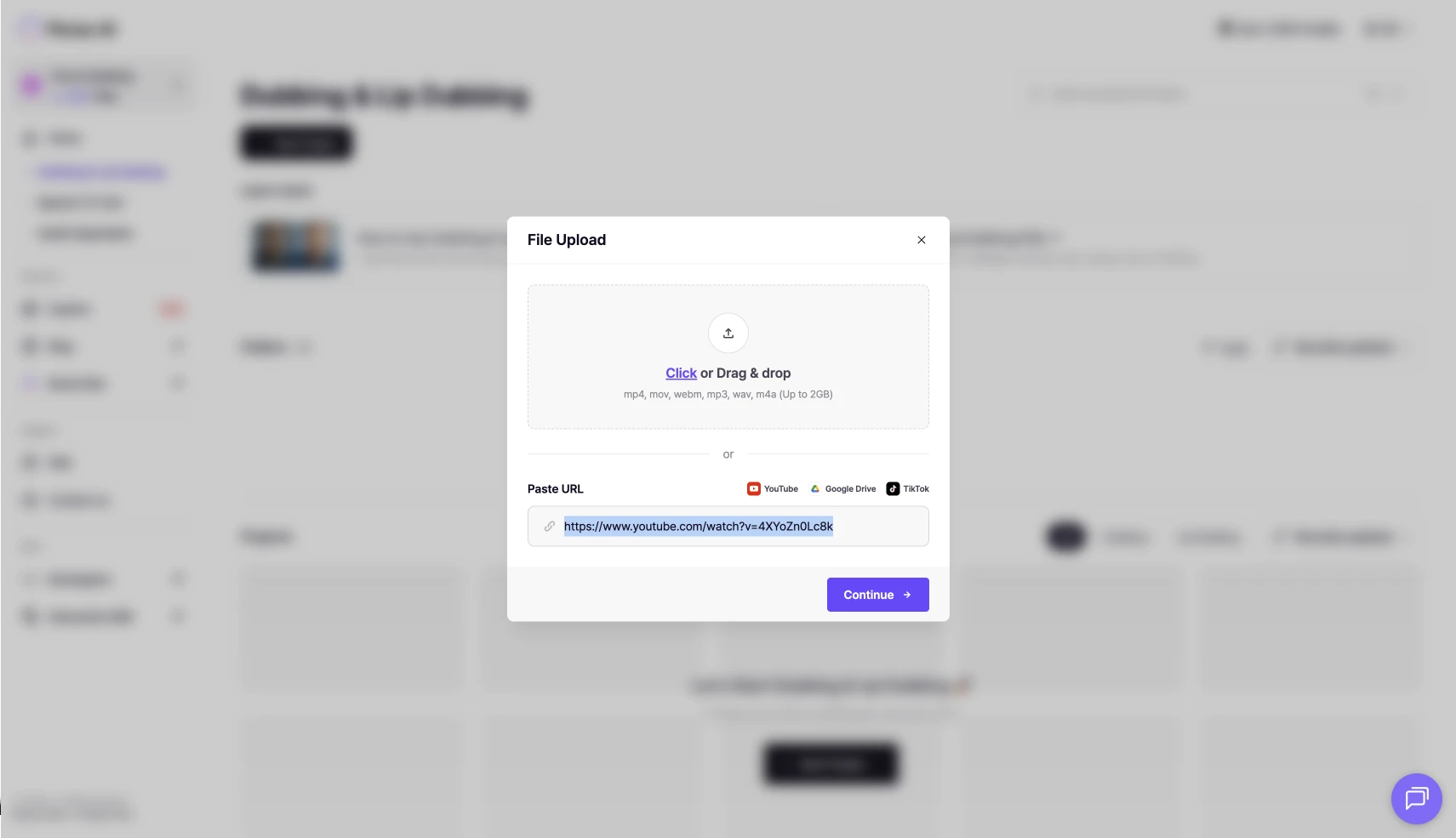
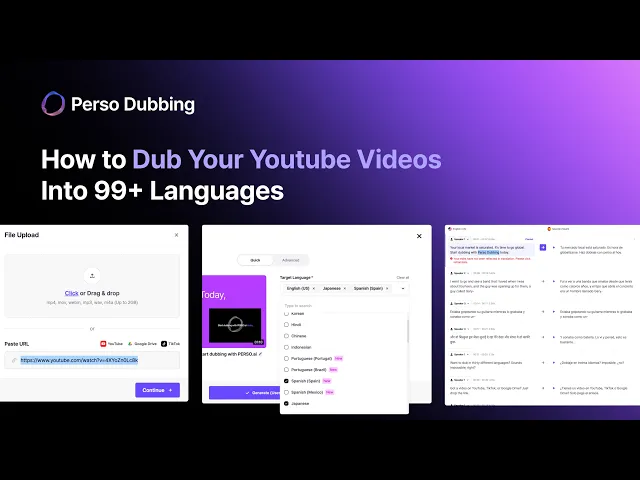
Log in, create a new project, and upload the video. Drag in a file, or paste a YouTube, TikTok, or Drive link and the server fetches it for you. A link is handy for videos already online; a direct upload suits finished local files.
Step 2 · Set translation options
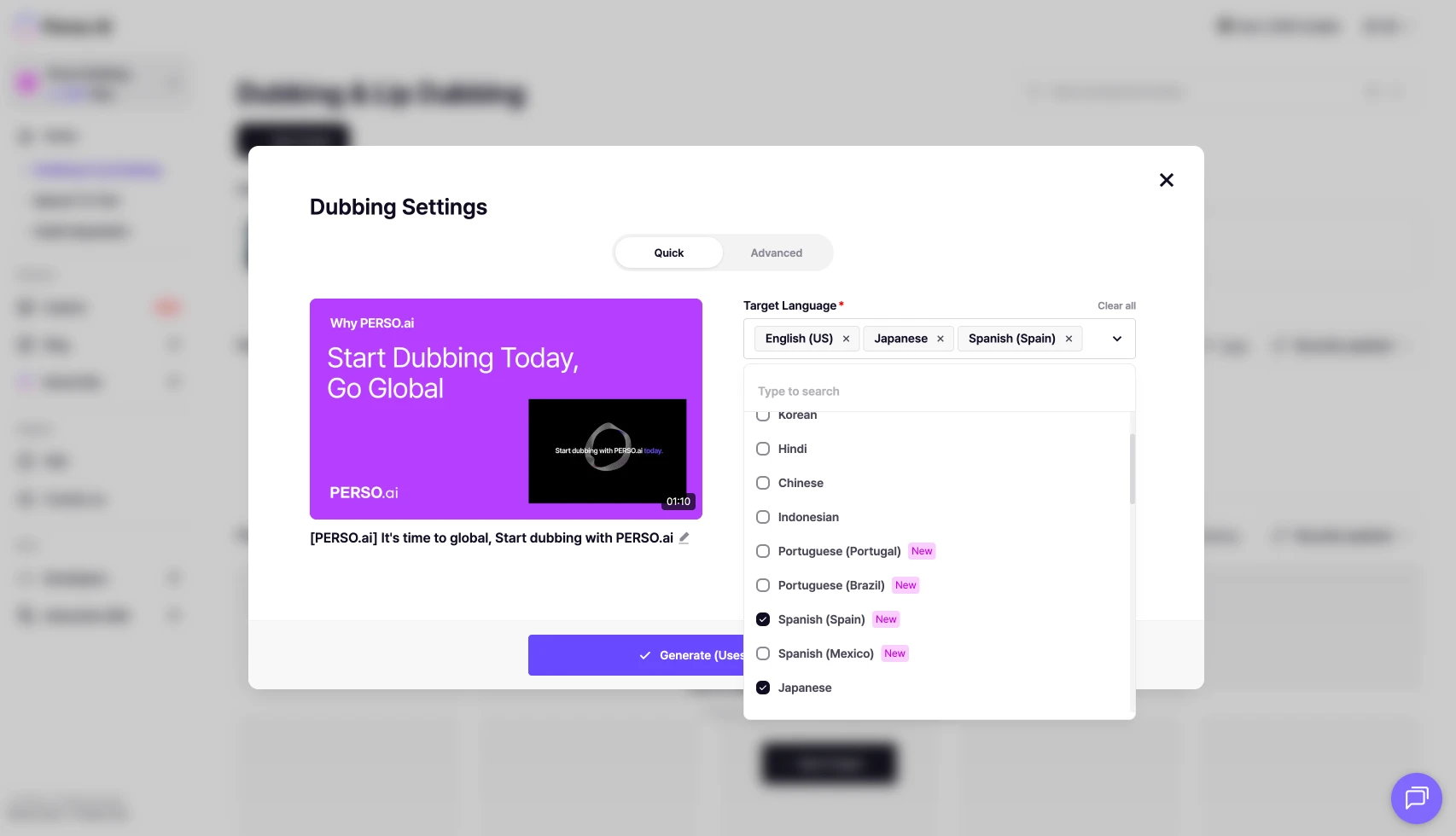
The source language is detected automatically. You can pick several target languages at once and produce the same video in English, Japanese, and Spanish at the same time.
There are two voice models. You can assign them per language and compare them in the preview before choosing.
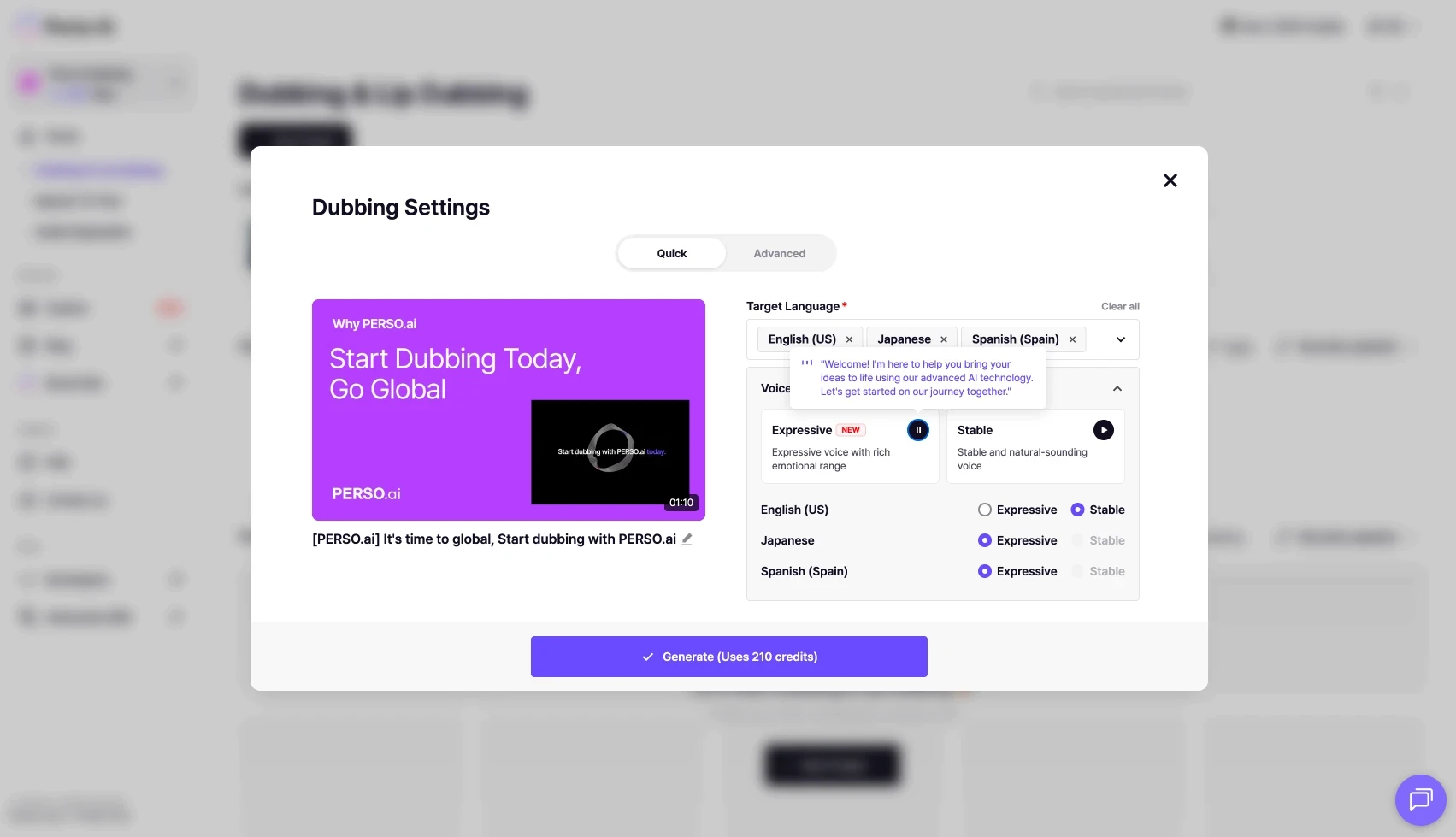
Voice model | Character |
|---|---|
Expressive | Rich, emotionally expressive |
Stable | Calm and steady |
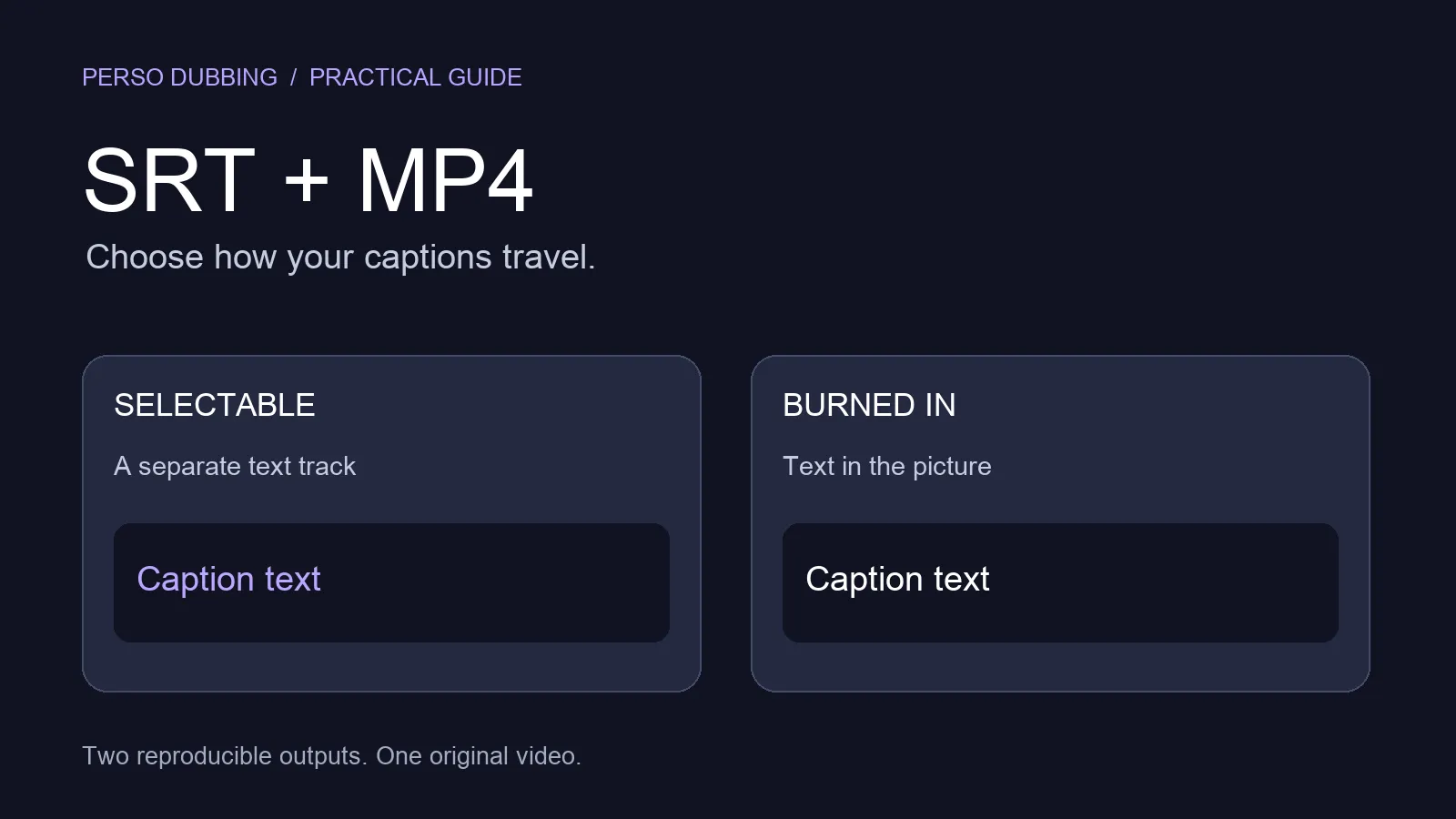
If you already have subtitles, upload them: with your own SRT, Perso Dubbing uses those lines and timings instead of AI transcription. This helps when there's a lot of terminology or when speech timing matters (PRO plan or higher).
Step 3 · Generate
Press generate and the process runs on its own: transcription, then translation, then voice synthesis. Progress shows stage by stage, and you get an email when it's done. You can close the window — the job keeps running.
Step 4 · Refine in the script editor
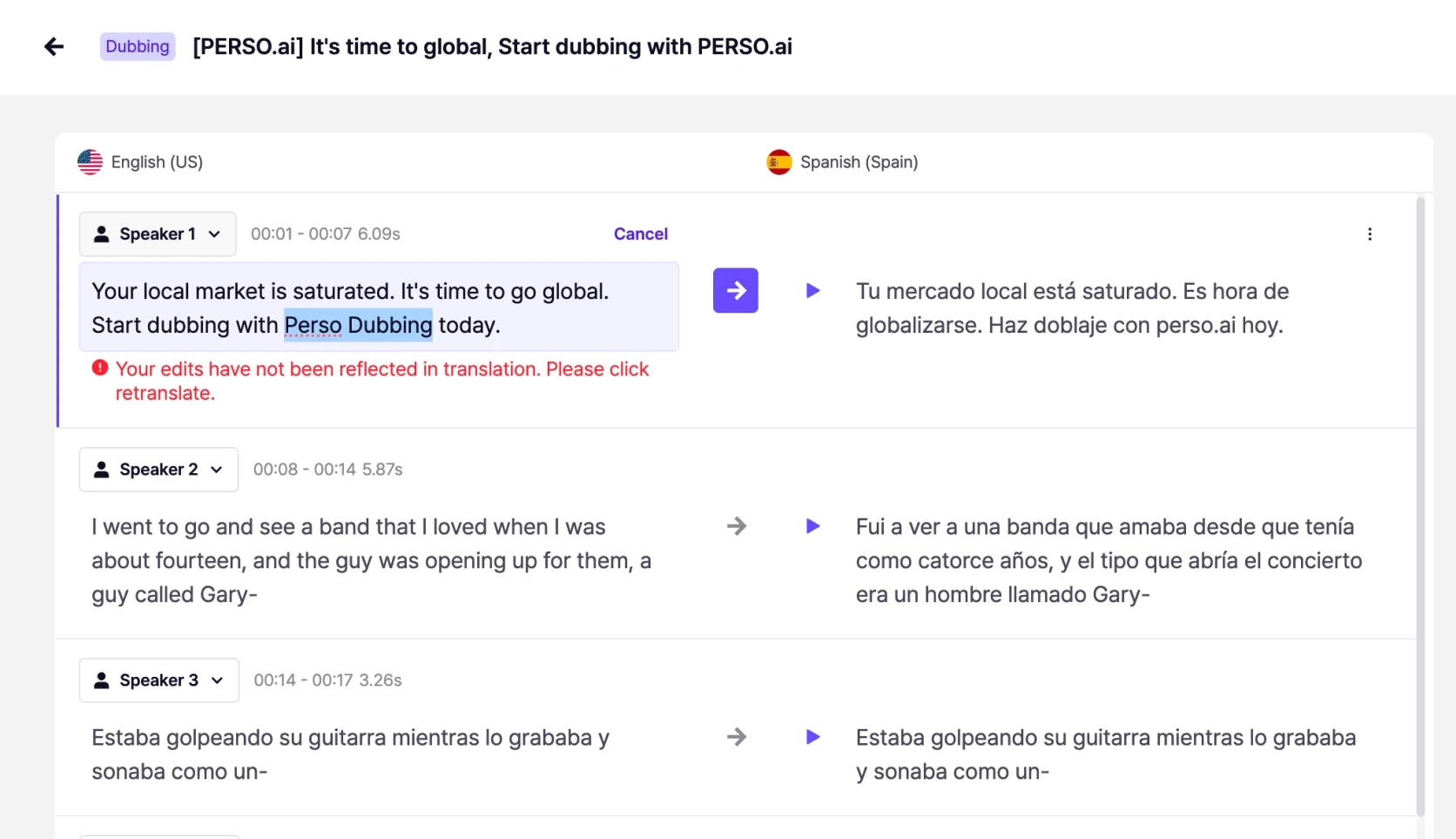
In the editor you fix the translation sentence by sentence and regenerate audio only for the sentences you change. Each sentence shows a "match rate," which indicates whether the translated text fits the original speaking time and whether the pace is right. Edit with that value in view and the dub sits naturally on the video. Correct proper nouns and technical terms here too.
Step 5 · Review, download, and share
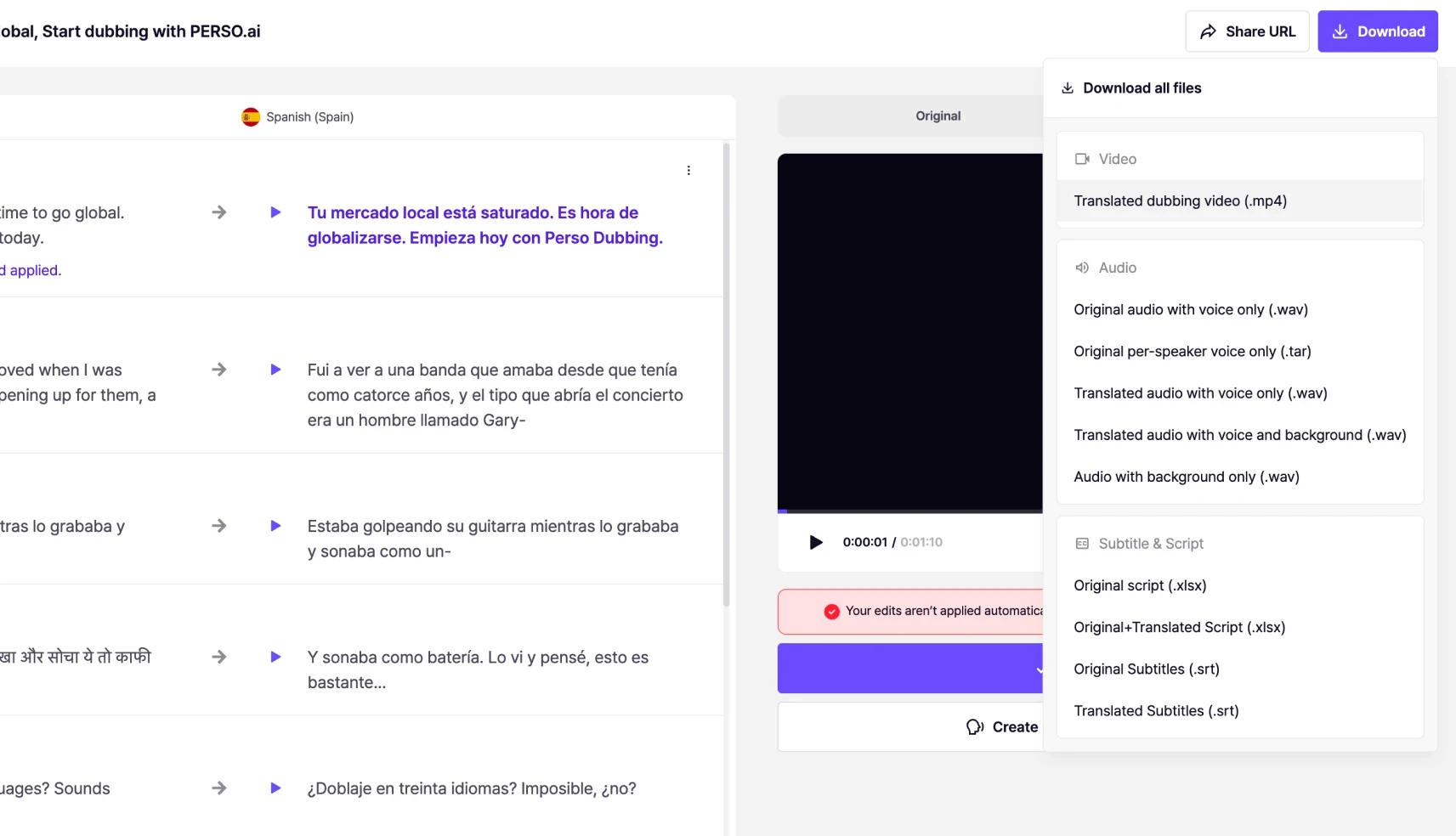
Preview the result, then download it as MP4 on a paid plan. Subtitles come separately (original and translated SRT), and audio splits into translated voice, voice only, or background only. Turn on the share link to show it externally without a login.
What each plan unlocks
The Free plan is for trying the tool; downloading requires a paid plan. Uploading your own SRT and 4K output open up on the PRO plan or higher.
Plan | Max length | Download | Upload own SRT | 4K output | Price |
|---|---|---|---|---|---|
Free | 1 min (one-time trial) | No | No | No | Free |
Starter | 5 min | Yes | No | No | $6.99/mo |
Creator | 15 min | Yes | No | No | $21/mo |
PRO | 30 min | Yes | Yes | Yes | $73/mo |
When importing fails
Symptom | Common cause | Fix |
|---|---|---|
External link won't load | Shortened URL (youtu.be) | Enter the full URL |
External link won't load | Region-, age-, or member-restricted video | Try a video without restrictions |
External link won't load | Private Drive link | Switch to "anyone with the link" |
Generation is blocked | Politician or celebrity voice detected | Remove that segment and retry |
Frequently asked questions
Can I dub a YouTube video for free?
The Free plan lets you try one video up to 1 minute long, once. Downloading requires a paid plan; for real work, we recommend the Starter plan from $6.99/mo.
What are the size and length limits for a video?
mp4·mov·webm formats, from 5 seconds to 2 GB. Maximum length per video is 5 min on Starter, 15 min on Creator, and 30 min on PRO.
I pasted the YouTube link but the video won't load.
Use the full URL instead of the shortened form (youtu.be). Region-, age-, or member-restricted videos and private Drive links also fail to import. Check the video's visibility settings.
Dubbing a YouTube video with Perso Dubbing takes just five steps: upload, choose your languages, generate, edit the script, and download. Your international viewers don't have to read subtitles — they hear the speaker in the video talking in their own language, as if it had been recorded that way from the start. The tone of the original voice is preserved.
Perso Dubbing supports AI dubbing in 99+ languages, including Korean, English, and Japanese. You can produce one video in several languages at once, which suits creators and marketers expanding a channel to a global audience. Follow these five steps in order.
upload → translation options → generate → edit the script → download and share
Before you start
Check the file requirements first. When they're met, the dub comes out clean.
Input type | Formats | Requirements |
|---|---|---|
Video | mp4 · mov · webm | 5 s to 2 GB (max length by plan: Starter 5 min / Creator 15 min / PRO 30 min) |
Audio | mp3 · wav · m4a | 5 s to 30 min |
External link | YouTube · TikTok · Google Drive | Use the full URL; set Drive to "anyone with the link" |
The best results come from two speakers or fewer, at least 20 s of speech per person, a near-frontal angle, and clean audio.
Step 1 · Upload
Log in, create a new project, and upload the video. Drag in a file, or paste a YouTube, TikTok, or Drive link and the server fetches it for you. A link is handy for videos already online; a direct upload suits finished local files.
Step 2 · Set translation options
The source language is detected automatically. You can pick several target languages at once and produce the same video in English, Japanese, and Spanish at the same time.
There are two voice models. You can assign them per language and compare them in the preview before choosing.
Voice model | Character |
|---|---|
Expressive | Rich, emotionally expressive |
Stable | Calm and steady |
If you already have subtitles, upload them: with your own SRT, Perso Dubbing uses those lines and timings instead of AI transcription. This helps when there's a lot of terminology or when speech timing matters (PRO plan or higher).
Step 3 · Generate
Press generate and the process runs on its own: transcription, then translation, then voice synthesis. Progress shows stage by stage, and you get an email when it's done. You can close the window — the job keeps running.
Step 4 · Refine in the script editor
In the editor you fix the translation sentence by sentence and regenerate audio only for the sentences you change. Each sentence shows a "match rate," which indicates whether the translated text fits the original speaking time and whether the pace is right. Edit with that value in view and the dub sits naturally on the video. Correct proper nouns and technical terms here too.
Step 5 · Review, download, and share
Preview the result, then download it as MP4 on a paid plan. Subtitles come separately (original and translated SRT), and audio splits into translated voice, voice only, or background only. Turn on the share link to show it externally without a login.
What each plan unlocks
The Free plan is for trying the tool; downloading requires a paid plan. Uploading your own SRT and 4K output open up on the PRO plan or higher.
Plan | Max length | Download | Upload own SRT | 4K output | Price |
|---|---|---|---|---|---|
Free | 1 min (one-time trial) | No | No | No | Free |
Starter | 5 min | Yes | No | No | $6.99/mo |
Creator | 15 min | Yes | No | No | $21/mo |
PRO | 30 min | Yes | Yes | Yes | $73/mo |
When importing fails
Symptom | Common cause | Fix |
|---|---|---|
External link won't load | Shortened URL (youtu.be) | Enter the full URL |
External link won't load | Region-, age-, or member-restricted video | Try a video without restrictions |
External link won't load | Private Drive link | Switch to "anyone with the link" |
Generation is blocked | Politician or celebrity voice detected | Remove that segment and retry |
Frequently asked questions
Can I dub a YouTube video for free?
The Free plan lets you try one video up to 1 minute long, once. Downloading requires a paid plan; for real work, we recommend the Starter plan from $6.99/mo.
What are the size and length limits for a video?
mp4·mov·webm formats, from 5 seconds to 2 GB. Maximum length per video is 5 min on Starter, 15 min on Creator, and 30 min on PRO.
I pasted the YouTube link but the video won't load.
Use the full URL instead of the shortened form (youtu.be). Region-, age-, or member-restricted videos and private Drive links also fail to import. Check the video's visibility settings.
Dubbing a YouTube video with Perso Dubbing takes just five steps: upload, choose your languages, generate, edit the script, and download. Your international viewers don't have to read subtitles — they hear the speaker in the video talking in their own language, as if it had been recorded that way from the start. The tone of the original voice is preserved.
Perso Dubbing supports AI dubbing in 99+ languages, including Korean, English, and Japanese. You can produce one video in several languages at once, which suits creators and marketers expanding a channel to a global audience. Follow these five steps in order.
upload → translation options → generate → edit the script → download and share
Before you start
Check the file requirements first. When they're met, the dub comes out clean.
Input type | Formats | Requirements |
|---|---|---|
Video | mp4 · mov · webm | 5 s to 2 GB (max length by plan: Starter 5 min / Creator 15 min / PRO 30 min) |
Audio | mp3 · wav · m4a | 5 s to 30 min |
External link | YouTube · TikTok · Google Drive | Use the full URL; set Drive to "anyone with the link" |
The best results come from two speakers or fewer, at least 20 s of speech per person, a near-frontal angle, and clean audio.
Step 1 · Upload
Log in, create a new project, and upload the video. Drag in a file, or paste a YouTube, TikTok, or Drive link and the server fetches it for you. A link is handy for videos already online; a direct upload suits finished local files.
Step 2 · Set translation options
The source language is detected automatically. You can pick several target languages at once and produce the same video in English, Japanese, and Spanish at the same time.
There are two voice models. You can assign them per language and compare them in the preview before choosing.
Voice model | Character |
|---|---|
Expressive | Rich, emotionally expressive |
Stable | Calm and steady |
If you already have subtitles, upload them: with your own SRT, Perso Dubbing uses those lines and timings instead of AI transcription. This helps when there's a lot of terminology or when speech timing matters (PRO plan or higher).
Step 3 · Generate
Press generate and the process runs on its own: transcription, then translation, then voice synthesis. Progress shows stage by stage, and you get an email when it's done. You can close the window — the job keeps running.
Step 4 · Refine in the script editor
In the editor you fix the translation sentence by sentence and regenerate audio only for the sentences you change. Each sentence shows a "match rate," which indicates whether the translated text fits the original speaking time and whether the pace is right. Edit with that value in view and the dub sits naturally on the video. Correct proper nouns and technical terms here too.
Step 5 · Review, download, and share
Preview the result, then download it as MP4 on a paid plan. Subtitles come separately (original and translated SRT), and audio splits into translated voice, voice only, or background only. Turn on the share link to show it externally without a login.
What each plan unlocks
The Free plan is for trying the tool; downloading requires a paid plan. Uploading your own SRT and 4K output open up on the PRO plan or higher.
Plan | Max length | Download | Upload own SRT | 4K output | Price |
|---|---|---|---|---|---|
Free | 1 min (one-time trial) | No | No | No | Free |
Starter | 5 min | Yes | No | No | $6.99/mo |
Creator | 15 min | Yes | No | No | $21/mo |
PRO | 30 min | Yes | Yes | Yes | $73/mo |
When importing fails
Symptom | Common cause | Fix |
|---|---|---|
External link won't load | Shortened URL (youtu.be) | Enter the full URL |
External link won't load | Region-, age-, or member-restricted video | Try a video without restrictions |
External link won't load | Private Drive link | Switch to "anyone with the link" |
Generation is blocked | Politician or celebrity voice detected | Remove that segment and retry |
Frequently asked questions
Can I dub a YouTube video for free?
The Free plan lets you try one video up to 1 minute long, once. Downloading requires a paid plan; for real work, we recommend the Starter plan from $6.99/mo.
What are the size and length limits for a video?
mp4·mov·webm formats, from 5 seconds to 2 GB. Maximum length per video is 5 min on Starter, 15 min on Creator, and 30 min on PRO.
I pasted the YouTube link but the video won't load.
Use the full URL instead of the shortened form (youtu.be). Region-, age-, or member-restricted videos and private Drive links also fail to import. Check the video's visibility settings.
Continue Reading
Browse All