




Product Guide
What Is AI Lip Sync? How It Works, Tools & Uses
Jump to section
Jump to section
Share
Share
Share

AI Video Translator, Localization, and Dubbing Tool
Try it out for Free
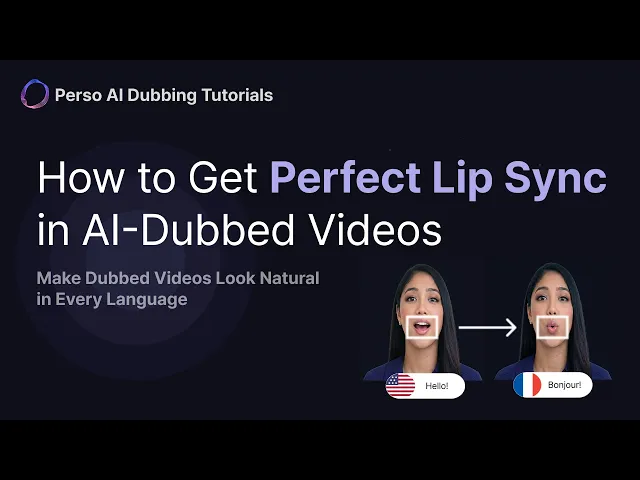
AI lip sync is technology that reshapes the speaker’s mouth movements in a video so they match a new audio track — usually a translated or AI-generated voice. It uses generative models to redraw the lips frame by frame, so a video dubbed into another language looks like it was filmed in that language. Perso Dubbing applies lip sync on top of AI dubbing across 99+ languages, turning a “voice-over that doesn’t match the face” into a video where speech and lips line up.
This guide explains what AI lip sync is, how it works, where it matters most, and how to apply it to your own videos.
What AI lip sync actually means
AI lip sync is the automated alignment of on-screen mouth movements with a different audio track using generative AI. In plain terms: you swap the voice in a video — a translation, a cloned voice, a re-recording — and the model repaints the speaker’s lips to fit the new words.
This solves the core problem of traditional dubbing. When you dub a Korean video into English, the English audio and the Korean mouth movements drift apart, and viewers notice within seconds. AI lip sync closes that gap. The face appears to speak the new language natively.
Two distinct processes are often confused. AI dubbing replaces the audio — it re-voices the speech in the target language while keeping the speaker’s own voice through voice cloning, so it’s the same person, just speaking a new language. AI lip sync corrects the video — it reshapes the visible mouth to match that dubbed audio. The strongest localization stacks run both: Perso Dubbing pairs 99+ language dubbing with lip sync so audio and visuals are corrected in one pass, rather than as two manual steps.
How AI lip sync works
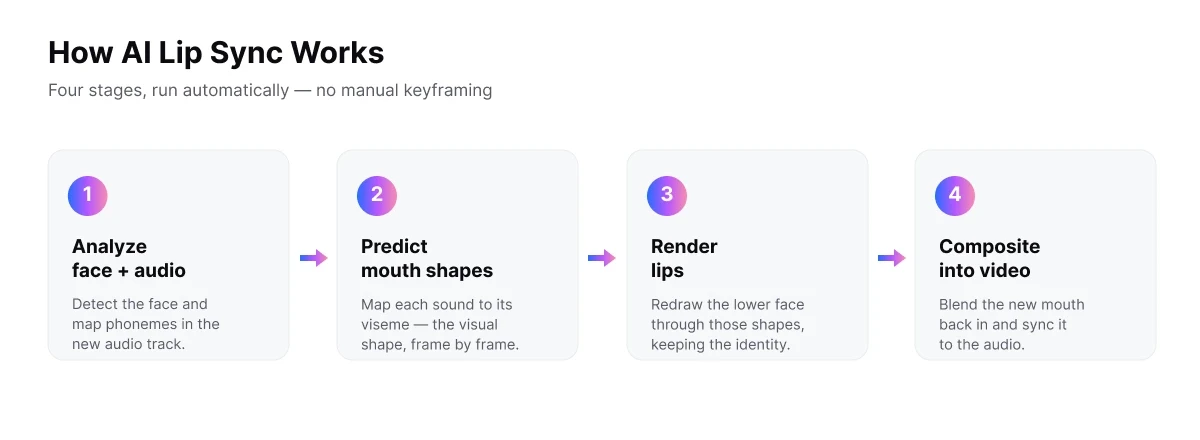
AI lip sync works by analyzing the speaker’s face, predicting the mouth shapes the new audio requires, and rendering those shapes back onto the original video. It runs in four stages.
First, face and audio analysis. The model detects the face, isolates the mouth region, and maps the phonemes (distinct speech sounds) in the new audio track. Each phoneme corresponds to a viseme — the visual mouth shape that produces that sound.
Second, viseme prediction. The model predicts the sequence of mouth shapes needed for the new speech, frame by frame, matched to the audio’s timing.
Third, generative rendering. A generative model redraws the lower face so the lips, teeth, and jaw move through the predicted shapes. Modern systems preserve the speaker’s identity, lighting, and skin texture, so the edit is hard to detect.
Fourth, compositing. The regenerated mouth region is blended back into the original footage and synced to the audio.
The simplified flow: analyze face + audio → predict mouth shapes → render lips → composite back into video. With Perso Dubbing, this happens automatically after dubbing, with no manual keyframing.
Inside the numbers: what Perso Dubbing measures
Perso Dubbing treats lip sync as a measurable output, not a black box. For talking-head localization, two figures matter most: how closely the cloned voice matches the original speaker, and how precisely the lips match it.
Voice match — how closely the dubbed voice resembles the original speaker — reaches 98% on Perso Dubbing’s AI dubbing (source: perso.ai/ai-dubbing). This matters for lip sync because the mouth is reshaped to fit that voice: the more faithful the voice, the more believable the final video.
Speed is the other measurable gain. Perso Dubbing runs dubbing and lip sync in a single pass, and most standard-length videos finish in about three minutes — versus the days a manual VFX lip-sync pass takes. That difference is what lets teams localize at volume rather than one video at a time.
AI lip sync vs traditional dubbing
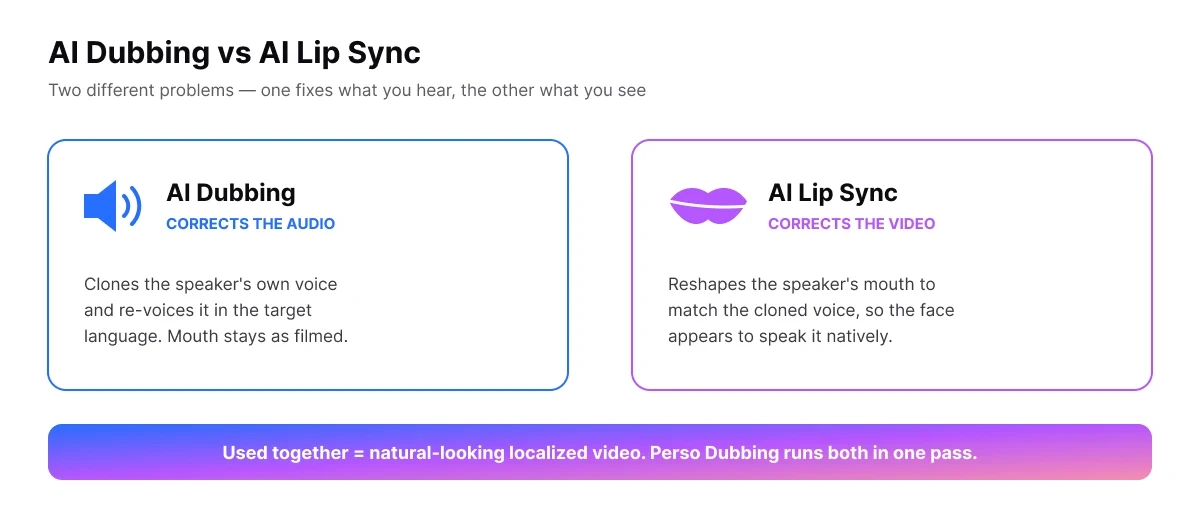
The difference between AI lip sync and traditional dubbing is what gets corrected and how long it takes. Traditional dubbing only replaces audio and leaves the visual mismatch in place. AI lip sync fixes the visual layer too.
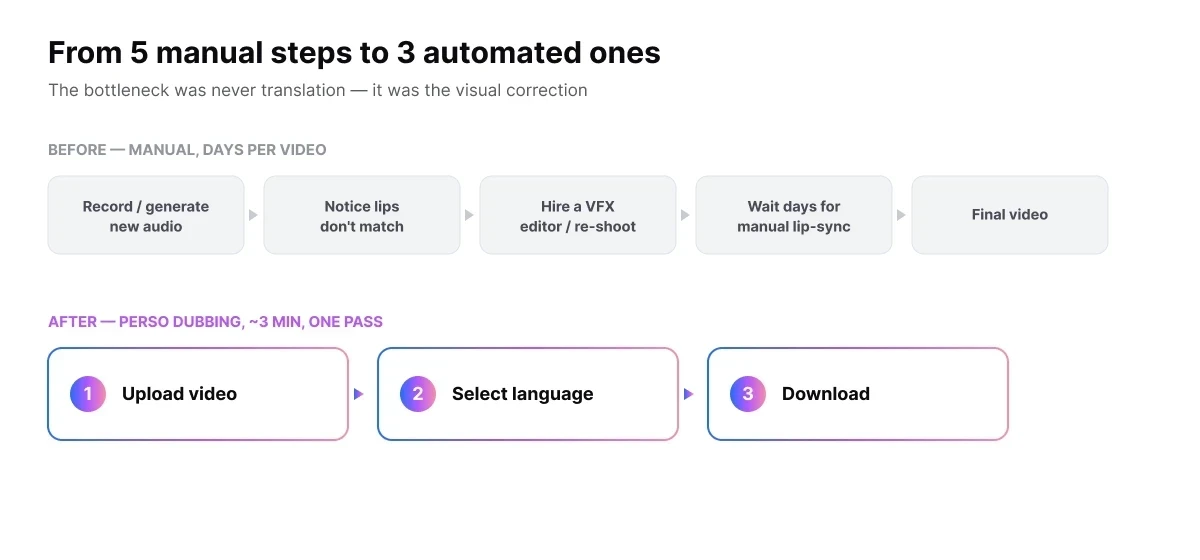
The change in workflow is the clearest way to see the value:
Before (manual localization): record or generate new audio → notice the lips don’t match → hire a VFX editor or re-shoot → wait days for a manual lip-sync pass → final video. Four to five steps, much of it manual.
After (AI lip sync): upload video → select target language → dubbing and lip sync run together → download the finished video. Three steps, automated end to end.
For teams localizing at volume, the bottleneck was never the translation — it was the visual correction. AI lip sync removes that bottleneck.
When you need AI lip sync
You need AI lip sync whenever a viewer can see the speaker’s face and the audio has changed. Talking-head content is where the mismatch is most visible and most damaging to credibility.
The clearest cases:
Localizing video into other languages. A face-to-camera explainer, course, or ad dubbed into Spanish, German, or Japanese looks unnatural if the lips still move in the original language. Lip sync makes each language version look native.
YouTube and creator content. Creators expanding to global audiences keep on-camera presence while reaching viewers in their own language. Mister Key, a YouTube creator, grew from 100K to 2.85M subscribers using Perso Dubbing for localized content.
Corporate training and marketing. Internal training, product demos, and campaign videos featuring a presenter need the speaker to look like they’re addressing each regional audience directly.
You generally do not need lip sync when the speaker isn’t on screen — voice-over documentaries, screen recordings, or slideshow videos. There, dubbing alone is enough, because there’s no visible mouth to correct.
How to apply AI lip sync with Perso Dubbing
You can apply AI lip sync in three steps with Perso Dubbing, with no editing software or manual keyframing required.
Upload your video. Add the file or paste a link from YouTube, TikTok, or Google Drive.
Select the target language. Choose from 99+ languages for dubbing; your original voice is cloned into that language, and lip sync is applied to match it.
Download the finished video. Perso Dubbing processes dubbing and lip sync together — most videos finish in about three minutes — and you download a video where speech and lips align.
The voice layer uses voice cloning, so the dubbed audio that the lips are matched to sounds natural rather than robotic.
Where AI lip sync still has limits
AI lip sync is strong on clear, front-facing talking-head footage, but it is not flawless in every condition — and knowing the limits helps set expectations.
Accuracy drops when the source footage is difficult: heavy motion blur, extreme side angles where the mouth is barely visible, or low-resolution video give the model less to work with. Very fast speech or large timing gaps between languages can also strain alignment.
It’s a fair trade-off to weigh against the alternative. Manual lip sync by a VFX team produces frame-perfect results but costs days of work per video and doesn’t scale. AI lip sync trades a small amount of edge-case precision for speed and volume that manual work can’t match. For most talking-head localization at scale, that trade favors AI.
Frequently asked questions
Q. What is the difference between AI dubbing and AI lip sync?
A. AI dubbing replaces the audio by re-voicing the speech in the target language while keeping the speaker’s own voice through voice cloning. AI lip sync changes the video by reshaping the speaker’s mouth to match that dubbed audio. Dubbing fixes what you hear; lip sync fixes what you see. The two are often used together for natural-looking localized video.
Q. Does AI lip sync work for any language?
A. Yes. Lip sync matches mouth movements to the audio, regardless of language. Perso Dubbing supports lip sync on top of AI dubbing across 99+ languages, so a single source video can be localized — with matching lips — into dozens of languages.
Q. How long does AI lip sync take?
A. With an automated tool like Perso Dubbing, dubbing and lip sync run together and most standard-length videos finish in about three minutes. A manual lip-sync pass by a VFX editor, by contrast, can take days per video.
Q. Is AI lip sync free?
A. Some AI lip sync tools offer a free tier with limits on length or watermarks. Perso Dubbing lets you start free with AI dubbing, and offers automatic lip-sync on all paid plans, with a monthly lip-sync allowance in each tier. Free plans suit short clips and testing; paid plans add longer videos, more languages, and higher output quality.
Q. Is AI lip sync the same as a deepfake?
A. No. AI lip sync edits a real speaker’s mouth to match a translated voice — usually their own cloned voice speaking their own words in another language — for localization. A deepfake replaces or fabricates a person’s identity or speech without consent. The technology overlaps, but the intent and consent differ. Responsible tools apply lip sync only to content the user owns or is authorized to edit.
Q. Can AI lip sync match my own cloned voice?
A. Yes. With voice cloning, AI lip sync can align a speaker’s mouth to a synthetic version of their own voice in another language. On Perso Dubbing, the dubbed voice is matched to the source speaker, and lip sync then reshapes the mouth to fit it — so the speaker appears to talk in a language they never recorded.
Ready to see your videos speak every language? Try Perso Dubbing free and dub your first video in minutes. Automatic lip-sync is available on all paid plans, with a monthly lip-sync allowance in each tier.
AI lip sync is technology that reshapes the speaker’s mouth movements in a video so they match a new audio track — usually a translated or AI-generated voice. It uses generative models to redraw the lips frame by frame, so a video dubbed into another language looks like it was filmed in that language. Perso Dubbing applies lip sync on top of AI dubbing across 99+ languages, turning a “voice-over that doesn’t match the face” into a video where speech and lips line up.
This guide explains what AI lip sync is, how it works, where it matters most, and how to apply it to your own videos.
What AI lip sync actually means
AI lip sync is the automated alignment of on-screen mouth movements with a different audio track using generative AI. In plain terms: you swap the voice in a video — a translation, a cloned voice, a re-recording — and the model repaints the speaker’s lips to fit the new words.
This solves the core problem of traditional dubbing. When you dub a Korean video into English, the English audio and the Korean mouth movements drift apart, and viewers notice within seconds. AI lip sync closes that gap. The face appears to speak the new language natively.
Two distinct processes are often confused. AI dubbing replaces the audio — it re-voices the speech in the target language while keeping the speaker’s own voice through voice cloning, so it’s the same person, just speaking a new language. AI lip sync corrects the video — it reshapes the visible mouth to match that dubbed audio. The strongest localization stacks run both: Perso Dubbing pairs 99+ language dubbing with lip sync so audio and visuals are corrected in one pass, rather than as two manual steps.
How AI lip sync works
AI lip sync works by analyzing the speaker’s face, predicting the mouth shapes the new audio requires, and rendering those shapes back onto the original video. It runs in four stages.
First, face and audio analysis. The model detects the face, isolates the mouth region, and maps the phonemes (distinct speech sounds) in the new audio track. Each phoneme corresponds to a viseme — the visual mouth shape that produces that sound.
Second, viseme prediction. The model predicts the sequence of mouth shapes needed for the new speech, frame by frame, matched to the audio’s timing.
Third, generative rendering. A generative model redraws the lower face so the lips, teeth, and jaw move through the predicted shapes. Modern systems preserve the speaker’s identity, lighting, and skin texture, so the edit is hard to detect.
Fourth, compositing. The regenerated mouth region is blended back into the original footage and synced to the audio.
The simplified flow: analyze face + audio → predict mouth shapes → render lips → composite back into video. With Perso Dubbing, this happens automatically after dubbing, with no manual keyframing.
Inside the numbers: what Perso Dubbing measures
Perso Dubbing treats lip sync as a measurable output, not a black box. For talking-head localization, two figures matter most: how closely the cloned voice matches the original speaker, and how precisely the lips match it.
Voice match — how closely the dubbed voice resembles the original speaker — reaches 98% on Perso Dubbing’s AI dubbing (source: perso.ai/ai-dubbing). This matters for lip sync because the mouth is reshaped to fit that voice: the more faithful the voice, the more believable the final video.
Speed is the other measurable gain. Perso Dubbing runs dubbing and lip sync in a single pass, and most standard-length videos finish in about three minutes — versus the days a manual VFX lip-sync pass takes. That difference is what lets teams localize at volume rather than one video at a time.
AI lip sync vs traditional dubbing
The difference between AI lip sync and traditional dubbing is what gets corrected and how long it takes. Traditional dubbing only replaces audio and leaves the visual mismatch in place. AI lip sync fixes the visual layer too.
The change in workflow is the clearest way to see the value:
Before (manual localization): record or generate new audio → notice the lips don’t match → hire a VFX editor or re-shoot → wait days for a manual lip-sync pass → final video. Four to five steps, much of it manual.
After (AI lip sync): upload video → select target language → dubbing and lip sync run together → download the finished video. Three steps, automated end to end.
For teams localizing at volume, the bottleneck was never the translation — it was the visual correction. AI lip sync removes that bottleneck.
When you need AI lip sync
You need AI lip sync whenever a viewer can see the speaker’s face and the audio has changed. Talking-head content is where the mismatch is most visible and most damaging to credibility.
The clearest cases:
Localizing video into other languages. A face-to-camera explainer, course, or ad dubbed into Spanish, German, or Japanese looks unnatural if the lips still move in the original language. Lip sync makes each language version look native.
YouTube and creator content. Creators expanding to global audiences keep on-camera presence while reaching viewers in their own language. Mister Key, a YouTube creator, grew from 100K to 2.85M subscribers using Perso Dubbing for localized content.
Corporate training and marketing. Internal training, product demos, and campaign videos featuring a presenter need the speaker to look like they’re addressing each regional audience directly.
You generally do not need lip sync when the speaker isn’t on screen — voice-over documentaries, screen recordings, or slideshow videos. There, dubbing alone is enough, because there’s no visible mouth to correct.
How to apply AI lip sync with Perso Dubbing
You can apply AI lip sync in three steps with Perso Dubbing, with no editing software or manual keyframing required.
Upload your video. Add the file or paste a link from YouTube, TikTok, or Google Drive.
Select the target language. Choose from 99+ languages for dubbing; your original voice is cloned into that language, and lip sync is applied to match it.
Download the finished video. Perso Dubbing processes dubbing and lip sync together — most videos finish in about three minutes — and you download a video where speech and lips align.
The voice layer uses voice cloning, so the dubbed audio that the lips are matched to sounds natural rather than robotic.
Where AI lip sync still has limits
AI lip sync is strong on clear, front-facing talking-head footage, but it is not flawless in every condition — and knowing the limits helps set expectations.
Accuracy drops when the source footage is difficult: heavy motion blur, extreme side angles where the mouth is barely visible, or low-resolution video give the model less to work with. Very fast speech or large timing gaps between languages can also strain alignment.
It’s a fair trade-off to weigh against the alternative. Manual lip sync by a VFX team produces frame-perfect results but costs days of work per video and doesn’t scale. AI lip sync trades a small amount of edge-case precision for speed and volume that manual work can’t match. For most talking-head localization at scale, that trade favors AI.
Frequently asked questions
Q. What is the difference between AI dubbing and AI lip sync?
A. AI dubbing replaces the audio by re-voicing the speech in the target language while keeping the speaker’s own voice through voice cloning. AI lip sync changes the video by reshaping the speaker’s mouth to match that dubbed audio. Dubbing fixes what you hear; lip sync fixes what you see. The two are often used together for natural-looking localized video.
Q. Does AI lip sync work for any language?
A. Yes. Lip sync matches mouth movements to the audio, regardless of language. Perso Dubbing supports lip sync on top of AI dubbing across 99+ languages, so a single source video can be localized — with matching lips — into dozens of languages.
Q. How long does AI lip sync take?
A. With an automated tool like Perso Dubbing, dubbing and lip sync run together and most standard-length videos finish in about three minutes. A manual lip-sync pass by a VFX editor, by contrast, can take days per video.
Q. Is AI lip sync free?
A. Some AI lip sync tools offer a free tier with limits on length or watermarks. Perso Dubbing lets you start free with AI dubbing, and offers automatic lip-sync on all paid plans, with a monthly lip-sync allowance in each tier. Free plans suit short clips and testing; paid plans add longer videos, more languages, and higher output quality.
Q. Is AI lip sync the same as a deepfake?
A. No. AI lip sync edits a real speaker’s mouth to match a translated voice — usually their own cloned voice speaking their own words in another language — for localization. A deepfake replaces or fabricates a person’s identity or speech without consent. The technology overlaps, but the intent and consent differ. Responsible tools apply lip sync only to content the user owns or is authorized to edit.
Q. Can AI lip sync match my own cloned voice?
A. Yes. With voice cloning, AI lip sync can align a speaker’s mouth to a synthetic version of their own voice in another language. On Perso Dubbing, the dubbed voice is matched to the source speaker, and lip sync then reshapes the mouth to fit it — so the speaker appears to talk in a language they never recorded.
Ready to see your videos speak every language? Try Perso Dubbing free and dub your first video in minutes. Automatic lip-sync is available on all paid plans, with a monthly lip-sync allowance in each tier.
AI lip sync is technology that reshapes the speaker’s mouth movements in a video so they match a new audio track — usually a translated or AI-generated voice. It uses generative models to redraw the lips frame by frame, so a video dubbed into another language looks like it was filmed in that language. Perso Dubbing applies lip sync on top of AI dubbing across 99+ languages, turning a “voice-over that doesn’t match the face” into a video where speech and lips line up.
This guide explains what AI lip sync is, how it works, where it matters most, and how to apply it to your own videos.
What AI lip sync actually means
AI lip sync is the automated alignment of on-screen mouth movements with a different audio track using generative AI. In plain terms: you swap the voice in a video — a translation, a cloned voice, a re-recording — and the model repaints the speaker’s lips to fit the new words.
This solves the core problem of traditional dubbing. When you dub a Korean video into English, the English audio and the Korean mouth movements drift apart, and viewers notice within seconds. AI lip sync closes that gap. The face appears to speak the new language natively.
Two distinct processes are often confused. AI dubbing replaces the audio — it re-voices the speech in the target language while keeping the speaker’s own voice through voice cloning, so it’s the same person, just speaking a new language. AI lip sync corrects the video — it reshapes the visible mouth to match that dubbed audio. The strongest localization stacks run both: Perso Dubbing pairs 99+ language dubbing with lip sync so audio and visuals are corrected in one pass, rather than as two manual steps.
How AI lip sync works
AI lip sync works by analyzing the speaker’s face, predicting the mouth shapes the new audio requires, and rendering those shapes back onto the original video. It runs in four stages.
First, face and audio analysis. The model detects the face, isolates the mouth region, and maps the phonemes (distinct speech sounds) in the new audio track. Each phoneme corresponds to a viseme — the visual mouth shape that produces that sound.
Second, viseme prediction. The model predicts the sequence of mouth shapes needed for the new speech, frame by frame, matched to the audio’s timing.
Third, generative rendering. A generative model redraws the lower face so the lips, teeth, and jaw move through the predicted shapes. Modern systems preserve the speaker’s identity, lighting, and skin texture, so the edit is hard to detect.
Fourth, compositing. The regenerated mouth region is blended back into the original footage and synced to the audio.
The simplified flow: analyze face + audio → predict mouth shapes → render lips → composite back into video. With Perso Dubbing, this happens automatically after dubbing, with no manual keyframing.
Inside the numbers: what Perso Dubbing measures
Perso Dubbing treats lip sync as a measurable output, not a black box. For talking-head localization, two figures matter most: how closely the cloned voice matches the original speaker, and how precisely the lips match it.
Voice match — how closely the dubbed voice resembles the original speaker — reaches 98% on Perso Dubbing’s AI dubbing (source: perso.ai/ai-dubbing). This matters for lip sync because the mouth is reshaped to fit that voice: the more faithful the voice, the more believable the final video.
Speed is the other measurable gain. Perso Dubbing runs dubbing and lip sync in a single pass, and most standard-length videos finish in about three minutes — versus the days a manual VFX lip-sync pass takes. That difference is what lets teams localize at volume rather than one video at a time.
AI lip sync vs traditional dubbing
The difference between AI lip sync and traditional dubbing is what gets corrected and how long it takes. Traditional dubbing only replaces audio and leaves the visual mismatch in place. AI lip sync fixes the visual layer too.
The change in workflow is the clearest way to see the value:
Before (manual localization): record or generate new audio → notice the lips don’t match → hire a VFX editor or re-shoot → wait days for a manual lip-sync pass → final video. Four to five steps, much of it manual.
After (AI lip sync): upload video → select target language → dubbing and lip sync run together → download the finished video. Three steps, automated end to end.
For teams localizing at volume, the bottleneck was never the translation — it was the visual correction. AI lip sync removes that bottleneck.
When you need AI lip sync
You need AI lip sync whenever a viewer can see the speaker’s face and the audio has changed. Talking-head content is where the mismatch is most visible and most damaging to credibility.
The clearest cases:
Localizing video into other languages. A face-to-camera explainer, course, or ad dubbed into Spanish, German, or Japanese looks unnatural if the lips still move in the original language. Lip sync makes each language version look native.
YouTube and creator content. Creators expanding to global audiences keep on-camera presence while reaching viewers in their own language. Mister Key, a YouTube creator, grew from 100K to 2.85M subscribers using Perso Dubbing for localized content.
Corporate training and marketing. Internal training, product demos, and campaign videos featuring a presenter need the speaker to look like they’re addressing each regional audience directly.
You generally do not need lip sync when the speaker isn’t on screen — voice-over documentaries, screen recordings, or slideshow videos. There, dubbing alone is enough, because there’s no visible mouth to correct.
How to apply AI lip sync with Perso Dubbing
You can apply AI lip sync in three steps with Perso Dubbing, with no editing software or manual keyframing required.
Upload your video. Add the file or paste a link from YouTube, TikTok, or Google Drive.
Select the target language. Choose from 99+ languages for dubbing; your original voice is cloned into that language, and lip sync is applied to match it.
Download the finished video. Perso Dubbing processes dubbing and lip sync together — most videos finish in about three minutes — and you download a video where speech and lips align.
The voice layer uses voice cloning, so the dubbed audio that the lips are matched to sounds natural rather than robotic.
Where AI lip sync still has limits
AI lip sync is strong on clear, front-facing talking-head footage, but it is not flawless in every condition — and knowing the limits helps set expectations.
Accuracy drops when the source footage is difficult: heavy motion blur, extreme side angles where the mouth is barely visible, or low-resolution video give the model less to work with. Very fast speech or large timing gaps between languages can also strain alignment.
It’s a fair trade-off to weigh against the alternative. Manual lip sync by a VFX team produces frame-perfect results but costs days of work per video and doesn’t scale. AI lip sync trades a small amount of edge-case precision for speed and volume that manual work can’t match. For most talking-head localization at scale, that trade favors AI.
Frequently asked questions
Q. What is the difference between AI dubbing and AI lip sync?
A. AI dubbing replaces the audio by re-voicing the speech in the target language while keeping the speaker’s own voice through voice cloning. AI lip sync changes the video by reshaping the speaker’s mouth to match that dubbed audio. Dubbing fixes what you hear; lip sync fixes what you see. The two are often used together for natural-looking localized video.
Q. Does AI lip sync work for any language?
A. Yes. Lip sync matches mouth movements to the audio, regardless of language. Perso Dubbing supports lip sync on top of AI dubbing across 99+ languages, so a single source video can be localized — with matching lips — into dozens of languages.
Q. How long does AI lip sync take?
A. With an automated tool like Perso Dubbing, dubbing and lip sync run together and most standard-length videos finish in about three minutes. A manual lip-sync pass by a VFX editor, by contrast, can take days per video.
Q. Is AI lip sync free?
A. Some AI lip sync tools offer a free tier with limits on length or watermarks. Perso Dubbing lets you start free with AI dubbing, and offers automatic lip-sync on all paid plans, with a monthly lip-sync allowance in each tier. Free plans suit short clips and testing; paid plans add longer videos, more languages, and higher output quality.
Q. Is AI lip sync the same as a deepfake?
A. No. AI lip sync edits a real speaker’s mouth to match a translated voice — usually their own cloned voice speaking their own words in another language — for localization. A deepfake replaces or fabricates a person’s identity or speech without consent. The technology overlaps, but the intent and consent differ. Responsible tools apply lip sync only to content the user owns or is authorized to edit.
Q. Can AI lip sync match my own cloned voice?
A. Yes. With voice cloning, AI lip sync can align a speaker’s mouth to a synthetic version of their own voice in another language. On Perso Dubbing, the dubbed voice is matched to the source speaker, and lip sync then reshapes the mouth to fit it — so the speaker appears to talk in a language they never recorded.
Ready to see your videos speak every language? Try Perso Dubbing free and dub your first video in minutes. Automatic lip-sync is available on all paid plans, with a monthly lip-sync allowance in each tier.
Continue Reading
Browse All