How to Translate Audio Files (MP3, WAV) with AI: Complete Guide
Last Updated




Jump to section
Jump to section

Share
Share
Share

AI Video Translator, Localization, and Dubbing Tool
Try it out for Free
By Untae Bae, Head of Growth & Product Owner at Perso AI
Perso pricing update, October 22, 2026: Perso Dubbing starts at $0.11 per dubbed minute with Finch on PRO monthly: $99/month for 10,800 credits, providing up to 900 minutes when all credits are used for Finch. Actual minutes depend on model choice and other credit use. Optional lip sync has separate usage conditions; the $0.11 rate is for Finch dubbing. The same PRO credit pool alternatively provides up to 180 minutes with Linnet 4 or 45 minutes with Nightingale. These allowances are alternatives, not additive.
You can translate an MP3, WAV, or M4A audio file into another language in under five minutes using AI dubbing tools. Upload the file, pick a target language, and download the translated audio with the original speaker’s voice preserved. No manual transcription, no hiring voice actors, no editing software required.
This guide walks through the full workflow for translating standalone audio files, from podcast episodes and lecture recordings to meeting notes and audiobooks, using Perso Dubbing’s AI pipeline. If your source is a video file, see our step-by-step guide on how to translate audio from a video instead.
What Is Audio File Translation?
Audio file translation converts spoken content in one language into another language while keeping the original speaker’s vocal characteristics. Unlike text translation, it handles the full speech pipeline: transcription, translation, and voice synthesis in a single pass. Tools like Perso Dubbing’s AI voice translator automate this entire chain.
Perso Dubbing supports speech recognition in 100 languages and outputs AI-dubbed audio in 99+ languages. The platform accepts MP3, WAV, and M4A files up to 30 minutes in length, making it suitable for most podcast episodes, recorded lectures, and business meeting recordings.
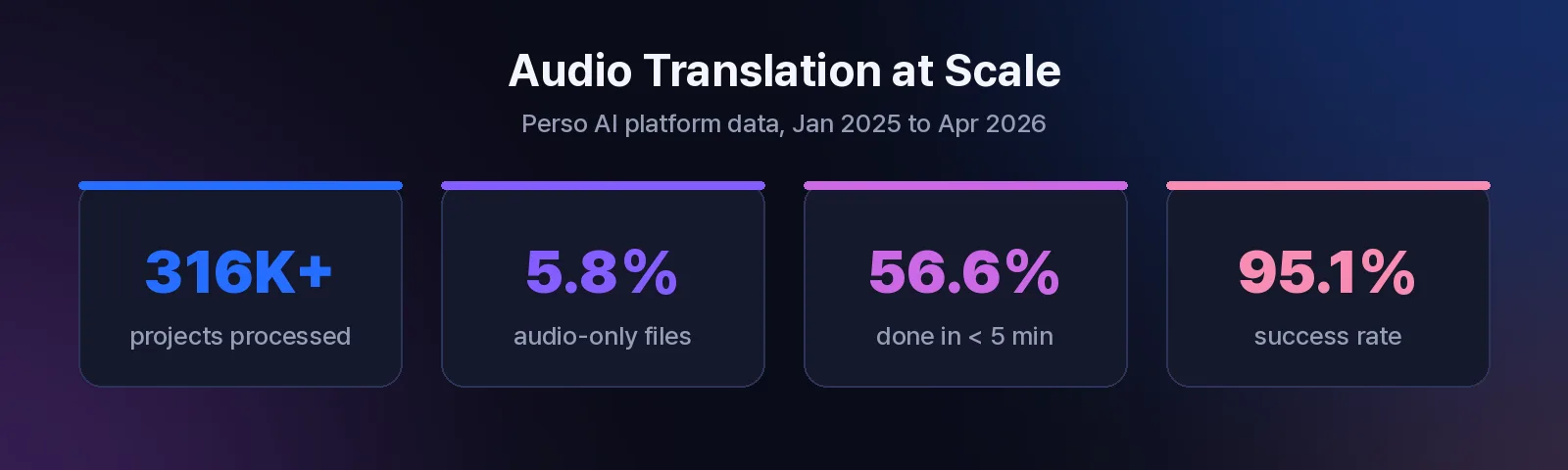
On Perso Dubbing’s platform, 5.8% of all projects (18,452 out of 316,856) are audio-only files rather than video. Education content leads adoption at 10.8% of categorized projects, followed by animation (9.2%) and film/drama (7.3%).
Source: Perso AI platform data, 316,856 projects, Jan 2025 -- Apr 2026
Supported Audio Formats and Limits
Before uploading, confirm your file meets these requirements:
Requirement | Details |
|---|---|
Supported formats | MP3, WAV, M4A |
Duration range | 5 seconds to 30 minutes |
File size limit | Up to 200 MB |
Source languages | 100 languages (speech recognition) |
Target languages | 99+ languages (AI dubbing output) |
If your audio file is in a different format (FLAC, OGG, AAC), convert it to MP3 or WAV first using any free converter. The quality of the source audio directly affects translation accuracy, so use the highest-bitrate version available.
How to Translate an Audio File with Perso Dubbing: 3 Steps
Perso Dubbing processes audio files through the same AI pipeline used for video dubbing. The workflow takes three steps and completes in minutes.
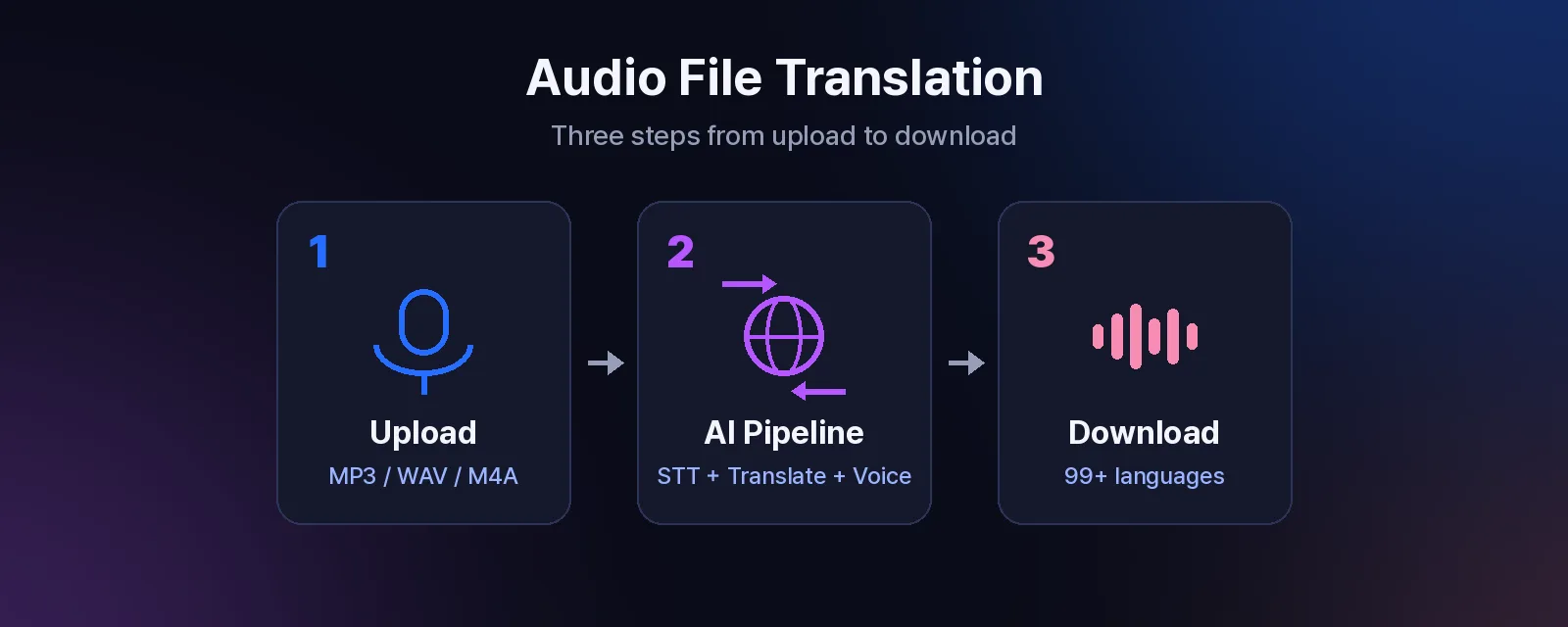
Step 1: Upload Your Audio File
Go to the Perso Dubbing dashboard and create a new project. Drag and drop your MP3, WAV, or M4A file into the upload area.
The platform automatically detects the source language using speech recognition that covers 100 languages. You can also set the source language manually if you know it.
Step 2: Select Your Target Language
Choose one or more target languages from the 99+ available options. Perso Dubbing translates and generates the dubbed audio in each selected language.
You can adjust the voice tone using the VoiceTone selector to match the context of your content, whether it is a formal business presentation, a casual podcast, or an educational lecture.
Step 3: Download the Translated Audio
Processing typically completes in under five minutes. On Perso Dubbing’s platform, 56.6% of completed projects finish in under five minutes, with a median processing time of 4 minutes 23 seconds.
Source: Perso AI platform data, completed projects, Jan 2025 -- Apr 2026
Once complete, download the translated audio file. You can also generate an SRT subtitle file for the translated version.
Best Use Cases for Audio File Translation
Standalone audio file translation serves different needs than video dubbing. Here are the most common scenarios.
Podcast Localization
Podcast creators can reach listeners in new markets without re-recording episodes. Upload the original MP3, translate it into Spanish, Portuguese, Hindi, or any of the 99+ supported languages, and publish the localized version on your podcast feed.
English is the top source language on Perso Dubbing at 34.4% of all projects, and Hindi is the most popular target language at 29.2%, followed by English (24.1%) and Portuguese (9.1%).
Source: Perso AI platform data, 316,856 projects, Jan 2025 -- Apr 2026
Lecture and Course Recordings
Educators and online course creators can make their content accessible to international students. A recorded lecture in English can be translated into dozens of languages, each preserving the instructor’s speaking style and pacing.
Education leads AI dubbing adoption on Perso Dubbing, accounting for 10.8% of all categorized projects.
Source: Perso AI platform data, 316,856 projects, Jan 2025 -- Apr 2026
Meeting Notes and Voicemails
Business teams working across languages can translate recorded meetings, voicemails, and internal training audio for team members who speak different languages. The three-step workflow requires no technical skills.
Audiobook Previews
Publishers and authors can create translated previews or sample chapters to test demand in new language markets before committing to a full professional localization.
Free vs. Paid: What You Get at Each Level
Perso Dubbing offers a free trial that requires no credit card, so you can test audio file translation before committing.
Plan | Monthly Price | Dubbing Minutes | Per-Minute Cost |
|---|---|---|---|
Free Trial | $0 | Limited | -- |
Starter | $6.99/mo | 7 min | $1.00/min |
Creator | $29/mo | 40 min | $0.73/min |
PRO | $99/mo | Up to 900 min with Finch | $0.11/min with Finch at full allocation |
The $0.11/min Finch figure uses PRO monthly billing at $99, divided by up to 900 minutes. Annual PRO is a separate $73/month offer billed $876/year; model choice and other credit use affect available minutes. For details, see Perso Dubbing pricing.
For high-volume audio translation, PRO subscribers can purchase Premium Credit Packs starting at $0.60/min for 2-hour packs.
How Audio File Translation Differs from Video Translation
If you are deciding between audio-only and video translation, here is how they compare.
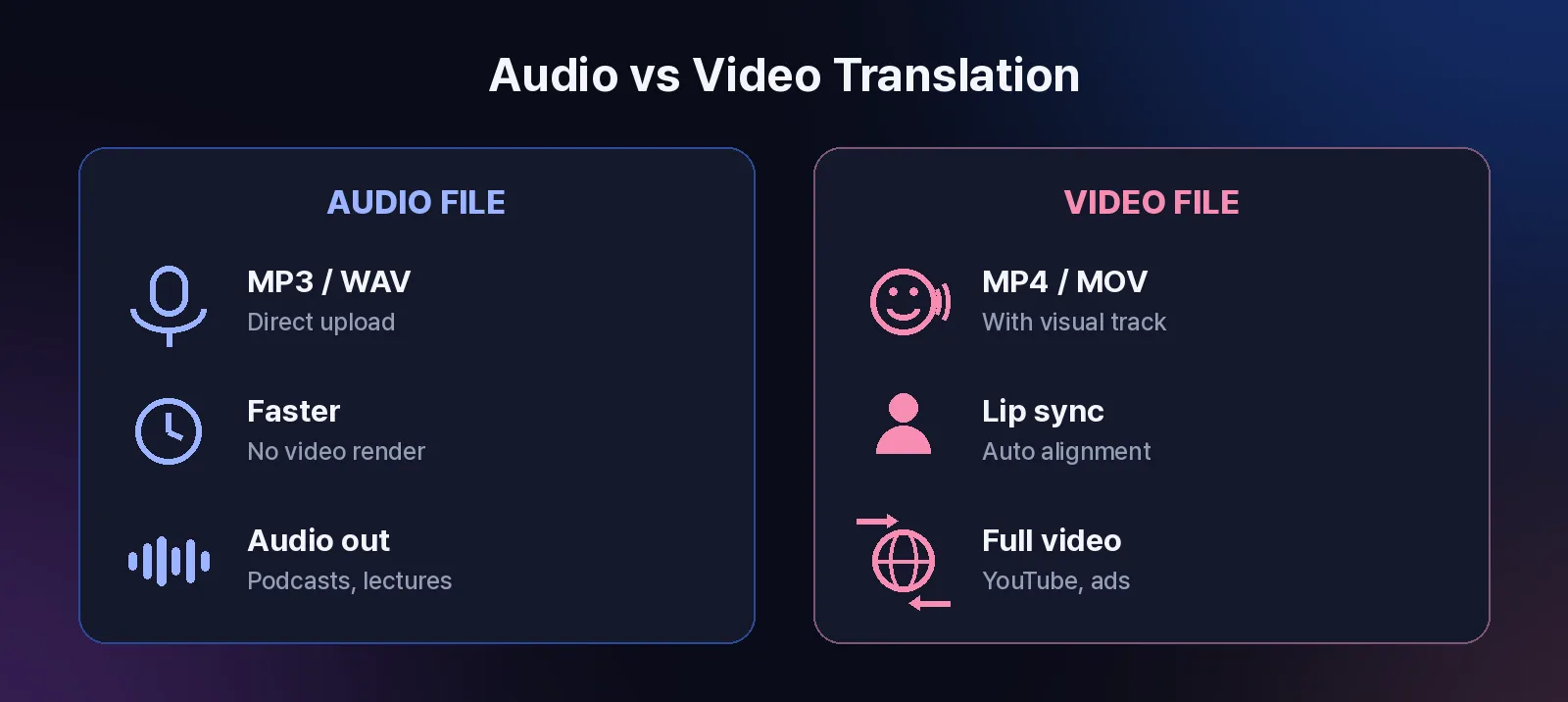
Factor | Audio File Translation | Video Translation |
|---|---|---|
Input | MP3, WAV, M4A | MP4, MOV, WebM |
Lip sync | Not applicable | Available (auto lip-sync) |
Output | Translated audio file | Translated video with synced audio |
Use case | Podcasts, lectures, meetings | YouTube videos, marketing clips, courses |
Processing | Typically faster (audio only) | Includes video rendering |
Both workflows use the same AI pipeline for speech recognition, translation, and voice synthesis. The difference is that video translation adds lip-sync alignment and video rendering on top. For standalone audio content, uploading the audio file directly is the faster and simpler path.
If your audio originated from a video and you need the translated audio synced back to the visual track, use the video translation workflow instead.
Tips for Better Translation Quality
Follow these practices to get the best results from AI audio translation.
Use clean source audio. Background music, overlapping speakers, and heavy echo reduce transcription accuracy. If possible, use the isolated vocal track. Perso Dubbing includes an audio separation tool that can extract vocals from mixed audio.
Choose the right source language. While auto-detection works well for most files, manually selecting the source language eliminates guessing errors, especially for less common languages or accented speech.
Keep files under 30 minutes. The platform supports files up to 30 minutes. For longer recordings, split them into segments before uploading. This also improves processing speed: 25% of completed projects on Perso Dubbing finish in under 3 minutes.
Source: Perso AI platform data, completed projects, Jan 2025 -- Apr 2026
Review and edit the transcript. After processing, review the generated transcript for any misheard words before finalizing. Small corrections at the transcript stage prevent compounding errors in the translated output.
Frequently Asked Questions
Q. Can I translate an MP3 file for free? A. Yes. Perso Dubbing offers a free trial with no credit card required, so you can upload an MP3 file and translate it to test the quality. The free tier includes limited dubbing minutes. Paid plans start at $6.99/month for 7 minutes of dubbing.
Q. What audio formats does Perso Dubbing accept? A. Perso Dubbing accepts MP3, WAV, and M4A audio files, as well as MP4, MOV, and WebM video files. Audio files must be between 5 seconds and 30 minutes long, with a maximum file size of 200 MB.
Q. How long does it take to translate an audio file? A. Most audio files are translated in under five minutes. On Perso Dubbing’s platform, the median processing time across completed projects is 4 minutes 23 seconds, and 56.6% of completed projects finish in under 5 minutes.
Q. Does the translated audio keep the original speaker’s voice? A. Yes. Perso Dubbing uses voice cloning to preserve the original speaker’s tone, pacing, and vocal characteristics in the translated output. You can also adjust the voice tone using the built-in VoiceTone selector.
By Untae Bae, Head of Growth & Product Owner at Perso AI
Perso pricing update, October 22, 2026: Perso Dubbing starts at $0.11 per dubbed minute with Finch on PRO monthly: $99/month for 10,800 credits, providing up to 900 minutes when all credits are used for Finch. Actual minutes depend on model choice and other credit use. Optional lip sync has separate usage conditions; the $0.11 rate is for Finch dubbing. The same PRO credit pool alternatively provides up to 180 minutes with Linnet 4 or 45 minutes with Nightingale. These allowances are alternatives, not additive.
You can translate an MP3, WAV, or M4A audio file into another language in under five minutes using AI dubbing tools. Upload the file, pick a target language, and download the translated audio with the original speaker’s voice preserved. No manual transcription, no hiring voice actors, no editing software required.
This guide walks through the full workflow for translating standalone audio files, from podcast episodes and lecture recordings to meeting notes and audiobooks, using Perso Dubbing’s AI pipeline. If your source is a video file, see our step-by-step guide on how to translate audio from a video instead.
What Is Audio File Translation?
Audio file translation converts spoken content in one language into another language while keeping the original speaker’s vocal characteristics. Unlike text translation, it handles the full speech pipeline: transcription, translation, and voice synthesis in a single pass. Tools like Perso Dubbing’s AI voice translator automate this entire chain.
Perso Dubbing supports speech recognition in 100 languages and outputs AI-dubbed audio in 99+ languages. The platform accepts MP3, WAV, and M4A files up to 30 minutes in length, making it suitable for most podcast episodes, recorded lectures, and business meeting recordings.
On Perso Dubbing’s platform, 5.8% of all projects (18,452 out of 316,856) are audio-only files rather than video. Education content leads adoption at 10.8% of categorized projects, followed by animation (9.2%) and film/drama (7.3%).
Source: Perso AI platform data, 316,856 projects, Jan 2025 -- Apr 2026
Supported Audio Formats and Limits
Before uploading, confirm your file meets these requirements:
Requirement | Details |
|---|---|
Supported formats | MP3, WAV, M4A |
Duration range | 5 seconds to 30 minutes |
File size limit | Up to 200 MB |
Source languages | 100 languages (speech recognition) |
Target languages | 99+ languages (AI dubbing output) |
If your audio file is in a different format (FLAC, OGG, AAC), convert it to MP3 or WAV first using any free converter. The quality of the source audio directly affects translation accuracy, so use the highest-bitrate version available.
How to Translate an Audio File with Perso Dubbing: 3 Steps
Perso Dubbing processes audio files through the same AI pipeline used for video dubbing. The workflow takes three steps and completes in minutes.
Step 1: Upload Your Audio File
Go to the Perso Dubbing dashboard and create a new project. Drag and drop your MP3, WAV, or M4A file into the upload area.
The platform automatically detects the source language using speech recognition that covers 100 languages. You can also set the source language manually if you know it.
Step 2: Select Your Target Language
Choose one or more target languages from the 99+ available options. Perso Dubbing translates and generates the dubbed audio in each selected language.
You can adjust the voice tone using the VoiceTone selector to match the context of your content, whether it is a formal business presentation, a casual podcast, or an educational lecture.
Step 3: Download the Translated Audio
Processing typically completes in under five minutes. On Perso Dubbing’s platform, 56.6% of completed projects finish in under five minutes, with a median processing time of 4 minutes 23 seconds.
Source: Perso AI platform data, completed projects, Jan 2025 -- Apr 2026
Once complete, download the translated audio file. You can also generate an SRT subtitle file for the translated version.
Best Use Cases for Audio File Translation
Standalone audio file translation serves different needs than video dubbing. Here are the most common scenarios.
Podcast Localization
Podcast creators can reach listeners in new markets without re-recording episodes. Upload the original MP3, translate it into Spanish, Portuguese, Hindi, or any of the 99+ supported languages, and publish the localized version on your podcast feed.
English is the top source language on Perso Dubbing at 34.4% of all projects, and Hindi is the most popular target language at 29.2%, followed by English (24.1%) and Portuguese (9.1%).
Source: Perso AI platform data, 316,856 projects, Jan 2025 -- Apr 2026
Lecture and Course Recordings
Educators and online course creators can make their content accessible to international students. A recorded lecture in English can be translated into dozens of languages, each preserving the instructor’s speaking style and pacing.
Education leads AI dubbing adoption on Perso Dubbing, accounting for 10.8% of all categorized projects.
Source: Perso AI platform data, 316,856 projects, Jan 2025 -- Apr 2026
Meeting Notes and Voicemails
Business teams working across languages can translate recorded meetings, voicemails, and internal training audio for team members who speak different languages. The three-step workflow requires no technical skills.
Audiobook Previews
Publishers and authors can create translated previews or sample chapters to test demand in new language markets before committing to a full professional localization.
Free vs. Paid: What You Get at Each Level
Perso Dubbing offers a free trial that requires no credit card, so you can test audio file translation before committing.
Plan | Monthly Price | Dubbing Minutes | Per-Minute Cost |
|---|---|---|---|
Free Trial | $0 | Limited | -- |
Starter | $6.99/mo | 7 min | $1.00/min |
Creator | $29/mo | 40 min | $0.73/min |
PRO | $99/mo | Up to 900 min with Finch | $0.11/min with Finch at full allocation |
The $0.11/min Finch figure uses PRO monthly billing at $99, divided by up to 900 minutes. Annual PRO is a separate $73/month offer billed $876/year; model choice and other credit use affect available minutes. For details, see Perso Dubbing pricing.
For high-volume audio translation, PRO subscribers can purchase Premium Credit Packs starting at $0.60/min for 2-hour packs.
How Audio File Translation Differs from Video Translation
If you are deciding between audio-only and video translation, here is how they compare.
Factor | Audio File Translation | Video Translation |
|---|---|---|
Input | MP3, WAV, M4A | MP4, MOV, WebM |
Lip sync | Not applicable | Available (auto lip-sync) |
Output | Translated audio file | Translated video with synced audio |
Use case | Podcasts, lectures, meetings | YouTube videos, marketing clips, courses |
Processing | Typically faster (audio only) | Includes video rendering |
Both workflows use the same AI pipeline for speech recognition, translation, and voice synthesis. The difference is that video translation adds lip-sync alignment and video rendering on top. For standalone audio content, uploading the audio file directly is the faster and simpler path.
If your audio originated from a video and you need the translated audio synced back to the visual track, use the video translation workflow instead.
Tips for Better Translation Quality
Follow these practices to get the best results from AI audio translation.
Use clean source audio. Background music, overlapping speakers, and heavy echo reduce transcription accuracy. If possible, use the isolated vocal track. Perso Dubbing includes an audio separation tool that can extract vocals from mixed audio.
Choose the right source language. While auto-detection works well for most files, manually selecting the source language eliminates guessing errors, especially for less common languages or accented speech.
Keep files under 30 minutes. The platform supports files up to 30 minutes. For longer recordings, split them into segments before uploading. This also improves processing speed: 25% of completed projects on Perso Dubbing finish in under 3 minutes.
Source: Perso AI platform data, completed projects, Jan 2025 -- Apr 2026
Review and edit the transcript. After processing, review the generated transcript for any misheard words before finalizing. Small corrections at the transcript stage prevent compounding errors in the translated output.
Frequently Asked Questions
Q. Can I translate an MP3 file for free? A. Yes. Perso Dubbing offers a free trial with no credit card required, so you can upload an MP3 file and translate it to test the quality. The free tier includes limited dubbing minutes. Paid plans start at $6.99/month for 7 minutes of dubbing.
Q. What audio formats does Perso Dubbing accept? A. Perso Dubbing accepts MP3, WAV, and M4A audio files, as well as MP4, MOV, and WebM video files. Audio files must be between 5 seconds and 30 minutes long, with a maximum file size of 200 MB.
Q. How long does it take to translate an audio file? A. Most audio files are translated in under five minutes. On Perso Dubbing’s platform, the median processing time across completed projects is 4 minutes 23 seconds, and 56.6% of completed projects finish in under 5 minutes.
Q. Does the translated audio keep the original speaker’s voice? A. Yes. Perso Dubbing uses voice cloning to preserve the original speaker’s tone, pacing, and vocal characteristics in the translated output. You can also adjust the voice tone using the built-in VoiceTone selector.
By Untae Bae, Head of Growth & Product Owner at Perso AI
Perso pricing update, October 22, 2026: Perso Dubbing starts at $0.11 per dubbed minute with Finch on PRO monthly: $99/month for 10,800 credits, providing up to 900 minutes when all credits are used for Finch. Actual minutes depend on model choice and other credit use. Optional lip sync has separate usage conditions; the $0.11 rate is for Finch dubbing. The same PRO credit pool alternatively provides up to 180 minutes with Linnet 4 or 45 minutes with Nightingale. These allowances are alternatives, not additive.
You can translate an MP3, WAV, or M4A audio file into another language in under five minutes using AI dubbing tools. Upload the file, pick a target language, and download the translated audio with the original speaker’s voice preserved. No manual transcription, no hiring voice actors, no editing software required.
This guide walks through the full workflow for translating standalone audio files, from podcast episodes and lecture recordings to meeting notes and audiobooks, using Perso Dubbing’s AI pipeline. If your source is a video file, see our step-by-step guide on how to translate audio from a video instead.
What Is Audio File Translation?
Audio file translation converts spoken content in one language into another language while keeping the original speaker’s vocal characteristics. Unlike text translation, it handles the full speech pipeline: transcription, translation, and voice synthesis in a single pass. Tools like Perso Dubbing’s AI voice translator automate this entire chain.
Perso Dubbing supports speech recognition in 100 languages and outputs AI-dubbed audio in 99+ languages. The platform accepts MP3, WAV, and M4A files up to 30 minutes in length, making it suitable for most podcast episodes, recorded lectures, and business meeting recordings.
On Perso Dubbing’s platform, 5.8% of all projects (18,452 out of 316,856) are audio-only files rather than video. Education content leads adoption at 10.8% of categorized projects, followed by animation (9.2%) and film/drama (7.3%).
Source: Perso AI platform data, 316,856 projects, Jan 2025 -- Apr 2026
Supported Audio Formats and Limits
Before uploading, confirm your file meets these requirements:
Requirement | Details |
|---|---|
Supported formats | MP3, WAV, M4A |
Duration range | 5 seconds to 30 minutes |
File size limit | Up to 200 MB |
Source languages | 100 languages (speech recognition) |
Target languages | 99+ languages (AI dubbing output) |
If your audio file is in a different format (FLAC, OGG, AAC), convert it to MP3 or WAV first using any free converter. The quality of the source audio directly affects translation accuracy, so use the highest-bitrate version available.
How to Translate an Audio File with Perso Dubbing: 3 Steps
Perso Dubbing processes audio files through the same AI pipeline used for video dubbing. The workflow takes three steps and completes in minutes.
Step 1: Upload Your Audio File
Go to the Perso Dubbing dashboard and create a new project. Drag and drop your MP3, WAV, or M4A file into the upload area.
The platform automatically detects the source language using speech recognition that covers 100 languages. You can also set the source language manually if you know it.
Step 2: Select Your Target Language
Choose one or more target languages from the 99+ available options. Perso Dubbing translates and generates the dubbed audio in each selected language.
You can adjust the voice tone using the VoiceTone selector to match the context of your content, whether it is a formal business presentation, a casual podcast, or an educational lecture.
Step 3: Download the Translated Audio
Processing typically completes in under five minutes. On Perso Dubbing’s platform, 56.6% of completed projects finish in under five minutes, with a median processing time of 4 minutes 23 seconds.
Source: Perso AI platform data, completed projects, Jan 2025 -- Apr 2026
Once complete, download the translated audio file. You can also generate an SRT subtitle file for the translated version.
Best Use Cases for Audio File Translation
Standalone audio file translation serves different needs than video dubbing. Here are the most common scenarios.
Podcast Localization
Podcast creators can reach listeners in new markets without re-recording episodes. Upload the original MP3, translate it into Spanish, Portuguese, Hindi, or any of the 99+ supported languages, and publish the localized version on your podcast feed.
English is the top source language on Perso Dubbing at 34.4% of all projects, and Hindi is the most popular target language at 29.2%, followed by English (24.1%) and Portuguese (9.1%).
Source: Perso AI platform data, 316,856 projects, Jan 2025 -- Apr 2026
Lecture and Course Recordings
Educators and online course creators can make their content accessible to international students. A recorded lecture in English can be translated into dozens of languages, each preserving the instructor’s speaking style and pacing.
Education leads AI dubbing adoption on Perso Dubbing, accounting for 10.8% of all categorized projects.
Source: Perso AI platform data, 316,856 projects, Jan 2025 -- Apr 2026
Meeting Notes and Voicemails
Business teams working across languages can translate recorded meetings, voicemails, and internal training audio for team members who speak different languages. The three-step workflow requires no technical skills.
Audiobook Previews
Publishers and authors can create translated previews or sample chapters to test demand in new language markets before committing to a full professional localization.
Free vs. Paid: What You Get at Each Level
Perso Dubbing offers a free trial that requires no credit card, so you can test audio file translation before committing.
Plan | Monthly Price | Dubbing Minutes | Per-Minute Cost |
|---|---|---|---|
Free Trial | $0 | Limited | -- |
Starter | $6.99/mo | 7 min | $1.00/min |
Creator | $29/mo | 40 min | $0.73/min |
PRO | $99/mo | Up to 900 min with Finch | $0.11/min with Finch at full allocation |
The $0.11/min Finch figure uses PRO monthly billing at $99, divided by up to 900 minutes. Annual PRO is a separate $73/month offer billed $876/year; model choice and other credit use affect available minutes. For details, see Perso Dubbing pricing.
For high-volume audio translation, PRO subscribers can purchase Premium Credit Packs starting at $0.60/min for 2-hour packs.
How Audio File Translation Differs from Video Translation
If you are deciding between audio-only and video translation, here is how they compare.
Factor | Audio File Translation | Video Translation |
|---|---|---|
Input | MP3, WAV, M4A | MP4, MOV, WebM |
Lip sync | Not applicable | Available (auto lip-sync) |
Output | Translated audio file | Translated video with synced audio |
Use case | Podcasts, lectures, meetings | YouTube videos, marketing clips, courses |
Processing | Typically faster (audio only) | Includes video rendering |
Both workflows use the same AI pipeline for speech recognition, translation, and voice synthesis. The difference is that video translation adds lip-sync alignment and video rendering on top. For standalone audio content, uploading the audio file directly is the faster and simpler path.
If your audio originated from a video and you need the translated audio synced back to the visual track, use the video translation workflow instead.
Tips for Better Translation Quality
Follow these practices to get the best results from AI audio translation.
Use clean source audio. Background music, overlapping speakers, and heavy echo reduce transcription accuracy. If possible, use the isolated vocal track. Perso Dubbing includes an audio separation tool that can extract vocals from mixed audio.
Choose the right source language. While auto-detection works well for most files, manually selecting the source language eliminates guessing errors, especially for less common languages or accented speech.
Keep files under 30 minutes. The platform supports files up to 30 minutes. For longer recordings, split them into segments before uploading. This also improves processing speed: 25% of completed projects on Perso Dubbing finish in under 3 minutes.
Source: Perso AI platform data, completed projects, Jan 2025 -- Apr 2026
Review and edit the transcript. After processing, review the generated transcript for any misheard words before finalizing. Small corrections at the transcript stage prevent compounding errors in the translated output.
Frequently Asked Questions
Q. Can I translate an MP3 file for free? A. Yes. Perso Dubbing offers a free trial with no credit card required, so you can upload an MP3 file and translate it to test the quality. The free tier includes limited dubbing minutes. Paid plans start at $6.99/month for 7 minutes of dubbing.
Q. What audio formats does Perso Dubbing accept? A. Perso Dubbing accepts MP3, WAV, and M4A audio files, as well as MP4, MOV, and WebM video files. Audio files must be between 5 seconds and 30 minutes long, with a maximum file size of 200 MB.
Q. How long does it take to translate an audio file? A. Most audio files are translated in under five minutes. On Perso Dubbing’s platform, the median processing time across completed projects is 4 minutes 23 seconds, and 56.6% of completed projects finish in under 5 minutes.
Q. Does the translated audio keep the original speaker’s voice? A. Yes. Perso Dubbing uses voice cloning to preserve the original speaker’s tone, pacing, and vocal characteristics in the translated output. You can also adjust the voice tone using the built-in VoiceTone selector.
Continue Reading
Browse All