How to Translate Japanese Videos to English with AI (2026)




Jump to section
Jump to section

Share
Share
Share

AI Video Translator, Localization, and Dubbing Tool
Try it out for Free
By Hyesun Shin, Growth Marketer at Perso AI
You can translate a Japanese video to English in minutes using AI dubbing. Upload your file to Perso Dubbing, select English as the target language, and download the dubbed version. Speech recognition, translation, and voice synthesis happen automatically in one workflow.
This guide covers the full process of translating Japanese videos to English, what makes the Japanese language pair uniquely challenging for AI, and how to get the best results. Whether you’re localizing anime clips, J-drama episodes, corporate training, or gaming content, AI dubbing replaces weeks of studio work with a three-step automated pipeline.
Why Japanese-to-English Video Translation Is Growing
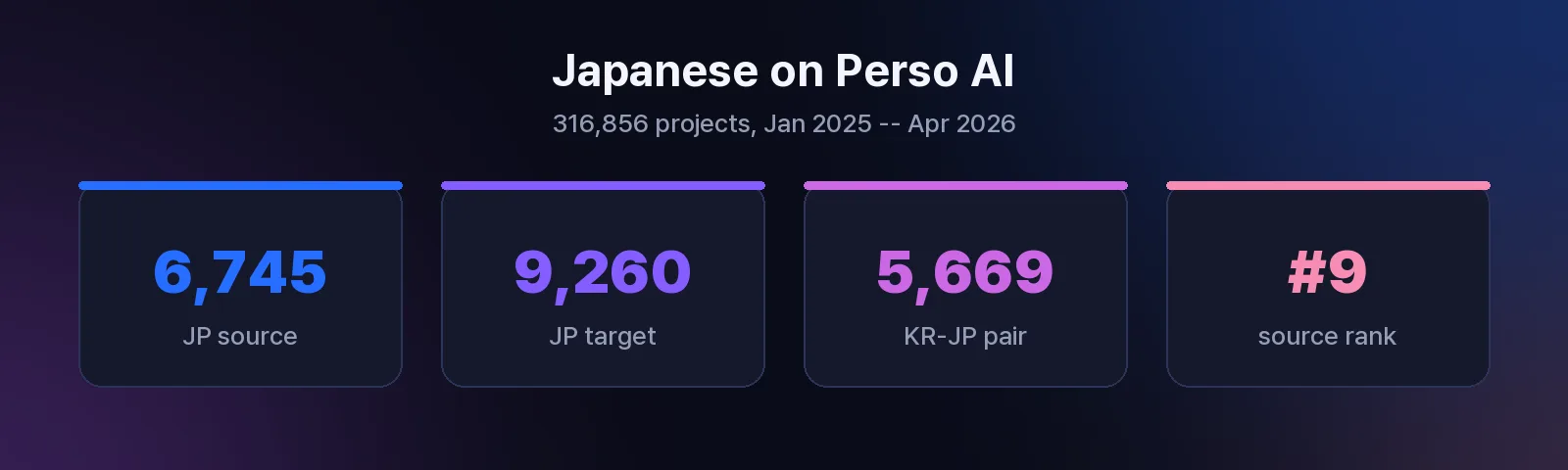
Japanese content has a massive global audience that increasingly expects English-language access. On the Perso AI platform, Japanese is the 9th most common source language with 6,745 dubbing projects, and the 8th most popular target language with 9,260 projects (source: Perso AI platform data, 316,856 projects, Jan 2025 -- Apr 2026). This two-way flow reflects demand from both directions: Japanese creators reaching English-speaking audiences, and English creators localizing into Japanese.
Three sectors drive most of this volume.
Anime and entertainment. The global anime market continues rapid expansion, with overseas viewership growing faster year over year. Creators, fan communities, and distributors need English-dubbed versions to serve the largest online audience segment. Perso Dubbing’s Japanese-to-English video translation page receives consistent organic traffic from creators searching for automated dubbing solutions.
Corporate and e-learning content. Japanese manufacturers, automakers, and tech companies produce training videos, product demonstrations, and compliance materials in Japanese. Expanding to English-speaking markets requires translating these assets -- often hundreds of hours of existing content that traditional dubbing studios would take months to process.
Gaming and YouTube. Japan is the #1 YouTube Gaming market globally. Japanese gaming creators who dub content into English unlock access to the second-largest gaming audience: the United States. Korean-to-Japanese is already a top-10 language pair on the Perso AI platform with 5,669 projects, confirming that content flows actively between East Asian languages and English (source: Perso AI platform data).
How to Translate a Japanese Video to English: Step-by-Step
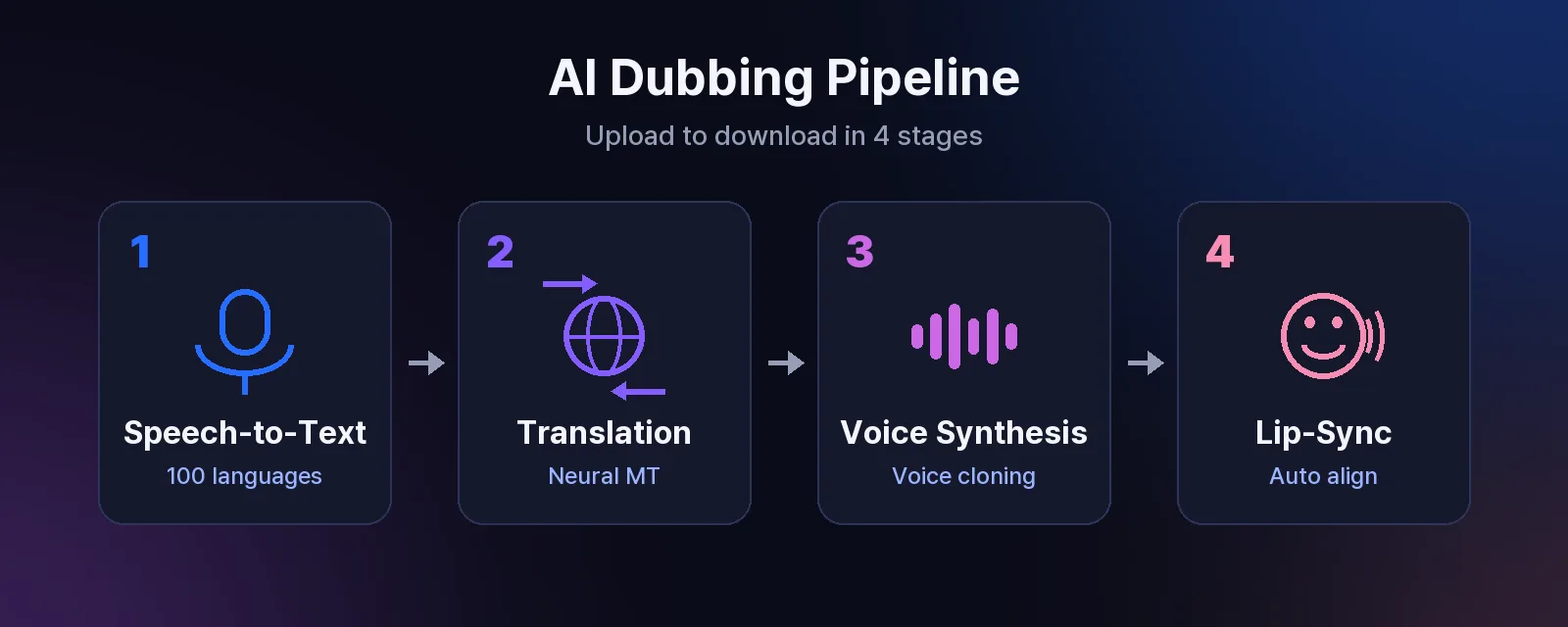
Perso Dubbing uses a fully automated AI pipeline: speech recognition in 100 languages, neural machine translation, voice synthesis, and optional lip-sync alignment. Here is the complete process.
Step 1: Upload Your Japanese Video
Go to perso.ai/dubbing and upload your video file. Perso Dubbing accepts most standard formats including MP4, MOV, AVI, and MKV. You can also paste a YouTube URL directly -- 15.0% of all dubbing projects on the platform start from YouTube URLs (source: Perso AI platform data). For a dedicated YouTube workflow, see our guide on how to dub YouTube videos.
Step 2: Select Japanese as Source and English as Target
Choose Japanese as the source language and English as your target. If you’re unsure of the source language, use Auto Detect -- the platform’s speech recognition covers 100 languages. Perso Dubbing can translate videos into 99+ languages, but for this guide we focus on the Japanese-to-English pair.
Step 3: Configure Voice Settings
Use the VoiceTone selector to match your content type:
Professional -- corporate training, product demos, compliance videos
Conversational -- vlogs, interviews, talk shows
Energetic -- gaming, anime, entertainment content
Enable lip-sync if your video shows the speaker’s face. On the platform, 14.1% of all dubbing projects use automatic lip-sync (source: Perso AI platform data).
Step 4: Process and Download
Click Start. The AI processes your video through four stages: speech recognition, translation, voice synthesis, and lip-sync alignment. The median processing time for completed Perso AI projects is 4 minutes 23 seconds, with 56.6% of completed projects finishing in under 5 minutes (source: Perso AI platform data, Jan 2025 -- Apr 2026).
Short-form videos under one minute -- which make up 55.8% of all dubbed content on the platform -- typically finish in 2-3 minutes. Once processing completes, download your English-dubbed video or share it using the generated share URL. Perso Dubbing maintains a 95.1% project completion rate across 316,856 total processed projects.
Ready to try? Perso Dubbing starts at $6.99/month with no credit card required for the free trial. See plans and pricing.
What Makes Japanese-to-English Translation Challenging
Japanese is linguistically distant from English in ways that affect dubbing quality differently than pairs like Chinese-to-English or Spanish-to-English. Perso Dubbing’s AI pipeline addresses each of these challenges automatically.
Subject-Object-Verb word order. Japanese follows SOV sentence structure while English uses SVO. The AI translation engine restructures sentences entirely rather than translating word by word, producing natural English phrasing in the output.
Implied subjects. Japanese speakers frequently drop the sentence subject when context makes it obvious. The neural translation model infers missing subjects from surrounding dialogue to produce grammatically complete English sentences.
Honorific speech levels (keigo). Japanese has three formality tiers: casual, polite (desu/masu), and honorific (keigo). The translation model maps these to appropriate English register so the speaker’s intended tone carries through to the dubbed version.
Compact expression, longer English output. Japanese conveys meaning in fewer syllables than English. Perso Dubbing’s voice synthesis engine adjusts pacing so dubbed audio fits naturally without awkward stretching or compression. Voice cloning preserves the original speaker’s tone and vocal characteristics while adapting timing for the target language.
Tips for Better Japanese-to-English Results
Use clear source audio. Audio without heavy background music or overlapping speakers gives the speech recognition engine optimal input. Perso Dubbing includes automatic audio separation that isolates the voice track from background sounds.
Test with a short clip first. If your video exceeds 15 minutes, run a representative 1-2 minute segment first. This confirms tone settings and translation accuracy before processing the full file. On the platform, 55.8% of all dubbed videos are under one minute (source: Perso AI platform data).
Match VoiceTone to your audience. Corporate content for American business audiences benefits from measured, professional delivery. Gaming or entertainment content for younger demographics often works better with energetic, expressive settings.
Check technical terminology. Japanese technical vocabulary in fields like automotive (monozukuri, kaizen), electronics, or gaming may translate to generic English terms rather than industry-specific ones. Review specialized terms after dubbing and use the transcript editor to make adjustments.
Consider your distribution format. Short-form content under one minute processes fastest and performs well across social platforms. For long-form content like full training courses or drama episodes, consider dubbing in segments for easier quality review.
Frequently Asked Questions
Q. Can I translate Japanese anime to English with AI dubbing?
Yes. Perso Dubbing handles anime, J-drama, and all entertainment content types. Upload your video, select Japanese as the source and English as the target, and the AI generates a fully dubbed English version. Perso Dubbing uses voice cloning to preserve the original speaker’s voice characteristics, including tone, pacing, and personality. The platform supports AI dubbing in 99+ languages.
Q. How long does it take to translate a Japanese video to English?
The median processing time on Perso AI is 4 minutes 23 seconds across completed projects, with 56.6% completing in under 5 minutes. Short videos under one minute -- which represent 55.8% of all dubbed content -- typically finish in 2-3 minutes. Processing time scales with video length and complexity (source: Perso AI platform data, Jan 2025 -- Apr 2026).
Q. Can I get English subtitles from a Japanese video instead of full dubbing?
Perso Dubbing generates full voiced dubbing, not subtitles alone. The process includes speech recognition (transcription of Japanese audio), translation to English, and AI voice synthesis. If you need subtitles only, you can use the platform’s speech-to-text feature to extract and translate a transcript separately. For more details on translation options, visit the AI video translator page.
Perso Dubbing translates videos in 99+ languages with AI-powered voice dubbing, lip-sync, and voice preservation. Start a free trial -- no credit card required.
By Hyesun Shin, Growth Marketer at Perso AI
You can translate a Japanese video to English in minutes using AI dubbing. Upload your file to Perso Dubbing, select English as the target language, and download the dubbed version. Speech recognition, translation, and voice synthesis happen automatically in one workflow.
This guide covers the full process of translating Japanese videos to English, what makes the Japanese language pair uniquely challenging for AI, and how to get the best results. Whether you’re localizing anime clips, J-drama episodes, corporate training, or gaming content, AI dubbing replaces weeks of studio work with a three-step automated pipeline.
Why Japanese-to-English Video Translation Is Growing
Japanese content has a massive global audience that increasingly expects English-language access. On the Perso AI platform, Japanese is the 9th most common source language with 6,745 dubbing projects, and the 8th most popular target language with 9,260 projects (source: Perso AI platform data, 316,856 projects, Jan 2025 -- Apr 2026). This two-way flow reflects demand from both directions: Japanese creators reaching English-speaking audiences, and English creators localizing into Japanese.
Three sectors drive most of this volume.
Anime and entertainment. The global anime market continues rapid expansion, with overseas viewership growing faster year over year. Creators, fan communities, and distributors need English-dubbed versions to serve the largest online audience segment. Perso Dubbing’s Japanese-to-English video translation page receives consistent organic traffic from creators searching for automated dubbing solutions.
Corporate and e-learning content. Japanese manufacturers, automakers, and tech companies produce training videos, product demonstrations, and compliance materials in Japanese. Expanding to English-speaking markets requires translating these assets -- often hundreds of hours of existing content that traditional dubbing studios would take months to process.
Gaming and YouTube. Japan is the #1 YouTube Gaming market globally. Japanese gaming creators who dub content into English unlock access to the second-largest gaming audience: the United States. Korean-to-Japanese is already a top-10 language pair on the Perso AI platform with 5,669 projects, confirming that content flows actively between East Asian languages and English (source: Perso AI platform data).
How to Translate a Japanese Video to English: Step-by-Step
Perso Dubbing uses a fully automated AI pipeline: speech recognition in 100 languages, neural machine translation, voice synthesis, and optional lip-sync alignment. Here is the complete process.
Step 1: Upload Your Japanese Video
Go to perso.ai/dubbing and upload your video file. Perso Dubbing accepts most standard formats including MP4, MOV, AVI, and MKV. You can also paste a YouTube URL directly -- 15.0% of all dubbing projects on the platform start from YouTube URLs (source: Perso AI platform data). For a dedicated YouTube workflow, see our guide on how to dub YouTube videos.
Step 2: Select Japanese as Source and English as Target
Choose Japanese as the source language and English as your target. If you’re unsure of the source language, use Auto Detect -- the platform’s speech recognition covers 100 languages. Perso Dubbing can translate videos into 99+ languages, but for this guide we focus on the Japanese-to-English pair.
Step 3: Configure Voice Settings
Use the VoiceTone selector to match your content type:
Professional -- corporate training, product demos, compliance videos
Conversational -- vlogs, interviews, talk shows
Energetic -- gaming, anime, entertainment content
Enable lip-sync if your video shows the speaker’s face. On the platform, 14.1% of all dubbing projects use automatic lip-sync (source: Perso AI platform data).
Step 4: Process and Download
Click Start. The AI processes your video through four stages: speech recognition, translation, voice synthesis, and lip-sync alignment. The median processing time for completed Perso AI projects is 4 minutes 23 seconds, with 56.6% of completed projects finishing in under 5 minutes (source: Perso AI platform data, Jan 2025 -- Apr 2026).
Short-form videos under one minute -- which make up 55.8% of all dubbed content on the platform -- typically finish in 2-3 minutes. Once processing completes, download your English-dubbed video or share it using the generated share URL. Perso Dubbing maintains a 95.1% project completion rate across 316,856 total processed projects.
Ready to try? Perso Dubbing starts at $6.99/month with no credit card required for the free trial. See plans and pricing.
What Makes Japanese-to-English Translation Challenging
Japanese is linguistically distant from English in ways that affect dubbing quality differently than pairs like Chinese-to-English or Spanish-to-English. Perso Dubbing’s AI pipeline addresses each of these challenges automatically.
Subject-Object-Verb word order. Japanese follows SOV sentence structure while English uses SVO. The AI translation engine restructures sentences entirely rather than translating word by word, producing natural English phrasing in the output.
Implied subjects. Japanese speakers frequently drop the sentence subject when context makes it obvious. The neural translation model infers missing subjects from surrounding dialogue to produce grammatically complete English sentences.
Honorific speech levels (keigo). Japanese has three formality tiers: casual, polite (desu/masu), and honorific (keigo). The translation model maps these to appropriate English register so the speaker’s intended tone carries through to the dubbed version.
Compact expression, longer English output. Japanese conveys meaning in fewer syllables than English. Perso Dubbing’s voice synthesis engine adjusts pacing so dubbed audio fits naturally without awkward stretching or compression. Voice cloning preserves the original speaker’s tone and vocal characteristics while adapting timing for the target language.
Tips for Better Japanese-to-English Results
Use clear source audio. Audio without heavy background music or overlapping speakers gives the speech recognition engine optimal input. Perso Dubbing includes automatic audio separation that isolates the voice track from background sounds.
Test with a short clip first. If your video exceeds 15 minutes, run a representative 1-2 minute segment first. This confirms tone settings and translation accuracy before processing the full file. On the platform, 55.8% of all dubbed videos are under one minute (source: Perso AI platform data).
Match VoiceTone to your audience. Corporate content for American business audiences benefits from measured, professional delivery. Gaming or entertainment content for younger demographics often works better with energetic, expressive settings.
Check technical terminology. Japanese technical vocabulary in fields like automotive (monozukuri, kaizen), electronics, or gaming may translate to generic English terms rather than industry-specific ones. Review specialized terms after dubbing and use the transcript editor to make adjustments.
Consider your distribution format. Short-form content under one minute processes fastest and performs well across social platforms. For long-form content like full training courses or drama episodes, consider dubbing in segments for easier quality review.
Frequently Asked Questions
Q. Can I translate Japanese anime to English with AI dubbing?
Yes. Perso Dubbing handles anime, J-drama, and all entertainment content types. Upload your video, select Japanese as the source and English as the target, and the AI generates a fully dubbed English version. Perso Dubbing uses voice cloning to preserve the original speaker’s voice characteristics, including tone, pacing, and personality. The platform supports AI dubbing in 99+ languages.
Q. How long does it take to translate a Japanese video to English?
The median processing time on Perso AI is 4 minutes 23 seconds across completed projects, with 56.6% completing in under 5 minutes. Short videos under one minute -- which represent 55.8% of all dubbed content -- typically finish in 2-3 minutes. Processing time scales with video length and complexity (source: Perso AI platform data, Jan 2025 -- Apr 2026).
Q. Can I get English subtitles from a Japanese video instead of full dubbing?
Perso Dubbing generates full voiced dubbing, not subtitles alone. The process includes speech recognition (transcription of Japanese audio), translation to English, and AI voice synthesis. If you need subtitles only, you can use the platform’s speech-to-text feature to extract and translate a transcript separately. For more details on translation options, visit the AI video translator page.
Perso Dubbing translates videos in 99+ languages with AI-powered voice dubbing, lip-sync, and voice preservation. Start a free trial -- no credit card required.
By Hyesun Shin, Growth Marketer at Perso AI
You can translate a Japanese video to English in minutes using AI dubbing. Upload your file to Perso Dubbing, select English as the target language, and download the dubbed version. Speech recognition, translation, and voice synthesis happen automatically in one workflow.
This guide covers the full process of translating Japanese videos to English, what makes the Japanese language pair uniquely challenging for AI, and how to get the best results. Whether you’re localizing anime clips, J-drama episodes, corporate training, or gaming content, AI dubbing replaces weeks of studio work with a three-step automated pipeline.
Why Japanese-to-English Video Translation Is Growing
Japanese content has a massive global audience that increasingly expects English-language access. On the Perso AI platform, Japanese is the 9th most common source language with 6,745 dubbing projects, and the 8th most popular target language with 9,260 projects (source: Perso AI platform data, 316,856 projects, Jan 2025 -- Apr 2026). This two-way flow reflects demand from both directions: Japanese creators reaching English-speaking audiences, and English creators localizing into Japanese.
Three sectors drive most of this volume.
Anime and entertainment. The global anime market continues rapid expansion, with overseas viewership growing faster year over year. Creators, fan communities, and distributors need English-dubbed versions to serve the largest online audience segment. Perso Dubbing’s Japanese-to-English video translation page receives consistent organic traffic from creators searching for automated dubbing solutions.
Corporate and e-learning content. Japanese manufacturers, automakers, and tech companies produce training videos, product demonstrations, and compliance materials in Japanese. Expanding to English-speaking markets requires translating these assets -- often hundreds of hours of existing content that traditional dubbing studios would take months to process.
Gaming and YouTube. Japan is the #1 YouTube Gaming market globally. Japanese gaming creators who dub content into English unlock access to the second-largest gaming audience: the United States. Korean-to-Japanese is already a top-10 language pair on the Perso AI platform with 5,669 projects, confirming that content flows actively between East Asian languages and English (source: Perso AI platform data).
How to Translate a Japanese Video to English: Step-by-Step
Perso Dubbing uses a fully automated AI pipeline: speech recognition in 100 languages, neural machine translation, voice synthesis, and optional lip-sync alignment. Here is the complete process.
Step 1: Upload Your Japanese Video
Go to perso.ai/dubbing and upload your video file. Perso Dubbing accepts most standard formats including MP4, MOV, AVI, and MKV. You can also paste a YouTube URL directly -- 15.0% of all dubbing projects on the platform start from YouTube URLs (source: Perso AI platform data). For a dedicated YouTube workflow, see our guide on how to dub YouTube videos.
Step 2: Select Japanese as Source and English as Target
Choose Japanese as the source language and English as your target. If you’re unsure of the source language, use Auto Detect -- the platform’s speech recognition covers 100 languages. Perso Dubbing can translate videos into 99+ languages, but for this guide we focus on the Japanese-to-English pair.
Step 3: Configure Voice Settings
Use the VoiceTone selector to match your content type:
Professional -- corporate training, product demos, compliance videos
Conversational -- vlogs, interviews, talk shows
Energetic -- gaming, anime, entertainment content
Enable lip-sync if your video shows the speaker’s face. On the platform, 14.1% of all dubbing projects use automatic lip-sync (source: Perso AI platform data).
Step 4: Process and Download
Click Start. The AI processes your video through four stages: speech recognition, translation, voice synthesis, and lip-sync alignment. The median processing time for completed Perso AI projects is 4 minutes 23 seconds, with 56.6% of completed projects finishing in under 5 minutes (source: Perso AI platform data, Jan 2025 -- Apr 2026).
Short-form videos under one minute -- which make up 55.8% of all dubbed content on the platform -- typically finish in 2-3 minutes. Once processing completes, download your English-dubbed video or share it using the generated share URL. Perso Dubbing maintains a 95.1% project completion rate across 316,856 total processed projects.
Ready to try? Perso Dubbing starts at $6.99/month with no credit card required for the free trial. See plans and pricing.
What Makes Japanese-to-English Translation Challenging
Japanese is linguistically distant from English in ways that affect dubbing quality differently than pairs like Chinese-to-English or Spanish-to-English. Perso Dubbing’s AI pipeline addresses each of these challenges automatically.
Subject-Object-Verb word order. Japanese follows SOV sentence structure while English uses SVO. The AI translation engine restructures sentences entirely rather than translating word by word, producing natural English phrasing in the output.
Implied subjects. Japanese speakers frequently drop the sentence subject when context makes it obvious. The neural translation model infers missing subjects from surrounding dialogue to produce grammatically complete English sentences.
Honorific speech levels (keigo). Japanese has three formality tiers: casual, polite (desu/masu), and honorific (keigo). The translation model maps these to appropriate English register so the speaker’s intended tone carries through to the dubbed version.
Compact expression, longer English output. Japanese conveys meaning in fewer syllables than English. Perso Dubbing’s voice synthesis engine adjusts pacing so dubbed audio fits naturally without awkward stretching or compression. Voice cloning preserves the original speaker’s tone and vocal characteristics while adapting timing for the target language.
Tips for Better Japanese-to-English Results
Use clear source audio. Audio without heavy background music or overlapping speakers gives the speech recognition engine optimal input. Perso Dubbing includes automatic audio separation that isolates the voice track from background sounds.
Test with a short clip first. If your video exceeds 15 minutes, run a representative 1-2 minute segment first. This confirms tone settings and translation accuracy before processing the full file. On the platform, 55.8% of all dubbed videos are under one minute (source: Perso AI platform data).
Match VoiceTone to your audience. Corporate content for American business audiences benefits from measured, professional delivery. Gaming or entertainment content for younger demographics often works better with energetic, expressive settings.
Check technical terminology. Japanese technical vocabulary in fields like automotive (monozukuri, kaizen), electronics, or gaming may translate to generic English terms rather than industry-specific ones. Review specialized terms after dubbing and use the transcript editor to make adjustments.
Consider your distribution format. Short-form content under one minute processes fastest and performs well across social platforms. For long-form content like full training courses or drama episodes, consider dubbing in segments for easier quality review.
Frequently Asked Questions
Q. Can I translate Japanese anime to English with AI dubbing?
Yes. Perso Dubbing handles anime, J-drama, and all entertainment content types. Upload your video, select Japanese as the source and English as the target, and the AI generates a fully dubbed English version. Perso Dubbing uses voice cloning to preserve the original speaker’s voice characteristics, including tone, pacing, and personality. The platform supports AI dubbing in 99+ languages.
Q. How long does it take to translate a Japanese video to English?
The median processing time on Perso AI is 4 minutes 23 seconds across completed projects, with 56.6% completing in under 5 minutes. Short videos under one minute -- which represent 55.8% of all dubbed content -- typically finish in 2-3 minutes. Processing time scales with video length and complexity (source: Perso AI platform data, Jan 2025 -- Apr 2026).
Q. Can I get English subtitles from a Japanese video instead of full dubbing?
Perso Dubbing generates full voiced dubbing, not subtitles alone. The process includes speech recognition (transcription of Japanese audio), translation to English, and AI voice synthesis. If you need subtitles only, you can use the platform’s speech-to-text feature to extract and translate a transcript separately. For more details on translation options, visit the AI video translator page.
Perso Dubbing translates videos in 99+ languages with AI-powered voice dubbing, lip-sync, and voice preservation. Start a free trial -- no credit card required.
Continue Reading
Browse All