Voice Over Translation: Complete Guide for Multilingual Video




Jump to section
Jump to section

Share
Share
Share

AI Video Translator, Localization, and Dubbing Tool
Try it out for Free
Short answer. Voice over translation is the workflow that takes an existing voice over — narration, explainer audio, or recorded commentary — and produces the same voice over in another language. AI-powered voice over translation handles three steps automatically: speech recognition, translation, and synthesis in the target language. With Perso Dubbing, you can translate across 99+ languages and clone the original speaker's voice so the new language sounds like the same person.
What is voice over translation?
Voice over translation converts a recorded voice over from one language to another. The input is audio — sometimes attached to video, sometimes standalone — and the output is audio in a different language, ready to ship.
The category is older than AI. Studios have done this manually for decades: hire a voice actor in the target language, hand them a translated script, record, mix back into the video. The bottleneck was always cost and time. A 5-minute explainer in three languages used to mean three studio sessions, three voice actors, and a week of turnaround.
AI changed the workflow without changing the goal. The output is still a voice over in another language. The path to that output now takes minutes instead of weeks.
Three categories of work fit under voice over translation:
The first is localized narration — explainer videos, e-learning courses, documentary narration, audiobook chapters. The original is one voice over the whole production. The translated output keeps the same voice or substitutes a target-language equivalent.
The second is dialogue dubbing — film, drama, interview content where multiple speakers need to be translated separately. Voice over translation is the workhorse here, even though the industry calls it "dubbing" once it crosses into multi-speaker territory.
The third is interface audio — IVR menus, app onboarding voices, in-product narration. Smaller scope, but the same translation-and-synthesis pipeline runs underneath.
The rest of this guide focuses on the first two. The third follows the same workflow at a smaller scale.
Voice over translation vs dubbing — are they the same?
Mostly yes. The distinction is older than the AI workflow and was never clean.
Industry usage:
Voice over translation usually refers to narration-style content. One speaker. Documentary. Explainer. Audiobook. The voice over sits on top of the video rather than synced to mouth movement.
Dubbing usually refers to dialogue. Multiple speakers. Lip-sync matters. Film and drama default to this term.
The line is fuzzy in practice. A creator who narrates a YouTube video and wants the same video in Spanish — is that voice over translation or dubbing? Both terms work. The workflow is identical: speech in → translation → speech out → mix back into video.
If you want a clean rule: think of voice over translation as the broader category, and dubbing as the case where lip-sync alignment is part of the deliverable. Both run on the same AI pipeline. The 4-Layer Model of AI media frames this as Layer 4 — the distribution layer — regardless of which industry term you use.
The rest of this guide uses "voice over translation" as the umbrella term. Where lip-sync matters, we call it out.
How AI-powered voice over translation works
The pipeline has four steps. Each runs in seconds or low minutes for typical content.
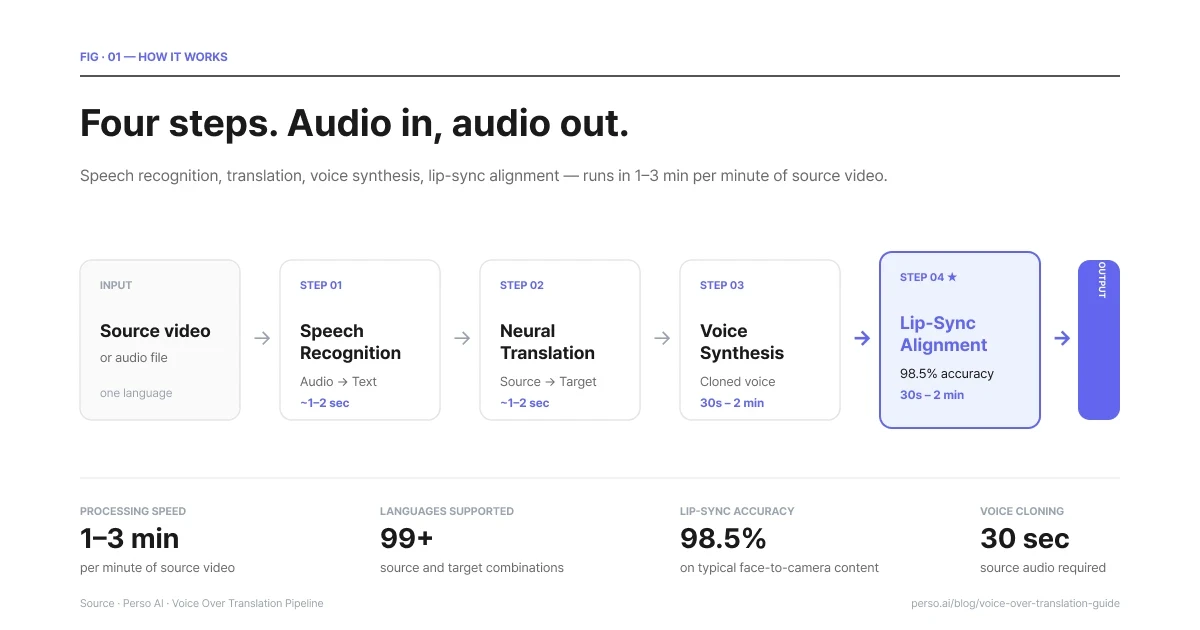
Four steps. Audio in, audio out. 1–3 min per minute of source video.
Step 1 — Speech recognition. The system transcribes the source audio into text. Modern speech recognition handles accents, background music, multiple speakers, and natural speech patterns (filler words, pauses, false starts). The transcript is the foundation of every downstream step, so accuracy here matters more than people realize. A bad transcript produces a bad translation, which produces a bad voice over.
Step 2 — Translation. The transcript runs through neural translation tuned for spoken language rather than written prose. Spoken language is shorter, more idiomatic, and more context-dependent than written text. A translation model that does well on documents can do badly on speech, and vice versa. The output is a target-language script timed to match the original's pacing as closely as possible.
Step 3 — Voice synthesis. The translated script is synthesized into speech. Two paths exist here.
The first is stock voices — pick a voice from a library and use it. Fast and free of any licensing concerns, but the new voice sounds nothing like the original speaker.
The second is voice cloning — train a model on the original speaker's voice and synthesize the target language in that same voice. The output sounds like the same person speaking the new language. This is what most professional voice over translation workflows want.
Step 4 — Lip-sync alignment (when video is involved). If the input is video, the synthesized audio is aligned to the original mouth movements. Modern systems hit accuracy around 98% for typical content. Without this step, the new voice plays over mouth movements timed to the original language, which most viewers find uncomfortable within seconds.
Perso Dubbing runs this entire pipeline as a single workflow. Upload video, pick target languages, get finished video back. Total processing time is roughly 1 to 3 minutes per minute of source video — a 5-minute video translates in about 5 to 15 minutes
When you need voice over translation
The decision is rarely "do I need translation at all" — that's usually obvious from the business case. The question is which translation format to choose.
Voice over translation makes sense when:
The content is video and your audience consumes video. Subtitles work for some audiences, but watch-time data consistently shows dubbed video outperforms subtitled video for non-native speakers. The State of AI Dubbing 2026 report found that 96% of AI-dubbed videos were shared the same day they were produced — the behavioral fingerprint of content built for distribution, not archive.
You have an existing voice and brand. A creator's voice is part of their brand. A company's narrator is part of their identity. Voice over translation with voice cloning keeps that identity intact across languages. Subtitle workflows lose it.
Your audience is mobile-first or distracted. Subtitled content requires undivided visual attention. Voice over translation can be listened to in the car, while cooking, while working. Mobile-first markets (India, Southeast Asia, Latin America) tend to favor dubbed content for this reason.
You're shipping to multiple markets at once. Subtitle production scales linearly — every new language is another round of timing, formatting, baking subtitles. Voice over translation scales sub-linearly — once the pipeline is set up, adding a 6th or 7th language costs minutes of compute rather than days of editor time.
Voice over translation makes less sense when:
The audience prefers subtitles. Japanese audiences watching foreign film are the classic example. Some niches default to subtitles regardless of cost. Test before assuming.
The video is short enough that subtitle production is trivial. A 60-second social clip might not justify a voice over workflow.
The voice over itself is the content. A famous narrator, an actor's specific delivery, a live recording where the voice is the asset — replacing it with translation changes what's being delivered. In these cases, subtitles preserve the original asset.
Voice over translation vs subtitles — choosing the right format
Subtitles and voice over translation answer the same business question — how do I reach speakers of another language — but produce different viewer experiences.
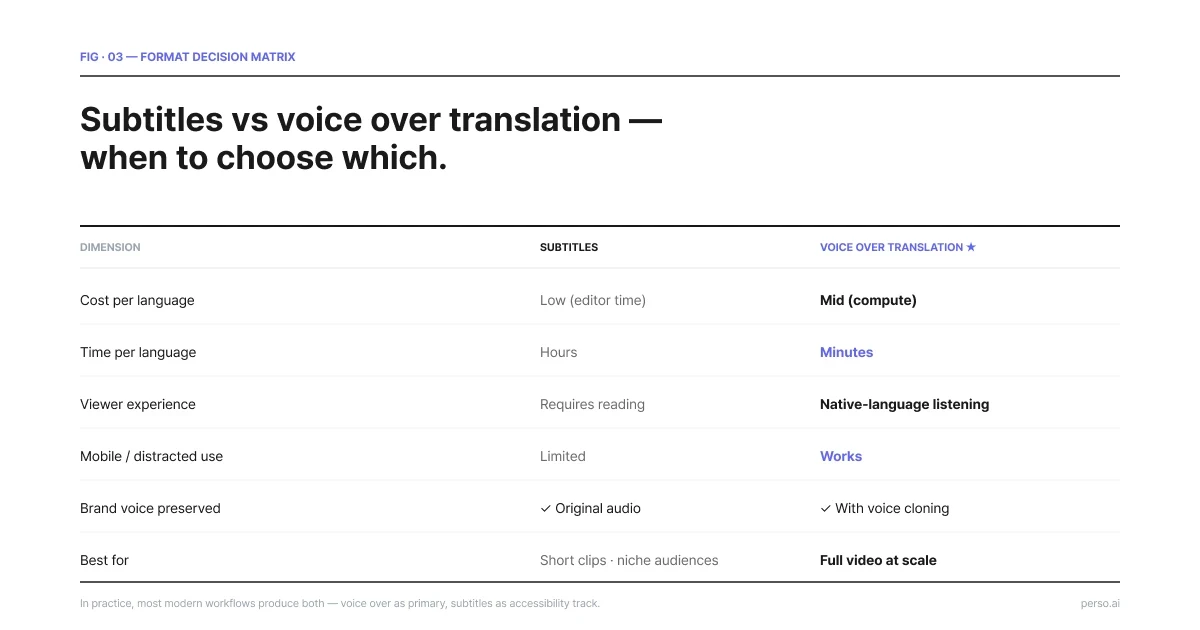
Subtitles vs voice over translation — when each format wins.
Dimension | Subtitles | Voice over translation |
|---|---|---|
Cost per language | Low (mostly editor time) | Mid (compute + voice licensing) |
Time per language | Hours | Minutes (AI-powered) |
Viewer experience | Requires reading | Native-language listening |
Mobile / distracted use | Limited | Works |
Brand voice preserved | Yes (original audio retained) | Yes (with voice cloning) |
Accessibility (deaf / HOH) | ✅ Essential | Needs separate subtitle track |
Best for | Short clips, niche audiences | Full video at scale |
In practice, most modern workflows produce both — voice over translation as the primary, subtitles as an accessibility track. AI dubbing platforms typically output both from the same pipeline, since the transcript and translation are already produced in step 1 and 2.
How to translate a voice over with AI (step by step)
The steps below describe the workflow on Perso Dubbing. Other platforms differ in interface but follow the same logic.
1. Upload the source. Drop in the video or audio file. Most platforms accept MP4, MOV, MP3, WAV. If the source is a YouTube link, paste the URL.
2. Pick target languages. Choose one or many. Perso Dubbing supports 99+ languages across source and target combinations. Common picks for first-time use: Spanish, Portuguese, French, German, Japanese, Korean.
3. Review the auto-transcript. The system shows the source-language transcript. Edit any speech recognition errors before the translation step runs — every fix here compounds downstream.
4. Edit the translation (optional). Review the target-language script before voice synthesis runs. Fix idioms, brand names, technical terms. This step is where teams catch the kind of issue that's nearly impossible to fix later.
5. Generate. The voice synthesis and lip-sync alignment run.Processing takes roughly 1 to 3 minutes per minute of source video — a 5-minute video lands in about 5 to 15 minutes.
6. Download or share. Output is finished MP4 video files per language, plus subtitle tracks (.srt) for accessibility. Some platforms also output MP3 audio if you want voice-over only without video.
The whole sequence is one workflow on a single platform. The State of AI Dubbing 2026 report's behavioral data — 96% share rate the same day — comes from this kind of single-workflow setup, not from manual hand-off between separate tools.
Voice over translation quality — what to look for
Quality has three components. All three matter, and the weakest one defines how the output feels.
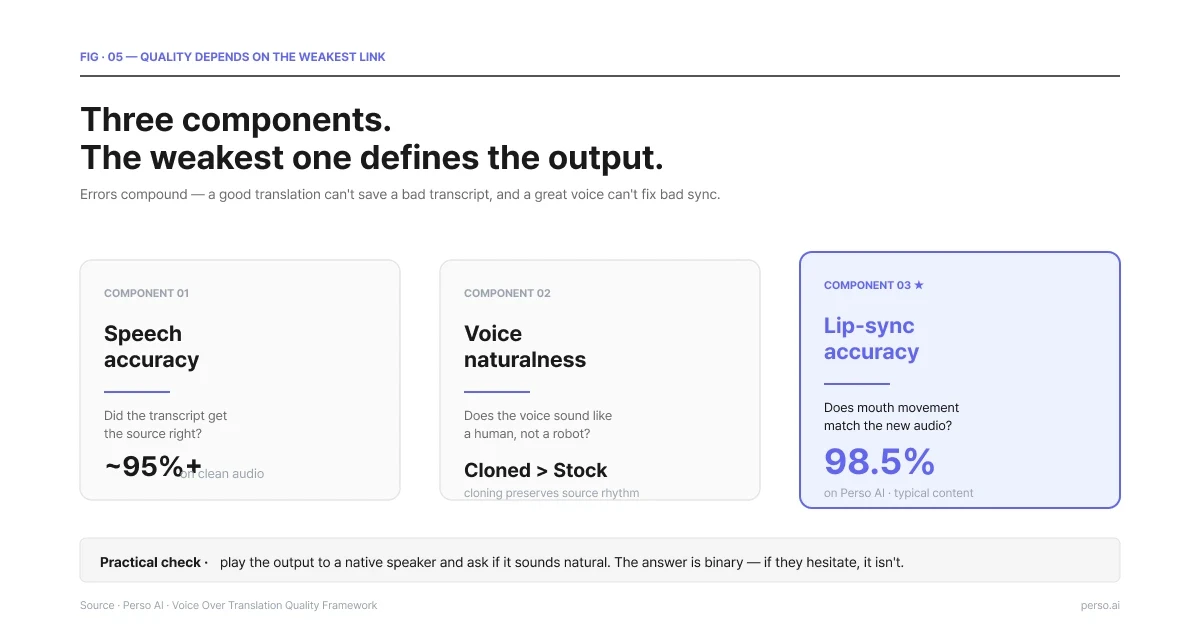
Three components. The weakest one defines the output.
Speech accuracy. Does the translated voice over say what the source said? Mistranslations of brand names, technical terms, or domain-specific phrasing are the most common failures. Mitigation: review the translated script before voice synthesis runs.
Voice naturalness. Does the voice sound like a human speaking the language, or like a robot reading a script? Modern AI voices have closed most of the gap, but the gap is not zero. Listen for intonation, sentence rhythm, and natural pause length. Voice cloning of the original speaker generally outperforms stock voices on this dimension because the model has the source's natural rhythm to work from.
Lip-sync accuracy (video only). Does the mouth movement match the new audio? Perso Dubbing reports 98.5% lip-sync accuracy across its pipeline, which is one of the highest publicly disclosed figures in the category. The 1.5% gap is most visible on close-up face-to-camera content. For wide shots, lip-sync sensitivity drops because the mouth is smaller in frame.
A practical quality check: play the output to a native speaker of the target language and ask if it sounds natural. The answer is binary. If they hesitate, it isn't.
Common voice over translation languages
Demand isn't evenly distributed. Across Perso Dubbing's data covering 316,856 dubbing projects and 4,023 professional creators, the top target languages tell you where global content is actually going.
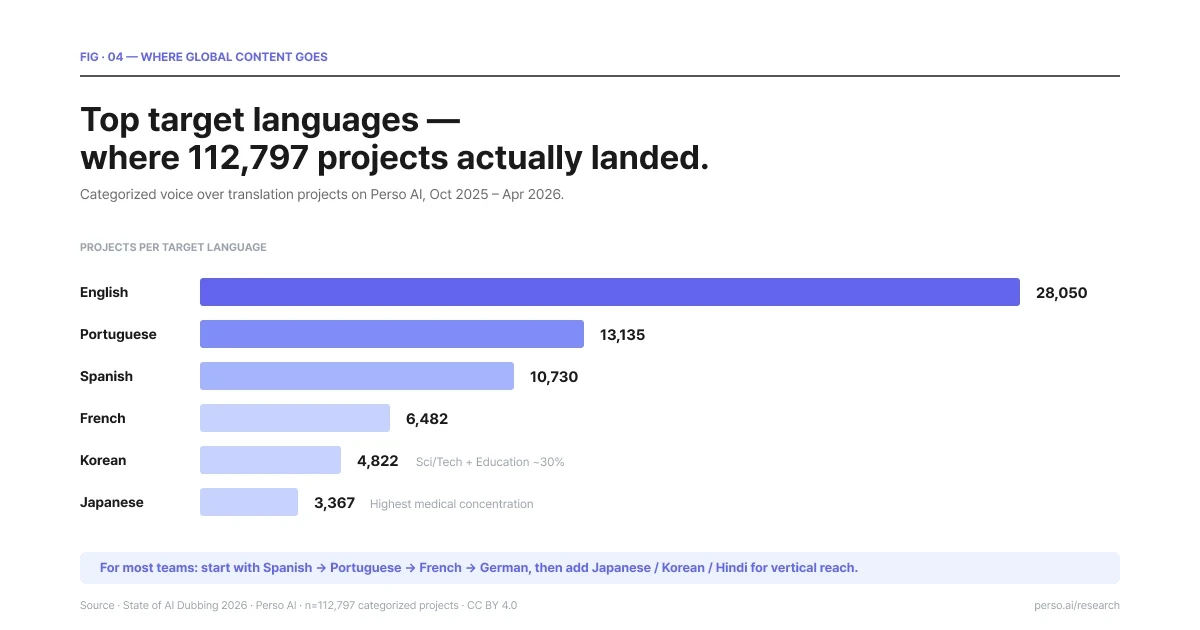
Top target languages — where 112,797 voice over translation projects actually landed. Source: State of AI Dubbing 2026.
English dominates as a target language (28,050 categorized projects) but is the most horizontal — no single industry exceeds 14% of English-target output. English is the default outbound language for non-English creators.
Portuguese (13,135 projects) is the most balanced multi-vertical market, with animation, religion, and education all near 10%+. Brazilian Portuguese specifically is the second hub for faith content alongside English — the State of AI Dubbing 2026 report documented English 25.6% / Portuguese 25.2% near-parity inside religion projects, a finding that surprised everyone who assumed Spanish was the LatAm faith default.
Spanish (10,730 projects) leads in education and religion verticals, dominant across Latin America.
Korean (4,822 projects) is unusual — 30% of Korean-target volume goes to knowledge verticals (sci/tech + education combined). The data is consistent with K-Content spillover into adjacent verticals beyond entertainment.
Japanese (3,367 projects) shows the highest medical concentration among major target markets — patient education and health content disproportionately localize into Japanese.
French (6,482 projects) is documentary-led, consistent with France's strong documentary production tradition.
For first-time voice over translation projects, the practical default order is Spanish → Portuguese → French → German for broad audience reach, then add Japanese → Korean → Hindi → Arabic for vertical or regional expansion.
Cost of voice over translation — AI vs human
The cost gap between AI and human voice over translation is the largest single change the category has seen.
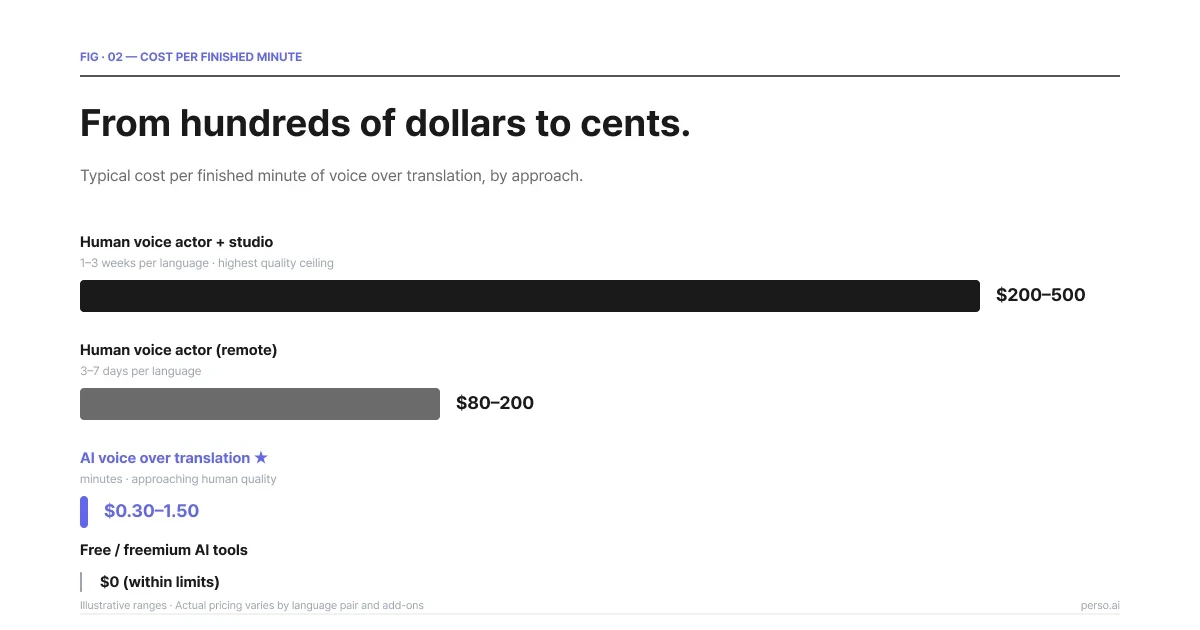
Cost per finished minute by approach. AI voice over is roughly 100× cheaper than studio-grade human.
Approach | Typical cost | Turnaround | Quality ceiling |
|---|---|---|---|
Human voice actor + studio | $200–$500 per finished minute | 1–3 weeks per language | Highest |
Human voice actor (remote) | $80–$200 per finished minute | 3–7 days per language | High |
AI voice over translation | $0.30–$1.50 per finished minute | Minutes | Approaching human on most metrics |
Free / freemium AI tools | $0 within limits | Minutes | Variable, often noticeable artifacts |
The numbers above are illustrative — actual pricing varies by language pair, voice cloning add-ons, and platform. Perso Dubbing's per-second billing model bills only for the actual duration of generated audio, so a 30-second clip is billed for 30 seconds rather than rounded up to a minute as most per-minute models would.
The cost gap matters more for multi-language projects than single-language. Going from one language to ten on human voice actors multiplies cost by 10×. On AI voice over translation, going from one to ten roughly doubles cost (each language adds compute, but most overhead is fixed). This is the "language onramp" thesis from the State of AI Dubbing 2026 report — most creators stay at one language because adding more is expensive, and AI workflows change that math.
For premium content where voice nuance is the product — feature films, AAA games, prestige documentary — human voice actors still set the quality ceiling. For everything else, AI voice over translation is now the default for new projects.
————————————————————————-
Frequently asked questions
Q. Is voice over translation the same as dubbing?
Largely, yes. Voice over translation is the broader umbrella; dubbing usually refers to the dialogue-heavy case where lip-sync alignment is part of the deliverable. Both run on the same AI pipeline — speech recognition, translation, voice synthesis, and (for video) lip-sync alignment.
Q. Can AI clone my voice for voice over translation?
Yes. Modern AI voice over translation platforms support voice cloning. A 30-second sample of clean source audio is usually enough. The cloned voice will speak every target language in your project, so the same person appears to be narrating in Spanish, Japanese, German, and so on.
Q. How accurate is AI voice over translation?
Three accuracy figures matter: speech recognition (~95%+ on clean audio), translation (depends heavily on language pair, with European pairs more accurate than rare-language pairs), and lip-sync alignment (~98.5% on Perso Dubbing for typical content). Errors compound, so the weakest step defines the final output.
Q. How long does AI voice over translation take?
Roughly 1 to 3 minutes per minute of source video. A 5-minute video translates in about 5 to 15 minutes for a single target language. Multi-language projects scale sub-linearly — translating into 5 languages is closer to 5 minutes total than to 5×3 minutes.
Q. Can I edit the translation before the voice is generated?
Yes, on most professional platforms. The translated script is shown after the translation step and before voice synthesis runs. Fixing brand names, technical terms, and idioms at this stage is significantly easier than fixing the audio afterward.
Q. What's the difference between voice over translation and just adding subtitles?
Subtitles are read; voice over translation is heard. Subtitles preserve the original audio and add a text track in the target language. Voice over translation replaces the audio with the target language. Most modern AI workflows produce both — voice over as the primary deliverable, subtitles as an accessibility track from the same transcript.
Q. Does voice over translation work for live content?
Currently no — voice over translation is a post-production workflow. Real-time live AI dubbing is an emerging category and the State of AI Dubbing 2026 report identified it as one of the three shifts expected to reach consumer products by late 2026 / 2027. For now, treat voice over translation as a same-day post-production step rather than a live one.
Q. How many languages should I translate into?
The State of AI Dubbing 2026 report found that the median professional creator on Perso Dubbing dubs into 1 language, while the top 1% averages 15. The expansion gap exists because most creators leave language adoption on the table even when their content would travel. A practical first expansion: 3–5 languages covering your largest non-source markets. Add from there based on watch-time data per language.
Get started
If you want to try voice over translation on existing video, the fastest path is to upload one source and see the output across 2–3 target languages. Most professional platforms offer free tiers for this kind of evaluation.
For a single platform that handles the full workflow — speech recognition, translation, voice cloning, and lip-sync alignment — see Perso Dubbing's video translator or compare across the alternatives hub if you're evaluating multiple options.
The full data behind every statistic in this guide is published in the State of AI Dubbing 2026 report, released under Creative Commons Attribution 4.0.
Short answer. Voice over translation is the workflow that takes an existing voice over — narration, explainer audio, or recorded commentary — and produces the same voice over in another language. AI-powered voice over translation handles three steps automatically: speech recognition, translation, and synthesis in the target language. With Perso Dubbing, you can translate across 99+ languages and clone the original speaker's voice so the new language sounds like the same person.
What is voice over translation?
Voice over translation converts a recorded voice over from one language to another. The input is audio — sometimes attached to video, sometimes standalone — and the output is audio in a different language, ready to ship.
The category is older than AI. Studios have done this manually for decades: hire a voice actor in the target language, hand them a translated script, record, mix back into the video. The bottleneck was always cost and time. A 5-minute explainer in three languages used to mean three studio sessions, three voice actors, and a week of turnaround.
AI changed the workflow without changing the goal. The output is still a voice over in another language. The path to that output now takes minutes instead of weeks.
Three categories of work fit under voice over translation:
The first is localized narration — explainer videos, e-learning courses, documentary narration, audiobook chapters. The original is one voice over the whole production. The translated output keeps the same voice or substitutes a target-language equivalent.
The second is dialogue dubbing — film, drama, interview content where multiple speakers need to be translated separately. Voice over translation is the workhorse here, even though the industry calls it "dubbing" once it crosses into multi-speaker territory.
The third is interface audio — IVR menus, app onboarding voices, in-product narration. Smaller scope, but the same translation-and-synthesis pipeline runs underneath.
The rest of this guide focuses on the first two. The third follows the same workflow at a smaller scale.
Voice over translation vs dubbing — are they the same?
Mostly yes. The distinction is older than the AI workflow and was never clean.
Industry usage:
Voice over translation usually refers to narration-style content. One speaker. Documentary. Explainer. Audiobook. The voice over sits on top of the video rather than synced to mouth movement.
Dubbing usually refers to dialogue. Multiple speakers. Lip-sync matters. Film and drama default to this term.
The line is fuzzy in practice. A creator who narrates a YouTube video and wants the same video in Spanish — is that voice over translation or dubbing? Both terms work. The workflow is identical: speech in → translation → speech out → mix back into video.
If you want a clean rule: think of voice over translation as the broader category, and dubbing as the case where lip-sync alignment is part of the deliverable. Both run on the same AI pipeline. The 4-Layer Model of AI media frames this as Layer 4 — the distribution layer — regardless of which industry term you use.
The rest of this guide uses "voice over translation" as the umbrella term. Where lip-sync matters, we call it out.
How AI-powered voice over translation works
The pipeline has four steps. Each runs in seconds or low minutes for typical content.
Four steps. Audio in, audio out. 1–3 min per minute of source video.
Step 1 — Speech recognition. The system transcribes the source audio into text. Modern speech recognition handles accents, background music, multiple speakers, and natural speech patterns (filler words, pauses, false starts). The transcript is the foundation of every downstream step, so accuracy here matters more than people realize. A bad transcript produces a bad translation, which produces a bad voice over.
Step 2 — Translation. The transcript runs through neural translation tuned for spoken language rather than written prose. Spoken language is shorter, more idiomatic, and more context-dependent than written text. A translation model that does well on documents can do badly on speech, and vice versa. The output is a target-language script timed to match the original's pacing as closely as possible.
Step 3 — Voice synthesis. The translated script is synthesized into speech. Two paths exist here.
The first is stock voices — pick a voice from a library and use it. Fast and free of any licensing concerns, but the new voice sounds nothing like the original speaker.
The second is voice cloning — train a model on the original speaker's voice and synthesize the target language in that same voice. The output sounds like the same person speaking the new language. This is what most professional voice over translation workflows want.
Step 4 — Lip-sync alignment (when video is involved). If the input is video, the synthesized audio is aligned to the original mouth movements. Modern systems hit accuracy around 98% for typical content. Without this step, the new voice plays over mouth movements timed to the original language, which most viewers find uncomfortable within seconds.
Perso Dubbing runs this entire pipeline as a single workflow. Upload video, pick target languages, get finished video back. Total processing time is roughly 1 to 3 minutes per minute of source video — a 5-minute video translates in about 5 to 15 minutes
When you need voice over translation
The decision is rarely "do I need translation at all" — that's usually obvious from the business case. The question is which translation format to choose.
Voice over translation makes sense when:
The content is video and your audience consumes video. Subtitles work for some audiences, but watch-time data consistently shows dubbed video outperforms subtitled video for non-native speakers. The State of AI Dubbing 2026 report found that 96% of AI-dubbed videos were shared the same day they were produced — the behavioral fingerprint of content built for distribution, not archive.
You have an existing voice and brand. A creator's voice is part of their brand. A company's narrator is part of their identity. Voice over translation with voice cloning keeps that identity intact across languages. Subtitle workflows lose it.
Your audience is mobile-first or distracted. Subtitled content requires undivided visual attention. Voice over translation can be listened to in the car, while cooking, while working. Mobile-first markets (India, Southeast Asia, Latin America) tend to favor dubbed content for this reason.
You're shipping to multiple markets at once. Subtitle production scales linearly — every new language is another round of timing, formatting, baking subtitles. Voice over translation scales sub-linearly — once the pipeline is set up, adding a 6th or 7th language costs minutes of compute rather than days of editor time.
Voice over translation makes less sense when:
The audience prefers subtitles. Japanese audiences watching foreign film are the classic example. Some niches default to subtitles regardless of cost. Test before assuming.
The video is short enough that subtitle production is trivial. A 60-second social clip might not justify a voice over workflow.
The voice over itself is the content. A famous narrator, an actor's specific delivery, a live recording where the voice is the asset — replacing it with translation changes what's being delivered. In these cases, subtitles preserve the original asset.
Voice over translation vs subtitles — choosing the right format
Subtitles and voice over translation answer the same business question — how do I reach speakers of another language — but produce different viewer experiences.
Subtitles vs voice over translation — when each format wins.
Dimension | Subtitles | Voice over translation |
|---|---|---|
Cost per language | Low (mostly editor time) | Mid (compute + voice licensing) |
Time per language | Hours | Minutes (AI-powered) |
Viewer experience | Requires reading | Native-language listening |
Mobile / distracted use | Limited | Works |
Brand voice preserved | Yes (original audio retained) | Yes (with voice cloning) |
Accessibility (deaf / HOH) | ✅ Essential | Needs separate subtitle track |
Best for | Short clips, niche audiences | Full video at scale |
In practice, most modern workflows produce both — voice over translation as the primary, subtitles as an accessibility track. AI dubbing platforms typically output both from the same pipeline, since the transcript and translation are already produced in step 1 and 2.
How to translate a voice over with AI (step by step)
The steps below describe the workflow on Perso Dubbing. Other platforms differ in interface but follow the same logic.
1. Upload the source. Drop in the video or audio file. Most platforms accept MP4, MOV, MP3, WAV. If the source is a YouTube link, paste the URL.
2. Pick target languages. Choose one or many. Perso Dubbing supports 99+ languages across source and target combinations. Common picks for first-time use: Spanish, Portuguese, French, German, Japanese, Korean.
3. Review the auto-transcript. The system shows the source-language transcript. Edit any speech recognition errors before the translation step runs — every fix here compounds downstream.
4. Edit the translation (optional). Review the target-language script before voice synthesis runs. Fix idioms, brand names, technical terms. This step is where teams catch the kind of issue that's nearly impossible to fix later.
5. Generate. The voice synthesis and lip-sync alignment run.Processing takes roughly 1 to 3 minutes per minute of source video — a 5-minute video lands in about 5 to 15 minutes.
6. Download or share. Output is finished MP4 video files per language, plus subtitle tracks (.srt) for accessibility. Some platforms also output MP3 audio if you want voice-over only without video.
The whole sequence is one workflow on a single platform. The State of AI Dubbing 2026 report's behavioral data — 96% share rate the same day — comes from this kind of single-workflow setup, not from manual hand-off between separate tools.
Voice over translation quality — what to look for
Quality has three components. All three matter, and the weakest one defines how the output feels.
Three components. The weakest one defines the output.
Speech accuracy. Does the translated voice over say what the source said? Mistranslations of brand names, technical terms, or domain-specific phrasing are the most common failures. Mitigation: review the translated script before voice synthesis runs.
Voice naturalness. Does the voice sound like a human speaking the language, or like a robot reading a script? Modern AI voices have closed most of the gap, but the gap is not zero. Listen for intonation, sentence rhythm, and natural pause length. Voice cloning of the original speaker generally outperforms stock voices on this dimension because the model has the source's natural rhythm to work from.
Lip-sync accuracy (video only). Does the mouth movement match the new audio? Perso Dubbing reports 98.5% lip-sync accuracy across its pipeline, which is one of the highest publicly disclosed figures in the category. The 1.5% gap is most visible on close-up face-to-camera content. For wide shots, lip-sync sensitivity drops because the mouth is smaller in frame.
A practical quality check: play the output to a native speaker of the target language and ask if it sounds natural. The answer is binary. If they hesitate, it isn't.
Common voice over translation languages
Demand isn't evenly distributed. Across Perso Dubbing's data covering 316,856 dubbing projects and 4,023 professional creators, the top target languages tell you where global content is actually going.
Top target languages — where 112,797 voice over translation projects actually landed. Source: State of AI Dubbing 2026.
English dominates as a target language (28,050 categorized projects) but is the most horizontal — no single industry exceeds 14% of English-target output. English is the default outbound language for non-English creators.
Portuguese (13,135 projects) is the most balanced multi-vertical market, with animation, religion, and education all near 10%+. Brazilian Portuguese specifically is the second hub for faith content alongside English — the State of AI Dubbing 2026 report documented English 25.6% / Portuguese 25.2% near-parity inside religion projects, a finding that surprised everyone who assumed Spanish was the LatAm faith default.
Spanish (10,730 projects) leads in education and religion verticals, dominant across Latin America.
Korean (4,822 projects) is unusual — 30% of Korean-target volume goes to knowledge verticals (sci/tech + education combined). The data is consistent with K-Content spillover into adjacent verticals beyond entertainment.
Japanese (3,367 projects) shows the highest medical concentration among major target markets — patient education and health content disproportionately localize into Japanese.
French (6,482 projects) is documentary-led, consistent with France's strong documentary production tradition.
For first-time voice over translation projects, the practical default order is Spanish → Portuguese → French → German for broad audience reach, then add Japanese → Korean → Hindi → Arabic for vertical or regional expansion.
Cost of voice over translation — AI vs human
The cost gap between AI and human voice over translation is the largest single change the category has seen.
Cost per finished minute by approach. AI voice over is roughly 100× cheaper than studio-grade human.
Approach | Typical cost | Turnaround | Quality ceiling |
|---|---|---|---|
Human voice actor + studio | $200–$500 per finished minute | 1–3 weeks per language | Highest |
Human voice actor (remote) | $80–$200 per finished minute | 3–7 days per language | High |
AI voice over translation | $0.30–$1.50 per finished minute | Minutes | Approaching human on most metrics |
Free / freemium AI tools | $0 within limits | Minutes | Variable, often noticeable artifacts |
The numbers above are illustrative — actual pricing varies by language pair, voice cloning add-ons, and platform. Perso Dubbing's per-second billing model bills only for the actual duration of generated audio, so a 30-second clip is billed for 30 seconds rather than rounded up to a minute as most per-minute models would.
The cost gap matters more for multi-language projects than single-language. Going from one language to ten on human voice actors multiplies cost by 10×. On AI voice over translation, going from one to ten roughly doubles cost (each language adds compute, but most overhead is fixed). This is the "language onramp" thesis from the State of AI Dubbing 2026 report — most creators stay at one language because adding more is expensive, and AI workflows change that math.
For premium content where voice nuance is the product — feature films, AAA games, prestige documentary — human voice actors still set the quality ceiling. For everything else, AI voice over translation is now the default for new projects.
————————————————————————-
Frequently asked questions
Q. Is voice over translation the same as dubbing?
Largely, yes. Voice over translation is the broader umbrella; dubbing usually refers to the dialogue-heavy case where lip-sync alignment is part of the deliverable. Both run on the same AI pipeline — speech recognition, translation, voice synthesis, and (for video) lip-sync alignment.
Q. Can AI clone my voice for voice over translation?
Yes. Modern AI voice over translation platforms support voice cloning. A 30-second sample of clean source audio is usually enough. The cloned voice will speak every target language in your project, so the same person appears to be narrating in Spanish, Japanese, German, and so on.
Q. How accurate is AI voice over translation?
Three accuracy figures matter: speech recognition (~95%+ on clean audio), translation (depends heavily on language pair, with European pairs more accurate than rare-language pairs), and lip-sync alignment (~98.5% on Perso Dubbing for typical content). Errors compound, so the weakest step defines the final output.
Q. How long does AI voice over translation take?
Roughly 1 to 3 minutes per minute of source video. A 5-minute video translates in about 5 to 15 minutes for a single target language. Multi-language projects scale sub-linearly — translating into 5 languages is closer to 5 minutes total than to 5×3 minutes.
Q. Can I edit the translation before the voice is generated?
Yes, on most professional platforms. The translated script is shown after the translation step and before voice synthesis runs. Fixing brand names, technical terms, and idioms at this stage is significantly easier than fixing the audio afterward.
Q. What's the difference between voice over translation and just adding subtitles?
Subtitles are read; voice over translation is heard. Subtitles preserve the original audio and add a text track in the target language. Voice over translation replaces the audio with the target language. Most modern AI workflows produce both — voice over as the primary deliverable, subtitles as an accessibility track from the same transcript.
Q. Does voice over translation work for live content?
Currently no — voice over translation is a post-production workflow. Real-time live AI dubbing is an emerging category and the State of AI Dubbing 2026 report identified it as one of the three shifts expected to reach consumer products by late 2026 / 2027. For now, treat voice over translation as a same-day post-production step rather than a live one.
Q. How many languages should I translate into?
The State of AI Dubbing 2026 report found that the median professional creator on Perso Dubbing dubs into 1 language, while the top 1% averages 15. The expansion gap exists because most creators leave language adoption on the table even when their content would travel. A practical first expansion: 3–5 languages covering your largest non-source markets. Add from there based on watch-time data per language.
Get started
If you want to try voice over translation on existing video, the fastest path is to upload one source and see the output across 2–3 target languages. Most professional platforms offer free tiers for this kind of evaluation.
For a single platform that handles the full workflow — speech recognition, translation, voice cloning, and lip-sync alignment — see Perso Dubbing's video translator or compare across the alternatives hub if you're evaluating multiple options.
The full data behind every statistic in this guide is published in the State of AI Dubbing 2026 report, released under Creative Commons Attribution 4.0.
Short answer. Voice over translation is the workflow that takes an existing voice over — narration, explainer audio, or recorded commentary — and produces the same voice over in another language. AI-powered voice over translation handles three steps automatically: speech recognition, translation, and synthesis in the target language. With Perso Dubbing, you can translate across 99+ languages and clone the original speaker's voice so the new language sounds like the same person.
What is voice over translation?
Voice over translation converts a recorded voice over from one language to another. The input is audio — sometimes attached to video, sometimes standalone — and the output is audio in a different language, ready to ship.
The category is older than AI. Studios have done this manually for decades: hire a voice actor in the target language, hand them a translated script, record, mix back into the video. The bottleneck was always cost and time. A 5-minute explainer in three languages used to mean three studio sessions, three voice actors, and a week of turnaround.
AI changed the workflow without changing the goal. The output is still a voice over in another language. The path to that output now takes minutes instead of weeks.
Three categories of work fit under voice over translation:
The first is localized narration — explainer videos, e-learning courses, documentary narration, audiobook chapters. The original is one voice over the whole production. The translated output keeps the same voice or substitutes a target-language equivalent.
The second is dialogue dubbing — film, drama, interview content where multiple speakers need to be translated separately. Voice over translation is the workhorse here, even though the industry calls it "dubbing" once it crosses into multi-speaker territory.
The third is interface audio — IVR menus, app onboarding voices, in-product narration. Smaller scope, but the same translation-and-synthesis pipeline runs underneath.
The rest of this guide focuses on the first two. The third follows the same workflow at a smaller scale.
Voice over translation vs dubbing — are they the same?
Mostly yes. The distinction is older than the AI workflow and was never clean.
Industry usage:
Voice over translation usually refers to narration-style content. One speaker. Documentary. Explainer. Audiobook. The voice over sits on top of the video rather than synced to mouth movement.
Dubbing usually refers to dialogue. Multiple speakers. Lip-sync matters. Film and drama default to this term.
The line is fuzzy in practice. A creator who narrates a YouTube video and wants the same video in Spanish — is that voice over translation or dubbing? Both terms work. The workflow is identical: speech in → translation → speech out → mix back into video.
If you want a clean rule: think of voice over translation as the broader category, and dubbing as the case where lip-sync alignment is part of the deliverable. Both run on the same AI pipeline. The 4-Layer Model of AI media frames this as Layer 4 — the distribution layer — regardless of which industry term you use.
The rest of this guide uses "voice over translation" as the umbrella term. Where lip-sync matters, we call it out.
How AI-powered voice over translation works
The pipeline has four steps. Each runs in seconds or low minutes for typical content.
Four steps. Audio in, audio out. 1–3 min per minute of source video.
Step 1 — Speech recognition. The system transcribes the source audio into text. Modern speech recognition handles accents, background music, multiple speakers, and natural speech patterns (filler words, pauses, false starts). The transcript is the foundation of every downstream step, so accuracy here matters more than people realize. A bad transcript produces a bad translation, which produces a bad voice over.
Step 2 — Translation. The transcript runs through neural translation tuned for spoken language rather than written prose. Spoken language is shorter, more idiomatic, and more context-dependent than written text. A translation model that does well on documents can do badly on speech, and vice versa. The output is a target-language script timed to match the original's pacing as closely as possible.
Step 3 — Voice synthesis. The translated script is synthesized into speech. Two paths exist here.
The first is stock voices — pick a voice from a library and use it. Fast and free of any licensing concerns, but the new voice sounds nothing like the original speaker.
The second is voice cloning — train a model on the original speaker's voice and synthesize the target language in that same voice. The output sounds like the same person speaking the new language. This is what most professional voice over translation workflows want.
Step 4 — Lip-sync alignment (when video is involved). If the input is video, the synthesized audio is aligned to the original mouth movements. Modern systems hit accuracy around 98% for typical content. Without this step, the new voice plays over mouth movements timed to the original language, which most viewers find uncomfortable within seconds.
Perso Dubbing runs this entire pipeline as a single workflow. Upload video, pick target languages, get finished video back. Total processing time is roughly 1 to 3 minutes per minute of source video — a 5-minute video translates in about 5 to 15 minutes
When you need voice over translation
The decision is rarely "do I need translation at all" — that's usually obvious from the business case. The question is which translation format to choose.
Voice over translation makes sense when:
The content is video and your audience consumes video. Subtitles work for some audiences, but watch-time data consistently shows dubbed video outperforms subtitled video for non-native speakers. The State of AI Dubbing 2026 report found that 96% of AI-dubbed videos were shared the same day they were produced — the behavioral fingerprint of content built for distribution, not archive.
You have an existing voice and brand. A creator's voice is part of their brand. A company's narrator is part of their identity. Voice over translation with voice cloning keeps that identity intact across languages. Subtitle workflows lose it.
Your audience is mobile-first or distracted. Subtitled content requires undivided visual attention. Voice over translation can be listened to in the car, while cooking, while working. Mobile-first markets (India, Southeast Asia, Latin America) tend to favor dubbed content for this reason.
You're shipping to multiple markets at once. Subtitle production scales linearly — every new language is another round of timing, formatting, baking subtitles. Voice over translation scales sub-linearly — once the pipeline is set up, adding a 6th or 7th language costs minutes of compute rather than days of editor time.
Voice over translation makes less sense when:
The audience prefers subtitles. Japanese audiences watching foreign film are the classic example. Some niches default to subtitles regardless of cost. Test before assuming.
The video is short enough that subtitle production is trivial. A 60-second social clip might not justify a voice over workflow.
The voice over itself is the content. A famous narrator, an actor's specific delivery, a live recording where the voice is the asset — replacing it with translation changes what's being delivered. In these cases, subtitles preserve the original asset.
Voice over translation vs subtitles — choosing the right format
Subtitles and voice over translation answer the same business question — how do I reach speakers of another language — but produce different viewer experiences.
Subtitles vs voice over translation — when each format wins.
Dimension | Subtitles | Voice over translation |
|---|---|---|
Cost per language | Low (mostly editor time) | Mid (compute + voice licensing) |
Time per language | Hours | Minutes (AI-powered) |
Viewer experience | Requires reading | Native-language listening |
Mobile / distracted use | Limited | Works |
Brand voice preserved | Yes (original audio retained) | Yes (with voice cloning) |
Accessibility (deaf / HOH) | ✅ Essential | Needs separate subtitle track |
Best for | Short clips, niche audiences | Full video at scale |
In practice, most modern workflows produce both — voice over translation as the primary, subtitles as an accessibility track. AI dubbing platforms typically output both from the same pipeline, since the transcript and translation are already produced in step 1 and 2.
How to translate a voice over with AI (step by step)
The steps below describe the workflow on Perso Dubbing. Other platforms differ in interface but follow the same logic.
1. Upload the source. Drop in the video or audio file. Most platforms accept MP4, MOV, MP3, WAV. If the source is a YouTube link, paste the URL.
2. Pick target languages. Choose one or many. Perso Dubbing supports 99+ languages across source and target combinations. Common picks for first-time use: Spanish, Portuguese, French, German, Japanese, Korean.
3. Review the auto-transcript. The system shows the source-language transcript. Edit any speech recognition errors before the translation step runs — every fix here compounds downstream.
4. Edit the translation (optional). Review the target-language script before voice synthesis runs. Fix idioms, brand names, technical terms. This step is where teams catch the kind of issue that's nearly impossible to fix later.
5. Generate. The voice synthesis and lip-sync alignment run.Processing takes roughly 1 to 3 minutes per minute of source video — a 5-minute video lands in about 5 to 15 minutes.
6. Download or share. Output is finished MP4 video files per language, plus subtitle tracks (.srt) for accessibility. Some platforms also output MP3 audio if you want voice-over only without video.
The whole sequence is one workflow on a single platform. The State of AI Dubbing 2026 report's behavioral data — 96% share rate the same day — comes from this kind of single-workflow setup, not from manual hand-off between separate tools.
Voice over translation quality — what to look for
Quality has three components. All three matter, and the weakest one defines how the output feels.
Three components. The weakest one defines the output.
Speech accuracy. Does the translated voice over say what the source said? Mistranslations of brand names, technical terms, or domain-specific phrasing are the most common failures. Mitigation: review the translated script before voice synthesis runs.
Voice naturalness. Does the voice sound like a human speaking the language, or like a robot reading a script? Modern AI voices have closed most of the gap, but the gap is not zero. Listen for intonation, sentence rhythm, and natural pause length. Voice cloning of the original speaker generally outperforms stock voices on this dimension because the model has the source's natural rhythm to work from.
Lip-sync accuracy (video only). Does the mouth movement match the new audio? Perso Dubbing reports 98.5% lip-sync accuracy across its pipeline, which is one of the highest publicly disclosed figures in the category. The 1.5% gap is most visible on close-up face-to-camera content. For wide shots, lip-sync sensitivity drops because the mouth is smaller in frame.
A practical quality check: play the output to a native speaker of the target language and ask if it sounds natural. The answer is binary. If they hesitate, it isn't.
Common voice over translation languages
Demand isn't evenly distributed. Across Perso Dubbing's data covering 316,856 dubbing projects and 4,023 professional creators, the top target languages tell you where global content is actually going.
Top target languages — where 112,797 voice over translation projects actually landed. Source: State of AI Dubbing 2026.
English dominates as a target language (28,050 categorized projects) but is the most horizontal — no single industry exceeds 14% of English-target output. English is the default outbound language for non-English creators.
Portuguese (13,135 projects) is the most balanced multi-vertical market, with animation, religion, and education all near 10%+. Brazilian Portuguese specifically is the second hub for faith content alongside English — the State of AI Dubbing 2026 report documented English 25.6% / Portuguese 25.2% near-parity inside religion projects, a finding that surprised everyone who assumed Spanish was the LatAm faith default.
Spanish (10,730 projects) leads in education and religion verticals, dominant across Latin America.
Korean (4,822 projects) is unusual — 30% of Korean-target volume goes to knowledge verticals (sci/tech + education combined). The data is consistent with K-Content spillover into adjacent verticals beyond entertainment.
Japanese (3,367 projects) shows the highest medical concentration among major target markets — patient education and health content disproportionately localize into Japanese.
French (6,482 projects) is documentary-led, consistent with France's strong documentary production tradition.
For first-time voice over translation projects, the practical default order is Spanish → Portuguese → French → German for broad audience reach, then add Japanese → Korean → Hindi → Arabic for vertical or regional expansion.
Cost of voice over translation — AI vs human
The cost gap between AI and human voice over translation is the largest single change the category has seen.
Cost per finished minute by approach. AI voice over is roughly 100× cheaper than studio-grade human.
Approach | Typical cost | Turnaround | Quality ceiling |
|---|---|---|---|
Human voice actor + studio | $200–$500 per finished minute | 1–3 weeks per language | Highest |
Human voice actor (remote) | $80–$200 per finished minute | 3–7 days per language | High |
AI voice over translation | $0.30–$1.50 per finished minute | Minutes | Approaching human on most metrics |
Free / freemium AI tools | $0 within limits | Minutes | Variable, often noticeable artifacts |
The numbers above are illustrative — actual pricing varies by language pair, voice cloning add-ons, and platform. Perso Dubbing's per-second billing model bills only for the actual duration of generated audio, so a 30-second clip is billed for 30 seconds rather than rounded up to a minute as most per-minute models would.
The cost gap matters more for multi-language projects than single-language. Going from one language to ten on human voice actors multiplies cost by 10×. On AI voice over translation, going from one to ten roughly doubles cost (each language adds compute, but most overhead is fixed). This is the "language onramp" thesis from the State of AI Dubbing 2026 report — most creators stay at one language because adding more is expensive, and AI workflows change that math.
For premium content where voice nuance is the product — feature films, AAA games, prestige documentary — human voice actors still set the quality ceiling. For everything else, AI voice over translation is now the default for new projects.
————————————————————————-
Frequently asked questions
Q. Is voice over translation the same as dubbing?
Largely, yes. Voice over translation is the broader umbrella; dubbing usually refers to the dialogue-heavy case where lip-sync alignment is part of the deliverable. Both run on the same AI pipeline — speech recognition, translation, voice synthesis, and (for video) lip-sync alignment.
Q. Can AI clone my voice for voice over translation?
Yes. Modern AI voice over translation platforms support voice cloning. A 30-second sample of clean source audio is usually enough. The cloned voice will speak every target language in your project, so the same person appears to be narrating in Spanish, Japanese, German, and so on.
Q. How accurate is AI voice over translation?
Three accuracy figures matter: speech recognition (~95%+ on clean audio), translation (depends heavily on language pair, with European pairs more accurate than rare-language pairs), and lip-sync alignment (~98.5% on Perso Dubbing for typical content). Errors compound, so the weakest step defines the final output.
Q. How long does AI voice over translation take?
Roughly 1 to 3 minutes per minute of source video. A 5-minute video translates in about 5 to 15 minutes for a single target language. Multi-language projects scale sub-linearly — translating into 5 languages is closer to 5 minutes total than to 5×3 minutes.
Q. Can I edit the translation before the voice is generated?
Yes, on most professional platforms. The translated script is shown after the translation step and before voice synthesis runs. Fixing brand names, technical terms, and idioms at this stage is significantly easier than fixing the audio afterward.
Q. What's the difference between voice over translation and just adding subtitles?
Subtitles are read; voice over translation is heard. Subtitles preserve the original audio and add a text track in the target language. Voice over translation replaces the audio with the target language. Most modern AI workflows produce both — voice over as the primary deliverable, subtitles as an accessibility track from the same transcript.
Q. Does voice over translation work for live content?
Currently no — voice over translation is a post-production workflow. Real-time live AI dubbing is an emerging category and the State of AI Dubbing 2026 report identified it as one of the three shifts expected to reach consumer products by late 2026 / 2027. For now, treat voice over translation as a same-day post-production step rather than a live one.
Q. How many languages should I translate into?
The State of AI Dubbing 2026 report found that the median professional creator on Perso Dubbing dubs into 1 language, while the top 1% averages 15. The expansion gap exists because most creators leave language adoption on the table even when their content would travel. A practical first expansion: 3–5 languages covering your largest non-source markets. Add from there based on watch-time data per language.
Get started
If you want to try voice over translation on existing video, the fastest path is to upload one source and see the output across 2–3 target languages. Most professional platforms offer free tiers for this kind of evaluation.
For a single platform that handles the full workflow — speech recognition, translation, voice cloning, and lip-sync alignment — see Perso Dubbing's video translator or compare across the alternatives hub if you're evaluating multiple options.
The full data behind every statistic in this guide is published in the State of AI Dubbing 2026 report, released under Creative Commons Attribution 4.0.
Continue Reading
Browse All