YouTube Audio Tracks: Technical Setup (2026)
Last Updated




Jump to section
Jump to section

Share
Share
Share
AI Video Translator, Localization, and Dubbing Tool
Try it out for Free
Your analytics show international viewers, but they're leaving at the 90-second mark. They want your content. They just can't access it in a way that works for them.
YouTube's multi-language audio track feature solves this, but only if you implement it correctly. Upload the wrong file format, let the audio drift out of sync, or skip metadata localization, and you've wasted hours of work.
This guide walks you through the technical implementation of YouTube multi-language audio tracks, from file preparation to upload verification, so your international audience actually stays and watches. Whether you're new to video localization or scaling existing workflows, these steps ensure professional results.
Understanding YouTube's Audio Track Infrastructure
YouTube's audio track system operates differently from subtitle tracks. While subtitles overlay text on existing video, audio tracks replace the entire audio stream based on viewer selection.
When you upload multiple audio tracks to a single video:
Each track must be roughly the same length as the video. YouTube does not publish a numeric tolerance, so treat an exact match as the target.
YouTube processes each track against the video timeline
YouTube processes each track independently for compression and quality
Viewers switch languages without page reload or video restart
This architecture creates specific technical requirements you need to meet before upload.
Supported Audio Formats and Technical Specifications
YouTube's multi-language audio documentation says only that the file must be in a supported audio-only file format, without listing them. These are the audio-only formats we exported and measured ourselves:
Format | Codec | Status |
|---|---|---|
.m4a | AAC | Exported and measured |
.mp3 | MP3 | Exported and measured |
.wav | PCM | Exported and measured |
Critical requirement: Your audio track duration must match your video duration. YouTube's wording is “roughly the same length as your video”, with no published tolerance, so do not rely on a margin.
Step 1: Preparing Source Video for Multi-Language Dubbing
Before generating translated audio, verify your source video meets quality standards for AI dubbing technology for video localization.
Audio Quality Checklist
✅ Speech clarity: Background music clearly below the speech level ✅ Consistent volume: No sudden peaks or drops ✅ Minimal background noise: Clean audio without hums, clicks, or environmental interference ✅ Clear speaker separation: If multiple speakers, each should have distinct audio positioning
Poor source quality compounds through translation. Fix audio issues before dubbing, not after.
Exporting Clean Audio Stems
For professional results, export your video's audio as separate stems:
Dialogue track only: Isolate voice without music or effects
Background music: Keep music and ambient sound separate
Sound effects: Maintain SFX as independent layer
This separation allows AI dubbing platforms with voice cloning to replace dialogue while preserving your video's original music and sound design. The result sounds natural instead of obviously dubbed.
Step 2: Generating Localized Audio with AI Dubbing
Professional video localization services require more than translation. You need voice matching, timing preservation, and cultural adaptation.
Selecting Target Languages Based on Analytics
Don't guess which languages to translate. Use data.
Open YouTube Studio → Audience → Geography tab. Look for:
Countries with 3%+ traffic from non-English regions
Growing markets showing month-over-month increases
High engagement countries with above-average watch time despite language barriers
Focus on languages where you already have organic demand. These viewers are finding your content and struggling through it. Give them proper access.
This approach works especially well for YouTube content creators, online course instructors, vloggers, and educators creating instructional videos.
Strategic language priority:
Tier 1 (translate first): Languages with existing 5-10% traffic share
Tier 2 (expand next): Adjacent markets in same language family
Tier 3 (test later): Emerging markets showing early signals
Using Perso Dubbing for Voice-Matched Dubbing
Perso Dubbing's voice cloning technology handles three critical technical challenges:
1. Dubbing with voice cloning across 99+ languages
The platform analyzes your voice characteristics from source video and replicates them in target languages. Your Spanish version sounds like you speaking Spanish, not a Spanish voice actor reading your script.
This maintains brand consistency across all language versions.
2. Automatic lip-sync on paid plans
Dubbing has to align with mouth movements closely enough that viewers stop noticing the gap.
Perso Dubbing's lip-sync technology adjusts timing automatically. Lip-sync is available on all paid plans, with a monthly lip-sync allowance in each tier.
3. Multi-speaker detection and separation
Videos with multiple speakers require individual voice handling. The system:
Identifies each unique speaker
Maintains their distinct voice characteristics in translation
Preserves speaker-specific vocal patterns across all languages
Workflow: Upload to Dubbed Audio
Upload source video or paste YouTube URL directly
Select target languages from the available options
Enable voice cloning to maintain vocal consistency
Review auto-generated script using built-in editor
Adjust terminology with custom glossary for technical terms
Generate dubbed versions for each language
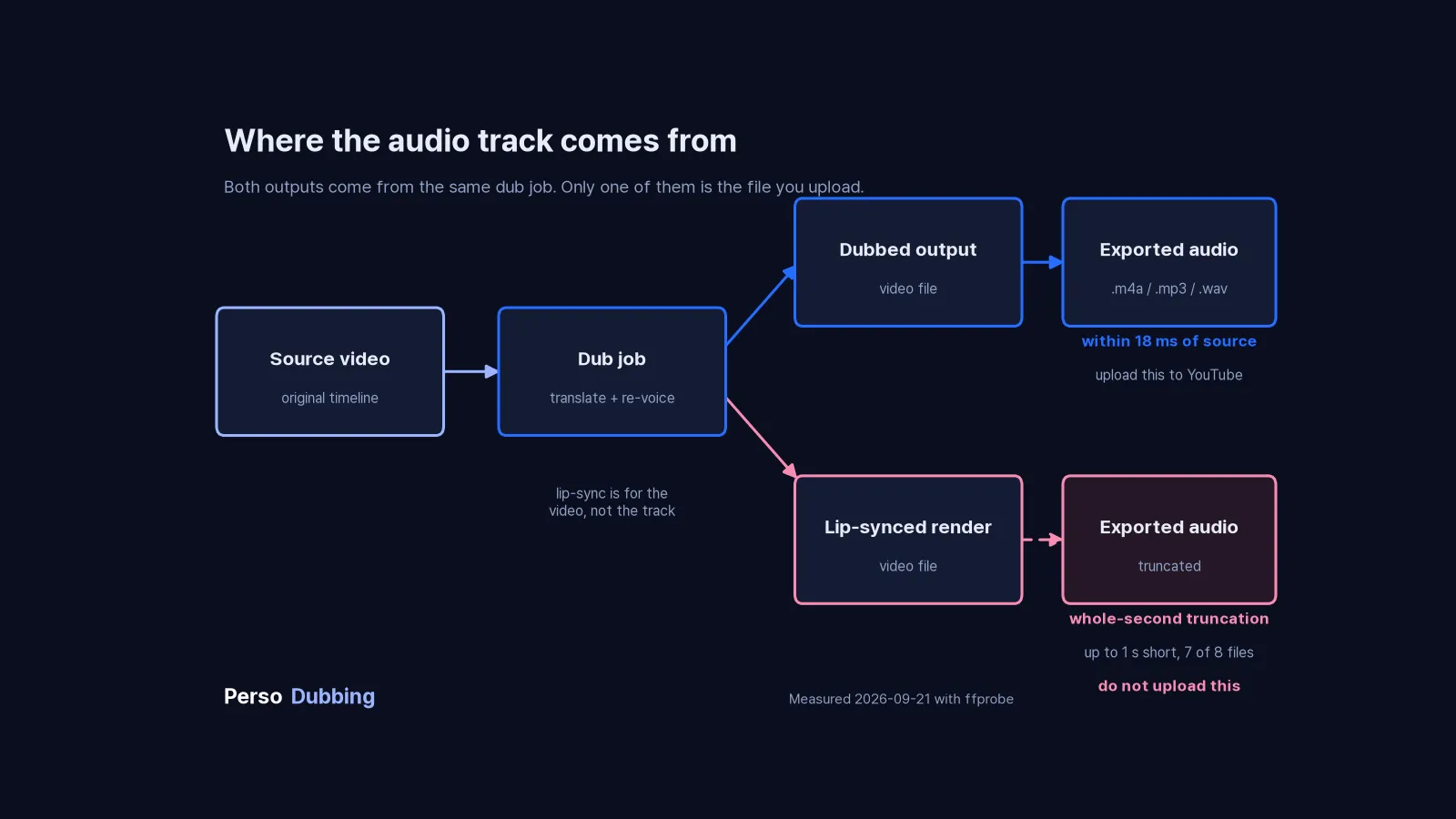
Download audio-only tracks from the dubbed output, not from the lip-synced render (.mp3, .m4a, or .wav)
The platform outputs separate audio files for each target language, formatted specifically for YouTube upload.
Step 3: Uploading Audio Tracks to YouTube Studio
Navigate to YouTube Studio and follow this exact sequence:
Upload Process Step-by-Step
1. Open the Languages menu
Sign in to YouTube Studio on a computer
From the left menu, select Languages
Click the video you want to add audio tracks to
2. Add the language and the dub
Click Add Language and select your language
Next to "Dub," click Add
If an automatic dub already exists in that language, delete it first. YouTube will not let you upload your own file until you do.
3. Upload audio file
Click "Upload" under audio track
Select your downloaded audio file
Wait for upload completion (progress bar shows status)
4. Publish and verify
Click Publish when the file is attached
Play the video back and switch to the new track to confirm it runs to the end
If YouTube detects copyrighted content in the secondary track that differs from the original audio, the file may be removed
5. Set track as default (optional)
Choose which language plays by default
Typically keep original language as primary
Secondary languages become available via settings menu
Common Upload Errors and Fixes
Error: "Audio duration doesn't match video"
Cause: Your audio file is longer or shorter than the video
Fix:
Check exact video duration in YouTube Studio
Re-export audio to match precisely
Use audio editing software to trim/extend to exact duration
Error: "File format not supported"
Cause: Uploaded audio in incompatible format
Fix:
Convert to .m4a, .mp3 or .wav
Try a different audio-only format
Verify file isn't corrupted during download
Error: "Upload failed"
Cause: Connection interrupted, or the file was rejected
Fix:
Compress audio file to lower bit rate
Use wired connection instead of WiFi
Try uploading during off-peak hours
Step 4: Metadata Localization for Each Language Track
Adding audio tracks is only half the battle. Discoverability requires localized metadata.
Title Translation Strategy
Don't directly translate titles. Optimize for search intent in each language.
English title: "How to Build a Gaming PC in 2025 - Complete Beginner's Guide"
Spanish (literal translation): "Cómo construir una PC para juegos en 2025 - Guía completa para principiantes"
Spanish (search-optimized): "Armar PC Gamer 2025 - Tutorial Paso a Paso para Principiantes"
The optimized version uses "Armar" (assemble) instead of "construir" (build) because search volume shows users searching "armar pc gamer" more frequently than "construir pc para juegos."
Research keyword variations in each target language using:
Google Trends for regional search patterns
YouTube autocomplete in target language
Competitor video titles in that market
Description Localization Best Practices
Translate descriptions with cultural context, not word-for-word conversion.
Include in localized descriptions:
Region-specific examples and references
Local measurement units (metric vs. imperial)
Currency conversions for pricing discussions
Links to region-appropriate resources
Culturally adapted analogies and metaphors
Avoid in localized descriptions:
Direct English-to-target translations of idioms
Region-specific slang from original language
References unfamiliar to target audience
Unchanged English product names (localize when appropriate)
Tag Strategy for Multi-Language Content
Each language version needs independent tag optimization.
Use YouTube channel growth with multilingual audio tracks strategy to add localized tags:
Go to YouTube Studio → Translations
Select target language
Add 15-20 tags in target language
Focus on long-tail search terms specific to that market
Include mix of broad and specific terms
Tags should reflect how native speakers actually search, not how you think they search.
Step 5: Testing and Quality Verification
Before publishing to your full audience, verify technical implementation.
Audio Track Testing Checklist
Duration verification:
✅ Run ffprobe -v error -show_entries format=duration -of csv=p=0 yourfile on the source video and on the exported audio file, and confirm the durations match
Playback verification:
✅ Test on desktop browser (Chrome, Firefox, Safari)
✅ Test on mobile app (iOS and Android)
✅ Verify language selector appears in settings menu
✅ Confirm smooth switching between languages
✅ Check audio continues seamlessly during language switch
Synchronization verification:
✅ Watch first 30 seconds in each language
✅ Check mid-video (around 50% mark)
✅ Verify ending synchronization
✅ Test during scenes with rapid speech
✅ Confirm sync during multi-speaker sections
Quality verification:
✅ Audio volume matches original video
✅ No clipping or distortion
✅ Voice sounds natural, not robotic
✅ Background music preserved correctly
✅ Sound effects remain intact
Metadata verification:
✅ Titles display correctly in all languages
✅ Descriptions formatted properly
✅ Tags relevant to target audience
✅ Thumbnail appropriate for all cultures
✅ No broken links in localized descriptions
A/B Testing Language Performance
Don't assume all language versions perform equally. Test and optimize.
Track these metrics per language:
Average view duration: How long do viewers watch in each language?
Click-through rate: Which thumbnails work in which markets?
Subscriber conversion: Which languages drive most new subscribers?
Engagement rate: Comments, likes, shares per language version
Use YouTube Analytics → Audience → Language filter to segment performance data.
Adjust strategy based on results:
Double down on high-performing languages
Improve metadata for underperforming languages
Consider removing languages with consistently poor engagement
Advanced Implementation: Channel-Wide Localization Strategy
Once you've successfully added audio tracks to individual videos, scale the strategy across your channel.
Content Prioritization Framework
Not every video needs immediate translation. Prioritize based on:
High priority (translate first):
Evergreen content with sustained traffic
Top 10 most-viewed videos on your channel
Videos ranking for competitive keywords
Tutorial/educational content with long watch times
Medium priority (translate second):
Recent uploads showing strong early performance
Seasonal content before relevant period
Videos targeting specific international markets
Content with high subscriber conversion rates
Low priority (translate later or skip):
Time-sensitive content already outdated
Low-performing videos with declining views
Highly culture-specific content difficult to localize
Videos with minimal existing international traffic
Workflow Automation for Multiple Videos
Establish efficient workflow for scaling:
Batch video selection: Identify 5-10 videos for translation
Parallel processing: Upload all to AI video dubbing platform simultaneously
Glossary creation: Build terminology database before processing
Review schedule: Allocate specific time for script verification
Upload calendar: Schedule systematic YouTube Studio updates
Performance tracking: Monitor analytics weekly for all languages
Consistent workflow prevents bottlenecks and maintains publishing rhythm across all language versions.
Measuring ROI: Analytics to Track
Quantify the impact of multi-language audio tracks with specific metrics.
Key Performance Indicators
Audience growth metrics:
New subscribers from international markets
Geography distribution changes over time
Percentage of views from non-primary languages
Subscriber retention rate by language
Engagement metrics:
Average view duration per language
Like/comment ratio by market
Share rate in target language regions
Playlist additions from international viewers
Revenue metrics:
CPM variations across different markets
Revenue growth from international ads
Sponsorship opportunities in new regions
Merchandise sales by geographic region
Algorithm performance:
Impression growth in target markets
Click-through rate by language
Suggested video appearances regionally
Search ranking for localized keywords
Track these metrics before and after implementing multi-language tracks. Compare performance over 30, 60, and 90-day periods to identify trends.
Common Technical Mistakes to Avoid
Mistake 1: Ignoring Audio File Duration Precision
Problem: Uploading audio that's 3 seconds shorter than video length
Impact: YouTube rejects upload or creates awkward silence at end
Solution: Export audio to exact video duration using video editing software's duration markers
Mistake 2: Using Compressed Audio with Artifacts
Problem: Over-compressing audio files to reduce file size
Impact: Audible quality degradation, robotic sound, listener fatigue
Solution: Avoid re-compressing an already compressed export, and keep the bit rate high enough that speech stays clean
Mistake 3: Skipping Script Review Before Generation
Problem: Accepting auto-translated scripts without manual verification
Impact: Awkward phrasing, incorrect terminology, lost meaning
Solution: Review every script in Perso Dubbing's subtitle and script editor, adjust for natural language flow
Mistake 4: Translating Region-Specific Content Without Adaptation
Problem: Directly translating content with cultural references unfamiliar to target audience
Impact: Confusion, disengagement, missed jokes or key points
Solution: Replace region-specific examples with equivalent references familiar to target culture
Mistake 5: Publishing Without Mobile Testing
Problem: Verifying only on desktop before publishing
Impact: Mobile users, who are a large share of YouTube traffic, see a different interface, potential audio issues
Solution: Test on actual mobile devices in target markets before full publication
What We Measured
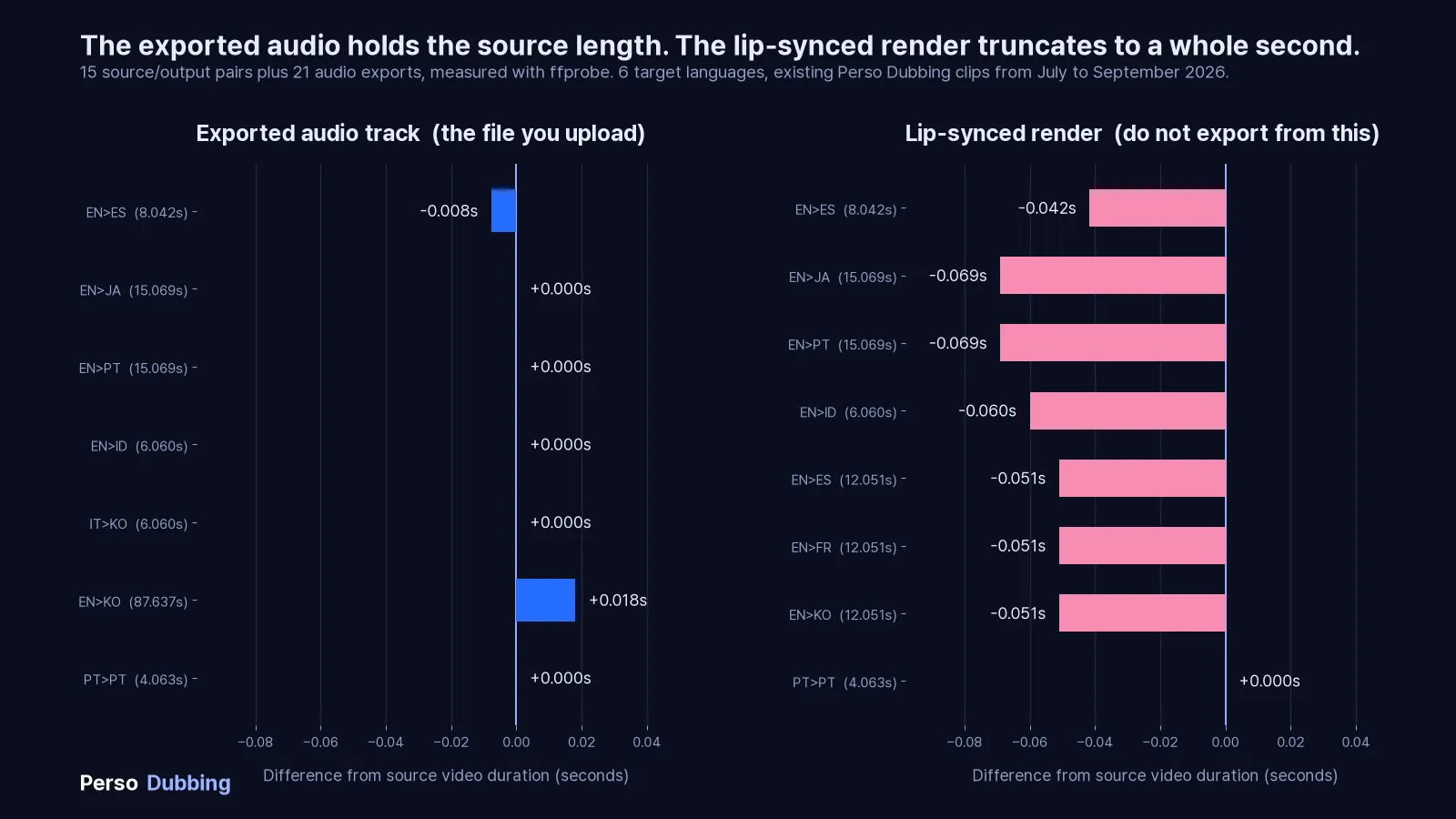
We measured 15 source and output pairs across 6 target languages, produced on Perso Dubbing, then exported audio from every dub and measured that too. These were existing marketing clips we already had on disk, not a purpose built test set, so read them as a spot check rather than a controlled experiment. Source clips ran from 4 to 88 seconds. Durations came from ffprobe.
Exported audio track, compared to the source video
Target | Source video | Exported audio | Difference |
|---|---|---|---|
Spanish | 8.042s | 8.034s | −0.008s |
Japanese | 15.069s | 15.069s | 0.000s |
Portuguese | 15.069s | 15.069s | 0.000s |
Indonesian | 6.060s | 6.060s | 0.000s |
Korean (from Italian) | 6.060s | 6.060s | 0.000s |
Portuguese (from Portuguese) | 4.063s | 4.063s | 0.000s |
Korean | 87.637s | 87.655s | +0.018s |
AAC in M4A, MP3 and PCM in WAV all returned the same duration as each other on every file, so the choice of export format did not move the number.
The Spanish row is the interesting one. Its exported audio is 8 milliseconds shorter than the source video, because in that source the audio stream was already 8 milliseconds shorter than the video container. Export gives you the audio stream length, and if your source has that kind of mismatch you inherit it.
Six of seven dubs came back identical in duration to the microsecond. The one that moved was also the longest file in the set at 88 seconds, and it moved by 0.018 seconds. We note that pairing rather than explain it. At 88 seconds an 18 millisecond shift is inside the range you would expect from frame boundary rounding alone, so we cannot tell accumulated drift apart from a container artefact with one data point.
Lip-synced render, compared to the source video
Export your audio from the dub, not from the lip-synced render. In the same set of files, lip-synced renders landed on an exact whole second in 7 of 8 cases. The table below covers 8 pairs, three of them sharing one source.
Target | Source | Lip-synced output | Difference |
|---|---|---|---|
Spanish | 8.042s | 8.000s | −0.042s |
Japanese | 15.069s | 15.000s | −0.069s |
Portuguese | 15.069s | 15.000s | −0.069s |
Indonesian | 6.060s | 6.000s | −0.060s |
Spanish, French, Korean (same source) | 12.051s | 12.000s | −0.051s |
Portuguese (from Portuguese) | 4.063s | 4.063s | 0.000s |
The largest gap was 0.069 seconds, and one file did not truncate at all. That Portuguese to Portuguese pair is the exception in the set and we do not know why it behaved differently, which is fair warning that we do not know what causes the truncation in the other seven either.
One thing does follow from the pattern itself. If the output is being truncated to a whole second, the error is the fractional part of the source duration, which lands anywhere between 0 and 1 second regardless of how long the file is. Our sources happened to have small fractions, all under 0.07. A twenty minute file at 1234.567 seconds would lose 0.567 seconds under the same behaviour, roughly eight times the worst case we saw. The error does not accumulate, but it does not stay small either.
This sample says nothing about 20 or 40 minute files, and we are not going to pretend otherwise.
Why Perso Dubbing Handles Technical Implementation Better
AI dubbing software for YouTube creators addresses specific technical challenges that generic translation tools miss:
Duration Matching
In our measurements the exported audio stayed within 18 milliseconds of the source video in all 7 files we tested. We did not inspect how the pipeline produces that result, so read it as an observation about the output files rather than a guarantee.
Professional Audio Quality Standards
Output maintains broadcast-quality specifications:
Consistent sample rate across exports
Consistent volume normalization
Clean frequency response without artifacts
Professional-grade compression
Seamless Background Audio Preservation
Advanced audio separation technology:
Isolates dialogue from music automatically
Preserves original soundtrack in dubbed versions
Maintains sound effects positioning
Prevents audio bleeding between layers
Export Options for Every Workflow
Download files in multiple formats:
Audio-only tracks for YouTube upload (.mp3, .m4a, .wav)
Full video with embedded audio (all languages)
Separate subtitle files (.srt) for each language
Background music and dialogue stems separately
This flexibility supports any technical workflow or publishing platform.
FAQs
1. What audio format should I use for YouTube audio tracks?
YouTube requires an audio-only file but does not publish a list of supported formats for this feature. We exported and measured .m4a, .mp3 and .wav, and all three returned the same duration as each other on every file we tested. Whichever you pick, make sure the duration matches your video, since YouTube does not publish a tolerance either.
2. How do I fix "audio duration doesn't match video" errors?
This error occurs when your audio file length does not match your video duration. To fix it, open your audio file in editing software like Audacity or Adobe Audition, check the exact video duration in YouTube Studio, then trim or extend the audio to match precisely. Use silence padding at the end if needed, but ensure the total duration matches exactly. Re-export and upload the corrected file.
3. Can I add audio tracks to existing YouTube videos?
Yes, you can add multiple language audio tracks to any video already published on your channel. In YouTube Studio, select Languages from the left menu, click the video, click Add Language, then click Add next to "Dub" and upload your file. The process works identically for new and existing videos, and you can add or remove audio tracks at any time without affecting the video itself.
4. How long does it take to process multi-language audio with AI?
AI dubbing platforms for multi-language content process videos quickly. On average, videos finish in under three minutes. Processing time depends on video length, number of speakers, and audio complexity. You can process multiple languages simultaneously to save time. The built-in script editor allows you to review and adjust translations while generation continues in the background.
5. Which languages should I prioritize for audio tracks?
Analyze your YouTube Analytics under Audience → Geography to identify countries with significant traffic from non-English regions. Prioritize languages where you already have 3-10% organic viewership despite language barriers, these viewers want your content but struggle to access it. Common high-value languages include Spanish, Portuguese for the Brazilian market, Hindi, and Japanese. Start with 2-3 languages showing existing demand before expanding further.
6. How does voice cloning maintain my brand across languages?
AI voice cloning technology analyzes your vocal characteristics from source video, including tone, pitch, pace, and emotional patterns, then replicates these qualities in target languages. The result sounds like you speaking Spanish, Japanese, or Hindi naturally, rather than a generic voice actor. This maintains brand consistency and authenticity across all language versions. The AI learns your unique speaking style and applies it to translations, preserving your personality in every market.
7. What happens if my audio track has multiple speakers?
Professional AI dubbing software for multi-speaker videos automatically detects and separates multiple speakers in your source audio. The system identifies each unique voice, maintains their distinct characteristics, and translates each speaker's dialogue while preserving their individual vocal qualities. This works for interviews, podcasts, panel discussions, and collaborative content. Each speaker maintains their voice identity across all language versions, creating natural multi-speaker conversations in every target language.
8. How do I localize metadata for different language tracks?
Use YouTube Studio's translation feature to add localized titles, descriptions, and tags for each language. Don't translate literally, research how native speakers search for your content type in their language. Use Google Trends and YouTube autocomplete in target languages to find optimal keywords. Include region-specific examples, adapt measurement units, and replace cultural references with locally relevant equivalents. Test thumbnail performance separately in each market since visual preferences vary by culture.
9. Can I edit the translated script before generating audio?
Yes, Perso Dubbing's subtitle and script editor allows you to review and modify auto-generated translations before creating dubbed audio. This allows you to adjust awkward phrasing, correct technical terminology, maintain brand voice, and adapt cultural references. You can also create custom glossaries for consistent translation of product names, industry terms, and key phrases across all videos. Edit the script, then regenerate audio with your corrections applied.
10. How do I measure the success of multi-language audio tracks?
Track these metrics in YouTube Analytics filtered by language: average view duration per language, subscriber growth from international markets, click-through rate by region, and engagement rate (likes, comments, shares) for each language version. Compare performance before and after adding audio tracks over 30, 60, and 90-day periods. Monitor which languages drive the highest watch time and subscriber conversion, then prioritize content translation for top-performing markets. Learn more about growing your YouTube channel with AI dubbing strategies.
Start Implementing Multi-Language Audio Tracks Today
YouTube's audio track feature transforms international growth from impossible to systematic. Follow the technical workflow, avoid common implementation mistakes, and verify quality before publishing.
The infrastructure exists. The tools work. Your international audience is waiting.
Pick your highest-traffic video with existing international viewers. Generate one language version. Upload the audio track. Test thoroughly. Check analytics in two weeks.
You'll see the technical implementation pay off immediately.
Start with Perso Dubbing's video dubbing platform to generate your first multi-language audio tracks. Dubbing with voice cloning across 99+ languages, automatic lip-sync on all paid plans, and YouTube-ready audio exports.
Your technical implementation determines your global success.
Your analytics show international viewers, but they're leaving at the 90-second mark. They want your content. They just can't access it in a way that works for them.
YouTube's multi-language audio track feature solves this, but only if you implement it correctly. Upload the wrong file format, let the audio drift out of sync, or skip metadata localization, and you've wasted hours of work.
This guide walks you through the technical implementation of YouTube multi-language audio tracks, from file preparation to upload verification, so your international audience actually stays and watches. Whether you're new to video localization or scaling existing workflows, these steps ensure professional results.
Understanding YouTube's Audio Track Infrastructure
YouTube's audio track system operates differently from subtitle tracks. While subtitles overlay text on existing video, audio tracks replace the entire audio stream based on viewer selection.
When you upload multiple audio tracks to a single video:
Each track must be roughly the same length as the video. YouTube does not publish a numeric tolerance, so treat an exact match as the target.
YouTube processes each track against the video timeline
YouTube processes each track independently for compression and quality
Viewers switch languages without page reload or video restart
This architecture creates specific technical requirements you need to meet before upload.
Supported Audio Formats and Technical Specifications
YouTube's multi-language audio documentation says only that the file must be in a supported audio-only file format, without listing them. These are the audio-only formats we exported and measured ourselves:
Format | Codec | Status |
|---|---|---|
.m4a | AAC | Exported and measured |
.mp3 | MP3 | Exported and measured |
.wav | PCM | Exported and measured |
Critical requirement: Your audio track duration must match your video duration. YouTube's wording is “roughly the same length as your video”, with no published tolerance, so do not rely on a margin.
Step 1: Preparing Source Video for Multi-Language Dubbing
Before generating translated audio, verify your source video meets quality standards for AI dubbing technology for video localization.
Audio Quality Checklist
✅ Speech clarity: Background music clearly below the speech level ✅ Consistent volume: No sudden peaks or drops ✅ Minimal background noise: Clean audio without hums, clicks, or environmental interference ✅ Clear speaker separation: If multiple speakers, each should have distinct audio positioning
Poor source quality compounds through translation. Fix audio issues before dubbing, not after.
Exporting Clean Audio Stems
For professional results, export your video's audio as separate stems:
Dialogue track only: Isolate voice without music or effects
Background music: Keep music and ambient sound separate
Sound effects: Maintain SFX as independent layer
This separation allows AI dubbing platforms with voice cloning to replace dialogue while preserving your video's original music and sound design. The result sounds natural instead of obviously dubbed.
Step 2: Generating Localized Audio with AI Dubbing
Professional video localization services require more than translation. You need voice matching, timing preservation, and cultural adaptation.
Selecting Target Languages Based on Analytics
Don't guess which languages to translate. Use data.
Open YouTube Studio → Audience → Geography tab. Look for:
Countries with 3%+ traffic from non-English regions
Growing markets showing month-over-month increases
High engagement countries with above-average watch time despite language barriers
Focus on languages where you already have organic demand. These viewers are finding your content and struggling through it. Give them proper access.
This approach works especially well for YouTube content creators, online course instructors, vloggers, and educators creating instructional videos.
Strategic language priority:
Tier 1 (translate first): Languages with existing 5-10% traffic share
Tier 2 (expand next): Adjacent markets in same language family
Tier 3 (test later): Emerging markets showing early signals
Using Perso Dubbing for Voice-Matched Dubbing
Perso Dubbing's voice cloning technology handles three critical technical challenges:
1. Dubbing with voice cloning across 99+ languages
The platform analyzes your voice characteristics from source video and replicates them in target languages. Your Spanish version sounds like you speaking Spanish, not a Spanish voice actor reading your script.
This maintains brand consistency across all language versions.
2. Automatic lip-sync on paid plans
Dubbing has to align with mouth movements closely enough that viewers stop noticing the gap.
Perso Dubbing's lip-sync technology adjusts timing automatically. Lip-sync is available on all paid plans, with a monthly lip-sync allowance in each tier.
3. Multi-speaker detection and separation
Videos with multiple speakers require individual voice handling. The system:
Identifies each unique speaker
Maintains their distinct voice characteristics in translation
Preserves speaker-specific vocal patterns across all languages
Workflow: Upload to Dubbed Audio
Upload source video or paste YouTube URL directly
Select target languages from the available options
Enable voice cloning to maintain vocal consistency
Review auto-generated script using built-in editor
Adjust terminology with custom glossary for technical terms
Generate dubbed versions for each language
Download audio-only tracks from the dubbed output, not from the lip-synced render (.mp3, .m4a, or .wav)
The platform outputs separate audio files for each target language, formatted specifically for YouTube upload.
Step 3: Uploading Audio Tracks to YouTube Studio
Navigate to YouTube Studio and follow this exact sequence:
Upload Process Step-by-Step
1. Open the Languages menu
Sign in to YouTube Studio on a computer
From the left menu, select Languages
Click the video you want to add audio tracks to
2. Add the language and the dub
Click Add Language and select your language
Next to "Dub," click Add
If an automatic dub already exists in that language, delete it first. YouTube will not let you upload your own file until you do.
3. Upload audio file
Click "Upload" under audio track
Select your downloaded audio file
Wait for upload completion (progress bar shows status)
4. Publish and verify
Click Publish when the file is attached
Play the video back and switch to the new track to confirm it runs to the end
If YouTube detects copyrighted content in the secondary track that differs from the original audio, the file may be removed
5. Set track as default (optional)
Choose which language plays by default
Typically keep original language as primary
Secondary languages become available via settings menu
Common Upload Errors and Fixes
Error: "Audio duration doesn't match video"
Cause: Your audio file is longer or shorter than the video
Fix:
Check exact video duration in YouTube Studio
Re-export audio to match precisely
Use audio editing software to trim/extend to exact duration
Error: "File format not supported"
Cause: Uploaded audio in incompatible format
Fix:
Convert to .m4a, .mp3 or .wav
Try a different audio-only format
Verify file isn't corrupted during download
Error: "Upload failed"
Cause: Connection interrupted, or the file was rejected
Fix:
Compress audio file to lower bit rate
Use wired connection instead of WiFi
Try uploading during off-peak hours
Step 4: Metadata Localization for Each Language Track
Adding audio tracks is only half the battle. Discoverability requires localized metadata.
Title Translation Strategy
Don't directly translate titles. Optimize for search intent in each language.
English title: "How to Build a Gaming PC in 2025 - Complete Beginner's Guide"
Spanish (literal translation): "Cómo construir una PC para juegos en 2025 - Guía completa para principiantes"
Spanish (search-optimized): "Armar PC Gamer 2025 - Tutorial Paso a Paso para Principiantes"
The optimized version uses "Armar" (assemble) instead of "construir" (build) because search volume shows users searching "armar pc gamer" more frequently than "construir pc para juegos."
Research keyword variations in each target language using:
Google Trends for regional search patterns
YouTube autocomplete in target language
Competitor video titles in that market
Description Localization Best Practices
Translate descriptions with cultural context, not word-for-word conversion.
Include in localized descriptions:
Region-specific examples and references
Local measurement units (metric vs. imperial)
Currency conversions for pricing discussions
Links to region-appropriate resources
Culturally adapted analogies and metaphors
Avoid in localized descriptions:
Direct English-to-target translations of idioms
Region-specific slang from original language
References unfamiliar to target audience
Unchanged English product names (localize when appropriate)
Tag Strategy for Multi-Language Content
Each language version needs independent tag optimization.
Use YouTube channel growth with multilingual audio tracks strategy to add localized tags:
Go to YouTube Studio → Translations
Select target language
Add 15-20 tags in target language
Focus on long-tail search terms specific to that market
Include mix of broad and specific terms
Tags should reflect how native speakers actually search, not how you think they search.
Step 5: Testing and Quality Verification
Before publishing to your full audience, verify technical implementation.
Audio Track Testing Checklist
Duration verification:
✅ Run ffprobe -v error -show_entries format=duration -of csv=p=0 yourfile on the source video and on the exported audio file, and confirm the durations match
Playback verification:
✅ Test on desktop browser (Chrome, Firefox, Safari)
✅ Test on mobile app (iOS and Android)
✅ Verify language selector appears in settings menu
✅ Confirm smooth switching between languages
✅ Check audio continues seamlessly during language switch
Synchronization verification:
✅ Watch first 30 seconds in each language
✅ Check mid-video (around 50% mark)
✅ Verify ending synchronization
✅ Test during scenes with rapid speech
✅ Confirm sync during multi-speaker sections
Quality verification:
✅ Audio volume matches original video
✅ No clipping or distortion
✅ Voice sounds natural, not robotic
✅ Background music preserved correctly
✅ Sound effects remain intact
Metadata verification:
✅ Titles display correctly in all languages
✅ Descriptions formatted properly
✅ Tags relevant to target audience
✅ Thumbnail appropriate for all cultures
✅ No broken links in localized descriptions
A/B Testing Language Performance
Don't assume all language versions perform equally. Test and optimize.
Track these metrics per language:
Average view duration: How long do viewers watch in each language?
Click-through rate: Which thumbnails work in which markets?
Subscriber conversion: Which languages drive most new subscribers?
Engagement rate: Comments, likes, shares per language version
Use YouTube Analytics → Audience → Language filter to segment performance data.
Adjust strategy based on results:
Double down on high-performing languages
Improve metadata for underperforming languages
Consider removing languages with consistently poor engagement
Advanced Implementation: Channel-Wide Localization Strategy
Once you've successfully added audio tracks to individual videos, scale the strategy across your channel.
Content Prioritization Framework
Not every video needs immediate translation. Prioritize based on:
High priority (translate first):
Evergreen content with sustained traffic
Top 10 most-viewed videos on your channel
Videos ranking for competitive keywords
Tutorial/educational content with long watch times
Medium priority (translate second):
Recent uploads showing strong early performance
Seasonal content before relevant period
Videos targeting specific international markets
Content with high subscriber conversion rates
Low priority (translate later or skip):
Time-sensitive content already outdated
Low-performing videos with declining views
Highly culture-specific content difficult to localize
Videos with minimal existing international traffic
Workflow Automation for Multiple Videos
Establish efficient workflow for scaling:
Batch video selection: Identify 5-10 videos for translation
Parallel processing: Upload all to AI video dubbing platform simultaneously
Glossary creation: Build terminology database before processing
Review schedule: Allocate specific time for script verification
Upload calendar: Schedule systematic YouTube Studio updates
Performance tracking: Monitor analytics weekly for all languages
Consistent workflow prevents bottlenecks and maintains publishing rhythm across all language versions.
Measuring ROI: Analytics to Track
Quantify the impact of multi-language audio tracks with specific metrics.
Key Performance Indicators
Audience growth metrics:
New subscribers from international markets
Geography distribution changes over time
Percentage of views from non-primary languages
Subscriber retention rate by language
Engagement metrics:
Average view duration per language
Like/comment ratio by market
Share rate in target language regions
Playlist additions from international viewers
Revenue metrics:
CPM variations across different markets
Revenue growth from international ads
Sponsorship opportunities in new regions
Merchandise sales by geographic region
Algorithm performance:
Impression growth in target markets
Click-through rate by language
Suggested video appearances regionally
Search ranking for localized keywords
Track these metrics before and after implementing multi-language tracks. Compare performance over 30, 60, and 90-day periods to identify trends.
Common Technical Mistakes to Avoid
Mistake 1: Ignoring Audio File Duration Precision
Problem: Uploading audio that's 3 seconds shorter than video length
Impact: YouTube rejects upload or creates awkward silence at end
Solution: Export audio to exact video duration using video editing software's duration markers
Mistake 2: Using Compressed Audio with Artifacts
Problem: Over-compressing audio files to reduce file size
Impact: Audible quality degradation, robotic sound, listener fatigue
Solution: Avoid re-compressing an already compressed export, and keep the bit rate high enough that speech stays clean
Mistake 3: Skipping Script Review Before Generation
Problem: Accepting auto-translated scripts without manual verification
Impact: Awkward phrasing, incorrect terminology, lost meaning
Solution: Review every script in Perso Dubbing's subtitle and script editor, adjust for natural language flow
Mistake 4: Translating Region-Specific Content Without Adaptation
Problem: Directly translating content with cultural references unfamiliar to target audience
Impact: Confusion, disengagement, missed jokes or key points
Solution: Replace region-specific examples with equivalent references familiar to target culture
Mistake 5: Publishing Without Mobile Testing
Problem: Verifying only on desktop before publishing
Impact: Mobile users, who are a large share of YouTube traffic, see a different interface, potential audio issues
Solution: Test on actual mobile devices in target markets before full publication
What We Measured
We measured 15 source and output pairs across 6 target languages, produced on Perso Dubbing, then exported audio from every dub and measured that too. These were existing marketing clips we already had on disk, not a purpose built test set, so read them as a spot check rather than a controlled experiment. Source clips ran from 4 to 88 seconds. Durations came from ffprobe.
Exported audio track, compared to the source video
Target | Source video | Exported audio | Difference |
|---|---|---|---|
Spanish | 8.042s | 8.034s | −0.008s |
Japanese | 15.069s | 15.069s | 0.000s |
Portuguese | 15.069s | 15.069s | 0.000s |
Indonesian | 6.060s | 6.060s | 0.000s |
Korean (from Italian) | 6.060s | 6.060s | 0.000s |
Portuguese (from Portuguese) | 4.063s | 4.063s | 0.000s |
Korean | 87.637s | 87.655s | +0.018s |
AAC in M4A, MP3 and PCM in WAV all returned the same duration as each other on every file, so the choice of export format did not move the number.
The Spanish row is the interesting one. Its exported audio is 8 milliseconds shorter than the source video, because in that source the audio stream was already 8 milliseconds shorter than the video container. Export gives you the audio stream length, and if your source has that kind of mismatch you inherit it.
Six of seven dubs came back identical in duration to the microsecond. The one that moved was also the longest file in the set at 88 seconds, and it moved by 0.018 seconds. We note that pairing rather than explain it. At 88 seconds an 18 millisecond shift is inside the range you would expect from frame boundary rounding alone, so we cannot tell accumulated drift apart from a container artefact with one data point.
Lip-synced render, compared to the source video
Export your audio from the dub, not from the lip-synced render. In the same set of files, lip-synced renders landed on an exact whole second in 7 of 8 cases. The table below covers 8 pairs, three of them sharing one source.
Target | Source | Lip-synced output | Difference |
|---|---|---|---|
Spanish | 8.042s | 8.000s | −0.042s |
Japanese | 15.069s | 15.000s | −0.069s |
Portuguese | 15.069s | 15.000s | −0.069s |
Indonesian | 6.060s | 6.000s | −0.060s |
Spanish, French, Korean (same source) | 12.051s | 12.000s | −0.051s |
Portuguese (from Portuguese) | 4.063s | 4.063s | 0.000s |
The largest gap was 0.069 seconds, and one file did not truncate at all. That Portuguese to Portuguese pair is the exception in the set and we do not know why it behaved differently, which is fair warning that we do not know what causes the truncation in the other seven either.
One thing does follow from the pattern itself. If the output is being truncated to a whole second, the error is the fractional part of the source duration, which lands anywhere between 0 and 1 second regardless of how long the file is. Our sources happened to have small fractions, all under 0.07. A twenty minute file at 1234.567 seconds would lose 0.567 seconds under the same behaviour, roughly eight times the worst case we saw. The error does not accumulate, but it does not stay small either.
This sample says nothing about 20 or 40 minute files, and we are not going to pretend otherwise.
Why Perso Dubbing Handles Technical Implementation Better
AI dubbing software for YouTube creators addresses specific technical challenges that generic translation tools miss:
Duration Matching
In our measurements the exported audio stayed within 18 milliseconds of the source video in all 7 files we tested. We did not inspect how the pipeline produces that result, so read it as an observation about the output files rather than a guarantee.
Professional Audio Quality Standards
Output maintains broadcast-quality specifications:
Consistent sample rate across exports
Consistent volume normalization
Clean frequency response without artifacts
Professional-grade compression
Seamless Background Audio Preservation
Advanced audio separation technology:
Isolates dialogue from music automatically
Preserves original soundtrack in dubbed versions
Maintains sound effects positioning
Prevents audio bleeding between layers
Export Options for Every Workflow
Download files in multiple formats:
Audio-only tracks for YouTube upload (.mp3, .m4a, .wav)
Full video with embedded audio (all languages)
Separate subtitle files (.srt) for each language
Background music and dialogue stems separately
This flexibility supports any technical workflow or publishing platform.
FAQs
1. What audio format should I use for YouTube audio tracks?
YouTube requires an audio-only file but does not publish a list of supported formats for this feature. We exported and measured .m4a, .mp3 and .wav, and all three returned the same duration as each other on every file we tested. Whichever you pick, make sure the duration matches your video, since YouTube does not publish a tolerance either.
2. How do I fix "audio duration doesn't match video" errors?
This error occurs when your audio file length does not match your video duration. To fix it, open your audio file in editing software like Audacity or Adobe Audition, check the exact video duration in YouTube Studio, then trim or extend the audio to match precisely. Use silence padding at the end if needed, but ensure the total duration matches exactly. Re-export and upload the corrected file.
3. Can I add audio tracks to existing YouTube videos?
Yes, you can add multiple language audio tracks to any video already published on your channel. In YouTube Studio, select Languages from the left menu, click the video, click Add Language, then click Add next to "Dub" and upload your file. The process works identically for new and existing videos, and you can add or remove audio tracks at any time without affecting the video itself.
4. How long does it take to process multi-language audio with AI?
AI dubbing platforms for multi-language content process videos quickly. On average, videos finish in under three minutes. Processing time depends on video length, number of speakers, and audio complexity. You can process multiple languages simultaneously to save time. The built-in script editor allows you to review and adjust translations while generation continues in the background.
5. Which languages should I prioritize for audio tracks?
Analyze your YouTube Analytics under Audience → Geography to identify countries with significant traffic from non-English regions. Prioritize languages where you already have 3-10% organic viewership despite language barriers, these viewers want your content but struggle to access it. Common high-value languages include Spanish, Portuguese for the Brazilian market, Hindi, and Japanese. Start with 2-3 languages showing existing demand before expanding further.
6. How does voice cloning maintain my brand across languages?
AI voice cloning technology analyzes your vocal characteristics from source video, including tone, pitch, pace, and emotional patterns, then replicates these qualities in target languages. The result sounds like you speaking Spanish, Japanese, or Hindi naturally, rather than a generic voice actor. This maintains brand consistency and authenticity across all language versions. The AI learns your unique speaking style and applies it to translations, preserving your personality in every market.
7. What happens if my audio track has multiple speakers?
Professional AI dubbing software for multi-speaker videos automatically detects and separates multiple speakers in your source audio. The system identifies each unique voice, maintains their distinct characteristics, and translates each speaker's dialogue while preserving their individual vocal qualities. This works for interviews, podcasts, panel discussions, and collaborative content. Each speaker maintains their voice identity across all language versions, creating natural multi-speaker conversations in every target language.
8. How do I localize metadata for different language tracks?
Use YouTube Studio's translation feature to add localized titles, descriptions, and tags for each language. Don't translate literally, research how native speakers search for your content type in their language. Use Google Trends and YouTube autocomplete in target languages to find optimal keywords. Include region-specific examples, adapt measurement units, and replace cultural references with locally relevant equivalents. Test thumbnail performance separately in each market since visual preferences vary by culture.
9. Can I edit the translated script before generating audio?
Yes, Perso Dubbing's subtitle and script editor allows you to review and modify auto-generated translations before creating dubbed audio. This allows you to adjust awkward phrasing, correct technical terminology, maintain brand voice, and adapt cultural references. You can also create custom glossaries for consistent translation of product names, industry terms, and key phrases across all videos. Edit the script, then regenerate audio with your corrections applied.
10. How do I measure the success of multi-language audio tracks?
Track these metrics in YouTube Analytics filtered by language: average view duration per language, subscriber growth from international markets, click-through rate by region, and engagement rate (likes, comments, shares) for each language version. Compare performance before and after adding audio tracks over 30, 60, and 90-day periods. Monitor which languages drive the highest watch time and subscriber conversion, then prioritize content translation for top-performing markets. Learn more about growing your YouTube channel with AI dubbing strategies.
Start Implementing Multi-Language Audio Tracks Today
YouTube's audio track feature transforms international growth from impossible to systematic. Follow the technical workflow, avoid common implementation mistakes, and verify quality before publishing.
The infrastructure exists. The tools work. Your international audience is waiting.
Pick your highest-traffic video with existing international viewers. Generate one language version. Upload the audio track. Test thoroughly. Check analytics in two weeks.
You'll see the technical implementation pay off immediately.
Start with Perso Dubbing's video dubbing platform to generate your first multi-language audio tracks. Dubbing with voice cloning across 99+ languages, automatic lip-sync on all paid plans, and YouTube-ready audio exports.
Your technical implementation determines your global success.
Your analytics show international viewers, but they're leaving at the 90-second mark. They want your content. They just can't access it in a way that works for them.
YouTube's multi-language audio track feature solves this, but only if you implement it correctly. Upload the wrong file format, let the audio drift out of sync, or skip metadata localization, and you've wasted hours of work.
This guide walks you through the technical implementation of YouTube multi-language audio tracks, from file preparation to upload verification, so your international audience actually stays and watches. Whether you're new to video localization or scaling existing workflows, these steps ensure professional results.
Understanding YouTube's Audio Track Infrastructure
YouTube's audio track system operates differently from subtitle tracks. While subtitles overlay text on existing video, audio tracks replace the entire audio stream based on viewer selection.
When you upload multiple audio tracks to a single video:
Each track must be roughly the same length as the video. YouTube does not publish a numeric tolerance, so treat an exact match as the target.
YouTube processes each track against the video timeline
YouTube processes each track independently for compression and quality
Viewers switch languages without page reload or video restart
This architecture creates specific technical requirements you need to meet before upload.
Supported Audio Formats and Technical Specifications
YouTube's multi-language audio documentation says only that the file must be in a supported audio-only file format, without listing them. These are the audio-only formats we exported and measured ourselves:
Format | Codec | Status |
|---|---|---|
.m4a | AAC | Exported and measured |
.mp3 | MP3 | Exported and measured |
.wav | PCM | Exported and measured |
Critical requirement: Your audio track duration must match your video duration. YouTube's wording is “roughly the same length as your video”, with no published tolerance, so do not rely on a margin.
Step 1: Preparing Source Video for Multi-Language Dubbing
Before generating translated audio, verify your source video meets quality standards for AI dubbing technology for video localization.
Audio Quality Checklist
✅ Speech clarity: Background music clearly below the speech level ✅ Consistent volume: No sudden peaks or drops ✅ Minimal background noise: Clean audio without hums, clicks, or environmental interference ✅ Clear speaker separation: If multiple speakers, each should have distinct audio positioning
Poor source quality compounds through translation. Fix audio issues before dubbing, not after.
Exporting Clean Audio Stems
For professional results, export your video's audio as separate stems:
Dialogue track only: Isolate voice without music or effects
Background music: Keep music and ambient sound separate
Sound effects: Maintain SFX as independent layer
This separation allows AI dubbing platforms with voice cloning to replace dialogue while preserving your video's original music and sound design. The result sounds natural instead of obviously dubbed.
Step 2: Generating Localized Audio with AI Dubbing
Professional video localization services require more than translation. You need voice matching, timing preservation, and cultural adaptation.
Selecting Target Languages Based on Analytics
Don't guess which languages to translate. Use data.
Open YouTube Studio → Audience → Geography tab. Look for:
Countries with 3%+ traffic from non-English regions
Growing markets showing month-over-month increases
High engagement countries with above-average watch time despite language barriers
Focus on languages where you already have organic demand. These viewers are finding your content and struggling through it. Give them proper access.
This approach works especially well for YouTube content creators, online course instructors, vloggers, and educators creating instructional videos.
Strategic language priority:
Tier 1 (translate first): Languages with existing 5-10% traffic share
Tier 2 (expand next): Adjacent markets in same language family
Tier 3 (test later): Emerging markets showing early signals
Using Perso Dubbing for Voice-Matched Dubbing
Perso Dubbing's voice cloning technology handles three critical technical challenges:
1. Dubbing with voice cloning across 99+ languages
The platform analyzes your voice characteristics from source video and replicates them in target languages. Your Spanish version sounds like you speaking Spanish, not a Spanish voice actor reading your script.
This maintains brand consistency across all language versions.
2. Automatic lip-sync on paid plans
Dubbing has to align with mouth movements closely enough that viewers stop noticing the gap.
Perso Dubbing's lip-sync technology adjusts timing automatically. Lip-sync is available on all paid plans, with a monthly lip-sync allowance in each tier.
3. Multi-speaker detection and separation
Videos with multiple speakers require individual voice handling. The system:
Identifies each unique speaker
Maintains their distinct voice characteristics in translation
Preserves speaker-specific vocal patterns across all languages
Workflow: Upload to Dubbed Audio
Upload source video or paste YouTube URL directly
Select target languages from the available options
Enable voice cloning to maintain vocal consistency
Review auto-generated script using built-in editor
Adjust terminology with custom glossary for technical terms
Generate dubbed versions for each language
Download audio-only tracks from the dubbed output, not from the lip-synced render (.mp3, .m4a, or .wav)
The platform outputs separate audio files for each target language, formatted specifically for YouTube upload.
Step 3: Uploading Audio Tracks to YouTube Studio
Navigate to YouTube Studio and follow this exact sequence:
Upload Process Step-by-Step
1. Open the Languages menu
Sign in to YouTube Studio on a computer
From the left menu, select Languages
Click the video you want to add audio tracks to
2. Add the language and the dub
Click Add Language and select your language
Next to "Dub," click Add
If an automatic dub already exists in that language, delete it first. YouTube will not let you upload your own file until you do.
3. Upload audio file
Click "Upload" under audio track
Select your downloaded audio file
Wait for upload completion (progress bar shows status)
4. Publish and verify
Click Publish when the file is attached
Play the video back and switch to the new track to confirm it runs to the end
If YouTube detects copyrighted content in the secondary track that differs from the original audio, the file may be removed
5. Set track as default (optional)
Choose which language plays by default
Typically keep original language as primary
Secondary languages become available via settings menu
Common Upload Errors and Fixes
Error: "Audio duration doesn't match video"
Cause: Your audio file is longer or shorter than the video
Fix:
Check exact video duration in YouTube Studio
Re-export audio to match precisely
Use audio editing software to trim/extend to exact duration
Error: "File format not supported"
Cause: Uploaded audio in incompatible format
Fix:
Convert to .m4a, .mp3 or .wav
Try a different audio-only format
Verify file isn't corrupted during download
Error: "Upload failed"
Cause: Connection interrupted, or the file was rejected
Fix:
Compress audio file to lower bit rate
Use wired connection instead of WiFi
Try uploading during off-peak hours
Step 4: Metadata Localization for Each Language Track
Adding audio tracks is only half the battle. Discoverability requires localized metadata.
Title Translation Strategy
Don't directly translate titles. Optimize for search intent in each language.
English title: "How to Build a Gaming PC in 2025 - Complete Beginner's Guide"
Spanish (literal translation): "Cómo construir una PC para juegos en 2025 - Guía completa para principiantes"
Spanish (search-optimized): "Armar PC Gamer 2025 - Tutorial Paso a Paso para Principiantes"
The optimized version uses "Armar" (assemble) instead of "construir" (build) because search volume shows users searching "armar pc gamer" more frequently than "construir pc para juegos."
Research keyword variations in each target language using:
Google Trends for regional search patterns
YouTube autocomplete in target language
Competitor video titles in that market
Description Localization Best Practices
Translate descriptions with cultural context, not word-for-word conversion.
Include in localized descriptions:
Region-specific examples and references
Local measurement units (metric vs. imperial)
Currency conversions for pricing discussions
Links to region-appropriate resources
Culturally adapted analogies and metaphors
Avoid in localized descriptions:
Direct English-to-target translations of idioms
Region-specific slang from original language
References unfamiliar to target audience
Unchanged English product names (localize when appropriate)
Tag Strategy for Multi-Language Content
Each language version needs independent tag optimization.
Use YouTube channel growth with multilingual audio tracks strategy to add localized tags:
Go to YouTube Studio → Translations
Select target language
Add 15-20 tags in target language
Focus on long-tail search terms specific to that market
Include mix of broad and specific terms
Tags should reflect how native speakers actually search, not how you think they search.
Step 5: Testing and Quality Verification
Before publishing to your full audience, verify technical implementation.
Audio Track Testing Checklist
Duration verification:
✅ Run ffprobe -v error -show_entries format=duration -of csv=p=0 yourfile on the source video and on the exported audio file, and confirm the durations match
Playback verification:
✅ Test on desktop browser (Chrome, Firefox, Safari)
✅ Test on mobile app (iOS and Android)
✅ Verify language selector appears in settings menu
✅ Confirm smooth switching between languages
✅ Check audio continues seamlessly during language switch
Synchronization verification:
✅ Watch first 30 seconds in each language
✅ Check mid-video (around 50% mark)
✅ Verify ending synchronization
✅ Test during scenes with rapid speech
✅ Confirm sync during multi-speaker sections
Quality verification:
✅ Audio volume matches original video
✅ No clipping or distortion
✅ Voice sounds natural, not robotic
✅ Background music preserved correctly
✅ Sound effects remain intact
Metadata verification:
✅ Titles display correctly in all languages
✅ Descriptions formatted properly
✅ Tags relevant to target audience
✅ Thumbnail appropriate for all cultures
✅ No broken links in localized descriptions
A/B Testing Language Performance
Don't assume all language versions perform equally. Test and optimize.
Track these metrics per language:
Average view duration: How long do viewers watch in each language?
Click-through rate: Which thumbnails work in which markets?
Subscriber conversion: Which languages drive most new subscribers?
Engagement rate: Comments, likes, shares per language version
Use YouTube Analytics → Audience → Language filter to segment performance data.
Adjust strategy based on results:
Double down on high-performing languages
Improve metadata for underperforming languages
Consider removing languages with consistently poor engagement
Advanced Implementation: Channel-Wide Localization Strategy
Once you've successfully added audio tracks to individual videos, scale the strategy across your channel.
Content Prioritization Framework
Not every video needs immediate translation. Prioritize based on:
High priority (translate first):
Evergreen content with sustained traffic
Top 10 most-viewed videos on your channel
Videos ranking for competitive keywords
Tutorial/educational content with long watch times
Medium priority (translate second):
Recent uploads showing strong early performance
Seasonal content before relevant period
Videos targeting specific international markets
Content with high subscriber conversion rates
Low priority (translate later or skip):
Time-sensitive content already outdated
Low-performing videos with declining views
Highly culture-specific content difficult to localize
Videos with minimal existing international traffic
Workflow Automation for Multiple Videos
Establish efficient workflow for scaling:
Batch video selection: Identify 5-10 videos for translation
Parallel processing: Upload all to AI video dubbing platform simultaneously
Glossary creation: Build terminology database before processing
Review schedule: Allocate specific time for script verification
Upload calendar: Schedule systematic YouTube Studio updates
Performance tracking: Monitor analytics weekly for all languages
Consistent workflow prevents bottlenecks and maintains publishing rhythm across all language versions.
Measuring ROI: Analytics to Track
Quantify the impact of multi-language audio tracks with specific metrics.
Key Performance Indicators
Audience growth metrics:
New subscribers from international markets
Geography distribution changes over time
Percentage of views from non-primary languages
Subscriber retention rate by language
Engagement metrics:
Average view duration per language
Like/comment ratio by market
Share rate in target language regions
Playlist additions from international viewers
Revenue metrics:
CPM variations across different markets
Revenue growth from international ads
Sponsorship opportunities in new regions
Merchandise sales by geographic region
Algorithm performance:
Impression growth in target markets
Click-through rate by language
Suggested video appearances regionally
Search ranking for localized keywords
Track these metrics before and after implementing multi-language tracks. Compare performance over 30, 60, and 90-day periods to identify trends.
Common Technical Mistakes to Avoid
Mistake 1: Ignoring Audio File Duration Precision
Problem: Uploading audio that's 3 seconds shorter than video length
Impact: YouTube rejects upload or creates awkward silence at end
Solution: Export audio to exact video duration using video editing software's duration markers
Mistake 2: Using Compressed Audio with Artifacts
Problem: Over-compressing audio files to reduce file size
Impact: Audible quality degradation, robotic sound, listener fatigue
Solution: Avoid re-compressing an already compressed export, and keep the bit rate high enough that speech stays clean
Mistake 3: Skipping Script Review Before Generation
Problem: Accepting auto-translated scripts without manual verification
Impact: Awkward phrasing, incorrect terminology, lost meaning
Solution: Review every script in Perso Dubbing's subtitle and script editor, adjust for natural language flow
Mistake 4: Translating Region-Specific Content Without Adaptation
Problem: Directly translating content with cultural references unfamiliar to target audience
Impact: Confusion, disengagement, missed jokes or key points
Solution: Replace region-specific examples with equivalent references familiar to target culture
Mistake 5: Publishing Without Mobile Testing
Problem: Verifying only on desktop before publishing
Impact: Mobile users, who are a large share of YouTube traffic, see a different interface, potential audio issues
Solution: Test on actual mobile devices in target markets before full publication
What We Measured
We measured 15 source and output pairs across 6 target languages, produced on Perso Dubbing, then exported audio from every dub and measured that too. These were existing marketing clips we already had on disk, not a purpose built test set, so read them as a spot check rather than a controlled experiment. Source clips ran from 4 to 88 seconds. Durations came from ffprobe.
Exported audio track, compared to the source video
Target | Source video | Exported audio | Difference |
|---|---|---|---|
Spanish | 8.042s | 8.034s | −0.008s |
Japanese | 15.069s | 15.069s | 0.000s |
Portuguese | 15.069s | 15.069s | 0.000s |
Indonesian | 6.060s | 6.060s | 0.000s |
Korean (from Italian) | 6.060s | 6.060s | 0.000s |
Portuguese (from Portuguese) | 4.063s | 4.063s | 0.000s |
Korean | 87.637s | 87.655s | +0.018s |
AAC in M4A, MP3 and PCM in WAV all returned the same duration as each other on every file, so the choice of export format did not move the number.
The Spanish row is the interesting one. Its exported audio is 8 milliseconds shorter than the source video, because in that source the audio stream was already 8 milliseconds shorter than the video container. Export gives you the audio stream length, and if your source has that kind of mismatch you inherit it.
Six of seven dubs came back identical in duration to the microsecond. The one that moved was also the longest file in the set at 88 seconds, and it moved by 0.018 seconds. We note that pairing rather than explain it. At 88 seconds an 18 millisecond shift is inside the range you would expect from frame boundary rounding alone, so we cannot tell accumulated drift apart from a container artefact with one data point.
Lip-synced render, compared to the source video
Export your audio from the dub, not from the lip-synced render. In the same set of files, lip-synced renders landed on an exact whole second in 7 of 8 cases. The table below covers 8 pairs, three of them sharing one source.
Target | Source | Lip-synced output | Difference |
|---|---|---|---|
Spanish | 8.042s | 8.000s | −0.042s |
Japanese | 15.069s | 15.000s | −0.069s |
Portuguese | 15.069s | 15.000s | −0.069s |
Indonesian | 6.060s | 6.000s | −0.060s |
Spanish, French, Korean (same source) | 12.051s | 12.000s | −0.051s |
Portuguese (from Portuguese) | 4.063s | 4.063s | 0.000s |
The largest gap was 0.069 seconds, and one file did not truncate at all. That Portuguese to Portuguese pair is the exception in the set and we do not know why it behaved differently, which is fair warning that we do not know what causes the truncation in the other seven either.
One thing does follow from the pattern itself. If the output is being truncated to a whole second, the error is the fractional part of the source duration, which lands anywhere between 0 and 1 second regardless of how long the file is. Our sources happened to have small fractions, all under 0.07. A twenty minute file at 1234.567 seconds would lose 0.567 seconds under the same behaviour, roughly eight times the worst case we saw. The error does not accumulate, but it does not stay small either.
This sample says nothing about 20 or 40 minute files, and we are not going to pretend otherwise.
Why Perso Dubbing Handles Technical Implementation Better
AI dubbing software for YouTube creators addresses specific technical challenges that generic translation tools miss:
Duration Matching
In our measurements the exported audio stayed within 18 milliseconds of the source video in all 7 files we tested. We did not inspect how the pipeline produces that result, so read it as an observation about the output files rather than a guarantee.
Professional Audio Quality Standards
Output maintains broadcast-quality specifications:
Consistent sample rate across exports
Consistent volume normalization
Clean frequency response without artifacts
Professional-grade compression
Seamless Background Audio Preservation
Advanced audio separation technology:
Isolates dialogue from music automatically
Preserves original soundtrack in dubbed versions
Maintains sound effects positioning
Prevents audio bleeding between layers
Export Options for Every Workflow
Download files in multiple formats:
Audio-only tracks for YouTube upload (.mp3, .m4a, .wav)
Full video with embedded audio (all languages)
Separate subtitle files (.srt) for each language
Background music and dialogue stems separately
This flexibility supports any technical workflow or publishing platform.
FAQs
1. What audio format should I use for YouTube audio tracks?
YouTube requires an audio-only file but does not publish a list of supported formats for this feature. We exported and measured .m4a, .mp3 and .wav, and all three returned the same duration as each other on every file we tested. Whichever you pick, make sure the duration matches your video, since YouTube does not publish a tolerance either.
2. How do I fix "audio duration doesn't match video" errors?
This error occurs when your audio file length does not match your video duration. To fix it, open your audio file in editing software like Audacity or Adobe Audition, check the exact video duration in YouTube Studio, then trim or extend the audio to match precisely. Use silence padding at the end if needed, but ensure the total duration matches exactly. Re-export and upload the corrected file.
3. Can I add audio tracks to existing YouTube videos?
Yes, you can add multiple language audio tracks to any video already published on your channel. In YouTube Studio, select Languages from the left menu, click the video, click Add Language, then click Add next to "Dub" and upload your file. The process works identically for new and existing videos, and you can add or remove audio tracks at any time without affecting the video itself.
4. How long does it take to process multi-language audio with AI?
AI dubbing platforms for multi-language content process videos quickly. On average, videos finish in under three minutes. Processing time depends on video length, number of speakers, and audio complexity. You can process multiple languages simultaneously to save time. The built-in script editor allows you to review and adjust translations while generation continues in the background.
5. Which languages should I prioritize for audio tracks?
Analyze your YouTube Analytics under Audience → Geography to identify countries with significant traffic from non-English regions. Prioritize languages where you already have 3-10% organic viewership despite language barriers, these viewers want your content but struggle to access it. Common high-value languages include Spanish, Portuguese for the Brazilian market, Hindi, and Japanese. Start with 2-3 languages showing existing demand before expanding further.
6. How does voice cloning maintain my brand across languages?
AI voice cloning technology analyzes your vocal characteristics from source video, including tone, pitch, pace, and emotional patterns, then replicates these qualities in target languages. The result sounds like you speaking Spanish, Japanese, or Hindi naturally, rather than a generic voice actor. This maintains brand consistency and authenticity across all language versions. The AI learns your unique speaking style and applies it to translations, preserving your personality in every market.
7. What happens if my audio track has multiple speakers?
Professional AI dubbing software for multi-speaker videos automatically detects and separates multiple speakers in your source audio. The system identifies each unique voice, maintains their distinct characteristics, and translates each speaker's dialogue while preserving their individual vocal qualities. This works for interviews, podcasts, panel discussions, and collaborative content. Each speaker maintains their voice identity across all language versions, creating natural multi-speaker conversations in every target language.
8. How do I localize metadata for different language tracks?
Use YouTube Studio's translation feature to add localized titles, descriptions, and tags for each language. Don't translate literally, research how native speakers search for your content type in their language. Use Google Trends and YouTube autocomplete in target languages to find optimal keywords. Include region-specific examples, adapt measurement units, and replace cultural references with locally relevant equivalents. Test thumbnail performance separately in each market since visual preferences vary by culture.
9. Can I edit the translated script before generating audio?
Yes, Perso Dubbing's subtitle and script editor allows you to review and modify auto-generated translations before creating dubbed audio. This allows you to adjust awkward phrasing, correct technical terminology, maintain brand voice, and adapt cultural references. You can also create custom glossaries for consistent translation of product names, industry terms, and key phrases across all videos. Edit the script, then regenerate audio with your corrections applied.
10. How do I measure the success of multi-language audio tracks?
Track these metrics in YouTube Analytics filtered by language: average view duration per language, subscriber growth from international markets, click-through rate by region, and engagement rate (likes, comments, shares) for each language version. Compare performance before and after adding audio tracks over 30, 60, and 90-day periods. Monitor which languages drive the highest watch time and subscriber conversion, then prioritize content translation for top-performing markets. Learn more about growing your YouTube channel with AI dubbing strategies.
Start Implementing Multi-Language Audio Tracks Today
YouTube's audio track feature transforms international growth from impossible to systematic. Follow the technical workflow, avoid common implementation mistakes, and verify quality before publishing.
The infrastructure exists. The tools work. Your international audience is waiting.
Pick your highest-traffic video with existing international viewers. Generate one language version. Upload the audio track. Test thoroughly. Check analytics in two weeks.
You'll see the technical implementation pay off immediately.
Start with Perso Dubbing's video dubbing platform to generate your first multi-language audio tracks. Dubbing with voice cloning across 99+ languages, automatic lip-sync on all paid plans, and YouTube-ready audio exports.
Your technical implementation determines your global success.
Continue Reading
Browse All



