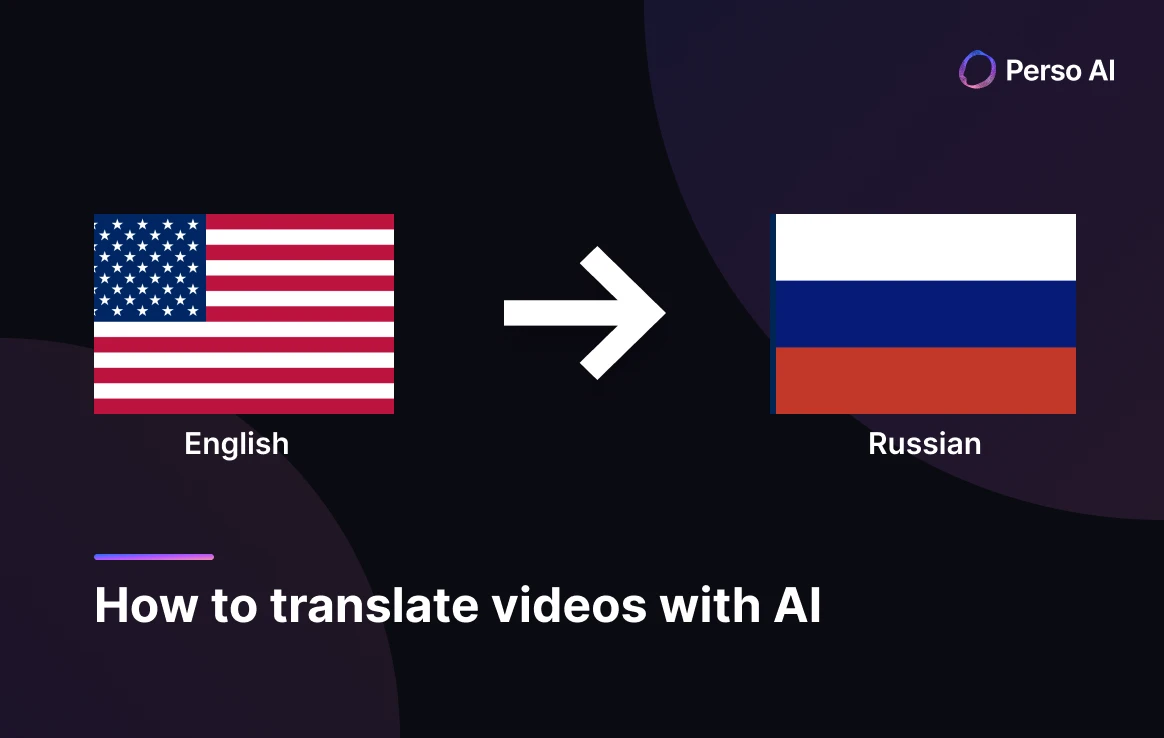
AIで英語動画をロシア語に翻訳する方法





AIビデオ翻訳、ローカリゼーション、および吹き替えツール
無料でお試しください
💡 Perso AIで、あらゆる英語動画を数分でロシア語に翻訳できます。 無料トライアル — クレジットカード不要。
答え先行の導入
ロシア語は世界で2億5,800万人の話者に届きます — その内訳は1億5,400万人のネイティブ話者に加え、ロシア連邦、CIS諸国、そして世界中のロシア語系ディアスポラにわたる数千万人の第二言語話者です(UN Regional Information Centre)。Perso AI は、ロシア語の6格文法体系、3つの性による名詞一致、そして正式/くだけた代名詞の選択(ты vs Вы)を扱いながら、AI吹き替えで英語動画をロシア語へ3ステップで翻訳します。
English → Russian は、Perso AI における最も特徴的なコンテンツ指標の一つを示します: ゲームが12.79%で最大のコンテンツカテゴリ — あらゆる言語ペアの中で最も高いゲームコンテンツ集中度 — に続き、コメディ(5.79%)、ニュース/時事(4.80%)、科学/技術(3.62%)が並びます。
このプラットフォームは長尺コンテンツをよく処理します — プロジェクトの平均長は471秒(約8分)で、あらゆる言語ペアの中で2番目に長い平均動画尺、さらに1プロジェクトあたり平均2.17人の話者は、インタビュー、パネル、Let's Play のゲーム形式を反映しています。
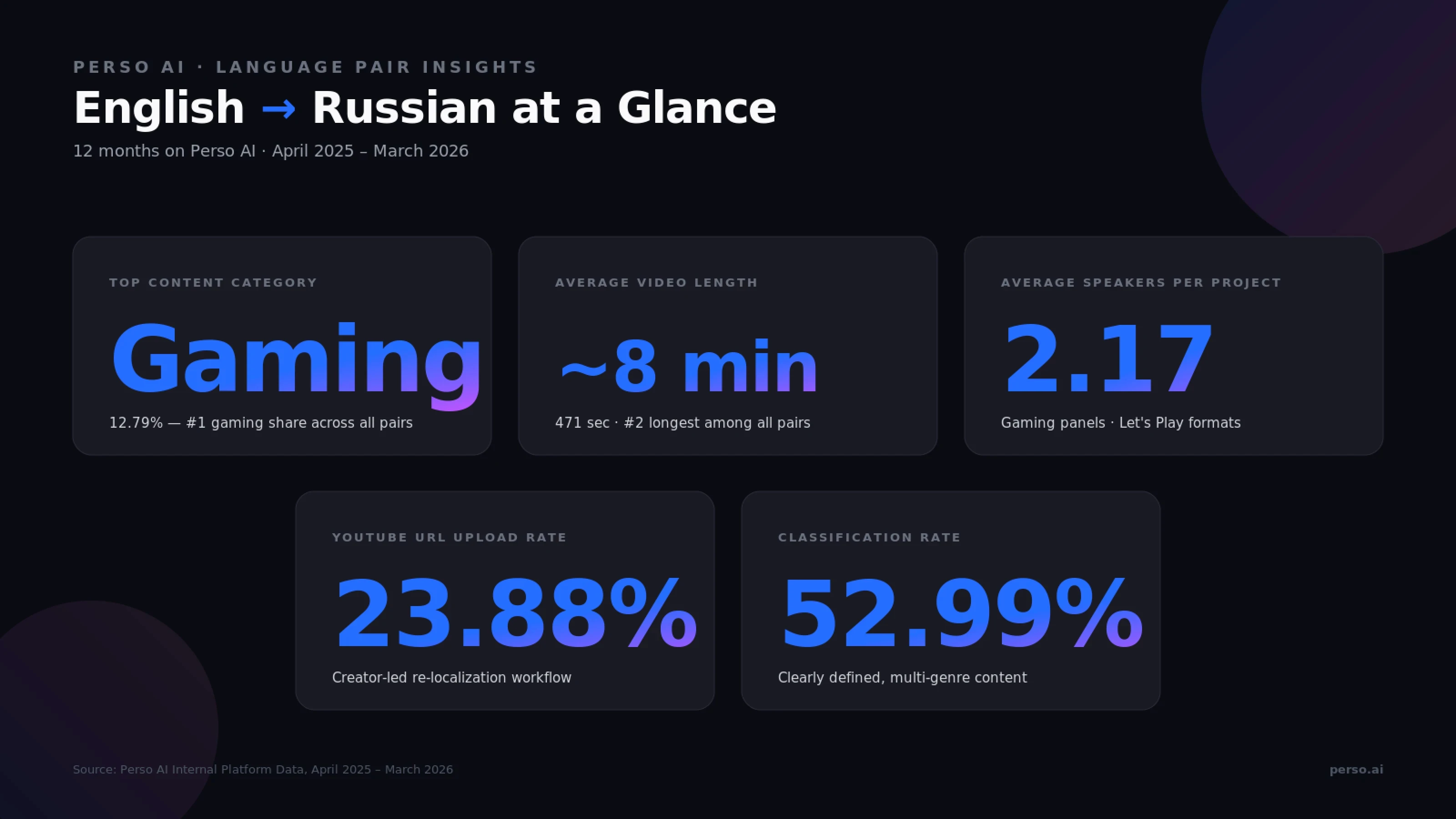
出典: Perso AI Internal Platform Data, 2025年4月 – 2026年3月
AIを使って英語動画をロシア語に翻訳するには?
Perso AI は英語動画をロシア語に3ステップで翻訳します:
アップロード:英語動画(MP4、MOV、AVI、MKV)をアップロードするか、YouTube URLを貼り付けます — 約30秒
ロシア語を選択し、任意機能(音声クローン、リップシンク、マルチスピーカー)を選びます — 約15秒
レビュー&エクスポート:吹き替え済み動画をMP4、WebM、MOVで書き出します(SRT/VTT字幕付き)
全体のパイプラインは、手作業の引き継ぎなしでエンドツーエンドに動作します。
ステップ1 — アップロードのポイント
English → Russian では、直接ファイルアップロードが70.04%で、YouTube URLの取り込みは23.88%です。この組み合わせは、ゲーム配信者、ニュース組織、スタジオが洗練されたコンテンツをアップロードする一方で、既存の英語YouTubeコンテンツをロシア語話者向けにローカライズするクリエイターもいることを反映しています。最大ファイルサイズは5 GBで、ポッドキャスト用途向けに音声のみ形式(MP3、WAV、M4A)もサポートされています。
ステップ2 — 言語選択時の任意機能
音声クローン — 元の英語話者のトーンをロシア語でも保持し、連載コンテンツやゲームクリエイターの継続性に有用です
マルチスピーカー検出 — 自動(English → Russian プロジェクトは平均1プロジェクトあたり2.17人の話者で、インタビュー、パネル、Let's Play 形式を反映するプラットフォーム内でも高いマルチスピーカー率の一つです)
リップシンク — プロジェクトの2.49%で使用され、配信や画面上の会話コンテンツのごく一部に選択的に適用されます
ステップ3 — レビュー&書き出しのポイント
内蔵エディタでロシア語スクリプトを行ごとに編集できます。これは特に、文法格の語尾(すべての名詞と形容詞に影響する6格体系)、性の一致(男性、女性、中性)、そして丁寧さ(くだけた ты vs 正式な Вы)を調整する際に有用です — いずれも英語では固有に表現されません。
Before / After: 従来の英語→ロシア語のスタジオ吹き替えには、キャスティング、スタジオ予約、数日にわたるポストプロダクション同期作業が必要でした。AI吹き替えなら、話者の声をクローンで保持しながら、同じ成果物を数分で届けます。
🎬 試してみますか? 最初の英語動画をアップロードして、数分でロシア語吹き替えを手に入れましょう。
なぜ English → Russian は独自にエンゲージメントの高いゲーム・デジタル視聴者に届くのか
English → Russian の吹き替えは、ロシアおよびより広いロシア語圏(CIS、ディアスポラ、旧ソ連諸国)を対象とするゲームクリエイター、ニュース媒体、グローバルコンテンツ配信者にとって、戦略的なローカライズ経路となっています。
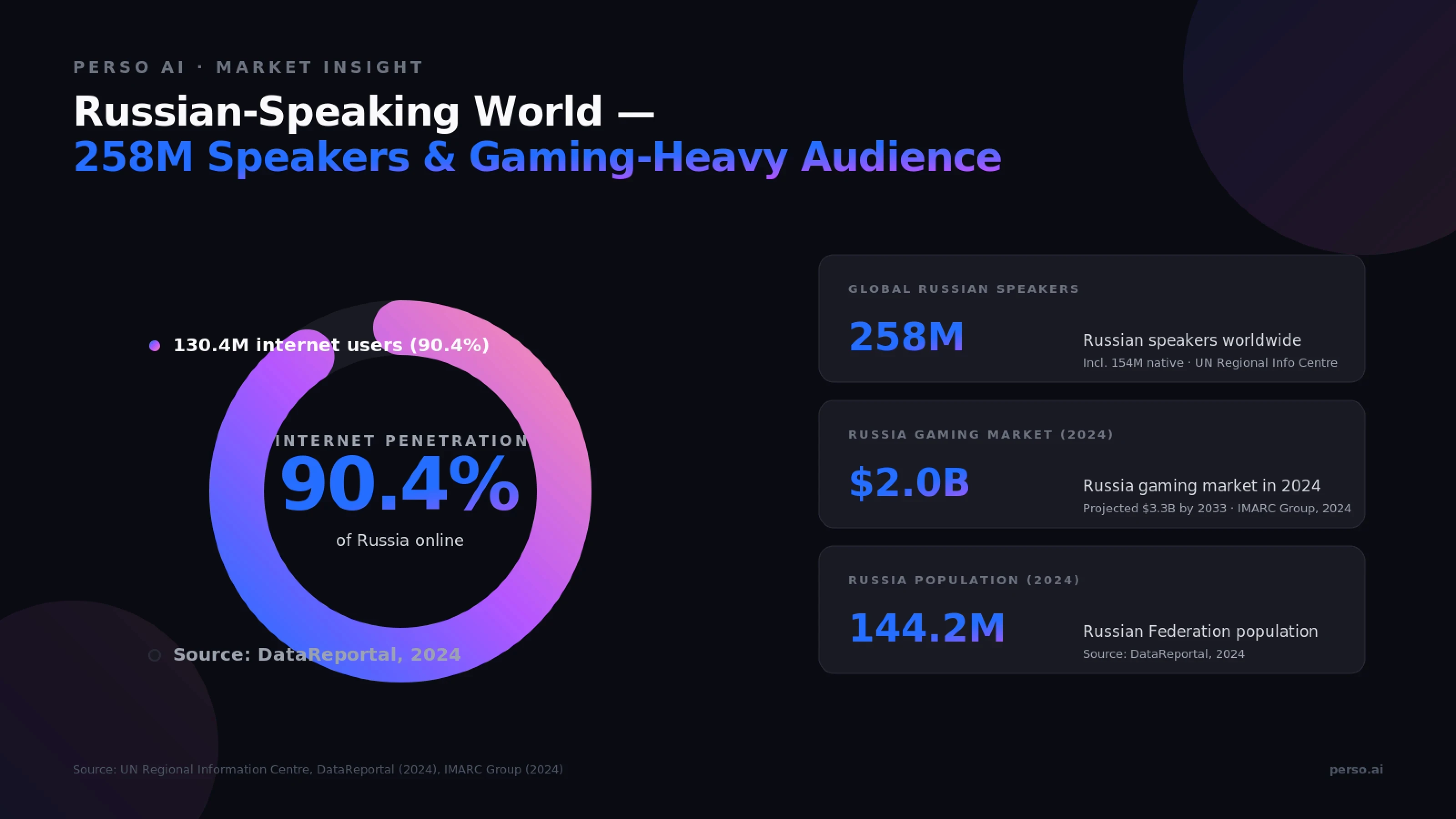
出典: UN Regional Information Centre, DataReportal (2024), IMARC Group (2024)
ロシア語コンテンツが世界的に重要な理由
ロシア語話者市場を支える数字:
指標 | 値 | 出典 |
|---|---|---|
世界のロシア語話者 | 合計2億5,800万人(うち1億5,400万人がネイティブ話者) | UN Regional Information Centre |
ロシア連邦の人口(2024年1月) | 1億4,420万人 | DataReportal, 2024 |
ロシアのインターネット利用者(2024年1月) | 1億3,040万人(普及率90.4%) | DataReportal, 2024 |
ロシアのソーシャルメディア利用者 | 1億600万人(人口の73.5%) | DataReportal, 2024 |
ロシアのゲーム市場(2024年) | 20億ドル(2033年までに33億ドルと予測) | IMARC Group, 2024 |
3つの需要エンジン
1. ゲームおよび Let's Play クリエイター。 ロシアのゲーム市場は2024年に20億ドルに達し(IMARC Group)、2033年までに33億ドルへ成長すると予測されています。Perso AI では、ゲームが12.79%で最大のコンテンツカテゴリ — プラットフォーム上のあらゆる言語ペアの中で最も高いゲームコンテンツ比率 — となっており、英語圏のゲームクリエイターがロシア語圏のゲーム視聴者向けにコンテンツをローカライズしている実態を示しています。1プロジェクトあたり平均2.17人の話者も、Let's Play やマルチプレイヤーの実況形式に合致します。
2. ニュースと時事。 News/Current Affairs はEnglish → Russian プロジェクトの4.80%を占めます — これは、英語ニュース、分析、時事コンテンツをロシア語に翻訳して、世界中のロシア語話者に届ける継続的な需要を反映する有意な割合です。
3. コメディとエンターテインメント。 Comedy はEnglish → Russian プロジェクトの5.79%を占めます — 2番目に大きいカテゴリであり、ロシア、CIS、ディアスポラの視聴者向けに適応されたスケッチ、スタンドアップ、エンターテインメントコンテンツを反映しています。
Perso AI のデータは、ゲーム中心でマルチスピーカーなロシア語特性と一致する
Perso AI 上の English → Russian プロジェクトは、長尺・ゲーム寄りの独特なパターンを示します:
平均471.4秒(約8分) — あらゆる言語ペアの中で2番目に長い(Korean → English のみがそれより長い)
1プロジェクトあたり平均2.17人の話者 — マルチスピーカー形式が一般的(ゲームパネル、インタビュー、Let's Play)
リップシンク有効化率2.49% — 低めで、画面上の会話よりも音声オーバーやゲーム実況に一致
直接ファイルアップロード70.04% — プロのクリエイターやスタジオのワークフローを示す特徴
分類率52.99% — 明確に定義されたマルチジャンルのコンテンツ構成
英語→ロシア語翻訳が技術的にユニークな理由は?
English → Russian は、ソース言語とターゲット言語が主語-動詞-目的語(SVO)語順を共有する言語ペアの一つであり、構文を簡略化します。課題は格体系、性の一致、動詞のアスペクト、キリル文字へと移ります。
英語 vs ロシア語 — 言語比較
特徴 | 英語 | ロシア語 |
|---|---|---|
語順 | SVO — 「彼女は動画を見る」 | 柔軟性のあるSVO — 「Она смотрит видео」(ほぼ同じ語順; 格によって柔軟) |
文字体系 | ラテン文字 | キリル文字(33文字) |
文法格 | なし(語順が機能を示す) | 6格(主格、属格、与格、対格、造格、前置格)— すべての名詞・代名詞・形容詞に影響します |
性 | 文法上の性はない(ほぼ) | 3つの性 — 男性、女性、中性 — が一致に影響します |
敬称代名詞 | 単一の「you」 | ты(くだけた単数)・Вы(正式な単数/複数) |
動詞のアスペクト | 時制ベース(過去、現在、未来) | アスペクトベース:完了体(完了した動作) vs 不完了体(進行中の動作)— 同じ動作に対する対になる動詞 |
冠詞 | 定冠詞「the」/不定冠詞「a/an」 | 冠詞なし |
出典: スラブ言語学の参考資料; ロシア科学アカデミー資料。
4段階の変換課題
英語音声をロシア語に変換するには、AI が4つの異なる処理を行う必要があります:
英語を正確に文字起こしする — 慣用表現、短縮形、ゲーム/ニュースのスラングを含む
格語尾を適用する — ロシア語のすべての名詞、代名詞、形容詞は、その文法上の役割(主語、目的語、所有、場所など)に応じて語尾が変化します
性の一致を合わせる — 冠詞、形容詞、過去形動詞は、名詞の男性・女性・中性の性に一致しなければなりません
動詞のアスペクトを選ぶ — モデルは、動作が完了しているか進行中かに応じて、完了体と不完了体のどちらかを選択しなければなりません
なぜ格体系が重要なのか
ロシア語の6格体系は、英語が語順と前置詞で表す意味を担っています。「私は猫を見る」(対格 — Я вижу кота) と「私は猫です」(造格 — Я являюсь котом) を比べると、格語尾が異なる文法関係をどう伝えるかが分かります。熟練した翻訳では、正しい格選択によってこれを保持します。
キリル文字
ロシア語はラテン文字とは異なる33文字のキリル文字を使用します。Perso AI のロシア語出力は、スクリプト全体でキリル文字の正確さを保ち、内蔵エディタで特定用語を確認できます。
英語→ロシア語吹き替えを形作るコンテンツカテゴリ
Perso AI の12か月データは、English → Russian において独特にゲーム寄りのコンテンツ構成を示しています — ゲームが大差で先行し、コメディ、ニュース、科学/技術コンテンツがそれを補完しています。
コンテンツカテゴリの内訳
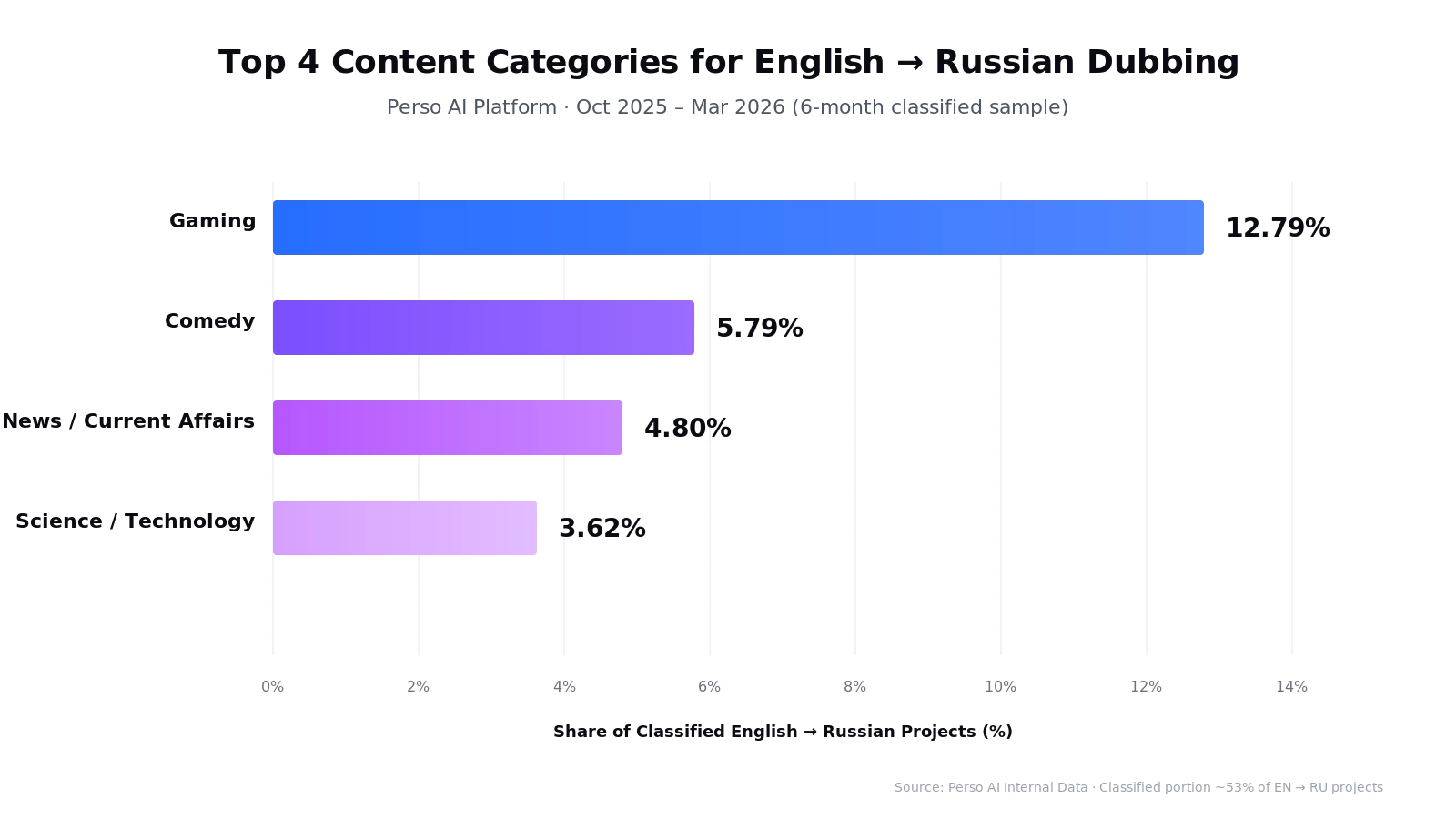
出典: Perso AI Internal Data · 2025年10月 – 2026年3月(6か月の分類サンプル)
ゲーム(12.79%) — この言語ペアで最大のコンテンツカテゴリであり、Perso AI 全体のあらゆる言語ペアの中で最も高いゲームコンテンツ集中度です。英語圏クリエイターによる Let's Play 動画、ゲームレビュー、eスポーツコンテンツ、ゲームチュートリアルがロシアのゲーマーに届いています
コメディ(5.79%) — ロシア語話者向けに適応されたスケッチ、スタンドアップ、ユーモアチャンネル
ニュース / 時事(4.80%) — 英語圏メディアのニュース報道、分析、時事コンテンツをロシア語圏向けに翻訳したもの
科学 / 技術(3.62%) — ロシア語学習者向けに適応された技術チュートリアル、サイエンス・コミュニケーション、STEMコンテンツ
注: カテゴリデータは、AIによるカテゴリ分類を受けた English → Russian プロジェクトの約53%を反映しています(機能は2025年10月から有効)。
フォーマットの特徴
English → Russian プロジェクトは、長尺・マルチスピーカー・ゲーム寄りの特性を共有しています:
平均動画長: 471秒(約8分) — あらゆる言語ペアの中で2番目に長い(Korean → English の後)
1プロジェクトあたり平均話者数: 2.17 — ゲームパネルや Let's Play 形式を反映する高いマルチスピーカー率の一つ
リップシンク有効化率: 2.49% — 低めで、画面上の会話よりも音声オーバー中心の解説に一致
直接ファイルアップロード: 70.04% — プロのクリエイターやスタジオのワークフロー
分類率: 52.99% — 明確に定義されたコンテンツ構成
クリエイターとスタジオにとって何を意味するか
ロシア語話者向けに英語コンテンツを制作している場合、ワークフローにはおそらく次が含まれます:
長尺のファイルアップロード(通常6〜15分のエピソード)
主なジャンルはゲーム、コメディ、ニュース、科学/技術
マルチスピーカーコンテンツ(ゲームのパネル、インタビュー形式)
連載型のゲームクリエイターコンテンツ向け音声クローン
スクリプト編集時の格体系と性の一致の調整
Perso AI の English → Russian パイプラインは、このゲーム中心のマルチジャンルワークフローをサポートします。
Perso AI は英語→ロシア語吹き替えをどのように処理するのか?
Perso AI はAI搭載の動画吹き替え・翻訳プラットフォームです。33以上の言語をサポートしています。その English → Russian パイプラインは、ロシア語圏のコンテンツ経済 — ゲームクリエイター、ニュース媒体、コメディチャンネル、そしてロシア、CIS諸国、世界のロシア語系ディアスポラに届く技術系コンテンツ配信者 — に合わせて調整されています。
格体系に対応した英語→ロシア語の直接翻訳
一般的な翻訳ツールは、ロシア語の文法格体系を無視した直訳を生成しがちで、読者に不自然または誤った名詞・形容詞の語尾を残します。Perso AI の英語→ロシア語直接モデルは、スクリプト全体にわたって文脈に応じて格語尾、性の一致、動詞のアスペクトを適用します。
キリル文字の精度
ロシア語はキリル文字(33文字)を使用します。Perso AI のロシア語出力はキリル文字の正確さを保ち、ラテン文字のまま残すべき固有名詞、技術用語、ブランド名には適切な音訳を適用します。
音声クローンがクリエイターのアイデンティティを保持
長尺のゲームコンテンツ、連載型の実況、ニュース番組、コメディクリエイターにとって、エピソード間の声の一貫性は重要です。プラットフォームは元の話者の声質(ピッチ、音色、話速)をクローンし、それをロシア語出力に適用することで、単独話者とマルチスピーカーの両方の形式を支えます。
マルチスピーカー検出(1プロジェクト平均2.17人の声)
English → Russian プロジェクトは2.17人の異なる話者を平均し、Perso AI 内でも高いマルチスピーカー率の一つです。これは、ゲームパネルの解説、Let's Play 形式、ニュースインタビュー、コメディスケッチに適しています。話者の切り替えは自動で検出され、それぞれに別々のロシア語音声が割り当てられます。
敬体とアスペクトを考慮した出力
一般的な翻訳ツールとは異なり、Perso AI のロシア語出力は、敬体(ты vs Вы)と動詞のアスペクト(完了体 vs 不完了体)を文脈に応じて処理します。編集者は、キャラクター固有のトーンやアスペクト選択のために、内蔵スクリプトエディタで特定の行を調整できます。
長尺コンテンツ向けの柔軟な書き出し
出力形式には、動画用のMP4、WebM、MOVに加え、字幕ファイル用のSRT、VTT、ASSが含まれます。これにより、YouTube、ロシア語圏プラットフォーム、ゲーム配信サービスへの再アップロードや、配信・ソーシャルメディア配信用の別納品物としての書き出しが可能です。
よくある質問
AIによる英語→ロシア語動画翻訳の精度はどの程度ですか?
Perso AI は English-to-Russian 吹き替えで高い翻訳精度を達成しており、ゲーム、コメディ、ニュース、科学/技術コンテンツ全般で検証されています。精度は、スラングの多い非台本素材よりも台本化されたコンテンツの方が高くなります。English → Russian は、ゲームが12.79%で最大カテゴリとなる、プラットフォーム上でも最も特徴的なコンテンツ指標の一つです。
Perso AI はロシア語の6格文法体系を処理できますか?
はい。Perso AI の英語→ロシア語直接モデルは、格語尾を文脈に応じて処理し、すべての名詞・代名詞・形容詞に対して、その文法上の役割に基づく主格、属格、与格、対格、造格、前置格の正しい語尾を付与します。編集者は内蔵スクリプトエディタで特定用語を調整できます。
英語動画をロシア語に吹き替えるにはどれくらい時間がかかりますか?
AI吹き替えなら、手動のスタジオ吹き替えに必要な数日ではなく、数分でロシア語版を提供できます。Perso AI における英語→ロシア語プロジェクトの平均長は471秒(約8分)で、あらゆる言語ペアの中で2番目に長いです。パイプライン全体はプラットフォーム上でエンドツーエンドに動作します。
Perso AI は複数話者のゲームコンテンツ(Let's Play、パネル解説)を処理できますか?
はい。English → Russian プロジェクトは1プロジェクトあたり平均2.17人の話者で、Perso AI 内でも高いマルチスピーカー率の一つです。これは、ゲームクリエイターが Let's Play、パネル解説、マルチプレイヤーコンテンツにこのプラットフォームを使っていることを反映しています。話者の切り替えは自動で検出されます。
Perso AI のロシア語出力ではキリル文字を使いますか?
はい。Perso AI のロシア語出力は標準的なキリル文字(33文字)を使用し、ラテン文字のまま残すべき固有名詞、技術用語、ブランド名には適切な音訳を適用します。編集者は内蔵スクリプトエディタで特定用語を調整できます。
English-to-Russian 吹き替えで最も成果が出るコンテンツは何ですか?
ゲーム、コメディ、ニュース、科学/技術のコンテンツはすべて Perso AI で高い成果を示します。ゲームだけで English-to-Russian プロジェクト全体の12.79%を占め、このペアにおける主要カテゴリであり、プラットフォーム上のあらゆる言語ペアの中で最も高いゲームコンテンツ集中度です。ロシア語は世界で2億5,800万人の話者に届くため(UN Regional Information Centre)、台本化された長尺コンテンツはプロのAI吹き替えから最も恩恵を受けます。
英語動画をロシア語に翻訳する準備はできましたか?
最初の English → Russian 吹き替えプロジェクトを数分で始めましょう。無料トライアル — クレジットカード不要。
データソース: Perso AI Internal Platform Data, 2025年4月 – 2026年3月。市場 आंक? は、本文中に引用した UN Regional Information Centre, DataReportal (2024), and IMARC Group (2024) に基づきます。この投稿は Perso AI の Language Pair Guide シリーズの一部です。より広いAI吹き替えの動向については、Q1 2026 AI Dubbing Language Trends Report をご覧ください。
💡 Perso AIで、あらゆる英語動画を数分でロシア語に翻訳できます。 無料トライアル — クレジットカード不要。
答え先行の導入
ロシア語は世界で2億5,800万人の話者に届きます — その内訳は1億5,400万人のネイティブ話者に加え、ロシア連邦、CIS諸国、そして世界中のロシア語系ディアスポラにわたる数千万人の第二言語話者です(UN Regional Information Centre)。Perso AI は、ロシア語の6格文法体系、3つの性による名詞一致、そして正式/くだけた代名詞の選択(ты vs Вы)を扱いながら、AI吹き替えで英語動画をロシア語へ3ステップで翻訳します。
English → Russian は、Perso AI における最も特徴的なコンテンツ指標の一つを示します: ゲームが12.79%で最大のコンテンツカテゴリ — あらゆる言語ペアの中で最も高いゲームコンテンツ集中度 — に続き、コメディ(5.79%)、ニュース/時事(4.80%)、科学/技術(3.62%)が並びます。
このプラットフォームは長尺コンテンツをよく処理します — プロジェクトの平均長は471秒(約8分)で、あらゆる言語ペアの中で2番目に長い平均動画尺、さらに1プロジェクトあたり平均2.17人の話者は、インタビュー、パネル、Let's Play のゲーム形式を反映しています。
出典: Perso AI Internal Platform Data, 2025年4月 – 2026年3月
AIを使って英語動画をロシア語に翻訳するには?
Perso AI は英語動画をロシア語に3ステップで翻訳します:
アップロード:英語動画(MP4、MOV、AVI、MKV)をアップロードするか、YouTube URLを貼り付けます — 約30秒
ロシア語を選択し、任意機能(音声クローン、リップシンク、マルチスピーカー)を選びます — 約15秒
レビュー&エクスポート:吹き替え済み動画をMP4、WebM、MOVで書き出します(SRT/VTT字幕付き)
全体のパイプラインは、手作業の引き継ぎなしでエンドツーエンドに動作します。
ステップ1 — アップロードのポイント
English → Russian では、直接ファイルアップロードが70.04%で、YouTube URLの取り込みは23.88%です。この組み合わせは、ゲーム配信者、ニュース組織、スタジオが洗練されたコンテンツをアップロードする一方で、既存の英語YouTubeコンテンツをロシア語話者向けにローカライズするクリエイターもいることを反映しています。最大ファイルサイズは5 GBで、ポッドキャスト用途向けに音声のみ形式(MP3、WAV、M4A)もサポートされています。
ステップ2 — 言語選択時の任意機能
音声クローン — 元の英語話者のトーンをロシア語でも保持し、連載コンテンツやゲームクリエイターの継続性に有用です
マルチスピーカー検出 — 自動(English → Russian プロジェクトは平均1プロジェクトあたり2.17人の話者で、インタビュー、パネル、Let's Play 形式を反映するプラットフォーム内でも高いマルチスピーカー率の一つです)
リップシンク — プロジェクトの2.49%で使用され、配信や画面上の会話コンテンツのごく一部に選択的に適用されます
ステップ3 — レビュー&書き出しのポイント
内蔵エディタでロシア語スクリプトを行ごとに編集できます。これは特に、文法格の語尾(すべての名詞と形容詞に影響する6格体系)、性の一致(男性、女性、中性)、そして丁寧さ(くだけた ты vs 正式な Вы)を調整する際に有用です — いずれも英語では固有に表現されません。
Before / After: 従来の英語→ロシア語のスタジオ吹き替えには、キャスティング、スタジオ予約、数日にわたるポストプロダクション同期作業が必要でした。AI吹き替えなら、話者の声をクローンで保持しながら、同じ成果物を数分で届けます。
🎬 試してみますか? 最初の英語動画をアップロードして、数分でロシア語吹き替えを手に入れましょう。
なぜ English → Russian は独自にエンゲージメントの高いゲーム・デジタル視聴者に届くのか
English → Russian の吹き替えは、ロシアおよびより広いロシア語圏(CIS、ディアスポラ、旧ソ連諸国)を対象とするゲームクリエイター、ニュース媒体、グローバルコンテンツ配信者にとって、戦略的なローカライズ経路となっています。
出典: UN Regional Information Centre, DataReportal (2024), IMARC Group (2024)
ロシア語コンテンツが世界的に重要な理由
ロシア語話者市場を支える数字:
指標 | 値 | 出典 |
|---|---|---|
世界のロシア語話者 | 合計2億5,800万人(うち1億5,400万人がネイティブ話者) | UN Regional Information Centre |
ロシア連邦の人口(2024年1月) | 1億4,420万人 | DataReportal, 2024 |
ロシアのインターネット利用者(2024年1月) | 1億3,040万人(普及率90.4%) | DataReportal, 2024 |
ロシアのソーシャルメディア利用者 | 1億600万人(人口の73.5%) | DataReportal, 2024 |
ロシアのゲーム市場(2024年) | 20億ドル(2033年までに33億ドルと予測) | IMARC Group, 2024 |
3つの需要エンジン
1. ゲームおよび Let's Play クリエイター。 ロシアのゲーム市場は2024年に20億ドルに達し(IMARC Group)、2033年までに33億ドルへ成長すると予測されています。Perso AI では、ゲームが12.79%で最大のコンテンツカテゴリ — プラットフォーム上のあらゆる言語ペアの中で最も高いゲームコンテンツ比率 — となっており、英語圏のゲームクリエイターがロシア語圏のゲーム視聴者向けにコンテンツをローカライズしている実態を示しています。1プロジェクトあたり平均2.17人の話者も、Let's Play やマルチプレイヤーの実況形式に合致します。
2. ニュースと時事。 News/Current Affairs はEnglish → Russian プロジェクトの4.80%を占めます — これは、英語ニュース、分析、時事コンテンツをロシア語に翻訳して、世界中のロシア語話者に届ける継続的な需要を反映する有意な割合です。
3. コメディとエンターテインメント。 Comedy はEnglish → Russian プロジェクトの5.79%を占めます — 2番目に大きいカテゴリであり、ロシア、CIS、ディアスポラの視聴者向けに適応されたスケッチ、スタンドアップ、エンターテインメントコンテンツを反映しています。
Perso AI のデータは、ゲーム中心でマルチスピーカーなロシア語特性と一致する
Perso AI 上の English → Russian プロジェクトは、長尺・ゲーム寄りの独特なパターンを示します:
平均471.4秒(約8分) — あらゆる言語ペアの中で2番目に長い(Korean → English のみがそれより長い)
1プロジェクトあたり平均2.17人の話者 — マルチスピーカー形式が一般的(ゲームパネル、インタビュー、Let's Play)
リップシンク有効化率2.49% — 低めで、画面上の会話よりも音声オーバーやゲーム実況に一致
直接ファイルアップロード70.04% — プロのクリエイターやスタジオのワークフローを示す特徴
分類率52.99% — 明確に定義されたマルチジャンルのコンテンツ構成
英語→ロシア語翻訳が技術的にユニークな理由は?
English → Russian は、ソース言語とターゲット言語が主語-動詞-目的語(SVO)語順を共有する言語ペアの一つであり、構文を簡略化します。課題は格体系、性の一致、動詞のアスペクト、キリル文字へと移ります。
英語 vs ロシア語 — 言語比較
特徴 | 英語 | ロシア語 |
|---|---|---|
語順 | SVO — 「彼女は動画を見る」 | 柔軟性のあるSVO — 「Она смотрит видео」(ほぼ同じ語順; 格によって柔軟) |
文字体系 | ラテン文字 | キリル文字(33文字) |
文法格 | なし(語順が機能を示す) | 6格(主格、属格、与格、対格、造格、前置格)— すべての名詞・代名詞・形容詞に影響します |
性 | 文法上の性はない(ほぼ) | 3つの性 — 男性、女性、中性 — が一致に影響します |
敬称代名詞 | 単一の「you」 | ты(くだけた単数)・Вы(正式な単数/複数) |
動詞のアスペクト | 時制ベース(過去、現在、未来) | アスペクトベース:完了体(完了した動作) vs 不完了体(進行中の動作)— 同じ動作に対する対になる動詞 |
冠詞 | 定冠詞「the」/不定冠詞「a/an」 | 冠詞なし |
出典: スラブ言語学の参考資料; ロシア科学アカデミー資料。
4段階の変換課題
英語音声をロシア語に変換するには、AI が4つの異なる処理を行う必要があります:
英語を正確に文字起こしする — 慣用表現、短縮形、ゲーム/ニュースのスラングを含む
格語尾を適用する — ロシア語のすべての名詞、代名詞、形容詞は、その文法上の役割(主語、目的語、所有、場所など)に応じて語尾が変化します
性の一致を合わせる — 冠詞、形容詞、過去形動詞は、名詞の男性・女性・中性の性に一致しなければなりません
動詞のアスペクトを選ぶ — モデルは、動作が完了しているか進行中かに応じて、完了体と不完了体のどちらかを選択しなければなりません
なぜ格体系が重要なのか
ロシア語の6格体系は、英語が語順と前置詞で表す意味を担っています。「私は猫を見る」(対格 — Я вижу кота) と「私は猫です」(造格 — Я являюсь котом) を比べると、格語尾が異なる文法関係をどう伝えるかが分かります。熟練した翻訳では、正しい格選択によってこれを保持します。
キリル文字
ロシア語はラテン文字とは異なる33文字のキリル文字を使用します。Perso AI のロシア語出力は、スクリプト全体でキリル文字の正確さを保ち、内蔵エディタで特定用語を確認できます。
英語→ロシア語吹き替えを形作るコンテンツカテゴリ
Perso AI の12か月データは、English → Russian において独特にゲーム寄りのコンテンツ構成を示しています — ゲームが大差で先行し、コメディ、ニュース、科学/技術コンテンツがそれを補完しています。
コンテンツカテゴリの内訳
出典: Perso AI Internal Data · 2025年10月 – 2026年3月(6か月の分類サンプル)
ゲーム(12.79%) — この言語ペアで最大のコンテンツカテゴリであり、Perso AI 全体のあらゆる言語ペアの中で最も高いゲームコンテンツ集中度です。英語圏クリエイターによる Let's Play 動画、ゲームレビュー、eスポーツコンテンツ、ゲームチュートリアルがロシアのゲーマーに届いています
コメディ(5.79%) — ロシア語話者向けに適応されたスケッチ、スタンドアップ、ユーモアチャンネル
ニュース / 時事(4.80%) — 英語圏メディアのニュース報道、分析、時事コンテンツをロシア語圏向けに翻訳したもの
科学 / 技術(3.62%) — ロシア語学習者向けに適応された技術チュートリアル、サイエンス・コミュニケーション、STEMコンテンツ
注: カテゴリデータは、AIによるカテゴリ分類を受けた English → Russian プロジェクトの約53%を反映しています(機能は2025年10月から有効)。
フォーマットの特徴
English → Russian プロジェクトは、長尺・マルチスピーカー・ゲーム寄りの特性を共有しています:
平均動画長: 471秒(約8分) — あらゆる言語ペアの中で2番目に長い(Korean → English の後)
1プロジェクトあたり平均話者数: 2.17 — ゲームパネルや Let's Play 形式を反映する高いマルチスピーカー率の一つ
リップシンク有効化率: 2.49% — 低めで、画面上の会話よりも音声オーバー中心の解説に一致
直接ファイルアップロード: 70.04% — プロのクリエイターやスタジオのワークフロー
分類率: 52.99% — 明確に定義されたコンテンツ構成
クリエイターとスタジオにとって何を意味するか
ロシア語話者向けに英語コンテンツを制作している場合、ワークフローにはおそらく次が含まれます:
長尺のファイルアップロード(通常6〜15分のエピソード)
主なジャンルはゲーム、コメディ、ニュース、科学/技術
マルチスピーカーコンテンツ(ゲームのパネル、インタビュー形式)
連載型のゲームクリエイターコンテンツ向け音声クローン
スクリプト編集時の格体系と性の一致の調整
Perso AI の English → Russian パイプラインは、このゲーム中心のマルチジャンルワークフローをサポートします。
Perso AI は英語→ロシア語吹き替えをどのように処理するのか?
Perso AI はAI搭載の動画吹き替え・翻訳プラットフォームです。33以上の言語をサポートしています。その English → Russian パイプラインは、ロシア語圏のコンテンツ経済 — ゲームクリエイター、ニュース媒体、コメディチャンネル、そしてロシア、CIS諸国、世界のロシア語系ディアスポラに届く技術系コンテンツ配信者 — に合わせて調整されています。
格体系に対応した英語→ロシア語の直接翻訳
一般的な翻訳ツールは、ロシア語の文法格体系を無視した直訳を生成しがちで、読者に不自然または誤った名詞・形容詞の語尾を残します。Perso AI の英語→ロシア語直接モデルは、スクリプト全体にわたって文脈に応じて格語尾、性の一致、動詞のアスペクトを適用します。
キリル文字の精度
ロシア語はキリル文字(33文字)を使用します。Perso AI のロシア語出力はキリル文字の正確さを保ち、ラテン文字のまま残すべき固有名詞、技術用語、ブランド名には適切な音訳を適用します。
音声クローンがクリエイターのアイデンティティを保持
長尺のゲームコンテンツ、連載型の実況、ニュース番組、コメディクリエイターにとって、エピソード間の声の一貫性は重要です。プラットフォームは元の話者の声質(ピッチ、音色、話速)をクローンし、それをロシア語出力に適用することで、単独話者とマルチスピーカーの両方の形式を支えます。
マルチスピーカー検出(1プロジェクト平均2.17人の声)
English → Russian プロジェクトは2.17人の異なる話者を平均し、Perso AI 内でも高いマルチスピーカー率の一つです。これは、ゲームパネルの解説、Let's Play 形式、ニュースインタビュー、コメディスケッチに適しています。話者の切り替えは自動で検出され、それぞれに別々のロシア語音声が割り当てられます。
敬体とアスペクトを考慮した出力
一般的な翻訳ツールとは異なり、Perso AI のロシア語出力は、敬体(ты vs Вы)と動詞のアスペクト(完了体 vs 不完了体)を文脈に応じて処理します。編集者は、キャラクター固有のトーンやアスペクト選択のために、内蔵スクリプトエディタで特定の行を調整できます。
長尺コンテンツ向けの柔軟な書き出し
出力形式には、動画用のMP4、WebM、MOVに加え、字幕ファイル用のSRT、VTT、ASSが含まれます。これにより、YouTube、ロシア語圏プラットフォーム、ゲーム配信サービスへの再アップロードや、配信・ソーシャルメディア配信用の別納品物としての書き出しが可能です。
よくある質問
AIによる英語→ロシア語動画翻訳の精度はどの程度ですか?
Perso AI は English-to-Russian 吹き替えで高い翻訳精度を達成しており、ゲーム、コメディ、ニュース、科学/技術コンテンツ全般で検証されています。精度は、スラングの多い非台本素材よりも台本化されたコンテンツの方が高くなります。English → Russian は、ゲームが12.79%で最大カテゴリとなる、プラットフォーム上でも最も特徴的なコンテンツ指標の一つです。
Perso AI はロシア語の6格文法体系を処理できますか?
はい。Perso AI の英語→ロシア語直接モデルは、格語尾を文脈に応じて処理し、すべての名詞・代名詞・形容詞に対して、その文法上の役割に基づく主格、属格、与格、対格、造格、前置格の正しい語尾を付与します。編集者は内蔵スクリプトエディタで特定用語を調整できます。
英語動画をロシア語に吹き替えるにはどれくらい時間がかかりますか?
AI吹き替えなら、手動のスタジオ吹き替えに必要な数日ではなく、数分でロシア語版を提供できます。Perso AI における英語→ロシア語プロジェクトの平均長は471秒(約8分)で、あらゆる言語ペアの中で2番目に長いです。パイプライン全体はプラットフォーム上でエンドツーエンドに動作します。
Perso AI は複数話者のゲームコンテンツ(Let's Play、パネル解説)を処理できますか?
はい。English → Russian プロジェクトは1プロジェクトあたり平均2.17人の話者で、Perso AI 内でも高いマルチスピーカー率の一つです。これは、ゲームクリエイターが Let's Play、パネル解説、マルチプレイヤーコンテンツにこのプラットフォームを使っていることを反映しています。話者の切り替えは自動で検出されます。
Perso AI のロシア語出力ではキリル文字を使いますか?
はい。Perso AI のロシア語出力は標準的なキリル文字(33文字)を使用し、ラテン文字のまま残すべき固有名詞、技術用語、ブランド名には適切な音訳を適用します。編集者は内蔵スクリプトエディタで特定用語を調整できます。
English-to-Russian 吹き替えで最も成果が出るコンテンツは何ですか?
ゲーム、コメディ、ニュース、科学/技術のコンテンツはすべて Perso AI で高い成果を示します。ゲームだけで English-to-Russian プロジェクト全体の12.79%を占め、このペアにおける主要カテゴリであり、プラットフォーム上のあらゆる言語ペアの中で最も高いゲームコンテンツ集中度です。ロシア語は世界で2億5,800万人の話者に届くため(UN Regional Information Centre)、台本化された長尺コンテンツはプロのAI吹き替えから最も恩恵を受けます。
英語動画をロシア語に翻訳する準備はできましたか?
最初の English → Russian 吹き替えプロジェクトを数分で始めましょう。無料トライアル — クレジットカード不要。
データソース: Perso AI Internal Platform Data, 2025年4月 – 2026年3月。市場 आंक? は、本文中に引用した UN Regional Information Centre, DataReportal (2024), and IMARC Group (2024) に基づきます。この投稿は Perso AI の Language Pair Guide シリーズの一部です。より広いAI吹き替えの動向については、Q1 2026 AI Dubbing Language Trends Report をご覧ください。
続きを読む
すべてを閲覧する