AIで韓国語の動画を英語に翻訳する方法





AIビデオ翻訳、ローカリゼーション、および吹き替えツール
無料でお試しください
💡 Perso AIで、韓国語の動画を数分で英語に翻訳。 無料トライアル — クレジットカードは不要です。
答えを先に示す導入
韓流(Hallyu)は現在、119か国で2億2,500万人のファンに届いており、年間経済価値は141.6億ドルに達しています(Korea Foundation, 2024)。Perso AIは、AI吹き替えによって韓国語の動画を英語へ3ステップで翻訳し、韓国語のSOV語順と三段階の敬語体系を自然な英語へ再構成しながら、話者本来の声を保ちます。
韓国語 → 英語は、プラットフォーム上で最も処理量の多い言語ペアの1つです。総処理コンテンツ量で第1位(12か月で2,105時間超)、平均動画長で第1位(1クリップあたり約8分)です。AI吹き替えにより、英語版を数日ではなく数分で提供でき、制作者はローカライズ済みコンテンツを当日中に公開できます。
最も特徴的な指標は、韓国語 → 英語プロジェクトの31.25%でリップシンクが有効化されることです。これはPerso AI全体の全言語ペアの中で最も高い有効化率です。これは韓流コンテンツの特徴を反映しています。K-Drama、K-Pop、K-Varietyでは、画面上の口の動きの一致が、声の翻訳と同じくらい重要です。
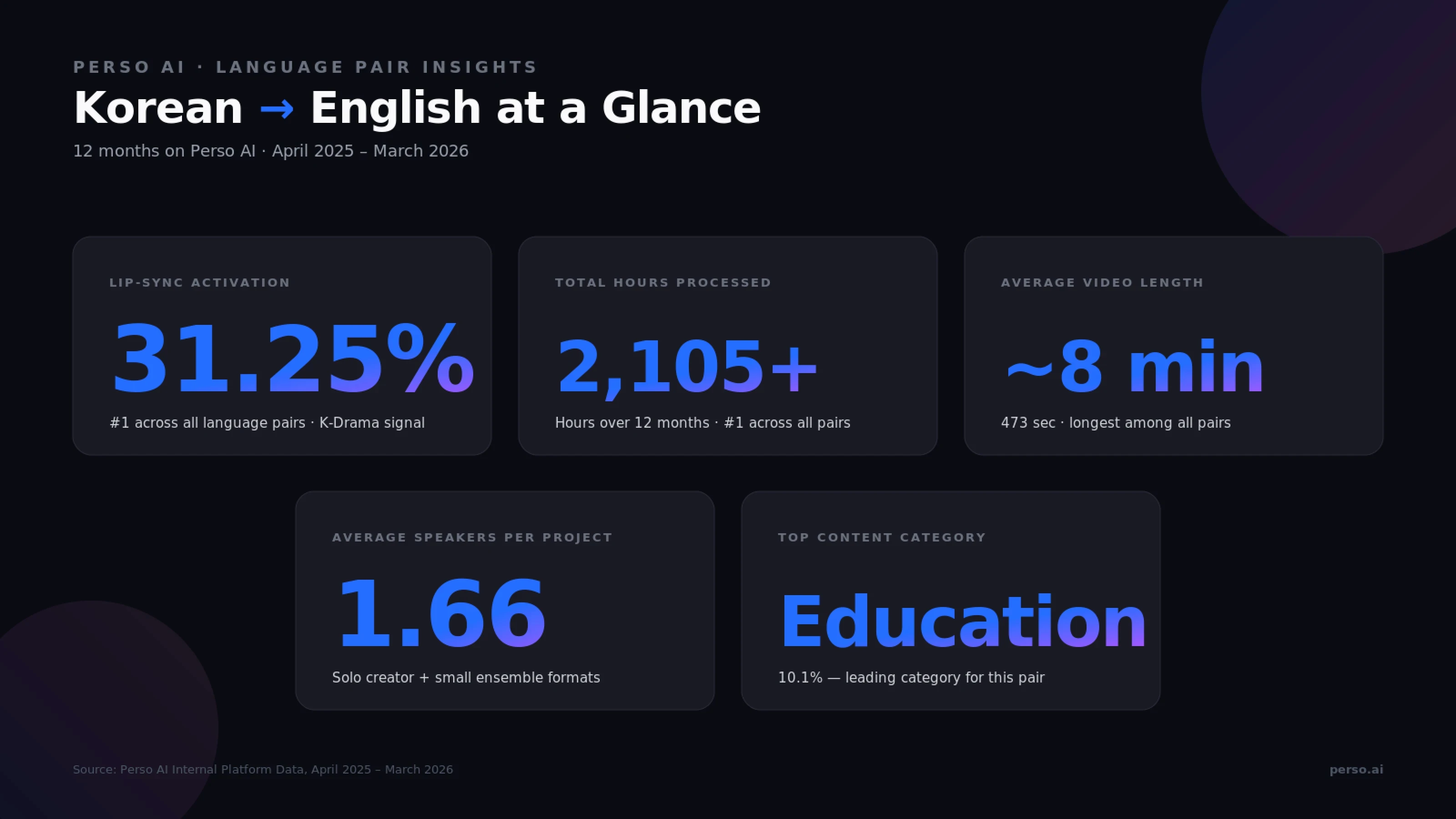
出典: Perso AI内部プラットフォームデータ、2025年4月 – 2026年3月
AIで韓国語の動画を英語に翻訳するには?
Perso AIは、韓国語の動画を3ステップで英語に翻訳します。
アップロード — 韓国語の動画(MP4、MOV、AVI、MKV)をアップロードするか、YouTubeのURLを貼り付けます — 約30秒
英語を選択 — 目的言語として英語を選び、オプション機能(ボイスクローン、リップシンク、複数話者)を選択します — 約15秒
確認 & エクスポート — 吹き替え済み動画をMP4、WebM、MOVで書き出します(SRT/VTT字幕も含む)
この一連の処理は、手作業の引き継ぎなしでエンドツーエンドに実行されます。
ステップ1 — アップロード時の注意
韓国語 → 英語では、直接ファイルのアップロードが全体の70.5%を占め、YouTube URLの取り込みは24.7%です。この構成は、2種類のユーザー像を示しています。洗練された書き出しファイルをアップロードするスタジオと、既存のYouTubeコンテンツを貼り付けて素早く再ローカライズする制作者です。最大ファイルサイズは5GBで、ポッドキャスト用途向けに音声のみの形式(MP3、WAV、M4A)もサポートされています。
ステップ2 — 言語選択時のオプション機能
ボイスクローン — 英語でも元の韓国語話者のトーンを保持します。チャンネルやブランドのアイデンティティを維持したいKコンテンツ制作者に有用です
複数話者検出 — 自動(韓国語 → 英語プロジェクトの平均話者数は1.66人で、単独ホストや少人数インタビュー形式に適しています)
リップシンク — 韓国語 → 英語プロジェクトの31.25%で使用され、Perso AI全言語ペアの中で最も高い有効化率です。K-DramaやK-Popのように、口の動きの一致が重要なコンテンツを反映しています
ステップ3 — 確認 & 書き出し時の注意
内蔵エディターで英語スクリプトを1行ずつ編集できます。これは、韓国語の敬語を扱う際に特に有用です。반말(親しい・くだけた表現)、해요체(丁寧体)、합니다체(正式体)を、英語の適切な文体に変換します。英語には同等の文法的な形式レベルがないためです。
Before / After: 従来の韓国語→英語のスタジオ吹き替えは、主要なKコンテンツ配信事業者で使われてきましたが、通常は声優キャスティング、スタジオ予約、そして数日を要するポストプロダクションの同期作業が必要です。AI吹き替えなら、元の制作者の声をクローンで保ちながら、同じ成果物を数分で提供できます。
🎬 試してみますか? 最初の韓国語動画をアップロードして、数分で英語吹き替えを取得しましょう。
韓国語 → 英語が最も活発な吹き替え回廊の1つである理由
韓国語 → 英語の吹き替えは、英語圏の視聴者を狙うKコンテンツ制作者、スタジオ、グローバルブランドにとって、戦略的な成長レバーになっています。マクロ指標は明確です。
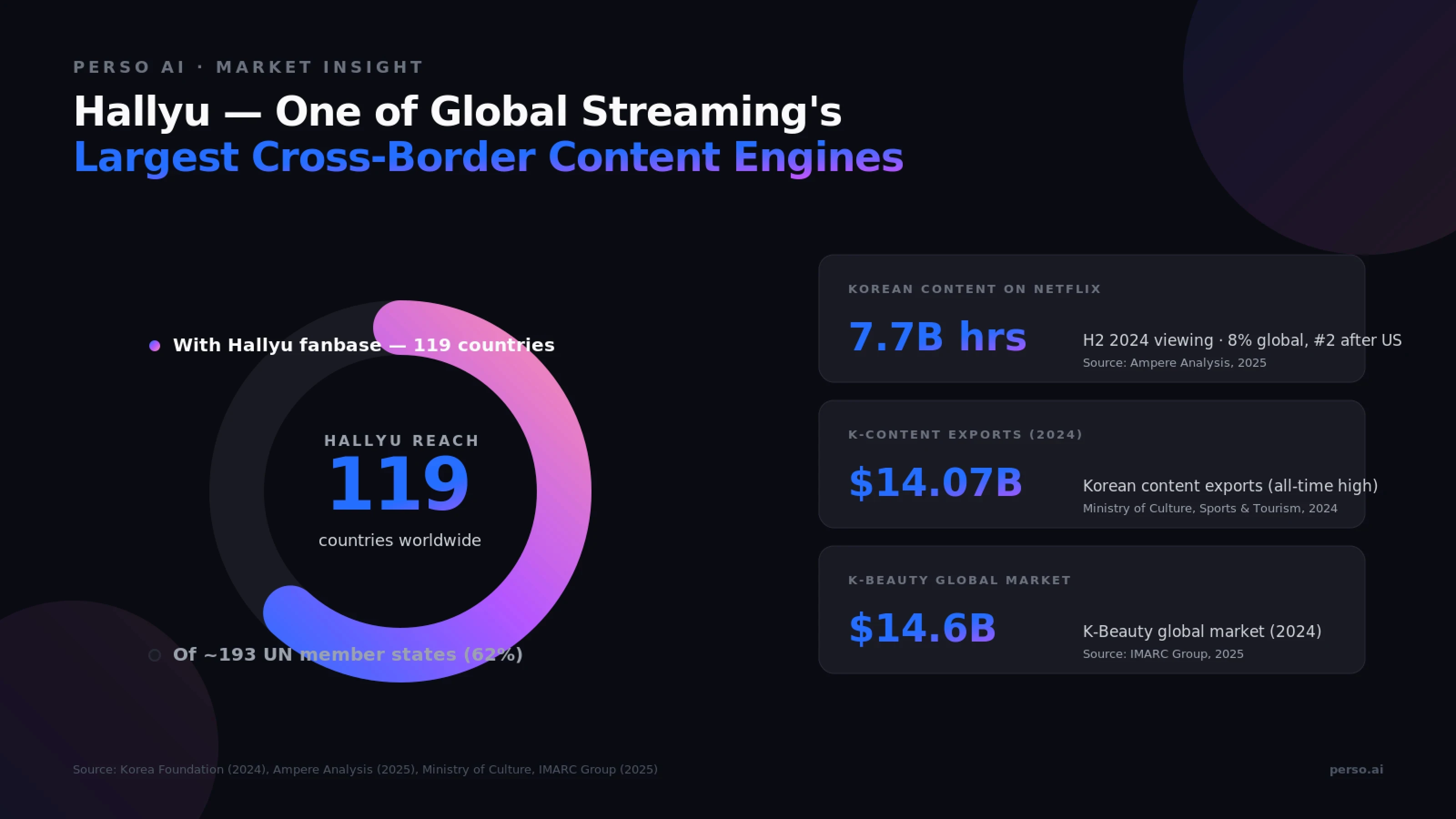
出典: Korea Foundation (2024), Ampere Analysis (2025), Ministry of Culture, Sports & Tourism (2024), IMARC Group (2025)
なぜ韓国コンテンツには大規模な英語化が必要なのか
韓流の数字が示すもの:
指標 | 値 | 出典 |
|---|---|---|
世界の韓流ファン | 119か国で2億2,500万人 | Korea Foundation, 2024 |
韓流の経済価値(年次) | 141.6億ドル | Korea Foundation, 2024 |
Netflixの世界視聴に占める韓国コンテンツの割合 | 8%(2024年下半期、米国に次ぐ第2位) | Ampere Analysis, 2025 |
韓国コンテンツ輸出(2024年) | 140.7億ドル(過去最高) | Ministry of Culture, Sports & Tourism, 2024 |
K-Beautyの世界市場(2024年) | 146.1億ドル | IMARC Group, 2025 |
2024年下半期には、韓国コンテンツがNetflix上で77億時間の視聴時間を生み出しました。世界全体では米国制作の作品に次ぐ規模です。KIMPROは、YouTube登録者数1億人を突破した初の韓国人クリエイターとなり、2025年時点で世界第9位にランクインしています(Korea Times)。英語圏での韓国発コンテンツ需要は、季節要因ではなく構造的なものです。
3つの需要エンジン
1. K-Drama、K-Pop、エンターテインメント。 韓国ドラマ、音楽コンテンツ、バラエティ番組は、NetflixやYouTubeの視聴を世界規模で牽引しています。リップシンクの精度は不可欠です。Perso AIの韓国語 → 英語プロジェクトで31.25%というリップシンク有効化率は、まさにこのコンテンツタイプを反映しており、制作品質の吹き替えでは口の動きの一致が絶対条件です。
2. 教育・ナレッジコンテンツ。 Perso AI上では、韓国の教育・チュートリアル系コンテンツが分類済み韓国語 → 英語プロジェクトの10.1%を占めており、この言語ペアでは最も大きなカテゴリです。オンライン講座、MOOC、Kアカデミックコンテンツ、英語話者向けに適応された制作者主導のチュートリアルなどが含まれます。
3. K-Beauty、K-Medical、ライフスタイル。 韓国は2024年に117万人の海外医療観光客を受け入れました。2023年の61万人からほぼ倍増です(Ministry of Health and Welfare / KHIDI, 2025)。K-Beauty市場は2024年に146.1億ドルに達しました。Perso AIでは、医療・ヘルスコンテンツが韓国語 → 英語プロジェクトの5.51%を占めており、KメディカルやK-Beautyの制作者が英語で世界の視聴者に届いていることを示す注目すべき割合です。
Perso AIのデータはKコンテンツの特徴と一致する
Perso AI上の韓国語 → 英語プロジェクトは、長尺で高品質な独自のパターンを示しています。
平均長 472.9秒(約8分) — 全言語ペア中で最長
12か月で2,105時間超の処理 — 全ペア中で最も高い総処理量
リップシンク有効化率31.25% — 全言語ペア中で最も高く、K-DramaとK-Popの制作要件を反映
直接ファイルアップロード70.5% — プロ向けスタジオワークフローの特徴
YouTube URL取り込み24.7% — 既存Kコンテンツの制作者主導の再ローカライズ
韓国語→英語翻訳が技術的に独特なのはなぜか?
韓国語 → 英語には、欧州言語ペアや他のアジア言語ペアとは大きく異なる独自の技術的課題があります。両言語は語順、敬語、形態論の面で大きく異なります。
韓国語 vs 英語 — 言語比較
特徴 | 韓国語 | 英語 |
|---|---|---|
語順 | SOV(主語-目的語-動詞)— "저는 비디오를 봅니다" | SVO — "I watch videos" |
文字体系 | ハングル — 特徴的な音素文字 | ラテン文字 |
敬語 | 3段階以上の話し方(반말、해요체、합니다체)+主語/目的語敬語 | 単一のレジスター。丁寧さは語彙や言い回しで表現される |
主語省略 | 文脈が明確なら主語がしばしば省略される | ほとんどの文で主語が必要 |
形態論 | 膠着語 — 助詞/接尾辞が語幹に付く(-은/는、-이/가、-을/를) | 分析的 — 文法関係は別々の単語で表す |
文字長 | 基準 | 英語音声では通常20〜30%長くなる |
出典: 韓国語学の参考資料、韓国語教育院(KLI)資料。
4ステップの変換課題
韓国語音声を英語に変換するには、AIが4つの異なる処理を行う必要があります。
韓国語を正確に書き起こす — クリエイターが使う敬語、助詞、くだけた省略形を含めて
SOVからSVOへ構文を再構成する — すべての文に文法順序の入れ替えが必要で、動詞を前に移動し、助詞の情報を吸収します
省略された主語を補う — 韓国語では文脈が明確な場合に主語が省略されますが、英語では必要なため、モデルは周囲の文脈から「I」「you」「we」「they」を推定しなければなりません
敬語体系を平坦化する — 3段階以上の話し方を、ニュアンスを損なわずに英語の単一レジスターへ統合します
韓国語 → 英語で敬語が重要な理由
敬語の選択には、英語では本来エンコードされない意味が含まれます。K-Dramaの登場人物が해요체(丁寧)から반말(くだけた表現)へ切り替えると、友情、恋愛、上下関係といった関係性の変化を示します。巧みな翻訳は、語彙、リズム、文脈の手がかりによってこれを保ちます。逐語訳では、このニュアンスは完全に失われます。
文字長の拡張
英語は、同じ意味でも、書き言葉でも話し言葉でも、韓国語より20〜30%長くなるのが一般的です。タイミング調整は吹き替え工程で自動的に処理され、英語出力を元の韓国語動画の長さに合わせます。これは、この言語ペアで主流の長尺(約8分)コンテンツにとって重要です。
韓国語→英語吹き替えを形作るコンテンツカテゴリ
Perso AIの12か月データは、韓国語 → 英語の独特なコンテンツパターンを示しています。教育、K-Beauty/K-Medical、ゲーム、エンターテインメントをまたぐ世界のKコンテンツ経済を反映したミックスです。
コンテンツカテゴリ内訳
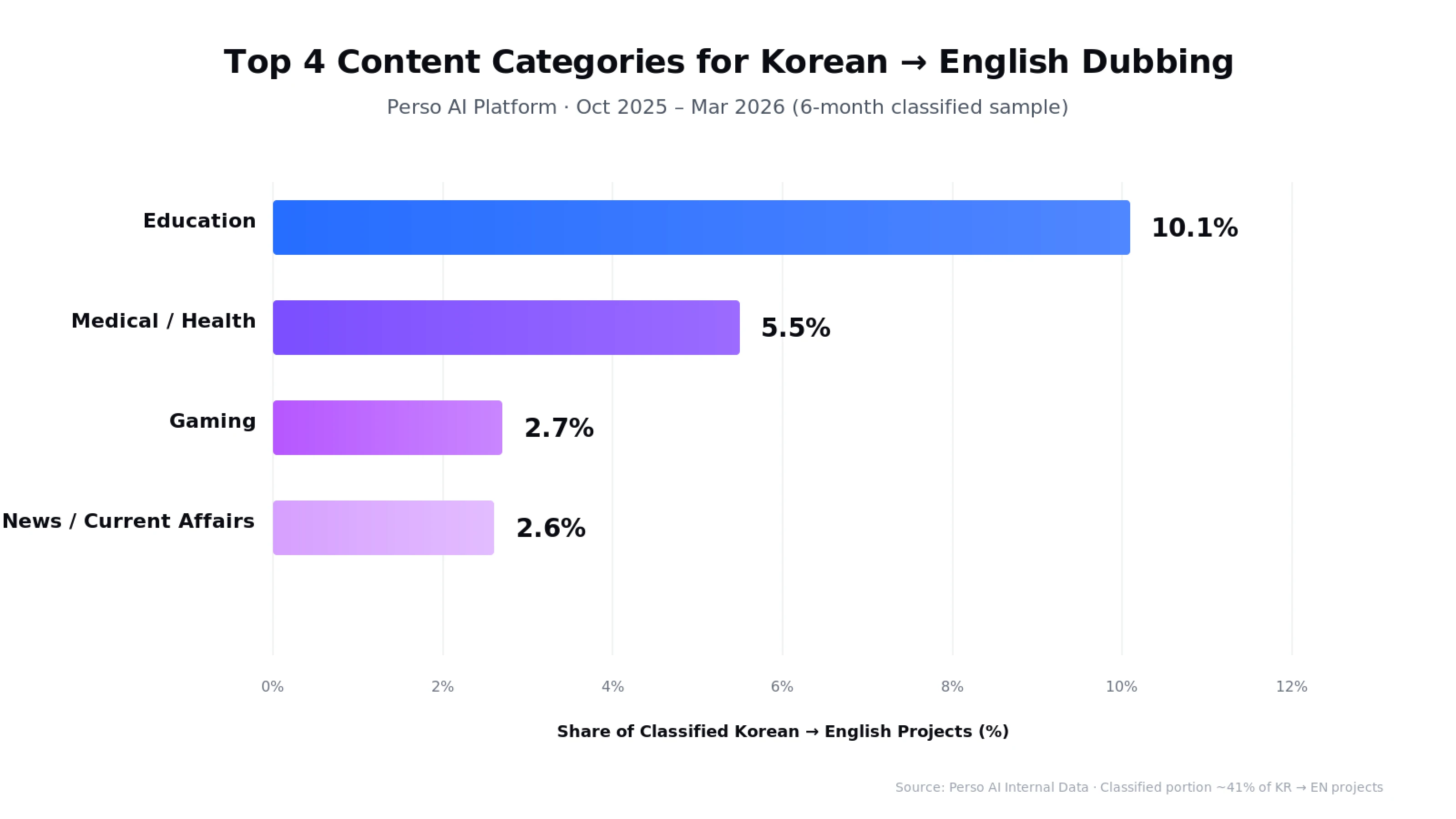
出典: Perso AI内部データ · 2025年10月 – 2026年3月(6か月の分類済みサンプル)
教育(10.1%) — この言語ペアで最も多いカテゴリ。オンライン講座、MOOC、Kアカデミックコンテンツ、英語話者向けに適応された制作者主導のチュートリアル
医療 / ヘルス(5.5%) — K-Beautyチュートリアル、K-Medical手技コンテンツ、皮膚科・美容施術。韓国の医療観光と美容産業が世界へ広がっていることを反映
ゲーム(2.7%) — 英語圏向けに適応された韓国のゲーム配信者、eスポーツコンテンツ、ゲームレビュー
ニュース / 時事(2.6%) — 韓国のニュースクリップ、経済ニュース、時事コンテンツを世界の視聴者向けに提供
注: カテゴリデータは、AIカテゴリ分類が適用された韓国語 → 英語プロジェクトのおよそ41%を反映しています(機能は2025年10月から有効)。
フォーマットの特徴
韓国語 → 英語プロジェクトは、長尺で制作品質の高い独自の特徴を共有しています。
平均動画長: 473秒(約8分) — Perso AI全言語ペア中で最長
1プロジェクトあたりの平均話者数: 1.66人 — 単独ホストと少人数アンサンブルが中心
リップシンク有効化率: 31.25% — K-DramaとK-Popの制作要件に合致し、全言語ペア中で最も高い
直接ファイルアップロード: 70.5% — スタジオおよびプロ向けワークフローの特徴
総処理時間: 2,105時間超 — 全言語ペア中で最も高い処理量
Kコンテンツ制作者とスタジオにとっての意味
英語圏向けに韓国コンテンツを制作する場合、ワークフローにはおそらく次が含まれます。
長尺ファイルのアップロード(典型的には5〜15分のエピソード)
K-Drama、K-Pop MV、画面上の会話コンテンツに対するリップシンク有効化
シリーズ制作者向けコンテンツやK-Beauty/K-Medicalチュートリアルでのボイスクローン
スクリプト編集時の敬語レジスターの判断
教育、医療/美容、ゲーム、エンターテインメントをまたぐジャンル適合
Perso AIの韓国語 → 英語パイプラインは、このプロフェッショナルで多ジャンルなKコンテンツのワークフローを支援します。
Perso AIは韓国語→英語吹き替えをどう処理するのか?
Perso AIは、32以上の言語をサポートするAI搭載の動画吹き替え・翻訳プラットフォームです。韓国語 → 英語のパイプラインは、Kコンテンツのワークフロー、つまり長尺エピソード、リップシンク付き制作、そして韓国の制作者やスタジオに典型的な敬語豊かな原文に最適化されています。
構文再構成を伴う韓国語→英語の直接翻訳
一般的な翻訳ツールは、韓国語のSOV順をそのまま残した直訳を出してしまい、英語話者にとって不自然な文構造になります。Perso AIの韓国語 → 英語モデルは、文を自然なSVO順に自動再構成し、省略された主語を文脈から補い、敬語を適切な英語レジスターへ平坦化します。
Kコンテンツ制作のためのリップシンク
韓国語 → 英語プロジェクトにおける31.25%というリップシンク有効化率は、Perso AI全言語ペア中で最も高く、K-Drama、K-Pop、画面上の会話コンテンツで口の動きの一致が不可欠であることを反映しています。プラットフォームのリップシンクエンジンは、英語音声のタイミングと音素配置を調整し、元の韓国語話者の口の動きに合わせます。
ボイスクローンがKクリエイターのアイデンティティを保持
K-Beauty、K-Medical、ゲーム、教育チャンネルでは、エピソードをまたぐ声の一貫性が視聴者の信頼を築きます。プラットフォームは、元話者の音声特性――ピッチ、音色、話速――をクローンし、英語出力に適用します。
敬語を意識した出力
一般的な翻訳ツールとは異なり、Perso AIの英語出力は韓国語の敬語変化を文脈的に処理し、반말 vs 해요체 vs 합니다체が伝える関係性の संकेतを、英語の語彙選択、文のリズム、トーンで保ちます。編集者は内蔵スクリプトエディターで個別の行を調整できます。
長尺エクスポートの柔軟性
出力形式には、動画向けのMP4、WebM、MOVに加え、字幕ファイル向けのSRT、VTT、ASSが含まれます。これにより、YouTube、Netflix、韓国OTTプラットフォームへの再アップロードや、配信・SNS配信用の個別成果物としての書き出しに対応します。
よくある質問
Q. AIによる韓国語→英語の動画翻訳の精度はどのくらいですか?
Perso AIは、K-Drama、教育、K-Beauty/K-Medical、ゲームコンテンツ全体で検証された、韓国語→英語吹き替えにおいて高い翻訳精度を実現しています。精度は、スラングが多い台本なし素材よりも、台本化されたコンテンツの方が高くなります。韓国語 → 英語は、プラットフォーム内でも最も処理量の多いペアの1つ(総処理時間で第1位)であり、モデルに豊富な学習シグナルを与えています。
Q. Perso AIは韓国語の敬語を正しく処理できますか?
はい。Perso AIの韓国語 → 英語モデルは、敬語の変化を文脈的に処理します。반말、해요체、합니다체が持つ関係性のニュアンスを、適切な英語のレジスター、語彙選択、トーンへマッピングします。編集者は内蔵スクリプトエディターで、ブランド固有またはキャラクター固有のトーンに合わせて個別の行を調整できます。
Q. 韓国語の動画を英語に吹き替えるにはどのくらい時間がかかりますか?
AI吹き替えなら、手作業のスタジオ吹き替えで必要な数日ではなく、数分で英語版を提供できます。特に、平均長が約8分(473秒)で、リップシンク制作が一般的な韓国語 → 英語では有効です。全工程はプラットフォーム上でエンドツーエンドに実行されます。
Q. Perso AIはK-DramaやK-Pop向けに韓国語動画を英語へリップシンクできますか?
はい。韓国語 → 英語プロジェクトでのリップシンク有効化率は31.25%で、Perso AI全言語ペア中で最も高いです。これは、K-Drama、K-Pop MV、画面上の会話コンテンツで口の動きの一致が必要だからです。プラットフォームのリップシンクエンジンは、英語音素のタイミングを調整して、元の韓国語話者の口の動きに合わせます。
Q. Perso AIは、全編エピソードや講義のような長尺韓国コンテンツを扱えますか?
はい。韓国語 → 英語はPerso AI上で最長形式の言語ペアで、平均動画長は473秒(約8分)です。プラットフォームは、MP4、MOV、AVI、MKVファイルを最大5GBまでサポートしており、配信エピソード全編、Kアカデミック講義、シリーズ化されたKクリエイターコンテンツに十分対応します。
Q. 韓国語→英語吹き替えで最も成果が出やすいコンテンツタイプは何ですか?
教育、K-Beauty/K-Medicalチュートリアル、ゲームコンテンツ、そしてエンターテインメント形式(K-Drama、K-Pop、K-Variety)が、Perso AIで特に高い成果を出しています。教育だけで韓国語→英語プロジェクト全体の10.1%を占め、この言語ペアでは最も大きなカテゴリです。韓国コンテンツは119か国で2億2,500万人の韓流ファンに届いているため(Korea Foundation, 2024)、台本化された長尺コンテンツほど、プロ品質のAI吹き替えの恩恵を最も受けます。
韓国語の動画を英語に翻訳する準備はできましたか?
最初の韓国語 → 英語吹き替えプロジェクトを数分で始めましょう。無料トライアル — クレジットカードは不要です。
データ出典: Perso AI内部プラットフォームデータ、2025年4月 – 2026年3月。市場データは、本文中で引用した Korea Foundation (2024)、Ampere Analysis (2025)、Ministry of Culture, Sports & Tourism (2024)、IMARC Group (2025)、Korea Times (2025)、および Korean Ministry of Health and Welfare / KHIDI (2025) に基づきます。本記事はPerso AIのLanguage Pair Guideシリーズの一部です。より広いAI吹き替えの動向については、Q1 2026 AI Dubbing Language Trends Reportをご覧ください。
💡 Perso AIで、韓国語の動画を数分で英語に翻訳。 無料トライアル — クレジットカードは不要です。
答えを先に示す導入
韓流(Hallyu)は現在、119か国で2億2,500万人のファンに届いており、年間経済価値は141.6億ドルに達しています(Korea Foundation, 2024)。Perso AIは、AI吹き替えによって韓国語の動画を英語へ3ステップで翻訳し、韓国語のSOV語順と三段階の敬語体系を自然な英語へ再構成しながら、話者本来の声を保ちます。
韓国語 → 英語は、プラットフォーム上で最も処理量の多い言語ペアの1つです。総処理コンテンツ量で第1位(12か月で2,105時間超)、平均動画長で第1位(1クリップあたり約8分)です。AI吹き替えにより、英語版を数日ではなく数分で提供でき、制作者はローカライズ済みコンテンツを当日中に公開できます。
最も特徴的な指標は、韓国語 → 英語プロジェクトの31.25%でリップシンクが有効化されることです。これはPerso AI全体の全言語ペアの中で最も高い有効化率です。これは韓流コンテンツの特徴を反映しています。K-Drama、K-Pop、K-Varietyでは、画面上の口の動きの一致が、声の翻訳と同じくらい重要です。
出典: Perso AI内部プラットフォームデータ、2025年4月 – 2026年3月
AIで韓国語の動画を英語に翻訳するには?
Perso AIは、韓国語の動画を3ステップで英語に翻訳します。
アップロード — 韓国語の動画(MP4、MOV、AVI、MKV)をアップロードするか、YouTubeのURLを貼り付けます — 約30秒
英語を選択 — 目的言語として英語を選び、オプション機能(ボイスクローン、リップシンク、複数話者)を選択します — 約15秒
確認 & エクスポート — 吹き替え済み動画をMP4、WebM、MOVで書き出します(SRT/VTT字幕も含む)
この一連の処理は、手作業の引き継ぎなしでエンドツーエンドに実行されます。
ステップ1 — アップロード時の注意
韓国語 → 英語では、直接ファイルのアップロードが全体の70.5%を占め、YouTube URLの取り込みは24.7%です。この構成は、2種類のユーザー像を示しています。洗練された書き出しファイルをアップロードするスタジオと、既存のYouTubeコンテンツを貼り付けて素早く再ローカライズする制作者です。最大ファイルサイズは5GBで、ポッドキャスト用途向けに音声のみの形式(MP3、WAV、M4A)もサポートされています。
ステップ2 — 言語選択時のオプション機能
ボイスクローン — 英語でも元の韓国語話者のトーンを保持します。チャンネルやブランドのアイデンティティを維持したいKコンテンツ制作者に有用です
複数話者検出 — 自動(韓国語 → 英語プロジェクトの平均話者数は1.66人で、単独ホストや少人数インタビュー形式に適しています)
リップシンク — 韓国語 → 英語プロジェクトの31.25%で使用され、Perso AI全言語ペアの中で最も高い有効化率です。K-DramaやK-Popのように、口の動きの一致が重要なコンテンツを反映しています
ステップ3 — 確認 & 書き出し時の注意
内蔵エディターで英語スクリプトを1行ずつ編集できます。これは、韓国語の敬語を扱う際に特に有用です。반말(親しい・くだけた表現)、해요체(丁寧体)、합니다체(正式体)を、英語の適切な文体に変換します。英語には同等の文法的な形式レベルがないためです。
Before / After: 従来の韓国語→英語のスタジオ吹き替えは、主要なKコンテンツ配信事業者で使われてきましたが、通常は声優キャスティング、スタジオ予約、そして数日を要するポストプロダクションの同期作業が必要です。AI吹き替えなら、元の制作者の声をクローンで保ちながら、同じ成果物を数分で提供できます。
🎬 試してみますか? 最初の韓国語動画をアップロードして、数分で英語吹き替えを取得しましょう。
韓国語 → 英語が最も活発な吹き替え回廊の1つである理由
韓国語 → 英語の吹き替えは、英語圏の視聴者を狙うKコンテンツ制作者、スタジオ、グローバルブランドにとって、戦略的な成長レバーになっています。マクロ指標は明確です。
出典: Korea Foundation (2024), Ampere Analysis (2025), Ministry of Culture, Sports & Tourism (2024), IMARC Group (2025)
なぜ韓国コンテンツには大規模な英語化が必要なのか
韓流の数字が示すもの:
指標 | 値 | 出典 |
|---|---|---|
世界の韓流ファン | 119か国で2億2,500万人 | Korea Foundation, 2024 |
韓流の経済価値(年次) | 141.6億ドル | Korea Foundation, 2024 |
Netflixの世界視聴に占める韓国コンテンツの割合 | 8%(2024年下半期、米国に次ぐ第2位) | Ampere Analysis, 2025 |
韓国コンテンツ輸出(2024年) | 140.7億ドル(過去最高) | Ministry of Culture, Sports & Tourism, 2024 |
K-Beautyの世界市場(2024年) | 146.1億ドル | IMARC Group, 2025 |
2024年下半期には、韓国コンテンツがNetflix上で77億時間の視聴時間を生み出しました。世界全体では米国制作の作品に次ぐ規模です。KIMPROは、YouTube登録者数1億人を突破した初の韓国人クリエイターとなり、2025年時点で世界第9位にランクインしています(Korea Times)。英語圏での韓国発コンテンツ需要は、季節要因ではなく構造的なものです。
3つの需要エンジン
1. K-Drama、K-Pop、エンターテインメント。 韓国ドラマ、音楽コンテンツ、バラエティ番組は、NetflixやYouTubeの視聴を世界規模で牽引しています。リップシンクの精度は不可欠です。Perso AIの韓国語 → 英語プロジェクトで31.25%というリップシンク有効化率は、まさにこのコンテンツタイプを反映しており、制作品質の吹き替えでは口の動きの一致が絶対条件です。
2. 教育・ナレッジコンテンツ。 Perso AI上では、韓国の教育・チュートリアル系コンテンツが分類済み韓国語 → 英語プロジェクトの10.1%を占めており、この言語ペアでは最も大きなカテゴリです。オンライン講座、MOOC、Kアカデミックコンテンツ、英語話者向けに適応された制作者主導のチュートリアルなどが含まれます。
3. K-Beauty、K-Medical、ライフスタイル。 韓国は2024年に117万人の海外医療観光客を受け入れました。2023年の61万人からほぼ倍増です(Ministry of Health and Welfare / KHIDI, 2025)。K-Beauty市場は2024年に146.1億ドルに達しました。Perso AIでは、医療・ヘルスコンテンツが韓国語 → 英語プロジェクトの5.51%を占めており、KメディカルやK-Beautyの制作者が英語で世界の視聴者に届いていることを示す注目すべき割合です。
Perso AIのデータはKコンテンツの特徴と一致する
Perso AI上の韓国語 → 英語プロジェクトは、長尺で高品質な独自のパターンを示しています。
平均長 472.9秒(約8分) — 全言語ペア中で最長
12か月で2,105時間超の処理 — 全ペア中で最も高い総処理量
リップシンク有効化率31.25% — 全言語ペア中で最も高く、K-DramaとK-Popの制作要件を反映
直接ファイルアップロード70.5% — プロ向けスタジオワークフローの特徴
YouTube URL取り込み24.7% — 既存Kコンテンツの制作者主導の再ローカライズ
韓国語→英語翻訳が技術的に独特なのはなぜか?
韓国語 → 英語には、欧州言語ペアや他のアジア言語ペアとは大きく異なる独自の技術的課題があります。両言語は語順、敬語、形態論の面で大きく異なります。
韓国語 vs 英語 — 言語比較
特徴 | 韓国語 | 英語 |
|---|---|---|
語順 | SOV(主語-目的語-動詞)— "저는 비디오를 봅니다" | SVO — "I watch videos" |
文字体系 | ハングル — 特徴的な音素文字 | ラテン文字 |
敬語 | 3段階以上の話し方(반말、해요체、합니다체)+主語/目的語敬語 | 単一のレジスター。丁寧さは語彙や言い回しで表現される |
主語省略 | 文脈が明確なら主語がしばしば省略される | ほとんどの文で主語が必要 |
形態論 | 膠着語 — 助詞/接尾辞が語幹に付く(-은/는、-이/가、-을/를) | 分析的 — 文法関係は別々の単語で表す |
文字長 | 基準 | 英語音声では通常20〜30%長くなる |
出典: 韓国語学の参考資料、韓国語教育院(KLI)資料。
4ステップの変換課題
韓国語音声を英語に変換するには、AIが4つの異なる処理を行う必要があります。
韓国語を正確に書き起こす — クリエイターが使う敬語、助詞、くだけた省略形を含めて
SOVからSVOへ構文を再構成する — すべての文に文法順序の入れ替えが必要で、動詞を前に移動し、助詞の情報を吸収します
省略された主語を補う — 韓国語では文脈が明確な場合に主語が省略されますが、英語では必要なため、モデルは周囲の文脈から「I」「you」「we」「they」を推定しなければなりません
敬語体系を平坦化する — 3段階以上の話し方を、ニュアンスを損なわずに英語の単一レジスターへ統合します
韓国語 → 英語で敬語が重要な理由
敬語の選択には、英語では本来エンコードされない意味が含まれます。K-Dramaの登場人物が해요체(丁寧)から반말(くだけた表現)へ切り替えると、友情、恋愛、上下関係といった関係性の変化を示します。巧みな翻訳は、語彙、リズム、文脈の手がかりによってこれを保ちます。逐語訳では、このニュアンスは完全に失われます。
文字長の拡張
英語は、同じ意味でも、書き言葉でも話し言葉でも、韓国語より20〜30%長くなるのが一般的です。タイミング調整は吹き替え工程で自動的に処理され、英語出力を元の韓国語動画の長さに合わせます。これは、この言語ペアで主流の長尺(約8分)コンテンツにとって重要です。
韓国語→英語吹き替えを形作るコンテンツカテゴリ
Perso AIの12か月データは、韓国語 → 英語の独特なコンテンツパターンを示しています。教育、K-Beauty/K-Medical、ゲーム、エンターテインメントをまたぐ世界のKコンテンツ経済を反映したミックスです。
コンテンツカテゴリ内訳
出典: Perso AI内部データ · 2025年10月 – 2026年3月(6か月の分類済みサンプル)
教育(10.1%) — この言語ペアで最も多いカテゴリ。オンライン講座、MOOC、Kアカデミックコンテンツ、英語話者向けに適応された制作者主導のチュートリアル
医療 / ヘルス(5.5%) — K-Beautyチュートリアル、K-Medical手技コンテンツ、皮膚科・美容施術。韓国の医療観光と美容産業が世界へ広がっていることを反映
ゲーム(2.7%) — 英語圏向けに適応された韓国のゲーム配信者、eスポーツコンテンツ、ゲームレビュー
ニュース / 時事(2.6%) — 韓国のニュースクリップ、経済ニュース、時事コンテンツを世界の視聴者向けに提供
注: カテゴリデータは、AIカテゴリ分類が適用された韓国語 → 英語プロジェクトのおよそ41%を反映しています(機能は2025年10月から有効)。
フォーマットの特徴
韓国語 → 英語プロジェクトは、長尺で制作品質の高い独自の特徴を共有しています。
平均動画長: 473秒(約8分) — Perso AI全言語ペア中で最長
1プロジェクトあたりの平均話者数: 1.66人 — 単独ホストと少人数アンサンブルが中心
リップシンク有効化率: 31.25% — K-DramaとK-Popの制作要件に合致し、全言語ペア中で最も高い
直接ファイルアップロード: 70.5% — スタジオおよびプロ向けワークフローの特徴
総処理時間: 2,105時間超 — 全言語ペア中で最も高い処理量
Kコンテンツ制作者とスタジオにとっての意味
英語圏向けに韓国コンテンツを制作する場合、ワークフローにはおそらく次が含まれます。
長尺ファイルのアップロード(典型的には5〜15分のエピソード)
K-Drama、K-Pop MV、画面上の会話コンテンツに対するリップシンク有効化
シリーズ制作者向けコンテンツやK-Beauty/K-Medicalチュートリアルでのボイスクローン
スクリプト編集時の敬語レジスターの判断
教育、医療/美容、ゲーム、エンターテインメントをまたぐジャンル適合
Perso AIの韓国語 → 英語パイプラインは、このプロフェッショナルで多ジャンルなKコンテンツのワークフローを支援します。
Perso AIは韓国語→英語吹き替えをどう処理するのか?
Perso AIは、32以上の言語をサポートするAI搭載の動画吹き替え・翻訳プラットフォームです。韓国語 → 英語のパイプラインは、Kコンテンツのワークフロー、つまり長尺エピソード、リップシンク付き制作、そして韓国の制作者やスタジオに典型的な敬語豊かな原文に最適化されています。
構文再構成を伴う韓国語→英語の直接翻訳
一般的な翻訳ツールは、韓国語のSOV順をそのまま残した直訳を出してしまい、英語話者にとって不自然な文構造になります。Perso AIの韓国語 → 英語モデルは、文を自然なSVO順に自動再構成し、省略された主語を文脈から補い、敬語を適切な英語レジスターへ平坦化します。
Kコンテンツ制作のためのリップシンク
韓国語 → 英語プロジェクトにおける31.25%というリップシンク有効化率は、Perso AI全言語ペア中で最も高く、K-Drama、K-Pop、画面上の会話コンテンツで口の動きの一致が不可欠であることを反映しています。プラットフォームのリップシンクエンジンは、英語音声のタイミングと音素配置を調整し、元の韓国語話者の口の動きに合わせます。
ボイスクローンがKクリエイターのアイデンティティを保持
K-Beauty、K-Medical、ゲーム、教育チャンネルでは、エピソードをまたぐ声の一貫性が視聴者の信頼を築きます。プラットフォームは、元話者の音声特性――ピッチ、音色、話速――をクローンし、英語出力に適用します。
敬語を意識した出力
一般的な翻訳ツールとは異なり、Perso AIの英語出力は韓国語の敬語変化を文脈的に処理し、반말 vs 해요체 vs 합니다체が伝える関係性の संकेतを、英語の語彙選択、文のリズム、トーンで保ちます。編集者は内蔵スクリプトエディターで個別の行を調整できます。
長尺エクスポートの柔軟性
出力形式には、動画向けのMP4、WebM、MOVに加え、字幕ファイル向けのSRT、VTT、ASSが含まれます。これにより、YouTube、Netflix、韓国OTTプラットフォームへの再アップロードや、配信・SNS配信用の個別成果物としての書き出しに対応します。
よくある質問
Q. AIによる韓国語→英語の動画翻訳の精度はどのくらいですか?
Perso AIは、K-Drama、教育、K-Beauty/K-Medical、ゲームコンテンツ全体で検証された、韓国語→英語吹き替えにおいて高い翻訳精度を実現しています。精度は、スラングが多い台本なし素材よりも、台本化されたコンテンツの方が高くなります。韓国語 → 英語は、プラットフォーム内でも最も処理量の多いペアの1つ(総処理時間で第1位)であり、モデルに豊富な学習シグナルを与えています。
Q. Perso AIは韓国語の敬語を正しく処理できますか?
はい。Perso AIの韓国語 → 英語モデルは、敬語の変化を文脈的に処理します。반말、해요체、합니다체が持つ関係性のニュアンスを、適切な英語のレジスター、語彙選択、トーンへマッピングします。編集者は内蔵スクリプトエディターで、ブランド固有またはキャラクター固有のトーンに合わせて個別の行を調整できます。
Q. 韓国語の動画を英語に吹き替えるにはどのくらい時間がかかりますか?
AI吹き替えなら、手作業のスタジオ吹き替えで必要な数日ではなく、数分で英語版を提供できます。特に、平均長が約8分(473秒)で、リップシンク制作が一般的な韓国語 → 英語では有効です。全工程はプラットフォーム上でエンドツーエンドに実行されます。
Q. Perso AIはK-DramaやK-Pop向けに韓国語動画を英語へリップシンクできますか?
はい。韓国語 → 英語プロジェクトでのリップシンク有効化率は31.25%で、Perso AI全言語ペア中で最も高いです。これは、K-Drama、K-Pop MV、画面上の会話コンテンツで口の動きの一致が必要だからです。プラットフォームのリップシンクエンジンは、英語音素のタイミングを調整して、元の韓国語話者の口の動きに合わせます。
Q. Perso AIは、全編エピソードや講義のような長尺韓国コンテンツを扱えますか?
はい。韓国語 → 英語はPerso AI上で最長形式の言語ペアで、平均動画長は473秒(約8分)です。プラットフォームは、MP4、MOV、AVI、MKVファイルを最大5GBまでサポートしており、配信エピソード全編、Kアカデミック講義、シリーズ化されたKクリエイターコンテンツに十分対応します。
Q. 韓国語→英語吹き替えで最も成果が出やすいコンテンツタイプは何ですか?
教育、K-Beauty/K-Medicalチュートリアル、ゲームコンテンツ、そしてエンターテインメント形式(K-Drama、K-Pop、K-Variety)が、Perso AIで特に高い成果を出しています。教育だけで韓国語→英語プロジェクト全体の10.1%を占め、この言語ペアでは最も大きなカテゴリです。韓国コンテンツは119か国で2億2,500万人の韓流ファンに届いているため(Korea Foundation, 2024)、台本化された長尺コンテンツほど、プロ品質のAI吹き替えの恩恵を最も受けます。
韓国語の動画を英語に翻訳する準備はできましたか?
最初の韓国語 → 英語吹き替えプロジェクトを数分で始めましょう。無料トライアル — クレジットカードは不要です。
データ出典: Perso AI内部プラットフォームデータ、2025年4月 – 2026年3月。市場データは、本文中で引用した Korea Foundation (2024)、Ampere Analysis (2025)、Ministry of Culture, Sports & Tourism (2024)、IMARC Group (2025)、Korea Times (2025)、および Korean Ministry of Health and Welfare / KHIDI (2025) に基づきます。本記事はPerso AIのLanguage Pair Guideシリーズの一部です。より広いAI吹き替えの動向については、Q1 2026 AI Dubbing Language Trends Reportをご覧ください。
続きを読む
すべてを閲覧する