Video Transcriber Checks Before You Finalize a Dub
Last Updated




Jump to section
Jump to section

Share
Share
Share
AI Video Translator, Localization, and Dubbing Tool
Try it out for Free
Before finalizing a dub, check the source transcript, speaker assignments and segment timing. Then review the translated speech separately. A correct transcript or SRT is a useful starting point, not a guarantee that dubbed audio and lip movement will match.
Check what was actually said
Play the source video while reading the transcript. Prioritize names, numbers, product terms, omitted speech and short reactions. A transcription error can change the meaning of the translation, even when the target sentence sounds fluent. Correct the source before you treat it as a reference for another language.
Keep a faithful transcript distinct from a rewrite for spoken delivery. Removing repeated words may help an adapted voiceover, but it can also change emphasis or meaning. For an interview or training video, compare the disputed line with the recording and keep the information the audience needs. If the recording is unclear, mark the uncertainty for review rather than inventing words.
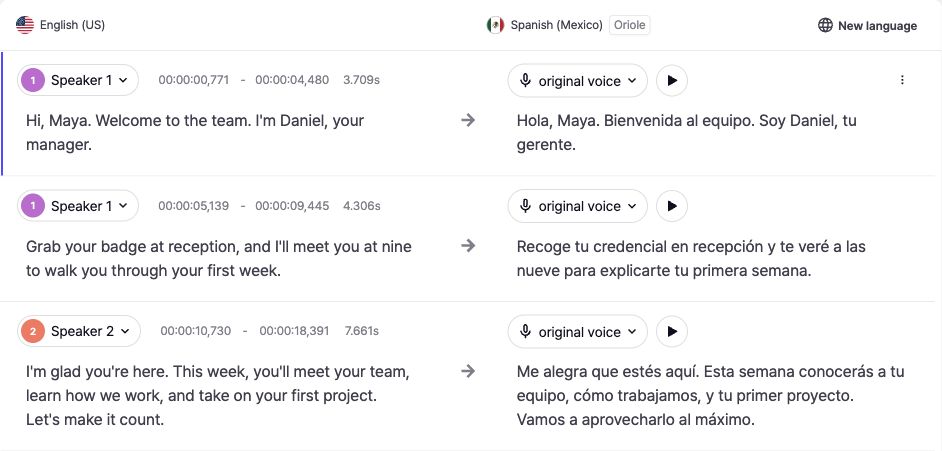
Actual Perso Dubbing editor, captured October 13, 2026. The source and translation are shown together with speaker assignments and editable start and end times. This is the dubbing editor, not a separate transcription-only screen.
Review speakers and segment boundaries
Check that each line belongs to the right speaker, especially around interruptions and quick replies. Listen on both sides of a speaker change. A correctly spelled sentence assigned to the wrong person is still a problem. Overlapping speech and background noise need closer review than a clear single-speaker recording.
Compare the visible start and end times with the source audio. Look for missing words at a boundary, segments that extend into the next line and empty segments. Keep phrases understandable, but do not assume that one long segment or many short segments will always produce better speech. The right boundary depends on the recording and the intended output.
Review translated speech as a separate result
A translation may take more or less time to say than the source. After checking the transcript, listen to the target-language version and review terminology, meaning, pace and scene transitions. Correct source text does not guarantee natural target wording. Accurate subtitle timestamps do not independently guarantee a good dub or lip sync.
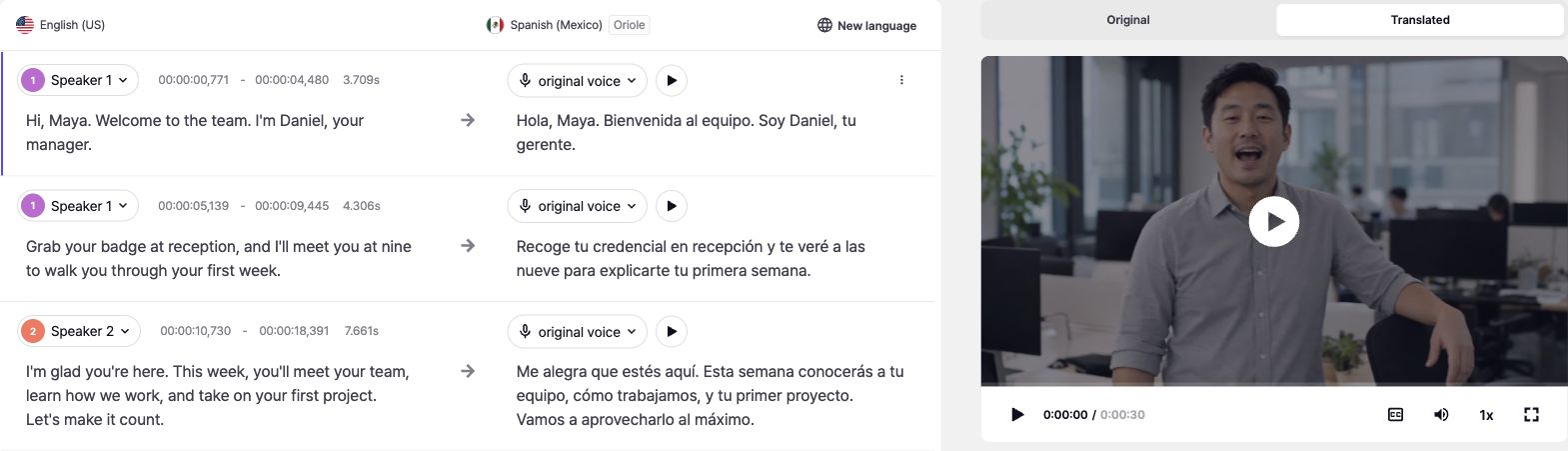
In the inspected Perso Dubbing project, text edits remain pending until Apply changes is used. Apply the corrections, follow the project prompts, then review the result again. If you opened a Lip Dubbing result, View Original Dubbing returns you to the editable project. New language requires pending changes to be applied first.
For a line-by-line walkthrough, see our script editor guide. For a subtitle file that is already out of sync, use the guide to fixing offset, drift and edit-related timing errors. That is a different task from verifying the source transcript.
Choose and check the exported file

The inspected Download menu offers original and translated SRT subtitles, an original XLSX script, and an original-plus-translated XLSX script, alongside video and audio exports. Choose the language and format needed for your next step. Available options may vary by project and plan.
Exporting an SRT is not a required intermediate step just to continue reviewing a dub inside the editor. Download it when your publishing platform or editing workflow needs a subtitle file. Check it against the corresponding final audio and video, including the opening, middle, ending and any revised sections.
Frequently asked questions
Q. Which transcription checks matter most before dubbing?
A. Check words and meaning, speaker assignments, missing speech and segment boundaries. Then evaluate the translated audio separately.
Q. Does a clean SRT guarantee synchronized dubbing?
A. No. Subtitle timing describes text cues. Generated speech and visible mouth movement still need their own review.
Q. Should I re-transcribe or edit a few lines?
A. Edit isolated errors when the rest of the transcript is reliable. If errors are widespread, first review recording quality and transcription settings before deciding whether to process the source again.
Explore Perso Dubbing’s video transcriber and video translation workflow to plan your next language version.
Before finalizing a dub, check the source transcript, speaker assignments and segment timing. Then review the translated speech separately. A correct transcript or SRT is a useful starting point, not a guarantee that dubbed audio and lip movement will match.
Check what was actually said
Play the source video while reading the transcript. Prioritize names, numbers, product terms, omitted speech and short reactions. A transcription error can change the meaning of the translation, even when the target sentence sounds fluent. Correct the source before you treat it as a reference for another language.
Keep a faithful transcript distinct from a rewrite for spoken delivery. Removing repeated words may help an adapted voiceover, but it can also change emphasis or meaning. For an interview or training video, compare the disputed line with the recording and keep the information the audience needs. If the recording is unclear, mark the uncertainty for review rather than inventing words.
Actual Perso Dubbing editor, captured October 13, 2026. The source and translation are shown together with speaker assignments and editable start and end times. This is the dubbing editor, not a separate transcription-only screen.
Review speakers and segment boundaries
Check that each line belongs to the right speaker, especially around interruptions and quick replies. Listen on both sides of a speaker change. A correctly spelled sentence assigned to the wrong person is still a problem. Overlapping speech and background noise need closer review than a clear single-speaker recording.
Compare the visible start and end times with the source audio. Look for missing words at a boundary, segments that extend into the next line and empty segments. Keep phrases understandable, but do not assume that one long segment or many short segments will always produce better speech. The right boundary depends on the recording and the intended output.
Review translated speech as a separate result
A translation may take more or less time to say than the source. After checking the transcript, listen to the target-language version and review terminology, meaning, pace and scene transitions. Correct source text does not guarantee natural target wording. Accurate subtitle timestamps do not independently guarantee a good dub or lip sync.
In the inspected Perso Dubbing project, text edits remain pending until Apply changes is used. Apply the corrections, follow the project prompts, then review the result again. If you opened a Lip Dubbing result, View Original Dubbing returns you to the editable project. New language requires pending changes to be applied first.
For a line-by-line walkthrough, see our script editor guide. For a subtitle file that is already out of sync, use the guide to fixing offset, drift and edit-related timing errors. That is a different task from verifying the source transcript.
Choose and check the exported file
The inspected Download menu offers original and translated SRT subtitles, an original XLSX script, and an original-plus-translated XLSX script, alongside video and audio exports. Choose the language and format needed for your next step. Available options may vary by project and plan.
Exporting an SRT is not a required intermediate step just to continue reviewing a dub inside the editor. Download it when your publishing platform or editing workflow needs a subtitle file. Check it against the corresponding final audio and video, including the opening, middle, ending and any revised sections.
Frequently asked questions
Q. Which transcription checks matter most before dubbing?
A. Check words and meaning, speaker assignments, missing speech and segment boundaries. Then evaluate the translated audio separately.
Q. Does a clean SRT guarantee synchronized dubbing?
A. No. Subtitle timing describes text cues. Generated speech and visible mouth movement still need their own review.
Q. Should I re-transcribe or edit a few lines?
A. Edit isolated errors when the rest of the transcript is reliable. If errors are widespread, first review recording quality and transcription settings before deciding whether to process the source again.
Explore Perso Dubbing’s video transcriber and video translation workflow to plan your next language version.
Before finalizing a dub, check the source transcript, speaker assignments and segment timing. Then review the translated speech separately. A correct transcript or SRT is a useful starting point, not a guarantee that dubbed audio and lip movement will match.
Check what was actually said
Play the source video while reading the transcript. Prioritize names, numbers, product terms, omitted speech and short reactions. A transcription error can change the meaning of the translation, even when the target sentence sounds fluent. Correct the source before you treat it as a reference for another language.
Keep a faithful transcript distinct from a rewrite for spoken delivery. Removing repeated words may help an adapted voiceover, but it can also change emphasis or meaning. For an interview or training video, compare the disputed line with the recording and keep the information the audience needs. If the recording is unclear, mark the uncertainty for review rather than inventing words.
Actual Perso Dubbing editor, captured October 13, 2026. The source and translation are shown together with speaker assignments and editable start and end times. This is the dubbing editor, not a separate transcription-only screen.
Review speakers and segment boundaries
Check that each line belongs to the right speaker, especially around interruptions and quick replies. Listen on both sides of a speaker change. A correctly spelled sentence assigned to the wrong person is still a problem. Overlapping speech and background noise need closer review than a clear single-speaker recording.
Compare the visible start and end times with the source audio. Look for missing words at a boundary, segments that extend into the next line and empty segments. Keep phrases understandable, but do not assume that one long segment or many short segments will always produce better speech. The right boundary depends on the recording and the intended output.
Review translated speech as a separate result
A translation may take more or less time to say than the source. After checking the transcript, listen to the target-language version and review terminology, meaning, pace and scene transitions. Correct source text does not guarantee natural target wording. Accurate subtitle timestamps do not independently guarantee a good dub or lip sync.
In the inspected Perso Dubbing project, text edits remain pending until Apply changes is used. Apply the corrections, follow the project prompts, then review the result again. If you opened a Lip Dubbing result, View Original Dubbing returns you to the editable project. New language requires pending changes to be applied first.
For a line-by-line walkthrough, see our script editor guide. For a subtitle file that is already out of sync, use the guide to fixing offset, drift and edit-related timing errors. That is a different task from verifying the source transcript.
Choose and check the exported file
The inspected Download menu offers original and translated SRT subtitles, an original XLSX script, and an original-plus-translated XLSX script, alongside video and audio exports. Choose the language and format needed for your next step. Available options may vary by project and plan.
Exporting an SRT is not a required intermediate step just to continue reviewing a dub inside the editor. Download it when your publishing platform or editing workflow needs a subtitle file. Check it against the corresponding final audio and video, including the opening, middle, ending and any revised sections.
Frequently asked questions
Q. Which transcription checks matter most before dubbing?
A. Check words and meaning, speaker assignments, missing speech and segment boundaries. Then evaluate the translated audio separately.
Q. Does a clean SRT guarantee synchronized dubbing?
A. No. Subtitle timing describes text cues. Generated speech and visible mouth movement still need their own review.
Q. Should I re-transcribe or edit a few lines?
A. Edit isolated errors when the rest of the transcript is reliable. If errors are widespread, first review recording quality and transcription settings before deciding whether to process the source again.
Explore Perso Dubbing’s video transcriber and video translation workflow to plan your next language version.
Continue Reading
Browse All