The 6-Step Content Automation Workflow: Tools, Prompts, Checklist, and the Step Most Teams Miss




Jump to section
Jump to section

Share
Share
Share

AI Video Translator, Localization, and Dubbing Tool
Try it out for Free
Most content teams already use AI. They use ChatGPT, Claude, or Gemini to find ideas, draft scripts, write captions, and repurpose content. But using AI does not mean your content workflow is automated.
If you still copy information between tools, upload files one by one, rename every export, schedule every post manually, and decide what to create next from scratch, your workflow is only AI-assisted.
A connected content workflow should move work forward without requiring the same manual handoff every time. It should look like this:
Audience question → Brief → Master content → Repurposing → Publishing → Performance → Expansion
There is also one high-impact step that most content automation guides miss: automatically expanding content that has already proven it can perform. Instead of translating and repurposing every post, you can identify your strongest content and turn it into new formats, languages, and market tests.
This guide includes:
A complete content automation tool map
Practical workflows for each stage
Copy-ready AI prompts
Human-review checkpoints
A method for selecting content worth expanding
A full workflow checklist
The Content Automation Tool Map
Each stage below hands off to the next. Instead of a table, here is the same map as a stage-by-stage list.
1. Questions → Briefs. Collect audience signals and create structured briefs. Recommended tools: Notion or Airtable + Zapier or Make + ChatGPT, Claude, or Gemini.
2. Brief → Master content. Develop one approved source asset. Recommended tools: ChatGPT, Claude, or Gemini + Descript or CapCut.
3. Master content → Many formats. Create clips, carousels, posts, and email content. Recommended tools: OpusClip, Descript, or CapCut + an AI assistant.
4. Approved → Published. Move approved assets into a scheduling queue. Recommended tools: Notion or Airtable + Zapier or Make + Buffer.
5. Results → Next brief. Analyze performance and determine the next action. Recommended tools: Buffer or native analytics + ChatGPT, Claude, or Gemini.
6. Proven content → New markets. Create dubbed, subtitled, and lip-synced versions. Recommended tools: Perso Dubbing + ChatGPT, Claude Code, Cursor, or Gemini.
Notion and Airtable can trigger actions when records or database properties change, while Zapier and Make can connect those records to other apps and automate repetitive handoffs.
You do not need every tool in this map. Start with the handoff your team repeats most often.
1. Turn Audience Questions Into Content Briefs
The best content ideas are usually already inside your business. They appear in comments and direct messages, support tickets, sales calls, search queries, product reviews, webinar questions, and community discussions. The problem is that these signals are scattered across different channels.
Recommended workflow
New audience question → Save it in Notion or Airtable → Use AI to identify the audience and pain point → Generate possible content angles → Send the strongest idea for human approval
Notion database automations use defined triggers and actions when database changes occur. Airtable also supports trigger-action automations and AI-generated outputs inside those workflows.
Recommended database fields
Original question
Source
Target audience
Pain point
Content intent
Suggested format
Product relevance
Priority
Owner
Status
Copy-ready prompt
Analyze the audience question below.
Return:
- The underlying problem
- The likely target audience
- Three practical content angles
- The best format for each angle
- Any claims that require verification

Audience question: [INSERT QUESTION]
Keep this manual
A person should still decide whether the problem matters, whether your brand has something useful to add, whether the idea fits your audience, and whether the topic deserves production resources. Automate idea collection and organization, not editorial judgment.
2. Turn One Approved Brief Into a Strong Master Asset
Do not generate ten versions before the core content is good. That only scales weak content faster. Start with one approved master asset, such as a tutorial, a long-form video, a product demonstration, a webinar, a podcast, or a detailed blog post. Everything else should come from that approved source.
Recommended workflow
Approved brief → Generate the first script → Add examples, evidence, and product demonstrations → Record or produce the master asset → Transcribe and clean the initial edit → Complete human review
Suggested tools
Use ChatGPT, Claude, or Gemini for first-draft scripts, alternative hooks, outline development, research questions, and CTA variations.
Use Descript or CapCut for transcription, basic editing, caption generation, removing pauses or filler, and preparing social-ready footage. Descript links the transcript directly to the underlying media, allowing audio and video to be edited by editing text. It can also remove filler words and shorten word gaps.
Content brief prompt
Create a practical content brief using the information below.

Audience: [AUDIENCE]
Problem: [PROBLEM]
Topic: [TOPIC]
Format: [FORMAT]
Keep this manual
Review the opening hook, factual accuracy, examples and demonstrations, pacing, pronunciation, visual continuity, and brand tone. Your audience does not care how much of the production process was automated. They care whether the result is useful and trustworthy.
3. Repurpose the Master Asset Without Reposting It
Repurposing does not mean uploading the same video everywhere. Different platforms need different packaging. One approved tutorial could become three short clips, one carousel, one LinkedIn post, one email section, one blog excerpt, and several future content ideas. Each version may need a different hook, crop, length, context, and CTA.
Recommended workflow
Approved master asset → AI identifies strong moments → Platform-specific drafts are generated → Each draft enters a review queue → Final versions are exported and organized
OpusClip is designed to turn long-form videos into shorter social clips, while Descript and CapCut support transcript-based editing, captions, and short-form production workflows.
Copy-ready repurposing prompt
Keep this manual
Check whether each version makes sense on its own, whether the hook fits the platform, whether important context was removed, whether the crop and on-screen text are correct, and whether the CTA matches the audience's intent. Automate the first draft of repurposing, not the final packaging.
4. Move Approved Content Into Publishing
Many content bottlenecks are operational rather than creative. Common problems include: nobody knows which file is final, feedback is spread across different chats, approved posts are not scheduled, tracking links are missing, files are named inconsistently, and the same asset is reviewed more than once.
Use one status pipeline:
Idea → Brief → Draft → Review → Approved → Scheduled → Published
Recommended workflow
Status changes to Approved → Zapier or Make detects the update → The asset enters Buffer → The owner receives a confirmation → The database status changes to Scheduled → The published URL is saved after posting
Zapier and Make can connect content databases with publishing and reporting tools. Buffer supports post scheduling, queues, calendars, approvals, and social performance analysis.
Track these fields
Owner
Platform
Format
Publish date
Final asset
Final caption
CTA
Destination URL
UTM parameters
Approval status
Published URL
Keep this manual
Require human approval for new statistics or claims, pricing, customer stories, product comparisons, sensitive topics, translated marketing messages, and posts published under an individual's name. Automation should make accountability clearer, not remove it.
5. Turn Performance Into the Next Content Decision
Most workflows stop after publishing. The team checks a dashboard, reports the numbers, and starts the next post from scratch. A better workflow uses performance data to choose the next action.
Set two review points
Early review: Check initial signals after approximately 72 hours.
Full review: Review again after seven days or a period appropriate for the channel.
Match the metric to the objective
Awareness — Reach, views, watch time
Engagement — Saves, shares, comments
Traffic — Profile visits, link clicks
Conversion — Sign-ups, trials, purchases
Compare each post with your own recent baseline. A video does not need to be your most-viewed post to be considered successful. It needs to outperform comparable content for the metric it was designed to improve.
Buffer's Insights feature provides channel and cross-channel performance views, including engagement, impressions, follower growth, and post-level comparisons. Native platform analytics should still be used when deeper platform-specific detail is needed.
Copy-ready analysis prompt
The recommendation should create a new record in your content backlog. That closes the loop: Performance → Insight → Next brief.
6. Expand Proven Content Into New Markets
This is the step most teams miss. They automate content creation, editing, and publishing. But when a video performs well, they usually make one of two mistakes.
Mistake 1: Publish once and move on. A strong asset reaches only its original audience.
Mistake 2: Translate everything. Resources are spent localizing videos that have not proven their value.
The better approach
Do not translate everything. Expand what already works. When a video performs above your normal baseline, you already have evidence that the topic matters, the hook attracts attention, the format works, and the message resonates. That makes it a stronger candidate for multilingual expansion than an untested video.
How to Select a Video Worth Expanding
Set a simple qualification rule. For example, flag a video when it reaches the top 20% of comparable recent posts for its primary objective.
If the objective is awareness, check watch time, retention, and shares.
If the objective is traffic, check profile visits, link clicks, and click-through rate.
If the objective is conversion, check sign-ups, purchases, and conversion rate.
Do not qualify a video based on reach alone. A lower-reach tutorial with a strong conversion rate may be a better localization candidate than a high-view video that produced no meaningful action.
How to Choose the First Market
Do not begin with every language available. Score each potential market from 0 to 2 for each signal below.
Existing customers in the market — 0–2
Website traffic from the market — 0–2
Organic engagement or comments — 0–2
Relevant search demand — 0–2
Paid advertising performance — 0–2
Start with the one or two markets with the strongest combined evidence. YouTube recommends prioritizing one or two languages rather than spreading localization resources too thinly. The platform also reported that creators using multi-language audio received, on average, more than 25% of their watch time from viewers watching in a non-primary language.
Why Multilingual Video Production Becomes a Bottleneck
Creating one translated video manually may feel manageable. Creating several versions across multiple videos does not. A team may need to:
Translate the script
Generate or record the new voice
Match the translated audio to the original timing
Export every language
Rename and organize the files
Each additional language creates another set of uploads, downloads, timing adjustments, and quality checks. That is where Perso Dubbing fits into the workflow.
Turn One Proven Video Into Multiple Market-Ready Versions
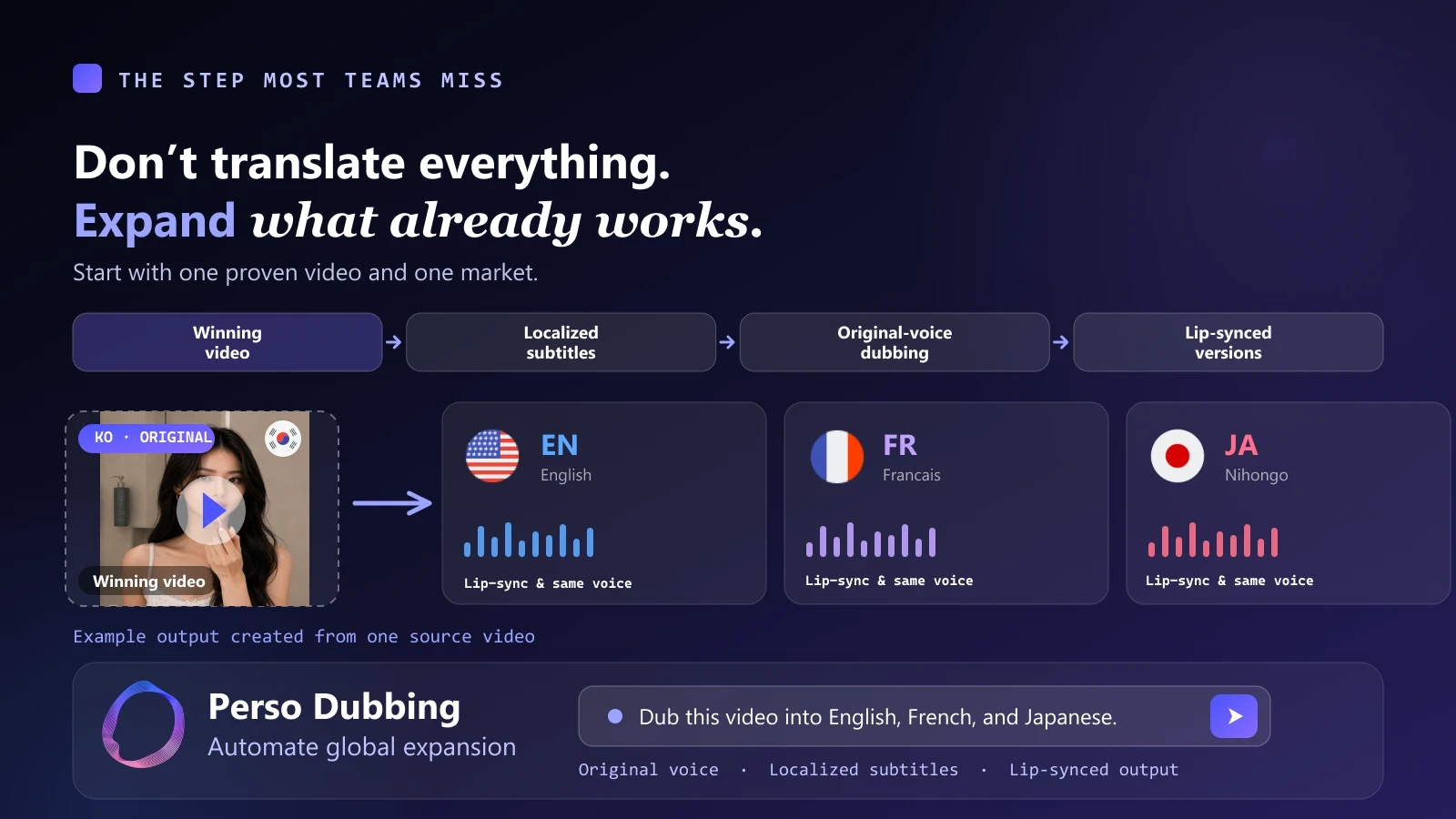
One source video. Multiple market-ready versions. Preserve the speaker's voice, generate localized subtitles, and create lip-synced outputs from the same approved asset.
Perso Dubbing automatically translates and dubs videos into 99+ languages with voice cloning, subtitle generation, and lip sync. The original speaker's voice can be preserved across translated versions.
Traditional workflow: Transcription → Translation → Voice generation → Audio timing → Subtitle creation → Lip sync → Export → File organization.
With Perso Dubbing: Upload or provide a video link → Select the target languages → Review the translated scripts → Generate dubbed, subtitled, and lip-synced versions → Export the results.
The platform can also be used through Claude Code, ChatGPT, Cursor, and Gemini. Using the Perso Dubbing API, a plain-language request can process a local file, a folder of videos, or a YouTube URL and organize the results by language.
Example: Expand One Winning Video
Example: Process a Folder
Example: Generate Subtitles Only
The main value is not simply that AI can translate a video. The value is that translation, voice cloning, dubbing, subtitles, lip sync, audio processing, and file organization become one connected workflow.
A Low-Risk New-Market Test
You do not need to localize your entire content library. Start with one proven video.
Step 1: Choose the video. Select a video that outperformed comparable content for its intended objective.
Step 2: Choose one or two markets. Use customer, traffic, search, engagement, and advertising data.
Step 3: Create the localized versions. Use Perso Dubbing to produce the translated audio, voice-cloned dubbing, subtitles, and lip-synced output.
Step 4: Localize the packaging. Also adapt the title, thumbnail or cover text, on-screen text, caption, CTA, and destination page. Changing only the spoken language is not a complete localization test.
Step 5: Compare the result. Measure watch time by language, retention, click-through rate, sign-ups, conversions, and cost per result when using paid distribution.
When one market shows meaningful demand, expand more proven content into that language. This is safer than translating an entire library before validating interest.
Quality Review Checklist for Localized Videos
Before publishing, check names and branded terms, numbers, dates, and prices, translation tone, pronunciation, subtitle timing, lip synchronization, on-screen text, the localized CTA, the destination page, and cultural context.
AI should remove repetitive production work. A person should still protect accuracy, brand meaning, and audience trust.
Full Content Automation Checklist
Ideas and briefs
Audience questions enter one central database
Ideas are tagged by audience, pain point, and intent
Approved ideas generate structured briefs
Claims requiring verification are clearly marked
Production
One strong master asset is created first
Transcription and repetitive editing are automated
Hooks, evidence, pacing, and brand tone are reviewed manually
Repurposing
One master asset becomes multiple formats
Each platform receives a tailored version
Final assets use one naming and storage system
Publishing
Approved content enters a scheduling queue
Every post has one owner and clear status
Tracking parameters are added consistently
Published URLs are saved
Performance
Content is reviewed at defined intervals
Results are compared with your own baseline
Every review ends with a clear next action
Insights feed the next content brief
Global expansion
Only proven videos are prioritized
Target markets are selected using evidence
Dubbing and subtitles can be generated in batches
Titles, CTAs, and landing pages are localized
Every version receives a final quality review
Start With One Proven Video
Do not start by building the most complicated automation system possible. Choose one video that has already performed well. Select one promising new market. Then use Perso Dubbing to create the translated, dubbed, subtitled, and lip-synced version without rebuilding the production process from scratch.
One video has already proven that the idea works. The next question is how much further it can travel.
Take your best video global with Perso Dubbing.
Create Your First Multilingual Video →
Start with one proven video and one new market. No need to translate your entire library.
FAQ
What is the difference between an AI-assisted and an automated content workflow?
An AI-assisted workflow uses tools like ChatGPT, Claude, or Gemini to help with individual tasks, but a person still copies data between tools, uploads files one by one, and schedules every post manually. An automated workflow connects those steps so approved work moves forward on its own, while humans keep control of editorial judgment and quality.
Which stage should I automate first?
Start with the handoff your team repeats most often. For many teams that is either turning audience questions into briefs or moving approved content into a publishing queue. You do not need every tool in the map to see a benefit.
How do I decide which content to translate into other languages?
Do not translate everything. Expand what already performs. Flag a video when it reaches roughly the top 20% of comparable recent posts for its primary objective, then localize that proven asset first. A lower-reach video with a strong conversion rate can be a better candidate than a high-view video that produced no action. See our guide on which dubbing languages make money by industry.
How many languages or markets should I start with?
Start with one or two markets that have the strongest combined evidence from customer, traffic, search, engagement, and advertising signals. Spreading localization resources across every language at once tends to underperform. YouTube itself recommends prioritizing one or two languages first.
Does AI dubbing keep the original speaker's voice?
Yes. Perso Dubbing uses voice cloning so the original speaker's voice can be preserved across translated versions, alongside subtitle generation and lip sync. If you want to understand how these layers differ, see AI dubbing vs voice cloning vs avatar.
Can I run dubbing without leaving my existing tools?
Yes. In addition to the web app, Perso Dubbing can be used through Claude Code, ChatGPT, Cursor, and Gemini, and via the Perso Dubbing API. A plain-language request can process a single file, a folder of videos, or a YouTube URL and organize the results by language.
What should a human always review before publishing a localized video?
Check names and branded terms, numbers, dates, and prices, translation tone, pronunciation, subtitle timing, lip synchronization, on-screen text, the localized CTA, the destination page, and cultural context. AI removes the repetitive production work, but a person still protects accuracy and brand meaning.
How much does AI dubbing cost?
Pricing depends on volume and the features you use, such as dubbing, subtitles, and lip sync. You can review current plans on the Perso pricing page.
Most content teams already use AI. They use ChatGPT, Claude, or Gemini to find ideas, draft scripts, write captions, and repurpose content. But using AI does not mean your content workflow is automated.
If you still copy information between tools, upload files one by one, rename every export, schedule every post manually, and decide what to create next from scratch, your workflow is only AI-assisted.
A connected content workflow should move work forward without requiring the same manual handoff every time. It should look like this:
Audience question → Brief → Master content → Repurposing → Publishing → Performance → Expansion
There is also one high-impact step that most content automation guides miss: automatically expanding content that has already proven it can perform. Instead of translating and repurposing every post, you can identify your strongest content and turn it into new formats, languages, and market tests.
This guide includes:
A complete content automation tool map
Practical workflows for each stage
Copy-ready AI prompts
Human-review checkpoints
A method for selecting content worth expanding
A full workflow checklist
The Content Automation Tool Map
Each stage below hands off to the next. Instead of a table, here is the same map as a stage-by-stage list.
1. Questions → Briefs. Collect audience signals and create structured briefs. Recommended tools: Notion or Airtable + Zapier or Make + ChatGPT, Claude, or Gemini.
2. Brief → Master content. Develop one approved source asset. Recommended tools: ChatGPT, Claude, or Gemini + Descript or CapCut.
3. Master content → Many formats. Create clips, carousels, posts, and email content. Recommended tools: OpusClip, Descript, or CapCut + an AI assistant.
4. Approved → Published. Move approved assets into a scheduling queue. Recommended tools: Notion or Airtable + Zapier or Make + Buffer.
5. Results → Next brief. Analyze performance and determine the next action. Recommended tools: Buffer or native analytics + ChatGPT, Claude, or Gemini.
6. Proven content → New markets. Create dubbed, subtitled, and lip-synced versions. Recommended tools: Perso Dubbing + ChatGPT, Claude Code, Cursor, or Gemini.
Notion and Airtable can trigger actions when records or database properties change, while Zapier and Make can connect those records to other apps and automate repetitive handoffs.
You do not need every tool in this map. Start with the handoff your team repeats most often.
1. Turn Audience Questions Into Content Briefs
The best content ideas are usually already inside your business. They appear in comments and direct messages, support tickets, sales calls, search queries, product reviews, webinar questions, and community discussions. The problem is that these signals are scattered across different channels.
Recommended workflow
New audience question → Save it in Notion or Airtable → Use AI to identify the audience and pain point → Generate possible content angles → Send the strongest idea for human approval
Notion database automations use defined triggers and actions when database changes occur. Airtable also supports trigger-action automations and AI-generated outputs inside those workflows.
Recommended database fields
Original question
Source
Target audience
Pain point
Content intent
Suggested format
Product relevance
Priority
Owner
Status
Copy-ready prompt
Analyze the audience question below.
Return:
- The underlying problem
- The likely target audience
- Three practical content angles
- The best format for each angle
- Any claims that require verification

Audience question: [INSERT QUESTION]
Keep this manual
A person should still decide whether the problem matters, whether your brand has something useful to add, whether the idea fits your audience, and whether the topic deserves production resources. Automate idea collection and organization, not editorial judgment.
2. Turn One Approved Brief Into a Strong Master Asset
Do not generate ten versions before the core content is good. That only scales weak content faster. Start with one approved master asset, such as a tutorial, a long-form video, a product demonstration, a webinar, a podcast, or a detailed blog post. Everything else should come from that approved source.
Recommended workflow
Approved brief → Generate the first script → Add examples, evidence, and product demonstrations → Record or produce the master asset → Transcribe and clean the initial edit → Complete human review
Suggested tools
Use ChatGPT, Claude, or Gemini for first-draft scripts, alternative hooks, outline development, research questions, and CTA variations.
Use Descript or CapCut for transcription, basic editing, caption generation, removing pauses or filler, and preparing social-ready footage. Descript links the transcript directly to the underlying media, allowing audio and video to be edited by editing text. It can also remove filler words and shorten word gaps.
Content brief prompt
Create a practical content brief using the information below.

Audience: [AUDIENCE]
Problem: [PROBLEM]
Topic: [TOPIC]
Format: [FORMAT]
Keep this manual
Review the opening hook, factual accuracy, examples and demonstrations, pacing, pronunciation, visual continuity, and brand tone. Your audience does not care how much of the production process was automated. They care whether the result is useful and trustworthy.
3. Repurpose the Master Asset Without Reposting It
Repurposing does not mean uploading the same video everywhere. Different platforms need different packaging. One approved tutorial could become three short clips, one carousel, one LinkedIn post, one email section, one blog excerpt, and several future content ideas. Each version may need a different hook, crop, length, context, and CTA.
Recommended workflow
Approved master asset → AI identifies strong moments → Platform-specific drafts are generated → Each draft enters a review queue → Final versions are exported and organized
OpusClip is designed to turn long-form videos into shorter social clips, while Descript and CapCut support transcript-based editing, captions, and short-form production workflows.
Copy-ready repurposing prompt
Keep this manual
Check whether each version makes sense on its own, whether the hook fits the platform, whether important context was removed, whether the crop and on-screen text are correct, and whether the CTA matches the audience's intent. Automate the first draft of repurposing, not the final packaging.
4. Move Approved Content Into Publishing
Many content bottlenecks are operational rather than creative. Common problems include: nobody knows which file is final, feedback is spread across different chats, approved posts are not scheduled, tracking links are missing, files are named inconsistently, and the same asset is reviewed more than once.
Use one status pipeline:
Idea → Brief → Draft → Review → Approved → Scheduled → Published
Recommended workflow
Status changes to Approved → Zapier or Make detects the update → The asset enters Buffer → The owner receives a confirmation → The database status changes to Scheduled → The published URL is saved after posting
Zapier and Make can connect content databases with publishing and reporting tools. Buffer supports post scheduling, queues, calendars, approvals, and social performance analysis.
Track these fields
Owner
Platform
Format
Publish date
Final asset
Final caption
CTA
Destination URL
UTM parameters
Approval status
Published URL
Keep this manual
Require human approval for new statistics or claims, pricing, customer stories, product comparisons, sensitive topics, translated marketing messages, and posts published under an individual's name. Automation should make accountability clearer, not remove it.
5. Turn Performance Into the Next Content Decision
Most workflows stop after publishing. The team checks a dashboard, reports the numbers, and starts the next post from scratch. A better workflow uses performance data to choose the next action.
Set two review points
Early review: Check initial signals after approximately 72 hours.
Full review: Review again after seven days or a period appropriate for the channel.
Match the metric to the objective
Awareness — Reach, views, watch time
Engagement — Saves, shares, comments
Traffic — Profile visits, link clicks
Conversion — Sign-ups, trials, purchases
Compare each post with your own recent baseline. A video does not need to be your most-viewed post to be considered successful. It needs to outperform comparable content for the metric it was designed to improve.
Buffer's Insights feature provides channel and cross-channel performance views, including engagement, impressions, follower growth, and post-level comparisons. Native platform analytics should still be used when deeper platform-specific detail is needed.
Copy-ready analysis prompt
The recommendation should create a new record in your content backlog. That closes the loop: Performance → Insight → Next brief.
6. Expand Proven Content Into New Markets
This is the step most teams miss. They automate content creation, editing, and publishing. But when a video performs well, they usually make one of two mistakes.
Mistake 1: Publish once and move on. A strong asset reaches only its original audience.
Mistake 2: Translate everything. Resources are spent localizing videos that have not proven their value.
The better approach
Do not translate everything. Expand what already works. When a video performs above your normal baseline, you already have evidence that the topic matters, the hook attracts attention, the format works, and the message resonates. That makes it a stronger candidate for multilingual expansion than an untested video.
How to Select a Video Worth Expanding
Set a simple qualification rule. For example, flag a video when it reaches the top 20% of comparable recent posts for its primary objective.
If the objective is awareness, check watch time, retention, and shares.
If the objective is traffic, check profile visits, link clicks, and click-through rate.
If the objective is conversion, check sign-ups, purchases, and conversion rate.
Do not qualify a video based on reach alone. A lower-reach tutorial with a strong conversion rate may be a better localization candidate than a high-view video that produced no meaningful action.
How to Choose the First Market
Do not begin with every language available. Score each potential market from 0 to 2 for each signal below.
Existing customers in the market — 0–2
Website traffic from the market — 0–2
Organic engagement or comments — 0–2
Relevant search demand — 0–2
Paid advertising performance — 0–2
Start with the one or two markets with the strongest combined evidence. YouTube recommends prioritizing one or two languages rather than spreading localization resources too thinly. The platform also reported that creators using multi-language audio received, on average, more than 25% of their watch time from viewers watching in a non-primary language.
Why Multilingual Video Production Becomes a Bottleneck
Creating one translated video manually may feel manageable. Creating several versions across multiple videos does not. A team may need to:
Translate the script
Generate or record the new voice
Match the translated audio to the original timing
Export every language
Rename and organize the files
Each additional language creates another set of uploads, downloads, timing adjustments, and quality checks. That is where Perso Dubbing fits into the workflow.
Turn One Proven Video Into Multiple Market-Ready Versions
One source video. Multiple market-ready versions. Preserve the speaker's voice, generate localized subtitles, and create lip-synced outputs from the same approved asset.
Perso Dubbing automatically translates and dubs videos into 99+ languages with voice cloning, subtitle generation, and lip sync. The original speaker's voice can be preserved across translated versions.
Traditional workflow: Transcription → Translation → Voice generation → Audio timing → Subtitle creation → Lip sync → Export → File organization.
With Perso Dubbing: Upload or provide a video link → Select the target languages → Review the translated scripts → Generate dubbed, subtitled, and lip-synced versions → Export the results.
The platform can also be used through Claude Code, ChatGPT, Cursor, and Gemini. Using the Perso Dubbing API, a plain-language request can process a local file, a folder of videos, or a YouTube URL and organize the results by language.
Example: Expand One Winning Video
Example: Process a Folder
Example: Generate Subtitles Only
The main value is not simply that AI can translate a video. The value is that translation, voice cloning, dubbing, subtitles, lip sync, audio processing, and file organization become one connected workflow.
A Low-Risk New-Market Test
You do not need to localize your entire content library. Start with one proven video.
Step 1: Choose the video. Select a video that outperformed comparable content for its intended objective.
Step 2: Choose one or two markets. Use customer, traffic, search, engagement, and advertising data.
Step 3: Create the localized versions. Use Perso Dubbing to produce the translated audio, voice-cloned dubbing, subtitles, and lip-synced output.
Step 4: Localize the packaging. Also adapt the title, thumbnail or cover text, on-screen text, caption, CTA, and destination page. Changing only the spoken language is not a complete localization test.
Step 5: Compare the result. Measure watch time by language, retention, click-through rate, sign-ups, conversions, and cost per result when using paid distribution.
When one market shows meaningful demand, expand more proven content into that language. This is safer than translating an entire library before validating interest.
Quality Review Checklist for Localized Videos
Before publishing, check names and branded terms, numbers, dates, and prices, translation tone, pronunciation, subtitle timing, lip synchronization, on-screen text, the localized CTA, the destination page, and cultural context.
AI should remove repetitive production work. A person should still protect accuracy, brand meaning, and audience trust.
Full Content Automation Checklist
Ideas and briefs
Audience questions enter one central database
Ideas are tagged by audience, pain point, and intent
Approved ideas generate structured briefs
Claims requiring verification are clearly marked
Production
One strong master asset is created first
Transcription and repetitive editing are automated
Hooks, evidence, pacing, and brand tone are reviewed manually
Repurposing
One master asset becomes multiple formats
Each platform receives a tailored version
Final assets use one naming and storage system
Publishing
Approved content enters a scheduling queue
Every post has one owner and clear status
Tracking parameters are added consistently
Published URLs are saved
Performance
Content is reviewed at defined intervals
Results are compared with your own baseline
Every review ends with a clear next action
Insights feed the next content brief
Global expansion
Only proven videos are prioritized
Target markets are selected using evidence
Dubbing and subtitles can be generated in batches
Titles, CTAs, and landing pages are localized
Every version receives a final quality review
Start With One Proven Video
Do not start by building the most complicated automation system possible. Choose one video that has already performed well. Select one promising new market. Then use Perso Dubbing to create the translated, dubbed, subtitled, and lip-synced version without rebuilding the production process from scratch.
One video has already proven that the idea works. The next question is how much further it can travel.
Take your best video global with Perso Dubbing.
Create Your First Multilingual Video →
Start with one proven video and one new market. No need to translate your entire library.
FAQ
What is the difference between an AI-assisted and an automated content workflow?
An AI-assisted workflow uses tools like ChatGPT, Claude, or Gemini to help with individual tasks, but a person still copies data between tools, uploads files one by one, and schedules every post manually. An automated workflow connects those steps so approved work moves forward on its own, while humans keep control of editorial judgment and quality.
Which stage should I automate first?
Start with the handoff your team repeats most often. For many teams that is either turning audience questions into briefs or moving approved content into a publishing queue. You do not need every tool in the map to see a benefit.
How do I decide which content to translate into other languages?
Do not translate everything. Expand what already performs. Flag a video when it reaches roughly the top 20% of comparable recent posts for its primary objective, then localize that proven asset first. A lower-reach video with a strong conversion rate can be a better candidate than a high-view video that produced no action. See our guide on which dubbing languages make money by industry.
How many languages or markets should I start with?
Start with one or two markets that have the strongest combined evidence from customer, traffic, search, engagement, and advertising signals. Spreading localization resources across every language at once tends to underperform. YouTube itself recommends prioritizing one or two languages first.
Does AI dubbing keep the original speaker's voice?
Yes. Perso Dubbing uses voice cloning so the original speaker's voice can be preserved across translated versions, alongside subtitle generation and lip sync. If you want to understand how these layers differ, see AI dubbing vs voice cloning vs avatar.
Can I run dubbing without leaving my existing tools?
Yes. In addition to the web app, Perso Dubbing can be used through Claude Code, ChatGPT, Cursor, and Gemini, and via the Perso Dubbing API. A plain-language request can process a single file, a folder of videos, or a YouTube URL and organize the results by language.
What should a human always review before publishing a localized video?
Check names and branded terms, numbers, dates, and prices, translation tone, pronunciation, subtitle timing, lip synchronization, on-screen text, the localized CTA, the destination page, and cultural context. AI removes the repetitive production work, but a person still protects accuracy and brand meaning.
How much does AI dubbing cost?
Pricing depends on volume and the features you use, such as dubbing, subtitles, and lip sync. You can review current plans on the Perso pricing page.
Most content teams already use AI. They use ChatGPT, Claude, or Gemini to find ideas, draft scripts, write captions, and repurpose content. But using AI does not mean your content workflow is automated.
If you still copy information between tools, upload files one by one, rename every export, schedule every post manually, and decide what to create next from scratch, your workflow is only AI-assisted.
A connected content workflow should move work forward without requiring the same manual handoff every time. It should look like this:
Audience question → Brief → Master content → Repurposing → Publishing → Performance → Expansion
There is also one high-impact step that most content automation guides miss: automatically expanding content that has already proven it can perform. Instead of translating and repurposing every post, you can identify your strongest content and turn it into new formats, languages, and market tests.
This guide includes:
A complete content automation tool map
Practical workflows for each stage
Copy-ready AI prompts
Human-review checkpoints
A method for selecting content worth expanding
A full workflow checklist
The Content Automation Tool Map
Each stage below hands off to the next. Instead of a table, here is the same map as a stage-by-stage list.
1. Questions → Briefs. Collect audience signals and create structured briefs. Recommended tools: Notion or Airtable + Zapier or Make + ChatGPT, Claude, or Gemini.
2. Brief → Master content. Develop one approved source asset. Recommended tools: ChatGPT, Claude, or Gemini + Descript or CapCut.
3. Master content → Many formats. Create clips, carousels, posts, and email content. Recommended tools: OpusClip, Descript, or CapCut + an AI assistant.
4. Approved → Published. Move approved assets into a scheduling queue. Recommended tools: Notion or Airtable + Zapier or Make + Buffer.
5. Results → Next brief. Analyze performance and determine the next action. Recommended tools: Buffer or native analytics + ChatGPT, Claude, or Gemini.
6. Proven content → New markets. Create dubbed, subtitled, and lip-synced versions. Recommended tools: Perso Dubbing + ChatGPT, Claude Code, Cursor, or Gemini.
Notion and Airtable can trigger actions when records or database properties change, while Zapier and Make can connect those records to other apps and automate repetitive handoffs.
You do not need every tool in this map. Start with the handoff your team repeats most often.
1. Turn Audience Questions Into Content Briefs
The best content ideas are usually already inside your business. They appear in comments and direct messages, support tickets, sales calls, search queries, product reviews, webinar questions, and community discussions. The problem is that these signals are scattered across different channels.
Recommended workflow
New audience question → Save it in Notion or Airtable → Use AI to identify the audience and pain point → Generate possible content angles → Send the strongest idea for human approval
Notion database automations use defined triggers and actions when database changes occur. Airtable also supports trigger-action automations and AI-generated outputs inside those workflows.
Recommended database fields
Original question
Source
Target audience
Pain point
Content intent
Suggested format
Product relevance
Priority
Owner
Status
Copy-ready prompt
Analyze the audience question below.
Return:
- The underlying problem
- The likely target audience
- Three practical content angles
- The best format for each angle
- Any claims that require verification

Audience question: [INSERT QUESTION]
Keep this manual
A person should still decide whether the problem matters, whether your brand has something useful to add, whether the idea fits your audience, and whether the topic deserves production resources. Automate idea collection and organization, not editorial judgment.
2. Turn One Approved Brief Into a Strong Master Asset
Do not generate ten versions before the core content is good. That only scales weak content faster. Start with one approved master asset, such as a tutorial, a long-form video, a product demonstration, a webinar, a podcast, or a detailed blog post. Everything else should come from that approved source.
Recommended workflow
Approved brief → Generate the first script → Add examples, evidence, and product demonstrations → Record or produce the master asset → Transcribe and clean the initial edit → Complete human review
Suggested tools
Use ChatGPT, Claude, or Gemini for first-draft scripts, alternative hooks, outline development, research questions, and CTA variations.
Use Descript or CapCut for transcription, basic editing, caption generation, removing pauses or filler, and preparing social-ready footage. Descript links the transcript directly to the underlying media, allowing audio and video to be edited by editing text. It can also remove filler words and shorten word gaps.
Content brief prompt
Create a practical content brief using the information below.

Audience: [AUDIENCE]
Problem: [PROBLEM]
Topic: [TOPIC]
Format: [FORMAT]
Keep this manual
Review the opening hook, factual accuracy, examples and demonstrations, pacing, pronunciation, visual continuity, and brand tone. Your audience does not care how much of the production process was automated. They care whether the result is useful and trustworthy.
3. Repurpose the Master Asset Without Reposting It
Repurposing does not mean uploading the same video everywhere. Different platforms need different packaging. One approved tutorial could become three short clips, one carousel, one LinkedIn post, one email section, one blog excerpt, and several future content ideas. Each version may need a different hook, crop, length, context, and CTA.
Recommended workflow
Approved master asset → AI identifies strong moments → Platform-specific drafts are generated → Each draft enters a review queue → Final versions are exported and organized
OpusClip is designed to turn long-form videos into shorter social clips, while Descript and CapCut support transcript-based editing, captions, and short-form production workflows.
Copy-ready repurposing prompt
Keep this manual
Check whether each version makes sense on its own, whether the hook fits the platform, whether important context was removed, whether the crop and on-screen text are correct, and whether the CTA matches the audience's intent. Automate the first draft of repurposing, not the final packaging.
4. Move Approved Content Into Publishing
Many content bottlenecks are operational rather than creative. Common problems include: nobody knows which file is final, feedback is spread across different chats, approved posts are not scheduled, tracking links are missing, files are named inconsistently, and the same asset is reviewed more than once.
Use one status pipeline:
Idea → Brief → Draft → Review → Approved → Scheduled → Published
Recommended workflow
Status changes to Approved → Zapier or Make detects the update → The asset enters Buffer → The owner receives a confirmation → The database status changes to Scheduled → The published URL is saved after posting
Zapier and Make can connect content databases with publishing and reporting tools. Buffer supports post scheduling, queues, calendars, approvals, and social performance analysis.
Track these fields
Owner
Platform
Format
Publish date
Final asset
Final caption
CTA
Destination URL
UTM parameters
Approval status
Published URL
Keep this manual
Require human approval for new statistics or claims, pricing, customer stories, product comparisons, sensitive topics, translated marketing messages, and posts published under an individual's name. Automation should make accountability clearer, not remove it.
5. Turn Performance Into the Next Content Decision
Most workflows stop after publishing. The team checks a dashboard, reports the numbers, and starts the next post from scratch. A better workflow uses performance data to choose the next action.
Set two review points
Early review: Check initial signals after approximately 72 hours.
Full review: Review again after seven days or a period appropriate for the channel.
Match the metric to the objective
Awareness — Reach, views, watch time
Engagement — Saves, shares, comments
Traffic — Profile visits, link clicks
Conversion — Sign-ups, trials, purchases
Compare each post with your own recent baseline. A video does not need to be your most-viewed post to be considered successful. It needs to outperform comparable content for the metric it was designed to improve.
Buffer's Insights feature provides channel and cross-channel performance views, including engagement, impressions, follower growth, and post-level comparisons. Native platform analytics should still be used when deeper platform-specific detail is needed.
Copy-ready analysis prompt
The recommendation should create a new record in your content backlog. That closes the loop: Performance → Insight → Next brief.
6. Expand Proven Content Into New Markets
This is the step most teams miss. They automate content creation, editing, and publishing. But when a video performs well, they usually make one of two mistakes.
Mistake 1: Publish once and move on. A strong asset reaches only its original audience.
Mistake 2: Translate everything. Resources are spent localizing videos that have not proven their value.
The better approach
Do not translate everything. Expand what already works. When a video performs above your normal baseline, you already have evidence that the topic matters, the hook attracts attention, the format works, and the message resonates. That makes it a stronger candidate for multilingual expansion than an untested video.
How to Select a Video Worth Expanding
Set a simple qualification rule. For example, flag a video when it reaches the top 20% of comparable recent posts for its primary objective.
If the objective is awareness, check watch time, retention, and shares.
If the objective is traffic, check profile visits, link clicks, and click-through rate.
If the objective is conversion, check sign-ups, purchases, and conversion rate.
Do not qualify a video based on reach alone. A lower-reach tutorial with a strong conversion rate may be a better localization candidate than a high-view video that produced no meaningful action.
How to Choose the First Market
Do not begin with every language available. Score each potential market from 0 to 2 for each signal below.
Existing customers in the market — 0–2
Website traffic from the market — 0–2
Organic engagement or comments — 0–2
Relevant search demand — 0–2
Paid advertising performance — 0–2
Start with the one or two markets with the strongest combined evidence. YouTube recommends prioritizing one or two languages rather than spreading localization resources too thinly. The platform also reported that creators using multi-language audio received, on average, more than 25% of their watch time from viewers watching in a non-primary language.
Why Multilingual Video Production Becomes a Bottleneck
Creating one translated video manually may feel manageable. Creating several versions across multiple videos does not. A team may need to:
Translate the script
Generate or record the new voice
Match the translated audio to the original timing
Export every language
Rename and organize the files
Each additional language creates another set of uploads, downloads, timing adjustments, and quality checks. That is where Perso Dubbing fits into the workflow.
Turn One Proven Video Into Multiple Market-Ready Versions
One source video. Multiple market-ready versions. Preserve the speaker's voice, generate localized subtitles, and create lip-synced outputs from the same approved asset.
Perso Dubbing automatically translates and dubs videos into 99+ languages with voice cloning, subtitle generation, and lip sync. The original speaker's voice can be preserved across translated versions.
Traditional workflow: Transcription → Translation → Voice generation → Audio timing → Subtitle creation → Lip sync → Export → File organization.
With Perso Dubbing: Upload or provide a video link → Select the target languages → Review the translated scripts → Generate dubbed, subtitled, and lip-synced versions → Export the results.
The platform can also be used through Claude Code, ChatGPT, Cursor, and Gemini. Using the Perso Dubbing API, a plain-language request can process a local file, a folder of videos, or a YouTube URL and organize the results by language.
Example: Expand One Winning Video
Example: Process a Folder
Example: Generate Subtitles Only
The main value is not simply that AI can translate a video. The value is that translation, voice cloning, dubbing, subtitles, lip sync, audio processing, and file organization become one connected workflow.
A Low-Risk New-Market Test
You do not need to localize your entire content library. Start with one proven video.
Step 1: Choose the video. Select a video that outperformed comparable content for its intended objective.
Step 2: Choose one or two markets. Use customer, traffic, search, engagement, and advertising data.
Step 3: Create the localized versions. Use Perso Dubbing to produce the translated audio, voice-cloned dubbing, subtitles, and lip-synced output.
Step 4: Localize the packaging. Also adapt the title, thumbnail or cover text, on-screen text, caption, CTA, and destination page. Changing only the spoken language is not a complete localization test.
Step 5: Compare the result. Measure watch time by language, retention, click-through rate, sign-ups, conversions, and cost per result when using paid distribution.
When one market shows meaningful demand, expand more proven content into that language. This is safer than translating an entire library before validating interest.
Quality Review Checklist for Localized Videos
Before publishing, check names and branded terms, numbers, dates, and prices, translation tone, pronunciation, subtitle timing, lip synchronization, on-screen text, the localized CTA, the destination page, and cultural context.
AI should remove repetitive production work. A person should still protect accuracy, brand meaning, and audience trust.
Full Content Automation Checklist
Ideas and briefs
Audience questions enter one central database
Ideas are tagged by audience, pain point, and intent
Approved ideas generate structured briefs
Claims requiring verification are clearly marked
Production
One strong master asset is created first
Transcription and repetitive editing are automated
Hooks, evidence, pacing, and brand tone are reviewed manually
Repurposing
One master asset becomes multiple formats
Each platform receives a tailored version
Final assets use one naming and storage system
Publishing
Approved content enters a scheduling queue
Every post has one owner and clear status
Tracking parameters are added consistently
Published URLs are saved
Performance
Content is reviewed at defined intervals
Results are compared with your own baseline
Every review ends with a clear next action
Insights feed the next content brief
Global expansion
Only proven videos are prioritized
Target markets are selected using evidence
Dubbing and subtitles can be generated in batches
Titles, CTAs, and landing pages are localized
Every version receives a final quality review
Start With One Proven Video
Do not start by building the most complicated automation system possible. Choose one video that has already performed well. Select one promising new market. Then use Perso Dubbing to create the translated, dubbed, subtitled, and lip-synced version without rebuilding the production process from scratch.
One video has already proven that the idea works. The next question is how much further it can travel.
Take your best video global with Perso Dubbing.
Create Your First Multilingual Video →
Start with one proven video and one new market. No need to translate your entire library.
FAQ
What is the difference between an AI-assisted and an automated content workflow?
An AI-assisted workflow uses tools like ChatGPT, Claude, or Gemini to help with individual tasks, but a person still copies data between tools, uploads files one by one, and schedules every post manually. An automated workflow connects those steps so approved work moves forward on its own, while humans keep control of editorial judgment and quality.
Which stage should I automate first?
Start with the handoff your team repeats most often. For many teams that is either turning audience questions into briefs or moving approved content into a publishing queue. You do not need every tool in the map to see a benefit.
How do I decide which content to translate into other languages?
Do not translate everything. Expand what already performs. Flag a video when it reaches roughly the top 20% of comparable recent posts for its primary objective, then localize that proven asset first. A lower-reach video with a strong conversion rate can be a better candidate than a high-view video that produced no action. See our guide on which dubbing languages make money by industry.
How many languages or markets should I start with?
Start with one or two markets that have the strongest combined evidence from customer, traffic, search, engagement, and advertising signals. Spreading localization resources across every language at once tends to underperform. YouTube itself recommends prioritizing one or two languages first.
Does AI dubbing keep the original speaker's voice?
Yes. Perso Dubbing uses voice cloning so the original speaker's voice can be preserved across translated versions, alongside subtitle generation and lip sync. If you want to understand how these layers differ, see AI dubbing vs voice cloning vs avatar.
Can I run dubbing without leaving my existing tools?
Yes. In addition to the web app, Perso Dubbing can be used through Claude Code, ChatGPT, Cursor, and Gemini, and via the Perso Dubbing API. A plain-language request can process a single file, a folder of videos, or a YouTube URL and organize the results by language.
What should a human always review before publishing a localized video?
Check names and branded terms, numbers, dates, and prices, translation tone, pronunciation, subtitle timing, lip synchronization, on-screen text, the localized CTA, the destination page, and cultural context. AI removes the repetitive production work, but a person still protects accuracy and brand meaning.
How much does AI dubbing cost?
Pricing depends on volume and the features you use, such as dubbing, subtitles, and lip sync. You can review current plans on the Perso pricing page.
Most content teams already use AI. They use ChatGPT, Claude, or Gemini to find ideas, draft scripts, write captions, and repurpose content. But using AI does not mean your content workflow is automated.
If you still copy information between tools, upload files one by one, rename every export, schedule every post manually, and decide what to create next from scratch, your workflow is only AI-assisted.
A connected content workflow should move work forward without requiring the same manual handoff every time. It should look like this:
Audience question → Brief → Master content → Repurposing → Publishing → Performance → Expansion
There is also one high-impact step that most content automation guides miss: automatically expanding content that has already proven it can perform. Instead of translating and repurposing every post, you can identify your strongest content and turn it into new formats, languages, and market tests.
This guide includes:
A complete content automation tool map
Practical workflows for each stage
Copy-ready AI prompts
Human-review checkpoints
A method for selecting content worth expanding
A full workflow checklist
The Content Automation Tool Map
Each stage below hands off to the next. Instead of a table, here is the same map as a stage-by-stage list.
1. Questions → Briefs. Collect audience signals and create structured briefs. Recommended tools: Notion or Airtable + Zapier or Make + ChatGPT, Claude, or Gemini.
2. Brief → Master content. Develop one approved source asset. Recommended tools: ChatGPT, Claude, or Gemini + Descript or CapCut.
3. Master content → Many formats. Create clips, carousels, posts, and email content. Recommended tools: OpusClip, Descript, or CapCut + an AI assistant.
4. Approved → Published. Move approved assets into a scheduling queue. Recommended tools: Notion or Airtable + Zapier or Make + Buffer.
5. Results → Next brief. Analyze performance and determine the next action. Recommended tools: Buffer or native analytics + ChatGPT, Claude, or Gemini.
6. Proven content → New markets. Create dubbed, subtitled, and lip-synced versions. Recommended tools: Perso Dubbing + ChatGPT, Claude Code, Cursor, or Gemini.
Notion and Airtable can trigger actions when records or database properties change, while Zapier and Make can connect those records to other apps and automate repetitive handoffs.
You do not need every tool in this map. Start with the handoff your team repeats most often.
1. Turn Audience Questions Into Content Briefs
The best content ideas are usually already inside your business. They appear in comments and direct messages, support tickets, sales calls, search queries, product reviews, webinar questions, and community discussions. The problem is that these signals are scattered across different channels.
Recommended workflow
New audience question → Save it in Notion or Airtable → Use AI to identify the audience and pain point → Generate possible content angles → Send the strongest idea for human approval
Notion database automations use defined triggers and actions when database changes occur. Airtable also supports trigger-action automations and AI-generated outputs inside those workflows.
Recommended database fields
Original question
Source
Target audience
Pain point
Content intent
Suggested format
Product relevance
Priority
Owner
Status
Copy-ready prompt
Analyze the audience question below.
Return:
- The underlying problem
- The likely target audience
- Three practical content angles
- The best format for each angle
- Any claims that require verification

Audience question: [INSERT QUESTION]
Keep this manual
A person should still decide whether the problem matters, whether your brand has something useful to add, whether the idea fits your audience, and whether the topic deserves production resources. Automate idea collection and organization, not editorial judgment.
2. Turn One Approved Brief Into a Strong Master Asset
Do not generate ten versions before the core content is good. That only scales weak content faster. Start with one approved master asset, such as a tutorial, a long-form video, a product demonstration, a webinar, a podcast, or a detailed blog post. Everything else should come from that approved source.
Recommended workflow
Approved brief → Generate the first script → Add examples, evidence, and product demonstrations → Record or produce the master asset → Transcribe and clean the initial edit → Complete human review
Suggested tools
Use ChatGPT, Claude, or Gemini for first-draft scripts, alternative hooks, outline development, research questions, and CTA variations.
Use Descript or CapCut for transcription, basic editing, caption generation, removing pauses or filler, and preparing social-ready footage. Descript links the transcript directly to the underlying media, allowing audio and video to be edited by editing text. It can also remove filler words and shorten word gaps.
Content brief prompt
Create a practical content brief using the information below.

Audience: [AUDIENCE]
Problem: [PROBLEM]
Topic: [TOPIC]
Format: [FORMAT]
Keep this manual
Review the opening hook, factual accuracy, examples and demonstrations, pacing, pronunciation, visual continuity, and brand tone. Your audience does not care how much of the production process was automated. They care whether the result is useful and trustworthy.
3. Repurpose the Master Asset Without Reposting It
Repurposing does not mean uploading the same video everywhere. Different platforms need different packaging. One approved tutorial could become three short clips, one carousel, one LinkedIn post, one email section, one blog excerpt, and several future content ideas. Each version may need a different hook, crop, length, context, and CTA.
Recommended workflow
Approved master asset → AI identifies strong moments → Platform-specific drafts are generated → Each draft enters a review queue → Final versions are exported and organized
OpusClip is designed to turn long-form videos into shorter social clips, while Descript and CapCut support transcript-based editing, captions, and short-form production workflows.
Copy-ready repurposing prompt
Keep this manual
Check whether each version makes sense on its own, whether the hook fits the platform, whether important context was removed, whether the crop and on-screen text are correct, and whether the CTA matches the audience's intent. Automate the first draft of repurposing, not the final packaging.
4. Move Approved Content Into Publishing
Many content bottlenecks are operational rather than creative. Common problems include: nobody knows which file is final, feedback is spread across different chats, approved posts are not scheduled, tracking links are missing, files are named inconsistently, and the same asset is reviewed more than once.
Use one status pipeline:
Idea → Brief → Draft → Review → Approved → Scheduled → Published
Recommended workflow
Status changes to Approved → Zapier or Make detects the update → The asset enters Buffer → The owner receives a confirmation → The database status changes to Scheduled → The published URL is saved after posting
Zapier and Make can connect content databases with publishing and reporting tools. Buffer supports post scheduling, queues, calendars, approvals, and social performance analysis.
Track these fields
Owner
Platform
Format
Publish date
Final asset
Final caption
CTA
Destination URL
UTM parameters
Approval status
Published URL
Keep this manual
Require human approval for new statistics or claims, pricing, customer stories, product comparisons, sensitive topics, translated marketing messages, and posts published under an individual's name. Automation should make accountability clearer, not remove it.
5. Turn Performance Into the Next Content Decision
Most workflows stop after publishing. The team checks a dashboard, reports the numbers, and starts the next post from scratch. A better workflow uses performance data to choose the next action.
Set two review points
Early review: Check initial signals after approximately 72 hours.
Full review: Review again after seven days or a period appropriate for the channel.
Match the metric to the objective
Awareness — Reach, views, watch time
Engagement — Saves, shares, comments
Traffic — Profile visits, link clicks
Conversion — Sign-ups, trials, purchases
Compare each post with your own recent baseline. A video does not need to be your most-viewed post to be considered successful. It needs to outperform comparable content for the metric it was designed to improve.
Buffer's Insights feature provides channel and cross-channel performance views, including engagement, impressions, follower growth, and post-level comparisons. Native platform analytics should still be used when deeper platform-specific detail is needed.
Copy-ready analysis prompt
The recommendation should create a new record in your content backlog. That closes the loop: Performance → Insight → Next brief.
6. Expand Proven Content Into New Markets
This is the step most teams miss. They automate content creation, editing, and publishing. But when a video performs well, they usually make one of two mistakes.
Mistake 1: Publish once and move on. A strong asset reaches only its original audience.
Mistake 2: Translate everything. Resources are spent localizing videos that have not proven their value.
The better approach
Do not translate everything. Expand what already works. When a video performs above your normal baseline, you already have evidence that the topic matters, the hook attracts attention, the format works, and the message resonates. That makes it a stronger candidate for multilingual expansion than an untested video.
How to Select a Video Worth Expanding
Set a simple qualification rule. For example, flag a video when it reaches the top 20% of comparable recent posts for its primary objective.
If the objective is awareness, check watch time, retention, and shares.
If the objective is traffic, check profile visits, link clicks, and click-through rate.
If the objective is conversion, check sign-ups, purchases, and conversion rate.
Do not qualify a video based on reach alone. A lower-reach tutorial with a strong conversion rate may be a better localization candidate than a high-view video that produced no meaningful action.
How to Choose the First Market
Do not begin with every language available. Score each potential market from 0 to 2 for each signal below.
Existing customers in the market — 0–2
Website traffic from the market — 0–2
Organic engagement or comments — 0–2
Relevant search demand — 0–2
Paid advertising performance — 0–2
Start with the one or two markets with the strongest combined evidence. YouTube recommends prioritizing one or two languages rather than spreading localization resources too thinly. The platform also reported that creators using multi-language audio received, on average, more than 25% of their watch time from viewers watching in a non-primary language.
Why Multilingual Video Production Becomes a Bottleneck
Creating one translated video manually may feel manageable. Creating several versions across multiple videos does not. A team may need to:
Translate the script
Generate or record the new voice
Match the translated audio to the original timing
Export every language
Rename and organize the files
Each additional language creates another set of uploads, downloads, timing adjustments, and quality checks. That is where Perso Dubbing fits into the workflow.
Turn One Proven Video Into Multiple Market-Ready Versions
One source video. Multiple market-ready versions. Preserve the speaker's voice, generate localized subtitles, and create lip-synced outputs from the same approved asset.
Perso Dubbing automatically translates and dubs videos into 99+ languages with voice cloning, subtitle generation, and lip sync. The original speaker's voice can be preserved across translated versions.
Traditional workflow: Transcription → Translation → Voice generation → Audio timing → Subtitle creation → Lip sync → Export → File organization.
With Perso Dubbing: Upload or provide a video link → Select the target languages → Review the translated scripts → Generate dubbed, subtitled, and lip-synced versions → Export the results.
The platform can also be used through Claude Code, ChatGPT, Cursor, and Gemini. Using the Perso Dubbing API, a plain-language request can process a local file, a folder of videos, or a YouTube URL and organize the results by language.
Example: Expand One Winning Video
Example: Process a Folder
Example: Generate Subtitles Only
The main value is not simply that AI can translate a video. The value is that translation, voice cloning, dubbing, subtitles, lip sync, audio processing, and file organization become one connected workflow.
A Low-Risk New-Market Test
You do not need to localize your entire content library. Start with one proven video.
Step 1: Choose the video. Select a video that outperformed comparable content for its intended objective.
Step 2: Choose one or two markets. Use customer, traffic, search, engagement, and advertising data.
Step 3: Create the localized versions. Use Perso Dubbing to produce the translated audio, voice-cloned dubbing, subtitles, and lip-synced output.
Step 4: Localize the packaging. Also adapt the title, thumbnail or cover text, on-screen text, caption, CTA, and destination page. Changing only the spoken language is not a complete localization test.
Step 5: Compare the result. Measure watch time by language, retention, click-through rate, sign-ups, conversions, and cost per result when using paid distribution.
When one market shows meaningful demand, expand more proven content into that language. This is safer than translating an entire library before validating interest.
Quality Review Checklist for Localized Videos
Before publishing, check names and branded terms, numbers, dates, and prices, translation tone, pronunciation, subtitle timing, lip synchronization, on-screen text, the localized CTA, the destination page, and cultural context.
AI should remove repetitive production work. A person should still protect accuracy, brand meaning, and audience trust.
Full Content Automation Checklist
Ideas and briefs
Audience questions enter one central database
Ideas are tagged by audience, pain point, and intent
Approved ideas generate structured briefs
Claims requiring verification are clearly marked
Production
One strong master asset is created first
Transcription and repetitive editing are automated
Hooks, evidence, pacing, and brand tone are reviewed manually
Repurposing
One master asset becomes multiple formats
Each platform receives a tailored version
Final assets use one naming and storage system
Publishing
Approved content enters a scheduling queue
Every post has one owner and clear status
Tracking parameters are added consistently
Published URLs are saved
Performance
Content is reviewed at defined intervals
Results are compared with your own baseline
Every review ends with a clear next action
Insights feed the next content brief
Global expansion
Only proven videos are prioritized
Target markets are selected using evidence
Dubbing and subtitles can be generated in batches
Titles, CTAs, and landing pages are localized
Every version receives a final quality review
Start With One Proven Video
Do not start by building the most complicated automation system possible. Choose one video that has already performed well. Select one promising new market. Then use Perso Dubbing to create the translated, dubbed, subtitled, and lip-synced version without rebuilding the production process from scratch.
One video has already proven that the idea works. The next question is how much further it can travel.
Take your best video global with Perso Dubbing.
Create Your First Multilingual Video →
Start with one proven video and one new market. No need to translate your entire library.
FAQ
What is the difference between an AI-assisted and an automated content workflow?
An AI-assisted workflow uses tools like ChatGPT, Claude, or Gemini to help with individual tasks, but a person still copies data between tools, uploads files one by one, and schedules every post manually. An automated workflow connects those steps so approved work moves forward on its own, while humans keep control of editorial judgment and quality.
Which stage should I automate first?
Start with the handoff your team repeats most often. For many teams that is either turning audience questions into briefs or moving approved content into a publishing queue. You do not need every tool in the map to see a benefit.
How do I decide which content to translate into other languages?
Do not translate everything. Expand what already performs. Flag a video when it reaches roughly the top 20% of comparable recent posts for its primary objective, then localize that proven asset first. A lower-reach video with a strong conversion rate can be a better candidate than a high-view video that produced no action. See our guide on which dubbing languages make money by industry.
How many languages or markets should I start with?
Start with one or two markets that have the strongest combined evidence from customer, traffic, search, engagement, and advertising signals. Spreading localization resources across every language at once tends to underperform. YouTube itself recommends prioritizing one or two languages first.
Does AI dubbing keep the original speaker's voice?
Yes. Perso Dubbing uses voice cloning so the original speaker's voice can be preserved across translated versions, alongside subtitle generation and lip sync. If you want to understand how these layers differ, see AI dubbing vs voice cloning vs avatar.
Can I run dubbing without leaving my existing tools?
Yes. In addition to the web app, Perso Dubbing can be used through Claude Code, ChatGPT, Cursor, and Gemini, and via the Perso Dubbing API. A plain-language request can process a single file, a folder of videos, or a YouTube URL and organize the results by language.
What should a human always review before publishing a localized video?
Check names and branded terms, numbers, dates, and prices, translation tone, pronunciation, subtitle timing, lip synchronization, on-screen text, the localized CTA, the destination page, and cultural context. AI removes the repetitive production work, but a person still protects accuracy and brand meaning.
How much does AI dubbing cost?
Pricing depends on volume and the features you use, such as dubbing, subtitles, and lip sync. You can review current plans on the Perso pricing page.
Continue Reading
Browse All