How to plan batch video dubbing for a large catalog






เครื่องมือแปลวิดีโอ AI การโลคัลไลเซชัน และการพากย์เสียง
เริ่มต้นตอนนี้
For batch video dubbing, count source minutes for each target language. Use a pilot to measure review time and rework before you book the full run.
A training team might have 200 videos ready to dub. The files can be ready for upload while the budget is still missing the time a Japanese reviewer will spend correcting technical terms. Work out which videos each audience needs, then use the pilot to put a time estimate on the approval step.
In Perso Dubbing's December 2025 to August 2026 paid cohort, 22.6% of projects with a recorded duration were five minutes or longer. Include a full-length file in your pilot if long lessons make up part of the rollout. A short excerpt can expose a mistranslated term. The full file also tests the upload, export, and time it takes to review an entire lesson. State of AI Dubbing 2026

Count source minutes for each target language
Give each source video an ID and record its revision, duration, target languages, and requested outputs. Count the full source duration once per language that needs a dub. This measures the scope you are sending out for quotes. Each vendor can then apply its own billing rules.
Suppose a training catalog has 200 five-minute videos. Spanish needs all 200. Japanese needs the 40 onboarding videos.
Language | Requested dubbing |
|---|---|
Spanish | 200 versions, 1,000 minutes |
Japanese | 40 versions, 200 minutes |
Total | 240 versions, 1,200 minutes |
With those 240 versions listed, flag any that also need captions, lip sync, or a separate audio file. For example, mark the courses with a presenter on screen and ask vendors how they scope lip sync for those files. Include the longest video in the inventory so each vendor can confirm whether the file can run intact.
Give each bidder the same pilot
Pick a routine lesson and a file that contains the issues your reviewers expect to see at scale. A full-length panel can cover speaker changes. A product walkthrough can expose the terms that need to match the interface. Give every bidder the same source cut, target languages, glossary, output requirements, and approval criteria.
Record the pilot at the level of one source video in one target language. For each version, capture these fields.
What to log | How to measure it |
|---|---|
Time to first export | Elapsed time from submission to the first playable file |
Active review time | Minutes spent listening, checking meaning, editing, and checking fixes |
Approval result | Approved on first review, approved after changes, or held |
Rework | Timecode, issue, fix, and any new generation or export required |
Agree on which errors hold delivery before the pilot starts. If a mandatory step becomes optional in translation, hold that version. If the same term is wrong in several lessons, correct it across the affected lessons and update the glossary before the next batch. Keep the original and corrected files tied to the same source revision so a new export cannot overwrite an approved version by mistake.
Choose when to add the other languages
Proofread first when a source correction would affect several languages. Run one target language in the pilot and open the script editor while the source project is still editable. Check the source and first translation side by side. If the transcript says "project ID" when the speaker said "workspace ID," correct the source text before adding languages. Also verify speaker assignments and timing where they affect meaning.

Open the full-size script editor screenshot
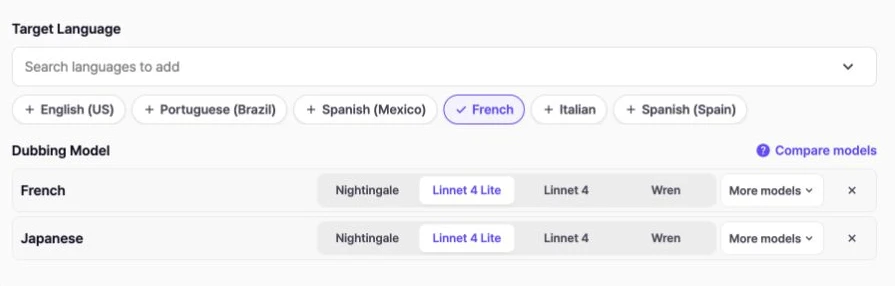
Once the source edits are complete, choose New language in the editor, select the remaining targets, and review the dubbing model for each one. The dialog says the new projects will use the current transcript. In the example below, French and Japanese are selected together. Both can start from the corrected source, saving reviewers from repeating the same source fix in separate projects. Review the translation and pronunciation for each language before delivery. Perso Dubbing feature announcement

Open the full-size New language screenshot
Choose all targets up front when the source has already been checked. In a new Dubbing & Lip Dubbing project, select several entries under Target Language before generating. This lets language reviewers start from the same intake without waiting for a lead translation. If they uncover a source error after generating, track which language versions need correcting and reviewing again.

Open the full-size initial setup screenshot
These are two ways to localize one source into several languages. A folder of source files is a separate batch planning problem: group videos by the destinations they need, then use the inventory to reconcile the outputs.
What a published lecture dub can show
Kim Chang-ok Academy used Perso Dubbing to localize lecture content. Its official YouTube channel published English-language versions and labels them as AI dubbed. Two English dubs cover finding the right work and waiting for a breakthrough. Both are available to listen to on the channel. When choosing a pilot for a lecture library, include a complete story or explanation so a reviewer can judge how pauses and changes in emphasis carry through.
Read the Kim Chang-ok Academy customer story
Watch the English dub about finding the right work
Watch the English dub about waiting for a breakthrough
If either video opens in Korean, open the player settings and choose English under Audio track.
The public case shows a finished language version. For your own procurement decision, collect the numbers a published video cannot give you, including reviewer hours, revisions, and per-language delivery cost.
Convert pilot results into a rollout decision
Estimate review time by language and type of video. For example, suppose the pilot suggests four active review minutes for each routine Spanish lesson, 12 for each dense Spanish lesson, and 10 for each Japanese onboarding version. These are illustrative rates.
Review group | Reviewer time |
|---|---|
Spanish, routine | 160 × 4 min = 10 h 40 min |
Spanish, dense | 40 × 12 min = 8 h |
Japanese, onboarding | 40 × 10 min = 6 h 40 min |
Total | 25 h 20 min |
The 25 hours and 20 minutes are staff time. For the delivery date, check when the relevant language reviewers can actually work and how long a corrected export takes to come back. If the pilot had only one dense lesson, carry a range for that group until a second sample gives you a better estimate.
Ask each vendor to quote against the 240 deliverables, with lip sync, captions, and additional revision rounds identified separately. Include the turnaround for a corrected export and tell vendors which languages or video types you will release first. Approve the next batch once the pilot meets your quality criteria, the review team has capacity, and you know how an individual failed version will be retried. If either a language or a file type is still untested, keep that part of the catalog out of the next batch.
Perso Dubbing's folder workflow can process multiple source files and target languages. When different groups need different targets, use separate runs so you can reconcile the results to your inventory. For an API integration, the usage documentation explains how to estimate credits for the selected media, model, and translation type. Folder dubbing workflow · Perso API documentation
Frequently asked questions
Q. How many videos should I include in a batch dubbing pilot?
A. Start with enough files to represent the types you will actually dub. Include a routine video and a file with the hardest combination of length, speakers, or terminology. If a target language requires its own reviewer or terminology, include it in the pilot before allocating the catalog to that team.
Q. Do I multiply the full catalog length by the number of target languages?
A. Multiply the catalog length by the number of languages only if every video goes to every language. Otherwise, add up the source minutes requested for each language. Send that inventory to vendors along with the expected audio, video, caption, and lip-sync outputs so they can quote the same scope.
Q. Can I add more target languages after proofreading a dub?
A. Yes. Make source corrections while the project is editable, then open New language and select additional targets. Perso Dubbing uses the current transcript to create the new language projects. Review each translation for local wording and pronunciation, and make revisions to existing versions in their own projects.
Review the Perso Dubbing video translation workflow before you select the pilot files and brief your reviewers.
For batch video dubbing, count source minutes for each target language. Use a pilot to measure review time and rework before you book the full run.
A training team might have 200 videos ready to dub. The files can be ready for upload while the budget is still missing the time a Japanese reviewer will spend correcting technical terms. Work out which videos each audience needs, then use the pilot to put a time estimate on the approval step.
In Perso Dubbing's December 2025 to August 2026 paid cohort, 22.6% of projects with a recorded duration were five minutes or longer. Include a full-length file in your pilot if long lessons make up part of the rollout. A short excerpt can expose a mistranslated term. The full file also tests the upload, export, and time it takes to review an entire lesson. State of AI Dubbing 2026
Count source minutes for each target language
Give each source video an ID and record its revision, duration, target languages, and requested outputs. Count the full source duration once per language that needs a dub. This measures the scope you are sending out for quotes. Each vendor can then apply its own billing rules.
Suppose a training catalog has 200 five-minute videos. Spanish needs all 200. Japanese needs the 40 onboarding videos.
Language | Requested dubbing |
|---|---|
Spanish | 200 versions, 1,000 minutes |
Japanese | 40 versions, 200 minutes |
Total | 240 versions, 1,200 minutes |
With those 240 versions listed, flag any that also need captions, lip sync, or a separate audio file. For example, mark the courses with a presenter on screen and ask vendors how they scope lip sync for those files. Include the longest video in the inventory so each vendor can confirm whether the file can run intact.
Give each bidder the same pilot
Pick a routine lesson and a file that contains the issues your reviewers expect to see at scale. A full-length panel can cover speaker changes. A product walkthrough can expose the terms that need to match the interface. Give every bidder the same source cut, target languages, glossary, output requirements, and approval criteria.
Record the pilot at the level of one source video in one target language. For each version, capture these fields.
What to log | How to measure it |
|---|---|
Time to first export | Elapsed time from submission to the first playable file |
Active review time | Minutes spent listening, checking meaning, editing, and checking fixes |
Approval result | Approved on first review, approved after changes, or held |
Rework | Timecode, issue, fix, and any new generation or export required |
Agree on which errors hold delivery before the pilot starts. If a mandatory step becomes optional in translation, hold that version. If the same term is wrong in several lessons, correct it across the affected lessons and update the glossary before the next batch. Keep the original and corrected files tied to the same source revision so a new export cannot overwrite an approved version by mistake.
Choose when to add the other languages
Proofread first when a source correction would affect several languages. Run one target language in the pilot and open the script editor while the source project is still editable. Check the source and first translation side by side. If the transcript says "project ID" when the speaker said "workspace ID," correct the source text before adding languages. Also verify speaker assignments and timing where they affect meaning.
Open the full-size script editor screenshot
Once the source edits are complete, choose New language in the editor, select the remaining targets, and review the dubbing model for each one. The dialog says the new projects will use the current transcript. In the example below, French and Japanese are selected together. Both can start from the corrected source, saving reviewers from repeating the same source fix in separate projects. Review the translation and pronunciation for each language before delivery. Perso Dubbing feature announcement
Open the full-size New language screenshot
Choose all targets up front when the source has already been checked. In a new Dubbing & Lip Dubbing project, select several entries under Target Language before generating. This lets language reviewers start from the same intake without waiting for a lead translation. If they uncover a source error after generating, track which language versions need correcting and reviewing again.
Open the full-size initial setup screenshot
These are two ways to localize one source into several languages. A folder of source files is a separate batch planning problem: group videos by the destinations they need, then use the inventory to reconcile the outputs.
What a published lecture dub can show
Kim Chang-ok Academy used Perso Dubbing to localize lecture content. Its official YouTube channel published English-language versions and labels them as AI dubbed. Two English dubs cover finding the right work and waiting for a breakthrough. Both are available to listen to on the channel. When choosing a pilot for a lecture library, include a complete story or explanation so a reviewer can judge how pauses and changes in emphasis carry through.
Read the Kim Chang-ok Academy customer story
Watch the English dub about finding the right work
Watch the English dub about waiting for a breakthrough
If either video opens in Korean, open the player settings and choose English under Audio track.
The public case shows a finished language version. For your own procurement decision, collect the numbers a published video cannot give you, including reviewer hours, revisions, and per-language delivery cost.
Convert pilot results into a rollout decision
Estimate review time by language and type of video. For example, suppose the pilot suggests four active review minutes for each routine Spanish lesson, 12 for each dense Spanish lesson, and 10 for each Japanese onboarding version. These are illustrative rates.
Review group | Reviewer time |
|---|---|
Spanish, routine | 160 × 4 min = 10 h 40 min |
Spanish, dense | 40 × 12 min = 8 h |
Japanese, onboarding | 40 × 10 min = 6 h 40 min |
Total | 25 h 20 min |
The 25 hours and 20 minutes are staff time. For the delivery date, check when the relevant language reviewers can actually work and how long a corrected export takes to come back. If the pilot had only one dense lesson, carry a range for that group until a second sample gives you a better estimate.
Ask each vendor to quote against the 240 deliverables, with lip sync, captions, and additional revision rounds identified separately. Include the turnaround for a corrected export and tell vendors which languages or video types you will release first. Approve the next batch once the pilot meets your quality criteria, the review team has capacity, and you know how an individual failed version will be retried. If either a language or a file type is still untested, keep that part of the catalog out of the next batch.
Perso Dubbing's folder workflow can process multiple source files and target languages. When different groups need different targets, use separate runs so you can reconcile the results to your inventory. For an API integration, the usage documentation explains how to estimate credits for the selected media, model, and translation type. Folder dubbing workflow · Perso API documentation
Frequently asked questions
Q. How many videos should I include in a batch dubbing pilot?
A. Start with enough files to represent the types you will actually dub. Include a routine video and a file with the hardest combination of length, speakers, or terminology. If a target language requires its own reviewer or terminology, include it in the pilot before allocating the catalog to that team.
Q. Do I multiply the full catalog length by the number of target languages?
A. Multiply the catalog length by the number of languages only if every video goes to every language. Otherwise, add up the source minutes requested for each language. Send that inventory to vendors along with the expected audio, video, caption, and lip-sync outputs so they can quote the same scope.
Q. Can I add more target languages after proofreading a dub?
A. Yes. Make source corrections while the project is editable, then open New language and select additional targets. Perso Dubbing uses the current transcript to create the new language projects. Review each translation for local wording and pronunciation, and make revisions to existing versions in their own projects.
Review the Perso Dubbing video translation workflow before you select the pilot files and brief your reviewers.
อ่านต่อ
เรียกดูทั้งหมด