YouTube音頻軌道:技術設定(2026)





人工智能視頻翻譯、定位和配音工具
免費試用
Your analytics show international viewers, but they're leaving at the 90-second mark. They want your content. They just can't access it in a way that works for them.
YouTube 的多語言音軌功能可以解決這個問題,但前提是你要正確導入。上傳錯誤的檔案格式、讓音訊與影片失去同步,或跳過中繼資料在地化,任何一項都會讓數小時的工作白費。
This guide walks you through the technical implementation of YouTube multi-language audio tracks, from file preparation to upload verification, so your international audience actually stays and watches. Whether you're new to video localization or scaling existing workflows, these steps ensure professional results.
Understanding YouTube's Audio Track Infrastructure
YouTube's audio track system operates differently from subtitle tracks. While subtitles overlay text on existing video, audio tracks replace the entire audio stream based on viewer selection.
When you upload multiple audio tracks to a single video:
每條音軌的長度必須與影片大致相同。YouTube 並未公開數值容差,因此請以完全一致為目標。
YouTube 會依影片時間軸處理每一條音軌
YouTube 會針對壓縮與品質個別處理每一條音軌
觀眾切換語言時不需要重新載入頁面或重新播放影片
This architecture creates specific technical requirements you need to meet before upload.
Supported Audio Formats and Technical Specifications
YouTube 的多語言音訊文件只說檔案必須是支援的純音訊格式,並未列出清單。以下是我們自己匯出並實際測量過的純音訊格式:
格式 | 編解碼器 | 狀態 |
|---|---|---|
.m4a | AAC | 已匯出並測量 |
.mp3 | MP3 | 已匯出並測量 |
.wav | PCM | 已匯出並測量 |
關鍵條件:音軌長度必須與影片長度相符。YouTube 的用語是「與影片大致相同的長度」,沒有公開容差,因此不要假設自己有餘裕。
Step 1: Preparing Source Video for Multi-Language Dubbing
Before generating translated audio, verify your source video meets quality standards for AI dubbing technology for video localization.
Audio Quality Checklist
✅ 語音清晰度:背景音樂明顯低於人聲 ✅ 音量穩定:沒有突然的峰值或驟降 ✅ 背景噪音極低:乾淨的音訊,沒有嗡聲、爆音或環境干擾 ✅ 說話者分離清楚:若有多位說話者,各自應有明確的聲像位置
Poor source quality compounds through translation. Fix audio issues before dubbing, not after.
Exporting Clean Audio Stems
For professional results, export your video's audio as separate stems:
Dialogue track only: Isolate voice without music or effects
Background music: Keep music and ambient sound separate
Sound effects: Maintain SFX as independent layer
This separation allows AI dubbing platforms with voice cloning to replace dialogue while preserving your video's original music and sound design. The result sounds natural instead of obviously dubbed.
Step 2: Generating Localized Audio with AI Dubbing
Professional video localization services require more than translation. You need voice matching, timing preservation, and cultural adaptation.
Selecting Target Languages Based on Analytics
Don't guess which languages to translate. Use data.
Open YouTube Studio → Audience → Geography tab. Look for:
Countries with 3%+ traffic from non-English regions
Growing markets showing month-over-month increases
High engagement countries with above-average watch time despite language barriers
Focus on languages where you already have organic demand. These viewers are finding your content and struggling through it. Give them proper access.
This approach works especially well for YouTube content creators, online course instructors, vloggers, and educators creating instructional videos.
Strategic language priority:
Tier 1 (translate first): Languages with existing 5-10% traffic share
Tier 2 (expand next): Adjacent markets in same language family
Tier 3 (test later): Emerging markets showing early signals
Using Perso AI for Voice-Matched Dubbing
Perso AI's voice cloning technology handles three critical technical challenges:
1. 支援 99 種以上語言的配音與聲音複製
The platform analyzes your voice characteristics from source video and replicates them in target languages. Your Spanish version sounds like you speaking Spanish, not a Spanish voice actor reading your script.
This maintains brand consistency across all language versions.
2. 付費方案的自動對嘴
配音必須貼合嘴形到觀眾不再注意落差的程度。
Perso Dubbing 的對嘴技術會自動調整時間點。所有付費方案都提供對嘴功能,各方案每月有各自的對嘴額度。
3. Multi-speaker detection and separation
Videos with multiple speakers require individual voice handling. The system:
Identifies each unique speaker
Maintains their distinct voice characteristics in translation
Preserves speaker-specific vocal patterns across all languages
Workflow: Upload to Dubbed Audio
上傳原始影片或直接貼上 YouTube 網址
從可用的語言中選擇目標語言
啟用聲音複製以維持聲音一致性
使用內建編輯器檢查自動產生的腳本
以自訂詞彙表調整專業術語
為每種語言產生配音版本
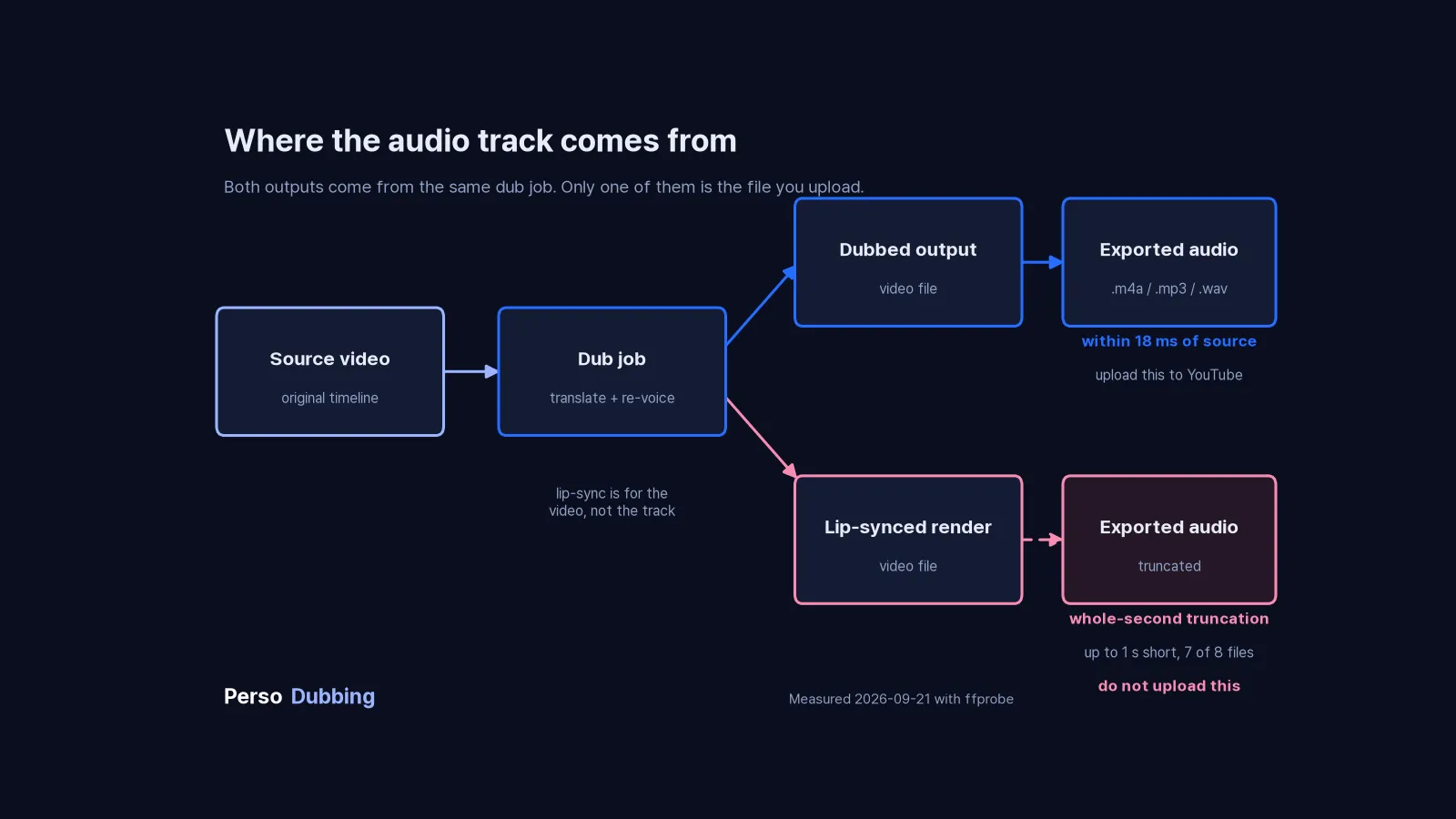
從配音輸出而非對嘴算圖下載純音訊音軌(.mp3、.m4a 或 .wav)
The platform outputs separate audio files for each target language, formatted specifically for YouTube upload.
Step 3: Uploading Audio Tracks to YouTube Studio
Navigate to YouTube Studio and follow this exact sequence:
Upload Process Step-by-Step
1. 開啟 Languages 選單
在電腦上登入 YouTube Studio
從左側選單選擇 Languages
點選你要新增音軌的影片
2. 新增語言與配音
點選 Add Language 並選擇語言
在「Dub」旁邊點選 Add
若該語言已有自動配音,必須先刪除。在刪除之前 YouTube 不會讓你上傳自己的檔案。
3. Upload audio file
Click "Upload" under audio track
Select your downloaded audio file
Wait for upload completion (progress bar shows status)
4. 發布並確認
檔案附加完成後點選 Publish
播放影片並切換到新音軌,確認能播到最後
若 YouTube 偵測到次要音軌中有與原始音訊不同的受版權保護內容,該檔案可能會被移除
5. Set track as default (optional)
Choose which language plays by default
Typically keep original language as primary
Secondary languages become available via settings menu
Common Upload Errors and Fixes
Error: "Audio duration doesn't match video"
Cause: Your audio file is longer or shorter than the video
Fix:
Check exact video duration in YouTube Studio
Re-export audio to match precisely
Use audio editing software to trim/extend to exact duration
Error: "File format not supported"
Cause: Uploaded audio in incompatible format
Fix:
轉換為 .m4a、.mp3 或 .wav
改用其他純音訊格式
確認檔案在下載過程中沒有毀損
Error: "Upload failed"
原因:連線中斷,或檔案遭到拒絕
Fix:
Compress audio file to lower bit rate
Use wired connection instead of WiFi
Try uploading during off-peak hours
Step 4: Metadata Localization for Each Language Track
Adding audio tracks is only half the battle. Discoverability requires localized metadata.
Title Translation Strategy
Don't directly translate titles. Optimize for search intent in each language.
English title: "How to Build a Gaming PC in 2025 - Complete Beginner's Guide"
Spanish (literal translation): "Cómo construir una PC para juegos en 2025 - Guía completa para principiantes"
Spanish (search-optimized): "Armar PC Gamer 2025 - Tutorial Paso a Paso para Principiantes"
The optimized version uses "Armar" (assemble) instead of "construir" (build) because search volume shows users searching "armar pc gamer" more frequently than "construir pc para juegos."
Research keyword variations in each target language using:
Google Trends for regional search patterns
YouTube autocomplete in target language
Competitor video titles in that market
Description Localization Best Practices
Translate descriptions with cultural context, not word-for-word conversion.
Include in localized descriptions:
Region-specific examples and references
Local measurement units (metric vs. imperial)
Currency conversions for pricing discussions
Links to region-appropriate resources
Culturally adapted analogies and metaphors
Avoid in localized descriptions:
Direct English-to-target translations of idioms
Region-specific slang from original language
References unfamiliar to target audience
Unchanged English product names (localize when appropriate)
Tag Strategy for Multi-Language Content
Each language version needs independent tag optimization.
Use YouTube channel growth with multilingual audio tracks strategy to add localized tags:
Go to YouTube Studio → Translations
Select target language
Add 15-20 tags in target language
Focus on long-tail search terms specific to that market
Include mix of broad and specific terms
Tags should reflect how native speakers actually search, not how you think they search.
Step 5: Testing and Quality Verification
Before publishing to your full audience, verify technical implementation.
Audio Track Testing Checklist
長度確認:
✅ 對原始影片與匯出的音訊檔分別執行 ffprobe -v error -show_entries format=duration -of csv=p=0 yourfile,確認長度一致
Playback verification:
✅ Test on desktop browser (Chrome, Firefox, Safari)
✅ Test on mobile app (iOS and Android)
✅ Verify language selector appears in settings menu
✅ Confirm smooth switching between languages
✅ Check audio continues seamlessly during language switch
Synchronization verification:
✅ Watch first 30 seconds in each language
✅ Check mid-video (around 50% mark)
✅ Verify ending synchronization
✅ Test during scenes with rapid speech
✅ Confirm sync during multi-speaker sections
Quality verification:
✅ Audio volume matches original video
✅ No clipping or distortion
✅ Voice sounds natural, not robotic
✅ Background music preserved correctly
✅ Sound effects remain intact
Metadata verification:
✅ Titles display correctly in all languages
✅ Descriptions formatted properly
✅ Tags relevant to target audience
✅ Thumbnail appropriate for all cultures
✅ No broken links in localized descriptions
A/B Testing Language Performance
Don't assume all language versions perform equally. Test and optimize.
Track these metrics per language:
Average view duration: How long do viewers watch in each language?
Click-through rate: Which thumbnails work in which markets?
Subscriber conversion: Which languages drive most new subscribers?
Engagement rate: Comments, likes, shares per language version
Use YouTube Analytics → Audience → Language filter to segment performance data.
Adjust strategy based on results:
Double down on high-performing languages
Improve metadata for underperforming languages
Consider removing languages with consistently poor engagement
Advanced Implementation: Channel-Wide Localization Strategy
Once you've successfully added audio tracks to individual videos, scale the strategy across your channel.
Content Prioritization Framework
Not every video needs immediate translation. Prioritize based on:
High priority (translate first):
Evergreen content with sustained traffic
Top 10 most-viewed videos on your channel
Videos ranking for competitive keywords
Tutorial/educational content with long watch times
Medium priority (translate second):
Recent uploads showing strong early performance
Seasonal content before relevant period
Videos targeting specific international markets
Content with high subscriber conversion rates
Low priority (translate later or skip):
Time-sensitive content already outdated
Low-performing videos with declining views
Highly culture-specific content difficult to localize
Videos with minimal existing international traffic
Workflow Automation for Multiple Videos
Establish efficient workflow for scaling:
Batch video selection: Identify 5-10 videos for translation
Parallel processing: Upload all to AI video dubbing platform simultaneously
Glossary creation: Build terminology database before processing
Review schedule: Allocate specific time for script verification
Upload calendar: Schedule systematic YouTube Studio updates
Performance tracking: Monitor analytics weekly for all languages
Consistent workflow prevents bottlenecks and maintains publishing rhythm across all language versions.
Measuring ROI: Analytics to Track
Quantify the impact of multi-language audio tracks with specific metrics.
Key Performance Indicators
Audience growth metrics:
New subscribers from international markets
Geography distribution changes over time
Percentage of views from non-primary languages
Subscriber retention rate by language
Engagement metrics:
Average view duration per language
Like/comment ratio by market
Share rate in target language regions
Playlist additions from international viewers
Revenue metrics:
CPM variations across different markets
Revenue growth from international ads
Sponsorship opportunities in new regions
Merchandise sales by geographic region
Algorithm performance:
Impression growth in target markets
Click-through rate by language
Suggested video appearances regionally
Search ranking for localized keywords
Track these metrics before and after implementing multi-language tracks. Compare performance over 30, 60, and 90-day periods to identify trends.
Common Technical Mistakes to Avoid
Mistake 1: Ignoring Audio File Duration Precision
Problem: Uploading audio that's 3 seconds shorter than video length
Impact: YouTube rejects upload or creates awkward silence at end
Solution: Export audio to exact video duration using video editing software's duration markers
Mistake 2: Using Compressed Audio with Artifacts
Problem: Over-compressing audio files to reduce file size
Impact: Audible quality degradation, robotic sound, listener fatigue
解法:不要對已壓縮的匯出檔再次壓縮,並維持足以讓人聲保持乾淨的位元率
Mistake 3: Skipping Script Review Before Generation
Problem: Accepting auto-translated scripts without manual verification
Impact: Awkward phrasing, incorrect terminology, lost meaning
Solution: Review every script in Perso AI's subtitle and script editor, adjust for natural language flow
Mistake 4: Translating Region-Specific Content Without Adaptation
Problem: Directly translating content with cultural references unfamiliar to target audience
Impact: Confusion, disengagement, missed jokes or key points
Solution: Replace region-specific examples with equivalent references familiar to target culture
Mistake 5: Publishing Without Mobile Testing
Problem: Verifying only on desktop before publishing
影響:行動裝置使用者佔 YouTube 流量的相當比例,他們看到的介面不同,也可能遇到音訊問題
Solution: Test on actual mobile devices in target markets before full publication
我們測量了什麼
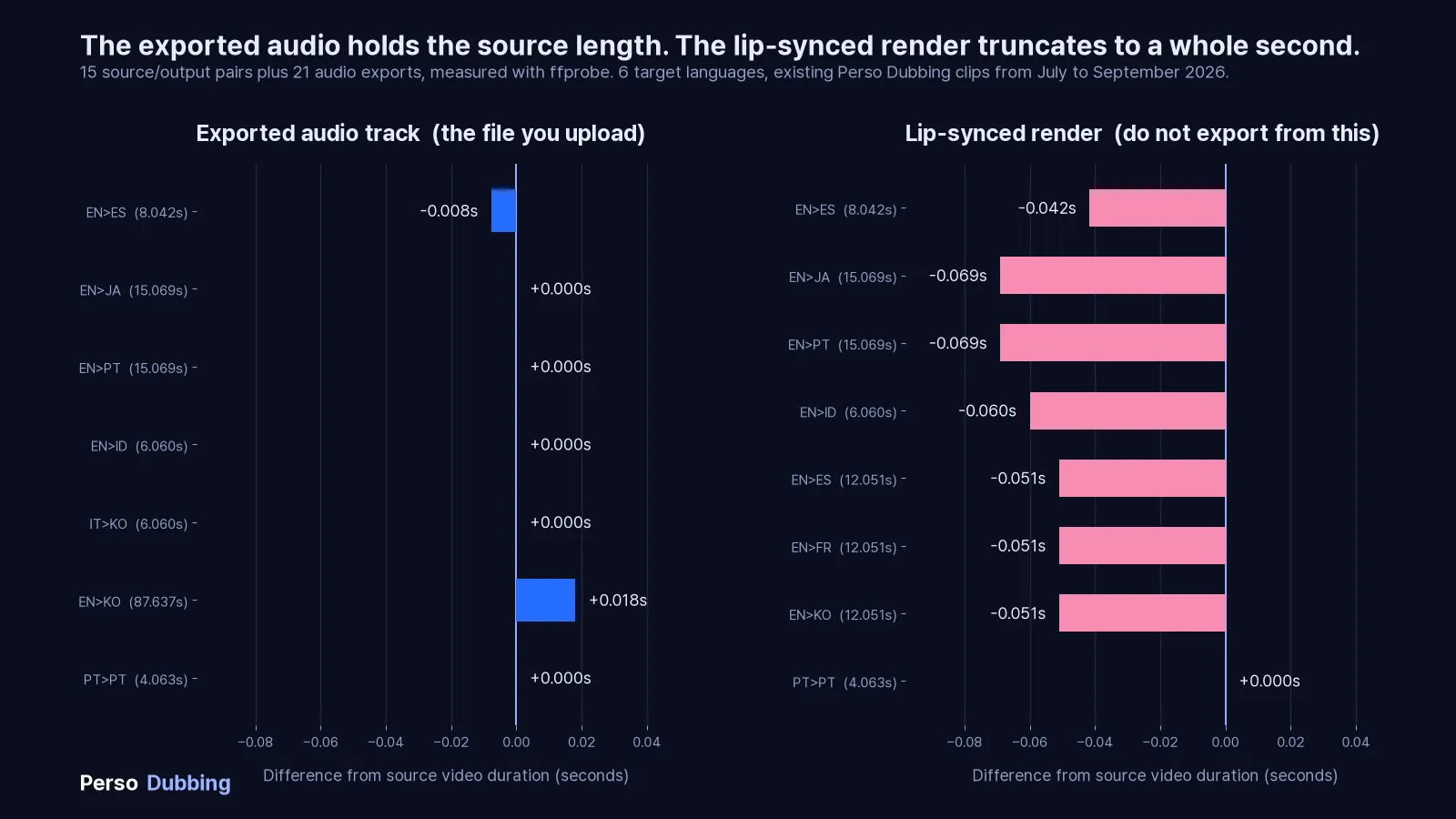
我們測量了在 Perso Dubbing 產生的 15 組來源與輸出,涵蓋 6 種目標語言,接著從每支配音匯出音訊再測一次。這些是我們手邊既有的行銷短片,不是為此準備的測試組,因此請當作抽樣檢查而非受控實驗。來源短片長度介於 4 秒到 88 秒。長度以 ffprobe 測得。
匯出的音軌與原始影片比較
目標語言 | 原始影片 | 匯出的音訊 | 差異 |
|---|---|---|---|
西班牙文 | 8.042s | 8.034s | −0.008s |
日文 | 15.069s | 15.069s | 0.000s |
葡萄牙文 | 15.069s | 15.069s | 0.000s |
印尼文 | 6.060s | 6.060s | 0.000s |
韓文(來源為義大利文) | 6.060s | 6.060s | 0.000s |
葡萄牙文(來源為葡萄牙文) | 4.063s | 4.063s | 0.000s |
韓文 | 87.637s | 87.655s | +0.018s |
M4A 中的 AAC、MP3 以及 WAV 中的 PCM,在每個檔案上都回傳彼此相同的長度,因此匯出格式的選擇並未改變數字。
西班牙文那一列值得注意。它匯出的音訊比原始影片短 8 毫秒,因為在那支來源檔中,音訊串流本來就比影片容器短 8 毫秒。匯出取得的是音訊串流的長度,如果你的來源有這種落差,就會一併繼承。
七組之中有六組回來的長度精確到微秒都相同。有變動的那一組同時也是整組中最長的 88 秒檔案,變動量為 0.018 秒。我們只記錄這個巧合,不加以解釋。在 88 秒的長度下,18 毫秒的偏移落在僅由影格邊界四捨五入就可能造成的範圍內,所以單一資料點無法區分累積漂移與容器造成的差異。
對嘴算圖與原始影片比較
請從配音檔匯出音訊,而不是從對嘴算圖。在同一組檔案中,對嘴算圖有 8 組中的 7 組正好落在整數秒。下表涵蓋 8 組,其中 3 組共用同一支來源。
目標語言 | 來源 | 對嘴輸出 | 差異 |
|---|---|---|---|
西班牙文 | 8.042s | 8.000s | −0.042s |
日文 | 15.069s | 15.000s | −0.069s |
葡萄牙文 | 15.069s | 15.000s | −0.069s |
印尼文 | 6.060s | 6.000s | −0.060s |
西班牙文、法文、韓文(同一來源) | 12.051s | 12.000s | −0.051s |
葡萄牙文(來源為葡萄牙文) | 4.063s | 4.063s | 0.000s |
最大的差距是 0.069 秒,而有一個檔案完全沒有被截斷。那組葡萄牙文轉葡萄牙文是整組中的例外,我們也不知道它為什麼表現不同。這同時也提醒我們,另外七組的截斷成因我們同樣不清楚。
不過從這個模式本身可以推出一件事。如果輸出被截斷到整數秒,誤差就是來源長度的小數部分,而無論檔案多長,它都會落在 0 秒到 1 秒之間的任何位置。我們的來源剛好小數部分都很小,全都低於 0.07。若是一支 1234.567 秒的 20 分鐘檔案,在相同行為下會損失 0.567 秒,大約是我們看到最壞情況的八倍。誤差不會累積,但也不會維持在很小的範圍。
這個樣本對 20 分鐘或 40 分鐘的檔案什麼都說不了,我們也不打算假裝可以。
Why Perso AI Handles Technical Implementation Better
AI dubbing software for YouTube creators addresses specific technical challenges that generic translation tools miss:
長度一致性
在我們的測量中,匯出的音訊在測試的全部 7 個檔案中都與原始影片相差不到 18 毫秒。我們並未檢視流程如何產生這個結果,因此請將它當作對輸出檔案的觀察,而不是保證。
Professional Audio Quality Standards
Output maintains broadcast-quality specifications:
各次匯出的取樣率一致
音量正規化一致
乾淨且無雜訊的頻率響應
專業等級的壓縮
Seamless Background Audio Preservation
Advanced audio separation technology:
Isolates dialogue from music automatically
Preserves original soundtrack in dubbed versions
Maintains sound effects positioning
Prevents audio bleeding between layers
Export Options for Every Workflow
Download files in multiple formats:
Audio-only tracks for YouTube upload (.mp3, .m4a, .wav)
Full video with embedded audio (all languages)
Separate subtitle files (.srt) for each language
Background music and dialogue stems separately
This flexibility supports any technical workflow or publishing platform.
FAQs
1. What audio format should I use for YouTube audio tracks?
YouTube 要求純音訊檔案,但並未針對這項功能公開支援格式清單。我們匯出並測量了 .m4a、.mp3 與 .wav,在測試的每個檔案中三者都回傳彼此相同的長度。無論選哪一種,都要確保長度與影片相符,因為 YouTube 同樣沒有公開容差。
2. How do I fix "audio duration doesn't match video" errors?
這個錯誤發生在音訊檔案長度與影片長度不符時。解決方式是用 Audacity 或 Adobe Audition 之類的編輯軟體開啟音訊檔,在 YouTube Studio 確認影片的精確長度,然後裁切或延長音訊使其精準相符。必要時可在結尾補上靜音,但總長度必須完全一致。重新匯出並上傳修正後的檔案。
3. Can I add audio tracks to existing YouTube videos?
可以。你可以為頻道上任何已發布的影片新增多語言音軌。在 YouTube Studio 從左側選單選擇 Languages,點選影片,點選 Add Language,再點選「Dub」旁邊的 Add 並上傳檔案。新影片與既有影片的流程完全相同,而且你可以隨時新增或移除音軌,不會影響影片本身。
4. How long does it take to process multi-language audio with AI?
多語言內容的 AI 配音平台處理影片的速度很快。平均而言,影片可在三分鐘內完成。處理時間取決於影片長度、說話者數量與音訊複雜度。你可以同時處理多種語言以節省時間。內建腳本編輯器讓你在背景繼續產生的同時檢查並調整翻譯。
5. Which languages should I prioritize for audio tracks?
在 YouTube 數據分析的「觀眾」→「地區」中,找出來自非英語地區且流量顯著的國家。優先處理那些即使有語言隔閡、自然觀看比例已達 3% 到 10% 的語言。這些觀眾想看你的內容,卻難以理解。高價值語言通常包含西班牙文、面向巴西市場的葡萄牙文、印地文與日文。先從已有需求的 2 到 3 種語言開始,之後再擴大。
6. How does voice cloning maintain my brand across languages?
AI voice cloning technology analyzes your vocal characteristics from source video, including tone, pitch, pace, and emotional patterns, then replicates these qualities in target languages. The result sounds like you speaking Spanish, Japanese, or Hindi naturally, rather than a generic voice actor. This maintains brand consistency and authenticity across all language versions. The AI learns your unique speaking style and applies it to translations, preserving your personality in every market.
7. What happens if my audio track has multiple speakers?
Professional AI dubbing software for multi-speaker videos automatically detects and separates multiple speakers in your source audio. The system identifies each unique voice, maintains their distinct characteristics, and translates each speaker's dialogue while preserving their individual vocal qualities. This works for interviews, podcasts, panel discussions, and collaborative content. Each speaker maintains their voice identity across all language versions, creating natural multi-speaker conversations in every target language.
8. How do I localize metadata for different language tracks?
Use YouTube Studio's translation feature to add localized titles, descriptions, and tags for each language. Don't translate literally, research how native speakers search for your content type in their language. Use Google Trends and YouTube autocomplete in target languages to find optimal keywords. Include region-specific examples, adapt measurement units, and replace cultural references with locally relevant equivalents. Test thumbnail performance separately in each market since visual preferences vary by culture.
9. Can I edit the translated script before generating audio?
Yes, Perso AI's subtitle and script editor allows you to review and modify auto-generated translations before creating dubbed audio. This allows you to adjust awkward phrasing, correct technical terminology, maintain brand voice, and adapt cultural references. You can also create custom glossaries for consistent translation of product names, industry terms, and key phrases across all videos. Edit the script, then regenerate audio with your corrections applied.
10. How do I measure the success of multi-language audio tracks?
Track these metrics in YouTube Analytics filtered by language: average view duration per language, subscriber growth from international markets, click-through rate by region, and engagement rate (likes, comments, shares) for each language version. Compare performance before and after adding audio tracks over 30, 60, and 90-day periods. Monitor which languages drive the highest watch time and subscriber conversion, then prioritize content translation for top-performing markets. Learn more about growing your YouTube channel with AI dubbing strategies.
Start Implementing Multi-Language Audio Tracks Today
YouTube's audio track feature transforms international growth from impossible to systematic. Follow the technical workflow, avoid common implementation mistakes, and verify quality before publishing.
The infrastructure exists. The tools work. Your international audience is waiting.
Pick your highest-traffic video with existing international viewers. Generate one language version. Upload the audio track. Test thoroughly. Check analytics in two weeks.
You'll see the technical implementation pay off immediately.
從 Perso Dubbing 的影片配音平台開始,產生你的第一批多語言音軌。支援 99 種以上語言的配音與聲音複製、所有付費方案的自動對嘴,以及可直接用於 YouTube 的音訊匯出。
Your technical implementation determines your global success.
Your analytics show international viewers, but they're leaving at the 90-second mark. They want your content. They just can't access it in a way that works for them.
YouTube 的多語言音軌功能可以解決這個問題,但前提是你要正確導入。上傳錯誤的檔案格式、讓音訊與影片失去同步,或跳過中繼資料在地化,任何一項都會讓數小時的工作白費。
This guide walks you through the technical implementation of YouTube multi-language audio tracks, from file preparation to upload verification, so your international audience actually stays and watches. Whether you're new to video localization or scaling existing workflows, these steps ensure professional results.
Understanding YouTube's Audio Track Infrastructure
YouTube's audio track system operates differently from subtitle tracks. While subtitles overlay text on existing video, audio tracks replace the entire audio stream based on viewer selection.
When you upload multiple audio tracks to a single video:
每條音軌的長度必須與影片大致相同。YouTube 並未公開數值容差,因此請以完全一致為目標。
YouTube 會依影片時間軸處理每一條音軌
YouTube 會針對壓縮與品質個別處理每一條音軌
觀眾切換語言時不需要重新載入頁面或重新播放影片
This architecture creates specific technical requirements you need to meet before upload.
Supported Audio Formats and Technical Specifications
YouTube 的多語言音訊文件只說檔案必須是支援的純音訊格式,並未列出清單。以下是我們自己匯出並實際測量過的純音訊格式:
格式 | 編解碼器 | 狀態 |
|---|---|---|
.m4a | AAC | 已匯出並測量 |
.mp3 | MP3 | 已匯出並測量 |
.wav | PCM | 已匯出並測量 |
關鍵條件:音軌長度必須與影片長度相符。YouTube 的用語是「與影片大致相同的長度」,沒有公開容差,因此不要假設自己有餘裕。
Step 1: Preparing Source Video for Multi-Language Dubbing
Before generating translated audio, verify your source video meets quality standards for AI dubbing technology for video localization.
Audio Quality Checklist
✅ 語音清晰度:背景音樂明顯低於人聲 ✅ 音量穩定:沒有突然的峰值或驟降 ✅ 背景噪音極低:乾淨的音訊,沒有嗡聲、爆音或環境干擾 ✅ 說話者分離清楚:若有多位說話者,各自應有明確的聲像位置
Poor source quality compounds through translation. Fix audio issues before dubbing, not after.
Exporting Clean Audio Stems
For professional results, export your video's audio as separate stems:
Dialogue track only: Isolate voice without music or effects
Background music: Keep music and ambient sound separate
Sound effects: Maintain SFX as independent layer
This separation allows AI dubbing platforms with voice cloning to replace dialogue while preserving your video's original music and sound design. The result sounds natural instead of obviously dubbed.
Step 2: Generating Localized Audio with AI Dubbing
Professional video localization services require more than translation. You need voice matching, timing preservation, and cultural adaptation.
Selecting Target Languages Based on Analytics
Don't guess which languages to translate. Use data.
Open YouTube Studio → Audience → Geography tab. Look for:
Countries with 3%+ traffic from non-English regions
Growing markets showing month-over-month increases
High engagement countries with above-average watch time despite language barriers
Focus on languages where you already have organic demand. These viewers are finding your content and struggling through it. Give them proper access.
This approach works especially well for YouTube content creators, online course instructors, vloggers, and educators creating instructional videos.
Strategic language priority:
Tier 1 (translate first): Languages with existing 5-10% traffic share
Tier 2 (expand next): Adjacent markets in same language family
Tier 3 (test later): Emerging markets showing early signals
Using Perso AI for Voice-Matched Dubbing
Perso AI's voice cloning technology handles three critical technical challenges:
1. 支援 99 種以上語言的配音與聲音複製
The platform analyzes your voice characteristics from source video and replicates them in target languages. Your Spanish version sounds like you speaking Spanish, not a Spanish voice actor reading your script.
This maintains brand consistency across all language versions.
2. 付費方案的自動對嘴
配音必須貼合嘴形到觀眾不再注意落差的程度。
Perso Dubbing 的對嘴技術會自動調整時間點。所有付費方案都提供對嘴功能,各方案每月有各自的對嘴額度。
3. Multi-speaker detection and separation
Videos with multiple speakers require individual voice handling. The system:
Identifies each unique speaker
Maintains their distinct voice characteristics in translation
Preserves speaker-specific vocal patterns across all languages
Workflow: Upload to Dubbed Audio
上傳原始影片或直接貼上 YouTube 網址
從可用的語言中選擇目標語言
啟用聲音複製以維持聲音一致性
使用內建編輯器檢查自動產生的腳本
以自訂詞彙表調整專業術語
為每種語言產生配音版本
從配音輸出而非對嘴算圖下載純音訊音軌(.mp3、.m4a 或 .wav)
The platform outputs separate audio files for each target language, formatted specifically for YouTube upload.
Step 3: Uploading Audio Tracks to YouTube Studio
Navigate to YouTube Studio and follow this exact sequence:
Upload Process Step-by-Step
1. 開啟 Languages 選單
在電腦上登入 YouTube Studio
從左側選單選擇 Languages
點選你要新增音軌的影片
2. 新增語言與配音
點選 Add Language 並選擇語言
在「Dub」旁邊點選 Add
若該語言已有自動配音,必須先刪除。在刪除之前 YouTube 不會讓你上傳自己的檔案。
3. Upload audio file
Click "Upload" under audio track
Select your downloaded audio file
Wait for upload completion (progress bar shows status)
4. 發布並確認
檔案附加完成後點選 Publish
播放影片並切換到新音軌,確認能播到最後
若 YouTube 偵測到次要音軌中有與原始音訊不同的受版權保護內容,該檔案可能會被移除
5. Set track as default (optional)
Choose which language plays by default
Typically keep original language as primary
Secondary languages become available via settings menu
Common Upload Errors and Fixes
Error: "Audio duration doesn't match video"
Cause: Your audio file is longer or shorter than the video
Fix:
Check exact video duration in YouTube Studio
Re-export audio to match precisely
Use audio editing software to trim/extend to exact duration
Error: "File format not supported"
Cause: Uploaded audio in incompatible format
Fix:
轉換為 .m4a、.mp3 或 .wav
改用其他純音訊格式
確認檔案在下載過程中沒有毀損
Error: "Upload failed"
原因:連線中斷,或檔案遭到拒絕
Fix:
Compress audio file to lower bit rate
Use wired connection instead of WiFi
Try uploading during off-peak hours
Step 4: Metadata Localization for Each Language Track
Adding audio tracks is only half the battle. Discoverability requires localized metadata.
Title Translation Strategy
Don't directly translate titles. Optimize for search intent in each language.
English title: "How to Build a Gaming PC in 2025 - Complete Beginner's Guide"
Spanish (literal translation): "Cómo construir una PC para juegos en 2025 - Guía completa para principiantes"
Spanish (search-optimized): "Armar PC Gamer 2025 - Tutorial Paso a Paso para Principiantes"
The optimized version uses "Armar" (assemble) instead of "construir" (build) because search volume shows users searching "armar pc gamer" more frequently than "construir pc para juegos."
Research keyword variations in each target language using:
Google Trends for regional search patterns
YouTube autocomplete in target language
Competitor video titles in that market
Description Localization Best Practices
Translate descriptions with cultural context, not word-for-word conversion.
Include in localized descriptions:
Region-specific examples and references
Local measurement units (metric vs. imperial)
Currency conversions for pricing discussions
Links to region-appropriate resources
Culturally adapted analogies and metaphors
Avoid in localized descriptions:
Direct English-to-target translations of idioms
Region-specific slang from original language
References unfamiliar to target audience
Unchanged English product names (localize when appropriate)
Tag Strategy for Multi-Language Content
Each language version needs independent tag optimization.
Use YouTube channel growth with multilingual audio tracks strategy to add localized tags:
Go to YouTube Studio → Translations
Select target language
Add 15-20 tags in target language
Focus on long-tail search terms specific to that market
Include mix of broad and specific terms
Tags should reflect how native speakers actually search, not how you think they search.
Step 5: Testing and Quality Verification
Before publishing to your full audience, verify technical implementation.
Audio Track Testing Checklist
長度確認:
✅ 對原始影片與匯出的音訊檔分別執行 ffprobe -v error -show_entries format=duration -of csv=p=0 yourfile,確認長度一致
Playback verification:
✅ Test on desktop browser (Chrome, Firefox, Safari)
✅ Test on mobile app (iOS and Android)
✅ Verify language selector appears in settings menu
✅ Confirm smooth switching between languages
✅ Check audio continues seamlessly during language switch
Synchronization verification:
✅ Watch first 30 seconds in each language
✅ Check mid-video (around 50% mark)
✅ Verify ending synchronization
✅ Test during scenes with rapid speech
✅ Confirm sync during multi-speaker sections
Quality verification:
✅ Audio volume matches original video
✅ No clipping or distortion
✅ Voice sounds natural, not robotic
✅ Background music preserved correctly
✅ Sound effects remain intact
Metadata verification:
✅ Titles display correctly in all languages
✅ Descriptions formatted properly
✅ Tags relevant to target audience
✅ Thumbnail appropriate for all cultures
✅ No broken links in localized descriptions
A/B Testing Language Performance
Don't assume all language versions perform equally. Test and optimize.
Track these metrics per language:
Average view duration: How long do viewers watch in each language?
Click-through rate: Which thumbnails work in which markets?
Subscriber conversion: Which languages drive most new subscribers?
Engagement rate: Comments, likes, shares per language version
Use YouTube Analytics → Audience → Language filter to segment performance data.
Adjust strategy based on results:
Double down on high-performing languages
Improve metadata for underperforming languages
Consider removing languages with consistently poor engagement
Advanced Implementation: Channel-Wide Localization Strategy
Once you've successfully added audio tracks to individual videos, scale the strategy across your channel.
Content Prioritization Framework
Not every video needs immediate translation. Prioritize based on:
High priority (translate first):
Evergreen content with sustained traffic
Top 10 most-viewed videos on your channel
Videos ranking for competitive keywords
Tutorial/educational content with long watch times
Medium priority (translate second):
Recent uploads showing strong early performance
Seasonal content before relevant period
Videos targeting specific international markets
Content with high subscriber conversion rates
Low priority (translate later or skip):
Time-sensitive content already outdated
Low-performing videos with declining views
Highly culture-specific content difficult to localize
Videos with minimal existing international traffic
Workflow Automation for Multiple Videos
Establish efficient workflow for scaling:
Batch video selection: Identify 5-10 videos for translation
Parallel processing: Upload all to AI video dubbing platform simultaneously
Glossary creation: Build terminology database before processing
Review schedule: Allocate specific time for script verification
Upload calendar: Schedule systematic YouTube Studio updates
Performance tracking: Monitor analytics weekly for all languages
Consistent workflow prevents bottlenecks and maintains publishing rhythm across all language versions.
Measuring ROI: Analytics to Track
Quantify the impact of multi-language audio tracks with specific metrics.
Key Performance Indicators
Audience growth metrics:
New subscribers from international markets
Geography distribution changes over time
Percentage of views from non-primary languages
Subscriber retention rate by language
Engagement metrics:
Average view duration per language
Like/comment ratio by market
Share rate in target language regions
Playlist additions from international viewers
Revenue metrics:
CPM variations across different markets
Revenue growth from international ads
Sponsorship opportunities in new regions
Merchandise sales by geographic region
Algorithm performance:
Impression growth in target markets
Click-through rate by language
Suggested video appearances regionally
Search ranking for localized keywords
Track these metrics before and after implementing multi-language tracks. Compare performance over 30, 60, and 90-day periods to identify trends.
Common Technical Mistakes to Avoid
Mistake 1: Ignoring Audio File Duration Precision
Problem: Uploading audio that's 3 seconds shorter than video length
Impact: YouTube rejects upload or creates awkward silence at end
Solution: Export audio to exact video duration using video editing software's duration markers
Mistake 2: Using Compressed Audio with Artifacts
Problem: Over-compressing audio files to reduce file size
Impact: Audible quality degradation, robotic sound, listener fatigue
解法:不要對已壓縮的匯出檔再次壓縮,並維持足以讓人聲保持乾淨的位元率
Mistake 3: Skipping Script Review Before Generation
Problem: Accepting auto-translated scripts without manual verification
Impact: Awkward phrasing, incorrect terminology, lost meaning
Solution: Review every script in Perso AI's subtitle and script editor, adjust for natural language flow
Mistake 4: Translating Region-Specific Content Without Adaptation
Problem: Directly translating content with cultural references unfamiliar to target audience
Impact: Confusion, disengagement, missed jokes or key points
Solution: Replace region-specific examples with equivalent references familiar to target culture
Mistake 5: Publishing Without Mobile Testing
Problem: Verifying only on desktop before publishing
影響:行動裝置使用者佔 YouTube 流量的相當比例,他們看到的介面不同,也可能遇到音訊問題
Solution: Test on actual mobile devices in target markets before full publication
我們測量了什麼
我們測量了在 Perso Dubbing 產生的 15 組來源與輸出,涵蓋 6 種目標語言,接著從每支配音匯出音訊再測一次。這些是我們手邊既有的行銷短片,不是為此準備的測試組,因此請當作抽樣檢查而非受控實驗。來源短片長度介於 4 秒到 88 秒。長度以 ffprobe 測得。
匯出的音軌與原始影片比較
目標語言 | 原始影片 | 匯出的音訊 | 差異 |
|---|---|---|---|
西班牙文 | 8.042s | 8.034s | −0.008s |
日文 | 15.069s | 15.069s | 0.000s |
葡萄牙文 | 15.069s | 15.069s | 0.000s |
印尼文 | 6.060s | 6.060s | 0.000s |
韓文(來源為義大利文) | 6.060s | 6.060s | 0.000s |
葡萄牙文(來源為葡萄牙文) | 4.063s | 4.063s | 0.000s |
韓文 | 87.637s | 87.655s | +0.018s |
M4A 中的 AAC、MP3 以及 WAV 中的 PCM,在每個檔案上都回傳彼此相同的長度,因此匯出格式的選擇並未改變數字。
西班牙文那一列值得注意。它匯出的音訊比原始影片短 8 毫秒,因為在那支來源檔中,音訊串流本來就比影片容器短 8 毫秒。匯出取得的是音訊串流的長度,如果你的來源有這種落差,就會一併繼承。
七組之中有六組回來的長度精確到微秒都相同。有變動的那一組同時也是整組中最長的 88 秒檔案,變動量為 0.018 秒。我們只記錄這個巧合,不加以解釋。在 88 秒的長度下,18 毫秒的偏移落在僅由影格邊界四捨五入就可能造成的範圍內,所以單一資料點無法區分累積漂移與容器造成的差異。
對嘴算圖與原始影片比較
請從配音檔匯出音訊,而不是從對嘴算圖。在同一組檔案中,對嘴算圖有 8 組中的 7 組正好落在整數秒。下表涵蓋 8 組,其中 3 組共用同一支來源。
目標語言 | 來源 | 對嘴輸出 | 差異 |
|---|---|---|---|
西班牙文 | 8.042s | 8.000s | −0.042s |
日文 | 15.069s | 15.000s | −0.069s |
葡萄牙文 | 15.069s | 15.000s | −0.069s |
印尼文 | 6.060s | 6.000s | −0.060s |
西班牙文、法文、韓文(同一來源) | 12.051s | 12.000s | −0.051s |
葡萄牙文(來源為葡萄牙文) | 4.063s | 4.063s | 0.000s |
最大的差距是 0.069 秒,而有一個檔案完全沒有被截斷。那組葡萄牙文轉葡萄牙文是整組中的例外,我們也不知道它為什麼表現不同。這同時也提醒我們,另外七組的截斷成因我們同樣不清楚。
不過從這個模式本身可以推出一件事。如果輸出被截斷到整數秒,誤差就是來源長度的小數部分,而無論檔案多長,它都會落在 0 秒到 1 秒之間的任何位置。我們的來源剛好小數部分都很小,全都低於 0.07。若是一支 1234.567 秒的 20 分鐘檔案,在相同行為下會損失 0.567 秒,大約是我們看到最壞情況的八倍。誤差不會累積,但也不會維持在很小的範圍。
這個樣本對 20 分鐘或 40 分鐘的檔案什麼都說不了,我們也不打算假裝可以。
Why Perso AI Handles Technical Implementation Better
AI dubbing software for YouTube creators addresses specific technical challenges that generic translation tools miss:
長度一致性
在我們的測量中,匯出的音訊在測試的全部 7 個檔案中都與原始影片相差不到 18 毫秒。我們並未檢視流程如何產生這個結果,因此請將它當作對輸出檔案的觀察,而不是保證。
Professional Audio Quality Standards
Output maintains broadcast-quality specifications:
各次匯出的取樣率一致
音量正規化一致
乾淨且無雜訊的頻率響應
專業等級的壓縮
Seamless Background Audio Preservation
Advanced audio separation technology:
Isolates dialogue from music automatically
Preserves original soundtrack in dubbed versions
Maintains sound effects positioning
Prevents audio bleeding between layers
Export Options for Every Workflow
Download files in multiple formats:
Audio-only tracks for YouTube upload (.mp3, .m4a, .wav)
Full video with embedded audio (all languages)
Separate subtitle files (.srt) for each language
Background music and dialogue stems separately
This flexibility supports any technical workflow or publishing platform.
FAQs
1. What audio format should I use for YouTube audio tracks?
YouTube 要求純音訊檔案,但並未針對這項功能公開支援格式清單。我們匯出並測量了 .m4a、.mp3 與 .wav,在測試的每個檔案中三者都回傳彼此相同的長度。無論選哪一種,都要確保長度與影片相符,因為 YouTube 同樣沒有公開容差。
2. How do I fix "audio duration doesn't match video" errors?
這個錯誤發生在音訊檔案長度與影片長度不符時。解決方式是用 Audacity 或 Adobe Audition 之類的編輯軟體開啟音訊檔,在 YouTube Studio 確認影片的精確長度,然後裁切或延長音訊使其精準相符。必要時可在結尾補上靜音,但總長度必須完全一致。重新匯出並上傳修正後的檔案。
3. Can I add audio tracks to existing YouTube videos?
可以。你可以為頻道上任何已發布的影片新增多語言音軌。在 YouTube Studio 從左側選單選擇 Languages,點選影片,點選 Add Language,再點選「Dub」旁邊的 Add 並上傳檔案。新影片與既有影片的流程完全相同,而且你可以隨時新增或移除音軌,不會影響影片本身。
4. How long does it take to process multi-language audio with AI?
多語言內容的 AI 配音平台處理影片的速度很快。平均而言,影片可在三分鐘內完成。處理時間取決於影片長度、說話者數量與音訊複雜度。你可以同時處理多種語言以節省時間。內建腳本編輯器讓你在背景繼續產生的同時檢查並調整翻譯。
5. Which languages should I prioritize for audio tracks?
在 YouTube 數據分析的「觀眾」→「地區」中,找出來自非英語地區且流量顯著的國家。優先處理那些即使有語言隔閡、自然觀看比例已達 3% 到 10% 的語言。這些觀眾想看你的內容,卻難以理解。高價值語言通常包含西班牙文、面向巴西市場的葡萄牙文、印地文與日文。先從已有需求的 2 到 3 種語言開始,之後再擴大。
6. How does voice cloning maintain my brand across languages?
AI voice cloning technology analyzes your vocal characteristics from source video, including tone, pitch, pace, and emotional patterns, then replicates these qualities in target languages. The result sounds like you speaking Spanish, Japanese, or Hindi naturally, rather than a generic voice actor. This maintains brand consistency and authenticity across all language versions. The AI learns your unique speaking style and applies it to translations, preserving your personality in every market.
7. What happens if my audio track has multiple speakers?
Professional AI dubbing software for multi-speaker videos automatically detects and separates multiple speakers in your source audio. The system identifies each unique voice, maintains their distinct characteristics, and translates each speaker's dialogue while preserving their individual vocal qualities. This works for interviews, podcasts, panel discussions, and collaborative content. Each speaker maintains their voice identity across all language versions, creating natural multi-speaker conversations in every target language.
8. How do I localize metadata for different language tracks?
Use YouTube Studio's translation feature to add localized titles, descriptions, and tags for each language. Don't translate literally, research how native speakers search for your content type in their language. Use Google Trends and YouTube autocomplete in target languages to find optimal keywords. Include region-specific examples, adapt measurement units, and replace cultural references with locally relevant equivalents. Test thumbnail performance separately in each market since visual preferences vary by culture.
9. Can I edit the translated script before generating audio?
Yes, Perso AI's subtitle and script editor allows you to review and modify auto-generated translations before creating dubbed audio. This allows you to adjust awkward phrasing, correct technical terminology, maintain brand voice, and adapt cultural references. You can also create custom glossaries for consistent translation of product names, industry terms, and key phrases across all videos. Edit the script, then regenerate audio with your corrections applied.
10. How do I measure the success of multi-language audio tracks?
Track these metrics in YouTube Analytics filtered by language: average view duration per language, subscriber growth from international markets, click-through rate by region, and engagement rate (likes, comments, shares) for each language version. Compare performance before and after adding audio tracks over 30, 60, and 90-day periods. Monitor which languages drive the highest watch time and subscriber conversion, then prioritize content translation for top-performing markets. Learn more about growing your YouTube channel with AI dubbing strategies.
Start Implementing Multi-Language Audio Tracks Today
YouTube's audio track feature transforms international growth from impossible to systematic. Follow the technical workflow, avoid common implementation mistakes, and verify quality before publishing.
The infrastructure exists. The tools work. Your international audience is waiting.
Pick your highest-traffic video with existing international viewers. Generate one language version. Upload the audio track. Test thoroughly. Check analytics in two weeks.
You'll see the technical implementation pay off immediately.
從 Perso Dubbing 的影片配音平台開始,產生你的第一批多語言音軌。支援 99 種以上語言的配音與聲音複製、所有付費方案的自動對嘴,以及可直接用於 YouTube 的音訊匯出。
Your technical implementation determines your global success.
Your analytics show international viewers, but they're leaving at the 90-second mark. They want your content. They just can't access it in a way that works for them.
YouTube 的多語言音軌功能可以解決這個問題,但前提是你要正確導入。上傳錯誤的檔案格式、讓音訊與影片失去同步,或跳過中繼資料在地化,任何一項都會讓數小時的工作白費。
This guide walks you through the technical implementation of YouTube multi-language audio tracks, from file preparation to upload verification, so your international audience actually stays and watches. Whether you're new to video localization or scaling existing workflows, these steps ensure professional results.
Understanding YouTube's Audio Track Infrastructure
YouTube's audio track system operates differently from subtitle tracks. While subtitles overlay text on existing video, audio tracks replace the entire audio stream based on viewer selection.
When you upload multiple audio tracks to a single video:
每條音軌的長度必須與影片大致相同。YouTube 並未公開數值容差,因此請以完全一致為目標。
YouTube 會依影片時間軸處理每一條音軌
YouTube 會針對壓縮與品質個別處理每一條音軌
觀眾切換語言時不需要重新載入頁面或重新播放影片
This architecture creates specific technical requirements you need to meet before upload.
Supported Audio Formats and Technical Specifications
YouTube 的多語言音訊文件只說檔案必須是支援的純音訊格式,並未列出清單。以下是我們自己匯出並實際測量過的純音訊格式:
格式 | 編解碼器 | 狀態 |
|---|---|---|
.m4a | AAC | 已匯出並測量 |
.mp3 | MP3 | 已匯出並測量 |
.wav | PCM | 已匯出並測量 |
關鍵條件:音軌長度必須與影片長度相符。YouTube 的用語是「與影片大致相同的長度」,沒有公開容差,因此不要假設自己有餘裕。
Step 1: Preparing Source Video for Multi-Language Dubbing
Before generating translated audio, verify your source video meets quality standards for AI dubbing technology for video localization.
Audio Quality Checklist
✅ 語音清晰度:背景音樂明顯低於人聲 ✅ 音量穩定:沒有突然的峰值或驟降 ✅ 背景噪音極低:乾淨的音訊,沒有嗡聲、爆音或環境干擾 ✅ 說話者分離清楚:若有多位說話者,各自應有明確的聲像位置
Poor source quality compounds through translation. Fix audio issues before dubbing, not after.
Exporting Clean Audio Stems
For professional results, export your video's audio as separate stems:
Dialogue track only: Isolate voice without music or effects
Background music: Keep music and ambient sound separate
Sound effects: Maintain SFX as independent layer
This separation allows AI dubbing platforms with voice cloning to replace dialogue while preserving your video's original music and sound design. The result sounds natural instead of obviously dubbed.
Step 2: Generating Localized Audio with AI Dubbing
Professional video localization services require more than translation. You need voice matching, timing preservation, and cultural adaptation.
Selecting Target Languages Based on Analytics
Don't guess which languages to translate. Use data.
Open YouTube Studio → Audience → Geography tab. Look for:
Countries with 3%+ traffic from non-English regions
Growing markets showing month-over-month increases
High engagement countries with above-average watch time despite language barriers
Focus on languages where you already have organic demand. These viewers are finding your content and struggling through it. Give them proper access.
This approach works especially well for YouTube content creators, online course instructors, vloggers, and educators creating instructional videos.
Strategic language priority:
Tier 1 (translate first): Languages with existing 5-10% traffic share
Tier 2 (expand next): Adjacent markets in same language family
Tier 3 (test later): Emerging markets showing early signals
Using Perso AI for Voice-Matched Dubbing
Perso AI's voice cloning technology handles three critical technical challenges:
1. 支援 99 種以上語言的配音與聲音複製
The platform analyzes your voice characteristics from source video and replicates them in target languages. Your Spanish version sounds like you speaking Spanish, not a Spanish voice actor reading your script.
This maintains brand consistency across all language versions.
2. 付費方案的自動對嘴
配音必須貼合嘴形到觀眾不再注意落差的程度。
Perso Dubbing 的對嘴技術會自動調整時間點。所有付費方案都提供對嘴功能,各方案每月有各自的對嘴額度。
3. Multi-speaker detection and separation
Videos with multiple speakers require individual voice handling. The system:
Identifies each unique speaker
Maintains their distinct voice characteristics in translation
Preserves speaker-specific vocal patterns across all languages
Workflow: Upload to Dubbed Audio
上傳原始影片或直接貼上 YouTube 網址
從可用的語言中選擇目標語言
啟用聲音複製以維持聲音一致性
使用內建編輯器檢查自動產生的腳本
以自訂詞彙表調整專業術語
為每種語言產生配音版本
從配音輸出而非對嘴算圖下載純音訊音軌(.mp3、.m4a 或 .wav)
The platform outputs separate audio files for each target language, formatted specifically for YouTube upload.
Step 3: Uploading Audio Tracks to YouTube Studio
Navigate to YouTube Studio and follow this exact sequence:
Upload Process Step-by-Step
1. 開啟 Languages 選單
在電腦上登入 YouTube Studio
從左側選單選擇 Languages
點選你要新增音軌的影片
2. 新增語言與配音
點選 Add Language 並選擇語言
在「Dub」旁邊點選 Add
若該語言已有自動配音,必須先刪除。在刪除之前 YouTube 不會讓你上傳自己的檔案。
3. Upload audio file
Click "Upload" under audio track
Select your downloaded audio file
Wait for upload completion (progress bar shows status)
4. 發布並確認
檔案附加完成後點選 Publish
播放影片並切換到新音軌,確認能播到最後
若 YouTube 偵測到次要音軌中有與原始音訊不同的受版權保護內容,該檔案可能會被移除
5. Set track as default (optional)
Choose which language plays by default
Typically keep original language as primary
Secondary languages become available via settings menu
Common Upload Errors and Fixes
Error: "Audio duration doesn't match video"
Cause: Your audio file is longer or shorter than the video
Fix:
Check exact video duration in YouTube Studio
Re-export audio to match precisely
Use audio editing software to trim/extend to exact duration
Error: "File format not supported"
Cause: Uploaded audio in incompatible format
Fix:
轉換為 .m4a、.mp3 或 .wav
改用其他純音訊格式
確認檔案在下載過程中沒有毀損
Error: "Upload failed"
原因:連線中斷,或檔案遭到拒絕
Fix:
Compress audio file to lower bit rate
Use wired connection instead of WiFi
Try uploading during off-peak hours
Step 4: Metadata Localization for Each Language Track
Adding audio tracks is only half the battle. Discoverability requires localized metadata.
Title Translation Strategy
Don't directly translate titles. Optimize for search intent in each language.
English title: "How to Build a Gaming PC in 2025 - Complete Beginner's Guide"
Spanish (literal translation): "Cómo construir una PC para juegos en 2025 - Guía completa para principiantes"
Spanish (search-optimized): "Armar PC Gamer 2025 - Tutorial Paso a Paso para Principiantes"
The optimized version uses "Armar" (assemble) instead of "construir" (build) because search volume shows users searching "armar pc gamer" more frequently than "construir pc para juegos."
Research keyword variations in each target language using:
Google Trends for regional search patterns
YouTube autocomplete in target language
Competitor video titles in that market
Description Localization Best Practices
Translate descriptions with cultural context, not word-for-word conversion.
Include in localized descriptions:
Region-specific examples and references
Local measurement units (metric vs. imperial)
Currency conversions for pricing discussions
Links to region-appropriate resources
Culturally adapted analogies and metaphors
Avoid in localized descriptions:
Direct English-to-target translations of idioms
Region-specific slang from original language
References unfamiliar to target audience
Unchanged English product names (localize when appropriate)
Tag Strategy for Multi-Language Content
Each language version needs independent tag optimization.
Use YouTube channel growth with multilingual audio tracks strategy to add localized tags:
Go to YouTube Studio → Translations
Select target language
Add 15-20 tags in target language
Focus on long-tail search terms specific to that market
Include mix of broad and specific terms
Tags should reflect how native speakers actually search, not how you think they search.
Step 5: Testing and Quality Verification
Before publishing to your full audience, verify technical implementation.
Audio Track Testing Checklist
長度確認:
✅ 對原始影片與匯出的音訊檔分別執行 ffprobe -v error -show_entries format=duration -of csv=p=0 yourfile,確認長度一致
Playback verification:
✅ Test on desktop browser (Chrome, Firefox, Safari)
✅ Test on mobile app (iOS and Android)
✅ Verify language selector appears in settings menu
✅ Confirm smooth switching between languages
✅ Check audio continues seamlessly during language switch
Synchronization verification:
✅ Watch first 30 seconds in each language
✅ Check mid-video (around 50% mark)
✅ Verify ending synchronization
✅ Test during scenes with rapid speech
✅ Confirm sync during multi-speaker sections
Quality verification:
✅ Audio volume matches original video
✅ No clipping or distortion
✅ Voice sounds natural, not robotic
✅ Background music preserved correctly
✅ Sound effects remain intact
Metadata verification:
✅ Titles display correctly in all languages
✅ Descriptions formatted properly
✅ Tags relevant to target audience
✅ Thumbnail appropriate for all cultures
✅ No broken links in localized descriptions
A/B Testing Language Performance
Don't assume all language versions perform equally. Test and optimize.
Track these metrics per language:
Average view duration: How long do viewers watch in each language?
Click-through rate: Which thumbnails work in which markets?
Subscriber conversion: Which languages drive most new subscribers?
Engagement rate: Comments, likes, shares per language version
Use YouTube Analytics → Audience → Language filter to segment performance data.
Adjust strategy based on results:
Double down on high-performing languages
Improve metadata for underperforming languages
Consider removing languages with consistently poor engagement
Advanced Implementation: Channel-Wide Localization Strategy
Once you've successfully added audio tracks to individual videos, scale the strategy across your channel.
Content Prioritization Framework
Not every video needs immediate translation. Prioritize based on:
High priority (translate first):
Evergreen content with sustained traffic
Top 10 most-viewed videos on your channel
Videos ranking for competitive keywords
Tutorial/educational content with long watch times
Medium priority (translate second):
Recent uploads showing strong early performance
Seasonal content before relevant period
Videos targeting specific international markets
Content with high subscriber conversion rates
Low priority (translate later or skip):
Time-sensitive content already outdated
Low-performing videos with declining views
Highly culture-specific content difficult to localize
Videos with minimal existing international traffic
Workflow Automation for Multiple Videos
Establish efficient workflow for scaling:
Batch video selection: Identify 5-10 videos for translation
Parallel processing: Upload all to AI video dubbing platform simultaneously
Glossary creation: Build terminology database before processing
Review schedule: Allocate specific time for script verification
Upload calendar: Schedule systematic YouTube Studio updates
Performance tracking: Monitor analytics weekly for all languages
Consistent workflow prevents bottlenecks and maintains publishing rhythm across all language versions.
Measuring ROI: Analytics to Track
Quantify the impact of multi-language audio tracks with specific metrics.
Key Performance Indicators
Audience growth metrics:
New subscribers from international markets
Geography distribution changes over time
Percentage of views from non-primary languages
Subscriber retention rate by language
Engagement metrics:
Average view duration per language
Like/comment ratio by market
Share rate in target language regions
Playlist additions from international viewers
Revenue metrics:
CPM variations across different markets
Revenue growth from international ads
Sponsorship opportunities in new regions
Merchandise sales by geographic region
Algorithm performance:
Impression growth in target markets
Click-through rate by language
Suggested video appearances regionally
Search ranking for localized keywords
Track these metrics before and after implementing multi-language tracks. Compare performance over 30, 60, and 90-day periods to identify trends.
Common Technical Mistakes to Avoid
Mistake 1: Ignoring Audio File Duration Precision
Problem: Uploading audio that's 3 seconds shorter than video length
Impact: YouTube rejects upload or creates awkward silence at end
Solution: Export audio to exact video duration using video editing software's duration markers
Mistake 2: Using Compressed Audio with Artifacts
Problem: Over-compressing audio files to reduce file size
Impact: Audible quality degradation, robotic sound, listener fatigue
解法:不要對已壓縮的匯出檔再次壓縮,並維持足以讓人聲保持乾淨的位元率
Mistake 3: Skipping Script Review Before Generation
Problem: Accepting auto-translated scripts without manual verification
Impact: Awkward phrasing, incorrect terminology, lost meaning
Solution: Review every script in Perso AI's subtitle and script editor, adjust for natural language flow
Mistake 4: Translating Region-Specific Content Without Adaptation
Problem: Directly translating content with cultural references unfamiliar to target audience
Impact: Confusion, disengagement, missed jokes or key points
Solution: Replace region-specific examples with equivalent references familiar to target culture
Mistake 5: Publishing Without Mobile Testing
Problem: Verifying only on desktop before publishing
影響:行動裝置使用者佔 YouTube 流量的相當比例,他們看到的介面不同,也可能遇到音訊問題
Solution: Test on actual mobile devices in target markets before full publication
我們測量了什麼
我們測量了在 Perso Dubbing 產生的 15 組來源與輸出,涵蓋 6 種目標語言,接著從每支配音匯出音訊再測一次。這些是我們手邊既有的行銷短片,不是為此準備的測試組,因此請當作抽樣檢查而非受控實驗。來源短片長度介於 4 秒到 88 秒。長度以 ffprobe 測得。
匯出的音軌與原始影片比較
目標語言 | 原始影片 | 匯出的音訊 | 差異 |
|---|---|---|---|
西班牙文 | 8.042s | 8.034s | −0.008s |
日文 | 15.069s | 15.069s | 0.000s |
葡萄牙文 | 15.069s | 15.069s | 0.000s |
印尼文 | 6.060s | 6.060s | 0.000s |
韓文(來源為義大利文) | 6.060s | 6.060s | 0.000s |
葡萄牙文(來源為葡萄牙文) | 4.063s | 4.063s | 0.000s |
韓文 | 87.637s | 87.655s | +0.018s |
M4A 中的 AAC、MP3 以及 WAV 中的 PCM,在每個檔案上都回傳彼此相同的長度,因此匯出格式的選擇並未改變數字。
西班牙文那一列值得注意。它匯出的音訊比原始影片短 8 毫秒,因為在那支來源檔中,音訊串流本來就比影片容器短 8 毫秒。匯出取得的是音訊串流的長度,如果你的來源有這種落差,就會一併繼承。
七組之中有六組回來的長度精確到微秒都相同。有變動的那一組同時也是整組中最長的 88 秒檔案,變動量為 0.018 秒。我們只記錄這個巧合,不加以解釋。在 88 秒的長度下,18 毫秒的偏移落在僅由影格邊界四捨五入就可能造成的範圍內,所以單一資料點無法區分累積漂移與容器造成的差異。
對嘴算圖與原始影片比較
請從配音檔匯出音訊,而不是從對嘴算圖。在同一組檔案中,對嘴算圖有 8 組中的 7 組正好落在整數秒。下表涵蓋 8 組,其中 3 組共用同一支來源。
目標語言 | 來源 | 對嘴輸出 | 差異 |
|---|---|---|---|
西班牙文 | 8.042s | 8.000s | −0.042s |
日文 | 15.069s | 15.000s | −0.069s |
葡萄牙文 | 15.069s | 15.000s | −0.069s |
印尼文 | 6.060s | 6.000s | −0.060s |
西班牙文、法文、韓文(同一來源) | 12.051s | 12.000s | −0.051s |
葡萄牙文(來源為葡萄牙文) | 4.063s | 4.063s | 0.000s |
最大的差距是 0.069 秒,而有一個檔案完全沒有被截斷。那組葡萄牙文轉葡萄牙文是整組中的例外,我們也不知道它為什麼表現不同。這同時也提醒我們,另外七組的截斷成因我們同樣不清楚。
不過從這個模式本身可以推出一件事。如果輸出被截斷到整數秒,誤差就是來源長度的小數部分,而無論檔案多長,它都會落在 0 秒到 1 秒之間的任何位置。我們的來源剛好小數部分都很小,全都低於 0.07。若是一支 1234.567 秒的 20 分鐘檔案,在相同行為下會損失 0.567 秒,大約是我們看到最壞情況的八倍。誤差不會累積,但也不會維持在很小的範圍。
這個樣本對 20 分鐘或 40 分鐘的檔案什麼都說不了,我們也不打算假裝可以。
Why Perso AI Handles Technical Implementation Better
AI dubbing software for YouTube creators addresses specific technical challenges that generic translation tools miss:
長度一致性
在我們的測量中,匯出的音訊在測試的全部 7 個檔案中都與原始影片相差不到 18 毫秒。我們並未檢視流程如何產生這個結果,因此請將它當作對輸出檔案的觀察,而不是保證。
Professional Audio Quality Standards
Output maintains broadcast-quality specifications:
各次匯出的取樣率一致
音量正規化一致
乾淨且無雜訊的頻率響應
專業等級的壓縮
Seamless Background Audio Preservation
Advanced audio separation technology:
Isolates dialogue from music automatically
Preserves original soundtrack in dubbed versions
Maintains sound effects positioning
Prevents audio bleeding between layers
Export Options for Every Workflow
Download files in multiple formats:
Audio-only tracks for YouTube upload (.mp3, .m4a, .wav)
Full video with embedded audio (all languages)
Separate subtitle files (.srt) for each language
Background music and dialogue stems separately
This flexibility supports any technical workflow or publishing platform.
FAQs
1. What audio format should I use for YouTube audio tracks?
YouTube 要求純音訊檔案,但並未針對這項功能公開支援格式清單。我們匯出並測量了 .m4a、.mp3 與 .wav,在測試的每個檔案中三者都回傳彼此相同的長度。無論選哪一種,都要確保長度與影片相符,因為 YouTube 同樣沒有公開容差。
2. How do I fix "audio duration doesn't match video" errors?
這個錯誤發生在音訊檔案長度與影片長度不符時。解決方式是用 Audacity 或 Adobe Audition 之類的編輯軟體開啟音訊檔,在 YouTube Studio 確認影片的精確長度,然後裁切或延長音訊使其精準相符。必要時可在結尾補上靜音,但總長度必須完全一致。重新匯出並上傳修正後的檔案。
3. Can I add audio tracks to existing YouTube videos?
可以。你可以為頻道上任何已發布的影片新增多語言音軌。在 YouTube Studio 從左側選單選擇 Languages,點選影片,點選 Add Language,再點選「Dub」旁邊的 Add 並上傳檔案。新影片與既有影片的流程完全相同,而且你可以隨時新增或移除音軌,不會影響影片本身。
4. How long does it take to process multi-language audio with AI?
多語言內容的 AI 配音平台處理影片的速度很快。平均而言,影片可在三分鐘內完成。處理時間取決於影片長度、說話者數量與音訊複雜度。你可以同時處理多種語言以節省時間。內建腳本編輯器讓你在背景繼續產生的同時檢查並調整翻譯。
5. Which languages should I prioritize for audio tracks?
在 YouTube 數據分析的「觀眾」→「地區」中,找出來自非英語地區且流量顯著的國家。優先處理那些即使有語言隔閡、自然觀看比例已達 3% 到 10% 的語言。這些觀眾想看你的內容,卻難以理解。高價值語言通常包含西班牙文、面向巴西市場的葡萄牙文、印地文與日文。先從已有需求的 2 到 3 種語言開始,之後再擴大。
6. How does voice cloning maintain my brand across languages?
AI voice cloning technology analyzes your vocal characteristics from source video, including tone, pitch, pace, and emotional patterns, then replicates these qualities in target languages. The result sounds like you speaking Spanish, Japanese, or Hindi naturally, rather than a generic voice actor. This maintains brand consistency and authenticity across all language versions. The AI learns your unique speaking style and applies it to translations, preserving your personality in every market.
7. What happens if my audio track has multiple speakers?
Professional AI dubbing software for multi-speaker videos automatically detects and separates multiple speakers in your source audio. The system identifies each unique voice, maintains their distinct characteristics, and translates each speaker's dialogue while preserving their individual vocal qualities. This works for interviews, podcasts, panel discussions, and collaborative content. Each speaker maintains their voice identity across all language versions, creating natural multi-speaker conversations in every target language.
8. How do I localize metadata for different language tracks?
Use YouTube Studio's translation feature to add localized titles, descriptions, and tags for each language. Don't translate literally, research how native speakers search for your content type in their language. Use Google Trends and YouTube autocomplete in target languages to find optimal keywords. Include region-specific examples, adapt measurement units, and replace cultural references with locally relevant equivalents. Test thumbnail performance separately in each market since visual preferences vary by culture.
9. Can I edit the translated script before generating audio?
Yes, Perso AI's subtitle and script editor allows you to review and modify auto-generated translations before creating dubbed audio. This allows you to adjust awkward phrasing, correct technical terminology, maintain brand voice, and adapt cultural references. You can also create custom glossaries for consistent translation of product names, industry terms, and key phrases across all videos. Edit the script, then regenerate audio with your corrections applied.
10. How do I measure the success of multi-language audio tracks?
Track these metrics in YouTube Analytics filtered by language: average view duration per language, subscriber growth from international markets, click-through rate by region, and engagement rate (likes, comments, shares) for each language version. Compare performance before and after adding audio tracks over 30, 60, and 90-day periods. Monitor which languages drive the highest watch time and subscriber conversion, then prioritize content translation for top-performing markets. Learn more about growing your YouTube channel with AI dubbing strategies.
Start Implementing Multi-Language Audio Tracks Today
YouTube's audio track feature transforms international growth from impossible to systematic. Follow the technical workflow, avoid common implementation mistakes, and verify quality before publishing.
The infrastructure exists. The tools work. Your international audience is waiting.
Pick your highest-traffic video with existing international viewers. Generate one language version. Upload the audio track. Test thoroughly. Check analytics in two weeks.
You'll see the technical implementation pay off immediately.
從 Perso Dubbing 的影片配音平台開始,產生你的第一批多語言音軌。支援 99 種以上語言的配音與聲音複製、所有付費方案的自動對嘴,以及可直接用於 YouTube 的音訊匯出。
Your technical implementation determines your global success.
繼續閱讀
瀏覽全部